> ## Documentation Index
> Fetch the complete documentation index at: https://dragonwingdocs.qualcomm.com/llms.txt
> Use this file to discover all available pages before exploring further.
# Benchmark a LiteRT model
> Benchmark LiteRT model performance on CPU, GPU, and NPU on Qualcomm Dragonwing IoT platforms using the benchmark_model tool.
The LiteRT open-source framework provides the `benchmark_model` tool to measure model execution performance on hardware using delegates. This tool is installed on the target device along with other LiteRT artifacts.
The tool measures and reports the following performance metrics:
* Initialization time
* Inference time (warm-up and steady state)
* Memory usage during initialization
* Overall memory usage
## Prerequisites
Before running the benchmark, ensure you have the following:
* An Ubuntu 22.04 host computer
* A Qualcomm development kit
### Set up model files
* [BMP test image](https://github.com/sourcecode369/tensorflow-1/tree/master/tensorflow/lite/examples/label_image/testdata/grace_hopper.bmp)
* [MobileNet LiteRT model](https://github.com/emgucv/models/blob/master/mobilenet_v1_1.0_224_float_2017_11_08/mobilenet_v1_1.0_224.tflite)
On the host computer:
```shell theme={null}
wget http://download.tensorflow.org/models/mobilenet_v1_2018_08_02/mobilenet_v1_1.0_224_quant.tgz
```
```shell theme={null}
tar -xvf mobilenet_v1_1.0_224_quant.tgz
```
```shell theme={null}
wget https://storage.googleapis.com/download.tensorflow.org/models/mobilenet_v1_1.0_224_frozen.tgz
```
```shell theme={null}
tar -xvf mobilenet_v1_1.0_224_frozen.tgz
```
```shell theme={null}
ssh ubuntu@
```
```shell theme={null}
sudo mount -o remount,rw /
```
```shell theme={null}
mkdir -p /home/ubuntu/artifacts
```
```shell theme={null}
exit
```
From the host computer:
```shell theme={null}
scp mobilenet_v1_1.0_224_quant.tflite grace_hopper.bmp mobilenet_v1_1.0_224/labels.txt mobilenet_v1_1.0_224.tflite ubuntu@:/home/ubuntu/artifacts
```
The sample applications use the MobileNet v1 model, trained on the ImageNet dataset with 1000 classes, as an example classification model.
## Benchmark on CPU
The `label_image` sample application is cross-compiled with the LiteRT library and installed on the target device. The source code is available on the [TensorFlow GitHub repository](https://github.com/tensorflow/tensorflow/tree/master/tensorflow/lite/examples/label_image).
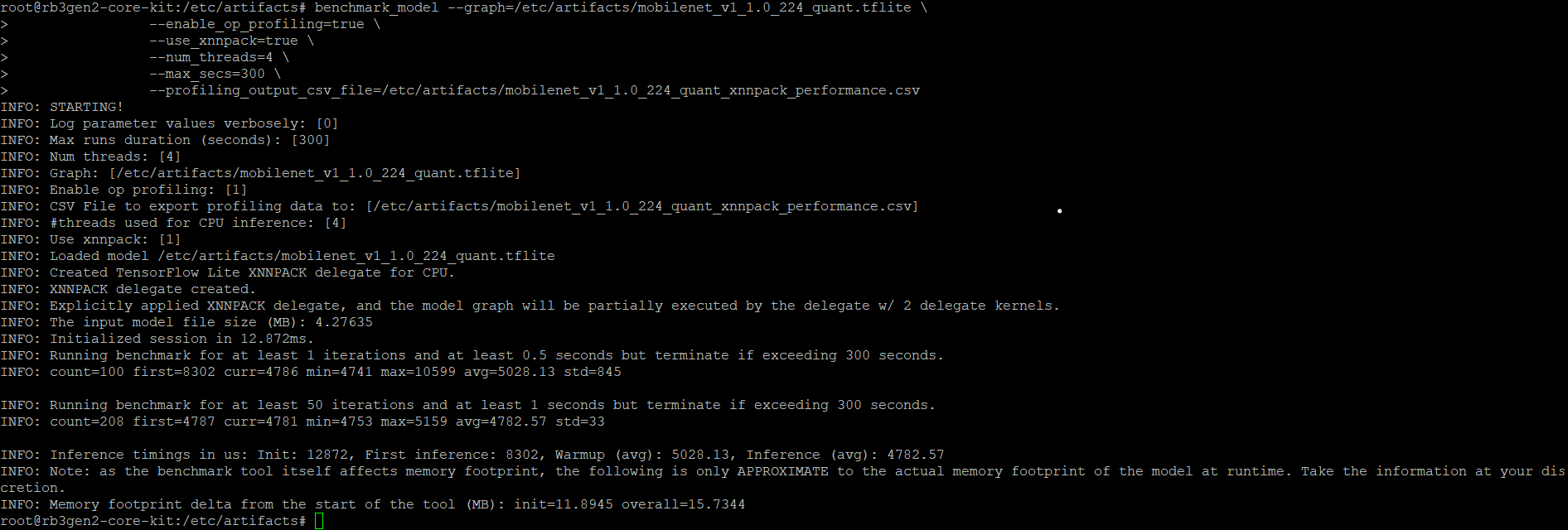
To benchmark using the XNNPACK delegate on the CPU:
```shell theme={null}
ssh ubuntu@
```
```shell theme={null}
cd /home/ubuntu/artifacts
```
```shell theme={null}
benchmark_model --graph=/home/ubuntu/artifacts/mobilenet_v1_1.0_224_quant.tflite \
--enable_op_profiling=true \
--use_xnnpack=true \
--num_threads=4 \
--max_secs=300 \
--profiling_output_csv_file=/home/ubuntu/artifacts/mobilenet_v1_1.0_224_quant_xnnpack_performance.csv
```
 ## Benchmark on GPU
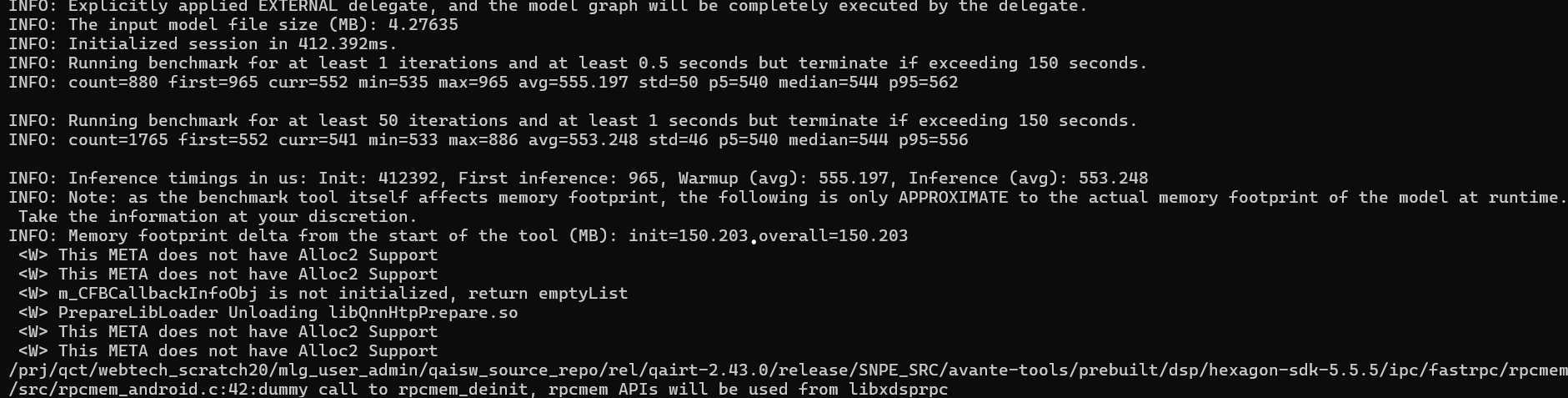
To benchmark using the GPU delegate:
```shell theme={null}
ssh ubuntu@
```
```shell theme={null}
cd /home/ubuntu/artifacts
```
```shell theme={null}
benchmark_model --graph=/home/ubuntu/artifacts/mobilenet_v1_1.0_224_quant.tflite \
--enable_op_profiling=true \
--use_gpu=true \
--num_runs=100 \
--warmup_runs=10 \
--max_secs=300 \
--profiling_output_csv_file=/home/ubuntu/artifacts/mobilenet_v1_1.0_224_GPU_Delegate_performance.csv
```
## Benchmark on GPU
To benchmark using the GPU delegate:
```shell theme={null}
ssh ubuntu@
```
```shell theme={null}
cd /home/ubuntu/artifacts
```
```shell theme={null}
benchmark_model --graph=/home/ubuntu/artifacts/mobilenet_v1_1.0_224_quant.tflite \
--enable_op_profiling=true \
--use_gpu=true \
--num_runs=100 \
--warmup_runs=10 \
--max_secs=300 \
--profiling_output_csv_file=/home/ubuntu/artifacts/mobilenet_v1_1.0_224_GPU_Delegate_performance.csv
```
 ## Benchmark on NPU using the QAIRT delegate
The Qualcomm AI Runtime delegate uses the Qualcomm AI Runtime API and its backends to accelerate models on the Adreno GPU and the Hexagon Tensor Processor.
To use the QAIRT external delegate, ensure the following libraries are available on the device:
* `libQnnTFLiteDelegate.so` — QNN delegate library
* Libraries from the Qualcomm AI Engine Direct SDK
You can customize model execution to use a specific backend through external delegate options:
* `libQnnGpu.so` — Run the QNN delegate on the GPU
* `libQnnHtp.so` — Run the QNN delegate on the Hexagon Tensor Processor
* `libQnnDsp.so` — Run the QNN delegate on the DSP
To benchmark on the Hexagon Tensor Processor using the QNN external delegate:
```shell theme={null}
benchmark_model --graph=/home/ubuntu/artifacts/mobilenet_v1_1.0_224_quant.tflite \
--external_delegate_path=/usr/lib/libQnnTFLiteDelegate.so \
--external_delegate_options='backend_type:htp;library_path:/usr/lib/libQnnHtp.so;skel_library_dir:/usr/lib/rfsa/adsp;htp_precision:0;htp_performance_mode:2'
```
```shell theme={null}
benchmark_model --graph=/usr/share/label_image/mobilenet_v1_1.0_224_quant.tflite \
--external_delegate_path=libQnnTFLiteDelegate.so \
--external_delegate_options='backend_type:dsp;library_path:/usr/lib/libQnnDsp.so;skel_library_dir:/usr/lib/dsp/adsp'
```
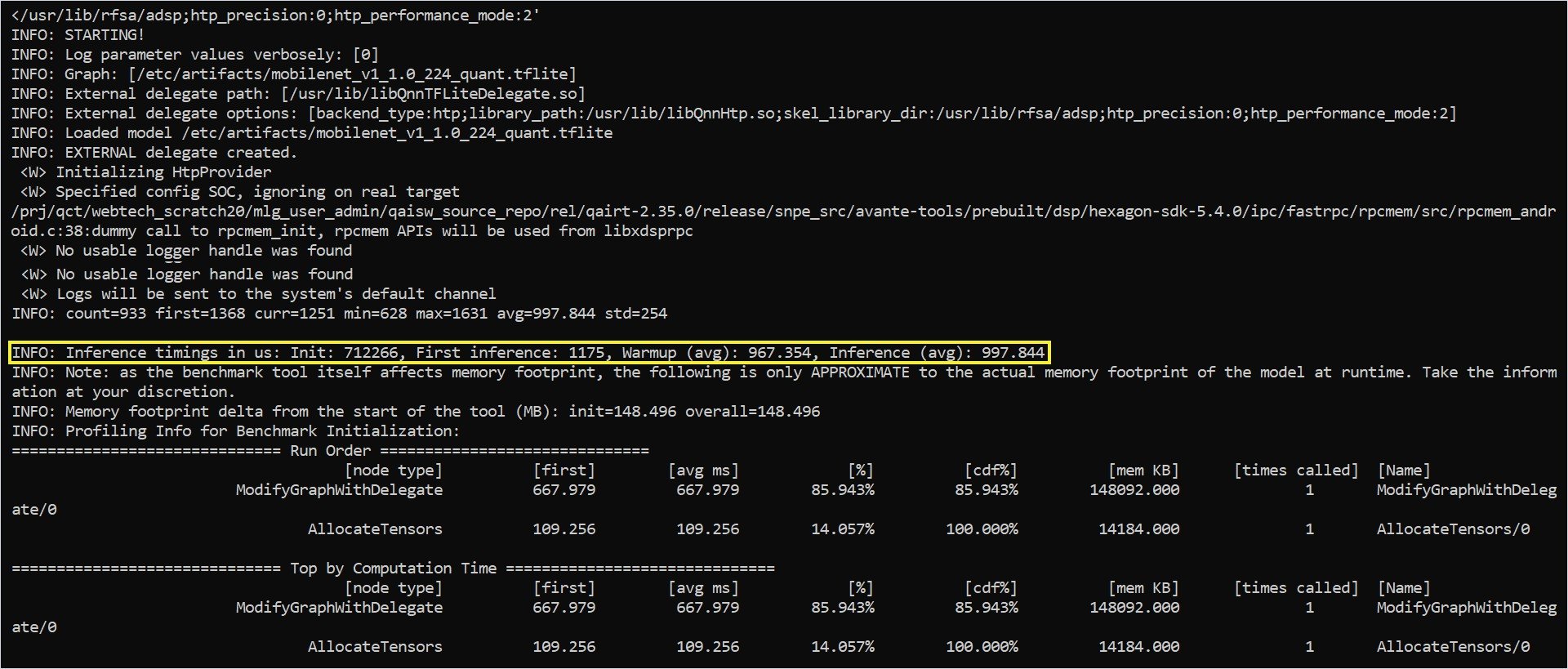
Benchmarking is currently failing on IQ-615.
The benchmark output includes the following statistics:
* Delegate creation status
* Average inference time on the hardware using the delegate
* Memory footprint of the model execution
## Benchmark on NPU using the QAIRT delegate
The Qualcomm AI Runtime delegate uses the Qualcomm AI Runtime API and its backends to accelerate models on the Adreno GPU and the Hexagon Tensor Processor.
To use the QAIRT external delegate, ensure the following libraries are available on the device:
* `libQnnTFLiteDelegate.so` — QNN delegate library
* Libraries from the Qualcomm AI Engine Direct SDK
You can customize model execution to use a specific backend through external delegate options:
* `libQnnGpu.so` — Run the QNN delegate on the GPU
* `libQnnHtp.so` — Run the QNN delegate on the Hexagon Tensor Processor
* `libQnnDsp.so` — Run the QNN delegate on the DSP
To benchmark on the Hexagon Tensor Processor using the QNN external delegate:
```shell theme={null}
benchmark_model --graph=/home/ubuntu/artifacts/mobilenet_v1_1.0_224_quant.tflite \
--external_delegate_path=/usr/lib/libQnnTFLiteDelegate.so \
--external_delegate_options='backend_type:htp;library_path:/usr/lib/libQnnHtp.so;skel_library_dir:/usr/lib/rfsa/adsp;htp_precision:0;htp_performance_mode:2'
```
```shell theme={null}
benchmark_model --graph=/usr/share/label_image/mobilenet_v1_1.0_224_quant.tflite \
--external_delegate_path=libQnnTFLiteDelegate.so \
--external_delegate_options='backend_type:dsp;library_path:/usr/lib/libQnnDsp.so;skel_library_dir:/usr/lib/dsp/adsp'
```
Benchmarking is currently failing on IQ-615.
The benchmark output includes the following statistics:
* Delegate creation status
* Average inference time on the hardware using the delegate
* Memory footprint of the model execution