> ## Documentation Index
> Fetch the complete documentation index at: https://dragonwingdocs.qualcomm.com/llms.txt
> Use this file to discover all available pages before exploring further.
# Install Qualcomm AI Runtime SDK
> Download and install the Qualcomm AI Runtime (QAIRT) SDK on an Ubuntu 22.04 host computer using direct download or Qualcomm Package Manager.
Qualcomm AI Runtime SDK requires an Ubuntu 22.04 host computer.
If the host computer uses Windows or macOS operating system software,
install a virtual machine.
Subsequent steps must be run in the virtual machine running Ubuntu
22.04 LTS.
The Qualcomm AI Runtime SDK workflow has been validated with
Ubuntu 22.04 running on bare metal or inside a Virtual Machine in the
following configurations.
Ubuntu 22.04 running inside a VM on macOS on Arm® architecture isn't supported.
| Download method | Prerequisites | Version available |
| ---------------------------------------------------------------------------------------------------------------------------------------------------- | ----------------------------------------------------- | ----------------------------------------- |
| [Direct Download](https://softwarecenter.qualcomm.com/api/download/software/sdks/Qualcomm_AI_Runtime_Community/All/2.47.0.260601/v2.47.0.260601.zip) | No prerequisites for download | 2.47.0.260601 (SDK updated every quarter) |
| [Qualcomm Package Manager](#qairt-qpm) | A valid Qualcomm ID and Qualcomm Package Manager tool | SDK updated every month |
## Default versions
The following table lists the default Qualcomm AI Runtime SDK version for your target device OS.
| OS | Default version |
| ----------------------- | --------------- |
| Qualcomm Linux (GA 2.0) | 2.47.0.260601 |
## Direct download
[Download the Qualcomm AI Runtime SDK](https://softwarecenter.qualcomm.com/api/download/software/sdks/Qualcomm_AI_Runtime_Community/All/2.47.0.260601/v2.47.0.260601.zip).
Once downloaded, extract or unzip the SDK.
This example uses version `2.47.0.260601` of the SDK. To use a different version of the
QAIRT SDK, update the steps below with the version you are using.
The SDK version hosted at the above link updates quarterly.
```shell theme={null}
unzip v2.47.0.260601.zip
```
```shell theme={null}
cd qairt/2.47.0.260601
```
```shell theme={null}
export QAIRT_ROOT=`pwd`
```
Once finished, proceed to [Set up Qualcomm AI Runtime SDK](../topic/qairt-setup).
Qualcomm Package Manager
Qualcomm AI Runtime SDK is available for download through
Qualcomm Package Manager (QPM). This section demonstrates how to
download Qualcomm AI Runtime SDK using QPM.
To download QPM3, install QPM3 from [https://qpm.qualcomm.com/#/main/tools/details/QPM3](https://qpm.qualcomm.com/#/main/tools/details/QPM3)
To download Qualcomm AI Runtime SDK from Qualcomm
Package Manager, ensure that you have registered for a Qualcomm ID.
If you don't have a Qualcomm ID, you will be prompted to register.
Then follow the instructions below to download and install the SDK.
This example uses version `2.47.0.260601` of the SDK. To use a different version of the
QAIRT SDK, update the steps below with the version you are using.
1. Go to [Qualcomm Package Manager](https://qpm.qualcomm.com/#/main/tools/find)
and sign in using your Qualcomm ID.
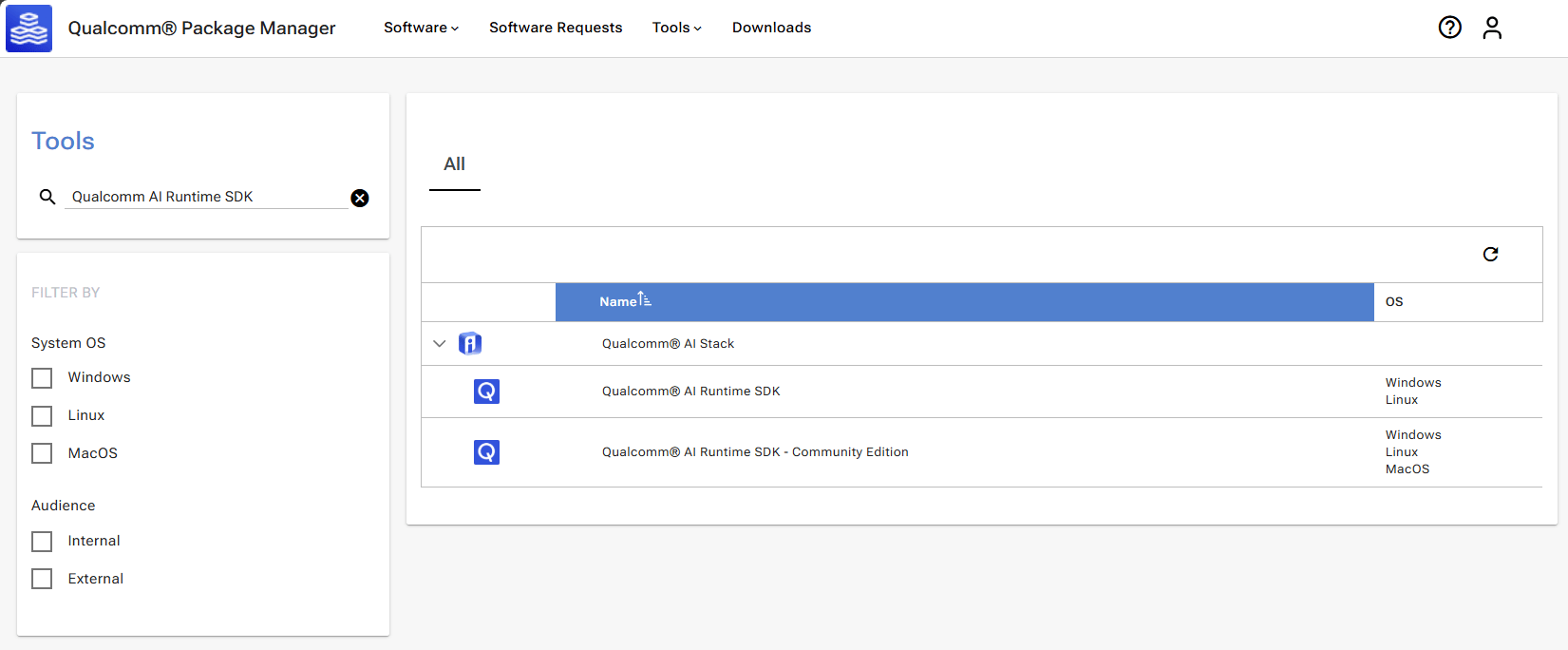
2. Go to the **Tools** tab and search for *Qualcomm AI Runtime SDK* in
the left pane. From the filtered results, select **Qualcomm AI Runtime - Community Edition**.
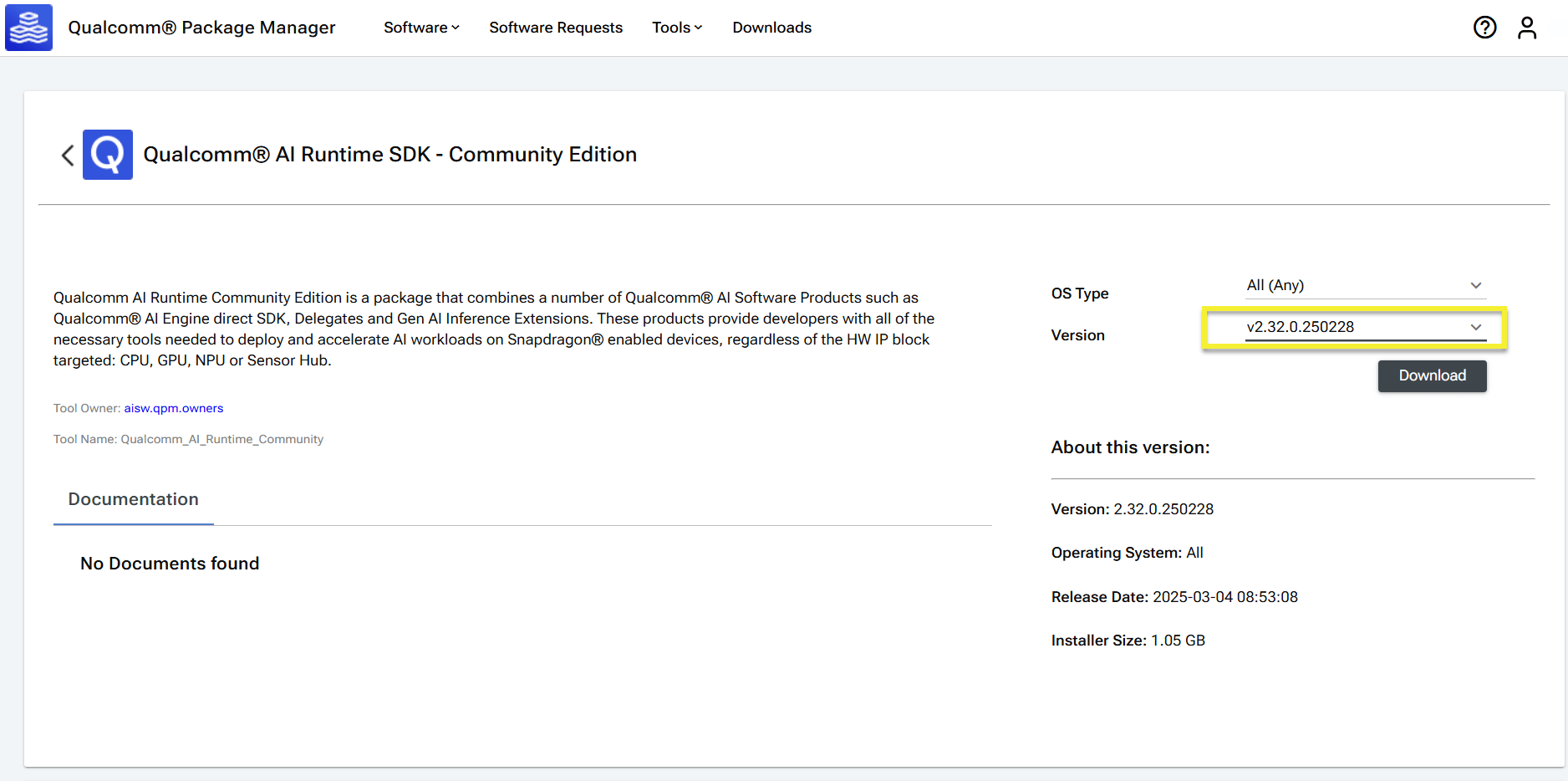
 3. Select `v2.47.0.260601` from the **Version** drop-down list.
If using the Qualcomm Package Manager desktop tool,
the **Extract** button is present instead of **Download**.
This automatically installs the Qualcomm AI Runtime SDK.
If you are using the web interface, the **Download** button
will download the Qualcomm AI Runtime SDK zip file.
3. Select `v2.47.0.260601` from the **Version** drop-down list.
If using the Qualcomm Package Manager desktop tool,
the **Extract** button is present instead of **Download**.
This automatically installs the Qualcomm AI Runtime SDK.
If you are using the web interface, the **Download** button
will download the Qualcomm AI Runtime SDK zip file.
 4. Install Qualcomm AI Runtime SDK using the QPM CLI tool.
a. Sign in using QPM CLI.
```shell theme={null}
qpm-cli --login
```
Expected output:
```
Password:
[Info] : Login is successful
[Info] : Fetching product catalog ....
[Info] : Product catalog refreshed successfully
```
b. Activate your SDK license.
```shell theme={null}
qpm-cli --license-activate qualcomm_ai_runtime_sdk
```
Expected output:
```
[Info] : Activating license : qualcomm_ai_runtime_sdk
[Info] : License activation is successful ActivationId=[f██████████b]
```
c. Download, extract, and install the SDK.
```shell theme={null}
qpm-cli --install qualcomm_ai_runtime_sdk --version 2.47.0.260601
```
Expected output:
```
[Info] : Current logged in user is
[Info] : Downloading qualcomm_ai_runtime_sdk 2.47.0.260601 ....
...
[Info] : SUCCESS: Installed qualcomm_ai_runtime_sdk.Core at /opt/qcom/aistack/qairt/2.47.0.260601
```
4. Install Qualcomm AI Runtime SDK using the QPM CLI tool.
a. Sign in using QPM CLI.
```shell theme={null}
qpm-cli --login
```
Expected output:
```
Password:
[Info] : Login is successful
[Info] : Fetching product catalog ....
[Info] : Product catalog refreshed successfully
```
b. Activate your SDK license.
```shell theme={null}
qpm-cli --license-activate qualcomm_ai_runtime_sdk
```
Expected output:
```
[Info] : Activating license : qualcomm_ai_runtime_sdk
[Info] : License activation is successful ActivationId=[f██████████b]
```
c. Download, extract, and install the SDK.
```shell theme={null}
qpm-cli --install qualcomm_ai_runtime_sdk --version 2.47.0.260601
```
Expected output:
```
[Info] : Current logged in user is
[Info] : Downloading qualcomm_ai_runtime_sdk 2.47.0.260601 ....
...
[Info] : SUCCESS: Installed qualcomm_ai_runtime_sdk.Core at /opt/qcom/aistack/qairt/2.47.0.260601
```