> ## Documentation Index
> Fetch the complete documentation index at: https://dragonwingdocs.qualcomm.com/llms.txt
> Use this file to discover all available pages before exploring further.
# Fan
The Dragonwing IQ‑8275 EVK is designed to consume up to 70 W, necessitating a substantial thermal solution. The default cooling solution is fan‑based, using a CPU cooler mounted to the bottom of the device.
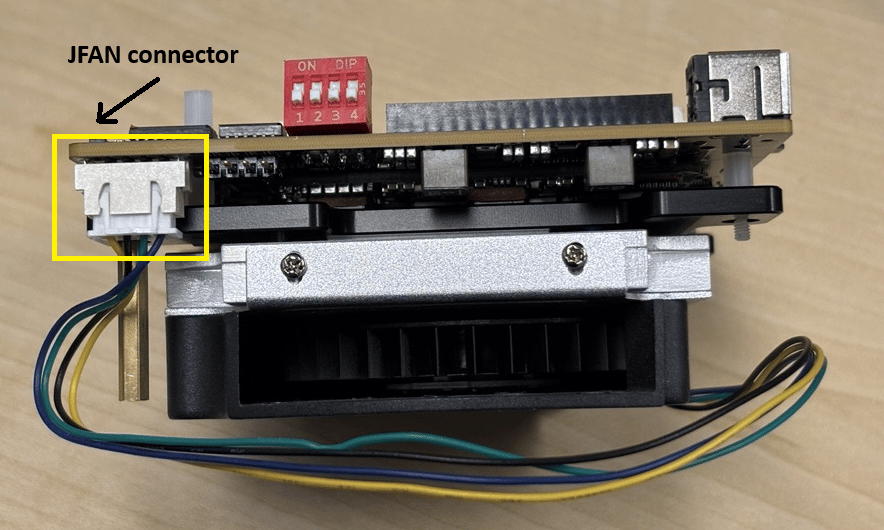
The fan controller used on this board is a Texas Instruments AMC6821SQDBQRQ1 PWM fan controller IC. The fan is connected using the JFAN connector (S6B‑XH‑SM4‑TB(LF)(SN)) on the mainboard.
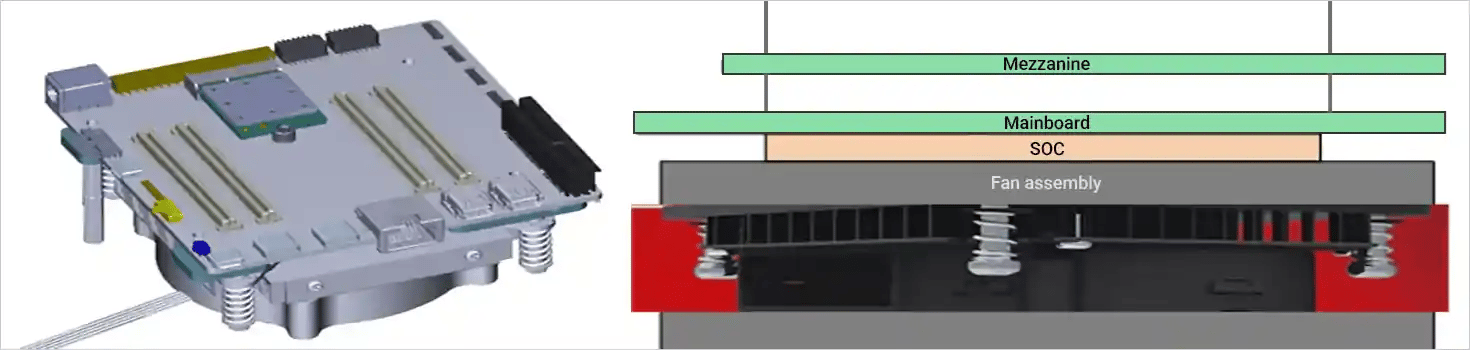 **Fan Connector details with IQ-8275 EVK main board:**
 ## Overview
The fan controller regulates fan speed based on temperature inputs to ensure optimal thermal performance and energy efficiency. It supports multiple operating modes and can be configured dynamically through system nodes.
## Features
* Supports two operating modes: Manual and Automatic (Mode 2)
* Dynamic fan speed control based on temperature inputs
## Operating Modes
| Mode | Description |
| --------------------------- | ---------------------------------------------------------------------------------------------------------------------- |
| **Manual Mode (Mode 1)** | Fan speed is manually set by the user. No automatic temperature-based control. |
| **Automatic Mode (Mode 2)** | Fan speed is automatically controlled based on remote temperature sensor readings. This is the currently enabled mode. |
## How It Works
System boots and loads fan controller configuration.
The `pwm1_enable` node is set to `2` for automatic mode.
Remote temperature sensors continuously monitor system temperature.
Based on temperature, the controller adjusts the PWM signal (0–255) to control fan speed.
Fan speed (`fan1_input`) increases or decreases accordingly.
If temperature drops below `temp2_auto_point1_temp`, the fan is turned off.
## Mode Details and Validation
### Description
In Auto Mode, fan speed is automatically controlled based on the remote temperature sensor (`temp2_input`). The system adjusts fan power and speed according to predefined temperature thresholds to ensure efficient cooling.
### Node Path
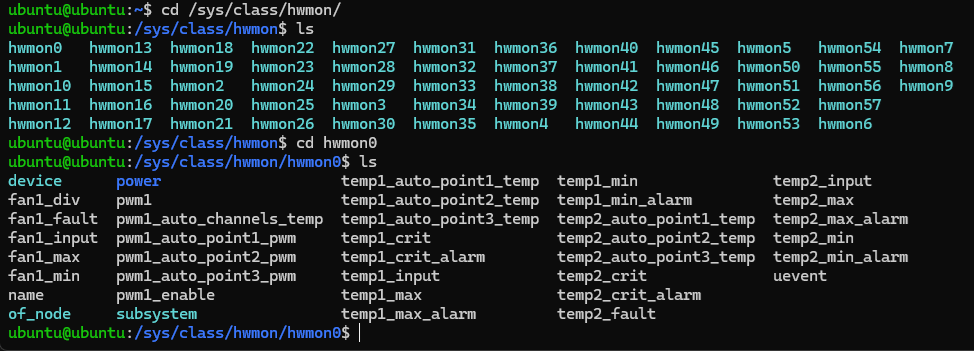
All relevant nodes are located under:
```bash theme={null}
/sys/class/hwmon/hwmonX/
```
## Overview
The fan controller regulates fan speed based on temperature inputs to ensure optimal thermal performance and energy efficiency. It supports multiple operating modes and can be configured dynamically through system nodes.
## Features
* Supports two operating modes: Manual and Automatic (Mode 2)
* Dynamic fan speed control based on temperature inputs
## Operating Modes
| Mode | Description |
| --------------------------- | ---------------------------------------------------------------------------------------------------------------------- |
| **Manual Mode (Mode 1)** | Fan speed is manually set by the user. No automatic temperature-based control. |
| **Automatic Mode (Mode 2)** | Fan speed is automatically controlled based on remote temperature sensor readings. This is the currently enabled mode. |
## How It Works
System boots and loads fan controller configuration.
The `pwm1_enable` node is set to `2` for automatic mode.
Remote temperature sensors continuously monitor system temperature.
Based on temperature, the controller adjusts the PWM signal (0–255) to control fan speed.
Fan speed (`fan1_input`) increases or decreases accordingly.
If temperature drops below `temp2_auto_point1_temp`, the fan is turned off.
## Mode Details and Validation
### Description
In Auto Mode, fan speed is automatically controlled based on the remote temperature sensor (`temp2_input`). The system adjusts fan power and speed according to predefined temperature thresholds to ensure efficient cooling.
### Node Path
All relevant nodes are located under:
```bash theme={null}
/sys/class/hwmon/hwmonX/
```
 ### Temperature Thresholds
| Temperature Range (°C) | Node Values (millidegrees Celsius) | Fan Behavior | Power (PWM1) |
| ---------------------- | ------------------------------------------------------------ | ------------------------- | ------------ |
| Below 0°C | `temp2_auto_point1_temp` = 0 | Fan stops | 0 |
| 0°C – 48°C | `temp2_auto_point1_temp` to `temp2_auto_point2_temp` = 48000 | Fan runs at minimal speed | \~85 |
| 48°C – 58°C | `temp2_auto_point2_temp` to `temp2_auto_point3_temp` = 58000 | Fan runs at high speed | 255 |
### Key Nodes
| Node | Purpose |
| ------------------------ | -------------------------------------- |
| `pwm1_enable` | Set to `2` to enable Auto Mode |
| `temp2_input` | Current remote temperature |
| `fan1_input` | Current fan speed in RPM |
| `pwm1` | Current power input to the fan (0–255) |
| `temp2_auto_point1_temp` | Lower threshold (fan off) |
| `temp2_auto_point2_temp` | Mid threshold (low speed) |
| `temp2_auto_point3_temp` | Upper threshold (high speed) |
### Validation
For IQ-8275, `amc6821` is located at `hwmon0`, so `X` = `0`.
```bash theme={null}
cat /sys/class/hwmon/hwmonX/pwm1_enable
```
Ensure the output is `2`.
```bash theme={null}
cat /sys/class/hwmon/hwmonX/temp2_input
```
```bash theme={null}
cat /sys/class/hwmon/hwmonX/fan1_input
```
```bash theme={null}
cat /sys/class/hwmon/hwmonX/pwm1
```
* Below `temp2_auto_point1_temp`: Fan should stop (`fan1_input` = 0, `pwm1` = 0)
* Between point1 and point2: Fan runs slowly (`pwm1` ≈ 85)
* Between point2 and point3: Fan runs at full speed (`pwm1` = 255)
### Description
In Manual Mode, fan speed is set by the user regardless of temperature. Adjust the power input to the fan controller through the `pwm1` node.
### Node Path
All relevant nodes are located under:
```bash theme={null}
/sys/class/hwmon/hwmonX/
```
### Key Nodes
| Node | Purpose |
| ------------- | ------------------------------------------------ |
| `pwm1_enable` | Set to `1` to enable Manual Mode |
| `pwm1` | Set the power input to control fan speed (0–255) |
### Validation
```bash theme={null}
cat /sys/class/hwmon/hwmonX/pwm1_enable
```
Ensure the output is `1`.
```bash theme={null}
echo > /sys/class/hwmon/hwmonX/pwm1
```
Set the desired power input value (0–255).
```bash theme={null}
cat /sys/class/hwmon/hwmonX/fan1_input
```
Ensure the fan speed changes according to the set power input.
The actual hwmon number for the AMC6821 fan controller may vary. To determine the correct number:
```bash theme={null}
grep "amc6821" hwmon*/name
```
Expected output:
```bash theme={null}
ubuntu@ubuntu:/sys/class/hwmon$ grep "amc6821" hwmon*/name
hwmon0/name:amc6821
```
### Temperature Thresholds
| Temperature Range (°C) | Node Values (millidegrees Celsius) | Fan Behavior | Power (PWM1) |
| ---------------------- | ------------------------------------------------------------ | ------------------------- | ------------ |
| Below 0°C | `temp2_auto_point1_temp` = 0 | Fan stops | 0 |
| 0°C – 48°C | `temp2_auto_point1_temp` to `temp2_auto_point2_temp` = 48000 | Fan runs at minimal speed | \~85 |
| 48°C – 58°C | `temp2_auto_point2_temp` to `temp2_auto_point3_temp` = 58000 | Fan runs at high speed | 255 |
### Key Nodes
| Node | Purpose |
| ------------------------ | -------------------------------------- |
| `pwm1_enable` | Set to `2` to enable Auto Mode |
| `temp2_input` | Current remote temperature |
| `fan1_input` | Current fan speed in RPM |
| `pwm1` | Current power input to the fan (0–255) |
| `temp2_auto_point1_temp` | Lower threshold (fan off) |
| `temp2_auto_point2_temp` | Mid threshold (low speed) |
| `temp2_auto_point3_temp` | Upper threshold (high speed) |
### Validation
For IQ-8275, `amc6821` is located at `hwmon0`, so `X` = `0`.
```bash theme={null}
cat /sys/class/hwmon/hwmonX/pwm1_enable
```
Ensure the output is `2`.
```bash theme={null}
cat /sys/class/hwmon/hwmonX/temp2_input
```
```bash theme={null}
cat /sys/class/hwmon/hwmonX/fan1_input
```
```bash theme={null}
cat /sys/class/hwmon/hwmonX/pwm1
```
* Below `temp2_auto_point1_temp`: Fan should stop (`fan1_input` = 0, `pwm1` = 0)
* Between point1 and point2: Fan runs slowly (`pwm1` ≈ 85)
* Between point2 and point3: Fan runs at full speed (`pwm1` = 255)
### Description
In Manual Mode, fan speed is set by the user regardless of temperature. Adjust the power input to the fan controller through the `pwm1` node.
### Node Path
All relevant nodes are located under:
```bash theme={null}
/sys/class/hwmon/hwmonX/
```
### Key Nodes
| Node | Purpose |
| ------------- | ------------------------------------------------ |
| `pwm1_enable` | Set to `1` to enable Manual Mode |
| `pwm1` | Set the power input to control fan speed (0–255) |
### Validation
```bash theme={null}
cat /sys/class/hwmon/hwmonX/pwm1_enable
```
Ensure the output is `1`.
```bash theme={null}
echo > /sys/class/hwmon/hwmonX/pwm1
```
Set the desired power input value (0–255).
```bash theme={null}
cat /sys/class/hwmon/hwmonX/fan1_input
```
Ensure the fan speed changes according to the set power input.
The actual hwmon number for the AMC6821 fan controller may vary. To determine the correct number:
```bash theme={null}
grep "amc6821" hwmon*/name
```
Expected output:
```bash theme={null}
ubuntu@ubuntu:/sys/class/hwmon$ grep "amc6821" hwmon*/name
hwmon0/name:amc6821
```