> ## Documentation Index
> Fetch the complete documentation index at: https://dragonwingdocs.qualcomm.com/llms.txt
> Use this file to discover all available pages before exploring further.
# LPDDR Memory
The Qualcomm Dragonwing IQ-8275 features an advanced memory subsystem designed for high-performance computing applications.
## Specifications
| Specification | Details |
| ------------------- | ------------------------------ |
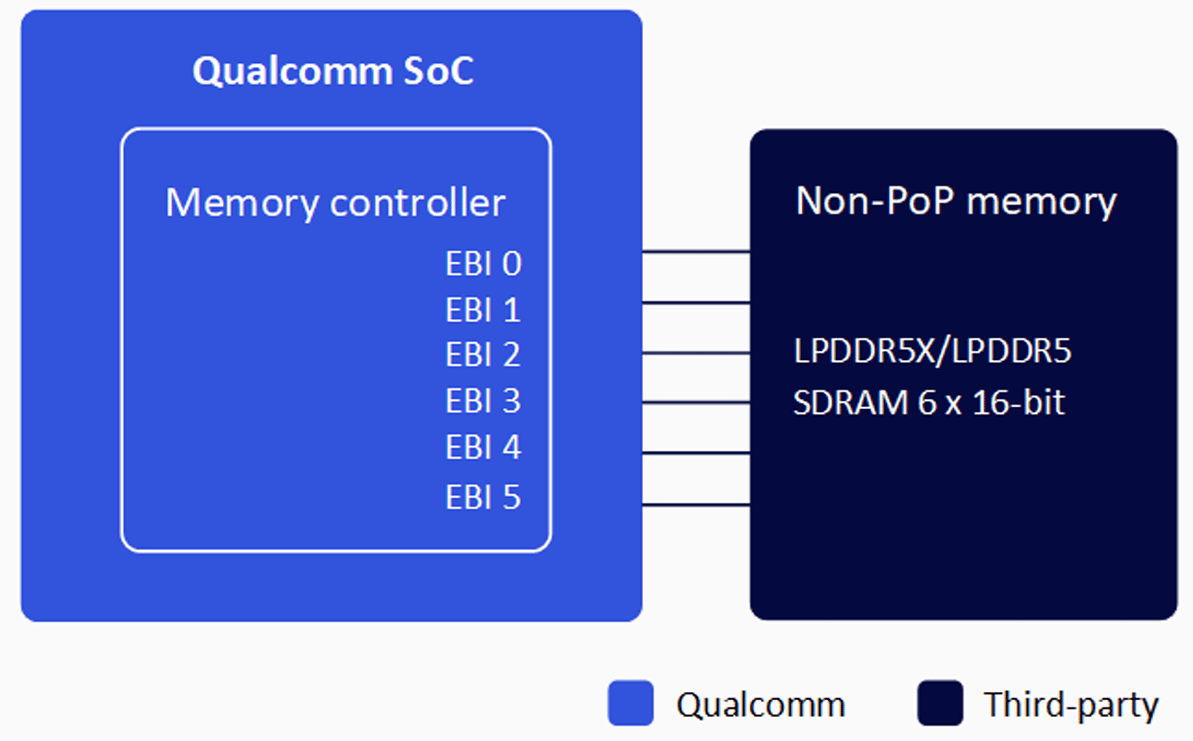
| **Memory Type** | LPDDR5X / LPDDR5 SDRAM |
| **Configuration** | Six-channel non-PoP |
| **Maximum Density** | 36 GB |
| **Clock Speed** | Up to 3200 MHz |
| **Data Width** | 6 × 16-bit (96-bit total) |
| **Standards** | JEDEC LPDDR5X/LPDDR5 compliant |
## Architecture
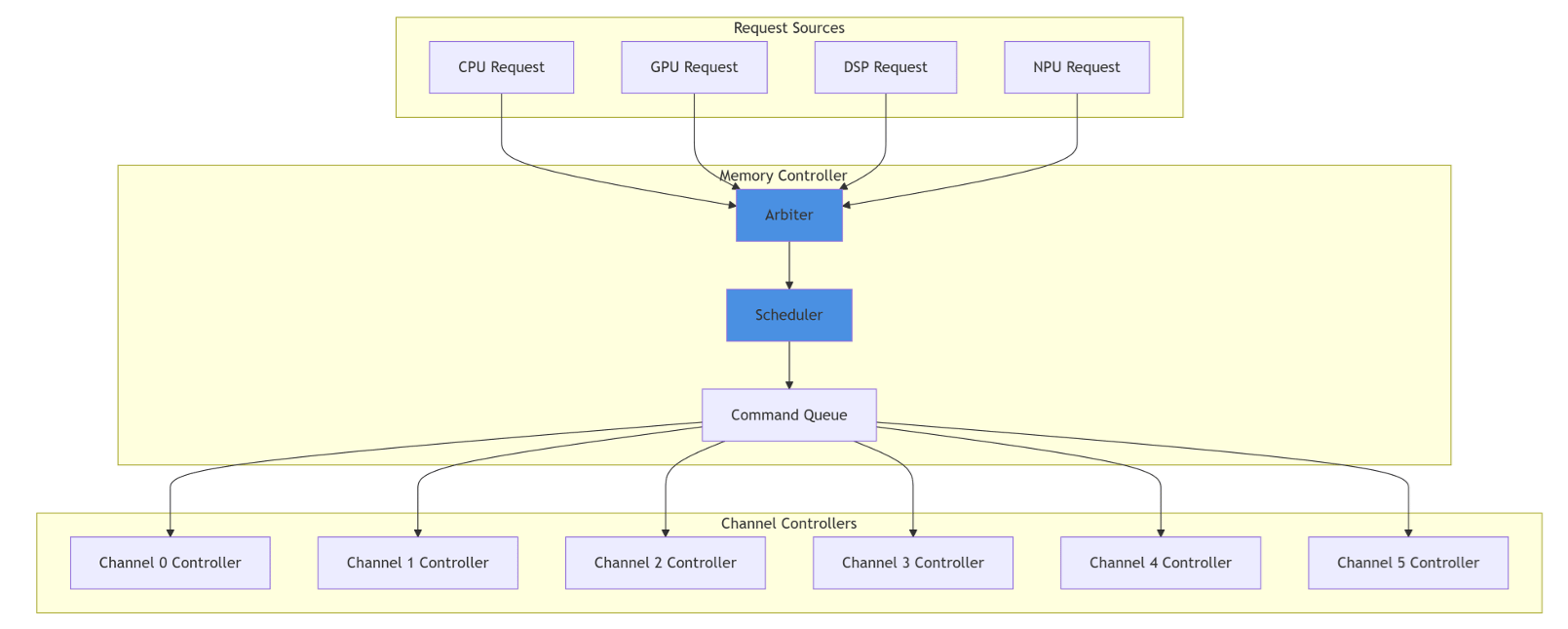
The IQ-8275 memory controller supports high-bandwidth, low-latency operations across six independent 16-bit channels with dynamic frequency scaling for power optimization.
 ### Supported DRAM Components
All DRAM components must be selected from the Qualcomm Preferred Vendor List (PVL).
Navigate to the [Qualcomm PVL](https://www.qualcomm.com/preferred-vendor-list) and sign in with your Qualcomm account.
Download the **QRD Hardware - Preferred Vendor List (PVL)** Excel file.
Filter by **Type: Memory** and **Chipset: IQ-8275**.
## Initialization
### Supported DRAM Components
All DRAM components must be selected from the Qualcomm Preferred Vendor List (PVL).
Navigate to the [Qualcomm PVL](https://www.qualcomm.com/preferred-vendor-list) and sign in with your Qualcomm account.
Download the **QRD Hardware - Preferred Vendor List (PVL)** Excel file.
Filter by **Type: Memory** and **Chipset: IQ-8275**.
## Initialization
 ## Setup and Configuration
### Prerequisites
* IQ-8275 development board with PVL-compliant LPDDR5X or LPDDR5 DRAM
* Canonical Ubuntu software package
* XBL bootloader with DSF (DDR System Firmware)
* UART debug cable and SSH access
### Initial Setup
Confirm your DRAM part number is listed in the Qualcomm PVL for IQ-8275.
```bash theme={null}
fastboot flash xbl xbl.elf
fastboot flashall
```
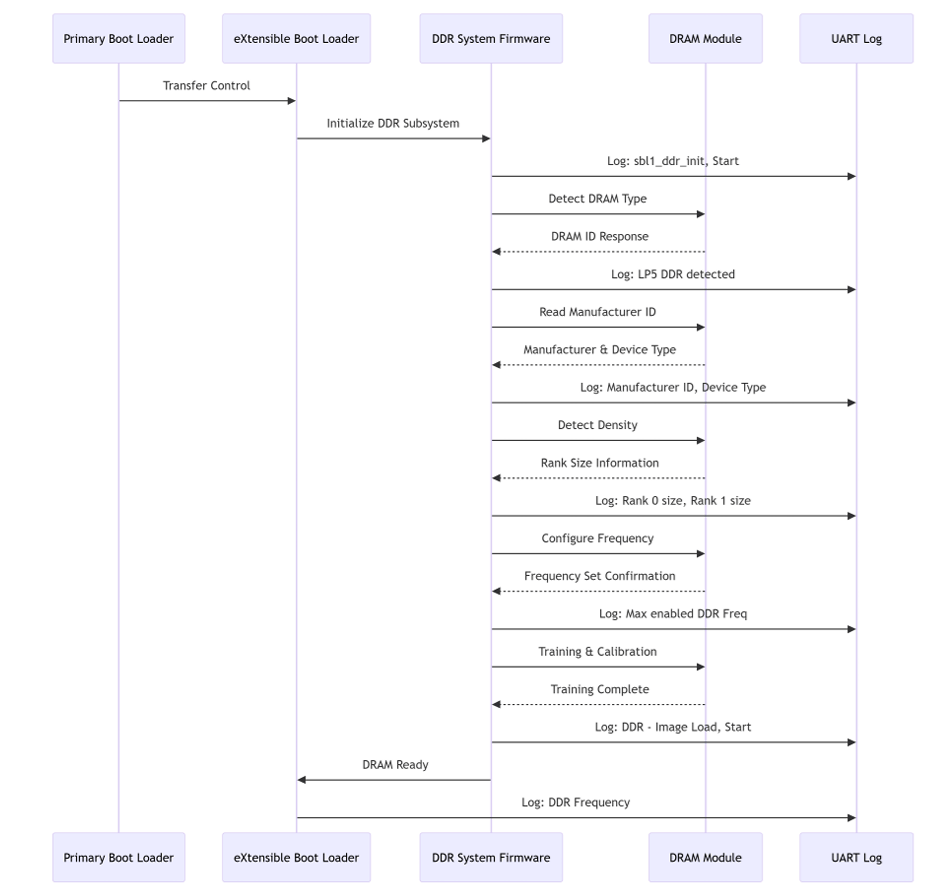
Connect UART console (115200 baud, 8N1) and watch for initialization messages:
* `sbl1_ddr_init, Start`
* `LP5 DDR detected`
* `Manufacturer ID = XXXX, Device Type = XXXX`
* `Max enabled DDR Freq = 3200 MHz`
### Frequency Scaling
```bash theme={null}
cat /sys/class/devfreq/soc:qcom,cpu-llcc-ddr-bw/cur_freq
cat /sys/class/devfreq/soc:qcom,cpu-llcc-ddr-bw/available_frequencies
echo > /sys/class/devfreq/soc:qcom,cpu-llcc-ddr-bw/userspace/set_freq
```
## Debugging
```bash theme={null}
dmesg | grep -i ddr
cat /proc/meminfo
cat /sys/class/devfreq/soc:qcom,cpu-llcc-ddr-bw/cur_freq
```
## Troubleshooting
**Symptoms:** No DRAM detection in UART logs; boot hangs at XBL stage.
* Verify DRAM modules are properly seated
* Measure VDD and VDDQ voltages — ensure they meet JEDEC specifications
* Contact Qualcomm support if hardware is verified
**Symptoms:** Boot hangs after DRAM detection; training/calibration failures.
* Check temperature and voltage stability
* Verify signal quality on all channels
* Try booting at a lower frequency
```bash theme={null}
cat /sys/class/devfreq/soc:qcom,cpu-llcc-ddr-bw/cur_freq
cat /sys/class/devfreq/soc:qcom,cpu-llcc-ddr-bw/governor
cat /sys/class/thermal/thermal_zone*/temp
```
Set performance governor:
```bash theme={null}
echo performance > /sys/class/devfreq/soc:qcom,cpu-llcc-ddr-bw/governor
```
## Resources
| Resource | URL |
| ------------------------ | ------------------------------------------------------------------------------------------------------------------------------------------------------------------------------------------ |
| JEDEC LPDDR Standards | [https://www.jedec.org/category/technology-focus-area/mobile-memory-lpddr-wide-io-memory-mcp](https://www.jedec.org/category/technology-focus-area/mobile-memory-lpddr-wide-io-memory-mcp) |
| Qualcomm PVL | [https://www.qualcomm.com/preferred-vendor-list](https://www.qualcomm.com/preferred-vendor-list) |
| Qualcomm Software Center | [https://softwarecenter.qualcomm.com/#/](https://softwarecenter.qualcomm.com/#/) |
## Setup and Configuration
### Prerequisites
* IQ-8275 development board with PVL-compliant LPDDR5X or LPDDR5 DRAM
* Canonical Ubuntu software package
* XBL bootloader with DSF (DDR System Firmware)
* UART debug cable and SSH access
### Initial Setup
Confirm your DRAM part number is listed in the Qualcomm PVL for IQ-8275.
```bash theme={null}
fastboot flash xbl xbl.elf
fastboot flashall
```
Connect UART console (115200 baud, 8N1) and watch for initialization messages:
* `sbl1_ddr_init, Start`
* `LP5 DDR detected`
* `Manufacturer ID = XXXX, Device Type = XXXX`
* `Max enabled DDR Freq = 3200 MHz`
### Frequency Scaling
```bash theme={null}
cat /sys/class/devfreq/soc:qcom,cpu-llcc-ddr-bw/cur_freq
cat /sys/class/devfreq/soc:qcom,cpu-llcc-ddr-bw/available_frequencies
echo > /sys/class/devfreq/soc:qcom,cpu-llcc-ddr-bw/userspace/set_freq
```
## Debugging
```bash theme={null}
dmesg | grep -i ddr
cat /proc/meminfo
cat /sys/class/devfreq/soc:qcom,cpu-llcc-ddr-bw/cur_freq
```
## Troubleshooting
**Symptoms:** No DRAM detection in UART logs; boot hangs at XBL stage.
* Verify DRAM modules are properly seated
* Measure VDD and VDDQ voltages — ensure they meet JEDEC specifications
* Contact Qualcomm support if hardware is verified
**Symptoms:** Boot hangs after DRAM detection; training/calibration failures.
* Check temperature and voltage stability
* Verify signal quality on all channels
* Try booting at a lower frequency
```bash theme={null}
cat /sys/class/devfreq/soc:qcom,cpu-llcc-ddr-bw/cur_freq
cat /sys/class/devfreq/soc:qcom,cpu-llcc-ddr-bw/governor
cat /sys/class/thermal/thermal_zone*/temp
```
Set performance governor:
```bash theme={null}
echo performance > /sys/class/devfreq/soc:qcom,cpu-llcc-ddr-bw/governor
```
## Resources
| Resource | URL |
| ------------------------ | ------------------------------------------------------------------------------------------------------------------------------------------------------------------------------------------ |
| JEDEC LPDDR Standards | [https://www.jedec.org/category/technology-focus-area/mobile-memory-lpddr-wide-io-memory-mcp](https://www.jedec.org/category/technology-focus-area/mobile-memory-lpddr-wide-io-memory-mcp) |
| Qualcomm PVL | [https://www.qualcomm.com/preferred-vendor-list](https://www.qualcomm.com/preferred-vendor-list) |
| Qualcomm Software Center | [https://softwarecenter.qualcomm.com/#/](https://softwarecenter.qualcomm.com/#/) |