> ## Documentation Index
> Fetch the complete documentation index at: https://dragonwingdocs.qualcomm.com/llms.txt
> Use this file to discover all available pages before exploring further.
# Overview
This guide describes the low-speed and high-speed I/O peripheral interface subsystems used in the Qualcomm Dragonwing IQ-9075 SoC.
**Low-speed interfaces** (via QUP v3 serial engine):
* UART, SPI, I2C, I3C
**High-speed interfaces:**
* PCIe, USB
## IQ-9075 Interface Overview
| 2× QUP v3 Serial Engine | QUP0\_V3 | QUP1\_V3 | QUP2\_V3 |
| --------------------------------------------- | -------- | -------- | -------- |
| Application processor serial engine instances | 7 | 7 | 1 |
| 3× USB Controller | 0xa600000 | 0xa800000 | 0xa400000 |
| ----------------- | ------------------ | ------------------ | ------------------ |
| Maximum speed | USB 3.x SuperSpeed | USB 3.x SuperSpeed | USB 2.0 High Speed |
| 2× PCIe Controller | RC1 | RC0 |
| ------------------ | ------------------- | ------------------- |
| Speed | Gen4 2L (8 GT/s) | Gen4 4L (8 GT/s) |
| Config space | 0x40100000 (1 MB) | 0x60100000 (1 MB) |
| BAR space | 0x40300000 (509 MB) | 0x60300000 (509 MB) |
| Power management | ASPM (L1/L1ss, L0s) | ASPM (L1/L1ss, L0s) |
## QUP v3 Protocol and GPIO Mapping
### QUP0 (SE0–SE5)
| QUP\_SE (addr) | SPI-M | I2C-M | UART | HS UART | GPIO mapping |
| -------------------- | ----- | ----- | ----- | ------- | -------------- |
| qup0\_se0 (0x980000) | spi0 | i2c0 | uart0 | — | 20, 21, 22, 23 |
| qup0\_se1 (0x984000) | spi1 | i2c1 | uart1 | — | 24, 25, 26, 27 |
| qup0\_se2 (0x988000) | spi2 | i2c2 | uart2 | uart2 | 36, 37, 38, 39 |
| qup0\_se3 (0x98c000) | spi3 | i2c3 | uart3 | uart3 | 28, 29, 30, 31 |
| qup0\_se4 (0x990000) | spi4 | i2c4 | uart4 | — | 32, 33, 34, 35 |
| qup0\_se5 (0x994000) | spi5 | i2c5 | uart5 | — | 36, 37, 38, 39 |
### QUP1 (SE0–SE6)
| QUP\_SE (addr) | SPI-M | I2C-M | UART | HS UART | GPIO mapping |
| -------------------- | ----- | ----- | ------ | ------- | -------------- |
| qup1\_se0 (0xa80000) | spi7 | i2c7 | uart7 | — | 40, 41, 42, 43 |
| qup1\_se1 (0xa84000) | spi8 | i2c8 | uart8 | — | 42, 43, 40, 41 |
| qup1\_se2 (0xa88000) | spi9 | i2c9 | uart9 | uart9 | 46, 47, 44, 45 |
| qup1\_se3 (0xa8c000) | spi10 | i2c10 | uart10 | uart10 | 44, 45, 46, 47 |
| qup1\_se4 (0xa90000) | spi11 | i2c11 | uart11 | — | 48, 49, 50, 51 |
| qup1\_se5 (0xa94000) | spi12 | i2c12 | uart12 | — | 52, 53, 54, 55 |
| qup1\_se6 (0xa9c000) | — | i2c13 | uart13 | — | 56, 57, 56, 57 |
### QUP2 (SE0–SE6)
| QUP\_SE (addr) | SPI-M | I2C-M | UART | HS UART | GPIO mapping |
| -------------------- | ----- | ----- | ------ | ------- | ------------------ |
| qup2\_se0 (0x880000) | spi14 | i2c14 | uart14 | — | 80, 81, 82, 83 |
| qup2\_se1 (0x884000) | spi15 | i2c15 | uart15 | — | 84, 85, 99, 100 |
| qup2\_se2 (0x888000) | spi16 | i2c16 | uart16 | uart16 | 86, 87, 88, 89, 90 |
| qup2\_se3 (0x88c000) | spi17 | i2c17 | uart17 | uart17 | 91, 92, 93, 94 |
| qup2\_se4 (0x890000) | spi18 | i2c18 | uart18 | — | 95, 96, 97, 98 |
| qup2\_se5 (0x894000) | spi19 | i2c19 | uart19 | — | 99, 100, 95, 96 |
| qup2\_se6 (0x898000) | spi20 | i2c20 | uart20 | — | 97, 98, 95, 96 |
### QUP3 (SE0)
| QUP\_SE (addr) | SPI-M | I2C-M | UART | GPIO mapping |
| -------------------- | ----- | ----- | ------ | -------------------------- |
| qup3\_se0 (0xb80000) | spi21 | i2c21 | uart21 | 13, 14, 15, 16, 17, 18, 19 |
SPI-M = SPI Master
### QUP Lane to Function Mapping
| Interface | L0 | L1 | L2 | L3 | L4 | L5 |
| ---------- | ---- | ---- | ---- | ----- | ----- | ----- |
| UART | CTS | RFR | Tx | Rx | | |
| HS UART | CTS | RFR | Tx | Rx | | |
| I2C | SDA | SCL | | | | |
| SPI master | MISO | MOSI | SCLK | CS\_0 | CS\_1 | CS\_2 |
## Set Up the Device Interface
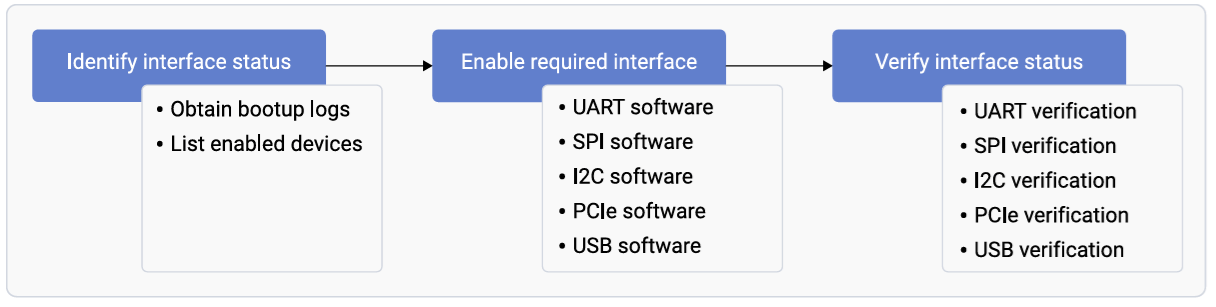 ### Obtain Boot Logs
```bash theme={null}
# SSH to device, then:
dmesg
```
### List Enabled Interfaces
```bash theme={null}
# UART
ls /dev/tty*
# I2C
ls /dev/i2c*
# Expected: /dev/i2c-18 /dev/i2c-19 /dev/i2c-20 /dev/i2c-21 /dev/i2c-22
```
## Load QUP v3 Firmware
The Application Processor serial engines are managed by the Linux kernel. Firmware files are at:
```bash theme={null}
usr/lib/firmware/qcom//qupv3fw.elf
```
Enable in kernel config:
```
CONFIG_QCOM_QUP_FW_LOAD=y # in qcom_defconfig
CONFIG_QCOM_QUP_FW_LOAD=m # in qcom_vm_defconfig
```
## Device Tree Configuration
IQ-9075 EVK reference device tree: `arch/arm64/boot/dts/qcom/lemans.dtsi`
### Sample Configurations
```bash theme={null}
i2c10: i2c@a8c000 {
compatible = "qcom,geni-i2c";
reg = <0x0 0xa8c000 0x0 0x4000>;
interrupts = ;
clocks = <&gcc GCC_QUPV3_WRAP1_S3_CLK>;
clock-names = "se";
pinctrl-0 = <&qup_i2c10_default>;
pinctrl-names = "default";
power-domains = <&rpmhpd SA8775P_CX>;
dmas = <&gpi_dma1 0 3 QCOM_GPI_I2C>,
<&gpi_dma1 1 3 QCOM_GPI_I2C>;
dma-names = "tx", "rx";
status = "disabled";
};
```
```bash theme={null}
spi11: spi@a90000 {
compatible = "qcom,geni-spi";
reg = <0x0 0xa90000 0x0 0x4000>;
interrupts = ;
clocks = <&gcc GCC_QUPV3_WRAP1_S4_CLK>;
clock-names = "se";
pinctrl-0 = <&qup_spi11_default>;
pinctrl-names = "default";
power-domains = <&rpmhpd SA8775P_CX>;
dmas = <&gpi_dma1 0 4 QCOM_GPI_SPI>,
<&gpi_dma1 1 4 QCOM_GPI_SPI>;
dma-names = "tx", "rx";
status = "disabled";
};
```
```bash theme={null}
uart12: serial@a94000 {
compatible = "qcom,geni-uart";
reg = <0x0 0x00a94000 0x0 0x4000>;
interrupts = ;
clocks = <&gcc GCC_QUPV3_WRAP1_S5_CLK>;
clock-names = "se";
pinctrl-0 = <&qup_uart12_default>;
pinctrl-names = "default";
power-domains = <&rpmhpd SA8775P_CX>;
status = "disabled";
};
```
### Device Tree Properties
| Property | Type | Description | Required |
| ------------------- | ------------ | ------------------------- | ----------- |
| `status` | string | `okay` or `disabled` | Yes |
| `clock-frequency` | u32 | I2C clock frequency (Hz) | Optional |
| `spi-max-frequency` | u32 | SPI max frequency (Hz) | Optional |
| `pinctrl-names` | string array | Pin control state names | Recommended |
| `pinctrl-0` | phandle | Default pin configuration | Recommended |
## Modify Serial Engine Node
To enable or change a serial engine, modify the device tree and rebuild the kernel.
```bash theme={null}
#download the kernel
devtool modify linux-qcom
#build the kernel
devtool build-image qcom-multimedia-image
```
Device tree files for IQ-9075 EVK:
* `lemans-evk.dts`
* `lemans.dtsi`
**Example — enable UART12:**
```bash theme={null}
&uart12 {
status = "okay";
};
```
**Example — enable I2C4:**
```bash theme={null}
&i2c4 {
status = "okay";
};
```
## Switch Serial Engine Protocol
To convert a serial engine from one protocol to another (e.g., SPI10 → I2C10):
```bash theme={null}
# In qcs9075-iq-9075-evk.dts:
# Disable SPI
&spi10 {
status = "disabled";
};
# Enable I2C
&i2c10 {
status = "okay";
};
```
## Troubleshooting
```bash theme={null}
# List I2C buses
ls -la /sys/bus/i2c/devices/
# List SPI buses
ls -la /sys/bus/spi/devices/
# Check UART devices
ls -la /dev/ttyHS*
# QUP-related kernel messages
dmesg | grep -i qup
dmesg | grep -i geni
dmesg | grep -i firmware
# Check compiled device tree
dtc -I fs /sys/firmware/devicetree/base | grep -A 20 qupv3
```
**Symptom:** `qcom-geni-se: firmware request failed`
```bash theme={null}
ls -la /lib/firmware/qcom/
# Verify CONFIG_FW_LOADER=y in kernel config
```
**Symptom:** No device node created; driver not loading.
Verify device tree: `status = "okay";` (not `"ok"` or `"enable"`)
```bash theme={null}
dmesg | grep -i qup
dmesg | grep -i geni
```
**Symptom:** `qcom-geni-se: serial engine is already in use`
Ensure only one protocol is enabled per serial engine:
```bash theme={null}
# WRONG — both enabled
&qupv3_se5_i2c { status = "okay"; };
&qupv3_se5_spi { status = "okay"; };
# CORRECT — only one enabled
&qupv3_se5_i2c { status = "okay"; };
&qupv3_se5_spi { status = "disabled"; };
```
## Enable Required Interfaces
* **UART** — see [UART software device tree configuration](./UART)
* **SPI** — see [SPI software configuration](./SPI)
* **I2C** — see [I2C software device tree configuration](./I2C)
* **PCIe** — see [PCIe software driver configuration](./PCIe)
* **USB** — see [USB configuration guide](./USB)
### Obtain Boot Logs
```bash theme={null}
# SSH to device, then:
dmesg
```
### List Enabled Interfaces
```bash theme={null}
# UART
ls /dev/tty*
# I2C
ls /dev/i2c*
# Expected: /dev/i2c-18 /dev/i2c-19 /dev/i2c-20 /dev/i2c-21 /dev/i2c-22
```
## Load QUP v3 Firmware
The Application Processor serial engines are managed by the Linux kernel. Firmware files are at:
```bash theme={null}
usr/lib/firmware/qcom//qupv3fw.elf
```
Enable in kernel config:
```
CONFIG_QCOM_QUP_FW_LOAD=y # in qcom_defconfig
CONFIG_QCOM_QUP_FW_LOAD=m # in qcom_vm_defconfig
```
## Device Tree Configuration
IQ-9075 EVK reference device tree: `arch/arm64/boot/dts/qcom/lemans.dtsi`
### Sample Configurations
```bash theme={null}
i2c10: i2c@a8c000 {
compatible = "qcom,geni-i2c";
reg = <0x0 0xa8c000 0x0 0x4000>;
interrupts = ;
clocks = <&gcc GCC_QUPV3_WRAP1_S3_CLK>;
clock-names = "se";
pinctrl-0 = <&qup_i2c10_default>;
pinctrl-names = "default";
power-domains = <&rpmhpd SA8775P_CX>;
dmas = <&gpi_dma1 0 3 QCOM_GPI_I2C>,
<&gpi_dma1 1 3 QCOM_GPI_I2C>;
dma-names = "tx", "rx";
status = "disabled";
};
```
```bash theme={null}
spi11: spi@a90000 {
compatible = "qcom,geni-spi";
reg = <0x0 0xa90000 0x0 0x4000>;
interrupts = ;
clocks = <&gcc GCC_QUPV3_WRAP1_S4_CLK>;
clock-names = "se";
pinctrl-0 = <&qup_spi11_default>;
pinctrl-names = "default";
power-domains = <&rpmhpd SA8775P_CX>;
dmas = <&gpi_dma1 0 4 QCOM_GPI_SPI>,
<&gpi_dma1 1 4 QCOM_GPI_SPI>;
dma-names = "tx", "rx";
status = "disabled";
};
```
```bash theme={null}
uart12: serial@a94000 {
compatible = "qcom,geni-uart";
reg = <0x0 0x00a94000 0x0 0x4000>;
interrupts = ;
clocks = <&gcc GCC_QUPV3_WRAP1_S5_CLK>;
clock-names = "se";
pinctrl-0 = <&qup_uart12_default>;
pinctrl-names = "default";
power-domains = <&rpmhpd SA8775P_CX>;
status = "disabled";
};
```
### Device Tree Properties
| Property | Type | Description | Required |
| ------------------- | ------------ | ------------------------- | ----------- |
| `status` | string | `okay` or `disabled` | Yes |
| `clock-frequency` | u32 | I2C clock frequency (Hz) | Optional |
| `spi-max-frequency` | u32 | SPI max frequency (Hz) | Optional |
| `pinctrl-names` | string array | Pin control state names | Recommended |
| `pinctrl-0` | phandle | Default pin configuration | Recommended |
## Modify Serial Engine Node
To enable or change a serial engine, modify the device tree and rebuild the kernel.
```bash theme={null}
#download the kernel
devtool modify linux-qcom
#build the kernel
devtool build-image qcom-multimedia-image
```
Device tree files for IQ-9075 EVK:
* `lemans-evk.dts`
* `lemans.dtsi`
**Example — enable UART12:**
```bash theme={null}
&uart12 {
status = "okay";
};
```
**Example — enable I2C4:**
```bash theme={null}
&i2c4 {
status = "okay";
};
```
## Switch Serial Engine Protocol
To convert a serial engine from one protocol to another (e.g., SPI10 → I2C10):
```bash theme={null}
# In qcs9075-iq-9075-evk.dts:
# Disable SPI
&spi10 {
status = "disabled";
};
# Enable I2C
&i2c10 {
status = "okay";
};
```
## Troubleshooting
```bash theme={null}
# List I2C buses
ls -la /sys/bus/i2c/devices/
# List SPI buses
ls -la /sys/bus/spi/devices/
# Check UART devices
ls -la /dev/ttyHS*
# QUP-related kernel messages
dmesg | grep -i qup
dmesg | grep -i geni
dmesg | grep -i firmware
# Check compiled device tree
dtc -I fs /sys/firmware/devicetree/base | grep -A 20 qupv3
```
**Symptom:** `qcom-geni-se: firmware request failed`
```bash theme={null}
ls -la /lib/firmware/qcom/
# Verify CONFIG_FW_LOADER=y in kernel config
```
**Symptom:** No device node created; driver not loading.
Verify device tree: `status = "okay";` (not `"ok"` or `"enable"`)
```bash theme={null}
dmesg | grep -i qup
dmesg | grep -i geni
```
**Symptom:** `qcom-geni-se: serial engine is already in use`
Ensure only one protocol is enabled per serial engine:
```bash theme={null}
# WRONG — both enabled
&qupv3_se5_i2c { status = "okay"; };
&qupv3_se5_spi { status = "okay"; };
# CORRECT — only one enabled
&qupv3_se5_i2c { status = "okay"; };
&qupv3_se5_spi { status = "disabled"; };
```
## Enable Required Interfaces
* **UART** — see [UART software device tree configuration](./UART)
* **SPI** — see [SPI software configuration](./SPI)
* **I2C** — see [I2C software device tree configuration](./I2C)
* **PCIe** — see [PCIe software driver configuration](./PCIe)
* **USB** — see [USB configuration guide](./USB)