> ## Documentation Index
> Fetch the complete documentation index at: https://dragonwingdocs.qualcomm.com/llms.txt
> Use this file to discover all available pages before exploring further.
# Introduction
> Qualcomm® Intelligent Multimedia SDK
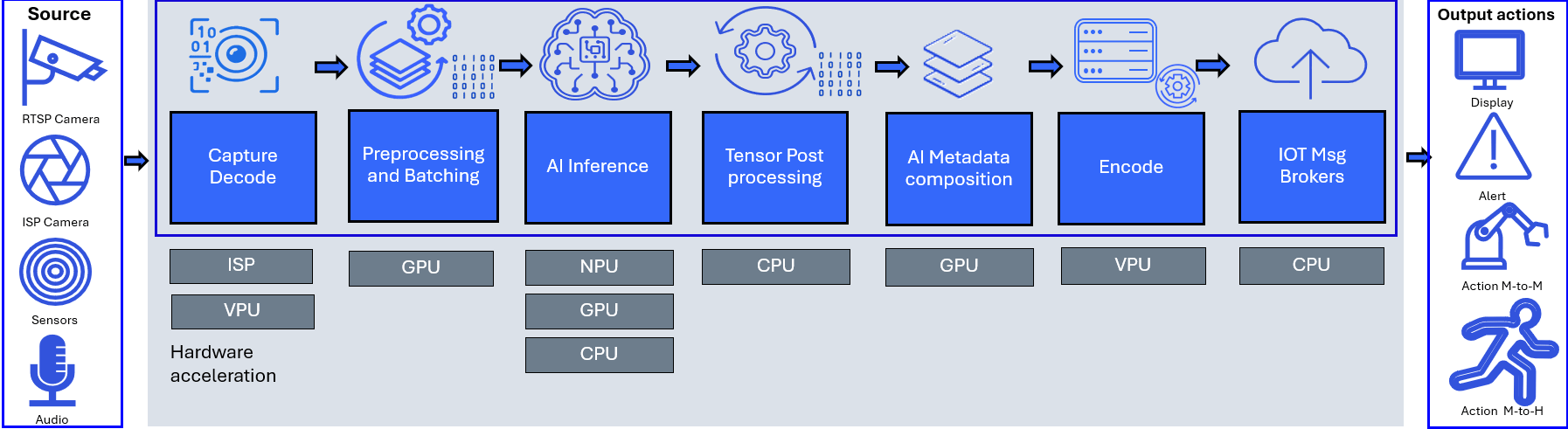
The Qualcomm® Intelligent Multimedia SDK (QIM SDK) is a comprehensive hardware-accelerated multimedia and AI framework built on GStreamer. It is designed for developers, solution integrators, and OEMs building intelligent vision, audio, and AI applications across IoT segments — including smart cameras, robotics, home appliances, drones, and AI inference appliances.
With QIM SDK, developers can rapidly compose and deploy single- or multi-stream AI and multimedia pipelines on Qualcomm® platforms. Pipelines have access to the full processing capacity of the SoC — including neural processing accelerators, video encode/decode, camera ISP, GPU, display, and audio DSP — without requiring deep knowledge of the underlying hardware or platform-specific libraries.
The SDK's plugin-based architecture abstracts hardware complexity entirely, enabling applications to run seamlessly across Qualcomm® chipset tiers and generations — accelerating time-to-market for a broad range of industries including smart retail, industrial automation, security surveillance, and connected devices.
 ## Recommended path for new developers
Get the QIM SDK installed on your Linux device
## Recommended path for new developers
Get the QIM SDK installed on your Linux device
[Go to Installation](installation)
Create a simple Hello World style AI pipeline
[Go to Quickstart Guide](quickstart)
Learn to capture video and audio from a device, preprocess inputs, run AI inference, and interpret the results
[Go to Building AI Pipelines](qimsdk-overview/sdkoverview)
Browse sample pipelines and code, dive into advanced features and containerization, and reference the full plugin documentation
## What do you want to do?
Install QIM SDK on your Linux device.
Learn how to quickly build AI pipelines using the provided examples.
Reference documentation for all QIM SDK GStreamer plugins.
View the latest release notes.
## Need inspiration?
View complete end-to-end pipeline examples you can leverage.
Get started with Python, C++, and GStreamer code samples.