

- QIMSDK on Ubuntu
- QIMSDK on Yocto
Prerequisites
Make sure your Dragonwing device has been set up with Ubuntu and you have shell access.Download Ubuntu on Qualcomm IoT Platforms
Installation
1
Add Qualcomm PPA
Update package metadata and add the Qualcomm Ubuntu PPA.
2
Install GStreamer core components
Install the required GStreamer tools and base multimedia packages.
3
Install Qualcomm hardware-accelerated GStreamer plugins
Install the Qualcomm GStreamer plugin package.
4
Install AI runtime and inference components
Install AI runtime packages and developer tools required for inference workflows.
5
Validate QIMSDK plugins on device
Verify that Qualcomm-specific GStreamer plugins are available after installation.After installation, you should see Qualcomm-specific GStreamer plugins listed.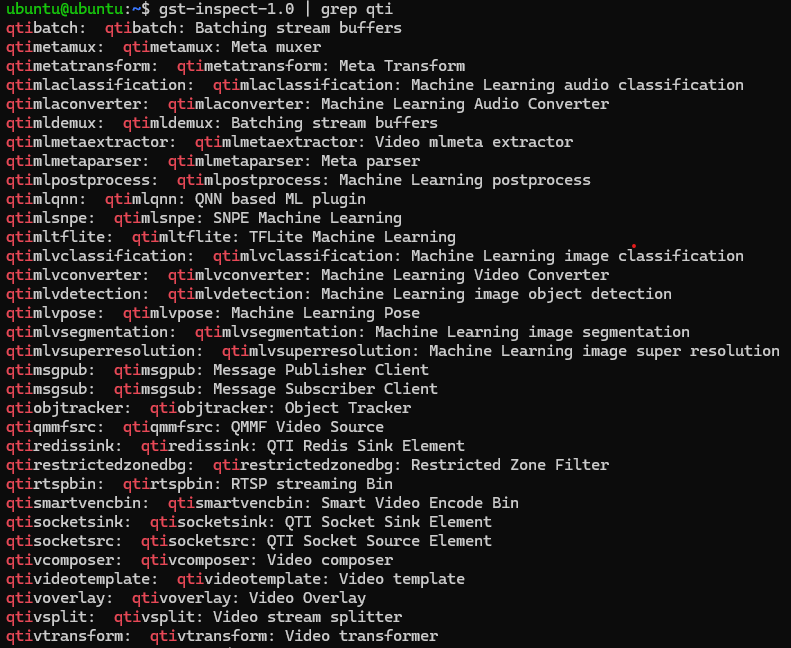
6
Install optional developer packages
Use the following optional packages based on your development or deployment needs.
Multimedia acceleration and system integration
Multimedia acceleration and system integration
Install packages for FastCV, DMA buffer heap integration, and sensor test applications.
Utilities and media tools
Utilities and media tools
Install common utilities used during media development, debugging, and validation.
Sample applications and Python examples
Sample applications and Python examples
Install sample applications and Python examples for quick validation and development.
Wayland and display support (server only)
Wayland and display support (server only)
Install display and Wayland-related packages for systems that require GUI or compositor support.