

Overview
qtibatch is a GStreamer element that aggregates multiple video or audio buffers into a single batched buffer for downstream processing. It is intended for multimedia and AI pipelines where downstream elements operate more efficiently on grouped input than on individual buffers.
The element supports two batching modes:
- Multi-stream batching — combines buffers arriving concurrently from multiple parallel streams
- Sequential batching — combines successive buffers from a single stream
qtibatch suitable for both parallel multi-stream workloads and temporal workflows that require multiple consecutive frames or samples as a single input unit.
Batching is commonly used to:
- Improve hardware utilization
- Increase throughput for downstream inference or analytics stages
- Enable models that require batched input
- Construct temporal or depth-oriented input tensors from consecutive frames
- Create overlapping batches for sliding-window style processing
- Multi-stream video batching — aggregating frames from multiple video sources into a single batch for parallel processing
- Multi-stream audio batching — aggregating audio buffers from multiple sources into a single batch for parallel processing
- Depth batching — grouping consecutive frames from the same stream to create tensors with an additional temporal or depth dimension
- Overlapping batch construction — building batches with shared frames between adjacent batches for temporal models or window-based analysis
qtibatch performs buffer aggregation only. It does not modify video pixels or audio samples, and it does not perform inference, preprocessing, or post-processing. Its sole responsibility is to package multiple input buffers into a single logical batch for efficient downstream consumption.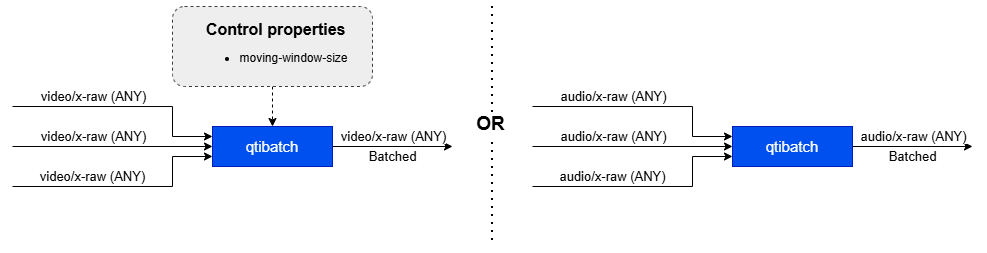
Hierarchy
GObjectGstObject
GstElement
qtibatch
Pad Templates
sink
src
Element Properties
Internal Architecture Details
qtibatch is organized around three functional components:
Sink Pads
qtibatch supports either a single sink pad or multiple sink pads, depending on the batching mode:
- A single sink pad is used for sequential batching of successive buffers from the same stream
- Multiple sink pads are used for parallel batching of buffers from multiple input streams
Aggregation Logic
The aggregation logic collects incoming buffers, tracks their arrival status, and determines when a batch is ready to be produced. Batch formation is driven by the negotiated batching configuration and the active batching mode.Source Pad
A single source pad emits the batched output buffer. The output buffer carries references to the aggregated input buffers together with batch metadata that describes the batch contents.Processing Flow
Caps Negotiation
During caps negotiation,qtibatch verifies that all sink pads use compatible media (audio or video) types and formats. It also derives the effective batching configuration, including the batch size and the expected input/output tensor or media characteristics required for downstream processing.
Buffer Reception
Incoming video or audio buffers are received asynchronously on the sink pads and queued internally on a per-pad basis.Synchronization
qtibatch synchronizes buffers according to the selected batching mode:
- For parallel streams, the element waits for buffers that correspond to the same time interval across all active sink pads
- For single stream, the element waits for the required number of successive buffers from the same input stream
Batch Formation
Buffers are grouped into a batch according to the selected batching strategy:- Successive buffers from a single stream
- Time-aligned buffers from multiple streams
Metadata Attachment
qtibatch attaches batch metadata to the output buffer. This metadata describes:
- The effective batch size
- The ordering of aggregated buffers
- Any missing inputs in parallel-stream mode
Output Delivery
Once the batch is complete, the batched buffer is pushed downstream for further processing.Batching Behavior
Batch formation inqtibatch is determined by the negotiated batch size together with the active batching mode.
Incoming buffers are always queued internally on a per-pad basis. The batch completion logic depends on whether the element is aggregating buffers from a single stream or from multiple parallel streams.
Sequential Batching (Single Stream)
In sequential mode,qtibatch aggregates successive buffers from a single input stream until the configured batch size is reached. Batch formation is count-based.
This mode supports a moving-window mechanism controlled by the moving-window-size property:
- A value of 0 produces non-overlapping batches
- A value greater than 0 produces overlapping batches, reusing the specified number of buffers from the previous batch in the next batch
Parallel Batching (Multiple Streams)
In parallel mode,qtibatch aggregates buffers arriving from multiple sink pads. The goal is to form a batch from buffers that belong to the same time interval across all input streams.
If a buffer is not received on one of the sink pads within the expected synchronization window, that input is treated as missing for the current batch. In this case, the batch metadata records the missing input so downstream elements can interpret the batch correctly — this is done through inserting a GAP buffer.
The synchronization window and timeout behavior are derived from buffer duration, which is calculated from the negotiated input framerate or audio timing information.
Memory and Buffer Management
qtibatch is designed to integrate into high-performance and zero-copy multimedia pipelines.
Buffer Handling
qtibatch does not copy media payloads during batch construction. Instead, the batched output buffer holds references to the original input buffers.
Allocation and Pool Behavior
qtibatch does not require a custom allocator, a specific memory type, or a dedicated buffer pool. Buffer allocation and memory layout remain under the control of upstream and downstream elements.
This design allows qtibatch to fit into a wide range of pipeline topologies without imposing additional memory management constraints.
Usage
Four-Source Batched Object Detection with Compositor
Demo pipeline with batching of 4 sources. A detection inference is run and the results are overlaid via composer on the screen.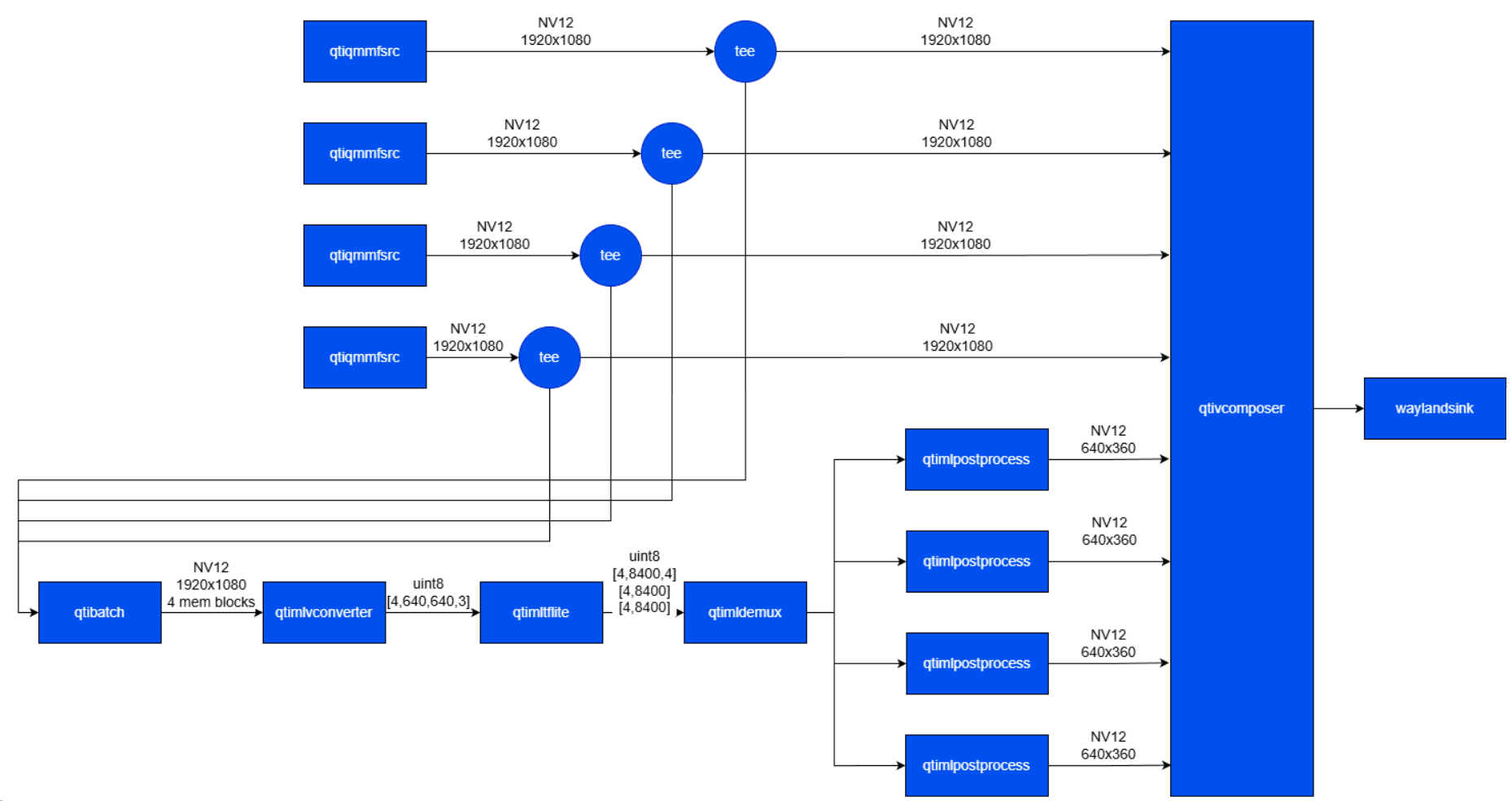
1
Download Required Files
2
Copy files to device
3
Connect to device
4
Set environment variables
Run below command on your device
5
Run the pipeline
Run the pipeline