> ## Documentation Index
> Fetch the complete documentation index at: https://dragonwingdocs.qualcomm.com/llms.txt
> Use this file to discover all available pages before exploring further.
# qtimetamux
> AI metadata synchronization and muxing plugin
# Overview
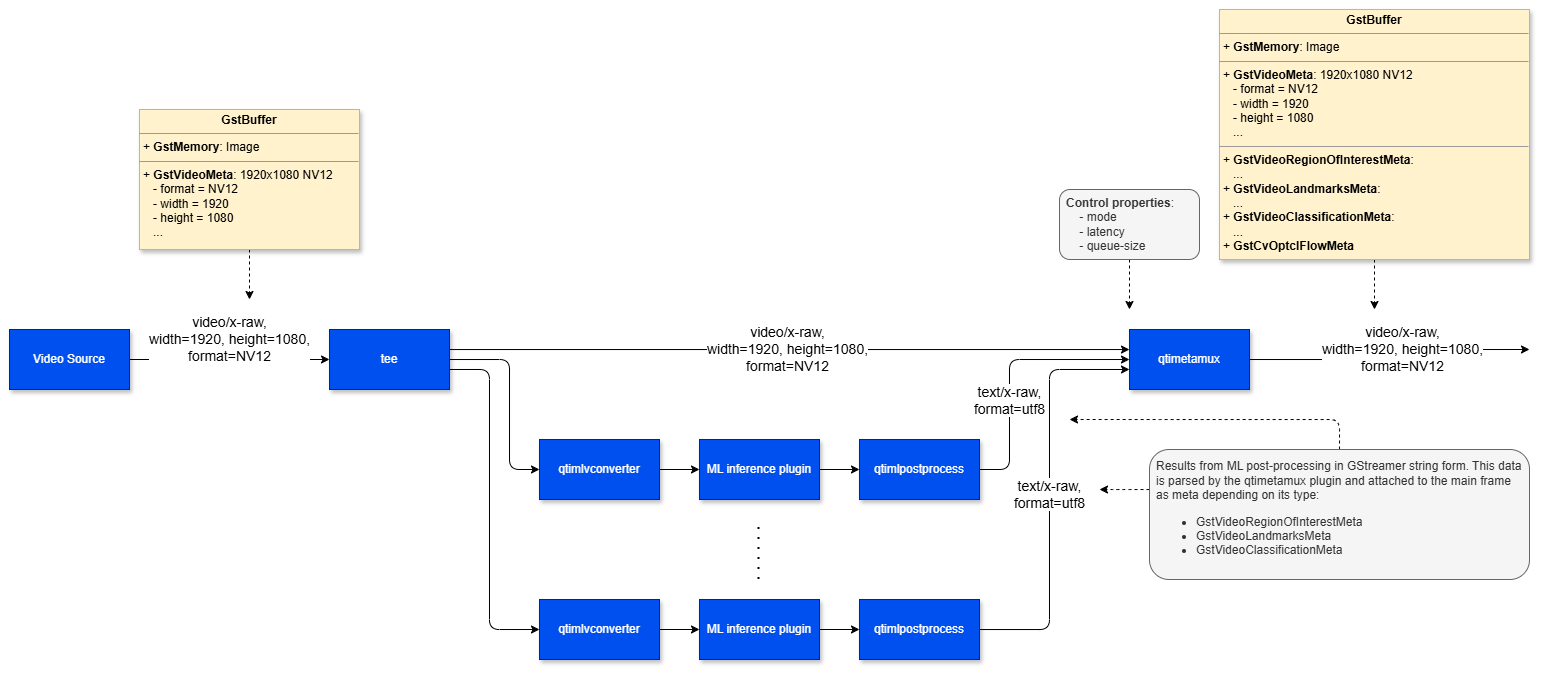
The **qtimetamux** element is a core component of an AI-enabled GStreamer pipeline. Its purpose is to
synchronize post-processed AI/CV results with the original media buffer and attach those results as
**GstMeta** using the standard metadata mechanism provided by GStreamer.
```mermaid theme={null}
flowchart LR
A[Media Source] -->|main stream| B[qtimetamux]
C[ML Post-processor] -->|data pad| B
B --> D[Sink element]
```
In practice, outputs generated by ML post-processing stages — such as:
* **Bounding box coordinates**
* **Class labels**
* **Segmentation masks**
* **Key points**
* **Motion vectors**
* **Other custom AI/CV metadata**
Can be associated with the corresponding video or audio frame and carried forward through the
pipeline as a single, unified buffer.
This design makes it easier to build pipelines where inference results remain tightly coupled with
the original frame. Downstream components can consume both the media buffer and its metadata without
needing separate synchronization logic.
By embedding metadata directly into the frame, **qtimetamux** enables several common AI pipeline patterns:
* **Live visualization** — Metadata can be consumed by overlay elements such as [`qtivoverlay`](qtivoverlay) to
render bounding boxes, labels, and other inference results directly on the video output.
* **Daisy-chained AI pipelines** — The metadata-bearing buffer can be passed to a subsequent
inference stage, allowing multi-stage AI workflows where the output of one model feeds the next.
* **Application-level access** — The resulting buffer can be sent to an `appsink`, giving a custom
application access to both the media frame and the attached metadata for business logic or
decision-making.
* **Metadata serialization and external integration** — The metadata can be forwarded to
`qtimlmetaparser`, which converts it into JSON. That JSON can then be published to external
systems such as MQTT, Kafka, or a REDIS server via [`qtiredissink`](qtiredissink).
In addition to AI inference outputs, **qtimetamux** is also capable of attaching other metadata
types such as **motion vectors**, making it useful for both AI and broader computer-vision-based
workflows.
 ## Example Pipeline
| File | Download | Save as |
| ---------------- | ----------------------------------------------------------------------------------------------------------------------------------- | --------------------------- |
| YOLOX W8A8 model | [Qualcomm AI Hub — YOLOX](https://aihub.qualcomm.com/iot/models/yolox) | `yolo_x_w8a8.tflite` |
| Detection labels | yolov8.json | `yolov8.json` |
| Sample video | Input video | `Draw_1080p_180s_30FPS.mp4` |
```bash SCP (SSH) theme={null}
# Replace $HOME to the appropriate device path before running the commands.
# For QLI: /root
# For Ubuntu: /home/ubuntu
# Modify this based on your platform and ensure files are copied to the correct location on the device.
# Run from your host machine — replace and
ssh @ "mkdir -p $HOME/{models,labels,media,media/output}"
scp yolo_x_w8a8.tflite @:$HOME/models/
scp yolov8.json @:$HOME/labels/
scp Draw_1080p_180s_30FPS.mp4 @:$HOME/media/
```
```bash SCP (SSH) theme={null}
# Run from your host machine — replace and
ssh @
```
Run below command on your device
```bash theme={null}
mkdir -p $HOME/{models,labels,media,media/output}
export MODEL_NAME=yolo_x_w8a8.tflite
export LABELS_NAME=yolov8.json
export SRC_VIDEO_NAME=Draw_1080p_180s_30FPS.mp4
```
```bash theme={null}
gst-launch-1.0 -e --gst-debug=2 \
filesrc location=$HOME/media/$SRC_VIDEO_NAME ! qtdemux ! h264parse ! \
v4l2h264dec capture-io-mode=4 output-io-mode=4 ! video/x-raw,format=NV12 ! queue ! \
tee name=t ! qtimetamux name=obj_mux ! qtivoverlay ! waylandsink fullscreen=true sync=false \
t. ! queue ! qtimlvconverter ! queue ! \
qtimltflite model=$HOME/models/$MODEL_NAME delegate=external external-delegate-path=libQnnTFLiteDelegate.so \
external-delegate-options="QNNExternalDelegate,backend_type=htp,log_level=(string)1;" ! queue ! \
qtimlpostprocess module=yolov8 labels=$HOME/labels/$LABELS_NAME \
settings="{\"confidence\": 51.0}" ! text/x-raw ! queue ! obj_mux.
```
# Hierarchy
[GObject](https://docs.gtk.org/gobject/)
## Example Pipeline
| File | Download | Save as |
| ---------------- | ----------------------------------------------------------------------------------------------------------------------------------- | --------------------------- |
| YOLOX W8A8 model | [Qualcomm AI Hub — YOLOX](https://aihub.qualcomm.com/iot/models/yolox) | `yolo_x_w8a8.tflite` |
| Detection labels | yolov8.json | `yolov8.json` |
| Sample video | Input video | `Draw_1080p_180s_30FPS.mp4` |
```bash SCP (SSH) theme={null}
# Replace $HOME to the appropriate device path before running the commands.
# For QLI: /root
# For Ubuntu: /home/ubuntu
# Modify this based on your platform and ensure files are copied to the correct location on the device.
# Run from your host machine — replace and
ssh @ "mkdir -p $HOME/{models,labels,media,media/output}"
scp yolo_x_w8a8.tflite @:$HOME/models/
scp yolov8.json @:$HOME/labels/
scp Draw_1080p_180s_30FPS.mp4 @:$HOME/media/
```
```bash SCP (SSH) theme={null}
# Run from your host machine — replace and
ssh @
```
Run below command on your device
```bash theme={null}
mkdir -p $HOME/{models,labels,media,media/output}
export MODEL_NAME=yolo_x_w8a8.tflite
export LABELS_NAME=yolov8.json
export SRC_VIDEO_NAME=Draw_1080p_180s_30FPS.mp4
```
```bash theme={null}
gst-launch-1.0 -e --gst-debug=2 \
filesrc location=$HOME/media/$SRC_VIDEO_NAME ! qtdemux ! h264parse ! \
v4l2h264dec capture-io-mode=4 output-io-mode=4 ! video/x-raw,format=NV12 ! queue ! \
tee name=t ! qtimetamux name=obj_mux ! qtivoverlay ! waylandsink fullscreen=true sync=false \
t. ! queue ! qtimlvconverter ! queue ! \
qtimltflite model=$HOME/models/$MODEL_NAME delegate=external external-delegate-path=libQnnTFLiteDelegate.so \
external-delegate-options="QNNExternalDelegate,backend_type=htp,log_level=(string)1;" ! queue ! \
qtimlpostprocess module=yolov8 labels=$HOME/labels/$LABELS_NAME \
settings="{\"confidence\": 51.0}" ! text/x-raw ! queue ! obj_mux.
```
# Hierarchy
[GObject](https://docs.gtk.org/gobject/)
[GstObject](https://gstreamer.freedesktop.org/documentation/gstreamer/gstobject.html?gi-language=c)
[GstElement](https://gstreamer.freedesktop.org/documentation/gstreamer/gstelement.html?gi-language=c)
qtimetamux
# Pad Templates
### sink
| Capabilities | |
| ---------------------- | ------------ |
| `video/x-raw(ANY)` | `format: NA` |
| `audio/x-raw(ANY)` | `format: NA` |
| Availability: *Always* | |
| Direction: *sink* | |
| Pad Name: `sink` | |
| Capabilities | |
| -------------------------- | -------------- |
| `text/x-raw` | `format: utf8` |
| `cv/x-optical-flow` | `format: NA` |
| Availability: *On request* | |
| Direction: *sink* | |
| Pad Name: `data_%u` | |
### src
| Capabilities | |
| ---------------------- | ------------ |
| `video/x-raw(ANY)` | `format: NA` |
| `audio/x-raw(ANY)` | `format: NA` |
| Availability: *Always* | |
| Direction: *source* | |
# Element Properties
| Property | Description |
| ------------ | -------------------------------------------------------------------------------------------------------------------------------------------------------------------------------------------------------------------------------------------------------------------------------------------------------------------------------------------------------------------------------------------------------------------------------------------------------------------------------------------------------------------------------------------------------------------------------------------------------------------------------------------------------------------------------------------------------------------------- |
| `latency` | Additional latency in nanoseconds to allow more time for upstream to produce metadata entries for the current position. Useful in sync mode when metadata generation takes longer than the default hold window.
`Type: Unsigned Integer64`
`Default: 0`
`Range: 0 - 18446744073709551615`
`Flags: readable/writable (changeable only in NULL or READY state)` |
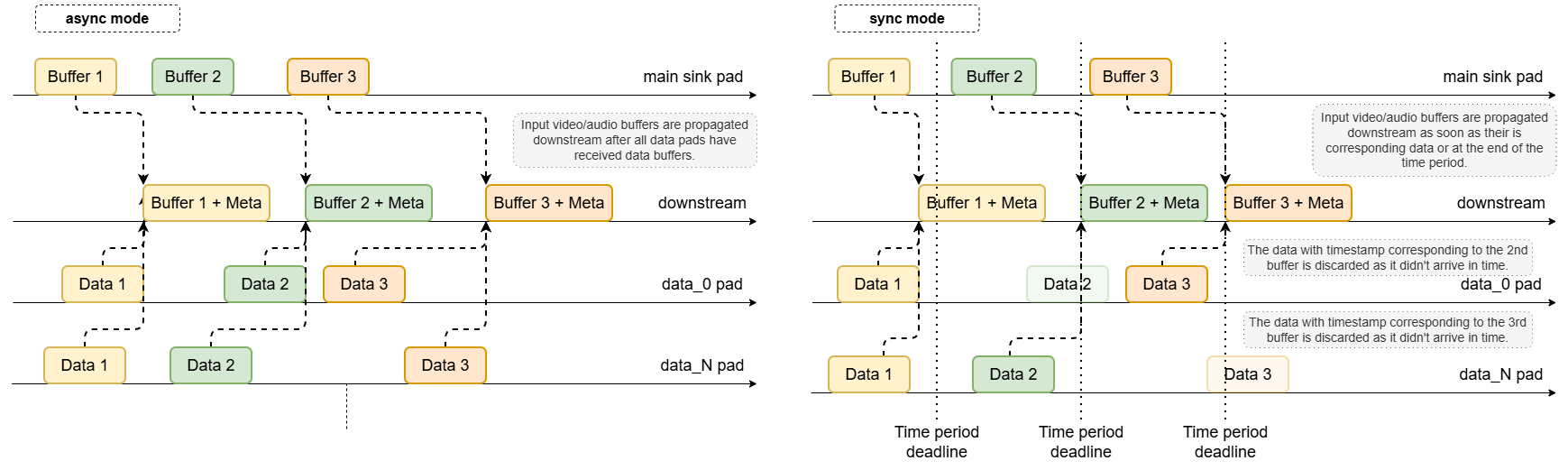
| `mode` | Controls the synchronization strategy used to associate metadata buffers with main media frames.
`Type: Enum `
`Default: 0, "async"`
`Range:`
`(0): async - No timestamp synchronization. The N-th incoming media frame is held until the N-th data buffer has been received on all data pads. Suitable for fixed, predictable sequences`
`(1): sync - Timestamp-based synchronization. Each incoming frame is held for up to 1 / framerate (video) or 1 / rate (audio). Metadata with matching timestamps is attached before the frame is forwarded downstream`
`Flags: readable/writable (changeable only in NULL or READY state)`
`Example: mode="sync" (or) mode=1` |
| `queue-size` | Sets the size of the internal input and output queues.
`Type: Unsigned Integer`
`Default: 10`
`Range: 3 - 4294967295`
`Flags: readable/writable (changeable only in NULL or READY state)` |
## Main Buffer, Metadata Synchronization and Latency control
The plugin is designed with a **single main sink pad** that receives the primary video or audio
buffers, and **multiple auxiliary data pads** that collect ML post-processing results or CV motion
vectors. Data arriving on auxiliary pads may be provided in string or blob form and is parsed into
structured representations. Once parsed, the plugin matches each data buffer to its corresponding
main media frame and attaches the result as **GstMeta**.
## Async Mode
This is the default synchronization mode. No timestamp-based matching is performed. Instead,
metadata buffers are associated with main frames in strict **1:1 order**:
* The N-th incoming video/audio frame is held until the N-th data buffer has been received on **all** data pads.
* Once all required data for that frame is available, the metadata is attached.
* The enriched buffer is then pushed downstream.
This mode is suitable when media buffers and metadata buffers are produced in a fixed, predictable sequence.
## Sync Mode
In sync mode, the plugin performs **timestamp-based synchronization**. Each incoming main frame is
held for a limited time window of up to `1 / framerate` seconds (video) or `1 / rate` seconds
(audio). For example, at 30 fps, the frame may be held for approximately **33.3 ms**.
During this hold period, the plugin waits for data buffers on its auxiliary pads whose timestamps
match the timestamp of the main frame:
* If all expected data buffers arrive within the time window, they are attached before forwarding.
* If one or more auxiliary pads do not provide matching buffers in time, only the successfully
matched metadata is attached and the main buffer is released downstream.
## Latency Control
In some use cases, the default hold period in sync mode may be too short — especially when metadata
generation takes longer than expected. The `latency` property extends the waiting period by
accepting an integer value in **nanoseconds**, allowing the plugin to wait longer for late-arriving
data buffers before forwarding the main frame.
 # Usage
### Person Detection
# Usage
### Person Detection
```mermaid theme={null}
%%{init: {'theme': 'default', 'themeVariables': {'fontSize': '50px', 'nodePadding': 120, 'nodeSpacing': 120, 'rankSpacing': 140}}}%%
flowchart LR
A[qticamsrc] --> Q1[queue] --> T[tee]
T -->|main path| Q2[queue] --> M[qtimetamux]
T -->|inference path| Q3[queue] --> C[qtimlvconverter]
C --> Q4[queue] --> I[qtimlqnn]
I --> Q5[queue] --> P[qtimlpostprocess]
P -->|text/x-raw| Q6[queue] --> M
M --> Q7[queue] --> O[qtivoverlay]
O --> Q8[queue] --> W[waylandsink]
```
| File | Download | Save as |
| ---------------- | ----------------------------------------------------------------------------------------------------------------------------------- | --------------------------- |
| YOLOX W8A8 model | [Qualcomm AI Hub — YOLOX](https://aihub.qualcomm.com/iot/models/yolox) | `yolo_x_w8a8.tflite` |
| Detection labels | yolov8.json | `yolov8.json` |
| Sample video | Input video | `Draw_1080p_180s_30FPS.mp4` |
If any downloaded file is a `.zip` archive, extract it on your host machine before copying:
`unzip filename.zip`
```bash SCP (SSH) theme={null}
# Replace $HOME to the appropriate device path before running the commands.
# For QLI: /root
# For Ubuntu: /home/ubuntu
# Modify this based on your platform and ensure files are copied to the correct location on the device.
# Run from your host machine — replace and
ssh @ "mkdir -p $HOME/{models,labels,media,media/output}"
scp yolo_x_w8a8.tflite @:$HOME/models/
scp yolov8.json @:$HOME/labels/
scp Draw_1080p_180s_30FPS.mp4 @:$HOME/media/
```
```bash SCP (SSH) theme={null}
# Run from your host machine — replace and
ssh @
```
Run below command on your device
```bash theme={null}
export MODEL_NAME=yolo_x_w8a8.tflite
export LABELS_NAME=yolov8.json
export SRC_VIDEO_NAME=Draw_1080p_180s_30FPS.mp4
```
```bash theme={null}
gst-launch-1.0 -e --gst-debug=2 \
filesrc location=$HOME/media/$SRC_VIDEO_NAME ! qtdemux ! h264parse ! \
v4l2h264dec capture-io-mode=4 output-io-mode=4 ! video/x-raw,format=NV12 ! queue ! \
tee name=t ! qtimetamux name=obj_mux ! qtivoverlay ! waylandsink fullscreen=true sync=false \
t. ! queue ! qtimlvconverter ! queue ! \
qtimltflite model=$HOME/models/$MODEL_NAME delegate=external external-delegate-path=libQnnTFLiteDelegate.so \
external-delegate-options="QNNExternalDelegate,backend_type=htp,log_level=(string)1;" ! queue ! \
qtimlpostprocess module=yolov8 labels=$HOME/labels/$LABELS_NAME \
settings="{\"confidence\": 51.0}" ! text/x-raw ! queue ! obj_mux.
```
### Detection-Classification Daisy Chain Pipeline
This pipeline demonstrates a cascaded inference approach where the output of one model (Detection) is used to crop regions of interest (ROIs) which are then fed into secondary models (Classification).
```mermaid theme={null}
%%{init: {'theme': 'default', 'themeVariables': {'fontSize': '32px', 'nodeSpacing': 120 'rankSpacing': 140}}}%%
flowchart LR
FS[filesrc\nvideo.mp4] --> DM[qtdemux] --> HP[h264parse]
HP --> DEC[v4l2h264dec\nNV12] --> Q1[queue] --> ST[tee\nsrc_tee]
ST -->|main path| Q2[queue] --> DX[qtimetamux\ndet_mux]
ST -->|det inference| Q3[queue] --> DC[qtimlvconverter\ndet_conv]
DC --> Q4[queue] --> DI[qtimltflite\ndet_infer yolox]
DI --> Q5[queue] --> DP[qtimlpostprocess\ndet_post yolov8]
DP -->|text/x-raw| Q6[queue] --> DX
DX --> Q7[queue] --> MT[tee\nmeta_tee]
MT -->|main path| Q8[queue] --> CX[qtimetamux\ncls_mux]
MT -->|cls inference| Q9[queue] --> CC[qtimlvconverter\ncls_conv]
CC --> Q10[queue] --> CI[qtimltflite\ncls_infer mobilenet_v2]
CI --> Q11[queue] --> CP[qtimlpostprocess\ncls_post mobilenet]
CP -->|text/x-raw| Q12[queue] --> CX
CX --> Q13[queue] --> CO[qtivoverlay\ncls_overlay]
CO --> Q14[queue] --> WS[waylandsink\nfullscreen=true]
```
| File | Download | Save as |
| ---------------- | ----------------------------------------------------------------------------------------------------------------------------------- | --------------------------------------- |
| YOLOX model | [Qualcomm AI Hub — YOLOX](https://aihub.qualcomm.com/iot/models/yolox) | `yolox-yolo-x-w8a8.tflite` |
| YOLO labels | yolov8.json | `yolov8.json` |
| MobileNet model | mobilenet-softmax | `mobilenet_v2-mobilenet-v2-w8a8.tflite` |
| MobileNet labels | mobilenet.json | `mobilenet_v2.json` |
| Input video | Input video | `video.mp4` |
```bash SCP (SSH) theme={null}
ssh @ "mkdir -p $HOME/{models,labels,media}"
scp yolox-yolo-x-w8a8.tflite @:$HOME/models/
scp yolov8.json @:$HOME/labels/
scp mobilenet_v2-mobilenet-v2-w8a8.tflite @:$HOME/models/
scp mobilenet_v2.json @:$HOME/labels/
scp video.mp4 @:$HOME/media/
```
```bash SCP (SSH) theme={null}
ssh @
```
Run below command on your device
```bash theme={null}
mkdir -p $HOME/{models,labels,media}
```
```bash theme={null}
gst-launch-1.0 -e --gst-debug=2 \
qtimlvconverter name=det_conv \
qtimltflite name=det_infer delegate=external external-delegate-path=libQnnTFLiteDelegate.so external-delegate-options="QNNExternalDelegate,backend_type=htp,log_level=(string)1;" model=$HOME/models/yolox-yolo-x-w8a8.tflite \
qtimlpostprocess name=det_post module=yolov8 labels=$HOME/labels/yolov8.json settings="{\"confidence\": 51.0}" \
qtimetamux name=det_mux \
qtivoverlay name=main_overlay \
qtimlvconverter name=cls_conv \
qtimltflite name=cls_infer delegate=external external-delegate-path=libQnnTFLiteDelegate.so external-delegate-options="QNNExternalDelegate,backend_type=htp,log_level=(string)1;" model=$HOME/models/mobilenet_v2-mobilenet-v2-w8a8.tflite \
qtimlpostprocess name=cls_post module=mobilenet labels=$HOME/labels/mobilenet_v2.json settings="{\"confidence\": 51.0}" \
qtimetamux name=cls_mux \
qtivoverlay name=cls_overlay \
filesrc location=$HOME/media/video.mp4 ! qtdemux ! h264parse ! v4l2h264dec capture-io-mode=4 output-io-mode=4 ! video/x-raw,format=NV12 ! queue ! tee name=src_tee \
src_tee. ! queue ! det_mux. \
src_tee. ! queue ! det_conv. det_conv. ! queue ! det_infer. det_infer. ! queue ! det_post. det_post. ! text/x-raw ! queue ! det_mux. \
det_mux. ! queue ! tee name=meta_tee \
meta_tee. ! queue ! cls_mux. \
meta_tee. ! queue ! cls_conv. cls_conv. ! queue ! cls_infer. cls_infer. ! queue ! cls_post. cls_post. ! text/x-raw ! queue ! cls_mux. \
cls_mux. ! queue ! cls_overlay. cls_overlay. ! queue ! waylandsink fullscreen=true sync=false
```