> ## Documentation Index
> Fetch the complete documentation index at: https://dragonwingdocs.qualcomm.com/llms.txt
> Use this file to discover all available pages before exploring further.
# qtimlpostprocess
> AI post-processing plugin
# Overview
**Output tensors** produced by inference models typically require **post-processing** to make the results usable for downstream components or interpretable by applications. For example:
* **Image classification** outputs are arrays of confidence scores that need interpretation, such as selecting the top classes exceeding a specified threshold.
* **Object detection** outputs should be converted into a set of bounding boxes with associated labels.
* **Pose estimation** outputs should be transformed into a set of keypoints and connections between them.
* **Image segmentation** outputs should be converted into RGBA image masks that can be overlaid on the original frame.
* **Raw tensor** data may require conversion into formats expected by subsequent plugins or processing stages.
Within the IM SDK, the **qtimlpostprocess** element manages post-processing tasks. This plugin converts raw model outputs into **GStreamer ML metadata.** It is a customizable plugin that provides a library interface for post-processing the tensor output of inference plugins. The **post-processing library** is solely responsible for tensor parsing and outputs a list of predictions. We refer to this as the post-processing (PP) module.
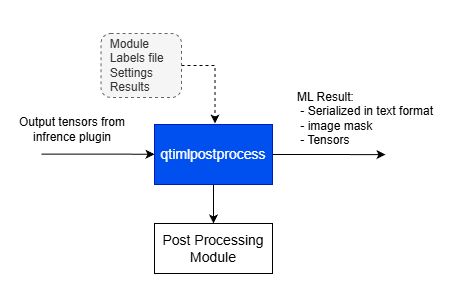 The **qtimlpostprocess** element receives a list of tensors as input, each encapsulated in a GST Buffer. Metadata describing the tensors—such as the number of tensors, their shapes, timestamps, batching indexes, and more—is attached as GStreamer metadata.
The post-processing plugin configuration ( GStreamer properties):
***
## Example Pipeline
| File | Download | Save as |
| ---------------- | ----------------------------------------------------------------------------------------------------------------------------------- | --------------------------- |
| YOLOX W8A8 model | [Qualcomm AI Hub — YOLOX](https://aihub.qualcomm.com/iot/models/yolox) | `yolo_x_w8a8.tflite` |
| Detection labels | yolov8.json | `yolov8.json` |
| Sample video | Input video | `Draw_1080p_180s_30FPS.mp4` |
```bash SCP (SSH) theme={null}
# Replace $HOME to the appropriate device path before running the commands.
# For QLI: /root
# For Ubuntu: /home/ubuntu
# Modify this based on your platform and ensure files are copied to the correct location on the device.
# Run from your host machine — replace and
ssh @ "mkdir -p $HOME/{models,labels,media,media/output}"
scp yolo_x_w8a8.tflite @:$HOME/models/
scp yolov8.json @:$HOME/labels/
scp Draw_1080p_180s_30FPS.mp4 @:$HOME/media/
```
```bash SCP (SSH) theme={null}
# Run from your host machine — replace and
ssh @
```
Run below command on your device
```bash theme={null}
mkdir -p $HOME/{models,labels,media,media/output}
export MODEL_NAME=yolo_x_w8a8.tflite
export LABELS_NAME=yolov8.json
export SRC_VIDEO_NAME=Draw_1080p_180s_30FPS.mp4
```
```bash theme={null}
gst-launch-1.0 -e --gst-debug=2 \
filesrc location=$HOME/media/$SRC_VIDEO_NAME ! qtdemux ! h264parse ! \
v4l2h264dec capture-io-mode=4 output-io-mode=4 ! video/x-raw,format=NV12 ! queue ! \
tee name=t ! qtimetamux name=obj_mux ! qtivoverlay ! waylandsink fullscreen=true sync=false \
t. ! queue ! qtimlvconverter ! queue ! \
qtimltflite model=$HOME/models/$MODEL_NAME delegate=external external-delegate-path=libQnnTFLiteDelegate.so \
external-delegate-options="QNNExternalDelegate,backend_type=htp,log_level=(string)1;" ! queue ! \
qtimlpostprocess module=yolov8 labels=$HOME/labels/$LABELS_NAME \
settings="{\"confidence\": 51.0}" ! text/x-raw ! queue ! obj_mux.
```
# Element Properties
| Property | Description |
| -------------------- | ----------------------------------------------------------------------------------------------------------------------------------------------------------------------------------------------------------------------------------------------------------------------------- |
| `module` | Post-processing module name. This mandatory property specifies how the tensor will be parsed. It does not define the plugin output type, which is determined during pipeline caps negotiation.
The **qtimlpostprocess** element receives a list of tensors as input, each encapsulated in a GST Buffer. Metadata describing the tensors—such as the number of tensors, their shapes, timestamps, batching indexes, and more—is attached as GStreamer metadata.
The post-processing plugin configuration ( GStreamer properties):
***
## Example Pipeline
| File | Download | Save as |
| ---------------- | ----------------------------------------------------------------------------------------------------------------------------------- | --------------------------- |
| YOLOX W8A8 model | [Qualcomm AI Hub — YOLOX](https://aihub.qualcomm.com/iot/models/yolox) | `yolo_x_w8a8.tflite` |
| Detection labels | yolov8.json | `yolov8.json` |
| Sample video | Input video | `Draw_1080p_180s_30FPS.mp4` |
```bash SCP (SSH) theme={null}
# Replace $HOME to the appropriate device path before running the commands.
# For QLI: /root
# For Ubuntu: /home/ubuntu
# Modify this based on your platform and ensure files are copied to the correct location on the device.
# Run from your host machine — replace and
ssh @ "mkdir -p $HOME/{models,labels,media,media/output}"
scp yolo_x_w8a8.tflite @:$HOME/models/
scp yolov8.json @:$HOME/labels/
scp Draw_1080p_180s_30FPS.mp4 @:$HOME/media/
```
```bash SCP (SSH) theme={null}
# Run from your host machine — replace and
ssh @
```
Run below command on your device
```bash theme={null}
mkdir -p $HOME/{models,labels,media,media/output}
export MODEL_NAME=yolo_x_w8a8.tflite
export LABELS_NAME=yolov8.json
export SRC_VIDEO_NAME=Draw_1080p_180s_30FPS.mp4
```
```bash theme={null}
gst-launch-1.0 -e --gst-debug=2 \
filesrc location=$HOME/media/$SRC_VIDEO_NAME ! qtdemux ! h264parse ! \
v4l2h264dec capture-io-mode=4 output-io-mode=4 ! video/x-raw,format=NV12 ! queue ! \
tee name=t ! qtimetamux name=obj_mux ! qtivoverlay ! waylandsink fullscreen=true sync=false \
t. ! queue ! qtimlvconverter ! queue ! \
qtimltflite model=$HOME/models/$MODEL_NAME delegate=external external-delegate-path=libQnnTFLiteDelegate.so \
external-delegate-options="QNNExternalDelegate,backend_type=htp,log_level=(string)1;" ! queue ! \
qtimlpostprocess module=yolov8 labels=$HOME/labels/$LABELS_NAME \
settings="{\"confidence\": 51.0}" ! text/x-raw ! queue ! obj_mux.
```
# Element Properties
| Property | Description |
| -------------------- | ----------------------------------------------------------------------------------------------------------------------------------------------------------------------------------------------------------------------------------------------------------------------------- |
| `module` | Post-processing module name. This mandatory property specifies how the tensor will be parsed. It does not define the plugin output type, which is determined during pipeline caps negotiation.
`Type: String`
`Default: NULL`
`Flags: readable/writable` |
| `labels` | Path to the label file. The file is passed directly to the module without interpretation by the plugin. Supports JSON and newline-separated formats.
`Type: String`
`Default: NULL`
`Flags: readable/writable` |
| `results` | Limits the number of output results. If the detected results exceed this value, lower-confidence results are discarded automatically by the plugin.
`Type: Integer`
`Default: 5`
`Range: 0 - 50`
`Flags: readable/writable` |
| `settings` | JSON string or path to a JSON file containing module-specific configuration such as confidence thresholds, keypoints, or other parameters.
`Type: String`
`Default: NULL`
`Flags: readable/writable` |
| `bbox-stabilization` | Enable stabilization of bounding boxes (bboxes) to reduce jitter across frames.
`Type: Boolean`
`Default: false`
`Flags: readable/writable` |
### Label File Examples
#### Newline-separated format
```
tench
goldfish
great white shark
tiger shark
hammerhead
electric ray
stingray
cock
hen
ostrich
```
#### JSON format
```json theme={null}
[
{"id": 3, "color": "0x00FF00FF", "label": "tiger shark"},
{"id": 4, "color": "0x00FF00FF", "label": "hammerhead"},
{"id": 5, "color": "0x00FF00FF", "label": "electric ray"},
{"id": 6, "color": "0x00FF00FF", "label": "stingray"},
{"id": 17, "color": "0x00FF00FF", "label": "jay"}
]
```
### Settings Example (Pose Estimation)
```json theme={null}
{
"confidence": 51.0,
"connections": [
{"id": 5, "connection": 6},
{"id": 6, "connection": 12},
{"id": 7, "connection": 5},
{"id": 8, "connection": 6}
]
}
```
The output of the **qtimlpostprocess** element can be in one of the following formats:
* **text** - The post-processing plugin serializes ML metadata to text. This metadata can either be used as-is by other plugins or attached to the source stream using qtimetamuxer.
* **image mask** - The post-processing plugin can generate an image mask with overlaid text, bounding boxes, dots, lines, and other visual elements. This is a transparent frame that contains only ML results. For example, if the post-processing type is object detection, the plugin will draw bounding boxes with labels. The image mask can then be blitted onto the source video stream using the qtivcomposer plugin.
* **tensor** - The post-processing plugin can generate tensors. This is useful when the output tensor from one inference stage needs to be passed to the next stage, but the tensor shapes don't match exactly. For example, the first stage might produce four output tensors, while the next stage might require only three of them.
Output format is selected during GStreamer pipeline caps negotiation. Most settable formats are usually negotiated automatically but developers can specify them manually via GStreamer caps filter. The plugin supports only one source pad. If the pipeline requires two or more of the supported formats simultaneously, then the post-processing plugin should be added and executed twice within the pipeline.
# Post Processing Module
The **post processing module** is solely responsible for tensor parsing and outputs a list of predictions. Each post-processing module implements parsing logic tailored to a specific class of models. For example, a single module is responsible for all variants of YoloV8 detection models. The plugin manages the execution of the module, the generation of outputs (ML metadata or image mask), batching, chained AI models, and other related tasks.
The post processing module currently supports the following output data types:
* object-detection
* image-classification
* image-segmentation
* super-resolution
* pose-estimation
* audio-classification
* tensor
The post-processing module is a loadable entity. The IM SDK provides a comprehensive set of post-processing modules, but application developers can also write their own custom modules and deploy them on the device. Each module is built as a shared library.
All post-processing module shared libraries must be deployed in a dedicated folder on the target device, typically:
```
/usr/lib/gstreamer-1.0/ml/modules
```
The **qtimlpostprocess** element automatically detects supported post-processing modules when they are deployed in this location.
Below you can find list of currently supported AI modules.
* `mobilenet-softmax`
* `mobilenet`
* `ocr-recognizer`
* `ocr`
* `qfr-softmax`
* `qfr`
* `easy-textdt`
* `easy-ocr-detector`
* `mediapipe-pose`
* `qfd`
* `qpd`
* `ssd-mobilenet`
* `yolo-nas`
* `yolov5`
* `yolov8`
* `palmd`
* `deeplab-argmax`
* `yolov8-seg`
* `midas-v2`
* `hrnet`
* `lite-3dmm`
* `posenet`
* `hlandmark`
* `mediapipe-pose-landmark`
* `srnet`
* `wave2vec`
* `yamnet`
* `tensor`
The supported models for all the above categories can be found in the [Supported Models](/supportedmodels/) section.
**Important:** It is very common for one post-process module to support more than one ML model. For example:
* yolov8 module can be used for both YoloV8 and YoloX models, because both Yolo models have the same output and need the same post processing implementation. The same applies to YoloV3 and YoloV5.
* mobilenet module can be used for MobileNet, ResNet and other Image Classification ML models because classification post processing is very common across ML models.
A list of supported post-processing modules, along with their supported input tensor shapes and data types, can be checked directly on the device.
To view the full list of supported modules, use the following command:
```
gst-inspect-1.0 qtimlpostprocess
```
This information is updated immediately when a new post-processing module is deployed or removed.
Example output:
```
module : Module name that is going to be used for processing the tensors
flags: readable, writable
Enum "GstMLPostProcessModules" Default: 0, "none"
(0): none - No module, default invalid mode
(1): ssd-mobilenet -
Supported tensors:
Type: FLOAT32
Tensor 0: 1, 10, 4
Tensor 1: 1, 10
Tensor 2: 1, 10
Tensor 3: 1
(2): hrnet -
Supported tensors:
Type: FLOAT32
Tensor 0: 1, 1-256, 1-256, 1-17
(3): srnet -
Supported tensors:
Type: FLOAT32
Tensor 0: 1, 32-4096, 32-4096
Type: FLOAT32
Tensor 0: 1, 32-4096, 32-4096, 1-3
(4): yolov8-seg -
Supported tensors:
Type: FLOAT32
Tensor 0: 1, 21-42840, 4
Tensor 1: 1, 21-42840
Tensor 2: 1, 21-42840, 1-32
Tensor 3: 1, 21-42840
Tensor 4: 1, 1-32, 32-2048, 32-2048
(5): posenet -
Supported tensors:
Type: FLOAT32
Tensor 0: 1, 5-251, 5-251, 1-17
Tensor 1: 1, 5-251, 5-251, 2-34
Tensor 2: 1, 5-251, 5-251, 4-64
(6): east-textdt -
Supported tensors:
Type: FLOAT32
Tensor 0: 1, 8-480, 8-480, 1-5
Tensor 1: 1, 8-480, 8-480, 1-5
(7): qfr -
Supported tensors:
Type: FLOAT32
Tensor 0: 1, 512
Tensor 1: 1, 32
Tensor 2: 1, 2
Tensor 3: 1, 2
Tensor 4: 1, 2
Tensor 5: 1, 2
(8): deeplab-argmax -
Supported tensors:
Type: FLOAT32
Tensor 0: 1, 32-2048, 32-2048
Type: FLOAT32
Tensor 0: 1, 32-2048, 32-2048, 1-21
(9): yolov8 -
Supported tensors:
Type: FLOAT32
Tensor 0: 1, 21-42840, 4
Tensor 1: 1, 21-42840
Tensor 2: 1, 21-42840
Type: FLOAT32
Tensor 0: 1, 4, 21-42840
Tensor 1: 1, 1-1001, 21-42840
Type: FLOAT32
Tensor 0: 1, 5-1005, 21-42840
(10): mobilenet -
Supported tensors:
Type: FLOAT32
Tensor 0: 1, 1000-1001
(11): lite-3dmm -
Supported tensors:
Type: FLOAT32
Tensor 0: 1, 512
Tensor 1: 1, 265
Type: FLOAT32
Tensor 0: 1, 265
(12): ocr -
Supported tensors:
Type: FLOAT32
Tensor 0: 26, 1, 37
Type: FLOAT32
Tensor 0: 1, 26-48, 37
(13): yolov5 -
Supported tensors:
Type: FLOAT32
Tensor 0: 1, 1-136, 1-136, 18-3018
Tensor 1: 1, 1-136, 1-136, 18-3018
Tensor 2: 1, 1-136, 1-136, 18-3018
Type: FLOAT32
Tensor 0: 1, 3, 1-136, 1-136, 6-85
Tensor 1: 1, 3, 1-136, 1-136, 6-85
Tensor 2: 1, 3, 1-136, 1-136, 6-85
Type: FLOAT32
Tensor 0: 1, 21-72828, 6-85
(14): mobilenet-softmax -
Supported tensors:
Type: FLOAT32
Tensor 0: 1, 1000-1001
(15): yolo-nas -
Supported tensors:
Type: FLOAT32
Tensor 0: 1, 21-42840, 4
Tensor 1: 1, 21-42840
Tensor 2: 1, 21-42840
Type: FLOAT32
Tensor 0: 1, 21-42840, 2
Tensor 1: 1, 21-42840, 2
Tensor 2: 1, 21-42840, 81
Type: FLOAT32
Tensor 0: 1, 5-1005, 21-42840
Type: FLOAT32
Tensor 0: 1, 21-42840, 1-1001
Tensor 1: 1, 21-42840, 4
Type: FLOAT32
Tensor 0: 1, 21-42840, 4
Tensor 1: 1, 21-42840, 1-1001
(16): qfd -
Supported tensors:
Type: UINT8, FLOAT32
Tensor 0: 1, 60, 80, 1
Tensor 1: 1, 60, 80, 1
Tensor 2: 1, 60, 80, 10
Tensor 3: 1, 60, 80, 4
Type: UINT8, FLOAT32
Tensor 0: 1, 120, 160, 1
Tensor 1: 1, 120, 160, 10
Tensor 2: 1, 120, 160, 4
Type: UINT8, FLOAT32
Tensor 0: 1, 60, 80, 4
Tensor 1: 1, 60, 80, 10
Tensor 2: 1, 60, 80, 1
Type: UINT8, FLOAT32
Tensor 0: 1, 60, 80, 1
Tensor 1: 1, 60, 80, 4
Tensor 2: 1, 60, 80, 10
(17): yamnet -
Supported tensors:
Type: FLOAT32
Tensor 0: 1, 521
(18): midas-v2 -
Supported tensors:
Type: FLOAT32
Tensor 0: 1, 256, 256, 1
Type: FLOAT32
Tensor 0: 1, 256, 256
(19): qfr-softmax -
Supported tensors:
Type: FLOAT32
Tensor 0: 1, 512
Tensor 1: 1, 32
Tensor 2: 1, 2
Tensor 3: 1, 2
Tensor 4: 1, 2
Tensor 5: 1, 2
(20): qpd -
Supported tensors:
Type: FLOAT32
Tensor 0: 1, 120, 160, 3
Tensor 1: 1, 120, 160, 12
Tensor 2: 1, 120, 160, 34
Tensor 3: 1, 120, 160, 17
```
Lets take the yolov8 post processing module as an example:
```
(9): yolov8 -
Supported tensors:
Type: FLOAT32
Tensor 0: 1, 21-42840, 4
Tensor 1: 1, 21-42840
Tensor 2: 1, 21-42840
Type: FLOAT32
Tensor 0: 1, 4, 21-42840
Tensor 1: 1, 1-1001, 21-42840
Type: FLOAT32
Tensor 0: 1, 5-1005, 21-42840
```
**1. Models with three output tensors**
These models produce three separate tensors. The second dimension is dynamic and depends on the number of classes used during training. This flexibility allows a single post-processing module to support multiple YOLOv8 models with different class configurations.
Example shapes:
* 1, (21–42840), 4
* 1, (21–42840)
* 1, (21–42840)
**2. Models with two output tensors**
These models combine bounding box and classification data across two tensors.
Example shapes:
* 1, 4, (21–42840)
* 1, (1–1001), (21–42840)
**3. Models with one output tensor**
These models output all relevant data in a single tensor.
Example shapes:
* 1, (5–1005), (21–42840)
*Data format is Float32 in all cases.*
## Batching & Daisy Chaining
IM SDK supports advanced features such as **batched models** and **daisy chaining** (executing models sequentially). These complex tasks are handled automatically by the SDK, allowing the post-processing module code to remain generic and focused solely on core post-processing logic.
**Examples:**
* If a model has a batch size of 4, the **qtimlpostprocess** element will execute the **post-processing module** four times—once for each item in the batch. This means the same module can be used in both simple scenarios (processing one frame at a time) and more complex ones (processing multiple sources in parallel).
* In a sequential model setup, where the first model detects objects and the second performs pose estimation, the second model is executed for each detected object from the first model. In this case, **IM SDK** manages the complexity of invoking the **post-processing module** for each inference result and mapping the output back to the original frame.
## Overview of AI Post Processing use cases
IM SDK (Qualcomm Intelligent multimedia SDK) is a framework that provides necessary building blocks to construct AI, Multimedia, and CV pipelines for end application. To build AI workflow three components/ GStreamer plugins are needed.
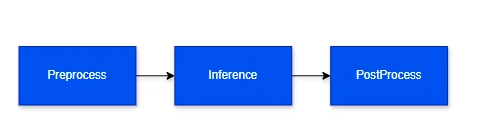 1. The preprocess element converts the data stream into a tensor.
2. The inference element performs inference on an AI model and eventually applies dequantization to the output tensor. There is no additional preprocessing or postprocessing involved, other than dequantization.
3. The post-processing is a plugin that parses tensors and creates a buffer containing either ML metadata or an image mask. ML metadata can be handled by the IM SDK in two different ways: it can either be attached to the source stream using qtimetamuxer, or used directly and streamed to RTSP, RTMP, Redis, etc. The image mask can be overlaid on the source video frame using qtivcomposer.
Examples legend:
1. The preprocess element converts the data stream into a tensor.
2. The inference element performs inference on an AI model and eventually applies dequantization to the output tensor. There is no additional preprocessing or postprocessing involved, other than dequantization.
3. The post-processing is a plugin that parses tensors and creates a buffer containing either ML metadata or an image mask. ML metadata can be handled by the IM SDK in two different ways: it can either be attached to the source stream using qtimetamuxer, or used directly and streamed to RTSP, RTMP, Redis, etc. The image mask can be overlaid on the source video frame using qtivcomposer.
Examples legend:
 Example 1: The ML metadata is used directly (source stream is not propagated after inference plugin):
 Example2: The ML metadata is attached to the source video. The overlay uses the attached ML metadata to draw bounding boxes, text, and other visual elements. The result is either displayed on screen or streamed over the network.
 Example3: The ML metadata is converted into an image mask, which is then blitted on top of the source stream.
 ## Guidelines for Writing a Custom Post-Processing Module
If you cannot find a suitable post-processing module for your AI model, you can implement your own. You can build a post-processing module completely independently from the IM SDK — all you need are the interface header files and a toolchain. Once the module is built, it should be deployed to the following location on the device: /usr/lib/gstreamer-1.0/ml/modules/. The post-processing plugin will automatically detect it, and users can select it in the GStreamer pipeline.
[Post processing module header file(s)](https://git.codelinaro.org/clo/le/platform/vendor/qcom-opensource/gst-plugins-qti-oss/-/blob/imsdk.lnx.2.0.0/gst-plugin-mlpostprocess/modules/qti-ml-post-process.h?ref_type=heads)
### Module/library naming
Post-processing module shared libraries must follow the naming convention: libml-postprocess-\.so. This is required to avoid duplication of post-processing module names. For example, the shared library for the YoloV8 module should be named libml-postprocess-yolov8.so. The same \ is used when configuring the post-processing plugin, for example: **module=yolov8.**
```bash theme={null}
gst-launch-1.0 -e --gst-debug=2 filesrc location=$HOME/models/Draw_1080p_180s_30FPS_1_ref.mp4 ! qtdemux ! h264parse ! v4l2h264dec capture-io-mode=4 output-io-mode=4 ! video/x-raw,format=NV12 ! qtimlvconverter ! qtimltflite name=inference delegate=external external-delegate-path=libQnnTFLiteDelegate.so external-delegate-options="QNNExternalDelegate,backend_type=htp;" model=$HOME/models/yolov8_det_quantized.tflite ! qtimlpostprocess **module=yolov8** labels=$HOME/labels/yolov8_json.labels ! filesink location=$HOME/data/ml-results.txt
```
### AI Post Processing Module Inference
```
class IModule {
public:
virtual ~IModule() {};
virtual std::string Caps() = 0;
virtual bool Configure(const std::string& labels_file, const std::string& json_settings) = 0;
virtual bool Process(const Tensors& tensors, Dictionary& mlparams, std::any& output) = 0;
};
```
The **post-processing modules** expose a C++ API. Since C++ classes cannot be directly instantiated from shared libraries, class creation is encapsulated in a C-style function. Module developers must include the following code in the source file:
```
IModule* NewModule(LogCallback logger) {
return new Module(logger);
}
```
The developer only needs to implement the following APIs in the Module class, which derives from the IModule interface:
* **Constructor / Destructor** - For initialization and cleanup.
* **Caps** - This function must return the module type (e.g., image classification, object detection), supported tensor dimensions, and supported data types (e.g., uint8, float32).
* **Configuration** - Called once during initialization. Handles label and configuration files.
* **Process** - Called after each inference. This is where the tensor is converted into a prediction result in one of the supported formats.
**std::string Caps()**
This API returns the module type and the supported tensor shapes as a JSON string. The tensor shape is not fixed but defined within a range, represented using square brackets. For example, \[1, \[21, 42840], 4] indicates that the second dimension can vary between 21 and 42840.
Example definition of post processing module capabilities. Module implements "object-detection" post-processing in this example. Three different tensor outputs are support: one tensor, two tensors, three tensors. Supported tensor format is only FLOAT32 in this example.
```
static const char* kModuleCaps = R"(
{
"type": "object-detection",
"tensors": [
{
"format": ["FLOAT32"],
"dimensions": [
[1, [21, 42840], 4],
[1, [21, 42840]],
[1, [21, 42840]]
]
},
{
"format": ["FLOAT32"],
"dimensions": [
[1, 4, [21, 42840]],
[1, [1, 1001], [21, 42840]]
]
},
{
"format": ["FLOAT32"],
"dimensions": [
[1, [5, 1005], [21, 42840]]
]
}
]
}
)";
```
Supported Post Processed Module types:
* object-detection
* image-classification
* image-segmentation
* super-resolution
* pose-estimation
* audio-classification
* tensor
Supported Tensor Types:
* FLOAT32
* FLOAT16
* INT8
* UINT8
* INT16
* UINT16
* INT32
* UINT32
* INT64
* UINT64
More than one format could be specified in the same time. Example:
```
...
{
"format": ["FLOAT32", "INT8"],
"dimensions": [
[1, 4, [21, 42840]],
[1, [1, 1001], [21, 42840]]
]
},
...
```
**bool Configure(const std::string& labels\_file, const std::string& json\_settings)**
* **labels** - (optional) а string that holds the path to a file containing labels. If the user does not provide a label file, the string remains empty. The label file can be in any format. The IM SDK includes parsers for both newline-separated labels and JSON-formatted labels.
* **settings** - (optional) a JSON string containing module-specific setting. These settings are provided by the user through the settings property of the post-processing GStreamer plugin. It will be empty if user does not provide any settings.
**bool Process(const Tensors& tensors, Dictionary& mlparams, std::any& output)**
The module takes as input: tensors, tensors shape, information how input tensor is filled. The output should be a list of predictions in one of the supported formats
* object-detection
* image-classification
* image-segmentation
* super-resolution
* pose-estimation
* audio-classification
* tensors
Tensor output is a special case where the post-processing plugin and module generate tensors instead of predictions. This is used when two ML models are chained together and the output tensor from the first model needs to be modified before it is passed to the next model. If the output tensor does not require modification, then both inference plugins can be linked directly, one after the other, and the post-processing plugin is not needed in that case.
#### Understanding post processing module input
The input is split into two fields:
1. **tensor** – This field holds the inference output tensors and describes their structure. Each output tensor is represented as an entry in a vector. For example, in the case of YOLOv8, which produces three output tensors (boxes, scores, class indices), the vector will contain three entries.
* type – float, uint8, etc
* name - tensor name. This field is useful when two or more output tensors have the same shape. Tensor names are unique and guarantee that an exact tensor is selected.
* dimensions – this field describes the tensor's shape. For example, YoloV8 with three output tensors: \[1,8400,4], \[1,8400], \[1,8400]
* data – pointer to tensor
2. **mlparams** – Additional parameters that may be required for tensor processing. These may not be applicable to all submodules. This field also provides information about how the input stream is processed, which is particularly important because the resolution and aspect ratio of the stream often do not match the shape of the input tensor. This field is a dictionary implemented using std::any. The module developer must know the expected key and its corresponding return type. The use of std::any ensures that the returned value matches the type associated with the given key. Example usage:
```
video::Region& region =
std::any_cast(mlparams["input-tensor-region"]);
```
Supported keys:
* Key: "input-tensor-region"
## Guidelines for Writing a Custom Post-Processing Module
If you cannot find a suitable post-processing module for your AI model, you can implement your own. You can build a post-processing module completely independently from the IM SDK — all you need are the interface header files and a toolchain. Once the module is built, it should be deployed to the following location on the device: /usr/lib/gstreamer-1.0/ml/modules/. The post-processing plugin will automatically detect it, and users can select it in the GStreamer pipeline.
[Post processing module header file(s)](https://git.codelinaro.org/clo/le/platform/vendor/qcom-opensource/gst-plugins-qti-oss/-/blob/imsdk.lnx.2.0.0/gst-plugin-mlpostprocess/modules/qti-ml-post-process.h?ref_type=heads)
### Module/library naming
Post-processing module shared libraries must follow the naming convention: libml-postprocess-\.so. This is required to avoid duplication of post-processing module names. For example, the shared library for the YoloV8 module should be named libml-postprocess-yolov8.so. The same \ is used when configuring the post-processing plugin, for example: **module=yolov8.**
```bash theme={null}
gst-launch-1.0 -e --gst-debug=2 filesrc location=$HOME/models/Draw_1080p_180s_30FPS_1_ref.mp4 ! qtdemux ! h264parse ! v4l2h264dec capture-io-mode=4 output-io-mode=4 ! video/x-raw,format=NV12 ! qtimlvconverter ! qtimltflite name=inference delegate=external external-delegate-path=libQnnTFLiteDelegate.so external-delegate-options="QNNExternalDelegate,backend_type=htp;" model=$HOME/models/yolov8_det_quantized.tflite ! qtimlpostprocess **module=yolov8** labels=$HOME/labels/yolov8_json.labels ! filesink location=$HOME/data/ml-results.txt
```
### AI Post Processing Module Inference
```
class IModule {
public:
virtual ~IModule() {};
virtual std::string Caps() = 0;
virtual bool Configure(const std::string& labels_file, const std::string& json_settings) = 0;
virtual bool Process(const Tensors& tensors, Dictionary& mlparams, std::any& output) = 0;
};
```
The **post-processing modules** expose a C++ API. Since C++ classes cannot be directly instantiated from shared libraries, class creation is encapsulated in a C-style function. Module developers must include the following code in the source file:
```
IModule* NewModule(LogCallback logger) {
return new Module(logger);
}
```
The developer only needs to implement the following APIs in the Module class, which derives from the IModule interface:
* **Constructor / Destructor** - For initialization and cleanup.
* **Caps** - This function must return the module type (e.g., image classification, object detection), supported tensor dimensions, and supported data types (e.g., uint8, float32).
* **Configuration** - Called once during initialization. Handles label and configuration files.
* **Process** - Called after each inference. This is where the tensor is converted into a prediction result in one of the supported formats.
**std::string Caps()**
This API returns the module type and the supported tensor shapes as a JSON string. The tensor shape is not fixed but defined within a range, represented using square brackets. For example, \[1, \[21, 42840], 4] indicates that the second dimension can vary between 21 and 42840.
Example definition of post processing module capabilities. Module implements "object-detection" post-processing in this example. Three different tensor outputs are support: one tensor, two tensors, three tensors. Supported tensor format is only FLOAT32 in this example.
```
static const char* kModuleCaps = R"(
{
"type": "object-detection",
"tensors": [
{
"format": ["FLOAT32"],
"dimensions": [
[1, [21, 42840], 4],
[1, [21, 42840]],
[1, [21, 42840]]
]
},
{
"format": ["FLOAT32"],
"dimensions": [
[1, 4, [21, 42840]],
[1, [1, 1001], [21, 42840]]
]
},
{
"format": ["FLOAT32"],
"dimensions": [
[1, [5, 1005], [21, 42840]]
]
}
]
}
)";
```
Supported Post Processed Module types:
* object-detection
* image-classification
* image-segmentation
* super-resolution
* pose-estimation
* audio-classification
* tensor
Supported Tensor Types:
* FLOAT32
* FLOAT16
* INT8
* UINT8
* INT16
* UINT16
* INT32
* UINT32
* INT64
* UINT64
More than one format could be specified in the same time. Example:
```
...
{
"format": ["FLOAT32", "INT8"],
"dimensions": [
[1, 4, [21, 42840]],
[1, [1, 1001], [21, 42840]]
]
},
...
```
**bool Configure(const std::string& labels\_file, const std::string& json\_settings)**
* **labels** - (optional) а string that holds the path to a file containing labels. If the user does not provide a label file, the string remains empty. The label file can be in any format. The IM SDK includes parsers for both newline-separated labels and JSON-formatted labels.
* **settings** - (optional) a JSON string containing module-specific setting. These settings are provided by the user through the settings property of the post-processing GStreamer plugin. It will be empty if user does not provide any settings.
**bool Process(const Tensors& tensors, Dictionary& mlparams, std::any& output)**
The module takes as input: tensors, tensors shape, information how input tensor is filled. The output should be a list of predictions in one of the supported formats
* object-detection
* image-classification
* image-segmentation
* super-resolution
* pose-estimation
* audio-classification
* tensors
Tensor output is a special case where the post-processing plugin and module generate tensors instead of predictions. This is used when two ML models are chained together and the output tensor from the first model needs to be modified before it is passed to the next model. If the output tensor does not require modification, then both inference plugins can be linked directly, one after the other, and the post-processing plugin is not needed in that case.
#### Understanding post processing module input
The input is split into two fields:
1. **tensor** – This field holds the inference output tensors and describes their structure. Each output tensor is represented as an entry in a vector. For example, in the case of YOLOv8, which produces three output tensors (boxes, scores, class indices), the vector will contain three entries.
* type – float, uint8, etc
* name - tensor name. This field is useful when two or more output tensors have the same shape. Tensor names are unique and guarantee that an exact tensor is selected.
* dimensions – this field describes the tensor's shape. For example, YoloV8 with three output tensors: \[1,8400,4], \[1,8400], \[1,8400]
* data – pointer to tensor
2. **mlparams** – Additional parameters that may be required for tensor processing. These may not be applicable to all submodules. This field also provides information about how the input stream is processed, which is particularly important because the resolution and aspect ratio of the stream often do not match the shape of the input tensor. This field is a dictionary implemented using std::any. The module developer must know the expected key and its corresponding return type. The use of std::any ensures that the returned value matches the type associated with the given key. Example usage:
```
video::Region& region =
std::any_cast(mlparams["input-tensor-region"]);
```
Supported keys:
* Key: "input-tensor-region"
Type: video::Region
Description: This parameter indicates which portion of the input tensor is filled with actual data from the stream. The remaining area is considered padding
* Key: "input-tensor-dimensions"
Type: video::Resolution
Description: Specifies the size of the input tensor. This is useful when the post-processing algorithm produces output in absolute coordinates. Since post-processing modules are required to output relative coordinates, the input tensor size is needed to convert absolute values to relative ones.
#### Generating post processing module output
The output is array of array of results. Arrays are nested because of the batching case. Only inner array is filled if there is no batching. Inner array size match to number of found result. Results are always in relative dimension. Result type depends on module type:
1. **Image/Audio Classification**
* Name – class label. Predicated category or class the image/audio belong to.
* Confidence – class probability / confidence score
* Color – RGBA8888 color for visualization in overlay plugin
* Xtraparams – (optional) additional parameters in #Dictionary (key/value pair) which the user can export arbitrary extra results from the module and be passed downstream.
2. Object Detection:
* Left, top, right, bottom – bounding box coordinates
* Name – class label. Predicated category or class the image/audio belong to.
* Landmarks – (optional) list of key points. For example, face detection model can output face point along with bounding box.
* Confidence – class probability / confidence score
* Color – RGBA8888 color for visualization in overlay plugin
* Xtraparams – (optional) additional parameters in #Dictionary (key/value pair) which the user can export arbitrary extra results from the module and be passed downstream.
3. Pose Estimation:
* Name – class label. Predicated category or class the image/audio belong to.
* Confidence – class probability / confidence score
* Keypoints – vector of key points
* Links – (optional) vector of links between key points.
* Color – RGBA8888 color for visualization in overlay plugin
* Xtraparams – (optional) additional parameters in #Dictionary (key/value pair) which the user can export arbitrary extra results from the module and be passed downstream.
4. Image Segmentation / Super Resolution:
* Output is image frame/mask
5. Tensor
* list of tensors
### Module helper tools
As part of interface header files we also provide label and JSON parsers. User is not obligated to use neither them. They are provided for convenience only. Developer can use any label and/or JSON parser but module must be linked statically with them.
**Label parser** – This parser support two formats. Label parser takes path to file with labels and automatically detects formatting:
* New line separated format. Line number is class id.
* JSON format. Class index, label, visualization color should be set in this format. This format is more flexible because user can pass only some classes. The rest of the classes will be automatically filtered out.
**JSON parser** – Settings are passed in JSON string. So this utility is useful to parse settings. This implementation is also used in our label parser in case of JSON format.
### Logging
The post-processing module can output logs to the GStreamer log system without having a direct dependency on GStreamer. A logging object is passed to the module via its constructor. This object, along with a LOG macros, can be used to output logs directly to the GStreamer log. Supported log levels include: Error, Warning, Info, Debug, Trace, and Log..
LOG macro:
```
#define LOG(logger, level, fmt, ...)
```
Example of logging usage:
```
LOG(logger_, kError, "ML frame with unsupported post-processing procedure!");
LOG(logger_, kLog, "Threshold: %f", threshold_);
```
## How to Compile the Post-Processing Module standalone
Prerequisite: Ubuntu22.04 or Ubuntu24.04 PC
1. Install tools
```
sudo apt-get install g++-aarch64-linux-gnu
sudo apt-get install cmake
```
2. Put IMSDK headers and module sources in one folder.
```
ml-postprocess-yolov8.cc
ml-postprocess-yolov8.h
qti-json-parser.h
qti-labels-parser.h
qti-ml-post-process.h
```
3. Create a CMakeLists.txt file. Example:
```
cmake_minimum_required(VERSION 3.8.2)
project(QTI_OSS_ML_MODULES LANGUAGES C CXX)
set(CMAKE_INCLUDE_CURRENT_DIR ON)
# Common compiler flags.
set(CMAKE_CXX_STANDARD 17)
set(CMAKE_CXX_FLAGS "${CMAKE_C_FLAGS} -Wall -Wextra -Werror")
set(CMAKE_CXX_FLAGS "${CMAKE_C_FLAGS} -Wno-unused-parameter")
include_directories(
$
)
set(CMAKE_INCLUDE_CURRENT_DIR ON)
set(TARGET_NAME ml-postprocess-yolov8)
add_library(${TARGET_NAME} SHARED
ml-postprocess-yolov8.cc
)
```
Post-processing module shared libraries must follow the naming convention: libml-postprocess-\.so
For example, the shared library for the YoloV8 module should be named libml-postprocess-yolov8.so
4. Create a toolchain file e.g. aarch64-toolchain.cmake. For example:
```
set(CMAKE_SYSTEM_NAME Linux)
set(CMAKE_SYSTEM_PROCESSOR aarch64)
set(CMAKE_CXX_COMPILER aarch64-linux-gnu-g++)
set(CMAKE_CXX_FLAGS "-march=armv8-a")
```
5. Configure and build project
```
mkdir build
cd build
cmake -DCMAKE_TOOLCHAIN_FILE=../aarch64-toolchain.cmake ..
cmake --build .
```
## How to Deploy and Test the Post-Processing Module
1. Deploy module on device
```
scp libml-postprocess-yolov8.so @:/usr/lib/gstreamer-1.0/ml/modules/
```
2. Run GST inspect and check if your module appears in supported modules list. You have to see you post processing module in supported modules list along with supported tensors shape.
```
gst-inspect-1.0 qtimlpostprocess
```
3. Once you have the post-processing module, you need to build a GStreamer pipeline. You must select your post-processing module using the module property of the qtimlpostprocess plugin. If your module requires a label file or configuration, you must pass them accordingly via the label and settings properties.
Below is an example pipeline for running a YOLOv8 model. An offline video is used as the video source. The video is decoded to YUV format using the v4l2h264dec decoder. YUV frames are preprocessed by the qtimlvconverter plugin. The qtimltflite plugin is used to run inference with the TensorFlow Lite YOLOv8 model. The post-processing plugin loads the YOLOv8 module and passes a label file in JSON format. The ML results are saved to a file.
```bash theme={null}
gst-launch-1.0 -e --gst-debug=2 filesrc location=<Path to mp4 file> ! qtdemux ! h264parse ! v4l2h264dec capture-io-mode=4 output-io-mode=4 ! video/x-raw,format=NV12 ! qtimlvconverter ! qtimltflite name=inference delegate=external external-delegate-path=libQnnTFLiteDelegate.so external-delegate-options="QNNExternalDelegate,backend_type=htp;" model=$HOME/models/yolov8_det_quantized.tflite ! qtimlpostprocess module=yolov8 labels=$HOME/labels/yolov8_json.labels ! filesink location=$HOME/data/ml-results.txt
```