> ## Documentation Index
> Fetch the complete documentation index at: https://dragonwingdocs.qualcomm.com/llms.txt
> Use this file to discover all available pages before exploring further.
# qtimltflite
> TensorFlow Lite inference element for GStreamer AI and multimedia pipelines.
# Overview
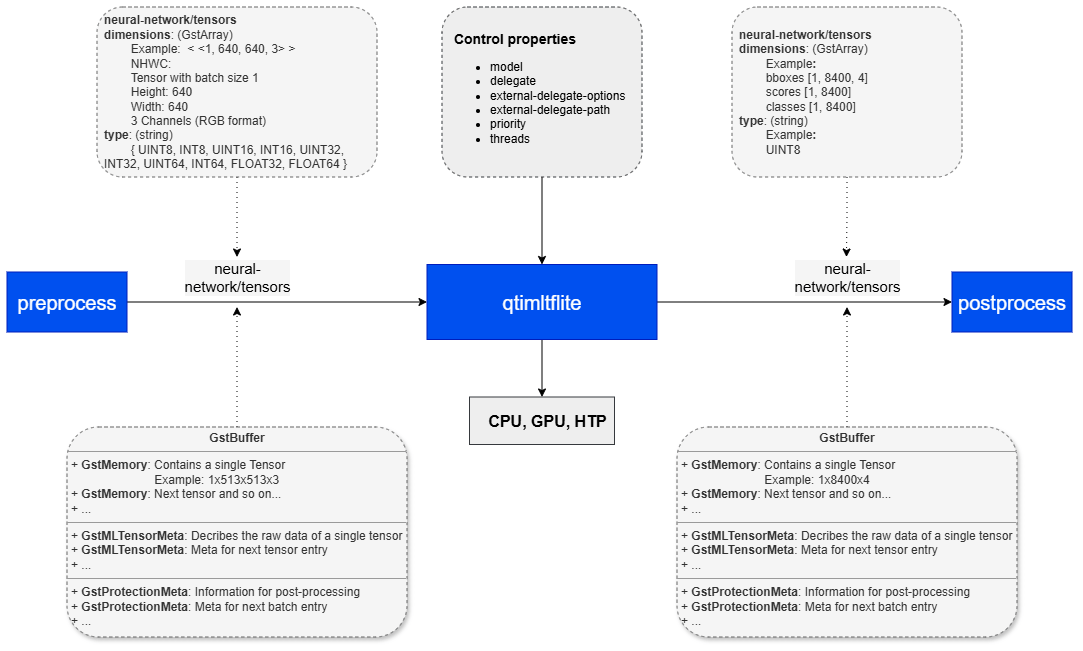
**qtimltflite** is a GStreamer inference element that executes **TensorFlow Lite** models as part of AI and multimedia pipelines. The element operates entirely in **tensor mode:** it accepts input tensors on its sink pad and produces output tensors on its source pad according to the model’s input and output specifications.
The element is limited to **model execution**. It does not perform preprocessing, tensor reshaping, batching, layout conversion, or model-specific post-processing. These functions are expected to be handled by adjacent elements in the pipeline. As a result, upstream elements must provide tensors that already match the model requirements, and downstream elements must interpret the output tensors produced by inference.
**qtimltflite** supports multiple TensorFlow Lite execution backends through delegates, including **CPU, GPU, and external delegate** configurations. This allows the same pipeline structure to be deployed across different hardware targets and optimized for different performance, latency, and power requirements. The element is intended for real-time and embedded AI pipelines where inference is one stage in a larger modular processing flow.
### Key Responsibilities
**qtimltflite** is responsible for:
* Loading and executing a TensorFlow Lite model
* Accepting preformatted input tensors from upstream elements
* Producing output tensors that match the model output signature
* Negotiating tensor data types and dimensions with adjacent elements
* Propagating tensor metadata required by downstream elements
In practice, **qtimltflite** serves as the inference stage in the pipeline, while tensor preparation and result interpretation are handled externally.
 ## Example Pipeline
| File | Download | Save as |
| ---------------- | ----------------------------------------------------------------------------------------------------------------------------------- | --------------------------- |
| YOLOX W8A8 model | [Qualcomm AI Hub — YOLOX](https://aihub.qualcomm.com/iot/models/yolox) | `yolox_w8a8.tflite` |
| Detection labels | yolov8.json | `yolov8.json` |
| Sample video | Input video | `Draw_1080p_180s_30FPS.mp4` |
If any downloaded file is a `.zip` archive, extract it on your host machine before copying:
`unzip filename.zip`
```bash SCP (SSH) theme={null}
# Replace $HOME to the appropriate device path before running the commands.
# For QLI: /root
# For Ubuntu: /home/ubuntu
# Modify this based on your platform and ensure files are copied to the correct location on the device.
# Run from your host machine — replace and
ssh @ "mkdir -p $HOME/{models,labels,media,media/output}"
scp yolox_w8a8.tflite @:$HOME/models/
scp yolov8.json @:$HOME/labels/
scp Draw_1080p_180s_30FPS.mp4 @:$HOME/media/
```
```bash SCP (SSH) theme={null}
# Run from your host machine — replace and
ssh @
```
Run below command on your device
```bash theme={null}
export MODEL_NAME=yolox_w8a8.tflite
export LABELS_NAME=yolov8.json
export SRC_VIDEO_NAME=Draw_1080p_180s_30FPS.mp4
```
```bash theme={null}
gst-launch-1.0 -e --gst-debug=2 \
filesrc location=$HOME/media/$SRC_VIDEO_NAME ! qtdemux ! h264parse ! \
v4l2h264dec capture-io-mode=4 output-io-mode=4 ! video/x-raw,format=NV12 ! queue ! \
tee name=t ! qtimetamux name=obj_mux ! qtivoverlay ! waylandsink fullscreen=true sync=true \
t. ! queue ! qtimlvconverter ! queue ! \
qtimltflite model=$HOME/models/$MODEL_NAME delegate=external external-delegate-path=libQnnTFLiteDelegate.so external-delegate-options="QNNExternalDelegate,backend_type=htp,log_level=(string)1;" ! queue ! \
qtimlpostprocess module=yolov8 labels=$HOME/labels/$LABELS_NAME ! text/x-raw ! queue ! obj_mux.
```
# Hierarchy
[GObject](https://docs.gtk.org/gobject/)
## Example Pipeline
| File | Download | Save as |
| ---------------- | ----------------------------------------------------------------------------------------------------------------------------------- | --------------------------- |
| YOLOX W8A8 model | [Qualcomm AI Hub — YOLOX](https://aihub.qualcomm.com/iot/models/yolox) | `yolox_w8a8.tflite` |
| Detection labels | yolov8.json | `yolov8.json` |
| Sample video | Input video | `Draw_1080p_180s_30FPS.mp4` |
If any downloaded file is a `.zip` archive, extract it on your host machine before copying:
`unzip filename.zip`
```bash SCP (SSH) theme={null}
# Replace $HOME to the appropriate device path before running the commands.
# For QLI: /root
# For Ubuntu: /home/ubuntu
# Modify this based on your platform and ensure files are copied to the correct location on the device.
# Run from your host machine — replace and
ssh @ "mkdir -p $HOME/{models,labels,media,media/output}"
scp yolox_w8a8.tflite @:$HOME/models/
scp yolov8.json @:$HOME/labels/
scp Draw_1080p_180s_30FPS.mp4 @:$HOME/media/
```
```bash SCP (SSH) theme={null}
# Run from your host machine — replace and
ssh @
```
Run below command on your device
```bash theme={null}
export MODEL_NAME=yolox_w8a8.tflite
export LABELS_NAME=yolov8.json
export SRC_VIDEO_NAME=Draw_1080p_180s_30FPS.mp4
```
```bash theme={null}
gst-launch-1.0 -e --gst-debug=2 \
filesrc location=$HOME/media/$SRC_VIDEO_NAME ! qtdemux ! h264parse ! \
v4l2h264dec capture-io-mode=4 output-io-mode=4 ! video/x-raw,format=NV12 ! queue ! \
tee name=t ! qtimetamux name=obj_mux ! qtivoverlay ! waylandsink fullscreen=true sync=true \
t. ! queue ! qtimlvconverter ! queue ! \
qtimltflite model=$HOME/models/$MODEL_NAME delegate=external external-delegate-path=libQnnTFLiteDelegate.so external-delegate-options="QNNExternalDelegate,backend_type=htp,log_level=(string)1;" ! queue ! \
qtimlpostprocess module=yolov8 labels=$HOME/labels/$LABELS_NAME ! text/x-raw ! queue ! obj_mux.
```
# Hierarchy
[GObject](https://docs.gtk.org/gobject/)
[GstObject](https://gstreamer.freedesktop.org/documentation/gstreamer/gstobject.html?gi-language=c)
[GstElement](https://gstreamer.freedesktop.org/documentation/gstreamer/gstelement.html?gi-language=c)
[GstBaseTransform](https://gstreamer.freedesktop.org/documentation/base/gstbasetransform.html?gi-language=c)
qtimltflite
# Pad Templates
### sink
| Capabilities | |
| ------------------------ | ---------------------------------------------------------------------------------------- |
| `neural-network/tensors` | `format: { INT8, UINT8, INT16, UINT16, INT32, UINT32, INT64, UINT64, FLOAT16, FLOAT32 }` |
| Availability: *Always* | |
| Direction: *sink* | |
### src
| Capabilities | |
| ------------------------ | ---------------------------------------------------------------------------------------- |
| `neural-network/tensors` | `format: { INT8, UINT8, INT16, UINT16, INT32, UINT32, INT64, UINT64, FLOAT16, FLOAT32 }` |
| Availability: *Always* | |
| Direction: *source* | |
# Element Properties
| Property | Description |
| --------------------------- | ----------------------------------------------------------------------------------------------------------------------------------------------------------------------------------------------------------------------------------------------------------------------------------------------------------------------------------------------------------------------------------------------------------------------------------------------------- |
| `model` | Path to the TensorFlow Lite model file. This property is required and must reference a valid `.tflite` model.
`Type: String`
`Default: NULL`
`Flags: readable/writable` |
| `delegate` | Selects the execution backend used for inference.
`Type: Enum `
`Default: 0, "none"`
`Range:`
`(0): none - Default TensorFlow Lite CPU execution`
`(5): gpu - TensorFlow Lite GPU delegate`
`(6): xnnpack - Optimized CPU execution through XNNPACK`
`(7): external - External delegate loaded through external-delegate-path and external-delegate-options`
`Flags: readable/writable` |
| `external-delegate-path` | Absolute path to the external delegate shared library. Used only when `delegate=external`.
`Type: String`
`Default: NULL`
`Flags: readable/writable` |
| `external-delegate-options` | Delegate-specific initialization options passed to the external delegate. Used only when `delegate=external`.
`Type: String`
`Default: NULL`
`Flags: readable/writable` |
| `priority` | Selects the execution preference for supported delegates, typically when there is a trade-off between latency and precision.
`Type: Enum `
`Default: 0, "min-latency"`
`Range:`
`(0): min-latency - Reduce latency at the cost of precision`
`(1): max-precision - Increase precision at the cost of higher latency`
`Flags: readable/writable` |
| `threads` | Number of threads assigned to the TensorFlow Lite interpreter. Primarily affects CPU-based execution including XNNPACK.
`Type: Unsigned Integer`
`Default: 1`
`Range: 1 - 4`
`Flags: readable/writable` |
# Input and Output Behavior
### Input Tensors
**qtimltflite** exposes a single sink pad, but it supports both single-input and multi-input models. For multi-input models, all required tensors are delivered through the same sink pad as a tensor set.
Input tensors must be fully prepared before they reach `qtimltflite`. Expected tensor layout, shape, data type, and batch size are determined by:
* the TensorFlow Lite model input signature
* caps negotiation with upstream elements
Typical upstream elements include:
* [`qtimlvconverter`](qtimlvconverter) for scaling, color conversion, normalization, and quantization
* [`qtibatch`](qtibatch) for batch construction
`qtimltflite` does not modify, reshape, batch, or reinterpret incoming tensors. It passes them to the TensorFlow Lite runtime as received.
### Output Tensors
`qtimltflite` exposes a single source pad and produces output tensors according to the model output signature. The single source pad does not limit the element to a single tensor. Models with multiple output tensors are fully supported, and all outputs are emitted together on the same pad.
The element supports:
* single-output and multi-output models
* arbitrary tensor ranks, including batch and depth dimensions
* quantized and floating-point outputs
Output tensors are typically consumed by downstream post-processing elements, which decode model-specific results such as classification scores, detection boxes, segmentation masks, landmarks, or other structured outputs.
# Quantization and Dequantization
`qtimltflite` can optionally dequantize quantized output tensors, such as `UINT8` or `INT8`, into `FLOAT32`. This conversion uses the quantization parameters stored in the TensorFlow Lite model metadata.
### Conditional Output Dequantization
Dequantization is performed only when the downstream path requires `FLOAT32` tensors. In practice, this is enabled when downstream caps negotiation indicates that floating-point output is needed.
When dequantization is applied, `qtimltflite`:
* reads the tensor `scale`
* reads the tensor `zero_point`
* applies the standard TensorFlow Lite dequantization formula:
```text theme={null}
output_float = scale × (quantized_value - zero_point)
```
* produces `FLOAT32` tensors for downstream processing
### When Dequantization Is Skipped
Dequantization is not performed when:
* downstream elements accept only quantized tensor types
* no downstream element negotiates `FLOAT32`
* the model output tensor does not contain valid quantization metadata
In these cases, the output tensor is forwarded in its original quantized representation.
This behavior allows the same downstream processing path to support both quantized and floating-point models where applicable, while avoiding unnecessary conversion.
# Supported Data Types
`qtimltflite` supports the tensor data types provided by the TensorFlow Lite runtime and the selected execution backend, subject to caps negotiation with adjacent elements.
Commonly used data types include:
* `UINT8`
* `INT8`
* `INT32`
* `FLOAT16`
* `FLOAT32`
The element does not impose additional data-type restrictions beyond those required by the runtime, the selected delegate, and negotiated pipeline caps.
# Batch and Depth Model Support
`qtimltflite` supports models with batch and multi-dimensional tensor inputs and outputs, including tensors with explicit batch and depth dimensions.
Examples include:
* batched tensors: `N × H × W × C`
* multi-dimensional tensors: `N × D × H × W × C`
The element treats these dimensions transparently and passes tensors to TensorFlow Lite according to the negotiated shape. It does not construct batches, reshape tensors, or reinterpret tensor dimensions internally.
Batch construction must be handled by upstream elements such as [`qtibatch`](qtibatch).
This behavior keeps inference predictable across single-frame, batched, and higher-dimensional workflows.
# Delegates
A TensorFlow Lite **delegate** defines the execution backend used to run a model. Delegates allow qtimltflite to offload inference from the default TensorFlow Lite CPU interpreter to an optimized backend, such as GPU, an optimized CPU runtime, or NPU.
`qtimltflite` supports multiple delegate options. The delegate is selected through the `delegate` property and controls how TensorFlow Lite dispatches model operations during inference.
### Built-in Delegate Options
### none
Runs the model on the default TensorFlow Lite CPU interpreter.
* **Backend**: CPU
* **Use case**: reference execution, debugging, or systems without acceleration
### gpu
Runs supported operations through the TensorFlow Lite GPU delegate.
* **Backend**: GPU
* **Use case**: floating-point models/workloads that benefit from GPU parallelism
### xnnpack
Runs inference through the XNNPACK optimized CPU backend.
* **Backend**: Optimized CPU
* **Use case**: improved CPU performance for supported floating-point and quantized models
### External Delegate Support
External delegate is used to accelerate models on Qualcomm’s NPU.
When an external delegate is selected, `qtimltflite` loads and configures the delegate at runtime using the following properties:
* `external-delegate-path`
* Path to the external delegate shared library.
* `external-delegate-options`
* Delegate-specific initialization options passed to the external delegate.
After initialization, supported model operations are offloaded to the NPU backend implemented by the external delegate.
# Runtime Memory Behavior and GAP Handling
`qtimltflite` operates within the memory model of the TensorFlow Lite runtime. Although the surrounding pipeline may use zero-copy transport for tensor buffers, TensorFlow Lite execution requires input and output tensors to reside in runtime-managed memory.
### TensorFlow Lite Memory Model
TensorFlow Lite uses an internal memory arena to allocate:
* input tensors
* intermediate activation tensors
* output tensors
### GAP Buffer Handling
`qtimltflite` is GAP-aware and correctly handles input buffers marked with `GST_BUFFER_FLAG_GAP`.
When a GAP buffer is received, the element skips inference and forwards the buffer downstream. This preserves timing and synchronization while explicitly indicating that no valid inference input is available for that timestamp.
GAP buffers commonly appear in conditional AI pipelines, such as cascaded workflows where later inference stages run only when earlier stages produce valid regions of interest.
# Usage
### Single-Stage AI Inference on Live Camera Stream
This example demonstrates real-time inference on a live camera stream using a single instance of `qtimltflite`. Inference results are attached to each `GstBuffer` as `MLMeta`, allowing downstream elements to access synchronized metadata directly from the frame. An overlay stage then uses this metadata to render annotations such as bounding boxes, labels, or key-points before display or further processing.
| File | Download | Save as |
| ---------------- | ---------------------------------------------------------------------- | ------------------- |
| YOLOX W8A8 model | [Qualcomm AI Hub — YOLOX](https://aihub.qualcomm.com/iot/models/yolox) | `yolox_w8a8.tflite` |
| Detection labels | yolov8.json | `yolov8.json` |
If any downloaded file is a `.zip` archive, extract it on your host machine before copying:
`unzip filename.zip`
```bash SCP (SSH) theme={null}
# Replace $HOME to the appropriate device path before running the commands.
# For QLI: /root
# For Ubuntu: /home/ubuntu
# Modify this based on your platform and ensure files are copied to the correct location on the device.
# Run from your host machine — replace and
ssh @ "mkdir -p $HOME/{models,labels}"
scp yolox_w8a8.tflite @:$HOME/models/
scp yolov8.json @:$HOME/labels/
```
```bash SCP (SSH) theme={null}
# Run from your host machine — replace and
ssh @
```
Run below command on your device
```bash theme={null}
export MODEL_NAME=yolox_w8a8.tflite
export LABELS_NAME=yolov8.json
```
```bash Run the pipeline theme={null}
gst-launch-1.0 -e --gst-debug=2 \
qticamsrc name=camsrc ! video/x-raw,format=NV12,width=1920,height=1080,framerate=30/1 ! queue ! \
tee name=t ! qtimetamux name=obj_mux ! qtivoverlay ! waylandsink fullscreen=true sync=true \
t. ! queue ! qtimlvconverter ! queue ! \
qtimltflite model=$HOME/models/$MODEL_NAME delegate=external external-delegate-path=libQnnTFLiteDelegate.so external-delegate-options="QNNExternalDelegate,backend_type=htp,log_level=(string)1;" ! queue ! \
qtimlpostprocess module=yolov8 labels=$HOME/labels/$LABELS_NAME settings="{\"confidence\": 51.0}" ! text/x-raw ! queue ! obj_mux.
```
 ### Two-Stage Daisy Chain AI Inference on Live Camera Stream
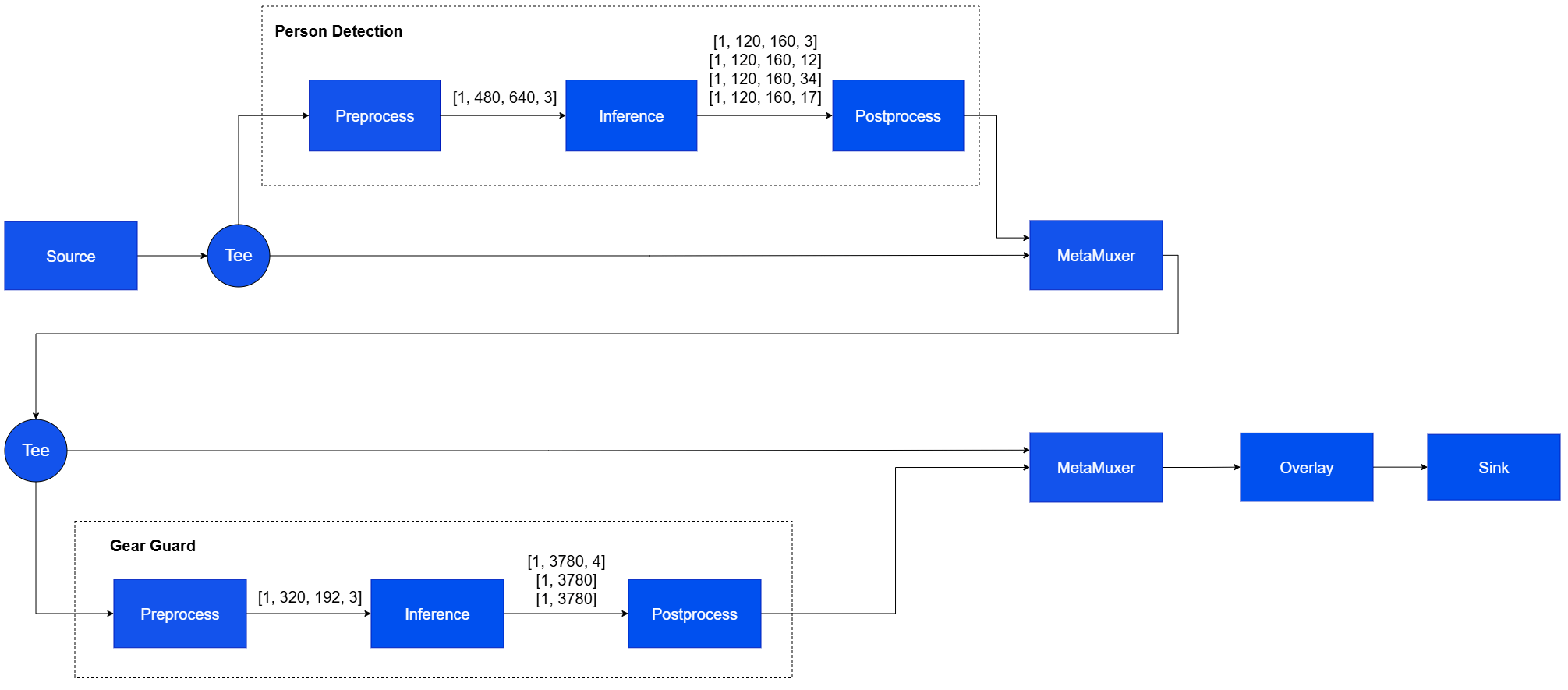
This example demonstrates a two-stage TensorFlow Lite inference workflow using two qtimltflite instances. The first model operates on full video frames after preprocessing by a [`qtimlvconverter`](qtimlvconverter) configured for full-frame input. Inference results, such as detected objects, are attached to the corresponding video buffer and propagated downstream. The second model runs once for each object detected by the first stage. A second [`qtimlvconverter`](qtimlvconverter), configured for ROI-based processing, crops each detected region from the input frame and prepares it as input for the second `qtimltflite` instance.
### Two-Stage Daisy Chain AI Inference on Live Camera Stream
This example demonstrates a two-stage TensorFlow Lite inference workflow using two qtimltflite instances. The first model operates on full video frames after preprocessing by a [`qtimlvconverter`](qtimlvconverter) configured for full-frame input. Inference results, such as detected objects, are attached to the corresponding video buffer and propagated downstream. The second model runs once for each object detected by the first stage. A second [`qtimlvconverter`](qtimlvconverter), configured for ROI-based processing, crops each detected region from the input frame and prepares it as input for the second `qtimltflite` instance.
 | File | Download | Save as |
| ---------------------------------- | ----------------------------------------------------------------------------------- | -------------------------- |
| Detection model (YOLOX) | [Qualcomm AI Hub — YOLOX](https://aihub.qualcomm.com/iot/models/yolox) | `yolox_w8a8.tflite` |
| Detection labels | yolov8.json | `yolov8.json` |
| Classification model (InceptionV3) | [Qualcomm AI Hub — InceptionV3](https://aihub.qualcomm.com/iot/models/inception_v3) | `inception_v3_w8a8.tflite` |
| Classification labels | mobilenet.json | `mobilenet.json` |
If any downloaded file is a `.zip` archive, extract it on your host machine before copying:
`unzip filename.zip`
```bash SCP (SSH) theme={null}
# Run from your host machine — replace and
ssh @ "mkdir -p $HOME/{models,labels}"
scp yolox_w8a8.tflite @:$HOME/models/
scp yolov8.json @:$HOME/labels/
scp inception_v3_w8a8.tflite @:$HOME/models/
scp mobilenet.json @:$HOME/labels/
```
```bash SCP (SSH) theme={null}
# Run from your host machine — replace and
ssh @
```
Run below command on your device
```bash theme={null}
export MODEL_NAME_1=yolox_w8a8.tflite
export LABELS_NAME_1=yolov8.json
export MODEL_NAME_2=inception_v3_w8a8.tflite
export LABELS_NAME_2=mobilenet.json
```
```bash Run the pipeline theme={null}
gst-launch-1.0 -e --gst-debug=2 \
qtimlvconverter name=stage_01_preproc \
qtimltflite name=stage_01_inference delegate=external external-delegate-path=libQnnTFLiteDelegate.so \
external-delegate-options="QNNExternalDelegate,backend_type=htp,log_level=(string)1;" \
model=$HOME/models/$MODEL_NAME_1 \
qtimlpostprocess name=stage_01_postproc module=yolov8 labels=$HOME/labels/$LABELS_NAME_1 \
settings="{\"confidence\": 51.0}" \
qtimetamux name=metamux_1 \
qtivoverlay name=main_overlay \
qtimlvconverter name=stage_02_preproc \
qtimltflite name=stage_02_inference delegate=external external-delegate-path=libQnnTFLiteDelegate.so \
external-delegate-options="QNNExternalDelegate,backend_type=htp,log_level=(string)1;" \
model=$HOME/models/$MODEL_NAME_2 \
qtimlpostprocess name=stage_02_postproc module=mobilenet labels=$HOME/labels/$LABELS_NAME_2 \
settings="{\"confidence\": 51.0}" \
qtimetamux name=metamux_2 \
qtivoverlay name=cls_overlay \
qticamsrc name=camsrc ! video/x-raw,format=NV12,width=1920,height=1080,framerate=30/1 ! queue ! \
tee name=t_split_1 \
t_split_1. ! queue ! metamux_1. \
t_split_1. ! queue ! stage_01_preproc. stage_01_preproc. ! queue ! stage_01_inference. stage_01_inference. ! queue ! \
stage_01_postproc. stage_01_postproc. ! text/x-raw ! queue ! metamux_1. \
metamux_1. ! queue ! tee name=t_split_2 \
t_split_2. ! queue ! metamux_2. \
t_split_2. ! queue ! stage_02_preproc. stage_02_preproc. ! queue ! stage_02_inference. stage_02_inference. ! queue ! \
stage_02_postproc. stage_02_postproc. ! text/x-raw ! queue ! metamux_2. \
metamux_2. ! queue ! cls_overlay. cls_overlay. ! queue ! waylandsink sync=true fullscreen=true
```
### Four-Stage Daisy Chain AI Inference on Live Camera Stream
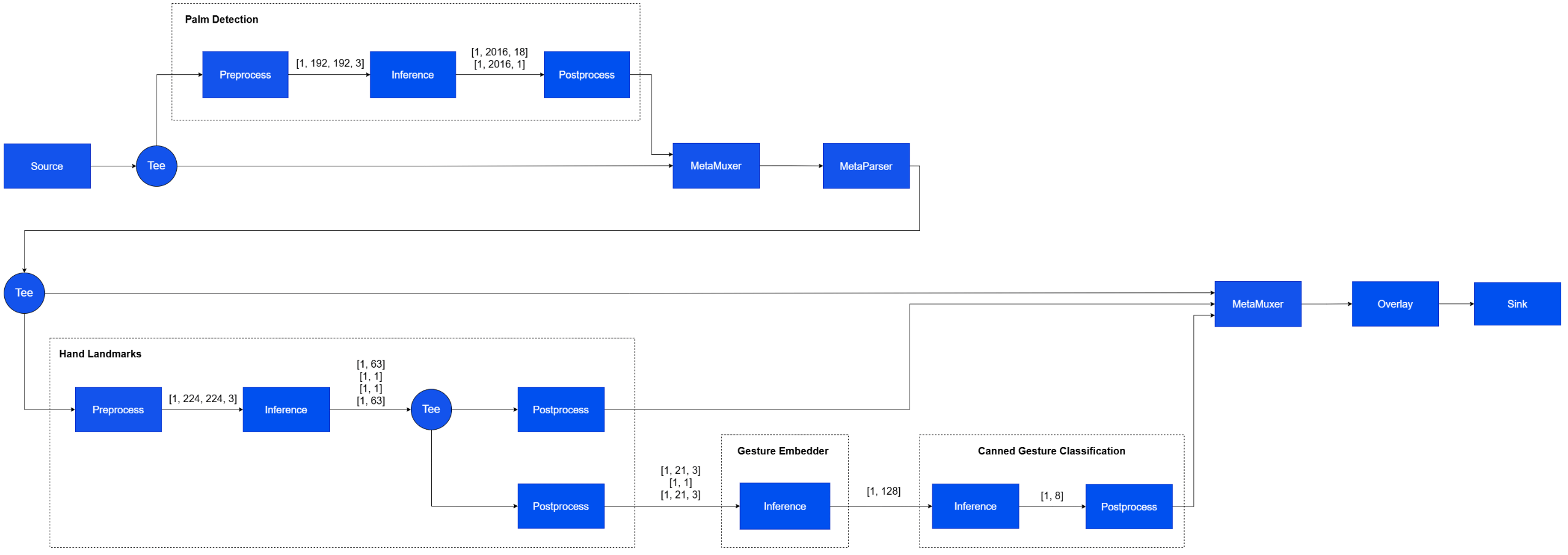
The example demonstrates a multi-stage inference workflow for live Hand-Gesture recognition use case built with four TensorFlow Lite models executed through four qtimltflite instances.
* **Stage 1** performs full-frame palm detection. The input video frame is preprocessed, passed through inference, and post-processed to generate metadata describing the detected palm.
* **Stage 2** performs per-ROI hand landmark inference. Regions detected in the first stage are cropped and batched for processing. Two post-processing paths are used: one generates visualization metadata, while the other reformats the output tensors for the next stage.
* **Stage 3** chains two models in tensor-only mode, without additional preprocessing or post-processing. The first model consumes multiple tensors produced by the previous stage, and its output is passed directly to the second model.
* **Stage 4** performs final gesture classification and converts the model output into metadata for downstream use.
| File | Download | Save as |
| ---------------------------------- | ----------------------------------------------------------------------------------- | -------------------------- |
| Detection model (YOLOX) | [Qualcomm AI Hub — YOLOX](https://aihub.qualcomm.com/iot/models/yolox) | `yolox_w8a8.tflite` |
| Detection labels | yolov8.json | `yolov8.json` |
| Classification model (InceptionV3) | [Qualcomm AI Hub — InceptionV3](https://aihub.qualcomm.com/iot/models/inception_v3) | `inception_v3_w8a8.tflite` |
| Classification labels | mobilenet.json | `mobilenet.json` |
If any downloaded file is a `.zip` archive, extract it on your host machine before copying:
`unzip filename.zip`
```bash SCP (SSH) theme={null}
# Run from your host machine — replace and
ssh @ "mkdir -p $HOME/{models,labels}"
scp yolox_w8a8.tflite @:$HOME/models/
scp yolov8.json @:$HOME/labels/
scp inception_v3_w8a8.tflite @:$HOME/models/
scp mobilenet.json @:$HOME/labels/
```
```bash SCP (SSH) theme={null}
# Run from your host machine — replace and
ssh @
```
Run below command on your device
```bash theme={null}
export MODEL_NAME_1=yolox_w8a8.tflite
export LABELS_NAME_1=yolov8.json
export MODEL_NAME_2=inception_v3_w8a8.tflite
export LABELS_NAME_2=mobilenet.json
```
```bash Run the pipeline theme={null}
gst-launch-1.0 -e --gst-debug=2 \
qtimlvconverter name=stage_01_preproc \
qtimltflite name=stage_01_inference delegate=external external-delegate-path=libQnnTFLiteDelegate.so \
external-delegate-options="QNNExternalDelegate,backend_type=htp,log_level=(string)1;" \
model=$HOME/models/$MODEL_NAME_1 \
qtimlpostprocess name=stage_01_postproc module=yolov8 labels=$HOME/labels/$LABELS_NAME_1 \
settings="{\"confidence\": 51.0}" \
qtimetamux name=metamux_1 \
qtivoverlay name=main_overlay \
qtimlvconverter name=stage_02_preproc \
qtimltflite name=stage_02_inference delegate=external external-delegate-path=libQnnTFLiteDelegate.so \
external-delegate-options="QNNExternalDelegate,backend_type=htp,log_level=(string)1;" \
model=$HOME/models/$MODEL_NAME_2 \
qtimlpostprocess name=stage_02_postproc module=mobilenet labels=$HOME/labels/$LABELS_NAME_2 \
settings="{\"confidence\": 51.0}" \
qtimetamux name=metamux_2 \
qtivoverlay name=cls_overlay \
qticamsrc name=camsrc ! video/x-raw,format=NV12,width=1920,height=1080,framerate=30/1 ! queue ! \
tee name=t_split_1 \
t_split_1. ! queue ! metamux_1. \
t_split_1. ! queue ! stage_01_preproc. stage_01_preproc. ! queue ! stage_01_inference. stage_01_inference. ! queue ! \
stage_01_postproc. stage_01_postproc. ! text/x-raw ! queue ! metamux_1. \
metamux_1. ! queue ! tee name=t_split_2 \
t_split_2. ! queue ! metamux_2. \
t_split_2. ! queue ! stage_02_preproc. stage_02_preproc. ! queue ! stage_02_inference. stage_02_inference. ! queue ! \
stage_02_postproc. stage_02_postproc. ! text/x-raw ! queue ! metamux_2. \
metamux_2. ! queue ! cls_overlay. cls_overlay. ! queue ! waylandsink sync=true fullscreen=true
```
### Four-Stage Daisy Chain AI Inference on Live Camera Stream
The example demonstrates a multi-stage inference workflow for live Hand-Gesture recognition use case built with four TensorFlow Lite models executed through four qtimltflite instances.
* **Stage 1** performs full-frame palm detection. The input video frame is preprocessed, passed through inference, and post-processed to generate metadata describing the detected palm.
* **Stage 2** performs per-ROI hand landmark inference. Regions detected in the first stage are cropped and batched for processing. Two post-processing paths are used: one generates visualization metadata, while the other reformats the output tensors for the next stage.
* **Stage 3** chains two models in tensor-only mode, without additional preprocessing or post-processing. The first model consumes multiple tensors produced by the previous stage, and its output is passed directly to the second model.
* **Stage 4** performs final gesture classification and converts the model output into metadata for downstream use.
 Download the gesture recognizer models from Google MediaPipe:
```bash theme={null}
# Download the gesture recognizer task
wget https://storage.googleapis.com/mediapipe-models/gesture_recognizer/gesture_recognizer/float16/latest/gesture_recognizer.task
# Extract the .task file
unzip gesture_recognizer.task
# This gives you two more task files: hand_landmarker.task and hand_gesture_recognizer.task
# Extract hand_landmarker.task
unzip hand_landmarker.task
# This gives you hand_detector.tflite and hand_landmarks_detector.tflite
# Extract hand_gesture_recognizer.task
unzip hand_gesture_recognizer.task
# This gives you gesture_embedder.tflite and canned_gesture_classifier.tflite
```
These are FLOAT precision models.
| File | Download | Save as |
| ------------------------ | ----------------------------------------------------------------------------------------------------------- | ---------------------------------- |
| Palm detection model | See download steps above | `hand_detector.tflite` |
| Palm detection labels | palmd\_labels.json | `palmd_labels.json` |
| Palm detection settings | palmd\_settings.json | `palmd_settings.json` |
| Hand landmark model | See download steps above | `hand_landmarks_detector.tflite` |
| Hand landmark labels | hlandmark\_labels.json | `hlandmark_labels.json` |
| Hand landmark settings | hlandmark\_settings.json | `hlandmark_settings.json` |
| Gesture embedder model | See download steps above | `gesture_embedder.tflite` |
| Gesture classifier model | See download steps above | `canned_gesture_classifier.tflite` |
| Gesture labels | gesture\_labels.json | `gesture_labels.json` |
```bash SCP (SSH) theme={null}
# Run from your host machine — replace and
ssh @ "mkdir -p $HOME/{models,labels}"
scp hand_detector.tflite @:$HOME/models/
scp palmd_labels.json @:$HOME/labels/
scp palmd_settings.json @:$HOME/labels/
scp hand_landmarks_detector.tflite @:$HOME/models/
scp hlandmark_labels.json @:$HOME/labels/
scp hlandmark_settings.json @:$HOME/labels/
scp gesture_embedder.tflite @:$HOME/models/
scp canned_gesture_classifier.tflite @:$HOME/models/
scp gesture_labels.json @:$HOME/labels/
```
```bash SCP (SSH) theme={null}
# Run from your host machine — replace and
ssh @
```
Run below command on your device
```bash theme={null}
export MODEL_NAME_1=hand_detector.tflite
export LABELS_NAME_1=palmd_labels.json
export LABELS_NAME_2=palmd_settings.json
export MODEL_NAME_2=hand_landmarks_detector.tflite
export LABELS_NAME_3=hlandmark_labels.json
export LABELS_NAME_4=hlandmark_settings.json
export MODEL_NAME_3=gesture_embedder.tflite
export MODEL_NAME_4=canned_gesture_classifier.tflite
export LABELS_NAME_5=gesture_labels.json
```
```bash Run the pipeline theme={null}
gst-launch-1.0 -e --gst-debug=2 \
qtimlvconverter name=stage_01_preproc \
qtimltflite name=stage_01_inference delegate=gpu model=$HOME/models/$MODEL_NAME_1 \
qtimlpostprocess name=stage_01_postproc results=1 module=palmd labels=$HOME/labels/$LABELS_NAME_1 settings=$HOME/labels/$LABELS_NAME_2 \
qtimlvconverter name=stage_02_preproc mode=roi-batch-non-cumulative \
qtimltflite name=stage_02_inference delegate=gpu model=$HOME/models/$MODEL_NAME_2 \
qtimlpostprocess name=stage_02_1_postproc results=6 module=hlandmark labels=/$HOME/labels/$LABELS_NAME_3 settings=$HOME/labels/$LABELS_NAME_4 \
qtimlpostprocess name=stage_02_2_postproc results=6 module=tensor \
qtimltflite name=stage_03_1_inference delegate=gpu model=$HOME/models/$MODEL_NAME_3 \
qtimltflite name=stage_03_2_inference delegate=gpu model=$HOME/models/$MODEL_NAME_4 \
qtimlpostprocess name=stage_03_postproc results=8 module=mobilenet labels=$HOME/labels/$LABELS_NAME_5 \
qticamsrc ! video/x-raw,format=NV12,width=1920,height=1080,framerate=30/1 ! queue ! tee name=t_split_1 \
t_split_1. ! queue ! qtimetamux name=metamux_1 ! queue ! qtimetatransform module=roi-palmd ! queue ! tee name=t_split_2 \
t_split_1. ! queue ! stage_01_preproc. stage_01_preproc. ! queue ! stage_01_inference. stage_01_inference. ! queue ! stage_01_postproc. stage_01_postproc. ! text/x-raw ! queue ! metamux_1. \
t_split_2. ! queue ! qtimetamux name=metamux_2 ! queue ! qtivoverlay ! waylandsink fullscreen=true sync=false \
t_split_2. ! queue ! stage_02_preproc. stage_02_preproc. ! queue ! stage_02_inference. stage_02_inference. ! queue ! tee name=t_split_3 \
t_split_3. ! queue ! stage_02_1_postproc. stage_02_1_postproc. ! text/x-raw ! metamux_2. \
t_split_3. ! queue ! stage_02_2_postproc. stage_02_2_postproc. ! queue ! stage_03_1_inference. stage_03_1_inference. ! stage_03_2_inference. stage_03_2_inference. ! stage_03_postproc. stage_03_postproc. ! text/x-raw ! metamux_2.
```
Download the gesture recognizer models from Google MediaPipe:
```bash theme={null}
# Download the gesture recognizer task
wget https://storage.googleapis.com/mediapipe-models/gesture_recognizer/gesture_recognizer/float16/latest/gesture_recognizer.task
# Extract the .task file
unzip gesture_recognizer.task
# This gives you two more task files: hand_landmarker.task and hand_gesture_recognizer.task
# Extract hand_landmarker.task
unzip hand_landmarker.task
# This gives you hand_detector.tflite and hand_landmarks_detector.tflite
# Extract hand_gesture_recognizer.task
unzip hand_gesture_recognizer.task
# This gives you gesture_embedder.tflite and canned_gesture_classifier.tflite
```
These are FLOAT precision models.
| File | Download | Save as |
| ------------------------ | ----------------------------------------------------------------------------------------------------------- | ---------------------------------- |
| Palm detection model | See download steps above | `hand_detector.tflite` |
| Palm detection labels | palmd\_labels.json | `palmd_labels.json` |
| Palm detection settings | palmd\_settings.json | `palmd_settings.json` |
| Hand landmark model | See download steps above | `hand_landmarks_detector.tflite` |
| Hand landmark labels | hlandmark\_labels.json | `hlandmark_labels.json` |
| Hand landmark settings | hlandmark\_settings.json | `hlandmark_settings.json` |
| Gesture embedder model | See download steps above | `gesture_embedder.tflite` |
| Gesture classifier model | See download steps above | `canned_gesture_classifier.tflite` |
| Gesture labels | gesture\_labels.json | `gesture_labels.json` |
```bash SCP (SSH) theme={null}
# Run from your host machine — replace and
ssh @ "mkdir -p $HOME/{models,labels}"
scp hand_detector.tflite @:$HOME/models/
scp palmd_labels.json @:$HOME/labels/
scp palmd_settings.json @:$HOME/labels/
scp hand_landmarks_detector.tflite @:$HOME/models/
scp hlandmark_labels.json @:$HOME/labels/
scp hlandmark_settings.json @:$HOME/labels/
scp gesture_embedder.tflite @:$HOME/models/
scp canned_gesture_classifier.tflite @:$HOME/models/
scp gesture_labels.json @:$HOME/labels/
```
```bash SCP (SSH) theme={null}
# Run from your host machine — replace and
ssh @
```
Run below command on your device
```bash theme={null}
export MODEL_NAME_1=hand_detector.tflite
export LABELS_NAME_1=palmd_labels.json
export LABELS_NAME_2=palmd_settings.json
export MODEL_NAME_2=hand_landmarks_detector.tflite
export LABELS_NAME_3=hlandmark_labels.json
export LABELS_NAME_4=hlandmark_settings.json
export MODEL_NAME_3=gesture_embedder.tflite
export MODEL_NAME_4=canned_gesture_classifier.tflite
export LABELS_NAME_5=gesture_labels.json
```
```bash Run the pipeline theme={null}
gst-launch-1.0 -e --gst-debug=2 \
qtimlvconverter name=stage_01_preproc \
qtimltflite name=stage_01_inference delegate=gpu model=$HOME/models/$MODEL_NAME_1 \
qtimlpostprocess name=stage_01_postproc results=1 module=palmd labels=$HOME/labels/$LABELS_NAME_1 settings=$HOME/labels/$LABELS_NAME_2 \
qtimlvconverter name=stage_02_preproc mode=roi-batch-non-cumulative \
qtimltflite name=stage_02_inference delegate=gpu model=$HOME/models/$MODEL_NAME_2 \
qtimlpostprocess name=stage_02_1_postproc results=6 module=hlandmark labels=/$HOME/labels/$LABELS_NAME_3 settings=$HOME/labels/$LABELS_NAME_4 \
qtimlpostprocess name=stage_02_2_postproc results=6 module=tensor \
qtimltflite name=stage_03_1_inference delegate=gpu model=$HOME/models/$MODEL_NAME_3 \
qtimltflite name=stage_03_2_inference delegate=gpu model=$HOME/models/$MODEL_NAME_4 \
qtimlpostprocess name=stage_03_postproc results=8 module=mobilenet labels=$HOME/labels/$LABELS_NAME_5 \
qticamsrc ! video/x-raw,format=NV12,width=1920,height=1080,framerate=30/1 ! queue ! tee name=t_split_1 \
t_split_1. ! queue ! qtimetamux name=metamux_1 ! queue ! qtimetatransform module=roi-palmd ! queue ! tee name=t_split_2 \
t_split_1. ! queue ! stage_01_preproc. stage_01_preproc. ! queue ! stage_01_inference. stage_01_inference. ! queue ! stage_01_postproc. stage_01_postproc. ! text/x-raw ! queue ! metamux_1. \
t_split_2. ! queue ! qtimetamux name=metamux_2 ! queue ! qtivoverlay ! waylandsink fullscreen=true sync=false \
t_split_2. ! queue ! stage_02_preproc. stage_02_preproc. ! queue ! stage_02_inference. stage_02_inference. ! queue ! tee name=t_split_3 \
t_split_3. ! queue ! stage_02_1_postproc. stage_02_1_postproc. ! text/x-raw ! metamux_2. \
t_split_3. ! queue ! stage_02_2_postproc. stage_02_2_postproc. ! queue ! stage_03_1_inference. stage_03_1_inference. ! stage_03_2_inference. stage_03_2_inference. ! stage_03_postproc. stage_03_postproc. ! text/x-raw ! metamux_2.
```