> ## Documentation Index
> Fetch the complete documentation index at: https://dragonwingdocs.qualcomm.com/llms.txt
> Use this file to discover all available pages before exploring further.
# qtivoverlay
> Hardware-accelerated in-place video overlay plugin
# Overview
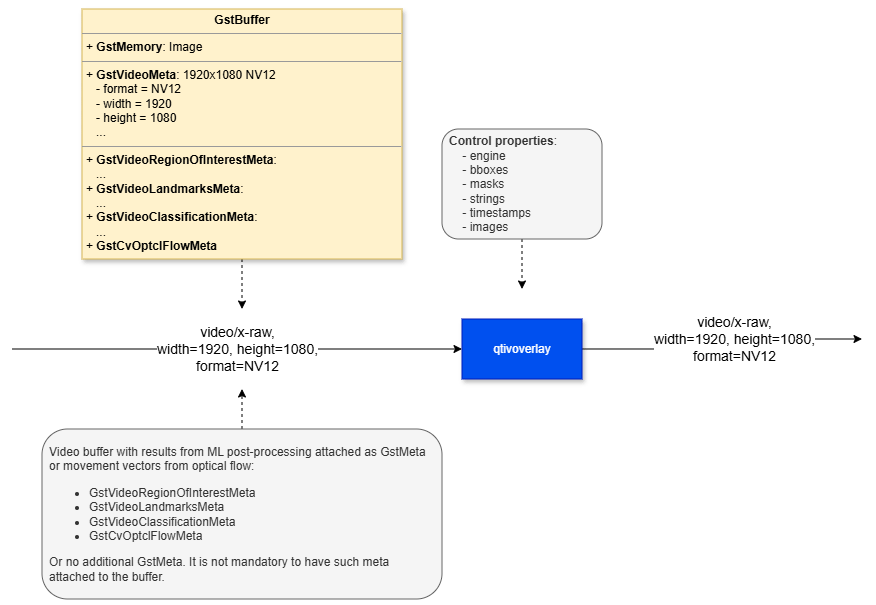
The **qtivoverlay** element is a hardware-accelerated, in-place drawing and blitting plugin designed to render visual overlay objects directly on top of incoming video frames, such as YUV or RGB buffers. By compositing overlays directly onto the frame data, it enables the processed video to be displayed on a screen or forwarded for encoding with minimal additional overhead. This makes it well suited for real-time video applications where performance and low latency are important.
The element supports a wide range of overlay content, including user-defined graphics and annotations such as logos, bounding boxes, custom labels, date and time, buffer timestamps, privacy masks, and other visual indicators. In addition, **qtivoverlay** can render dynamic overlay information carried in **GstMeta**, which is commonly used to attach AI or analytics results to each frame for post-processing and visualization.
To achieve efficient overlay rendering, **qtivoverlay** combines CPU-based drawing with GPU-based blending:
* **CPU rendering with Cairo**: Overlay content is first drawn using the open-source Cairo graphics library into compact, memory-efficient overlay buffers.
* **GPU hardware blending**: These rendered overlay buffers are then blended with the main video frame using GPU hardware acceleration.
This hybrid approach helps reduce memory usage and improves overall performance, especially in pipelines handling high-resolution or high-frame-rate video streams.
The overlays supported by the element can be described in two ways:
**Through element properties**
These are overlays configured manually by the user, including:
* Static images or logos
* Bounding boxes
* Date and/or time
* Buffer timestamps
* Custom text
* Privacy masks
**Through buffer metadata**
These overlays are attached to each input frame as metadata, and are typically added by the **qtimetamux** plugin. This metadata is used to draw machine-learning-related overlays such as:
* Detection overlays, including bounding boxes
* Segmentation overlays, such as semantic masks or mask images
* Classification overlays, such as labels or user text
* Pose graph overlays
In summary, qtivoverlay is a hardware-accelerated, in-place image drawing and blitting plugin for overlaying visual annotations on video frames. It supports both manually configured overlays and metadata-driven overlays, making it suitable for use cases such as video analytics, AI inference visualization, and privacy masking.
 ## Example Pipeline
| File | Download | Save as |
| ---------------- | ----------------------------------------------------------------------------------------------------------------------------------- | --------------------------- |
| YOLOX W8A8 model | [Qualcomm AI Hub — YOLOX](https://aihub.qualcomm.com/iot/models/yolox) | `yolo_x_w8a8.tflite` |
| Detection labels | yolov8.json | `yolov8.json` |
| Sample video | Input video | `Draw_1080p_180s_30FPS.mp4` |
```bash SCP (SSH) theme={null}
# Replace $HOME to the appropriate device path before running the commands.
# For QLI: /root
# For Ubuntu: /home/ubuntu
# Modify this based on your platform and ensure files are copied to the correct location on the device.
# Run from your host machine — replace and
ssh @ "mkdir -p $HOME/{models,labels,media,media/output}"
scp yolo_x_w8a8.tflite @:$HOME/models/
scp yolov8.json @:$HOME/labels/
scp Draw_1080p_180s_30FPS.mp4 @:$HOME/media/
```
```bash SCP (SSH) theme={null}
# Run from your host machine — replace and
ssh @
```
Run below command on your device
```bash theme={null}
mkdir -p $HOME/{models,labels,media,media/output}
export MODEL_NAME=yolo_x_w8a8.tflite
export LABELS_NAME=yolov8.json
export SRC_VIDEO_NAME=Draw_1080p_180s_30FPS.mp4
```
```bash theme={null}
gst-launch-1.0 -e --gst-debug=2 \
filesrc location=$HOME/media/$SRC_VIDEO_NAME ! qtdemux ! h264parse ! \
v4l2h264dec capture-io-mode=4 output-io-mode=4 ! video/x-raw,format=NV12 ! queue ! \
tee name=t ! qtimetamux name=obj_mux ! qtivoverlay ! waylandsink fullscreen=true sync=false \
t. ! queue ! qtimlvconverter ! queue ! \
qtimltflite model=$HOME/models/$MODEL_NAME delegate=external external-delegate-path=libQnnTFLiteDelegate.so \
external-delegate-options="QNNExternalDelegate,backend_type=htp,log_level=(string)1;" ! queue ! \
qtimlpostprocess module=yolov8 labels=$HOME/labels/$LABELS_NAME \
settings="{\"confidence\": 51.0}" ! text/x-raw ! queue ! obj_mux.
```
# Hierarchy
[GObject](https://docs.gtk.org/gobject/)
## Example Pipeline
| File | Download | Save as |
| ---------------- | ----------------------------------------------------------------------------------------------------------------------------------- | --------------------------- |
| YOLOX W8A8 model | [Qualcomm AI Hub — YOLOX](https://aihub.qualcomm.com/iot/models/yolox) | `yolo_x_w8a8.tflite` |
| Detection labels | yolov8.json | `yolov8.json` |
| Sample video | Input video | `Draw_1080p_180s_30FPS.mp4` |
```bash SCP (SSH) theme={null}
# Replace $HOME to the appropriate device path before running the commands.
# For QLI: /root
# For Ubuntu: /home/ubuntu
# Modify this based on your platform and ensure files are copied to the correct location on the device.
# Run from your host machine — replace and
ssh @ "mkdir -p $HOME/{models,labels,media,media/output}"
scp yolo_x_w8a8.tflite @:$HOME/models/
scp yolov8.json @:$HOME/labels/
scp Draw_1080p_180s_30FPS.mp4 @:$HOME/media/
```
```bash SCP (SSH) theme={null}
# Run from your host machine — replace and
ssh @
```
Run below command on your device
```bash theme={null}
mkdir -p $HOME/{models,labels,media,media/output}
export MODEL_NAME=yolo_x_w8a8.tflite
export LABELS_NAME=yolov8.json
export SRC_VIDEO_NAME=Draw_1080p_180s_30FPS.mp4
```
```bash theme={null}
gst-launch-1.0 -e --gst-debug=2 \
filesrc location=$HOME/media/$SRC_VIDEO_NAME ! qtdemux ! h264parse ! \
v4l2h264dec capture-io-mode=4 output-io-mode=4 ! video/x-raw,format=NV12 ! queue ! \
tee name=t ! qtimetamux name=obj_mux ! qtivoverlay ! waylandsink fullscreen=true sync=false \
t. ! queue ! qtimlvconverter ! queue ! \
qtimltflite model=$HOME/models/$MODEL_NAME delegate=external external-delegate-path=libQnnTFLiteDelegate.so \
external-delegate-options="QNNExternalDelegate,backend_type=htp,log_level=(string)1;" ! queue ! \
qtimlpostprocess module=yolov8 labels=$HOME/labels/$LABELS_NAME \
settings="{\"confidence\": 51.0}" ! text/x-raw ! queue ! obj_mux.
```
# Hierarchy
[GObject](https://docs.gtk.org/gobject/)
[GstObject](https://gstreamer.freedesktop.org/documentation/gstreamer/gstobject.html?gi-language=c)
[GstElement](https://gstreamer.freedesktop.org/documentation/gstreamer/gstelement.html?gi-language=c)
[GstBaseTransform](https://gstreamer.freedesktop.org/documentation/base/gstbasetransform.html?gi-language=c)
qtivoverlay
# Pad Templates
### sink
| Capabilities | |
| ---------------------- | ----------------------------------------------------------------------------------------------------------------------------------------------------------------------------------------------------------- |
| `video/x-raw` | `format: { NV12, NV21, YUY2, RGBA, BGRA, ARGB, ABGR, RGBx, BGRx, xRGB, xBGR, RGB, BGR, NV12_Q08 }`
`width: [1, 2147483647]`
`height: [1, 2147483647]`
`framerate: [0/1, 2147483647/1]` |
| Availability: *Always* | |
| Direction: *sink* | |
### src
| Capabilities | |
| ---------------------- | ----------------------------------------------------------------------------------------------------------------------------------------------------------------------------------------------------------- |
| `video/x-raw` | `format: { NV12, NV21, YUY2, RGBA, BGRA, ARGB, ABGR, RGBx, BGRx, xRGB, xBGR, RGB, BGR, NV12_Q08 }`
`width: [1, 2147483647]`
`height: [1, 2147483647]`
`framerate: [0/1, 2147483647/1]` |
| Availability: *Always* | |
| Direction: *source* | |
# Element Properties
| Property | Description |
| ------------ | ----------------------------------------------------------------------------------------------------------------------------------------------------------------------------------------------------------------------------------------------------------------------------------------------------------------------------------------------------------------------------------------------------------------------------------------------------------------------------------------------------------------------------------------------------------------------------- |
| `bboxes` | Manually set multiple custom bounding boxes as a list of GstStructures with a unique name and three parameters: `position`, `dimensions`, and `color`. The `position` and `dimensions` are mandatory for new entries.
`Type: String`
`Default: "{ }"`
`Flags: readable/writable`
`Example:`
`{(structure)\"Box1,position=<100,100>,dimensions=<640,480>;\", (structure)\"Box2,position=<1000,100>,dimensions=<300,300>,color=0xFF0000FF;\"}` |
| `images` | Manually set multiple custom BGRA images as a list of GstStructures with a unique name and three mandatory parameters: `path`, `resolution`, and `destination`.
`Type: String`
`Default: "{ }"`
`Flags: readable/writable`
`Example:`
`{(structure)\"Image1,path=/data/image1.bgra,resolution=<480,360>,destination=<0,0,640,480>;\", (structure)\"Image2,path=/data/image2.bgra,resolution=<240,180>,destination=<100,100,480,360>;\"}` |
| `masks` | Manually set multiple masks as a list of GstStructures with a unique name and parameters `color` and either `circle=` or `rectangle=` (polygon also supported).
`Type: String`
`Default: "{ }"`
`Flags: readable/writable`
`Example:`
`{(structure)\"Mask1,color=0xRRGGBBAA,circle=<400,400,200>;\",(structure)\"Mask2,color=0xRRGGBBAA,rectangle=<0,0,20,10>;\",(structure)\"Mask3,color=0xRRGGBBAA,polygon=<<2,2>,<2,4>,<4,4>>;\"}` |
| `strings` | Manually set multiple custom strings as a list of GstStructures with a unique name and four parameters: `contents`, `fontsize`, `position`, and `color`. The `contents` field is mandatory for new entries.
`Type: String`
`Default: "{ }"`
`Flags: readable/writable`
`Example:`
`{(structure)\"Text1,contents=\\\"Example\ 1\\\",fontsize=12,position=<0,0>,color=0xRRGGBBAA;\"}` |
| `timestamps` | Manually set timestamps using GstStructures. Use `Date/Time` for displaying formatted date and time with optional parameters `format`, `fontsize`, `position`, and `color`. Use `PTS/DTS` for displaying buffer timestamps with optional parameters `fontsize`, `position`, and `color`.
`Type: String`
`Default: "{ }"`
`Flags: readable/writable`
`Example:`
`{(structure)\"Date/Time,format=\\\"%d/%m/%Y\ %H:%M:%S\\\",fontsize=12,position=<0,0>,color=0xRRGGBBAA;\", (structure)\"PTS/DTS,fontsize=12,position=<0,0>,color=0xRRGGBBAA;\}` |
# Metadata (AI Post-Process Information)
Incoming video buffers may contain additional metadata in the form of **GstMeta**. The element inspects each buffer for supported metadata types and renders any detected metadata directly on top of the corresponding image frame. Each supported metadata type is processed and displayed according to its own visual representation.
## Supported Metadata Types
### GstVideoRegionOfInterestMeta
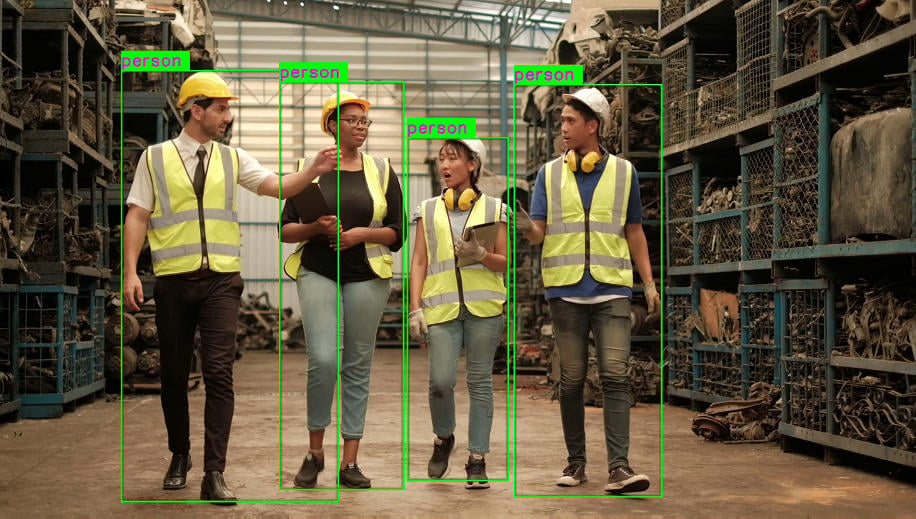
This metadata describes a region of interest (ROI) within the frame, typically representing an object such as a person, vehicle, keyboard, or any other detected item.
A rectangle is drawn around the ROI using the specified X/Y coordinates, width, and height. The rectangle is rendered with a visible border and a transparent interior so that the object inside the region remains visible.
 ### GstVideoLandmarksMeta
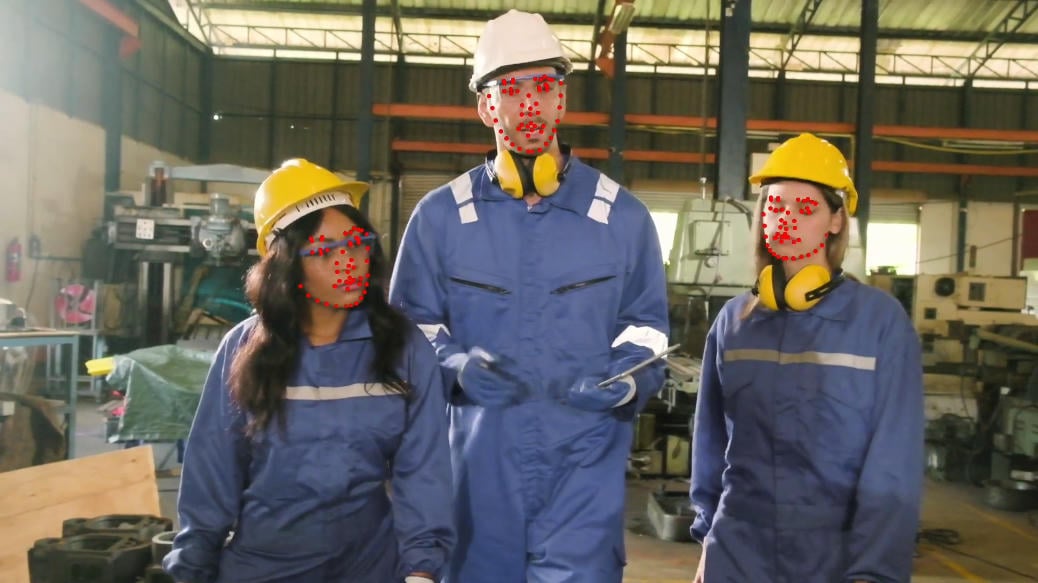
This metadata describes a collection of landmark points that may represent human pose key-points, facial features, hand joints, or other connected points of interest.
Both the individual points and the lines connecting related points are drawn on the image, allowing the landmark structure to be visualized clearly.
### GstVideoLandmarksMeta
This metadata describes a collection of landmark points that may represent human pose key-points, facial features, hand joints, or other connected points of interest.
Both the individual points and the lines connecting related points are drawn on the image, allowing the landmark structure to be visualized clearly.
 ### GstVideoClassificationMeta
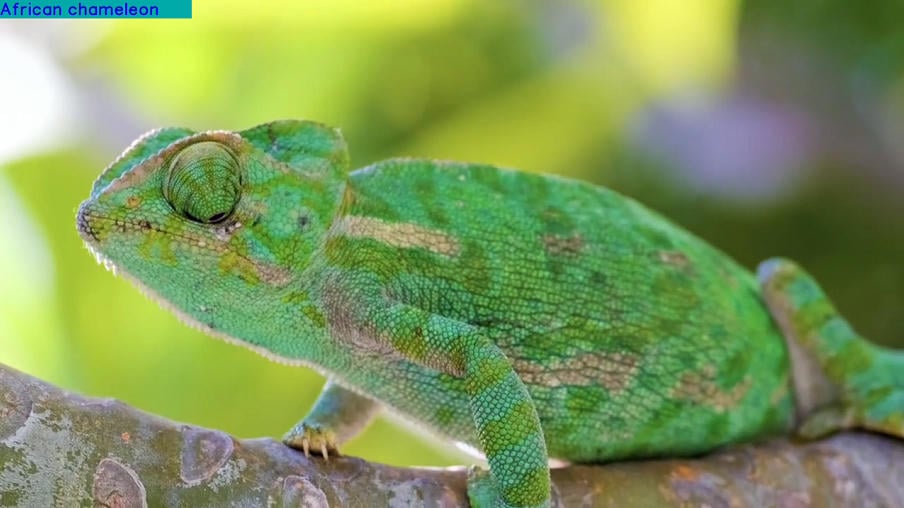
This metadata contains a list of possible labels or classifications for the entire image.
All associated labels are rendered in the top-left corner of the frame, making the classification results easy to view at a glance.
### GstVideoClassificationMeta
This metadata contains a list of possible labels or classifications for the entire image.
All associated labels are rendered in the top-left corner of the frame, making the classification results easy to view at a glance.
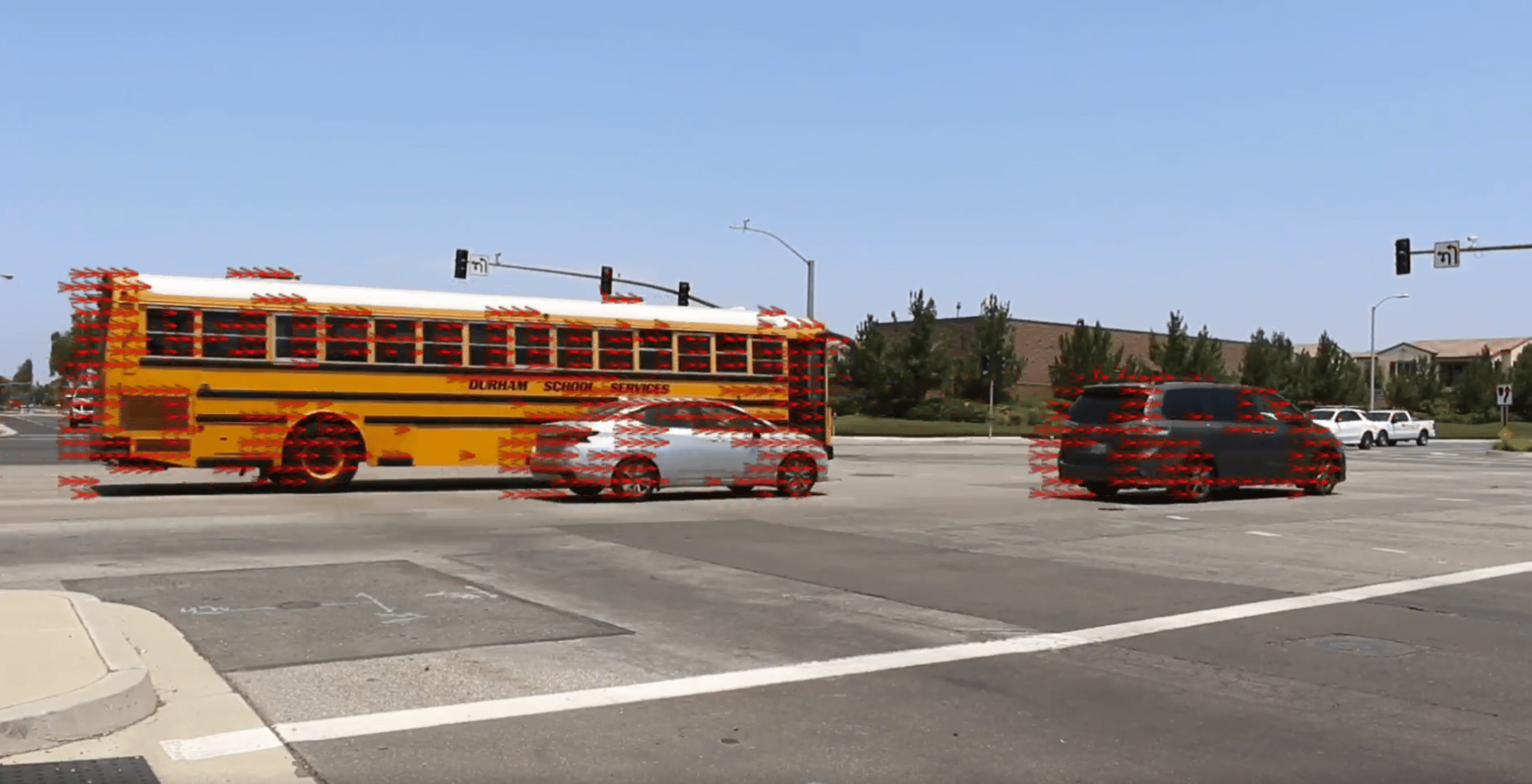
 ### GstCvOptclFlowMeta
This metadata represents optical flow motion vectors, which describe the movement between pixels across two sequential video frames.
The vectors indicate motion direction and magnitude, making it useful for visualizing frame-to-frame movement in the video stream.
### GstCvOptclFlowMeta
This metadata represents optical flow motion vectors, which describe the movement between pixels across two sequential video frames.
The vectors indicate motion direction and magnitude, making it useful for visualizing frame-to-frame movement in the video stream.
 # User-Defined Overlay Objects via Properties
In addition to buffer metadata, the plugin supports user-defined overlay objects that can be configured through properties. These overlays can be added, updated, or removed during runtime. Once configured, each overlay remains visible on every incoming video frame until the user explicitly removes it.
## Supported Property Types
### Static Images
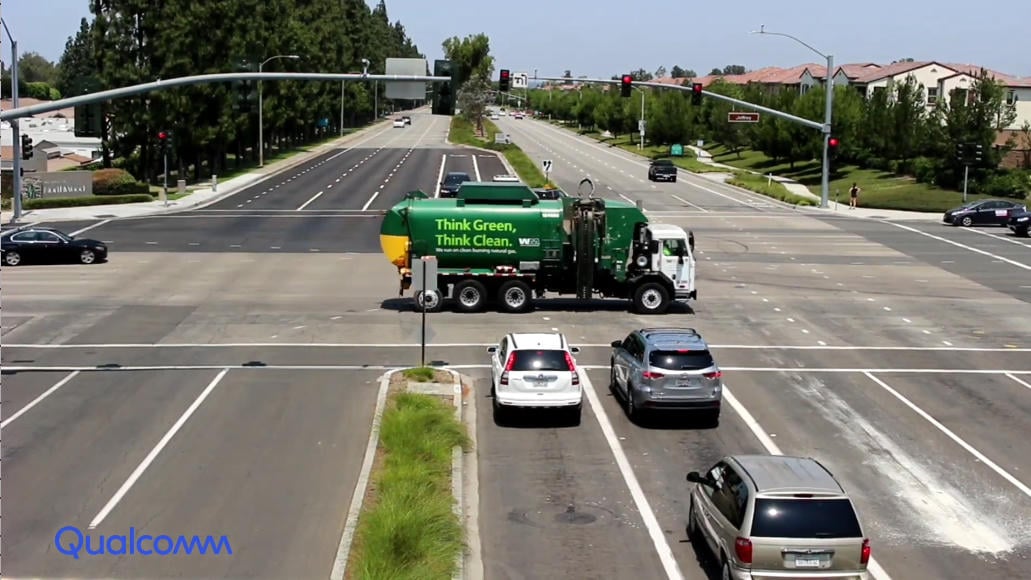
Static images such as logos, icons, or watermarks can be added using the **images** property.
All images provided through this property must be in raw **RGBA** format.
The property payload follows the GStreamer structure layout and requires the following mandatory parameters when first set:
| Parameter | Description |
| ------------- | --------------------------------------------------------------------------------------------- |
| `path` | URL or path to the image file |
| `resolution` | Width and height of the image in pixels |
| `destination` | Top-left X/Y coordinates where the image should be placed, along with its final rendered size |
```bash theme={null}
"{(structure)"Image1,path=/data/logo1.rgba,resolution=<480,360>,destination=<0,0,640,480>;", (structure)"Image2,path=/data/logo2.rgba,resolution=<240,180>,destination=<100,100,480,360>;"}"
```
| | Description |
| ---------- | ------------------------------------------------------------------------------- |
| **Image1** | Resolution 480×360, destination coordinates X=0, Y=0, rendered size 640×480 |
| **Image2** | Resolution 240×180, destination coordinates X=100, Y=100, rendered size 480×360 |
# User-Defined Overlay Objects via Properties
In addition to buffer metadata, the plugin supports user-defined overlay objects that can be configured through properties. These overlays can be added, updated, or removed during runtime. Once configured, each overlay remains visible on every incoming video frame until the user explicitly removes it.
## Supported Property Types
### Static Images
Static images such as logos, icons, or watermarks can be added using the **images** property.
All images provided through this property must be in raw **RGBA** format.
The property payload follows the GStreamer structure layout and requires the following mandatory parameters when first set:
| Parameter | Description |
| ------------- | --------------------------------------------------------------------------------------------- |
| `path` | URL or path to the image file |
| `resolution` | Width and height of the image in pixels |
| `destination` | Top-left X/Y coordinates where the image should be placed, along with its final rendered size |
```bash theme={null}
"{(structure)"Image1,path=/data/logo1.rgba,resolution=<480,360>,destination=<0,0,640,480>;", (structure)"Image2,path=/data/logo2.rgba,resolution=<240,180>,destination=<100,100,480,360>;"}"
```
| | Description |
| ---------- | ------------------------------------------------------------------------------- |
| **Image1** | Resolution 480×360, destination coordinates X=0, Y=0, rendered size 640×480 |
| **Image2** | Resolution 240×180, destination coordinates X=100, Y=100, rendered size 480×360 |
 ### Custom Text
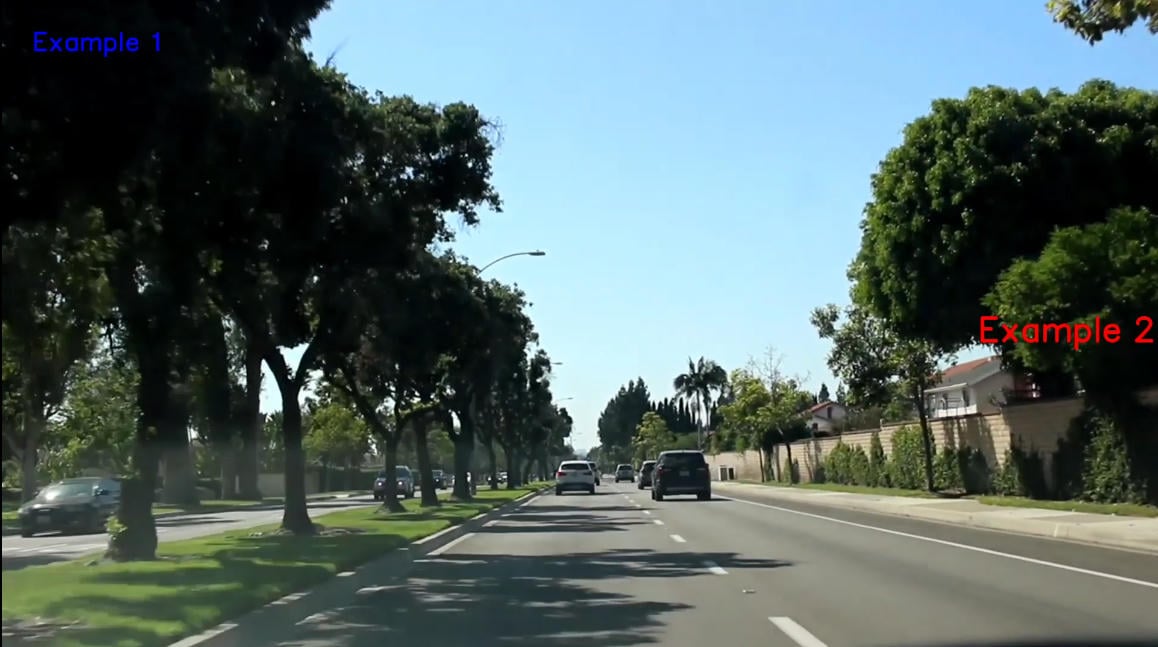
Text overlays such as captions, titles, annotations, or labels can be set using the **strings** property.
The property payload follows the GStreamer structure layout and requires the following parameters when first set:
| Parameter | Description |
| ---------- | ----------------------------------------------------- |
| `contents` | Text content to be displayed |
| `fontsize` | Font size of the text |
| `position` | Top-left X/Y coordinates where the text should appear |
| `color` | Text color in RGBA hex format |
```bash theme={null}
"{(structure)"Text1,contents=\"Example 1\",fontsize=48,position=<50,50>,color=0x0000FFFF;", (structure)"Text2,contents=\"Example 2\",fontsize=64,position=<1620,520>,color=0xFF0000FF;"}"
```
| | Description |
| --------- | ----------------------------------------------- |
| **Text1** | Font size 48, position X=50, Y=50, blue color |
| **Text2** | Font size 64, position X=1620, Y=520, red color |
### Custom Text
Text overlays such as captions, titles, annotations, or labels can be set using the **strings** property.
The property payload follows the GStreamer structure layout and requires the following parameters when first set:
| Parameter | Description |
| ---------- | ----------------------------------------------------- |
| `contents` | Text content to be displayed |
| `fontsize` | Font size of the text |
| `position` | Top-left X/Y coordinates where the text should appear |
| `color` | Text color in RGBA hex format |
```bash theme={null}
"{(structure)"Text1,contents=\"Example 1\",fontsize=48,position=<50,50>,color=0x0000FFFF;", (structure)"Text2,contents=\"Example 2\",fontsize=64,position=<1620,520>,color=0xFF0000FF;"}"
```
| | Description |
| --------- | ----------------------------------------------- |
| **Text1** | Font size 48, position X=50, Y=50, blue color |
| **Text2** | Font size 64, position X=1620, Y=520, red color |
 ### Timestamps
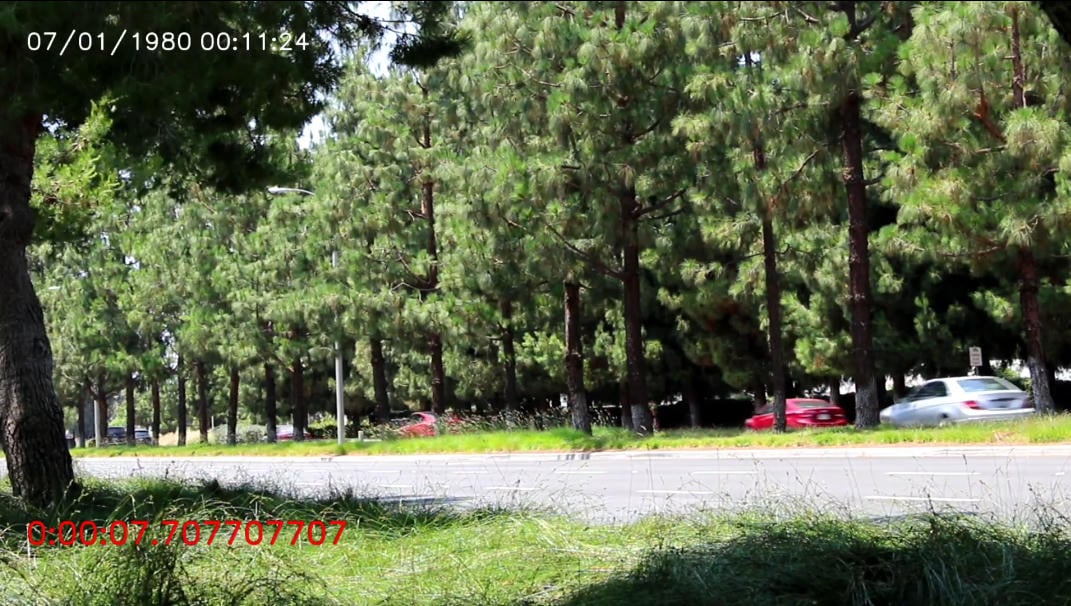
Timestamps such as the current date/time or buffer timestamps can be displayed using the **timestamps** property.
The property payload follows the GStreamer structure layout and requires the following parameters when first set:
| Parameter | Description |
| ---------- | ------------------------------------------------------------- |
| `format` | Date/time formatting string. Not applicable for `PTS/DTS` |
| `fontsize` | Font size of the timestamp |
| `position` | Top-left X/Y coordinates where the timestamp should be placed |
| `color` | Timestamp color in RGBA hex format |
```bash theme={null}
"{(structure)"Date/Time,format=\"%d/%m/%Y %H:%M:%S\",fontsize=48,position=<50,50>,color=0xFFFFFFFF;", (structure)"PTS/DTS,fontsize=64,position=<50,920>,color=0xFF0000FF;"}"
```
| | Description |
| ------------- | ---------------------------------------------------------------------------------- |
| **Date/Time** | Format DAY/MONTH/YEAR HOUR:MIN:SEC, font size 48, position X=50, Y=50, white color |
| **PTS/DTS** | Buffer timestamp, font size 64, position X=50, Y=920, red color |
### Timestamps
Timestamps such as the current date/time or buffer timestamps can be displayed using the **timestamps** property.
The property payload follows the GStreamer structure layout and requires the following parameters when first set:
| Parameter | Description |
| ---------- | ------------------------------------------------------------- |
| `format` | Date/time formatting string. Not applicable for `PTS/DTS` |
| `fontsize` | Font size of the timestamp |
| `position` | Top-left X/Y coordinates where the timestamp should be placed |
| `color` | Timestamp color in RGBA hex format |
```bash theme={null}
"{(structure)"Date/Time,format=\"%d/%m/%Y %H:%M:%S\",fontsize=48,position=<50,50>,color=0xFFFFFFFF;", (structure)"PTS/DTS,fontsize=64,position=<50,920>,color=0xFF0000FF;"}"
```
| | Description |
| ------------- | ---------------------------------------------------------------------------------- |
| **Date/Time** | Format DAY/MONTH/YEAR HOUR:MIN:SEC, font size 48, position X=50, Y=50, white color |
| **PTS/DTS** | Buffer timestamp, font size 64, position X=50, Y=920, red color |
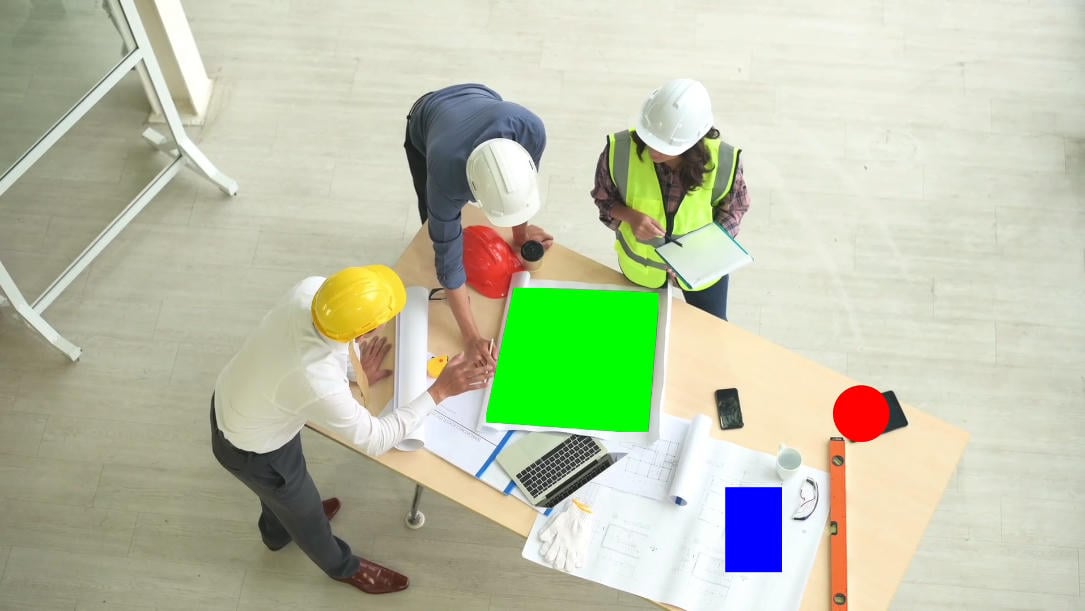
 ### Privacy Masks
Privacy masks can be used to obscure specific portions of the image using the **masks** property.
The property payload follows the GStreamer structure layout and requires a unique name along with a `color` value and one of the supported shape definitions:
| Shape | Syntax | Description |
| ----------- | --------------------------------------- | ---------------------------------------------------------------------------------- |
| `circle` | `circle=` | Draws a circular mask centered at the specified X/Y position with the given radius |
| `rectangle` | `rectangle=` | Draws a rectangular mask using the specified coordinates and dimensions |
| `polygon` | `polygon=` | Draws a polygonal mask defined by multiple coordinate points |
Additional parameter:
| Parameter | Description |
| --------- | ----------------------------- |
| `color` | Mask color in RGBA hex format |
```bash theme={null}
"{(structure)"Mask2,color=0xFF0000FF,circle=<1520,730,50>;", (structure)"Mask1,color=0x0000FFFF,rectangle=<1280,860,100,150>;", (structure)"Mask3,color=0x00FF00FF,polygon=<<910,510>,<860,740>,<1140,760>,<1160,520>>;"}"
```
| | Description |
| --------- | ------------------------------------------------------------------------- |
| **Mask2** | Red circle mask — X=1520, Y=730, R=50 |
| **Mask1** | Blue rectangle mask — X=1280, Y=860, Width=100, Height=150 |
| **Mask3** | Green polygon mask — points: (910,510), (860,740), (1140,760), (1160,520) |
### Privacy Masks
Privacy masks can be used to obscure specific portions of the image using the **masks** property.
The property payload follows the GStreamer structure layout and requires a unique name along with a `color` value and one of the supported shape definitions:
| Shape | Syntax | Description |
| ----------- | --------------------------------------- | ---------------------------------------------------------------------------------- |
| `circle` | `circle=` | Draws a circular mask centered at the specified X/Y position with the given radius |
| `rectangle` | `rectangle=` | Draws a rectangular mask using the specified coordinates and dimensions |
| `polygon` | `polygon=` | Draws a polygonal mask defined by multiple coordinate points |
Additional parameter:
| Parameter | Description |
| --------- | ----------------------------- |
| `color` | Mask color in RGBA hex format |
```bash theme={null}
"{(structure)"Mask2,color=0xFF0000FF,circle=<1520,730,50>;", (structure)"Mask1,color=0x0000FFFF,rectangle=<1280,860,100,150>;", (structure)"Mask3,color=0x00FF00FF,polygon=<<910,510>,<860,740>,<1140,760>,<1160,520>>;"}"
```
| | Description |
| --------- | ------------------------------------------------------------------------- |
| **Mask2** | Red circle mask — X=1520, Y=730, R=50 |
| **Mask1** | Blue rectangle mask — X=1280, Y=860, Width=100, Height=150 |
| **Mask3** | Green polygon mask — points: (910,510), (860,740), (1140,760), (1160,520) |
 ### Bounding Boxes
Rectangles used to highlight a region or object within the frame can be configured using the **bboxes** property.
The property payload follows the GStreamer structure layout and requires the following parameters when first set:
| Parameter | Description |
| ------------ | ------------------------------------------------------------- |
| `position` | Top-left X/Y coordinates where the rectangle should be placed |
| `dimensions` | Width and height of the rectangle |
| `color` | Rectangle color in RGBA hex format |
```bash theme={null}
"{(structure)"Box1,position=<100,100>,dimensions=<640,480>;", (structure)"Box2,position=<1000,100>,dimensions=<300,300>,color=0xFF0000FF;"}"
```
| | Description |
| -------- | ----------------------------------------------- |
| **Box1** | Position X=100, Y=100, size 640×480 |
| **Box2** | Position X=1000, Y=100, size 300×300, red color |
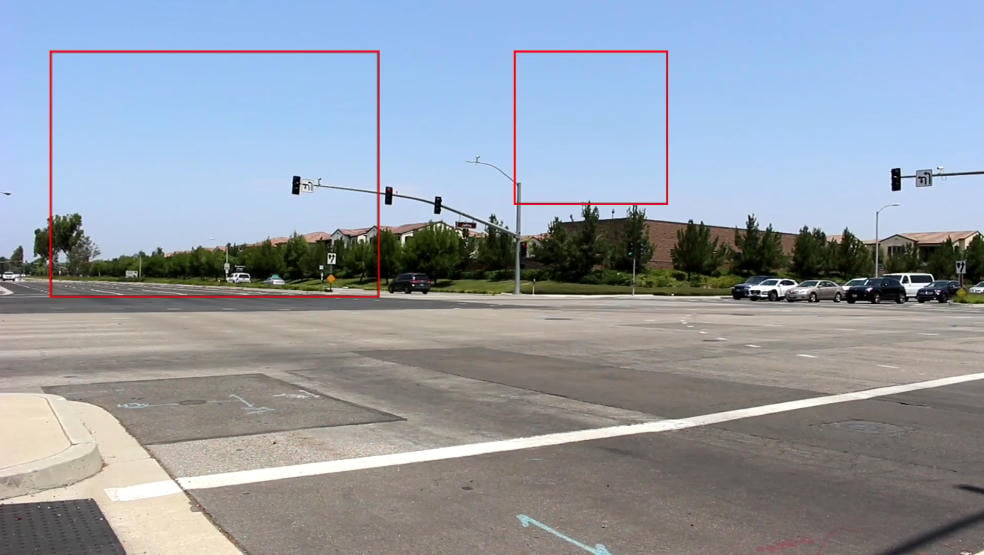
### Bounding Boxes
Rectangles used to highlight a region or object within the frame can be configured using the **bboxes** property.
The property payload follows the GStreamer structure layout and requires the following parameters when first set:
| Parameter | Description |
| ------------ | ------------------------------------------------------------- |
| `position` | Top-left X/Y coordinates where the rectangle should be placed |
| `dimensions` | Width and height of the rectangle |
| `color` | Rectangle color in RGBA hex format |
```bash theme={null}
"{(structure)"Box1,position=<100,100>,dimensions=<640,480>;", (structure)"Box2,position=<1000,100>,dimensions=<300,300>,color=0xFF0000FF;"}"
```
| | Description |
| -------- | ----------------------------------------------- |
| **Box1** | Position X=100, Y=100, size 640×480 |
| **Box2** | Position X=1000, Y=100, size 300×300, red color |
 # Usage
### User-Defined Overlays with Live Camera Preview
Sample pipeline displaying user-defined text positioned at the **top-left** corner of the video frames (live preview from camera), along with a circular privacy mask applied to conceal a selected region of the image.
```mermaid theme={null}
flowchart LR
A[qticamsrc] --> C[qtivoverlay
masks + strings] --> E[waylandsink]
```
```bash theme={null}
gst-launch-1.0 -e --gst-debug=2 \
qticamsrc ! video/x-raw,format=NV12,width=1920,height=1080,framerate=30/1 ! queue ! \
qtivoverlay \
masks='{(structure)"Mask1,color=0xff0011ff,inverse=false,circle=<500,500,50>;"}' \
strings='{(structure)"Text1,contents=\"Example\ 1\",fontsize=40,position=<0,0>,color=0xFF00FFFF;"}' \
! queue ! waylandsink fullscreen=true sync=false
```
### Single-Stage AI Inference with Overlay
Sample pipeline containing a single stage AI inference that performs object detection on the video frame. The AI stage generates ROI metadata in string format and attaches it to the main frame. This metadata is then rendered as an overlay using the **qtivoverlay** plugin and displayed on the output video.
```mermaid theme={null}
flowchart LR
A[qticamsrc] --> T{{tee}}
T --> MM[qtimetamux]
T --> VC[qtimlvconverter] --> QNN[qtimltflite] --> PP[qtimlpostprocess] -->|text/x-raw| MM
MM --> OVL[qtivoverlay] --> WS[waylandsink]
```
| File | Download | Save as |
| ---------------- | ---------------------------------------------------------------------- | ------------------- |
| YOLOX W8A8 model | [Qualcomm AI Hub — YOLOX](https://aihub.qualcomm.com/iot/models/yolox) | `yolox_w8a8.tflite` |
| Detection labels | yolov8.json | `yolov8.json` |
If any downloaded file is a `.zip` archive, extract it on your host machine before copying:
`unzip filename.zip`
```bash SCP (SSH) theme={null}
# Run from your host machine — replace and
ssh @ "mkdir -p $HOME/{models,labels}"
scp yolox_w8a8.tflite @:$HOME/models/
scp yolov8.json @:$HOME/labels/
```
```bash SCP (SSH) theme={null}
# Run from your host machine — replace and
ssh @
```
Run below command on your device
```bash theme={null}
mkdir -p $HOME/{models,labels}
export MODEL_NAME=yolox_w8a8.tflite
export LABELS_NAME=yolov8.json
```
```bash theme={null}
gst-launch-1.0 -e --gst-debug=2 \
qticamsrc ! video/x-raw,format=NV12,width=1920,height=1080,framerate=30/1 ! queue ! tee name=t_split \
t_split. ! queue ! metamux. \
t_split. ! queue ! qtimlvconverter ! queue ! qtimltflite model=$HOME/models/$MODEL_NAME delegate=external external-delegate-path=libQnnTFLiteDelegate.so external-delegate-options="QNNExternalDelegate,backend_type=htp,log_level=(string)1;" ! queue ! qtimlpostprocess results=6 module=yolov8 labels=$HOME/labels/$LABELS_NAME ! text/x-raw ! queue ! metamux. \
qtimetamux name=metamux ! queue ! qtivoverlay ! queue ! waylandsink fullscreen=true sync=false
```
### Applying a Static Image as Overlay
This pipeline demonstrates how to blit a static image (e.g., a company logo or watermark) onto a live video stream using the `images` property of **qtivoverlay**. The image is loaded once at pipeline start and composited onto every frame at the specified position and size.
The image file must be in raw **BGRA** format. Save your image as `logo.bgra` before running this pipeline.
```mermaid theme={null}
flowchart LR
A[qticamsrc] -->|NV12
1920x1080| B[qtivoverlay
images=logo.bgra] -->|NV12
1920x1080| C[waylandsink]
```
| File | Description | Save as |
| ---------- | ----------------------------------------------------------------- | ----------- |
| Logo image | Raw BGRA format image file (e.g., your company logo or watermark) | `logo.bgra` |
```bash SCP (SSH) theme={null}
# Run from your host machine — replace and
ssh @ "mkdir -p $HOME/media"
scp logo.bgra @:$HOME/media/
```
```bash SCP (SSH) theme={null}
# Run from your host machine — replace and
ssh @
```
Run below command on your device
```bash theme={null}
mkdir -p $HOME/media
```
```bash theme={null}
gst-launch-1.0 -e --gst-debug=2 \
qticamsrc ! video/x-raw,format=NV12,width=1920,height=1080,framerate=30/1 ! \
qtivoverlay \
images='{(structure)"Image1,path=$HOME/media/logo.bgra,resolution=<480,360>,destination=<0,0,640,480>;"}' \
! waylandsink fullscreen=true sync=false
```
| Parameter | Value | Notes |
| ------------- | ----------------------- | ------------------------------------------- |
| `path` | `$HOME/media/logo.bgra` | Absolute path to the raw BGRA image file |
| `resolution` | `<480,360>` | Original width × height of the source image |
| `destination` | `<0,0,640,480>` | X, Y position and rendered width × height |
### Applying Timestamp — DD/MM/YY and Time as Text Overlay
This pipeline demonstrates how to render the current date in **DD/MM/YYYY** format and the current time as a live text overlay on each video frame using the `timestamps` property of **qtivoverlay**. The timestamp is updated automatically on every buffer.
```mermaid theme={null}
flowchart LR
A[qticamsrc] -->|NV12
1920x1080| B[qtivoverlay
timestamps] -->|NV12
1920x1080| C[waylandsink]
```
```bash theme={null}
gst-launch-1.0 -e \
qticamsrc ! video/x-raw,format=NV12,width=1920,height=1080,framerate=30/1 ! \
qtivoverlay \
timestamps='{(structure)"Date/Time,format=\"%d/%m/%Y\ %H:%M:%S\",fontsize=60,position=<200,200>,color=0xFFFFFFFF;"}' \
! waylandsink sync=false fullscreen=true
```
| Parameter | Value | Notes |
| ---------- | ------------------- | --------------------------------------------------------- |
| `format` | `%d/%m/%Y %H:%M:%S` | Day/Month/Year Hour:Min:Sec — e.g., `16/04/2025 14:35:07` |
| `fontsize` | `60` | Font size in points |
| `position` | `<200,200>` | X, Y pixel coordinates on the frame |
| `color` | `0xFFFFFFFF` | White text in RGBA hex format |
***
### Applying Circular and Rhombus Privacy Masks
This pipeline demonstrates how to apply multiple privacy masks of different shapes — a **circle** and a **rhombus** (polygon) — to obscure sensitive regions of the video frame using the `masks` property of **qtivoverlay**. Both masks are rendered simultaneously on every frame.
```mermaid theme={null}
flowchart LR
A[qticamsrc] -->|NV12
1920x1080| B[qtivoverlay
masks=circle+rhombus] -->|NV12
1920x1080| C[waylandsink]
```
```bash theme={null}
gst-launch-1.0 -e --gst-debug=2 \
qticamsrc ! video/x-raw,format=NV12,width=1920,height=1080,framerate=30/1 ! \
qtivoverlay \
masks='{(structure)"Mask1,color=0xff0011ff,inverse=false,circle=<500,500,50>;",(structure)"Mask2,color=0xff0011f0,polygon=<<100,50>,<150,100>,<100,150>,<50,100>>;"}' \
! waylandsink sync=false fullscreen=true
```
| Mask | Shape | Parameters | `color` | Notes |
| ------ | --------- | ------------------------------------------------- | ------------ | ------------------------------------- |
| Mask 1 | `circle` | `circle=<500,500,50>`, `inverse=false` | `0xff0011ff` | Circle at center X=500, Y=500, R=50 |
| Mask 2 | `polygon` | `polygon=<<100,50>,<150,100>,<100,150>,<50,100>>` | `0xff0011f0` | Rhombus defined by four corner points |
Multiple masks can be combined in a single `masks` property by listing multiple GStreamer structures separated by commas. Each mask is rendered independently and can use a different shape, position, and color.
***
# Usage
### User-Defined Overlays with Live Camera Preview
Sample pipeline displaying user-defined text positioned at the **top-left** corner of the video frames (live preview from camera), along with a circular privacy mask applied to conceal a selected region of the image.
```mermaid theme={null}
flowchart LR
A[qticamsrc] --> C[qtivoverlay
masks + strings] --> E[waylandsink]
```
```bash theme={null}
gst-launch-1.0 -e --gst-debug=2 \
qticamsrc ! video/x-raw,format=NV12,width=1920,height=1080,framerate=30/1 ! queue ! \
qtivoverlay \
masks='{(structure)"Mask1,color=0xff0011ff,inverse=false,circle=<500,500,50>;"}' \
strings='{(structure)"Text1,contents=\"Example\ 1\",fontsize=40,position=<0,0>,color=0xFF00FFFF;"}' \
! queue ! waylandsink fullscreen=true sync=false
```
### Single-Stage AI Inference with Overlay
Sample pipeline containing a single stage AI inference that performs object detection on the video frame. The AI stage generates ROI metadata in string format and attaches it to the main frame. This metadata is then rendered as an overlay using the **qtivoverlay** plugin and displayed on the output video.
```mermaid theme={null}
flowchart LR
A[qticamsrc] --> T{{tee}}
T --> MM[qtimetamux]
T --> VC[qtimlvconverter] --> QNN[qtimltflite] --> PP[qtimlpostprocess] -->|text/x-raw| MM
MM --> OVL[qtivoverlay] --> WS[waylandsink]
```
| File | Download | Save as |
| ---------------- | ---------------------------------------------------------------------- | ------------------- |
| YOLOX W8A8 model | [Qualcomm AI Hub — YOLOX](https://aihub.qualcomm.com/iot/models/yolox) | `yolox_w8a8.tflite` |
| Detection labels | yolov8.json | `yolov8.json` |
If any downloaded file is a `.zip` archive, extract it on your host machine before copying:
`unzip filename.zip`
```bash SCP (SSH) theme={null}
# Run from your host machine — replace and
ssh @ "mkdir -p $HOME/{models,labels}"
scp yolox_w8a8.tflite @:$HOME/models/
scp yolov8.json @:$HOME/labels/
```
```bash SCP (SSH) theme={null}
# Run from your host machine — replace and
ssh @
```
Run below command on your device
```bash theme={null}
mkdir -p $HOME/{models,labels}
export MODEL_NAME=yolox_w8a8.tflite
export LABELS_NAME=yolov8.json
```
```bash theme={null}
gst-launch-1.0 -e --gst-debug=2 \
qticamsrc ! video/x-raw,format=NV12,width=1920,height=1080,framerate=30/1 ! queue ! tee name=t_split \
t_split. ! queue ! metamux. \
t_split. ! queue ! qtimlvconverter ! queue ! qtimltflite model=$HOME/models/$MODEL_NAME delegate=external external-delegate-path=libQnnTFLiteDelegate.so external-delegate-options="QNNExternalDelegate,backend_type=htp,log_level=(string)1;" ! queue ! qtimlpostprocess results=6 module=yolov8 labels=$HOME/labels/$LABELS_NAME ! text/x-raw ! queue ! metamux. \
qtimetamux name=metamux ! queue ! qtivoverlay ! queue ! waylandsink fullscreen=true sync=false
```
### Applying a Static Image as Overlay
This pipeline demonstrates how to blit a static image (e.g., a company logo or watermark) onto a live video stream using the `images` property of **qtivoverlay**. The image is loaded once at pipeline start and composited onto every frame at the specified position and size.
The image file must be in raw **BGRA** format. Save your image as `logo.bgra` before running this pipeline.
```mermaid theme={null}
flowchart LR
A[qticamsrc] -->|NV12
1920x1080| B[qtivoverlay
images=logo.bgra] -->|NV12
1920x1080| C[waylandsink]
```
| File | Description | Save as |
| ---------- | ----------------------------------------------------------------- | ----------- |
| Logo image | Raw BGRA format image file (e.g., your company logo or watermark) | `logo.bgra` |
```bash SCP (SSH) theme={null}
# Run from your host machine — replace and
ssh @ "mkdir -p $HOME/media"
scp logo.bgra @:$HOME/media/
```
```bash SCP (SSH) theme={null}
# Run from your host machine — replace and
ssh @
```
Run below command on your device
```bash theme={null}
mkdir -p $HOME/media
```
```bash theme={null}
gst-launch-1.0 -e --gst-debug=2 \
qticamsrc ! video/x-raw,format=NV12,width=1920,height=1080,framerate=30/1 ! \
qtivoverlay \
images='{(structure)"Image1,path=$HOME/media/logo.bgra,resolution=<480,360>,destination=<0,0,640,480>;"}' \
! waylandsink fullscreen=true sync=false
```
| Parameter | Value | Notes |
| ------------- | ----------------------- | ------------------------------------------- |
| `path` | `$HOME/media/logo.bgra` | Absolute path to the raw BGRA image file |
| `resolution` | `<480,360>` | Original width × height of the source image |
| `destination` | `<0,0,640,480>` | X, Y position and rendered width × height |
### Applying Timestamp — DD/MM/YY and Time as Text Overlay
This pipeline demonstrates how to render the current date in **DD/MM/YYYY** format and the current time as a live text overlay on each video frame using the `timestamps` property of **qtivoverlay**. The timestamp is updated automatically on every buffer.
```mermaid theme={null}
flowchart LR
A[qticamsrc] -->|NV12
1920x1080| B[qtivoverlay
timestamps] -->|NV12
1920x1080| C[waylandsink]
```
```bash theme={null}
gst-launch-1.0 -e \
qticamsrc ! video/x-raw,format=NV12,width=1920,height=1080,framerate=30/1 ! \
qtivoverlay \
timestamps='{(structure)"Date/Time,format=\"%d/%m/%Y\ %H:%M:%S\",fontsize=60,position=<200,200>,color=0xFFFFFFFF;"}' \
! waylandsink sync=false fullscreen=true
```
| Parameter | Value | Notes |
| ---------- | ------------------- | --------------------------------------------------------- |
| `format` | `%d/%m/%Y %H:%M:%S` | Day/Month/Year Hour:Min:Sec — e.g., `16/04/2025 14:35:07` |
| `fontsize` | `60` | Font size in points |
| `position` | `<200,200>` | X, Y pixel coordinates on the frame |
| `color` | `0xFFFFFFFF` | White text in RGBA hex format |
***
### Applying Circular and Rhombus Privacy Masks
This pipeline demonstrates how to apply multiple privacy masks of different shapes — a **circle** and a **rhombus** (polygon) — to obscure sensitive regions of the video frame using the `masks` property of **qtivoverlay**. Both masks are rendered simultaneously on every frame.
```mermaid theme={null}
flowchart LR
A[qticamsrc] -->|NV12
1920x1080| B[qtivoverlay
masks=circle+rhombus] -->|NV12
1920x1080| C[waylandsink]
```
```bash theme={null}
gst-launch-1.0 -e --gst-debug=2 \
qticamsrc ! video/x-raw,format=NV12,width=1920,height=1080,framerate=30/1 ! \
qtivoverlay \
masks='{(structure)"Mask1,color=0xff0011ff,inverse=false,circle=<500,500,50>;",(structure)"Mask2,color=0xff0011f0,polygon=<<100,50>,<150,100>,<100,150>,<50,100>>;"}' \
! waylandsink sync=false fullscreen=true
```
| Mask | Shape | Parameters | `color` | Notes |
| ------ | --------- | ------------------------------------------------- | ------------ | ------------------------------------- |
| Mask 1 | `circle` | `circle=<500,500,50>`, `inverse=false` | `0xff0011ff` | Circle at center X=500, Y=500, R=50 |
| Mask 2 | `polygon` | `polygon=<<100,50>,<150,100>,<100,150>,<50,100>>` | `0xff0011f0` | Rhombus defined by four corner points |
Multiple masks can be combined in a single `masks` property by listing multiple GStreamer structures separated by commas. Each mask is rendered independently and can use a different shape, position, and color.
***