> ## Documentation Index
> Fetch the complete documentation index at: https://dragonwingdocs.qualcomm.com/llms.txt
> Use this file to discover all available pages before exploring further.
# Control AMR in the simulator with simulation_sample_amr_simple_motion
> This sample application demonstrates AMR control in the simulator.
`simulation_sample_amr_simple_motion` is a simulated sample application that uses a Python-based ROS node to control the movements of QRB autonomous moving robots (AMRs) within the simulator.
The [QRB ROS Simulation](https://github.com/qualcomm-qrb-ros/qrb_ros_simulation) package provides the simulation environment. It allows you to control the movement of QRB AMRs through publishing the ROS messages to the `/qrb_robot_base/cmd_vel` topic.
**Note**
For more information, see [simulation\_sample\_amr\_simple\_motion](https://github.com/qualcomm-qrb-ros/qrb_ros_samples/tree/main/robotics/simulation_sample_amr_simple_motion) on GitHub.
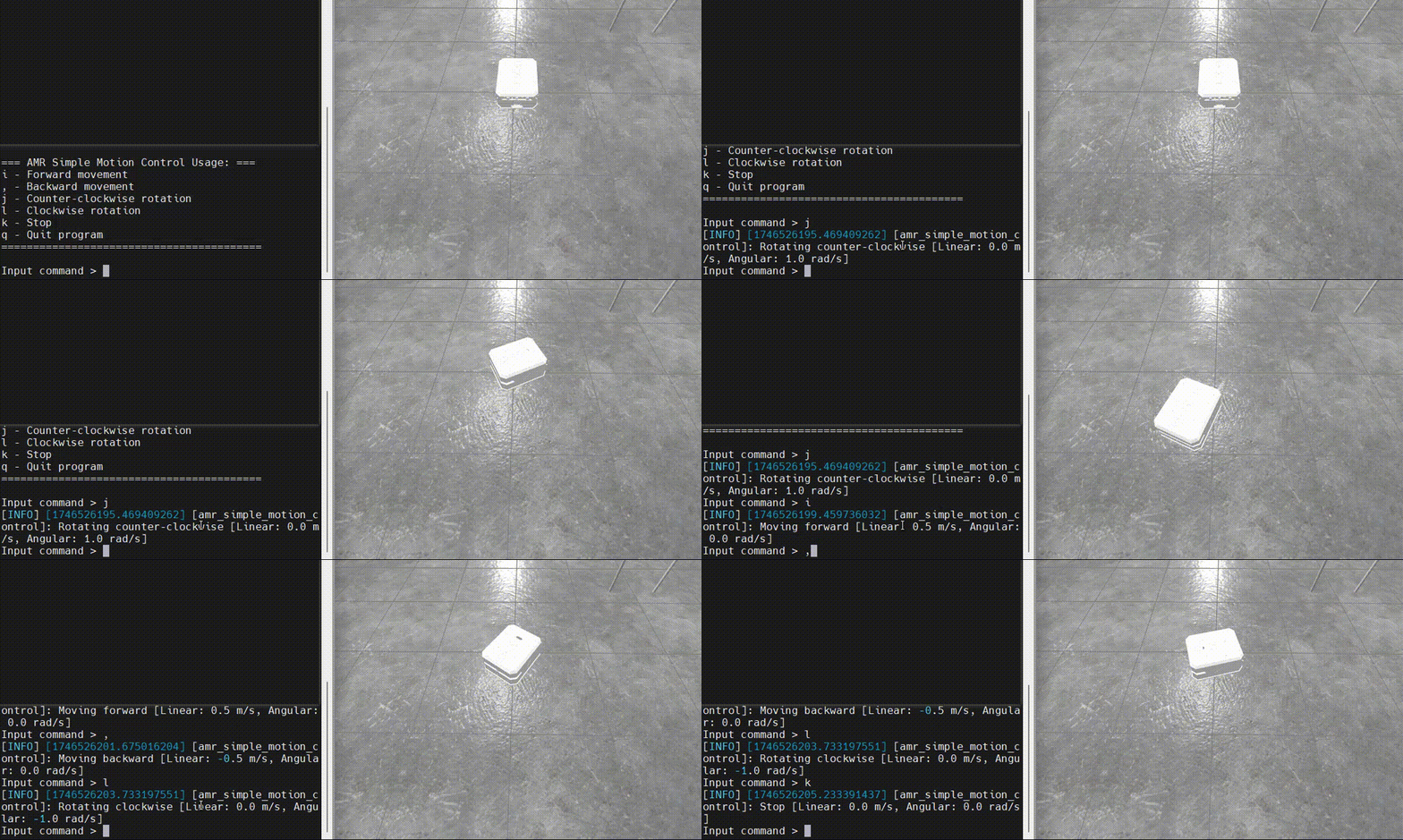
Figure: Sample effects of controlling AMR in the simulator
## Pipeline flow for `simulation_sample_amr_simple_motion`

Figure: Pipeline flow for `simulation_sample_amr_simple_motion`
## ROS nodes used in the `simulation_sample_amr_simple_motion `**pipeline**
| **ROS node** | **Description** |
| :------------------- | :--------------------------------------------------------------------------------------------------------------------------------------------------------------------------------------------- |
| `qrb_ros_simulation` | `qrb ros simulation` is a ROS package that sets up the Qualcomm robotic simulation environment. For details, see [QRB ROS Simulation](https://github.com/qualcomm-qrb-ros/qrb_ros_simulation). |
## ROS topics used in the `simulation_sample_amr_simple_motion `pipeline
| ROS topic |
Type |
Published by |
Description |
| `/qrb_robot_base/cmd_vel` |
`geometry_msgs::msg::Twist` |
`simulation_sample_amr_simple_motion` |
Indicates the velocity commands for robot movement. |
## Prerequisites
You have completed the following settings in [Set up the environment for running sample applications](./set-up-env-for-sample-app) (Skip the settings of **Set up host docker**).
* Set up the device
* Set up the host computer
### **Set up the simulation environment**
1. On your host computer, complete the following to build the Qualcomm robotic simulation environment according to the **README** of [QRB ROS Simulation](https://github.com/qualcomm-qrb-ros/qrb_ros_simulation). Ensure that the device and the host are on the same local network and can communicate with each other through ROS communication.
1. Set up development environment on Ubuntu24.04 host or Docker.
2. Build from source.
2. Run the QRB Robot Base AMR on the host.
```cpp theme={null}
# Set the ROS_DOMAIN_ID
export ROS_DOMAIN_ID=123
ros2 launch qrb_ros_sim_gazebo gazebo_robot_base.launch.py namespace:=qrb_robot_base enable_laser:=false
```
## Run out-of-the-box `simulation_sample_amr_simple_motion`
On the development kit, run the following commands:
```cpp theme={null}
# setup runtime environment
(ssh) source /usr/share/qirp-setup.sh
# Set the ROS_DOMAIN_ID
(ssh) export ROS_DOMAIN_ID=123
ros2 run simulation_sample_amr_simple_motion simple_motion
```
**Result**
If the ROS node launches successfully, the log starting from `=== AMR Simple Motion Control Usage: ===` appears.
Then, you can input the motion control commands and check the movement status of the QRB AMR within the simulator on the host computer.
## **Build and run** `simulation_sample_amr_simple_motion`
1. In a terminal of the host computer, run the following commands:
**Note**
* ``: Version of the QIR SDK, see [QIR SDK 2.0 Release Notes](../../Key-Documents/QIR-SDK-Release-Notes/robotics-sdk-qli2.0-062026).
* ``: The path where the QIR SDK is decompressed.
1. Build the sample application project.
```powershell theme={null}
# Set up the QIR SDK environment
cd /target/qcs9075-iq-9075-evk/qirpsdk_artifacts/qcs9075-iq-9075-evk
tar -zxf qirp-sdk_.tar.gz
cd /qirp-sdk
source setup.sh
# build sample
cd /qirp-sdk/qirp-samples/robotics/simulation_sample_amr_simple_motion
colcon build
```
2. Package and push the sample application to the device.
```powershell theme={null}
# package and push build result of sample
cd /qirp-sdk/qirp-samples/robotics/simulation_sample_amr_simple_motion/install/simulation_sample_amr_simple_motion
tar -czf simulation_sample_amr_simple_motion.tar.gz lib share
scp simulation_sample_amr_simple_motion.tar.gz root@[ip-addr]:/opt/
```
2. On the development kit, run the following commands:
1. Install the sample application.
```shell theme={null}
# Install sample package
(ssh) tar --no-overwrite-dir --no-same-owner -zxf /opt/simulation_sample_amr_simple_motion.tar.gz -C /usr/ros/jazzy/
```
2. Run the sample application with the steps in [Run out-of-the-box simulation\_sample\_amr\_simple\_motion](#run-out-of-the-box-simulation_sample_amr_simple_motion).