> ## Documentation Index
> Fetch the complete documentation index at: https://dragonwingdocs.qualcomm.com/llms.txt
> Use this file to discover all available pages before exploring further.
# Control AMR in the simulator with simulation_sample_amr_simple_motion
> The AMR simple motion is a simulated sample application that uses a Python-based ROS node to control the movements of QRB autonomous moving robots (AMRs) within the simulator.
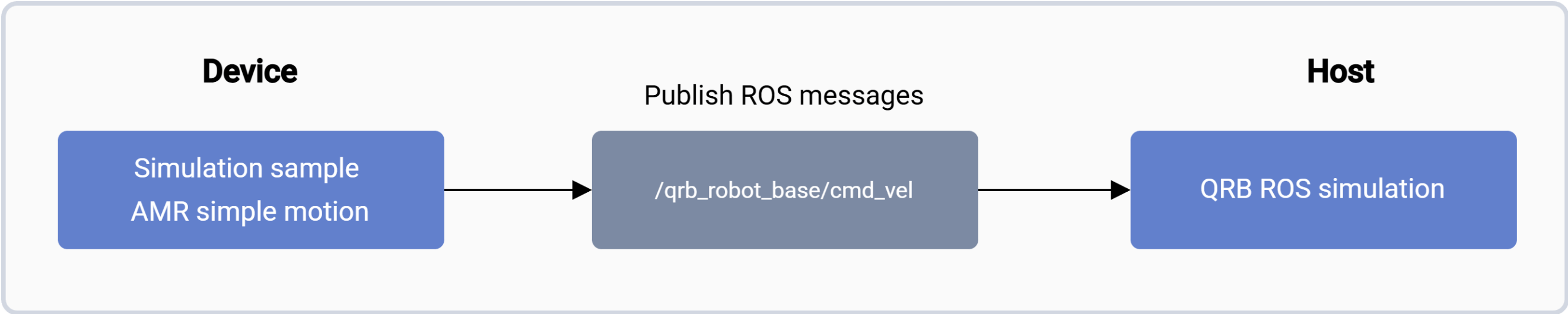
The [qrb\_ros\_simulation](https://github.com/qualcomm-qrb-ros/qrb_ros_simulation) package provides the simulation environment. It allows you to control the movement of QRB autonomous moving robots (AMRs) through publishing the ROS messages to the `/qrb_robot_base/cmd_vel` topic.
For more information, see the [Simulation Sample AMR Simple Motion](https://github.com/qualcomm-qrb-ros/qrb_ros_samples/tree/main/robotics/simulation_sample_amr_simple_motion) GitHub repo.
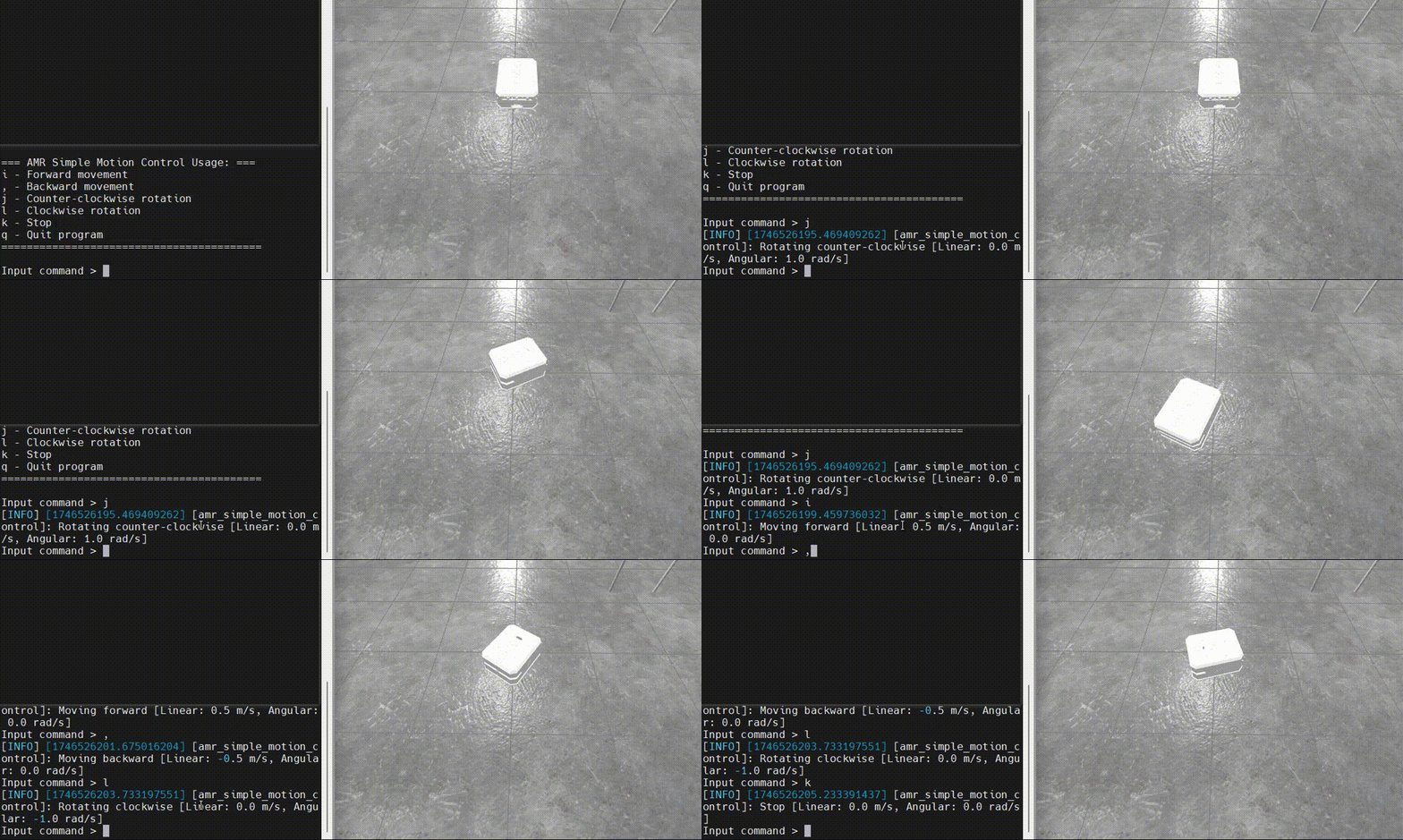
The following figure shows the motion control terminal next to the simulator view of the QRB AMR:
 ## Pipeline flow for `simulation_sample_amr_simple_motion`
The following figure shows the pipeline of `simulation_sample_amr_simple_motion`:
## Pipeline flow for `simulation_sample_amr_simple_motion`
The following figure shows the pipeline of `simulation_sample_amr_simple_motion`:
 ## ROS nodes used in the `simulation_sample_amr_simple_motion` pipeline
The following table describes the ROS node used in the AMR simple motion pipeline.
| ROS node | Description |
| -------------------- | ------------------------------------------------------------------------------------------------------------------------------------------------------------------------------------------------------------------ |
| `qrb_ros_simulation` | `qrb_ros_simulation` is a ROS package designed to set up the Qualcomm robotic simulation environment. For details, see the [QRB ROS Simulation](https://github.com/qualcomm-qrb-ros/qrb_ros_simulation) on GitHub. |
## ROS topics used in the `simulation_sample_amr_simple_motion` pipeline
The following table describes the ROS topics used in the `simulation_sample_amr_simple_motion` pipeline.
| ROS topic | Type | Published by |
| ------------------------- | --------------------------- | ------------------------------------- |
| `/qrb_robot_base/cmd_vel` | `geometry_msgs::msg::Twist` | `simulation_sample_amr_simple_motion` |
## Prerequisite
You have set up the device, installed ROS2 Jazzy and the Qualcomm Intelligent Robotics (QIR) SDK on the device according to [Install the QIR SDK](./install-the-qir-sdk).
## Run `simulation_sample_amr_simple_motion`
On your host computer, complete the following to build the Qualcomm robotic simulation environment according to the README of [QRB ROS Simulation](https://github.com/qualcomm-qrb-ros/qrb_ros_simulation).
1. Set up development environment on Ubuntu24.04 host or Docker.
2. Build from source.
```bash theme={null}
source /opt/ros/jazzy/setup.bash
ros2 launch qrb_ros_sim_gazebo gazebo_robot_base.launch.py namespace:=qrb_robot_base enable_laser:=false
```
On the development kit, run the following commands to run AMR simple motion.
```bash theme={null}
source /opt/ros/jazzy/setup.bash
ros2 run simulation_sample_amr_simple_motion simple_motion
```
### Result
If the ROS node launches successfully, the log starting from `=== AMR Simple Motion Control Usage: ===` appears.
Then, you can input the motion control commands and check the movement status of the QRB AMR within the simulator on the host.
## ROS nodes used in the `simulation_sample_amr_simple_motion` pipeline
The following table describes the ROS node used in the AMR simple motion pipeline.
| ROS node | Description |
| -------------------- | ------------------------------------------------------------------------------------------------------------------------------------------------------------------------------------------------------------------ |
| `qrb_ros_simulation` | `qrb_ros_simulation` is a ROS package designed to set up the Qualcomm robotic simulation environment. For details, see the [QRB ROS Simulation](https://github.com/qualcomm-qrb-ros/qrb_ros_simulation) on GitHub. |
## ROS topics used in the `simulation_sample_amr_simple_motion` pipeline
The following table describes the ROS topics used in the `simulation_sample_amr_simple_motion` pipeline.
| ROS topic | Type | Published by |
| ------------------------- | --------------------------- | ------------------------------------- |
| `/qrb_robot_base/cmd_vel` | `geometry_msgs::msg::Twist` | `simulation_sample_amr_simple_motion` |
## Prerequisite
You have set up the device, installed ROS2 Jazzy and the Qualcomm Intelligent Robotics (QIR) SDK on the device according to [Install the QIR SDK](./install-the-qir-sdk).
## Run `simulation_sample_amr_simple_motion`
On your host computer, complete the following to build the Qualcomm robotic simulation environment according to the README of [QRB ROS Simulation](https://github.com/qualcomm-qrb-ros/qrb_ros_simulation).
1. Set up development environment on Ubuntu24.04 host or Docker.
2. Build from source.
```bash theme={null}
source /opt/ros/jazzy/setup.bash
ros2 launch qrb_ros_sim_gazebo gazebo_robot_base.launch.py namespace:=qrb_robot_base enable_laser:=false
```
On the development kit, run the following commands to run AMR simple motion.
```bash theme={null}
source /opt/ros/jazzy/setup.bash
ros2 run simulation_sample_amr_simple_motion simple_motion
```
### Result
If the ROS node launches successfully, the log starting from `=== AMR Simple Motion Control Usage: ===` appears.
Then, you can input the motion control commands and check the movement status of the QRB AMR within the simulator on the host.