> ## Documentation Index
> Fetch the complete documentation index at: https://dragonwingdocs.qualcomm.com/llms.txt
> Use this file to discover all available pages before exploring further.
# Detect faces with sample_face_detection
> The sample_face_detection sample application is a Python-based face detection ROS node that uses QNN for model inference.
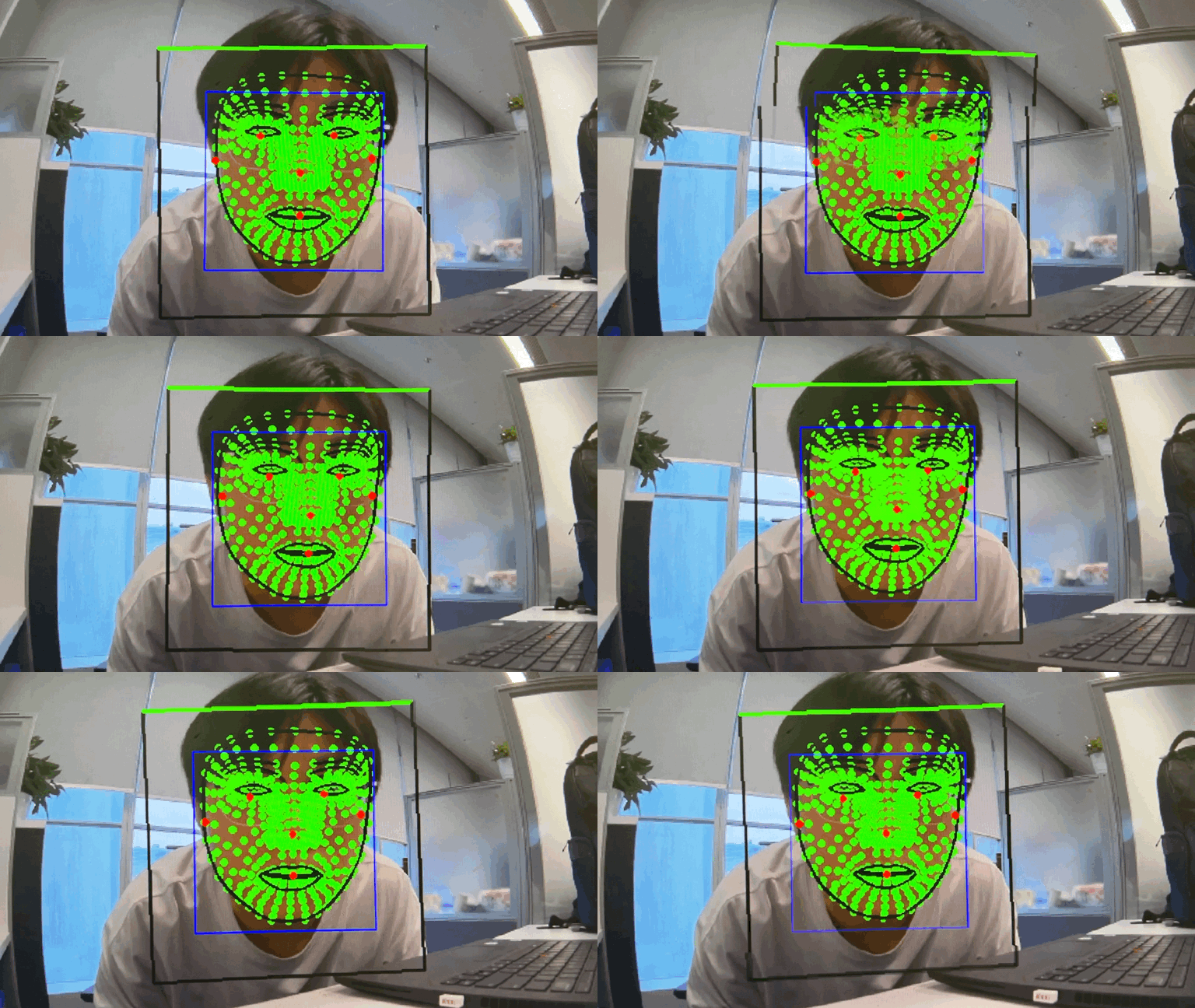
The models have the source from the Qualcomm AI-hub. It can detect face and locate facial features from a face image. It captures the `face_image.jpg` as input and publishes the result to the `/mediaface_det_image` topic.
For model information, see [MediaPipe-Face-Detection - Qualcomm AI Hub](https://aihub.qualcomm.com/iot/models/mediapipe_face?searchTerm=Media).
The following figure shows an example face detection result.
 ## `sample_face_detection` pipeline flow
The following figure shows the pipeline flow for `sample_face_detection`.
## `sample_face_detection` pipeline flow
The following figure shows the pipeline flow for `sample_face_detection`.
 ## ROS nodes used in the `sample_face_detection` pipeline
The following table lists the ROS nodes used in the `sample_face_detection` pipeline.
| ROS node | Description |
| ----------------------------------------------------------------------------------- | -------------------------------------------------------------------------------------------------------------------------------------------------------------------------------------------------------------------- |
| `qrb_ros_face_detector` | `qrb_ros_face_detector` is a Python-based ROS jazzy package that processes face images. This ROS node subscribes to an image topic and publishes the face image result topic after preprocessing and postprocessing. |
| [qrb\_ros\_nn\_inference](https://github.com/qualcomm-qrb-ros/qrb_ros_nn_inference) | `qrb_ros_nn_inference` is a ROS2 package for performing neural network model, providing AI-based perception for robotics applications. |
| [qrb ros camera](https://github.com/qualcomm-qrb-ros/qrb_ros_camera) | Qualcomm ROS 2 package that captures images with parameters and publishes them to ROS topics. |
| [image\_publisher\_node](https://github.com/ros-perception/image_pipeline) | `image_publisher` is a ROS 2 jazzy package that publishes the image ROS topic with a local path. |
## ROS topics used in the `sample_face_detection` pipeline
The following table lists the ROS topics used in the `sample_face_detection` pipeline.
| ROS topic | Type | Published by |
| ------------------------------ | ------------------------------------------- | ------------------------------------- |
| `/mediaface_det_image` | `< sensor_msgs.msg.Image >` | `qrb_ros_face_detector` |
| `/image_raw` | `` | `image_publisher_node`, `camera_node` |
| `/face_detector_input_tensor` | `` | `qrb_ros_face_detector` |
| `/face_detector_output_tensor` | `` | `qrb_ros_nn_inference` |
| `/face_landmark_input_tensor` | `` | `qrb_ros_face_detector` |
| `/face_landmark_output_tensor` | `` | `qrb_ros_nn_inference` |
## Prerequisites
You have set up the device, installed ROS2 Jazzy and Qualcomm Intelligent Robotics (QIR) SDK on the device according to [Install the QIR SDK](./install-the-qir-sdk).
## Build from source of face detection
Build the face detection sample from source when you need to change the sample code. The device steps install the dependencies, clone the source repository, and build the package.
### Device steps
```bash Download the models theme={null}
mkdir -p /opt/model && cd /opt/model
sudo wget https://huggingface.co/qualcomm/MediaPipe-Face-Detection/resolve/0dd669a326ec24a884e51b82741997299d937705/MediaPipeFaceDetector.bin -O MediaPipeFaceDetector.bin
sudo wget https://huggingface.co/qualcomm/MediaPipe-Face-Detection/resolve/0dd669a326ec24a884e51b82741997299d937705/MediaPipeFaceLandmarkDetector.bin -O MediaPipeFaceLandmarkDetector.bin
sudo wget https://raw.githubusercontent.com/zmurez/MediaPipePyTorch/65f2549ba35cd61dfd29f402f6c21882a32fabb1/anchors_face.npy -O anchors_face.npy
```
```bash Install the dependencies theme={null}
sudo apt install ros-dev-tools
sudo apt install ros-jazzy-qrb-ros-camera
```
```bash Download and build theme={null}
mkdir -p ~/qrb_ros_ws/src && cd ~/qrb_ros_ws/src
git clone https://github.com/qualcomm-qrb-ros/qrb_ros_samples.git
cd ai_vision/sample_face_detection
rosdep install -i --from-path src --rosdistro jazzy -y
colcon build
```
```bash Run the sample application theme={null}
source install/setup.bash
# You can use the default face image file
ros2 launch sample_face_detection launch_with_image_publisher.py model_path:=/opt/model/
# You can also replace this with a custom image file
ros2 launch sample_face_detection launch_with_image_publisher.py image_path:=/opt/resource/xxx.jpg model_path:=/opt/model/
# You can launch with qrb ros camera
ros2 launch sample_face_detection launch_with_qrb_ros_camera.py model_path:=/opt/model/
```
## ROS nodes used in the `sample_face_detection` pipeline
The following table lists the ROS nodes used in the `sample_face_detection` pipeline.
| ROS node | Description |
| ----------------------------------------------------------------------------------- | -------------------------------------------------------------------------------------------------------------------------------------------------------------------------------------------------------------------- |
| `qrb_ros_face_detector` | `qrb_ros_face_detector` is a Python-based ROS jazzy package that processes face images. This ROS node subscribes to an image topic and publishes the face image result topic after preprocessing and postprocessing. |
| [qrb\_ros\_nn\_inference](https://github.com/qualcomm-qrb-ros/qrb_ros_nn_inference) | `qrb_ros_nn_inference` is a ROS2 package for performing neural network model, providing AI-based perception for robotics applications. |
| [qrb ros camera](https://github.com/qualcomm-qrb-ros/qrb_ros_camera) | Qualcomm ROS 2 package that captures images with parameters and publishes them to ROS topics. |
| [image\_publisher\_node](https://github.com/ros-perception/image_pipeline) | `image_publisher` is a ROS 2 jazzy package that publishes the image ROS topic with a local path. |
## ROS topics used in the `sample_face_detection` pipeline
The following table lists the ROS topics used in the `sample_face_detection` pipeline.
| ROS topic | Type | Published by |
| ------------------------------ | ------------------------------------------- | ------------------------------------- |
| `/mediaface_det_image` | `< sensor_msgs.msg.Image >` | `qrb_ros_face_detector` |
| `/image_raw` | `` | `image_publisher_node`, `camera_node` |
| `/face_detector_input_tensor` | `` | `qrb_ros_face_detector` |
| `/face_detector_output_tensor` | `` | `qrb_ros_nn_inference` |
| `/face_landmark_input_tensor` | `` | `qrb_ros_face_detector` |
| `/face_landmark_output_tensor` | `` | `qrb_ros_nn_inference` |
## Prerequisites
You have set up the device, installed ROS2 Jazzy and Qualcomm Intelligent Robotics (QIR) SDK on the device according to [Install the QIR SDK](./install-the-qir-sdk).
## Build from source of face detection
Build the face detection sample from source when you need to change the sample code. The device steps install the dependencies, clone the source repository, and build the package.
### Device steps
```bash Download the models theme={null}
mkdir -p /opt/model && cd /opt/model
sudo wget https://huggingface.co/qualcomm/MediaPipe-Face-Detection/resolve/0dd669a326ec24a884e51b82741997299d937705/MediaPipeFaceDetector.bin -O MediaPipeFaceDetector.bin
sudo wget https://huggingface.co/qualcomm/MediaPipe-Face-Detection/resolve/0dd669a326ec24a884e51b82741997299d937705/MediaPipeFaceLandmarkDetector.bin -O MediaPipeFaceLandmarkDetector.bin
sudo wget https://raw.githubusercontent.com/zmurez/MediaPipePyTorch/65f2549ba35cd61dfd29f402f6c21882a32fabb1/anchors_face.npy -O anchors_face.npy
```
```bash Install the dependencies theme={null}
sudo apt install ros-dev-tools
sudo apt install ros-jazzy-qrb-ros-camera
```
```bash Download and build theme={null}
mkdir -p ~/qrb_ros_ws/src && cd ~/qrb_ros_ws/src
git clone https://github.com/qualcomm-qrb-ros/qrb_ros_samples.git
cd ai_vision/sample_face_detection
rosdep install -i --from-path src --rosdistro jazzy -y
colcon build
```
```bash Run the sample application theme={null}
source install/setup.bash
# You can use the default face image file
ros2 launch sample_face_detection launch_with_image_publisher.py model_path:=/opt/model/
# You can also replace this with a custom image file
ros2 launch sample_face_detection launch_with_image_publisher.py image_path:=/opt/resource/xxx.jpg model_path:=/opt/model/
# You can launch with qrb ros camera
ros2 launch sample_face_detection launch_with_qrb_ros_camera.py model_path:=/opt/model/
```