> ## Documentation Index
> Fetch the complete documentation index at: https://dragonwingdocs.qualcomm.com/llms.txt
> Use this file to discover all available pages before exploring further.
# Detect hands with sample_hand_detection
> sample_hand_detection uses the Python-based hand recognition ROS node to detect hand and hand movement. It uses Qualcomm AI Engine Direct SDK (QNN) for model inference.
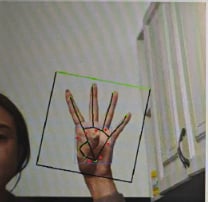
The model is sourced from the MediaPipe Hand Landmark Detector, which is a machine learning pipeline that predicts bounding boxes and pose skeletons of hands in an image. This sample application allows you to input an image named `input_image.jpg`, and then it publishes the result as ROS topic `handlandmark_result`. It uses [Qualcomm AI Engine Direct SDK (QNN)](https://www.qualcomm.com/developer/software/neural-processing-sdk-for-ai) for model inference.
For model information, see [MediaPipe-Hand-Detection](https://huggingface.co/qualcomm/MediaPipe-Hand-Detection).
For more information, see the [sample\_hand\_detection](https://github.com/qualcomm-qrb-ros/qrb_ros_samples/tree/main/ai_vision/sample_hand_detection) GitHub repository.
The following figure shows an example hand detection result.
 ## `sample_hand_detection` pipeline flow
The following figure shows the pipeline flow for `sample_hand_detection`.
## `sample_hand_detection` pipeline flow
The following figure shows the pipeline flow for `sample_hand_detection`.
 ## ROS nodes used in the `sample_hand_detection` pipeline
The following table lists the ROS nodes used in the `sample_hand_detection` pipeline.
| ROS node | Description |
| ----------------------- | ----------------------------------------------------------------------------------------------------------------------------------------------------------------------------------------------------------------------------------------------------------------------- |
| `qrb_ros_hand_detector` | The `qrb_ros_hand_detector` node is a python-based ROS Jazzy package that achieves image classification. It uses the QNN SDK for model inference. This ROS node subscribes to the image topic and publishes the classification result topic after the pre-post process. |
| `image_publisher` | `image_publisher` is a ROS Jazzy package. It publishes the image ROS topic with a local path. For more information, see [image\_publisher](https://github.com/ros-perception/image_pipeline). |
## ROS topics used in the `sample_hand_detection` pipeline
The following table lists the ROS topics used in the `sample_hand_detection` pipeline.
| ROS topic | Type | Published by |
| ---------------------- | ----------------------- | ----------------------- |
| `/handlandmark_result` | `sensor_msgs.msg.Image` | `qrb_ros_hand_detector` |
| `/image_raw` | `sensor_msgs.msg.Image` | `image_publisher` |
## Prerequisites
You have set up the device, installed ROS2 Jazzy and Qualcomm Intelligent Robotics (QIR) SDK on the device according to [Install the QIR SDK](./install-the-qir-sdk).
## Run out-of-the-box `sample_hand_detection`
```bash Create the output directories theme={null}
sudo mkdir -p /opt/ros/jazzy/share/sample_hand_detection/output_MediaPipeHandDetector/
sudo chmod 777 /opt/ros/jazzy/share/sample_hand_detection/output_MediaPipeHandDetector/
sudo mkdir -p /opt/ros/jazzy/share/sample_hand_detection/output_MediaPipeHandLandmarkDetector
sudo chmod 777 /opt/ros/jazzy/share/sample_hand_detection/output_MediaPipeHandLandmarkDetector
sudo chmod 777 -R /opt/ros/jazzy/share/sample_hand_detection/
```
```bash Launch the sample application theme={null}
export ROS_DOMAIN_ID=123
source /opt/ros/jazzy/setup.bash
ros2 launch sample_hand_detection launch_with_image_publisher.py
```
a. Start `rqt`.
```bash theme={null}
# YOUR_HOST_IP is the IP address of the Host where you want to view the sample output.
export DISPLAY=YOUR_HOST_IP:0
export ROS_DOMAIN_ID=123
rqt
```
b. Select the following buttons in sequence:
```text theme={null}
Plugins --> Visualization --> Image View
```
c. Select `handlandmark_result` to see the results.
## ROS nodes used in the `sample_hand_detection` pipeline
The following table lists the ROS nodes used in the `sample_hand_detection` pipeline.
| ROS node | Description |
| ----------------------- | ----------------------------------------------------------------------------------------------------------------------------------------------------------------------------------------------------------------------------------------------------------------------- |
| `qrb_ros_hand_detector` | The `qrb_ros_hand_detector` node is a python-based ROS Jazzy package that achieves image classification. It uses the QNN SDK for model inference. This ROS node subscribes to the image topic and publishes the classification result topic after the pre-post process. |
| `image_publisher` | `image_publisher` is a ROS Jazzy package. It publishes the image ROS topic with a local path. For more information, see [image\_publisher](https://github.com/ros-perception/image_pipeline). |
## ROS topics used in the `sample_hand_detection` pipeline
The following table lists the ROS topics used in the `sample_hand_detection` pipeline.
| ROS topic | Type | Published by |
| ---------------------- | ----------------------- | ----------------------- |
| `/handlandmark_result` | `sensor_msgs.msg.Image` | `qrb_ros_hand_detector` |
| `/image_raw` | `sensor_msgs.msg.Image` | `image_publisher` |
## Prerequisites
You have set up the device, installed ROS2 Jazzy and Qualcomm Intelligent Robotics (QIR) SDK on the device according to [Install the QIR SDK](./install-the-qir-sdk).
## Run out-of-the-box `sample_hand_detection`
```bash Create the output directories theme={null}
sudo mkdir -p /opt/ros/jazzy/share/sample_hand_detection/output_MediaPipeHandDetector/
sudo chmod 777 /opt/ros/jazzy/share/sample_hand_detection/output_MediaPipeHandDetector/
sudo mkdir -p /opt/ros/jazzy/share/sample_hand_detection/output_MediaPipeHandLandmarkDetector
sudo chmod 777 /opt/ros/jazzy/share/sample_hand_detection/output_MediaPipeHandLandmarkDetector
sudo chmod 777 -R /opt/ros/jazzy/share/sample_hand_detection/
```
```bash Launch the sample application theme={null}
export ROS_DOMAIN_ID=123
source /opt/ros/jazzy/setup.bash
ros2 launch sample_hand_detection launch_with_image_publisher.py
```
a. Start `rqt`.
```bash theme={null}
# YOUR_HOST_IP is the IP address of the Host where you want to view the sample output.
export DISPLAY=YOUR_HOST_IP:0
export ROS_DOMAIN_ID=123
rqt
```
b. Select the following buttons in sequence:
```text theme={null}
Plugins --> Visualization --> Image View
```
c. Select `handlandmark_result` to see the results.