> ## Documentation Index
> Fetch the complete documentation index at: https://dragonwingdocs.qualcomm.com/llms.txt
> Use this file to discover all available pages before exploring further.
# Enable people tracking in the simulator with simulation_follow_me
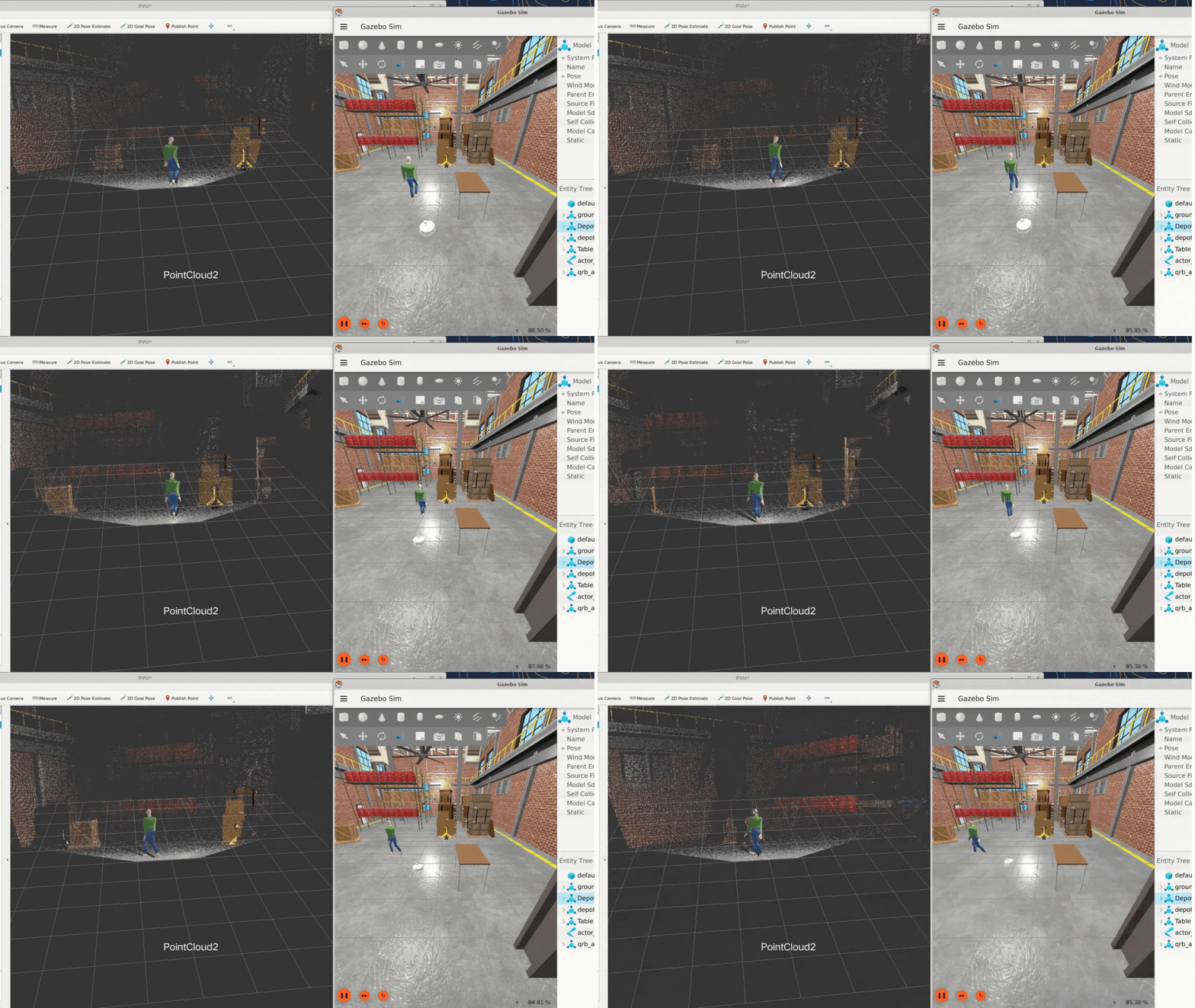
> The simulation_follow_me sample application is an AMR that detects, tracks, and follows a moving person in real time. The application integrates sensor emulation and motion control to achieve the human-following behavior in simulated environments.
For more information, see the [simulation\_follow\_me](https://github.com/qualcomm-qrb-ros/qrb_ros_samples/tree/main/robotics/simulation_follow_me) on GitHub.
 ## Pipeline flow for `simulation_follow_me`
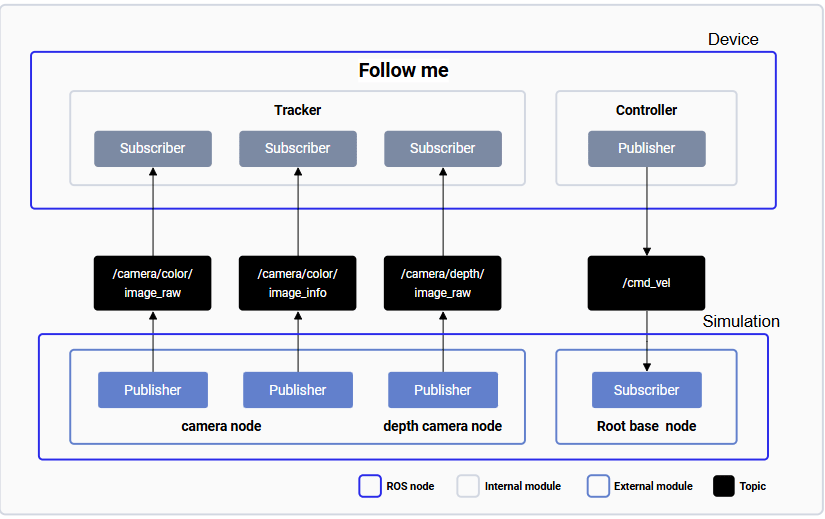
The following figure shows the pipeline flow for `simulation_follow_me`.
## Pipeline flow for `simulation_follow_me`
The following figure shows the pipeline flow for `simulation_follow_me`.
 ## ROS nodes used in the `simulation_follow_me` pipeline
The following table lists the ROS nodes used in the `simulation_follow_me` pipeline and describes what each node does.
| ROS node | Description |
| ---------------------- | ------------------------------------------------------------------------------------------------------- |
| `camera node` | Publishes camera frames RGB image data to a ROS topic in Gazebo. |
| `depth camera node` | Publishes camera frames depth image data to a ROS topic in Gazebo. |
| `Root base node` | Subscribes to control commands and coordinates motion with the autonomous mobile robot (AMR) in Gazebo. |
| `Follow me Tracker` | Subscribes to camera information and runs a model to target detection on the device. |
| `Follow me Controller` | Publishes the movement execution `/cmd_vel` commands on the device. |
## ROS topics used in the `simulation_follow_me` pipeline
The following table lists the ROS topics used in the `simulation_follow_me` pipeline, with the message type, the publisher or subscriber, and a description of each topic.
| ROS topic | Message type | Published by/Subscription | Description |
| ------------------------- | ------------------------- | -------------------------------------- | --------------------------------------- |
| `/image_raw` | `sensor_msgs.msg.Image` | Subscribes to images from other nodes. | Indicates the image for processing. |
| `/camera/depth/image_raw` | `sensor_msgs.msg.Image` | Published by `camera node`. | Publishes the image depth topic. |
| `/cmd_vel` | `geometry_msgs.msg.Twist` | Published by `Follow me Controller` | Publishes the movement execution topic. |
## Prerequisites
You have set up the device, installed ROS2 Jazzy and the Qualcomm Intelligent Robotics (QIR) SDK on the device according to [Install the QIR SDK](./install-the-qir-sdk).
Ensure you have connected the board to the simulation host using an Ethernet cable. Otherwise, the sample's performance may degrade due to data transmission issues.
## Run out-of-the-box `simulation_follow_me`
On the device, run the follow-me function according to [Run out-of-the-box follow\_me](./followme#run-out-of-the-box-follow_me).
1. On the host, run `QRB Robot Base AMR` according to the **README** of [QRB ROS Simulation](https://github.com/qualcomm-qrb-ros/qrb_ros_simulation). Ensure that the device and the host are on the same local network and can communicate with each other through ROS communication.
2. Run the following command in the simulation environment.
```bash Run the sample in Gazebo theme={null}
# Run samples in Gazebo
git clone https://github.com/qualcomm-qrb-ros/qrb_ros_samples.git
cd robotics/simulation_follow_me
export ROS_DOMAIN_ID=123
ros2 launch qrb_ros_sim_gazebo gazebo_robot_base_mini.launch.py world_model:=warehouse_followme_path2 rgb_camera_config_file:=$(pwd)/followme_rgb_camera_params.yaml enable_laser:=false enable_imu:=false
```
## ROS nodes used in the `simulation_follow_me` pipeline
The following table lists the ROS nodes used in the `simulation_follow_me` pipeline and describes what each node does.
| ROS node | Description |
| ---------------------- | ------------------------------------------------------------------------------------------------------- |
| `camera node` | Publishes camera frames RGB image data to a ROS topic in Gazebo. |
| `depth camera node` | Publishes camera frames depth image data to a ROS topic in Gazebo. |
| `Root base node` | Subscribes to control commands and coordinates motion with the autonomous mobile robot (AMR) in Gazebo. |
| `Follow me Tracker` | Subscribes to camera information and runs a model to target detection on the device. |
| `Follow me Controller` | Publishes the movement execution `/cmd_vel` commands on the device. |
## ROS topics used in the `simulation_follow_me` pipeline
The following table lists the ROS topics used in the `simulation_follow_me` pipeline, with the message type, the publisher or subscriber, and a description of each topic.
| ROS topic | Message type | Published by/Subscription | Description |
| ------------------------- | ------------------------- | -------------------------------------- | --------------------------------------- |
| `/image_raw` | `sensor_msgs.msg.Image` | Subscribes to images from other nodes. | Indicates the image for processing. |
| `/camera/depth/image_raw` | `sensor_msgs.msg.Image` | Published by `camera node`. | Publishes the image depth topic. |
| `/cmd_vel` | `geometry_msgs.msg.Twist` | Published by `Follow me Controller` | Publishes the movement execution topic. |
## Prerequisites
You have set up the device, installed ROS2 Jazzy and the Qualcomm Intelligent Robotics (QIR) SDK on the device according to [Install the QIR SDK](./install-the-qir-sdk).
Ensure you have connected the board to the simulation host using an Ethernet cable. Otherwise, the sample's performance may degrade due to data transmission issues.
## Run out-of-the-box `simulation_follow_me`
On the device, run the follow-me function according to [Run out-of-the-box follow\_me](./followme#run-out-of-the-box-follow_me).
1. On the host, run `QRB Robot Base AMR` according to the **README** of [QRB ROS Simulation](https://github.com/qualcomm-qrb-ros/qrb_ros_simulation). Ensure that the device and the host are on the same local network and can communicate with each other through ROS communication.
2. Run the following command in the simulation environment.
```bash Run the sample in Gazebo theme={null}
# Run samples in Gazebo
git clone https://github.com/qualcomm-qrb-ros/qrb_ros_samples.git
cd robotics/simulation_follow_me
export ROS_DOMAIN_ID=123
ros2 launch qrb_ros_sim_gazebo gazebo_robot_base_mini.launch.py world_model:=warehouse_followme_path2 rgb_camera_config_file:=$(pwd)/followme_rgb_camera_params.yaml enable_laser:=false enable_imu:=false
```