> ## Documentation Index
> Fetch the complete documentation index at: https://dragonwingdocs.qualcomm.com/llms.txt
> Use this file to discover all available pages before exploring further.
# Enable pick-and-place in the simulator with simulation_sample_pick_and_place
> The RML-63 Robotic Arm Pick and Place sample application implements a C++ based ROS2 node. It shows autonomous pick-and-place operations using MoveIt2 for motion planning and Gazebo for physics simulation.
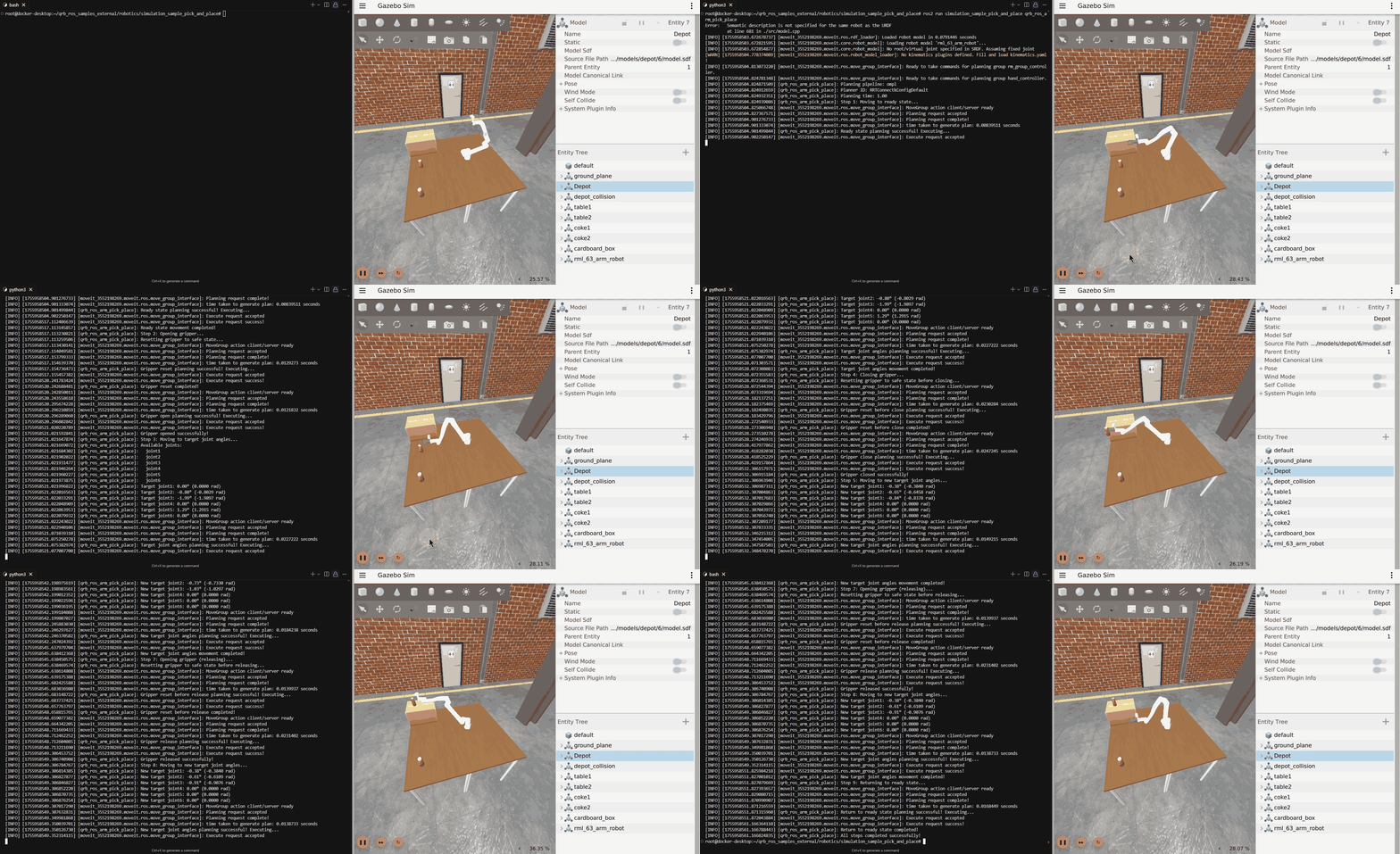
Following is a sample result showing the pick-and-place operation of the robot base in a simulator.
 ## `simulation_sample_pick_and_place` software structure
The following figure shows the software structure of `simulation_sample_pick_and_place`:
## `simulation_sample_pick_and_place` software structure
The following figure shows the software structure of `simulation_sample_pick_and_place`:
 ## ROS node used in the `simulation_sample_pick_and_place` software structure
The following table describes the ROS nodes used in the `simulation_sample_pick_and_place` software structure.
| ROS node | Description |
| ---------------------------- | ---------------------------------------------------------------------------------------------------------------------------------------- |
| `qrb_ros_simulation` | Sets up the Qualcomm robotic simulation environment. See [qrb\_ros\_simulation](https://github.com/qualcomm-qrb-ros/qrb_ros_simulation). |
| `qrb_ros_arm_pick_and_place` | Defines pick and place positions with ROS2 `launch.py` configuration parameter support |
## ROS topics used in the `simulation_sample_pick_and_place` software structure
The following table describes the ROS topics used in the `simulation_sample_pick_and_place` software structure.
| ROS topic | Type | Description |
| --------------------------------------- | --------------------------------------- | -------------------------------------------------------------------------- |
| `/joint_states` | `` | Real-time joint position, velocity, and effort data for all robot joints. |
| `/hand_controller/controller_state` | `` | Current state and status information of the gripper controller. |
| `/hand_controller/joint_trajectory` | `` | Trajectory commands sent to gripper joints for motion execution. |
| `/rm_group_controller/controller_state` | `` | Current state and status information of the robotic arm controller. |
| `/rm_group_controller/joint_trajectory` | `` | Trajectory commands sent to arm joints for motion execution. |
| `/robot_description` | `` | URDF robot description in XML format for robot modeling and visualization. |
| `/robot_description_semantic` | `` | SRDF semantic robot description for MoveIt planning and configuration. |
## Prerequisites
* You have set up the device, installed ROS2 Jazzy and the Qualcomm Intelligent Robotics (QIR) SDK on the device according to [Install the QIR SDK](./install-the-qir-sdk).
## Build from the source of `simulation_sample_pick_and_place`
Build `simulation_sample_pick_and_place` from source when you need to change the sample code. The device steps install the dependencies, clone the source repository, and build the package.
### Device steps
a. Install `qcom-adreno-dev` to resolve conflicts with graphic libraries needed by Moveit2.
```bash theme={null}
sudo apt install -y qcom-adreno-dev
```
b. Install the QIR SDK to restore packages.
```bash theme={null}
sudo apt install -y qirp-sdk
source /usr/share/qirp-setup.sh
```
c. Install MoveIt for ROS 2 Jazzy.
```bash theme={null}
sudo apt install -y ros-dev-tools
sudo apt install -y ros-jazzy-moveit
```
```bash theme={null}
mkdir -p ~/qrb_ros_ws/src && cd ~/qrb_ros_ws/src
git clone -b jazzy-rel https://github.com/qualcomm-qrb-ros/qrb_ros_samples.git
```
```bash theme={null}
cd ~/qrb_ros_ws/src/qrb_ros_samples/robotics/simulation_sample_pick_and_place
rosdep install -i --from-path ./ --rosdistro jazzy -y
colcon build
```
## Launch Gazebo on host Docker
Launch QRB Robot arm on the host according to the **Build from source** section of [QRB ROS Simulation](https://github.com/qualcomm-qrb-ros/qrb_ros_simulation). Use the same local network and `ROS_DOMAIN_ID` to ensure devices can communicate through ROS.
Launch Gazebo with the following commands:
```bash theme={null}
source install/setup.bash
export ROS_DOMAIN_ID=55
ros2 launch qrb_ros_sim_gazebo gazebo_rml_63_gripper.launch.py world_model:=warehouse initial_x:=2.2 initial_y:=-2 initial_z:=1.025 initial_yaw:=3.14159 initial_pitch:=0.0 initial_roll:=0.0 use_sim_time:=true
```
Select the **Play** button in Gazebo after the world environment renders, open another terminal, and use the following commands to launch the controller:
```bash theme={null}
source install/setup.bash
export ROS_DOMAIN_ID=55
ros2 launch qrb_ros_sim_gazebo gazebo_rml_63_gripper_load_controller.launch.py
```
## Run out-of-the-box `simulation_sample_pick_and_place`
To run the pick-and-place sample application in simulation, use the following commands:
This launch file brings up the MoveIt2 configuration for the robot, and then executes a predefined pick-and-place motion using the arm.
```bash theme={null}
source install/setup.bash
export ROS_DOMAIN_ID=55
ros2 launch simulation_sample_pick_and_place simulation_sample_pick_and_place.launch.py
```
## ROS node used in the `simulation_sample_pick_and_place` software structure
The following table describes the ROS nodes used in the `simulation_sample_pick_and_place` software structure.
| ROS node | Description |
| ---------------------------- | ---------------------------------------------------------------------------------------------------------------------------------------- |
| `qrb_ros_simulation` | Sets up the Qualcomm robotic simulation environment. See [qrb\_ros\_simulation](https://github.com/qualcomm-qrb-ros/qrb_ros_simulation). |
| `qrb_ros_arm_pick_and_place` | Defines pick and place positions with ROS2 `launch.py` configuration parameter support |
## ROS topics used in the `simulation_sample_pick_and_place` software structure
The following table describes the ROS topics used in the `simulation_sample_pick_and_place` software structure.
| ROS topic | Type | Description |
| --------------------------------------- | --------------------------------------- | -------------------------------------------------------------------------- |
| `/joint_states` | `` | Real-time joint position, velocity, and effort data for all robot joints. |
| `/hand_controller/controller_state` | `` | Current state and status information of the gripper controller. |
| `/hand_controller/joint_trajectory` | `` | Trajectory commands sent to gripper joints for motion execution. |
| `/rm_group_controller/controller_state` | `` | Current state and status information of the robotic arm controller. |
| `/rm_group_controller/joint_trajectory` | `` | Trajectory commands sent to arm joints for motion execution. |
| `/robot_description` | `` | URDF robot description in XML format for robot modeling and visualization. |
| `/robot_description_semantic` | `` | SRDF semantic robot description for MoveIt planning and configuration. |
## Prerequisites
* You have set up the device, installed ROS2 Jazzy and the Qualcomm Intelligent Robotics (QIR) SDK on the device according to [Install the QIR SDK](./install-the-qir-sdk).
## Build from the source of `simulation_sample_pick_and_place`
Build `simulation_sample_pick_and_place` from source when you need to change the sample code. The device steps install the dependencies, clone the source repository, and build the package.
### Device steps
a. Install `qcom-adreno-dev` to resolve conflicts with graphic libraries needed by Moveit2.
```bash theme={null}
sudo apt install -y qcom-adreno-dev
```
b. Install the QIR SDK to restore packages.
```bash theme={null}
sudo apt install -y qirp-sdk
source /usr/share/qirp-setup.sh
```
c. Install MoveIt for ROS 2 Jazzy.
```bash theme={null}
sudo apt install -y ros-dev-tools
sudo apt install -y ros-jazzy-moveit
```
```bash theme={null}
mkdir -p ~/qrb_ros_ws/src && cd ~/qrb_ros_ws/src
git clone -b jazzy-rel https://github.com/qualcomm-qrb-ros/qrb_ros_samples.git
```
```bash theme={null}
cd ~/qrb_ros_ws/src/qrb_ros_samples/robotics/simulation_sample_pick_and_place
rosdep install -i --from-path ./ --rosdistro jazzy -y
colcon build
```
## Launch Gazebo on host Docker
Launch QRB Robot arm on the host according to the **Build from source** section of [QRB ROS Simulation](https://github.com/qualcomm-qrb-ros/qrb_ros_simulation). Use the same local network and `ROS_DOMAIN_ID` to ensure devices can communicate through ROS.
Launch Gazebo with the following commands:
```bash theme={null}
source install/setup.bash
export ROS_DOMAIN_ID=55
ros2 launch qrb_ros_sim_gazebo gazebo_rml_63_gripper.launch.py world_model:=warehouse initial_x:=2.2 initial_y:=-2 initial_z:=1.025 initial_yaw:=3.14159 initial_pitch:=0.0 initial_roll:=0.0 use_sim_time:=true
```
Select the **Play** button in Gazebo after the world environment renders, open another terminal, and use the following commands to launch the controller:
```bash theme={null}
source install/setup.bash
export ROS_DOMAIN_ID=55
ros2 launch qrb_ros_sim_gazebo gazebo_rml_63_gripper_load_controller.launch.py
```
## Run out-of-the-box `simulation_sample_pick_and_place`
To run the pick-and-place sample application in simulation, use the following commands:
This launch file brings up the MoveIt2 configuration for the robot, and then executes a predefined pick-and-place motion using the arm.
```bash theme={null}
source install/setup.bash
export ROS_DOMAIN_ID=55
ros2 launch simulation_sample_pick_and_place simulation_sample_pick_and_place.launch.py
```