> ## Documentation Index
> Fetch the complete documentation index at: https://dragonwingdocs.qualcomm.com/llms.txt
> Use this file to discover all available pages before exploring further.
# Estimate human poses with sample_hrnet_pose_estimation
> The sample_hrnet_pose_estimation sample application provides high-precision human pose estimation capabilities.
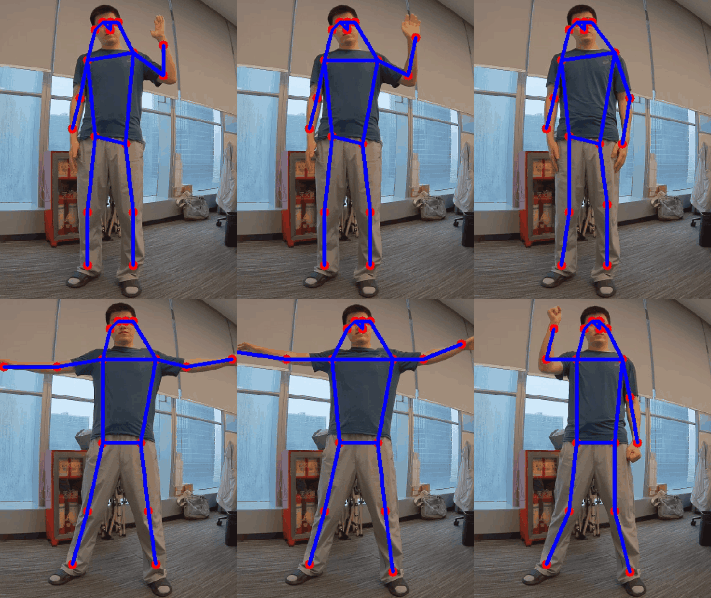
The `sample_hrnet_pose_estimation` sample application provides high-precision human pose estimation. It processes input images and publishes the following ROS2 topics:
* `/pose_estimation_results`: Output images with visualized pose keypoints.
* `/pose_estimation_points`: Raw keypoint coordinates in a structured message format.
For model information, see [HRNetPose - Qualcomm AI Hub](https://aihub.qualcomm.com/iot/models/hrnet_pose?searchTerm=hrnet).
The following figure shows an example pose estimation result.
 ## `sample_hrnet_pose_estimation` pipeline flow
The following figure shows the pipeline flow for `sample_hrnet_pose_estimation`.
## `sample_hrnet_pose_estimation` pipeline flow
The following figure shows the pipeline flow for `sample_hrnet_pose_estimation`.
 ## ROS nodes used in the `sample_hrnet_pose_estimation` pipeline
The following table lists the ROS nodes used in the `sample_hrnet_pose_estimation` pipeline.
| Node name | Description |
| ---------------------------- | ----------------------------------------------------------------------------------------------------------------------------------------------------------------------------------------------------------------------------------------------- |
| `hrnet_pose_estimation_node` | The node subscribes to `/image_raw` for image input, performs pose estimation, and publishes the results to `/pose_estimation_results` and `/pose_estimation_points` topics. |
| `image_publisher_node` | `image_publisher` is a ROS 2 Jazzy package that publishes the image ROS topic with a local path. For more details, see [image\_publisher](https://github.com/ros-perception/image_pipeline). |
| `qrb_ros_camera` | The QRB ROS Camera is a ROS package that publishes the images from Qualcomm CSI and GMSL cameras. For more details, see [QRB ROS CAMERA](https://github.com/qualcomm-qrb-ros/qrb_ros_camera). |
| `qrb_ros_nn_inference` | `qrb_ros_nn_inference` is a ROS 2 package for performing neural network model, providing AI-based perception for robotics applications. For more details, see [QRB ROS NN Inference](https://github.com/qualcomm-qrb-ros/qrb_ros_nn_inference). |
## ROS topics used in the `sample_hrnet_pose_estimation` pipeline
The following table lists the ROS topics used in the `sample_hrnet_pose_estimation` pipeline.
| ROS topic | Type | Description |
| ------------------------------ | ----------------------------------------- | ------------------------------------------------------------------------------- |
| `/image_raw` | `sensor_msgs.msg.Image` | The input image for `sample_hrnet_pose_estimation`. |
| `/qrb_inference_input_tensor` | `qrb_ros_tensor_list_msgs/msg/TensorList` | The preprocessed image is converted into an input message for the nn inference. |
| `/qrb_inference_output_tensor` | `qrb_ros_tensor_list_msgs/msg/TensorList` | Message after nn inference. |
| `/pose_estimation_results` | `sensor_msgs.msg.Image` | Output images with visualized pose keypoints. |
| `/pose_estimation_points` | `geometry_msgs.msg.PolygonStamped` | Raw keypoint coordinates in a structured message format. |
`/pose_estimation_points` has the coordinates of 17 key points on the original image. You can subscribe to this topic for secondary development.
The key points include: nose, left eye, and right eye. The following diagram lists the specific correspondence between each key point ID and body part.
```text theme={null}
(1)
Nose
/ \
(3) L Eye R Eye (2)
/ \
(5) L Ear R Ear (4)
(7) (6)
L Shoulder ----------- R Shoulder
| |
(9) (8)
L Elbow R Elbow
| |
(11) (10)
L Wrist R Wrist
(13) (12)
L Hip --------------- R Hip
| |
(15) (14)
L Knee R Knee
| |
(17) (16)
L Ankle R Ankle
```
## Prerequisites
You have set up the device, installed ROS2 Jazzy and Qualcomm Intelligent Robotics (QIR) SDK on the device according to [Install the QIR SDK](./install-the-qir-sdk).
## Build from the source of `sample_hrnet_pose_estimation`
Build `sample_hrnet_pose_estimation` from source when you need to change the sample code. The device steps install the dependencies, clone the source repository, and build the package.
### Device steps
```bash Add the PPAs theme={null}
sudo add-apt-repository ppa:ubuntu-qcom-iot/qcom-ppa
sudo add-apt-repository ppa:ubuntu-qcom-iot/qirp
sudo apt update
```
```bash Install the packages theme={null}
sudo apt install -y ros-jazzy-qrb-ros-camera ros-jazzy-qrb-ros-nn-inference ros-jazzy-qrb-ros-tensor-list-msgs
sudo apt install -y ros-dev-tools
sudo rosdep init
rosdep update
```
```bash Download the source code theme={null}
mkdir -p ~/qrb_ros_sample_ws/src && cd ~/qrb_ros_sample_ws/src
git clone https://github.com/qualcomm-qrb-ros/qrb_ros_samples.git
```
```bash Download the model theme={null}
sudo mkdir -p /opt/model && cd /opt/model
wget https://huggingface.co/qualcomm/HRNetPose/resolve/6011b6e69a84dad8f53fb555b11035a5e26c8755/HRNetPose.bin?download=true -O HRNetPose.bin
```
```bash Build the sample application theme={null}
cd ~/qrb_ros_sample_ws/src/qrb_ros_samples/ai_vision/sample_hrnet_pose_estimation
rosdep install --from-paths . --ignore-src --rosdistro jazzy -y --skip-keys "qrb_ros_tensor_list_msgs qrb_ros_nn_inference qrb_ros_camera"
source /opt/ros/jazzy/setup.bash
colcon build
source install/setup.bash
```
```bash Run the sample application theme={null}
# Launch the sample with image publisher, You can replace 'image_path' with the path to your desired image.
ros2 launch sample_hrnet_pose_estimation launch_with_image_publisher.py image_path:=/opt/ros/jazzy/share/sample_hrnet_pose_estimation/input_image.jpg
# Launch the sample with qrb ros camera.
ros2 launch sample_hrnet_pose_estimation launch_with_qrb_ros_camera.py
```
## ROS nodes used in the `sample_hrnet_pose_estimation` pipeline
The following table lists the ROS nodes used in the `sample_hrnet_pose_estimation` pipeline.
| Node name | Description |
| ---------------------------- | ----------------------------------------------------------------------------------------------------------------------------------------------------------------------------------------------------------------------------------------------- |
| `hrnet_pose_estimation_node` | The node subscribes to `/image_raw` for image input, performs pose estimation, and publishes the results to `/pose_estimation_results` and `/pose_estimation_points` topics. |
| `image_publisher_node` | `image_publisher` is a ROS 2 Jazzy package that publishes the image ROS topic with a local path. For more details, see [image\_publisher](https://github.com/ros-perception/image_pipeline). |
| `qrb_ros_camera` | The QRB ROS Camera is a ROS package that publishes the images from Qualcomm CSI and GMSL cameras. For more details, see [QRB ROS CAMERA](https://github.com/qualcomm-qrb-ros/qrb_ros_camera). |
| `qrb_ros_nn_inference` | `qrb_ros_nn_inference` is a ROS 2 package for performing neural network model, providing AI-based perception for robotics applications. For more details, see [QRB ROS NN Inference](https://github.com/qualcomm-qrb-ros/qrb_ros_nn_inference). |
## ROS topics used in the `sample_hrnet_pose_estimation` pipeline
The following table lists the ROS topics used in the `sample_hrnet_pose_estimation` pipeline.
| ROS topic | Type | Description |
| ------------------------------ | ----------------------------------------- | ------------------------------------------------------------------------------- |
| `/image_raw` | `sensor_msgs.msg.Image` | The input image for `sample_hrnet_pose_estimation`. |
| `/qrb_inference_input_tensor` | `qrb_ros_tensor_list_msgs/msg/TensorList` | The preprocessed image is converted into an input message for the nn inference. |
| `/qrb_inference_output_tensor` | `qrb_ros_tensor_list_msgs/msg/TensorList` | Message after nn inference. |
| `/pose_estimation_results` | `sensor_msgs.msg.Image` | Output images with visualized pose keypoints. |
| `/pose_estimation_points` | `geometry_msgs.msg.PolygonStamped` | Raw keypoint coordinates in a structured message format. |
`/pose_estimation_points` has the coordinates of 17 key points on the original image. You can subscribe to this topic for secondary development.
The key points include: nose, left eye, and right eye. The following diagram lists the specific correspondence between each key point ID and body part.
```text theme={null}
(1)
Nose
/ \
(3) L Eye R Eye (2)
/ \
(5) L Ear R Ear (4)
(7) (6)
L Shoulder ----------- R Shoulder
| |
(9) (8)
L Elbow R Elbow
| |
(11) (10)
L Wrist R Wrist
(13) (12)
L Hip --------------- R Hip
| |
(15) (14)
L Knee R Knee
| |
(17) (16)
L Ankle R Ankle
```
## Prerequisites
You have set up the device, installed ROS2 Jazzy and Qualcomm Intelligent Robotics (QIR) SDK on the device according to [Install the QIR SDK](./install-the-qir-sdk).
## Build from the source of `sample_hrnet_pose_estimation`
Build `sample_hrnet_pose_estimation` from source when you need to change the sample code. The device steps install the dependencies, clone the source repository, and build the package.
### Device steps
```bash Add the PPAs theme={null}
sudo add-apt-repository ppa:ubuntu-qcom-iot/qcom-ppa
sudo add-apt-repository ppa:ubuntu-qcom-iot/qirp
sudo apt update
```
```bash Install the packages theme={null}
sudo apt install -y ros-jazzy-qrb-ros-camera ros-jazzy-qrb-ros-nn-inference ros-jazzy-qrb-ros-tensor-list-msgs
sudo apt install -y ros-dev-tools
sudo rosdep init
rosdep update
```
```bash Download the source code theme={null}
mkdir -p ~/qrb_ros_sample_ws/src && cd ~/qrb_ros_sample_ws/src
git clone https://github.com/qualcomm-qrb-ros/qrb_ros_samples.git
```
```bash Download the model theme={null}
sudo mkdir -p /opt/model && cd /opt/model
wget https://huggingface.co/qualcomm/HRNetPose/resolve/6011b6e69a84dad8f53fb555b11035a5e26c8755/HRNetPose.bin?download=true -O HRNetPose.bin
```
```bash Build the sample application theme={null}
cd ~/qrb_ros_sample_ws/src/qrb_ros_samples/ai_vision/sample_hrnet_pose_estimation
rosdep install --from-paths . --ignore-src --rosdistro jazzy -y --skip-keys "qrb_ros_tensor_list_msgs qrb_ros_nn_inference qrb_ros_camera"
source /opt/ros/jazzy/setup.bash
colcon build
source install/setup.bash
```
```bash Run the sample application theme={null}
# Launch the sample with image publisher, You can replace 'image_path' with the path to your desired image.
ros2 launch sample_hrnet_pose_estimation launch_with_image_publisher.py image_path:=/opt/ros/jazzy/share/sample_hrnet_pose_estimation/input_image.jpg
# Launch the sample with qrb ros camera.
ros2 launch sample_hrnet_pose_estimation launch_with_qrb_ros_camera.py
```