> ## Documentation Index
> Fetch the complete documentation index at: https://dragonwingdocs.qualcomm.com/llms.txt
> Use this file to discover all available pages before exploring further.
# Experience remote assistant in the simulator with simulation_remote_assistant
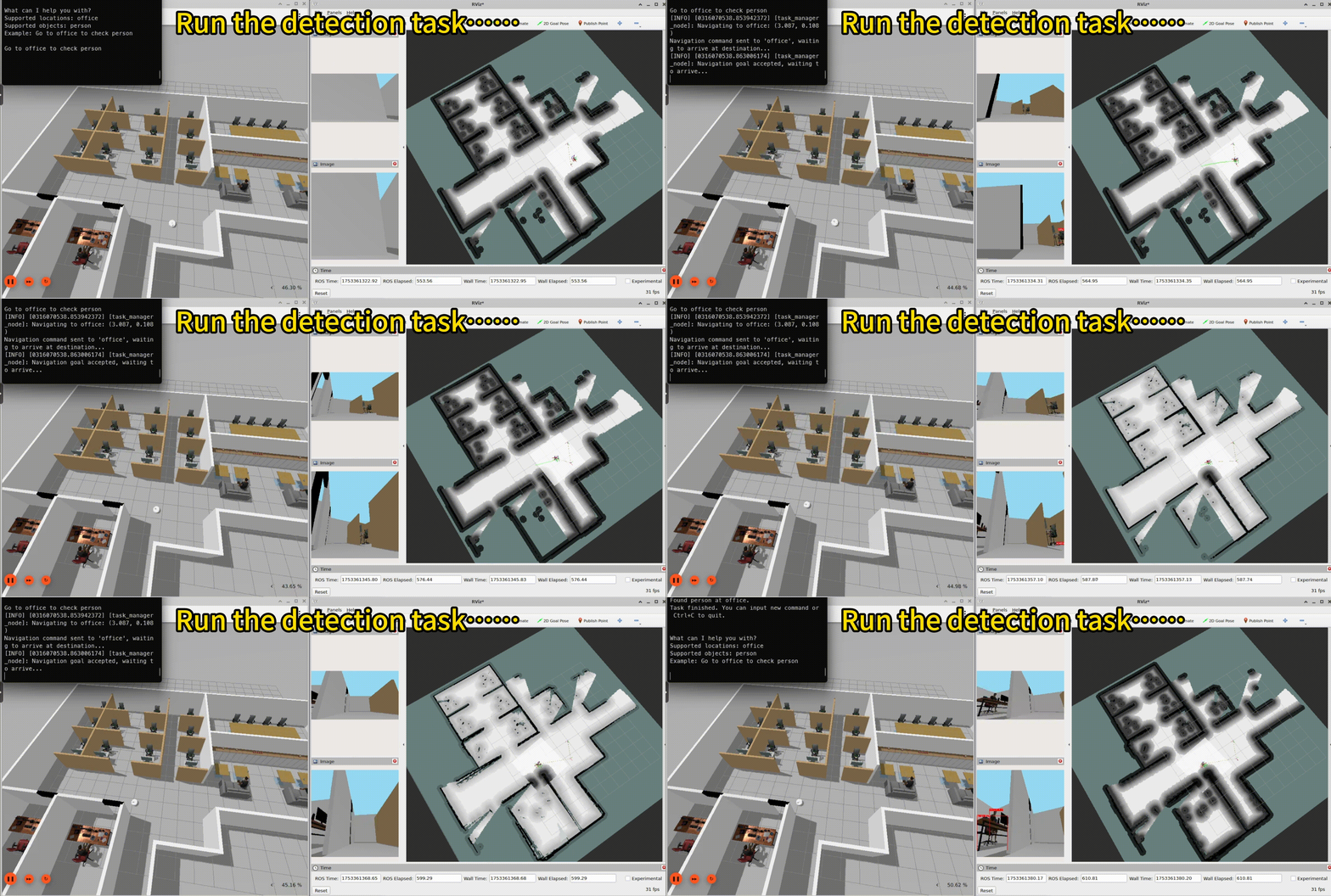
> The simulation_remote_assistant sample application is a ROS package that uses an AMR as a remote assistant within a virtual office environment.
Users can interact with the robot by inputting natural language commands, such as "Go to the office to check the person." The robot then autonomously goes to the specified location and perform object detection tasks as instructed.
The following figure shows the autonomous mobile robot (AMR) running the remote assistant sample:
 ## Pipeline flow
The following figure shows the pipeline of `simulation_remote_assistant`:
## Pipeline flow
The following figure shows the pipeline of `simulation_remote_assistant`:
 ## ROS nodes used in the `simulation_remote_assistant` pipeline
The following table describes the ROS nodes used in the `simulation_remote_assistant` pipeline.
| Node name | Description |
| ---------------------------------- | ------------------------------------------------------------------------------------------------------------------------------------------------------------------------------------------------- |
| `qrb_ros_simulation` | Sets up the Qualcomm® Robotics simulation environment. See `qrb_ros_simulation`. |
| `nn_inference_node` | Loads a trained AI model, receives preprocessed images, performs inference, and publishes results. See [nn\_inference\_node](https://github.com/qualcomm-qrb-ros/qrb_ros_nn_inference) on GitHub. |
| `yolo_preprocess_node` | Runs preprocessing and postprocessing for the Yolo model. See [qrb\_ros\_tensor\_process](https://github.com/qualcomm-qrb-ros/qrb_ros_tensor_process) on GitHub. |
| `yolo_detection_postprocess_node` | Runs preprocessing and postprocessing for the Yolo model. See [qrb\_ros\_tensor\_process](https://github.com/qualcomm-qrb-ros/qrb_ros_tensor_process) on GitHub. |
| `yolo_detection_overlay_node` | Runs preprocessing and postprocessing for the Yolo model. See [qrb\_ros\_tensor\_process](https://github.com/qualcomm-qrb-ros/qrb_ros_tensor_process) on GitHub. |
| `cartographer_node` | Processes sensor data to perform simultaneous localization and mapping (SLAM). |
| `cartographer_occupancy_grid_node` | Publishes a ROS occupancy grid map. |
| `nav2_bringup` | The Navigation2 stack for robot navigation. |
| `build_map_node` | Builds the map of office world. |
| `nav_preparation_node` | Relocalization and launches the navigation node. |
| `task_manager_node` | Parses the input commands and runs the action. |
## ROS topics used in the `simulation_remote_assistant` pipeline
The following table describes the ROS topics used in the `simulation_remote_assistant` pipeline.
| ROS topic | Type | Description |
| ----------------------------- | --------------------------------------------- | ------------------------------------------------------- |
| `/scan` | `` | 2D lidar data for SLAM and mapping. |
| `/map` | `` | Occupancy grid map for navigation. |
| `/tf` | `` | Transforms between coordinate frames. |
| `/odom` | `` | Odometry data for pose estimation. |
| `/cmd_vel` | `` | Velocity commands for robot movement. |
| `/goal_pose` | `` | Target goal pose for navigation. |
| `/camera/color/image_raw` | `` | RGB image from simulation camera. |
| `/qrb_inference_input_tensor` | `` | `yolo_preprocess_node` preprocessed tensor. |
| `/yolo_detect_result` | `` | `nn_inference_node` publishes the detected result. |
| `/yolo_detect_tensor_output` | `` | `yolo_detection_postprocess_node` postprocessed tensor. |
| `/yolo_detect_overlay` | `` | The detected result with the bounding box. |
## Prerequisites
You have set up the device, installed ROS2 Jazzy and the Qualcomm Intelligent Robotics (QIR) SDK on the device according to [Install the QIR SDK](./install-the-qir-sdk).
## Run out-of-the-box `simulation_remote_assistant`
a. Prepare the simulation environment according to the [qrb\_ros\_simulation](https://github.com/qualcomm-qrb-ros/qrb_ros_simulation/tree/main) README.
b. Set up the simulation office world.
```bash Set up environment theme={null}
source /opt/ros/jazzy/setup.bash
export ROS_DOMAIN_ID=78
```
```bash Launch the simulation office world theme={null}
ros2 launch qrb_ros_sim_gazebo gazebo_robot_base_mini.launch.py \
world_model:=office \
initial_x:=1.0 \
initial_y:=6.0 \
enable_depth_camera:=false
```
```bash theme={null}
sudo apt install ros-jazzy-simulation-remote-assistant
```
a. Build and download the yolo model according to [qrb\_ros\_tensor\_process](https://github.com/qualcomm-qrb-ros/qrb_ros_tensor_process/tree/main/cv_tensor_process/yolo_v8_process) README.
b. Run the following commands:
```bash Prepare the model and move to the default model path theme={null}
sudo chmod -R 777 /opt/
mkdir /opt/model/
mv coco8.yaml yolov8_det_qcs9075.bin yolov8_det_qcs8275.bin /opt/model/
```
a. Set up the environment and run the `map_nav_setup.launch.py` script for auto mapping.
```bash Set up the environment theme={null}
source /opt/ros/jazzy/setup.bash
export ROS_DOMAIN_ID=78
```
```bash title="Launch the map_nav_setup.launch.py scripts" theme={null}
ros2 launch simulation_remote_assistant map_nav_setup.launch.py
```
b. Launch the yolo object detection script.
```bash VentunoQ (IQ-8275 series) theme={null}
ros2 launch simulation_remote_assistant yolo_detectcion.launch.py model:=/opt/model/yolov8_det_qcs8275.bin backend_option:=libQnnHtp.so label_file:=/opt/model/coco8.yaml
```
```bash Qualcomm Dragonwing™ IQ-9075 EVK theme={null}
ros2 launch simulation_remote_assistant yolo_detectcion.launch.py model:=/opt/model/yolov8_det_qcs9075.bin backend_option:=libQnnHtp.so label_file:=/opt/model/coco8.yaml
```
c. Run the task manager to parse the location and object.
```bash theme={null}
ros2 run simulation_remote_assistant task_manager_node
```
d. Input the task commands in terminal.
```bash theme={null}
go to office to check person
```
## Build from the source of `simulation_remote_assistant`
Build `simulation_remote_assistant` from source when you need to change the sample code. The device steps install the dependencies, clone the source repository, and build the package.
### Device steps
```bash theme={null}
sudo apt install ros-dev-tools
```
```bash theme={null}
mkdir -p ~/qrb_ros_sample_ws/src && cd ~/qrb_ros_sample_ws/src
git clone -b jazzy-rel https://github.com/qualcomm-qrb-ros/qrb_ros_samples.git
```
```bash theme={null}
cd ~/qrb_ros_sample_ws/src/qrb_ros_samples/robotics/simulation_remote_assistant
rosdep install -i --from-path ./ --rosdistro jazzy -y
colcon build
source install/setup.bash
```
Run and test according to steps 2-4 of [Run out-of-the-box simulation\_remote\_assistant](./experience-remote-assistant-in-the-simulator-with-simulation_remote_assistant#run-out-of-the-box-simulation_remote_assistant).
## ROS nodes used in the `simulation_remote_assistant` pipeline
The following table describes the ROS nodes used in the `simulation_remote_assistant` pipeline.
| Node name | Description |
| ---------------------------------- | ------------------------------------------------------------------------------------------------------------------------------------------------------------------------------------------------- |
| `qrb_ros_simulation` | Sets up the Qualcomm® Robotics simulation environment. See `qrb_ros_simulation`. |
| `nn_inference_node` | Loads a trained AI model, receives preprocessed images, performs inference, and publishes results. See [nn\_inference\_node](https://github.com/qualcomm-qrb-ros/qrb_ros_nn_inference) on GitHub. |
| `yolo_preprocess_node` | Runs preprocessing and postprocessing for the Yolo model. See [qrb\_ros\_tensor\_process](https://github.com/qualcomm-qrb-ros/qrb_ros_tensor_process) on GitHub. |
| `yolo_detection_postprocess_node` | Runs preprocessing and postprocessing for the Yolo model. See [qrb\_ros\_tensor\_process](https://github.com/qualcomm-qrb-ros/qrb_ros_tensor_process) on GitHub. |
| `yolo_detection_overlay_node` | Runs preprocessing and postprocessing for the Yolo model. See [qrb\_ros\_tensor\_process](https://github.com/qualcomm-qrb-ros/qrb_ros_tensor_process) on GitHub. |
| `cartographer_node` | Processes sensor data to perform simultaneous localization and mapping (SLAM). |
| `cartographer_occupancy_grid_node` | Publishes a ROS occupancy grid map. |
| `nav2_bringup` | The Navigation2 stack for robot navigation. |
| `build_map_node` | Builds the map of office world. |
| `nav_preparation_node` | Relocalization and launches the navigation node. |
| `task_manager_node` | Parses the input commands and runs the action. |
## ROS topics used in the `simulation_remote_assistant` pipeline
The following table describes the ROS topics used in the `simulation_remote_assistant` pipeline.
| ROS topic | Type | Description |
| ----------------------------- | --------------------------------------------- | ------------------------------------------------------- |
| `/scan` | `` | 2D lidar data for SLAM and mapping. |
| `/map` | `` | Occupancy grid map for navigation. |
| `/tf` | `` | Transforms between coordinate frames. |
| `/odom` | `` | Odometry data for pose estimation. |
| `/cmd_vel` | `` | Velocity commands for robot movement. |
| `/goal_pose` | `` | Target goal pose for navigation. |
| `/camera/color/image_raw` | `` | RGB image from simulation camera. |
| `/qrb_inference_input_tensor` | `` | `yolo_preprocess_node` preprocessed tensor. |
| `/yolo_detect_result` | `` | `nn_inference_node` publishes the detected result. |
| `/yolo_detect_tensor_output` | `` | `yolo_detection_postprocess_node` postprocessed tensor. |
| `/yolo_detect_overlay` | `` | The detected result with the bounding box. |
## Prerequisites
You have set up the device, installed ROS2 Jazzy and the Qualcomm Intelligent Robotics (QIR) SDK on the device according to [Install the QIR SDK](./install-the-qir-sdk).
## Run out-of-the-box `simulation_remote_assistant`
a. Prepare the simulation environment according to the [qrb\_ros\_simulation](https://github.com/qualcomm-qrb-ros/qrb_ros_simulation/tree/main) README.
b. Set up the simulation office world.
```bash Set up environment theme={null}
source /opt/ros/jazzy/setup.bash
export ROS_DOMAIN_ID=78
```
```bash Launch the simulation office world theme={null}
ros2 launch qrb_ros_sim_gazebo gazebo_robot_base_mini.launch.py \
world_model:=office \
initial_x:=1.0 \
initial_y:=6.0 \
enable_depth_camera:=false
```
```bash theme={null}
sudo apt install ros-jazzy-simulation-remote-assistant
```
a. Build and download the yolo model according to [qrb\_ros\_tensor\_process](https://github.com/qualcomm-qrb-ros/qrb_ros_tensor_process/tree/main/cv_tensor_process/yolo_v8_process) README.
b. Run the following commands:
```bash Prepare the model and move to the default model path theme={null}
sudo chmod -R 777 /opt/
mkdir /opt/model/
mv coco8.yaml yolov8_det_qcs9075.bin yolov8_det_qcs8275.bin /opt/model/
```
a. Set up the environment and run the `map_nav_setup.launch.py` script for auto mapping.
```bash Set up the environment theme={null}
source /opt/ros/jazzy/setup.bash
export ROS_DOMAIN_ID=78
```
```bash title="Launch the map_nav_setup.launch.py scripts" theme={null}
ros2 launch simulation_remote_assistant map_nav_setup.launch.py
```
b. Launch the yolo object detection script.
```bash VentunoQ (IQ-8275 series) theme={null}
ros2 launch simulation_remote_assistant yolo_detectcion.launch.py model:=/opt/model/yolov8_det_qcs8275.bin backend_option:=libQnnHtp.so label_file:=/opt/model/coco8.yaml
```
```bash Qualcomm Dragonwing™ IQ-9075 EVK theme={null}
ros2 launch simulation_remote_assistant yolo_detectcion.launch.py model:=/opt/model/yolov8_det_qcs9075.bin backend_option:=libQnnHtp.so label_file:=/opt/model/coco8.yaml
```
c. Run the task manager to parse the location and object.
```bash theme={null}
ros2 run simulation_remote_assistant task_manager_node
```
d. Input the task commands in terminal.
```bash theme={null}
go to office to check person
```
## Build from the source of `simulation_remote_assistant`
Build `simulation_remote_assistant` from source when you need to change the sample code. The device steps install the dependencies, clone the source repository, and build the package.
### Device steps
```bash theme={null}
sudo apt install ros-dev-tools
```
```bash theme={null}
mkdir -p ~/qrb_ros_sample_ws/src && cd ~/qrb_ros_sample_ws/src
git clone -b jazzy-rel https://github.com/qualcomm-qrb-ros/qrb_ros_samples.git
```
```bash theme={null}
cd ~/qrb_ros_sample_ws/src/qrb_ros_samples/robotics/simulation_remote_assistant
rosdep install -i --from-path ./ --rosdistro jazzy -y
colcon build
source install/setup.bash
```
Run and test according to steps 2-4 of [Run out-of-the-box simulation\_remote\_assistant](./experience-remote-assistant-in-the-simulator-with-simulation_remote_assistant#run-out-of-the-box-simulation_remote_assistant).