> ## Documentation Index
> Fetch the complete documentation index at: https://dragonwingdocs.qualcomm.com/llms.txt
> Use this file to discover all available pages before exploring further.
# Explore the shared message interfaces in qrb_ros_interfaces
> The qrb_ros_interfaces is a collection of ROS 2 interface packages designed to define and merge custom message, service, and action types. It's specifically adapted to communication within the QRB ROS ecosystem.
The `qrb_ros_interfaces` collection serves as a centralized repository for all QRB ROS related communication interfaces, ensuring standardization and consistency across various QRB ROS nodes.
Each package within the collection provides specific interface definitions crucial for enabling interoperability and efficient data exchange between components interacting with QRB hardware or software.
The following table lists the interface packages currently included in this collection, with the status, description, and interface types of each package.
| Interface package name | Status | Description | Interface type (Contains) |
| ----------------------------- | ---------- | -------------------------------------------------------------------------------------- | ------------------------- |
| `qrb_ros_amr_msgs` | Active | QRB autonomous mobile robot (AMR) ROS msg | message, service, action |
| `qrb_ros_audio_common_msgs` | Active | QRB ROS audio common messages | message, action |
| `qrb_ros_audio_service_msgs` | Active | QRB ROS audio service messages | message, service |
| `qrb_ros_navigation_msgs` | Active | QRB Navigation ROS messages | message, service |
| `qrb_ros_robot_base_msgs` | Active | QRB ROS robot base messages | message, service |
| `qrb_ros_sensor_service_msgs` | Deprecated | QRB ROS Sensor Service Interfaces | message, service |
| `qrb_ros_slam_msgs` | Active | Messages ROS Package for QRB simultaneous localization and mapping (SLAM) Service call | message, service |
| `qrb_ros_system_monitor_msgs` | Active | System monitor interfaces | message, service |
| `qrb_ros_tensor_list_msgs` | Active | Messages for model inference | message |
| `qrb_ros_vision_msgs` | Active | Messages for computer vision pipelines | message |
## Prerequisites
You have set up the device, installed ROS2 Jazzy and the Qualcomm Intelligent Robotics (QIR) SDK on the device according to [Install the QIR SDK](./install-the-qir-sdk).
## Run out-of-the-box `qrb_ros_interfaces`
```bash Install the packages theme={null}
sudo apt install ros-jazzy-qrb-ros-tensor-list-msgs
```
```bash List the package interfaces theme={null}
source /opt/ros/jazzy/setup.bash
ros2 interface package qrb_ros_tensor_list_msgs
```
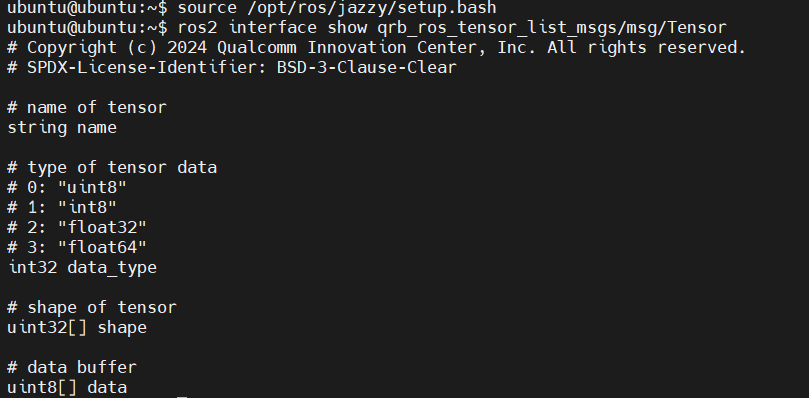
 ```bash Show the Tensor message definition theme={null}
source /opt/ros/jazzy/setup.bash
ros2 interface show qrb_ros_tensor_list_msgs/msg/Tensor
```
```bash Show the Tensor message definition theme={null}
source /opt/ros/jazzy/setup.bash
ros2 interface show qrb_ros_tensor_list_msgs/msg/Tensor
```
 ## Build and run `qrb_ros_interfaces`
```bash Install the dependencies theme={null}
sudo apt install ros-dev-tools colcon
```
```bash Clone the repository theme={null}
mkdir -p ~/qrb_ros_ws/src
cd ~/qrb_ros_ws/src
source /opt/ros/jazzy/setup.bash
git clone https://github.com/qualcomm-qrb-ros/qrb_ros_interfaces.git
```
```bash Resolve the dependencies theme={null}
source /opt/ros/jazzy/setup.sh
cd ~/qrb_ros_ws
sudo rosdep install -i --from-path src --rosdistro jazzy -y
```
```bash Build the workspace theme={null}
colcon build
```
```bash Source the setup files and inspect the interfaces theme={null}
source install/setup.bash
ros2 interface package qrb_ros_tensor_list_msgs
ros2 interface show qrb_ros_tensor_list_msgs/msg/Tensor
```
## Build and run `qrb_ros_interfaces`
```bash Install the dependencies theme={null}
sudo apt install ros-dev-tools colcon
```
```bash Clone the repository theme={null}
mkdir -p ~/qrb_ros_ws/src
cd ~/qrb_ros_ws/src
source /opt/ros/jazzy/setup.bash
git clone https://github.com/qualcomm-qrb-ros/qrb_ros_interfaces.git
```
```bash Resolve the dependencies theme={null}
source /opt/ros/jazzy/setup.sh
cd ~/qrb_ros_ws
sudo rosdep install -i --from-path src --rosdistro jazzy -y
```
```bash Build the workspace theme={null}
colcon build
```
```bash Source the setup files and inspect the interfaces theme={null}
source install/setup.bash
ros2 interface package qrb_ros_tensor_list_msgs
ros2 interface show qrb_ros_tensor_list_msgs/msg/Tensor
```