> ## Documentation Index
> Fetch the complete documentation index at: https://dragonwingdocs.qualcomm.com/llms.txt
> Use this file to discover all available pages before exploring further.
# Implement model inference with qrb_ros_nn_inference
> qrb_ros_nn_inference is a ROS2 package for performing neural network model, providing AI-based perception for robotics applications.
The `qrb_ros_nn_inference` package provides AI-based perception for robotics applications. It provides the following:
* Model inference API which supports three model formats: `.tflite`, `.so`, `.bin`
* Model inference acceleration based on Qualcomm platforms
## Architecture of `qrb_ros_nn_inference`
The following figure shows the architecture of `qrb_ros_nn_interface`.
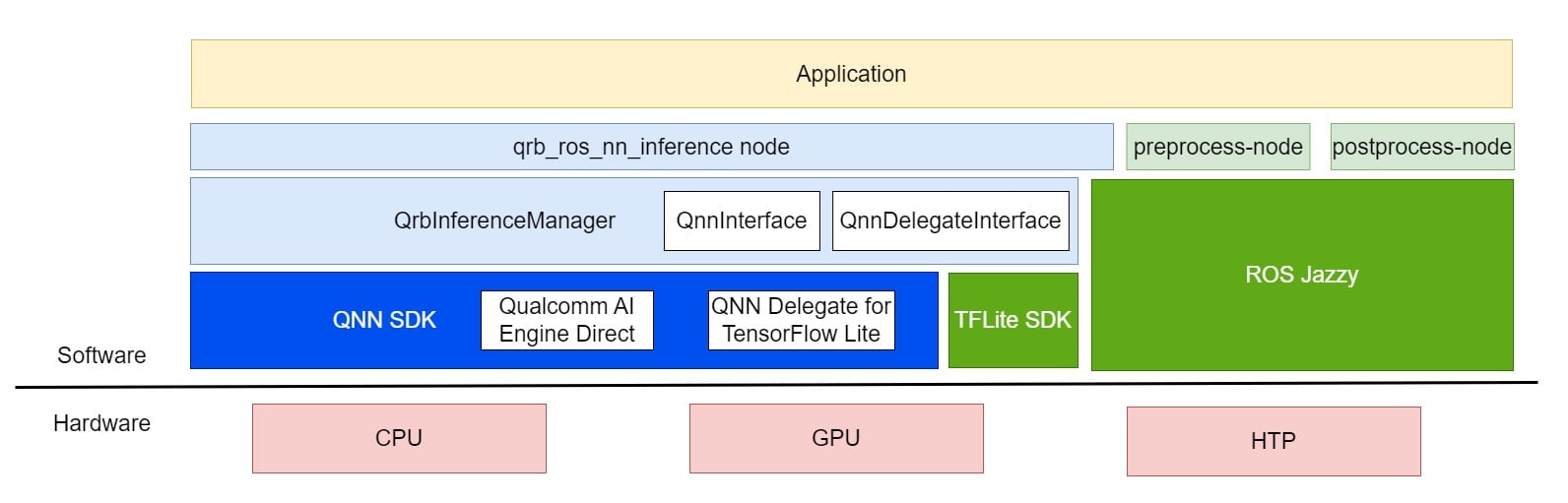 `qrb_ros_nn_inference` is a ROS2 package based on [qrb\_inference\_manager](https://github.com/qualcomm-qrb-ros/qrb_ros_nn_inference/blob/main/qrb_inference_manager/README.md), which is a C++ library encapsulating the APIs of [Qualcomm AI Engine Direct](https://docs.qualcomm.com/bundle/publicresource/topics/80-63442-50/overview.html) and [Qualcomm Neural Network (QNN) Delegate for TensorFlow Lite](https://docs.qualcomm.com/bundle/publicresource/topics/80-63442-2/overview.html).
`qrb_ros_nn_inference` receives data from a specific topic, then without any processing, directly uses the received data for model inference. Then, the results of the model inference are sent out directly through another specific topic.
## ROS node parameters
The following table describes the ROS node parameters for `qrb_ros_nn_inference`.
| Parameter | Type | Default value | Description |
| ---------------- | -------- | ------------- | ----------------------------------------------------------------------------------------------------------------------------------------------------------------------------------------------------------------------------------- |
| `backend_option` | `String` | `""` | For the hardware acceleration options for model inference and valid values, see [qrb\_inference\_manager documentation](https://github.com/qualcomm-qrb-ros/qrb_ros_nn_inference/blob/main/qrb_inference_manager/Documentation.md). |
| `model_path` | `String` | `""` | Path of model file. |
## ROS topics
The following table describes the ROS topics used by `qrb_ros_nn_inference`.
| Topic name | Message type | Description |
| ----------------------------- | ---------------------------------------------------------------------------------------------------------------------------- | ---------------- |
| `qrb_inference_input_tensor` | [`TensorList`](https://github.com/qualcomm-qrb-ros/qrb_ros_interfaces/blob/main/qrb_ros_tensor_list_msgs/msg/TensorList.msg) | Subscribed topic |
| `qrb_inference_output_tensor` | [`TensorList`](https://github.com/qualcomm-qrb-ros/qrb_ros_interfaces/blob/main/qrb_ros_tensor_list_msgs/msg/TensorList.msg) | Published topic |
## Prerequisites
You have set up the device, installed ROS2 Jazzy and Qualcomm Intelligent Robotics (QIR) SDK on the device according to [Install the QIR SDK](./install-the-qir-sdk).
## Run out-of-the-box `qrb_ros_nn_inference`
```bash Install the packages theme={null}
sudo apt install ros-jazzy-qrb-ros-nn-inference
```
```bash Download the test nodes theme={null}
# qrb_ros_nn_inference/test includes the pre-process node and post-process node
mkdir -p ~/ros-ws/src && cd ~/ros-ws/src && \
git clone https://github.com/qualcomm-qrb-ros/qrb_ros_nn_inference && \
```
a. Download the `yolov8.tflite` model by following [QC AI hub Getting Started](https://app.aihub.qualcomm.com/docs/hub/getting_started.html).
b. Download the test image for object detection.
```bash theme={null}
wget -P ~/ros-ws/src/qrb_ros_nn_inference/test/qrb_ros_pre_process/image/ \
https://ultralytics.com/images/bus.jpg && \
python3 ~/ros-ws/src/qrb_ros_nn_inference/test/qrb_ros_post_process/scripts/yolov8_input_pre_process.py
```
c. Point out the raw image path and model path in `~/ros-ws/src/qrb_ros_nn_inference/test/qrb_ros_post_process/launch/nn_node_test.launch.py`.
```python title="nn_node_test.launch.py" theme={null}
pre_process_node = ComposableNode(
package = "qrb_ros_pre_process",
plugin = "qrb_ros::pre_process::QrbRosPreProcessNode",
name = "pre_process_node",
parameters=[
{
"image_path": os.environ['HOME'] + "/ros-ws/src/qrb_ros_nn_inference/test/qrb_ros_pre_process/image/bus.raw"
}
]
)
nn_inference_node = ComposableNode(
package = "qrb_ros_nn_inference",
plugin = "qrb_ros::nn_inference::QrbRosInferenceNode",
name = "nn_inference_node",
parameters=[
{
"backend_option": "",
"model_path": "/path/to/model"
}
]
)
```
d. Build the preprocess node and postprocess node.
```bash Build and run the inference theme={null}
source /opt/ros/jazzy/setup.bash && \
cd ~/ros-ws && \
rm ./src/qrb_ros_nn_inference/test/qrb_ros_post_process/COLCON_IGNORE && \
rm ./src/qrb_ros_nn_inference/test/qrb_ros_pre_process/COLCON_IGNORE && \
colcon build --packages-select qrb_ros_pre_process qrb_ros_post_process
execute the inference
cd ~/ros-ws && \
source install/local_setup.bash && \
ros2 launch qrb_ros_post_process nn_node_test.launch.py
visualize the detection result
python3 ~/ros-ws/src/qrb_ros_nn_inference/test/qrb_ros_post_process/scripts/qrb_ros_yolo_detection_visualizer.py \
--original_image ~/ros-ws/src/qrb_ros_nn_inference/test/qrb_ros_pre_process/image/bus.jpg
```
The output result image is in `~/ros-ws/src/qrb_ros_nn_inference/test/qrb_ros_post_process/inference_result`.
## Build and run `qrb_ros_nn_inference`
```bash Install the dependencies theme={null}
sudo apt install -y software-properties-common colcon
sudo apt install -y libtensorflow-lite-c-qcom1 libtensorflow-lite-qcom-dev libqnn-dev libqnn1
```
```bash Download the source code theme={null}
mkdir -p ~/qrb_ros_ws/src
cd ~/qrb_ros_ws/src
git clone https://github.com/qualcomm-qrb-ros/qrb_ros_nn_inference
git clone https://github.com/qualcomm-qrb-ros/qrb_ros_interfaces
```
```bash Build and launch theme={null}
cd ~/qrb_ros_ws
colcon build --packages-up-to qrb_ros_nn_inference
source install/setup.bash
ros2 launch qrb_ros_post_process nn_node_test.launch.py
```
`qrb_ros_nn_inference` is a ROS2 package based on [qrb\_inference\_manager](https://github.com/qualcomm-qrb-ros/qrb_ros_nn_inference/blob/main/qrb_inference_manager/README.md), which is a C++ library encapsulating the APIs of [Qualcomm AI Engine Direct](https://docs.qualcomm.com/bundle/publicresource/topics/80-63442-50/overview.html) and [Qualcomm Neural Network (QNN) Delegate for TensorFlow Lite](https://docs.qualcomm.com/bundle/publicresource/topics/80-63442-2/overview.html).
`qrb_ros_nn_inference` receives data from a specific topic, then without any processing, directly uses the received data for model inference. Then, the results of the model inference are sent out directly through another specific topic.
## ROS node parameters
The following table describes the ROS node parameters for `qrb_ros_nn_inference`.
| Parameter | Type | Default value | Description |
| ---------------- | -------- | ------------- | ----------------------------------------------------------------------------------------------------------------------------------------------------------------------------------------------------------------------------------- |
| `backend_option` | `String` | `""` | For the hardware acceleration options for model inference and valid values, see [qrb\_inference\_manager documentation](https://github.com/qualcomm-qrb-ros/qrb_ros_nn_inference/blob/main/qrb_inference_manager/Documentation.md). |
| `model_path` | `String` | `""` | Path of model file. |
## ROS topics
The following table describes the ROS topics used by `qrb_ros_nn_inference`.
| Topic name | Message type | Description |
| ----------------------------- | ---------------------------------------------------------------------------------------------------------------------------- | ---------------- |
| `qrb_inference_input_tensor` | [`TensorList`](https://github.com/qualcomm-qrb-ros/qrb_ros_interfaces/blob/main/qrb_ros_tensor_list_msgs/msg/TensorList.msg) | Subscribed topic |
| `qrb_inference_output_tensor` | [`TensorList`](https://github.com/qualcomm-qrb-ros/qrb_ros_interfaces/blob/main/qrb_ros_tensor_list_msgs/msg/TensorList.msg) | Published topic |
## Prerequisites
You have set up the device, installed ROS2 Jazzy and Qualcomm Intelligent Robotics (QIR) SDK on the device according to [Install the QIR SDK](./install-the-qir-sdk).
## Run out-of-the-box `qrb_ros_nn_inference`
```bash Install the packages theme={null}
sudo apt install ros-jazzy-qrb-ros-nn-inference
```
```bash Download the test nodes theme={null}
# qrb_ros_nn_inference/test includes the pre-process node and post-process node
mkdir -p ~/ros-ws/src && cd ~/ros-ws/src && \
git clone https://github.com/qualcomm-qrb-ros/qrb_ros_nn_inference && \
```
a. Download the `yolov8.tflite` model by following [QC AI hub Getting Started](https://app.aihub.qualcomm.com/docs/hub/getting_started.html).
b. Download the test image for object detection.
```bash theme={null}
wget -P ~/ros-ws/src/qrb_ros_nn_inference/test/qrb_ros_pre_process/image/ \
https://ultralytics.com/images/bus.jpg && \
python3 ~/ros-ws/src/qrb_ros_nn_inference/test/qrb_ros_post_process/scripts/yolov8_input_pre_process.py
```
c. Point out the raw image path and model path in `~/ros-ws/src/qrb_ros_nn_inference/test/qrb_ros_post_process/launch/nn_node_test.launch.py`.
```python title="nn_node_test.launch.py" theme={null}
pre_process_node = ComposableNode(
package = "qrb_ros_pre_process",
plugin = "qrb_ros::pre_process::QrbRosPreProcessNode",
name = "pre_process_node",
parameters=[
{
"image_path": os.environ['HOME'] + "/ros-ws/src/qrb_ros_nn_inference/test/qrb_ros_pre_process/image/bus.raw"
}
]
)
nn_inference_node = ComposableNode(
package = "qrb_ros_nn_inference",
plugin = "qrb_ros::nn_inference::QrbRosInferenceNode",
name = "nn_inference_node",
parameters=[
{
"backend_option": "",
"model_path": "/path/to/model"
}
]
)
```
d. Build the preprocess node and postprocess node.
```bash Build and run the inference theme={null}
source /opt/ros/jazzy/setup.bash && \
cd ~/ros-ws && \
rm ./src/qrb_ros_nn_inference/test/qrb_ros_post_process/COLCON_IGNORE && \
rm ./src/qrb_ros_nn_inference/test/qrb_ros_pre_process/COLCON_IGNORE && \
colcon build --packages-select qrb_ros_pre_process qrb_ros_post_process
execute the inference
cd ~/ros-ws && \
source install/local_setup.bash && \
ros2 launch qrb_ros_post_process nn_node_test.launch.py
visualize the detection result
python3 ~/ros-ws/src/qrb_ros_nn_inference/test/qrb_ros_post_process/scripts/qrb_ros_yolo_detection_visualizer.py \
--original_image ~/ros-ws/src/qrb_ros_nn_inference/test/qrb_ros_pre_process/image/bus.jpg
```
The output result image is in `~/ros-ws/src/qrb_ros_nn_inference/test/qrb_ros_post_process/inference_result`.
## Build and run `qrb_ros_nn_inference`
```bash Install the dependencies theme={null}
sudo apt install -y software-properties-common colcon
sudo apt install -y libtensorflow-lite-c-qcom1 libtensorflow-lite-qcom-dev libqnn-dev libqnn1
```
```bash Download the source code theme={null}
mkdir -p ~/qrb_ros_ws/src
cd ~/qrb_ros_ws/src
git clone https://github.com/qualcomm-qrb-ros/qrb_ros_nn_inference
git clone https://github.com/qualcomm-qrb-ros/qrb_ros_interfaces
```
```bash Build and launch theme={null}
cd ~/qrb_ros_ws
colcon build --packages-up-to qrb_ros_nn_inference
source install/setup.bash
ros2 launch qrb_ros_post_process nn_node_test.launch.py
```