> ## Documentation Index
> Fetch the complete documentation index at: https://dragonwingdocs.qualcomm.com/llms.txt
> Use this file to discover all available pages before exploring further.
# Publish system status with qrb_ros_system_monitor
> The qrb_ros_system_monitor sample application has various ROS nodes that publish system status information, such as CPU loading, memory usage, and disk space.
## Pipeline flow for `qrb_ros_system_monitor`
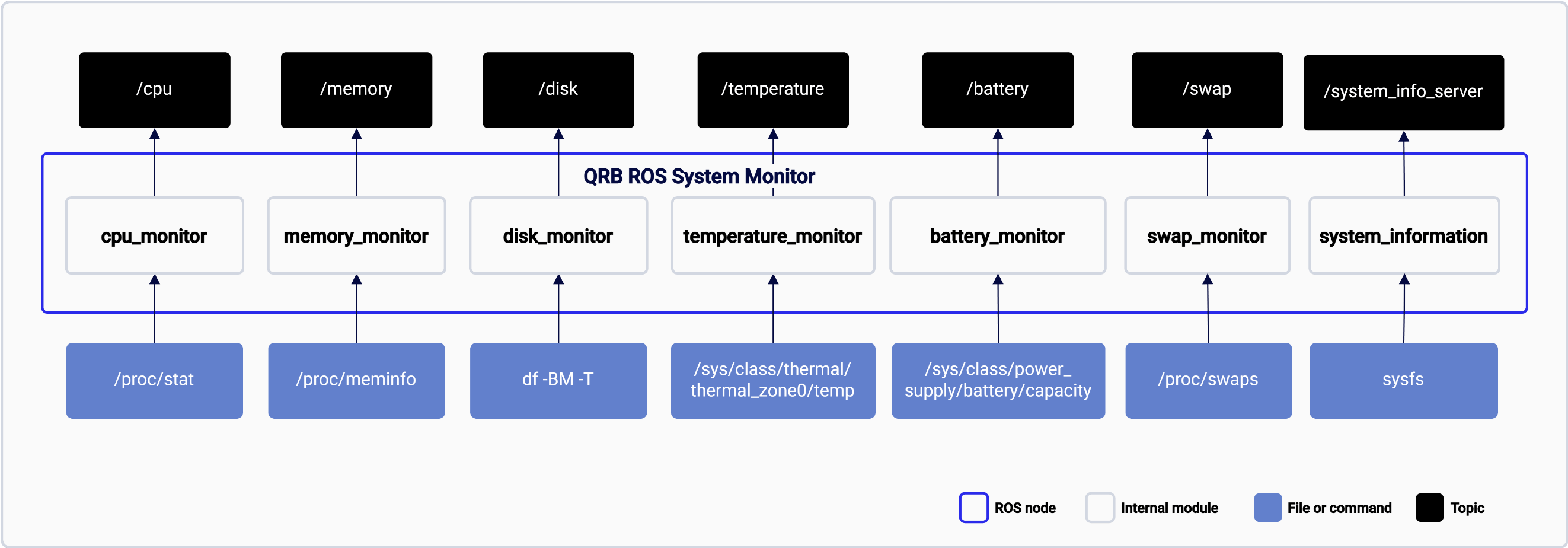
The following figure shows the pipeline flow, which collects system information with the sysfs node and some system standard command tools and then publishes these data with ROS messages.
 ## ROS nodes used in the `qrb_ros_system_monitor` pipeline
The following table lists the ROS nodes used in the `qrb_ros_system_monitor` pipeline and describes what each node publishes.
| ROS node | Description |
| -------------------- | -------------------------------------------------------- |
| `CpuMonitor` | Publishes CPU loading information. |
| `MemoryMonitor` | Publishes memory usage information. |
| `DiskMonitor` | Publishes disk usage information. |
| `SwapMonitor` | Publishes swap space information |
| `TemperatureMonitor` | Publishes CPU temperature. |
| `BatteryMonitor` | Publishes battery information. |
| `SystemInfoServer` | Serves for static system information, such as CPU count. |
## ROS topics used in the `qrb_ros_system_monitor` pipeline
The following table lists the ROS topics used in the `qrb_ros_system_monitor` pipeline, with the message type and a description of each topic.
| ROS topic | Type | Description |
| --------------------- | -------------------------------------------- | --------------------------------------------- |
| `/cpu` | `qrb_ros_system_monitor::CpuMonitor` | CPU loading information. |
| `/memory` | `qrb_ros_system_monitor::MemoryMonitor` | Memory usage information. |
| `/disk` | `qrb_ros_system_monitor::DiskMonitor` | Disk usage information. |
| `/swap` | `qrb_ros_system_monitor::SwapMonitor` | Swap space information |
| `/temperature` | `qrb_ros_system_monitor::TemperatureMonitor` | CPU temperature. |
| `/battery` | `qrb_ros_system_monitor::BatteryMonitor` | Battery information. |
| `/system_info_server` | `qrb_ros_system_monitor::SystemInfoServer` | Static system information, such as CPU count. |
## ROS services used in the ROS topics used in `qrb_ros_system_monitor` pipeline
The following table lists the ROS services used in the `qrb_ros_system_monitor` pipeline, with the service type and a description.
| ROS service | Type | Description |
| --------------------- | ------------------------------------------ | --------------------------------------------- |
| `/system_info_server` | `qrb_ros_system_monitor::SystemInfoServer` | Static system information, such as CPU count. |
## Prerequisites
You have set up the device, installed ROS2 Jazzy and the Qualcomm Intelligent Robotics (QIR) SDK on the device according to [Install the QIR SDK](./install-the-qir-sdk).
## Run out-of-the-box `qrb_ros_system_monitor`
```bash Run the system monitor theme={null}
source /opt/ros/jazzy/setup.bash
ros2 run qrb_ros_system_monitor qrb_ros_system_monitor
```
```bash List the topics and echo the system status theme={null}
source /opt/ros/jazzy/setup.bash
ros2 topic list
# You can now echo system monitor, for example, /cpu
ros2 topic echo /cpu
```
## Limitation
The system information values are collected by the sysfs node and Linux standard command-line tools. Therefore, if the sysfs path changes or the command-line tools output format changes, those ROS nodes may not work properly.
## ROS nodes used in the `qrb_ros_system_monitor` pipeline
The following table lists the ROS nodes used in the `qrb_ros_system_monitor` pipeline and describes what each node publishes.
| ROS node | Description |
| -------------------- | -------------------------------------------------------- |
| `CpuMonitor` | Publishes CPU loading information. |
| `MemoryMonitor` | Publishes memory usage information. |
| `DiskMonitor` | Publishes disk usage information. |
| `SwapMonitor` | Publishes swap space information |
| `TemperatureMonitor` | Publishes CPU temperature. |
| `BatteryMonitor` | Publishes battery information. |
| `SystemInfoServer` | Serves for static system information, such as CPU count. |
## ROS topics used in the `qrb_ros_system_monitor` pipeline
The following table lists the ROS topics used in the `qrb_ros_system_monitor` pipeline, with the message type and a description of each topic.
| ROS topic | Type | Description |
| --------------------- | -------------------------------------------- | --------------------------------------------- |
| `/cpu` | `qrb_ros_system_monitor::CpuMonitor` | CPU loading information. |
| `/memory` | `qrb_ros_system_monitor::MemoryMonitor` | Memory usage information. |
| `/disk` | `qrb_ros_system_monitor::DiskMonitor` | Disk usage information. |
| `/swap` | `qrb_ros_system_monitor::SwapMonitor` | Swap space information |
| `/temperature` | `qrb_ros_system_monitor::TemperatureMonitor` | CPU temperature. |
| `/battery` | `qrb_ros_system_monitor::BatteryMonitor` | Battery information. |
| `/system_info_server` | `qrb_ros_system_monitor::SystemInfoServer` | Static system information, such as CPU count. |
## ROS services used in the ROS topics used in `qrb_ros_system_monitor` pipeline
The following table lists the ROS services used in the `qrb_ros_system_monitor` pipeline, with the service type and a description.
| ROS service | Type | Description |
| --------------------- | ------------------------------------------ | --------------------------------------------- |
| `/system_info_server` | `qrb_ros_system_monitor::SystemInfoServer` | Static system information, such as CPU count. |
## Prerequisites
You have set up the device, installed ROS2 Jazzy and the Qualcomm Intelligent Robotics (QIR) SDK on the device according to [Install the QIR SDK](./install-the-qir-sdk).
## Run out-of-the-box `qrb_ros_system_monitor`
```bash Run the system monitor theme={null}
source /opt/ros/jazzy/setup.bash
ros2 run qrb_ros_system_monitor qrb_ros_system_monitor
```
```bash List the topics and echo the system status theme={null}
source /opt/ros/jazzy/setup.bash
ros2 topic list
# You can now echo system monitor, for example, /cpu
ros2 topic echo /cpu
```
## Limitation
The system information values are collected by the sysfs node and Linux standard command-line tools. Therefore, if the sysfs path changes or the command-line tools output format changes, those ROS nodes may not work properly.