> ## Documentation Index
> Fetch the complete documentation index at: https://dragonwingdocs.qualcomm.com/llms.txt
> Use this file to discover all available pages before exploring further.
# Run basic AMR functionality with the AMR service
> qrb_ros_amr_service is a ROS2 package suite designed to manage the AMR behaviors on Qualcomm robotics platforms.
Key features include:
* P2P navigation requests.
* Path following.
* Mapping services.
* Automatic return to charging station when battery is low.
## Software structure
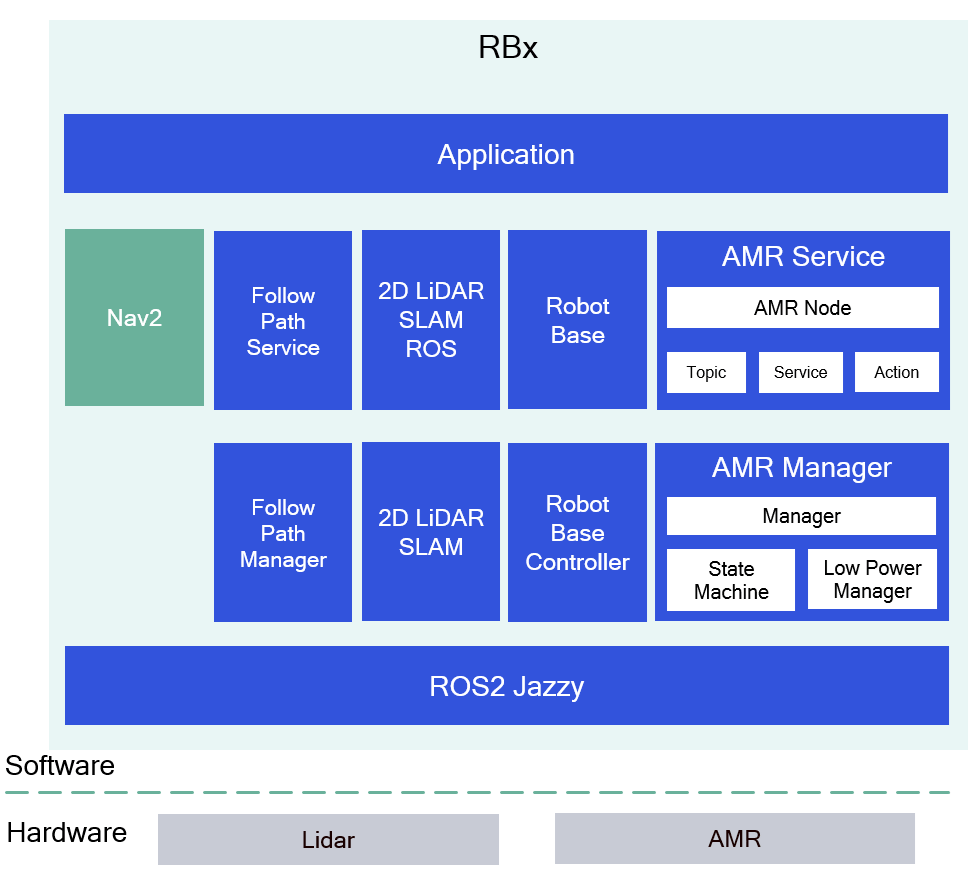
The following figure shows the structure of the autonomous mobile robot (AMR) service.
 ## ROS nodes and modules used in the AMR service
The following table lists the ROS nodes and modules used in the AMR service and the function of each one.
| Node name | Function |
| ----------------------------------------- | -------------------------------------------------------------------------------------------------------------------------------------------------------------------------------------------------------------------------------------------------- |
| `qrb_ros_amr` | ROS2 package implementing action/service clients & servers, publishers and subscribers for navigation, mapping and AMR status feedback. |
| `qrb_amr_manager` | C++ library providing APIs for AMR state management and charging logic.
## ROS nodes and modules used in the AMR service
The following table lists the ROS nodes and modules used in the AMR service and the function of each one.
| Node name | Function |
| ----------------------------------------- | -------------------------------------------------------------------------------------------------------------------------------------------------------------------------------------------------------------------------------------------------- |
| `qrb_ros_amr` | ROS2 package implementing action/service clients & servers, publishers and subscribers for navigation, mapping and AMR status feedback. |
| `qrb_amr_manager` | C++ library providing APIs for AMR state management and charging logic.
- Low Power Manager: Returns to charging station when battery `< 2.2V`.
- Manager: Library interface.
- State Machine: Manages AMR state and actions. |
| Follow Path Service & Follow Path Manager | ROS2 package for path following navigation |
| Robot Base & Robot Base Controller | ROS2 package for AMR base control. |
| 2D lidar SLAM ROS and 2D lidar SLAM | Provides mapping and localization. |
| Nav2 | Provides P2P navigation. |
## `qrb_ros_amr_service` APIs
The following table lists the interfaces that `qrb_ros_amr_service` exposes, with the name, type, and description of each one.
| Interface | Name | Type | Description |
| -------------- | ----------------- | ---------------------------------- | --------------------------------------------- |
| Publisher | `amr_status` | `qrb_ros_amr_msgs::msg::AMRStatus` | Publishes AMR status. |
| Subscriber | `test` | `std_msgs::msg::Int16` | Receives the debugging information. |
| Subscriber | `debug_exception` | `std_msgs::msg::Int16` | Receives the simulated exception information. |
| Service Server | `sub_cmd` | `qrb_ros_amr_msgs::srv::SubCmd` | Handles sub-command requests. |
| Service Server | `amr_mapping` | `qrb_ros_amr_msgs::srv::Mapping` | Handles mapping requests. |
| Service Server | `api` | `qrb_ros_amr_msgs::srv::API` | Handles API requests. |
| Action Server | `cmd` | `qrb_ros_amr_msgs::action::Cmd` | Handles navigation commands. |
## Prerequisites
You have set up the device, installed ROS2 Jazzy and the Qualcomm Intelligent Robotics (QIR) SDK on the device according to [Install the QIR SDK](./install-the-qir-sdk).
## Run the out-of-the-box AMR service
Run the following commands on the device unless otherwise specified.
```bash Install the AMR service packages theme={null}
sudo apt install ros-jazzy-nav2-msgs
sudo apt install ros-jazzy-nav-2d-msgs
sudo apt install ros-jazzy-qrb-ros-amr-msgs
sudo apt install ros-jazzy-qrb-ros-navigation-msgs
sudo apt install ros-jazzy-qrb-amr-manager
sudo apt install ros-jazzy-qrb-ros-amr
```
Run step 1 to step 5 of [Run out-of-the-box 2D lidar SLAM](./enable-2d-lidar-slam-with-cartographer_node-and-cartographer_occupancy_grid_node#run-out-of-the-box-2d-lidar-slam) to launch 2D Lidar simultaneous localization and mapping (SLAM), skipping step 6.
Set up the follow-path service according to step 1 to step 3 of [Run out-of-the-box qrb\_ros\_follow\_path service](./test-follow-path-with-the-qrb_ros_follow_path-service#run-out-of-the-box-qrb_ros_follow_path-service).
```bash Install and launch nav2 theme={null}
sudo apt install ros-jazzy-navigation2 ros-jazzy-nav2-bringup ros-jazzy-nav2-route
ros2 launch nav2_bringup navigation_launch.py
```
```bash Launch the AMR service theme={null}
source /opt/ros/jazzy/setup.bash
source install/setup.bash
ros2 launch qrb_ros_amr qrb_ros_amr_bringup.launch.py
```
* You can implement a ROS node according to the `qrb_ros_amr_service` APIs table to complete the mapping, follow-path and P2P navigation.
* You can also use these ROS commands to complete the mapping, follow-path and P2P navigation.
a. Install `rqt-robot-steering` on the host computer (Ubuntu 24.04)
```bash theme={null}
sudo apt install ros-jazzy-rqt-robot-steering
```
b. Run `rqt-robot-steering` on the host computer.
```bash theme={null}
ros2 run rqt_robot_steering rqt_robot_steering
```
c. Initiate the AMR.
```bash theme={null}
ros2 service call /api qrb_ros_amr_msgs/srv/API "{api_id: 1}"
```
d. Start mapping.
```bash theme={null}
ros2 service call /amr_mapping qrb_ros_amr_msgs/srv/Mapping "{cmd: 2}"
```
e. Install and set up `rviz2` on the host computer.
```bash theme={null}
sudo apt install ros-jazzy-rviz2
ros2 run rviz2 rviz2
```
f. Use `rqt-robot-steering` to control the movement of the robot base.
g. Stop mapping.
```bash theme={null}
ros2 service call /amr_mapping qrb_ros_amr_msgs/srv/Mapping "{cmd: 3}"
```
The base starts to rotate, and after a period of time, it stops rotating. The map is displayed properly on `rviz`.
h. Start a P2P navigation.
```bash theme={null}
ros2 action send_goal /cmd qrb_ros_amr_msgs/action/Cmd "{command: 3, goal: {header: {frame_id: 'map'}, pose: {position: {x: 0.0, y: 0.0, z: 0.0}, orientation: {x: 0.0, y: 0.0, z: 0.0, w: 2.0}}}}"
```
The pose can be replaced by a real value of map.
i. Pause the current P2P navigation.
```bash theme={null}
ros2 service call /sub_cmd qrb_ros_amr_msgs/srv/SubCmd "{ subcommand: 2}"
```
j. Resume the current P2P navigation.
```bash theme={null}
ros2 service call /sub_cmd qrb_ros_amr_msgs/srv/SubCmd "{ subcommand: 3}"
```
k. After the P2P navigation is completed, set the waypoint and virtual path according to step 4 (a to j) of the follow-path out-of-the-box steps.
l. Use `rqt-robot-steering` to move the robot base to waypoint (`id = 2`).
m. Start a follow-path operation from waypoint (`id = 2`) to waypoint (`id = 1`).
```bash theme={null}
ros2 action send_goal /cmd qrb_ros_amr_msgs/action/Cmd "{command: 6, goal_id: 1}"
```
## Build from source and run AMR service
Build the autonomous mobile robot (AMR) service from source when you need to change the service code. The device steps install the dependencies, clone the source repositories, build the packages, and run the result.
### Device steps
```bash Install the dependencies theme={null}
sudo apt install ros-jazzy-nav2-msgs
sudo apt install ros-jazzy-nav-2d-msgs
```
```bash Download and build theme={null}
source /opt/ros/jazzy/setup.bash
git clone https://github.com/qualcomm-qrb-ros/qrb_ros_amr_service.git
git clone https://github.com/qualcomm-qrb-ros/qrb_ros_interfaces.git
colcon build
```
Run and test according to steps 2 to 6 of [Run the out-of-the-box AMR service](./run-basic-amr-functionality-with-the-amr-service#run-the-out-of-the-box-amr-service).