> ## Documentation Index
> Fetch the complete documentation index at: https://dragonwingdocs.qualcomm.com/llms.txt
> Use this file to discover all available pages before exploring further.
# Playback and record audio with qrb_ros_audio_service
> qrb_ros_audio_service is a ROS package that provides core audio functionalities. It serves as the primary interface for audio playback and recording within the ROS ecosystem.
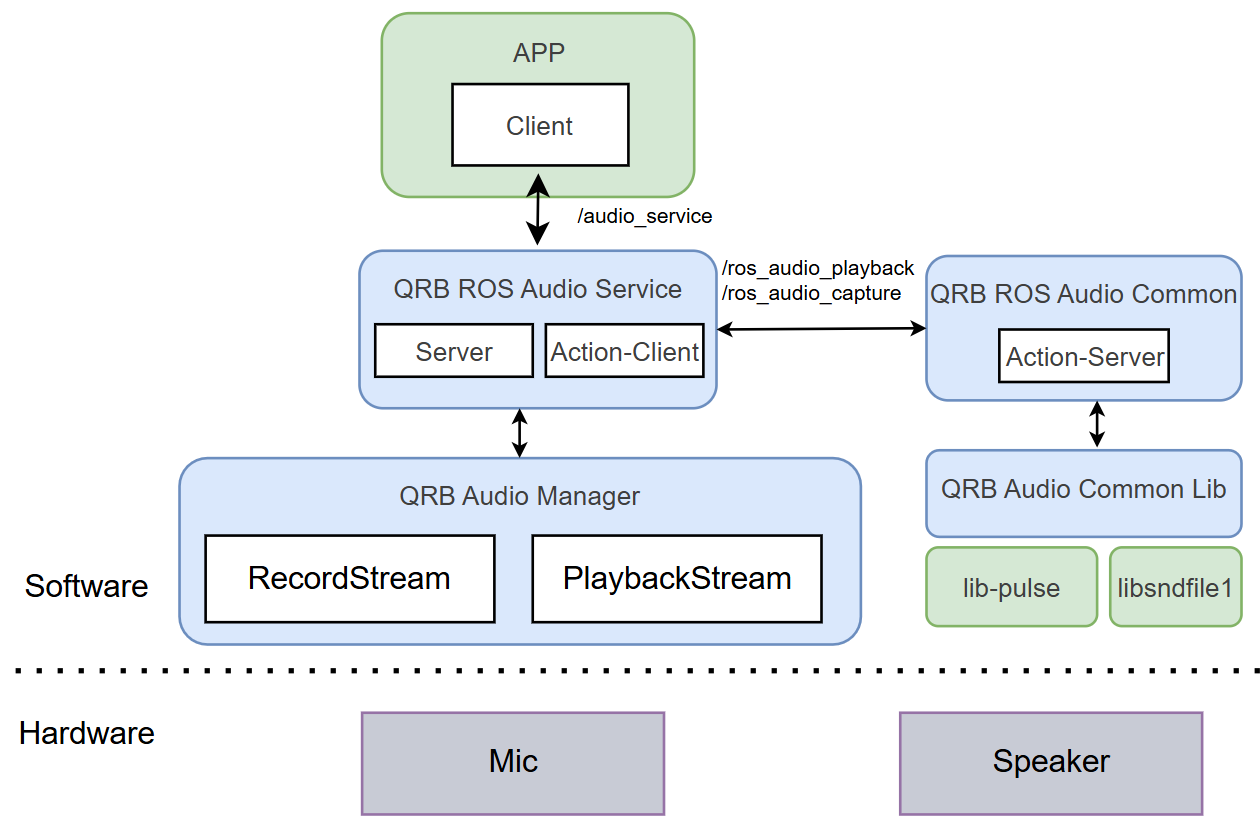
* QRB ROS Audio Service: A ROS node that creates a service server, responds to requests from the application, and translates them into operations on the Audio Manager.
* QRB ROS Audio Common: A ROS node that acts as a bridge between QRB ROS Audio Service and QRB Audio Common Lib.
* QRB Audio Manager: Executes audio operations provided by the Audio Service, based on stream configurations.
* QRB Audio Common Lib: Provides audio functionalities by calling PulseAudio APIs.
## Pipeline flow
The following figure shows the pipeline flow for `qrb_ros_audio_service`.
 ## `qrb_ros_audio_service` APIs
The following table lists the ROS interfaces that `qrb_ros_audio_service` provides.
| Interface | Name | Type | Description |
| --------- | ---------------- | ----------------------------------------------- | ---------------------------------------------------------------------------------- |
| Service | `/audio_service` | `qrb_ros_audio_service_msgs::srv::AudioRequest` | Allows ROS applications to send service requests for audio playback and recording. |
## `qrb_ros_audio_common` APIs
The `qrb_ros_audio_common` package exposes ROS parameters, ROS interfaces, and the `qrb_audio_common_lib` APIs. Use them to set up playback and capture streams and to control them from your own node.
### ROS parameters
The following table lists the ROS parameters of `qrb_ros_audio_common`, with the type, description, and default value of each parameter.
| Name | Type | Description | Default value |
| ------------- | -------- | --------------------------------------------------------------------------------------------------------- | ---------------- |
| `Stream_type` | `string` | Specifies the stream type for the action: `playback` for audio playback or `capture` for audio recording. | `default_stream` |
| `action_name` | `string` | Specifies the name of an action. | `default_action` |
| `topic_name` | `string` | Specifies the name of a topic. | `default_topic` |
### ROS interfaces
The following table lists the ROS interfaces of `qrb_ros_audio_common`, with the name, type, and purpose of each interface.
| Interface | Name | Type | Description |
| ---------- | --------------------- | ------------------------------------------------ | ---------------------------------------------------------------------------------------------------------------------------------------------------------- |
| Action | `/ros_audio_playback` | `qrb_ros_audio_common_msgs::action::AudioCommon` | Action for playback function, specify the action name by the `action_name` parameter. |
| Action | `/ros_audio_capture` | `qrb_ros_audio_common_msgs::action::AudioCommon` | Action for record function, specify action name by `action_name` parameter. |
| Subscriber | `/qrb_audiodata` | `qrb_ros_audio_common_msgs::msg::AudioData` | Used for streaming audio playback. Subscribes to raw audio data from this node. You can change the topic name using the `--topic_name` parameter. |
| Publisher | `/qrb_audiodata` | `qrb_ros_audio_common_msgs::msg::AudioData` | Used for streaming audio recording. Publishes real-time raw audio data during recording. You can change the topic name using the `--topic_name` parameter. |
### `qrb_audio_common_lib` APIs
The following table lists the `qrb_audio_common_lib` APIs, with the parameters and behavior of each function.
| Function | Parameters | Description |
| -------------------------------------------------------------------------------------------------------------- | --------------------------------------------------------------------------------------------------------------------------- | --------------------------------------------------------------------------- |
| `uint32_t audio_stream_open(const audio_stream_info & stream_info, stream_event_callback_func event_callback)` | • `stream_info`: A structure specifies the configuration of stream.
## `qrb_ros_audio_service` APIs
The following table lists the ROS interfaces that `qrb_ros_audio_service` provides.
| Interface | Name | Type | Description |
| --------- | ---------------- | ----------------------------------------------- | ---------------------------------------------------------------------------------- |
| Service | `/audio_service` | `qrb_ros_audio_service_msgs::srv::AudioRequest` | Allows ROS applications to send service requests for audio playback and recording. |
## `qrb_ros_audio_common` APIs
The `qrb_ros_audio_common` package exposes ROS parameters, ROS interfaces, and the `qrb_audio_common_lib` APIs. Use them to set up playback and capture streams and to control them from your own node.
### ROS parameters
The following table lists the ROS parameters of `qrb_ros_audio_common`, with the type, description, and default value of each parameter.
| Name | Type | Description | Default value |
| ------------- | -------- | --------------------------------------------------------------------------------------------------------- | ---------------- |
| `Stream_type` | `string` | Specifies the stream type for the action: `playback` for audio playback or `capture` for audio recording. | `default_stream` |
| `action_name` | `string` | Specifies the name of an action. | `default_action` |
| `topic_name` | `string` | Specifies the name of a topic. | `default_topic` |
### ROS interfaces
The following table lists the ROS interfaces of `qrb_ros_audio_common`, with the name, type, and purpose of each interface.
| Interface | Name | Type | Description |
| ---------- | --------------------- | ------------------------------------------------ | ---------------------------------------------------------------------------------------------------------------------------------------------------------- |
| Action | `/ros_audio_playback` | `qrb_ros_audio_common_msgs::action::AudioCommon` | Action for playback function, specify the action name by the `action_name` parameter. |
| Action | `/ros_audio_capture` | `qrb_ros_audio_common_msgs::action::AudioCommon` | Action for record function, specify action name by `action_name` parameter. |
| Subscriber | `/qrb_audiodata` | `qrb_ros_audio_common_msgs::msg::AudioData` | Used for streaming audio playback. Subscribes to raw audio data from this node. You can change the topic name using the `--topic_name` parameter. |
| Publisher | `/qrb_audiodata` | `qrb_ros_audio_common_msgs::msg::AudioData` | Used for streaming audio recording. Publishes real-time raw audio data during recording. You can change the topic name using the `--topic_name` parameter. |
### `qrb_audio_common_lib` APIs
The following table lists the `qrb_audio_common_lib` APIs, with the parameters and behavior of each function.
| Function | Parameters | Description |
| -------------------------------------------------------------------------------------------------------------- | --------------------------------------------------------------------------------------------------------------------------- | --------------------------------------------------------------------------- |
| `uint32_t audio_stream_open(const audio_stream_info & stream_info, stream_event_callback_func event_callback)` | • `stream_info`: A structure specifies the configuration of stream.
• `stream_event_callback_func`: callback function. | Opens the stream. Returns `stream_handle` when successful. |
| `int audio_stream_start(uint32_t stream_handle)` | `stream_handle`: A unique identifier for stream. | Starts the stream. Returns 0 when successful. |
| `int audio_stream_mute(uint32_t stream_handle, bool mute)` | • `stream_handle`: A unique identifier for stream.
• `mute`: Boolean flag indicating whether to mute the stream. | Mutes or unmutes the stream. Returns 0 when successful. |
| `int audio_stream_stop(uint32_t stream_handle)` | `stream_handle`: A unique identifier for stream. | Stops the stream. Returns 0 when successful. |
| `size_t audio_stream_write(uint32_t stream_handle, size_t length, void * buf)` | • `stream_handle`: A unique identifier for stream.
• `length`: Size to write.
• `buf`: Point to data buffer. | Writes buffer to play back the stream. Returns the actually written length. |
## Prerequisites
You have set up the device, installed ROS2 Jazzy and the Qualcomm Intelligent Robotics (QIR) SDK on the device according to [Install the QIR SDK](./install-the-qir-sdk).
## Run out-of-the-box `qrb_ros_audio_service`
```bash Install the packages theme={null}
sudo apt install ros-jazzy-qrb-ros-audio-common ros-jazzy-qrb-ros-audio-service
```
a. Terminal 1: Audio common package
```bash theme={null}
source /opt/ros/jazzy/setup.bash
ros2 launch qrb_ros_audio_common component.launch.py
```
b. Terminal 2: Audio service
```bash theme={null}
source /opt/ros/jazzy/setup.bash
ros2 launch qrb_ros_audio_service audio_service.launch.py
```
Push a music file to a device path, for example, `/tmp/xxx.wav`.
a. Get the `audio_service_test.py` script for music recording and playback.
```bash theme={null}
wget https://raw.githubusercontent.com/qualcomm-qrb-ros/qrb_ros_audio_service/main/tests/audio_service_test.py
```
b. Choose one of the following actions to test the audio service.
* Step-by-step playback (output the sound through the speaker).
```bash theme={null}
source /opt/ros/jazzy/setup.bash
python3 audio_service_test.py --type='playback' --source='/tmp/xxx.wav' --volume=100
```
* Step-by-step record (record sound input from the mic and save to a file).
```bash theme={null}
source /opt/ros/jazzy/setup.bash
python3 audio_service_test.py --type='record' --source='/tmp/rec.wav' --channels=1 --sample_rate=16000 --sample_format=16
```
* Streaming playback.
```bash theme={null}
source /opt/ros/jazzy/setup.bash
python3 audio_service_test.py --type='playback' --channels=1 --sample_rate=16000 --sample_format=16 --pub_pcm=True --volume=100 --topic_name='loopback'
```
* Streaming record.
If you start streaming playback and streaming record the sound will loopback from the mic to the speaker.
```bash theme={null}
source /opt/ros/jazzy/setup.bash
python3 audio_service_test.py --type='record' --source='/tmp/rec.wav' --channels=1 --sample_rate=16000 --sample_format=16 --topic_name='loopback'
```
## Build from source
```bash Install the dependencies theme={null}
sudo apt install build-essential cmake pkg-config
# Install ROS2 Jazzy (if not already installed)
# Follow instructions at https://docs.ros.org/en/jazzy/Installation.html
sudo apt install ros-jazzy-rclcpp ros-jazzy-rclcpp-components ros-jazzy-ament-cmake-auto ros-jazzy-std-msgs libpulse-dev libsndfile1-dev
```
```bash Build the packages theme={null}
cd ~/ros2_ws/src
git clone https://github.com/qualcomm-qrb-ros/qrb_ros_audio_service.git
cd ~/ros2_ws
colcon build
```
```bash Run the test script theme={null}
source install/setup.bash
source /opt/ros/jazzy/setup.bash
python3 audio_service_test.py --type='playback' --source='/tmp/xxx.wav' --volume=100
```