> ## Documentation Index
> Fetch the complete documentation index at: https://dragonwingdocs.qualcomm.com/llms.txt
> Use this file to discover all available pages before exploring further.
# Test follow-path with the qrb_ros_follow_path service
> The qrb_ros_follow_path service is a ROS2 package suite designed for path following navigation on the Qualcomm® Robotics Platform.
The key features include:
* Waypoint and virtual path management on the map.
* Path following navigation to target waypoints.
* Obstacle avoidance during path following.
## Software structure
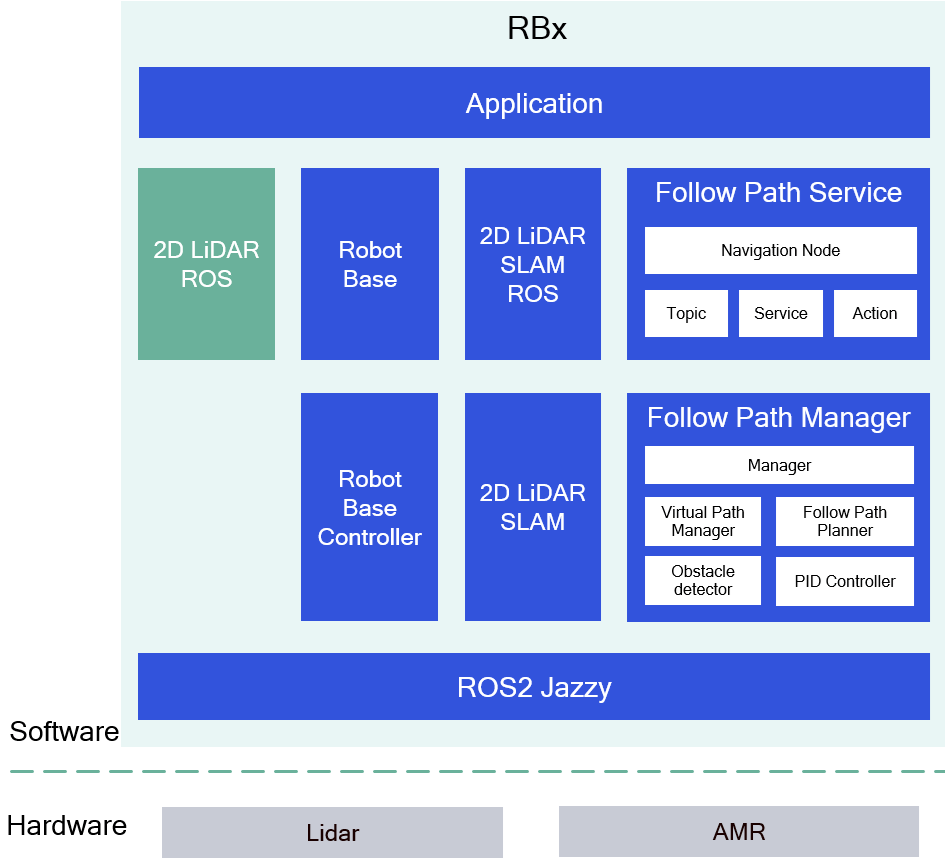
The following figure shows the software structure of the `qrb_ros_follow_path` service:
 ## ROS nodes and modules used in the `qrb_ros_follow_path` service
The following table describes the ROS nodes and modules used in the `qrb_ros_follow_path` service.
| Node name | Description |
| ------------------------------------------------------------------------------------------------------------------------------- | --------------------------------------------------------------------------------------------------------------------------------------------------------------------------------------------------------------------------------------------------------------------------------------------------------------------------------------------------------------------------------------------------------------------------------------------------------------------------------------------------------------------------------------------------------------------------------------------------------------------------------------- |
| [qrb\_ros\_follow\_path](https://github.com/qualcomm-qrb-ros/qrb_ros_follow_path_service/tree/main/qrb_ros_follow_path) | This ROS2 package implements the action/service clients and servers, publishers and subscribers for waypoints, virtual paths, follow path navigation, position and lidar data. |
| [qrb\_follow\_path\_manager](https://github.com/qualcomm-qrb-ros/qrb_ros_follow_path_service/tree/main/qrb_follow_path_manager) | This is a C++ library that provides APIs for waypoints and virtual path management and path following navigation.
## ROS nodes and modules used in the `qrb_ros_follow_path` service
The following table describes the ROS nodes and modules used in the `qrb_ros_follow_path` service.
| Node name | Description |
| ------------------------------------------------------------------------------------------------------------------------------- | --------------------------------------------------------------------------------------------------------------------------------------------------------------------------------------------------------------------------------------------------------------------------------------------------------------------------------------------------------------------------------------------------------------------------------------------------------------------------------------------------------------------------------------------------------------------------------------------------------------------------------------- |
| [qrb\_ros\_follow\_path](https://github.com/qualcomm-qrb-ros/qrb_ros_follow_path_service/tree/main/qrb_ros_follow_path) | This ROS2 package implements the action/service clients and servers, publishers and subscribers for waypoints, virtual paths, follow path navigation, position and lidar data. |
| [qrb\_follow\_path\_manager](https://github.com/qualcomm-qrb-ros/qrb_ros_follow_path_service/tree/main/qrb_follow_path_manager) | This is a C++ library that provides APIs for waypoints and virtual path management and path following navigation.
• Manager: Library interface.
• Virtual Path Manager: Manages waypoints and virtual paths and computes the follow-path.
• Follow Path Planner: Sends linear speed and angular speed to Robot Base Controller, checks for obstacles on the follow path and supports dynamic obstacle avoidance.
• Obstacle Detector: Uses laser scan and a grid map to detect dynamic obstacles.
• PID Controller: Computes the speed and checks if the target pose is reached. |
| [Robot Base and Robot Base Controller](https://github.com/qualcomm-qrb-ros/qrb_ros_robot_base) | This is a ROS2 package for autonomous mobile robot (AMR) base control. |
| 2D lidar SLAM ROS and 2D lidar SLAM | Provides mapping and localization. |
| 2D lidar ROS | Provides lidar data. |
## `qrb_ros_follow_path_service` APIs
The following table describes the `qrb_ros_follow_path_service` APIs.
| Interface | Name | Type | Description |
| -------------- | ---------------------- | ------------------------------------------------- | ------------------------------------------------------------------ |
| Subscriber | `developer_mode` | `std_msgs::msg::Int16` | Receives debugging information. |
| Subscriber | `robot_base_exception` | `qrb_ros_robot_base_msgs::msg::Exception` | Receives exception information. |
| Service server | `virtual_path` | `qrb_ros_navigation_msgs::srv::VirtualPath` | Manages waypoints or the virtual path. |
| Service server | `compute_follow_path` | `qrb_ros_navigation_msgs::srv::ComputeFollowPath` | Computes the follow-path, including the passing through waypoints. |
| Service server | `follow_path_sub_cmd` | `qrb_ros_amr_msgs::srv::SubCmd` | Cancel, pause or resume follow path. |
| Action server | `wfollowpath` | `qrb_ros_navigation_msgs::action::FollowPath` | Request a follow path navigation. |
## Prerequisites
You have set up the device, installed ROS2 Jazzy and the Qualcomm Intelligent Robotics (QIR) SDK on the device according to [Install the QIR SDK](./install-the-qir-sdk).
## Run out-of-the-box `qrb_ros_follow_path` service
Run the following commands on the device unless otherwise specified.
```bash theme={null}
sudo apt install ros-jazzy-nav2-msgs
sudo apt install ros-jazzy-nav-2d-msgs
sudo apt install ros-jazzy-qrb-ros-amr-msgs
sudo apt install ros-jazzy-qrb-ros-navigation-msgs
sudo apt install ros-jazzy-qrb-follow-path-manager
sudo apt install ros-jazzy-qrb-ros-follow-path
```
Set up 2D lidar SLAM by completing the steps 1-6 in [Run out-of-the-box 2D lidar SLAM](./enable-2d-lidar-slam-with-cartographer_node-and-cartographer_occupancy_grid_node#run-out-of-the-box-2d-lidar-slam). Ensure that the mapping is completed.
```bash theme={null}
source /opt/ros/jazzy/setup.bash
source install/setup.bash
ros2 launch qrb_ros_follow_path qrb_ros_follow_path_bringup.launch.py
```
* You can implement a ROS node according to the [`qrb_ros_follow_path_service` APIs](#qrb_ros_follow_path_service-apis) table to complete the follow-path navigation.
* You also can use these ROS commands to complete the follow-path navigation.
a. Install `rqt-robot-steering` on the host computer (Ubuntu 24.04).
```bash theme={null}
sudo apt install ros-jazzy-rqt-robot-steering
```
b. Run `rqt-robot-steering` on the host computer.
```bash theme={null}
ros2 run rqt_robot_steering rqt_robot_steering
```
c. Use `rqt_robot_steering` to move the robot base to an expected position.
d. Install and set up `rviz2` on the host computer (Ubuntu 24.04).
```bash theme={null}
sudo apt install ros-jazzy-rviz2
ros2 run rviz2 rviz2
```
e. Get the pose from `rviz` and convert the pose to a 2D position (x,y,angle).
f. Add a waypoint with the current position.
For example, if the current position is (0.1, 0.3, 3.0), use the following command:
```bash theme={null}
ros2 service call /virtual_path qrb_ros_navigation_msgs/srv/VirtualPath "{api_id: 2, waypoint: {x: 0.1, y: 0.3, z: 3.0}}"
```
Get the waypoint ID from the service response. For example, waypoint ID is 1.
g. Use `rqt_robot_steering` to move the robot base to another position.
h. Get the pose from `rviz` and convert the pose to a 2D position (x,y,angle).
i. Add a waypoint with the current position.
For example, if the current position is (0.3, 0.1, 3.0), use the following command:
```bash theme={null}
ros2 service call /virtual_path qrb_ros_navigation_msgs/srv/VirtualPath "{api_id: 2, waypoint: {x: 0.3, y: 0.1, z: 3.0}}"
```
Get the waypoint id from service respond. For example, waypoint ID is 2.
j. Set the virtual path between waypoint (id = 2) and waypoint (id = 1).
```bash theme={null}
ros2 service call /virtual_path qrb_ros_navigation_msgs/srv/VirtualPath "{api_id: 6, waypoint_id: 1, adjacent_waypoints: [2]}"
```
k. Start a follow-path operation from waypoint (id = 2) to waypoint (id = 1).
```bash theme={null}
ros2 action send_goal /wfollowpath qrb_ros_navigation_msgs/action/FollowPath "{goal: 1}"
```
## Build from source and run the `follow-path` service
Build the `follow-path` service from source when you need to change the service code. The device steps install the dependencies, clone the source repositories, build the packages, and run the result.
### Device steps
```bash theme={null}
sudo apt install ros-jazzy-nav2-msgs
sudo apt install ros-jazzy-nav-2d-msgs
```
```bash theme={null}
source /opt/ros/jazzy/setup.bash
git clone https://github.com/qualcomm-qrb-ros/qrb_ros_follow_path_service.git
git clone https://github.com/qualcomm-qrb-ros/qrb_ros_interfaces.git
colcon build
```
Run and test according to step 2 to step 4 of [Run out-of-the-box `qrb_ros_follow_path` service](./test-follow-path-with-the-qrb_ros_follow_path-service#run-out-of-the-box-qrb_ros_follow_path-service).