> ## Documentation Index
> Fetch the complete documentation index at: https://dragonwingdocs.qualcomm.com/llms.txt
> Use this file to discover all available pages before exploring further.
# Test ROS message transport with qrb_ros_transport
> The qrb_ros_transport sample application implements zero-copy transport of ROS messages on Qualcomm robotics platforms.
The implementation has its base on [REP 2007](https://ros.org/reps/rep-2007.html), which provides interfaces to define methods for serializing custom types and/or using those types in intra-process communication without conversion.
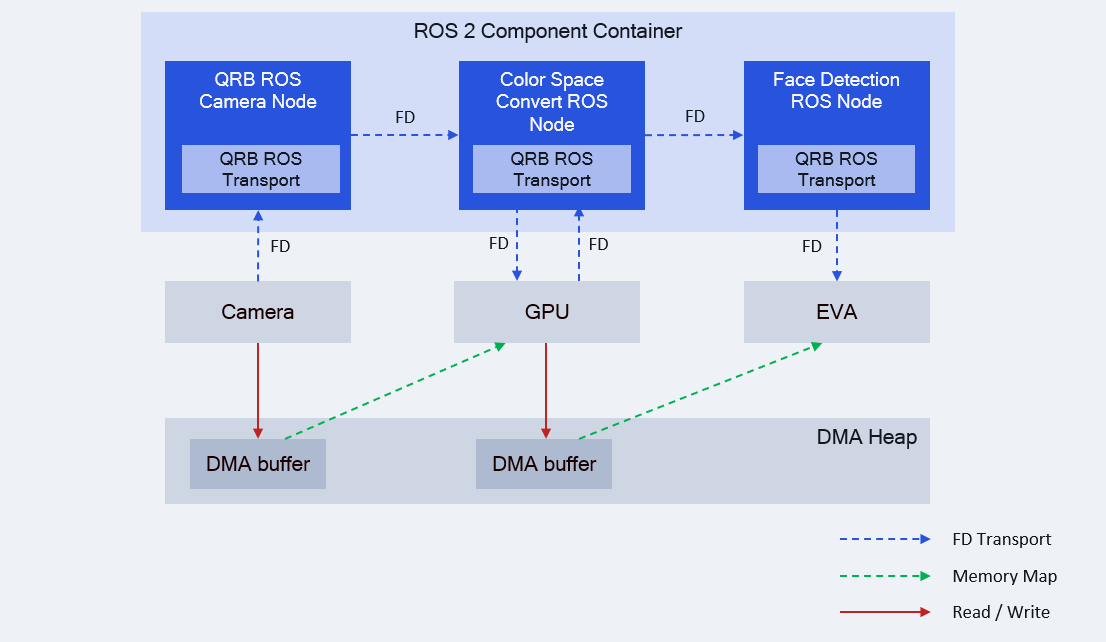
The `qrb_ros_transport` sends image DMA buffer file descriptors (fd) between ROS nodes, rather than sending the image data itself.
Hardware accelerators, such as cameras, GPUs, and EVA, share image data zero-copy through mmap DMA buffers.
## Pipeline flow for `qrb_ros_transport`
The following figure shows the pipeline flow for `qrb_ros_transport`.
 ## Prerequisites
You have set up the device, installed ROS2 Jazzy and the Qualcomm Intelligent Robotics (QIR) SDK on the device according to [Install the QIR SDK](./install-the-qir-sdk).
## Run out-of-the-box `qrb_ros_transport`
```bash Install the packages theme={null}
sudo apt install ros-jazzy-qrb-ros-transport-\*
```
For example:
1. Add the dependencies in your `package.xml`:
```xml package.xml theme={null}
qrb_ros_transport_image_type
```
2. Use `ament_cmake_auto` to find dependencies in your `CMakeLists.txt`:
```cmake CMakeLists.txt theme={null}
find_package(ament_cmake_auto REQUIRED)
ament_auto_find_build_dependencies()
```
3. Use the adapted types in your ROS node.
```cpp Use the adapted image type theme={null}
#include "qrb_ros_transport_image_type/image.hpp"
// Create message
auto msg = std::make_unique();
msg->header = std_msgs::msg::Header();
msg->width = width;
msg->height = height;
msg->encoding = "nv12";
// Allocate dmabuf for message
auto dmabuf = lib_mem_dmabuf::DmaBuffer::alloc(size, "/dev/dma_heap/system");
// ... set data to dmabuf
msg->dmabuf = dmabuf;
// Publish message
pub->publish(std::move(msg));
```
## Build from source
Build from the source of `qrb_ros_transport` and run this application.
```bash Install the dependencies theme={null}
sudo apt install ros-dev-tools \
ros-jazzy-lib-mem-dmabuf \
ros-jazzy-qrb-sensor-client \
ros-jazzy-pcl-conversions colcon
```
```bash Clone the repository theme={null}
mkdir -p ~/qrb_ros_ws/src
cd ~/qrb_ros_ws/src
source /opt/ros/jazzy/setup.bash
git clone https://github.com/qualcomm-qrb-ros/qrb_ros_transport.git
```
```bash Build the workspace theme={null}
cd ~/qrb_ros_ws
colcon build
```
## Prerequisites
You have set up the device, installed ROS2 Jazzy and the Qualcomm Intelligent Robotics (QIR) SDK on the device according to [Install the QIR SDK](./install-the-qir-sdk).
## Run out-of-the-box `qrb_ros_transport`
```bash Install the packages theme={null}
sudo apt install ros-jazzy-qrb-ros-transport-\*
```
For example:
1. Add the dependencies in your `package.xml`:
```xml package.xml theme={null}
qrb_ros_transport_image_type
```
2. Use `ament_cmake_auto` to find dependencies in your `CMakeLists.txt`:
```cmake CMakeLists.txt theme={null}
find_package(ament_cmake_auto REQUIRED)
ament_auto_find_build_dependencies()
```
3. Use the adapted types in your ROS node.
```cpp Use the adapted image type theme={null}
#include "qrb_ros_transport_image_type/image.hpp"
// Create message
auto msg = std::make_unique();
msg->header = std_msgs::msg::Header();
msg->width = width;
msg->height = height;
msg->encoding = "nv12";
// Allocate dmabuf for message
auto dmabuf = lib_mem_dmabuf::DmaBuffer::alloc(size, "/dev/dma_heap/system");
// ... set data to dmabuf
msg->dmabuf = dmabuf;
// Publish message
pub->publish(std::move(msg));
```
## Build from source
Build from the source of `qrb_ros_transport` and run this application.
```bash Install the dependencies theme={null}
sudo apt install ros-dev-tools \
ros-jazzy-lib-mem-dmabuf \
ros-jazzy-qrb-sensor-client \
ros-jazzy-pcl-conversions colcon
```
```bash Clone the repository theme={null}
mkdir -p ~/qrb_ros_ws/src
cd ~/qrb_ros_ws/src
source /opt/ros/jazzy/setup.bash
git clone https://github.com/qualcomm-qrb-ros/qrb_ros_transport.git
```
```bash Build the workspace theme={null}
cd ~/qrb_ros_ws
colcon build
```