> ## Documentation Index
> Fetch the complete documentation index at: https://dragonwingdocs.qualcomm.com/llms.txt
> Use this file to discover all available pages before exploring further.
# Encode and decode video with qrb_ros_video
> qrb_ros_video is a ROS package that provides hardware-accelerated video processing for Qualcomm robotics platforms.
The `qrb_ros_video` sample application provides the following features:
* Hardware-accelerated H.264/H.265 video encoding and decoding using the Qualcomm video processing unit (VPU)
* Zero-copy memory management for high-performance video processing
* Integration with ROS 2 ecosystem and camera pipelines
* Support for real-time video streaming and file I/O operations
## Pipeline flow for `qrb_ros_video`
The following figure shows the pipeline flow for `qrb_ros_video`.
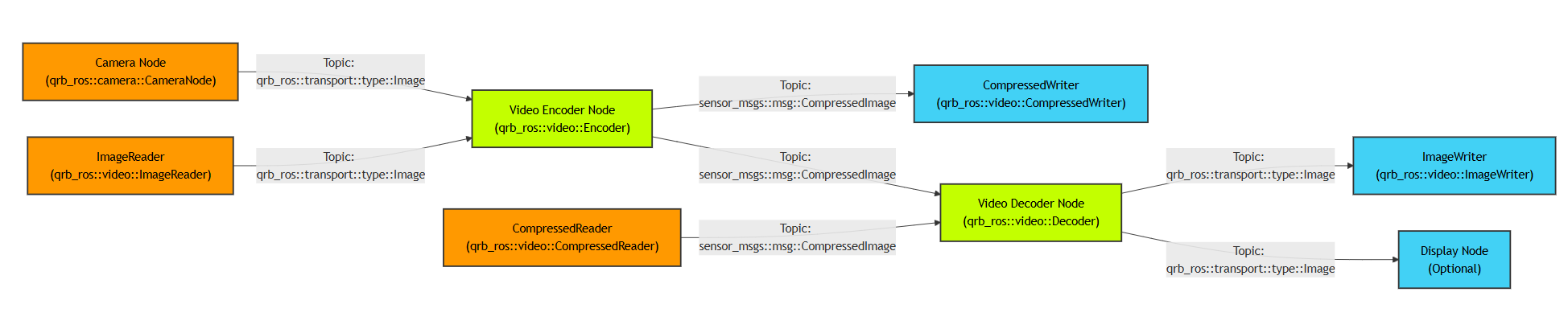 * **Video encoder node**: Converts raw images to compressed H.264/H.265 streams using Qualcomm VPU hardware.
* **Video decoder node**: Decodes compressed video streams back to raw image frames.
* **Camera support**: Accepts input from the QRB ROS Camera package with zero-copy transport.
* **File I/O components**: Implements `CompressedWriter` and `ImageWriter` for saving video data to files.
* **Hardware acceleration**: Leverages Qualcomm Video Processing Unit (VPU) for efficient encoding/decoding.
* **Memory management**: Uses DMA buffers and `qrb_ros_transport` for zero-copy operations.
## `qrb_ros_video` APIs
The `qrb_ros_video` node exposes ROS interfaces and ROS parameters. Use them to feed frames to the encoder or decoder and to configure the video format.
### ROS interfaces
The following table lists the encoder topics, with the message type and content of each topic.
| Topic | Message type | Description |
| --------- | ----------------------------------- | ----------------------------------- |
| `/input` | `qrb_ros::transport::type::Image` | Uncompressed YUV frames |
| `/output` | `sensor_msgs::msg::CompressedImage` | Compressed H.264/H.265 video stream |
The following table lists the decoder topics, with the message type and content of each topic.
| Topic | Message type | Description |
| --------- | ----------------------------------- | ------------------------------------------------------------- |
| `/input` | `sensor_msgs::msg::CompressedImage` | Indicates the input of a compressed H.264/H.265 video stream. |
| `/output` | `qrb_ros::transport::type::Image` | Indicates the output decoded YUV frames. |
### ROS parameters
The following table lists the video encoder parameters, with the type, default value, and purpose of each parameter.
| Parameter | Type | Default | Description |
| -------------- | -------- | ---------- | ---------------------------------------- |
| `format` | `string` | `h264` | Video codec format (`h264`/`h265`) |
| `pixel_format` | `string` | `nv12` | Input pixel format (`nv12`/`p010`) |
| `width` | `int` | `1920` | Video width |
| `height` | `int` | `1080` | Video height |
| `framerate` | `int` | `30` | Frames per second |
| `bitrate` | `int` | `5000000` | Target bit rate in bits/second |
| `rate_control` | `string` | `variable` | Rate control mode (`variable`/`cbr`) |
| `profile` | `string` | `main` | Codec profile (`baseline`/`main`/`high`) |
| `level` | `string` | `4.1` | Codec level |
The following table lists the video decoder parameters, with the type, default value, and purpose of each parameter.
| Parameter | Type | Default | Description |
| -------------- | -------- | ------- | ---------------------------------- |
| `format` | `string` | `h264` | Indicates the input codec format. |
| `pixel-format` | `string` | `nv12` | Indicates the output pixel format. |
## Prerequisites
* You have set up the device, installed ROS2 Jazzy and the Qualcomm Intelligent Robotics (QIR) SDK on the device according to [Install the QIR SDK](./install-the-qir-sdk).
* You have connected the device to the display monitor.
## Run out-of-the-box `qrb_ros_video`
```bash Install the packages theme={null}
sudo apt install ros-jazzy-qrb-ros-video ros-jazzy-qrb-ros-video-test
```
```bash Start the encoder theme={null}
mkdir -p /data
sudo chmod 777 /data
source /opt/ros/jazzy/setup.bash
# push YUV sample file 1920_1080_nv12.yuv to /data/ directory
scp IP@ubuntu:/home/ubuntu
sudo mv /home/ubuntu/1920_1080_nv12.yuv /data
ros2 launch qrb_ros_video encoder_launch.py
```
```bash Start the decoder theme={null}
mkdir -p /data
sudo chmod 777 /data
source /opt/ros/jazzy/setup.bash
# push YUV sample file 1920_1080.mp4 to /data/ directory
scp IP@ubuntu:/home/ubuntu
sudo mv /home/ubuntu/1920_1080.mp4 /data
ros2 launch qrb_ros_video decoder_launch.py
```
## Build from source
```bash Install the dependencies theme={null}
sudo apt install build-essential cmake pkg-config
# Install GStreamer development packages
sudo apt install libgstreamer1.0-dev libgstreamer-plugins-base1.0-devs
# Install ROS2 Jazzy (if not already installed)
# Follow instructions at https://docs.ros.org/en/jazzy/Installation.html
sudo apt install ros-jazzy-rclcpp ros-jazzy-rclcpp-components ros-jazzy-ament-cmake-auto ros-jazzy-std-msgs ros-jazzy-sensor-msgs ros-jazzy-qrb-ros-transport-image-type
```
```bash Build the package theme={null}
source /opt/ros/jazzy/setup.bash
git clone https://github.com/qualcomm-qrb-ros/qrb_ros_video qrb_ros_video
colcon build --packages-select qrb_ros_video
```
```bash Run the encoder theme={null}
source install/setup.bash
# push YUV sample file 1920_1080_nv12.yuv to /data/ directory
ros2 launch qrb_ros_video encoder_launch.py
```
* **Video encoder node**: Converts raw images to compressed H.264/H.265 streams using Qualcomm VPU hardware.
* **Video decoder node**: Decodes compressed video streams back to raw image frames.
* **Camera support**: Accepts input from the QRB ROS Camera package with zero-copy transport.
* **File I/O components**: Implements `CompressedWriter` and `ImageWriter` for saving video data to files.
* **Hardware acceleration**: Leverages Qualcomm Video Processing Unit (VPU) for efficient encoding/decoding.
* **Memory management**: Uses DMA buffers and `qrb_ros_transport` for zero-copy operations.
## `qrb_ros_video` APIs
The `qrb_ros_video` node exposes ROS interfaces and ROS parameters. Use them to feed frames to the encoder or decoder and to configure the video format.
### ROS interfaces
The following table lists the encoder topics, with the message type and content of each topic.
| Topic | Message type | Description |
| --------- | ----------------------------------- | ----------------------------------- |
| `/input` | `qrb_ros::transport::type::Image` | Uncompressed YUV frames |
| `/output` | `sensor_msgs::msg::CompressedImage` | Compressed H.264/H.265 video stream |
The following table lists the decoder topics, with the message type and content of each topic.
| Topic | Message type | Description |
| --------- | ----------------------------------- | ------------------------------------------------------------- |
| `/input` | `sensor_msgs::msg::CompressedImage` | Indicates the input of a compressed H.264/H.265 video stream. |
| `/output` | `qrb_ros::transport::type::Image` | Indicates the output decoded YUV frames. |
### ROS parameters
The following table lists the video encoder parameters, with the type, default value, and purpose of each parameter.
| Parameter | Type | Default | Description |
| -------------- | -------- | ---------- | ---------------------------------------- |
| `format` | `string` | `h264` | Video codec format (`h264`/`h265`) |
| `pixel_format` | `string` | `nv12` | Input pixel format (`nv12`/`p010`) |
| `width` | `int` | `1920` | Video width |
| `height` | `int` | `1080` | Video height |
| `framerate` | `int` | `30` | Frames per second |
| `bitrate` | `int` | `5000000` | Target bit rate in bits/second |
| `rate_control` | `string` | `variable` | Rate control mode (`variable`/`cbr`) |
| `profile` | `string` | `main` | Codec profile (`baseline`/`main`/`high`) |
| `level` | `string` | `4.1` | Codec level |
The following table lists the video decoder parameters, with the type, default value, and purpose of each parameter.
| Parameter | Type | Default | Description |
| -------------- | -------- | ------- | ---------------------------------- |
| `format` | `string` | `h264` | Indicates the input codec format. |
| `pixel-format` | `string` | `nv12` | Indicates the output pixel format. |
## Prerequisites
* You have set up the device, installed ROS2 Jazzy and the Qualcomm Intelligent Robotics (QIR) SDK on the device according to [Install the QIR SDK](./install-the-qir-sdk).
* You have connected the device to the display monitor.
## Run out-of-the-box `qrb_ros_video`
```bash Install the packages theme={null}
sudo apt install ros-jazzy-qrb-ros-video ros-jazzy-qrb-ros-video-test
```
```bash Start the encoder theme={null}
mkdir -p /data
sudo chmod 777 /data
source /opt/ros/jazzy/setup.bash
# push YUV sample file 1920_1080_nv12.yuv to /data/ directory
scp IP@ubuntu:/home/ubuntu
sudo mv /home/ubuntu/1920_1080_nv12.yuv /data
ros2 launch qrb_ros_video encoder_launch.py
```
```bash Start the decoder theme={null}
mkdir -p /data
sudo chmod 777 /data
source /opt/ros/jazzy/setup.bash
# push YUV sample file 1920_1080.mp4 to /data/ directory
scp IP@ubuntu:/home/ubuntu
sudo mv /home/ubuntu/1920_1080.mp4 /data
ros2 launch qrb_ros_video decoder_launch.py
```
## Build from source
```bash Install the dependencies theme={null}
sudo apt install build-essential cmake pkg-config
# Install GStreamer development packages
sudo apt install libgstreamer1.0-dev libgstreamer-plugins-base1.0-devs
# Install ROS2 Jazzy (if not already installed)
# Follow instructions at https://docs.ros.org/en/jazzy/Installation.html
sudo apt install ros-jazzy-rclcpp ros-jazzy-rclcpp-components ros-jazzy-ament-cmake-auto ros-jazzy-std-msgs ros-jazzy-sensor-msgs ros-jazzy-qrb-ros-transport-image-type
```
```bash Build the package theme={null}
source /opt/ros/jazzy/setup.bash
git clone https://github.com/qualcomm-qrb-ros/qrb_ros_video qrb_ros_video
colcon build --packages-select qrb_ros_video
```
```bash Run the encoder theme={null}
source install/setup.bash
# push YUV sample file 1920_1080_nv12.yuv to /data/ directory
ros2 launch qrb_ros_video encoder_launch.py
```