> ## Documentation Index
> Fetch the complete documentation index at: https://dragonwingdocs.qualcomm.com/llms.txt
> Use this file to discover all available pages before exploring further.
# RTSS test commands
Use the RTSS test commands to test the drivers. By default, the RTSS software supports the CLI test commands through the UART terminal. Run the test commands to generate the logs.
## **Prerequisites**
* Set up debug UART.
* Go to UART terminal.
* To enable logging on to UART terminal, do the following:
> 1. Select Enter in the UART Shell to access `sail_proc@home$`.
> The following sample output show the logs that verify the access to `sail_proc@home$`.
> ```python theme={null}
> c0[ 34.609865s] Running in APPL_SAIL_Shell_start 0
> c0[ 34.609912s]CPU 0 -:
> c0[ 34.609995s]Please use help or exit command....
> c0[ 34.610084s]sail_proc@home$
> ```
> 2. Run `setlog ` on the UART terminal to set the allowed logging based on level and privilege.
> Parameters:
> > * ``: info, err, warn, or dbg
> > * ``: el1 or el2
> >
> > For example,
> >
> > ```undefined theme={null}
> > setlog info el1
> > ```
> >
> > The following sample output shows the logs for loglevel set to LOG\_INFO:
> >
> > c0\[ 208.449904s]CPU 0 -: setlog info el1
c0\[ 208.450087s]>>>>>> EL1 UART loglevel set to LOG\_INFO Success \<\<\<\<\<\<\<
c0\[ 208.450153s]Please use help or exit command….
c0\[ 208.450190s]sail\_proc\@home\$
## **Procedure**
Run the following commands and verify the logs to validate the successful execution of commands:
* `help`
* `i2cel1`
* `spi`
* `gpt`
### **help**
Run `help` on the UART terminal to know about the list of supported commands and their usage.
For example,
> ```python theme={null}
> help
> ```
The following sample logs show the usage references and command references:
```text theme={null}
c0[ 1954.278799s]Please use help or exit command….
c0[ 1954.278837s]sail_proc@home$
c0[ 1955.755765s]===== SAIL Command Usage =====
c0[ 1955.755802s]1) getsailversion
usage -: getsailversion ( No param for this cmd)
c0[ 1955.755954s]2) i2cel1
usage -: i2cel1
c0[ 1955.756032s]3) spi
usage -: spi
c0[ 1955.756075s]4) gpt
usage -: gpt start < value >
gpt stop
gpt stats
c0[ 1955.756161s]5) setlog
usage -: setlog info el1
usage -: setlog err el1
usage -: setlog warn el1
usage -: setlog dbg el1
usage -: setlog info el2
usage -: setlog err el2
usage -: setlog warn el2
usage -: setlog dbg el2
c0[ 1955.756272s]Please use help or exit command….
c0[ 1955.756350s]sail_proc@home$
```
### **i2cel1**
Run `i2cel1` on the UART terminal to do the I2C functional test.
>
> Note
>
> The `i2cel1` test command is for i2c0 only. For i2c1, you must update the test application.
>
>
>
> Note
>
> PMIC is connected to I2C.
>
Parameters: None
For example,
> ```undefined theme={null}
> i2cel1
> ```
The following sample logs show the successful validation of the `i2cel1` command:
> ```text theme={null}
> c0[ 57.020413s]>>>>>> I2C El1 Test Cases Started <<<<<<<
> c0[ 57.020481s][TC_I2C_EL1_01] I2C El1 Initialization test
> c0[ 57.021221s][TC_I2C_EL1_01] I2C0 Init Success.
> c0[ 57.021967s][TC_I2C_EL1_01] I2C1 Init Success.
> c0[ 57.022033s][TC_I2C_EL1_01] I2C El1 DMA Initialization test Passed
> c0[ 57.022095s][TC_I2C_EL1_02] I2C El1 Get Slave Address test
> c0[ 57.022208s][TC_I2C_EL1_02] xI2c_EL1_GetSlaveAddress Success for PAGE_ID_0 Slave address= 0x28.
> c0[ 57.022288s][TC_I2C_EL1_02] xI2c_EL1_GetSlaveAddress Success for PAGE_ID_1 Slave address= 0x29.
> c0[ 57.022474s][TC_I2C_EL1_02] xI2c_EL1_GetSlaveAddress Success for PAGE_ID_4 Slave address= 0x12.
> c0[ 57.022562s][TC_I2C_EL1_02] xI2c_EL1_GetSlaveAddress Success for i2cSE3_CHANNEL_ID_0 Slave address= 0x2.
> c0[ 57.022741s][TC_I2C_EL1_02] xI2c_EL1_GetSlaveAddress FAIL for ChannelID 10 .
> c0[ 57.022869s][TC_I2C_EL1_02] I2C El1 Get Slave Address test Passed
> c0[ 57.022948s][TC_I2C_EL1_06] I2C El1 xI2c_EL1_PingStatusFromSlave Positive test for PSAIL Slaves
> c0[ 57.023540s][TC_I2C_EL1_06] I2C El1 Negative test for Invalid HW ID
> c0[ 57.023611s][TC_I2C_EL1_06] I2C El1 DMA xI2c_EL1_PingStatusFromSlave test Passed
> c0[ 57.024396s]PSAIL WRITE: 0x48
> c0[ 57.026393s]PSAIL READ: 0x48
> c0[ 57.027408s]PSAIL WRITE: 0x48
> c0[ 57.029485s]PSAIL READ: 0x48
> c0[ 57.030395s]PSAIL WRITE: 0x48
> c0[ 57.032406s]PSAIL READ: 0x48
> c0[ 57.033408s]PSAIL WRITE: 0x48
> c0[ 57.035393s]PSAIL READ: 0x48
> c0[ 57.035466s][TC_I2C_EL1_07] I2C El1 DMA mode READ-WRITE test for Kobra PMIC slave Passed
> c0[ 57.035594s][TC_I2C_EL1_08] I2C El1 DeInit test with Invalid HWID
> c0[ 57.035674s][TC_I2C_EL1_08] I2C0 DeInit with Invalid HWID Success.
> c0[ 57.035789s][TC_I2C_EL1_08] I2C El1 DeInit-ReInit-DeInit test
> c0[ 57.036216s][TC_I2C_EL1_08] I2C0 DeInit Success.
> c0[ 57.036873s][TC_I2C_EL1_08] I2C0 Init Success.
> c0[ 57.037387s][TC_I2C_EL1_08] I2C1 DeInit Success.
> c0[ 57.038127s][TC_I2C_EL1_08] I2C1 Init Success.
> c0[ 57.038658s][TC_I2C_EL1_08] I2C DeInit Success.
> c0[ 57.039164s][TC_I2C_EL1_08] I2C DeInit Success.
> c0[ 57.039229s][TC_I2C_EL1_08] I2C El1 DeInit-ReInit-DeInit test Passed
> c0[ 57.039291s]I2C EL1 Unit test validation Passed!!!
> ```
Note
To get all the I2C test result logs, enable the INFO log level by running the following command:
```undefined theme={null}
setlog info el1
```
### **spi**
Run `spi` on the UART terminal to do the SPI functional test.
Parameters: None
For example,
> ```undefined theme={null}
> spi
> ```
The following sample logs show the successful validation of the `spi` command:
> ```text theme={null}
> c1[ 8.411406s][TC_SPI_001]: Test Synchronous transmission in Loopback mode - Passed
> c1[ 8.411434s]Spi_SetupEB : 369 END
> c1[ 8.411515s][TC_SPI_002]: Test Read TCAN0 Device ID using synchronous transfer - Failed
> c1[ 8.411541s]Spi_SetupEB : 369 END
> c1[ 8.411585s][TC_SPI_003]: Test Read TCAN1 Device ID using synchronous transfer - Failed
> c1[ 8.411612s]Spi_SetupEB : 369 END
> c1[ 8.411678s]Spi_SetupEB : 369 END
> c1[ 8.411743s][TC_SPI_005]: Test - Write/Read TCAN0 Scratch register - Failed
> c1[ 8.411769s][TC_SPI_008]: Test Spi_GetJobResult API for a Job ID in sync mode - Passed
> c1[ 8.411796s][TC_SPI_009]: Test Spi_GetSequenceResult API for a Sequence ID in sync mode - Passed
> c1[ 8.411824s][TC_SPI_010]: Test Spi_GetStatus API for Spi Handler driver - Passed
>
> ```
Note
`TC_SPI_002`/`TC_SPI_003`/`TC_SPI_005` are expected to fail due to no device ID and scratch register. These test cases will be removed in a future release.
Note
```text theme={null}
To enable the SPI loopback, add the following code changes in Spi_PBcfg.c:
--- a/SAIL.SI.1.2/sail_proc/BSP/spi/src/Spi_PBcfg.c
+++ b/SAIL.SI.1.2/sail_proc/BSP/spi/src/Spi_PBcfg.c
@@ -212,7 +212,7 @@ SPI_RO static const Spi_JobConfigType Spi_JobConfig[] =
.SpiJobId = 0,
.SpiChannelAssignment = SpiJob_0_ChannelList,
.SpiChannelsPerJob = 1,
- .SpiInternalLoopBack = FALSE,
+ .SpiInternalLoopBack = TRUE, /* Change from FALSE to TRUE for loopback test */
.SpiJobEndNotification = NULL_PTR,
.SpiJobPriority = 0,
.SpiHwUnit = CSIB1,
```
### **gpt**
Run `gpt ` on the UART terminal to do the GPT functional test.
Parameters:
> * ``: start, stop, or stats
> * ``: Value can be any number.
The following are the various gpt commands:
> * `gpt start `
> For example,
> ```powershell theme={null}
> gpt start 1000
> ```
> The following sample logs show the initialization of the timer test:
> ```text theme={null}
> c0[ 114.798681s]Timer test start>>>>
> c0[ 114.798747s]>>>> GPt Test Done
> c0[ 114.798913s]xTestsTimerTaskInit created
> c0[ 114.798948s]Please use help or exit command….
> c0[ 114.799026s]sail_proc@home$
> c0[ 114.816617s]xTestGptChannelNotification called 1 channel
> c0[ 114.816659s]xTestGptChannelNotification called 3 channel
> c0[ 114.816738s]xTestGptChannelNotification called 4 channel
> c0[ 114.816782s]xTestGptChannelNotification called 5 channel
> c0[ 114.816826s]xTestGptChannelNotification called 7 channel
> c0[ 114.816870s]xTestGptChannelNotification called 8 channel
> c0[ 114.816914s]xTestGptChannelNotification called 9 channel
> c0[ 114.816958s]xTestGptChannelNotification called 10 channel
> c0[ 114.970449s]xTestGptChannelNotification called 2 channel
> c0[ 115.142163s]xTestGptChannelNotification called 0 channel
> c0[ 115.142206s]xTestGptChannelNotification called 6 channel
> c0[ 115.557613s]Please use help or exit command….
> ```
> * `gpt stop`
> For example,
> ```css theme={null}
> gpt stop
> ```
> The following sample logs show the termination of the timer test:
> > ```text theme={null}
> > c0[ 127.895966s]sail_proc@home$
> > c0[ 128.045926s]Please use help or exit command….
> > c0[ 128.045967s]sail_proc@home$
> > c0[ 131.697776s]>>>>> Stopped Timer Test Task
> > c0[ 131.697812s]Please use help or exit command….
> > c0[ 131.697951s]sail_proc@home$
> > c0[ 131.932761s]Please use help or exit command….
> > c0[ 131.932798s]sail_proc@home$
> > ```
> * `gpt stats`
> For example,
> ```undefined theme={null}
> gpt stats
> ```
> The following sample logs show the statistics for various GPT channels:
> > ```text theme={null}
> > c0[ 1535.304438s]sail_proc@home$
> > c0[ 1537.554277s]<<<>>>
> > c0[ 1537.554322s]High: 0
> > c0[ 1537.554470s]Low: 0
> > c0[ 1537.554510s]Avg is : 0
> > c0[ 1537.554543s]iters: 0
> > c0[ 1537.554619s]<<<>>>
> >
> > c0[ 1537.554670s]<<<>>>
> > c0[ 1537.554720s]High: 0
> > c0[ 1537.554754s]Low: 0
> > c0[ 1537.554829s]Avg is : 0
> > c0[ 1537.554862s]iters: 0
> > c0[ 1537.554938s]<<<>>>
> >
> > c0[ 1537.554988s]<<<>>>
> > c0[ 1537.555038s]High: 0
> > c0[ 1537.555070s]Low: 0
> > c0[ 1537.555145s]Avg is : 0
> > c0[ 1537.555178s]iters: 0
> > c0[ 1537.555269s]<<<>>>
> >
> > c0[ 1537.555320s]<<<>>>
> > c0[ 1537.555369s]High: 0
> > c0[ 1537.555401s]Low: 0
> > c0[ 1537.555478s]Avg is : 0
> > c0[ 1537.555510s]iters: 0
> > c0[ 1537.555586s]<<<>>>
> >
> > c0[ 1537.555635s]<<<>>>
> > c0[ 1537.555685s]High: 0
> > c0[ 1537.555718s]Low: 0
> > c0[ 1537.555794s]Avg is : 0
> > c0[ 1537.555827s]iters: 0
> > c0[ 1537.555902s]<<<>>>
> >
> > c0[ 1537.555953s]<<<>>>
> > c0[ 1537.556004s]High: 0
> > c0[ 1537.556036s]Low: 0
> > c0[ 1537.556111s]Avg is : 0
> > c0[ 1537.556144s]iters: 0
> > c0[ 1537.556219s]<<<>>>
> >
> > c0[ 1537.556285s]<<<>>>
> > c0[ 1537.556336s]High: 0
> > c0[ 1537.556368s]Low: 0
> > c0[ 1537.556444s]Avg is : 0
> > c0[ 1537.556476s]iters: 0
> > c0[ 1537.556553s]<<<>>>
> >
> > c0[ 1537.556604s]<<<>>>
> > c0[ 1537.556654s]High: 0
> > c0[ 1537.556686s]Low: 0
> > c0[ 1537.556761s]Avg is : 0
> > c0[ 1537.556794s]iters: 0
> > c0[ 1537.556869s]<<<>>>
> >
> > c0[ 1537.556919s]<<<>>>
> > c0[ 1537.556969s]High: 0
> > c0[ 1537.557002s]Low: 0
> > c0[ 1537.557076s]Avg is : 0
> > c0[ 1537.557108s]iters: 0
> > c0[ 1537.557184s]<<<>>>
> >
> > c0[ 1537.557233s]<<<>>>
> > c0[ 1537.557289s]High: 0
> > c0[ 1537.557326s]Low: 0
> > c0[ 1537.557371s]Avg is : 0
> > c0[ 1537.557404s]iters: 0
> > c0[ 1537.557479s]<<<>>>
> >
> > c0[ 1537.557531s]<<<>>>
> > c0[ 1537.557581s]High: 0
> > c0[ 1537.557614s]Low: 0
> > c0[ 1537.557690s]Avg is : 0
> > c0[ 1537.557723s]iters: 0
> > c0[ 1537.557798s]<<<>>>
> >
> > c0[ 1537.557848s]<<<>>>
> > c0[ 1537.557900s]High: 0
> > c0[ 1537.557933s]Low: 0
> > c0[ 1537.558008s]Avg is : 0
> > c0[ 1537.558041s]iters: 0
> > c0[ 1537.558116s]<<<>>>
> >
> > c0[ 1537.558167s]Please use help or exit command….
> > c0[ 1537.558217s]sail_proc@home$
> > ```
### **CAN**
Run the following `can` commands on the UART terminal to do the CAN functional test:
* `can init`
* `can TX`
* `can RX`
#### **Run CAN test commands**
* `can init`
Syntax:
```undefined theme={null}
can -t 0 -config 1
```
Sample logs for `can -t 0 -config 1`:
```text theme={null}
c0[ 736.054477s][ UART-CAN ] Queue send for core 1 pass
c1[ 736.054535s]vSAILAPPLShelltask_core1: Rx Seq Q SUCCESS -:can -t 0 -config 1
c1[ 736.054562s]can_mcal_test : 422 Entered string : can -t 0 -config 1
c1[ 736.054594s]Invoked CanTC_Init
c0[ 736.054562s]Please use help or exit command….
c1[ 736.054706s]xCanSrv_Add_Client_Ctxt: set xCanClient[2].ClientInfo.HwObjId[0] = 0
c1[ 736.054741s]xCanSrv_Add_Client_Ctxt: set xCanClient[2].ClientInfo.HwObjId[1] = 1
c1[ 736.054777s]xCanSrv_Add_Client_Ctxt: set xCanClient[2].ClientInfo.HwObjId[2] = 2
c1[ 736.054812s]xCanSrv_Add_Client_Ctxt: set xCanClient[2].ClientInfo.HwObjId[3] = 3
c1[ 736.054848s]xCanSrv_Add_Client_Ctxt: set xCanClient[2].ClientInfo.HwObjId[4] = 4
c1[ 736.054884s]xCanSrv_Add_Client_Ctxt: set xCanClient[2].ClientInfo.HwObjId[5] = 5
c1[ 736.054919s]xCanSrv_Add_Client_Ctxt: set xCanClient[2].ClientInfo.HwObjId[6] = 6
c1[ 736.054955s]xCanSrv_Add_Client_Ctxt: set xCanClient[2].ClientInfo.HwObjId[7] = 7
c1[ 736.054990s]xCanSrv_Add_Client_Ctxt: set xCanClient[2].ClientInfo.HwObjId[8] = 8
c1[ 736.055026s]xCanSrv_Add_Client_Ctxt: set xCanClient[2].ClientInfo.HwObjId[9] = 9
c1[ 736.055061s]xCanSrv_Add_Client_Ctxt: set xCanClient[2].ClientInfo.HwObjId[10] = 10
c1[ 736.055098s]xCanSrv_Add_Client_Ctxt: set xCanClient[2].ClientInfo.HwObjId[11] = 11
c1[ 736.055134s]xCanSrv_Add_Client_Ctxt: set xCanClient[2].ClientInfo.HwObjId[12] = 12
c1[ 736.055171s]xCanSrv_Add_Client_Ctxt: set xCanClient[2].ClientInfo.HwObjId[13] = 13
c1[ 736.055207s]xCanSrv_Add_Client_Ctxt: set xCanClient[2].ClientInfo.HwObjId[14] = 14
c1[ 736.055244s]xCanSrv_Add_Client_Ctxt: set xCanClient[2].ClientInfo.HwObjId[15] = 15
c1[ 736.055280s]xCanSrv_Add_Client_Ctxt: set xCanClient[2].ClientInfo.HwObjId[16] = 16
c1[ 736.055317s]xCanSrv_Add_Client_Ctxt: set xCanClient[2].ClientInfo.HwObjId[17] = 17
c1[ 736.055354s]xCanSrv_Add_Client_Ctxt: set xCanClient[2].ClientInfo.HwObjId[18] = 18
c1[ 736.055390s]xCanSrv_Add_Client_Ctxt: set xCanClient[2].ClientInfo.HwObjId[19] = 19
c1[ 736.055427s]xCanSrv_Add_Client_Ctxt: set xCanClient[2].ClientInfo.HwObjId[20] = 20
c1[ 736.055463s]xCanSrv_Add_Client_Ctxt: set xCanClient[2].ClientInfo.HwObjId[21] = 21
c1[ 736.055559s]xCanSrv_Add_Client_Ctxt: set xCanClient[2].ClientInfo.HwObjId[22] = 22
c1[ 736.055596s]xCanSrv_Add_Client_Ctxt: set xCanClient[2].ClientInfo.HwObjId[23] = 23
c1[ 736.055632s]xCanSrv_Add_Client_Ctxt: set xCanClient[2].ClientInfo.HwObjId[24] = 24
c1[ 736.055669s]xCanSrv_Add_Client_Ctxt: set xCanClient[2].ClientInfo.HwObjId[25] = 25
c1[ 736.055706s]xCanSrv_Add_Client_Ctxt: set xCanClient[2].ClientInfo.HwObjId[26] = 26
c1[ 736.055742s]xCanSrv_Add_Client_Ctxt: set xCanClient[2].ClientInfo.HwObjId[27] = 27
c1[ 736.055779s]xCanSrv_Add_Client_Ctxt: set xCanClient[2].ClientInfo.HwObjId[28] = 28
c1[ 736.055815s]xCanSrv_Add_Client_Ctxt: set xCanClient[2].ClientInfo.HwObjId[29] = 29
c1[ 736.055852s]xCanSrv_Add_Client_Ctxt: set xCanClient[2].ClientInfo.HwObjId[30] = 30
c1[ 736.055889s]xCanSrv_Add_Client_Ctxt: set xCanClient[2].ClientInfo.HwObjId[31] = 31
c1[ 736.055925s]xCanSrv_Add_Client_Ctxt: set xCanClient[2].ClientInfo.HwObjId[32] = 32
c1[ 736.055962s]xCanSrv_Add_Client_Ctxt: set xCanClient[2].ClientInfo.HwObjId[33] = 33
c1[ 736.055998s]xCanSrv_Add_Client_Ctxt: set xCanClient[2].ClientInfo.HwObjId[34] = 34
c1[ 736.056035s]xCanSrv_Add_Client_Ctxt: set xCanClient[2].ClientInfo.HwObjId[35] = 35
c1[ 736.056071s]xCanSrv_Add_Client_Ctxt: set xCanClient[2].ClientInfo.HwObjId[36] = 36
c1[ 736.056107s]xCanSrv_Add_Client_Ctxt: set xCanClient[2].ClientInfo.HwObjId[37] = 37
c1[ 736.056144s]xCanSrv_Add_Client_Ctxt: set xCanClient[2].ClientInfo.HwObjId[38] = 38
c1[ 736.056181s]xCanSrv_Add_Client_Ctxt: set xCanClient[2].ClientInfo.HwObjId[39] = 39
c1[ 736.056217s]xCanSrv_Add_Client_Ctxt: ClientHandle[0xffff0004] Status:0
c1[ 736.056247s] CanTest_Register ClientHandle 0xffff0004 invoked with status: 0
c1[ 736.056281s] CanTest_Register client No.1 is redisted
c0[ 736.056482s]sail_proc@home$
c1[ 736.056554s]Can Test Callback Registration Done
c1[ 736.056576s]Exiting Can Testapp with return : 0
```
* `can TX - standard ID`
Syntax:
```css theme={null}
can -t 3 -c x
```
Parameters: `x` = CAN controller ID: 0 to 7
Sample logs for `can -t 3 -c x`
```text theme={null}
c0[ 1690.439764s]CPU 0 -: can -t 3 -c 0
c0[ 1690.439931s][ UART-CAN ] Queue send for core 1 pass
c1[ 1690.439951s]vSAIL
c1[ 1690.439973s]can_mcal_test : 422 Entered string : can -t 3 -c 0
c1[ 1690.439995s]**************************************************************
c1[ 1690.440018s]Entering Can Testapp
c1[ 1690.440030s]**************************************************************
c1[ 1690.440059s]Invoked CanTC_Write
```
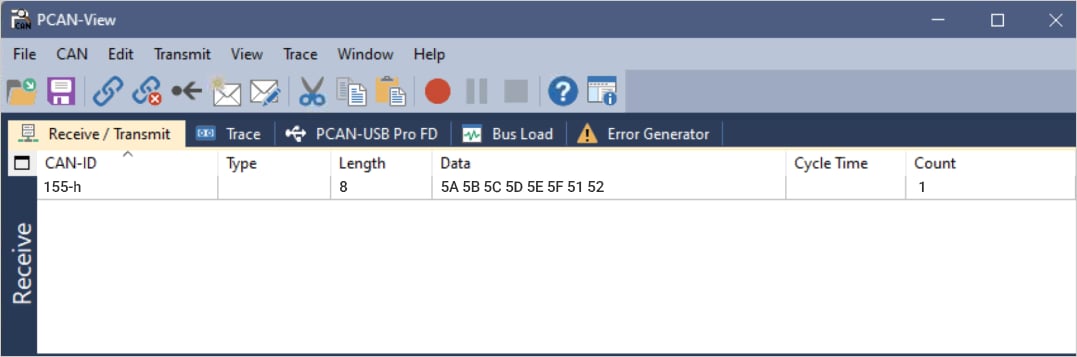
The CAN TX data shows up on the PCAN-View application.
>
>  >
>
`can TX - FD ID`
Syntax:
```css theme={null}
can -t 5 -c x
```
Parameters: `x` = CAN controller ID: 0 to 7
Sample logs for `can -t 5 -c x`
```text theme={null}
c0[ 1691.299867s]sail_proc@home$
c0[ 1695.237474s] Running in APPL_SAIL_Shell_start 0
c0[ 1695.237514s]CPU 0 -: can -t 5 -c 0
c0[ 1695.237680s][ UART-CAN ] Queue send for core 1 pass
c1[ 1695.237701s]vSAIL
c1[ 1695.237723s]can_mcal_test : 422 Entered string : can -t 5 -c 0
c1[ 1695.237745s]**************************************************************
c1[ 1695.237770s]Entering Can Testapp
c1[ 1695.237782s]**************************************************************
c1[ 1695.237811s]Invoked CanTC_Write
```
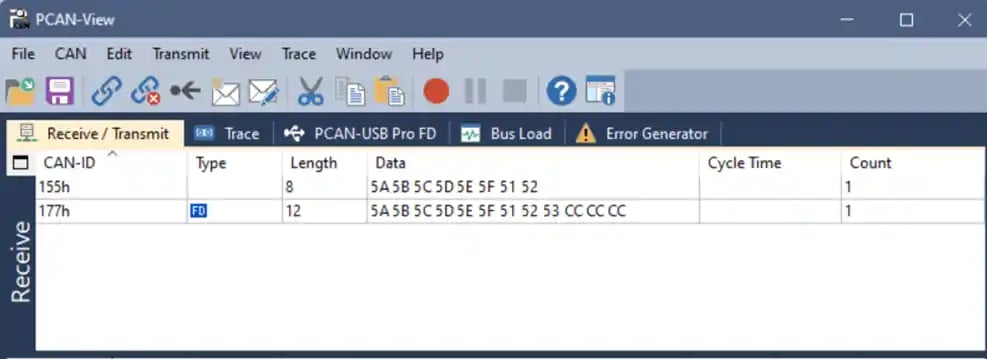
The CAN TX FD data shows up on the PCAN-View application.
 `CAN RX`
To run the CAN RX command, do the following:
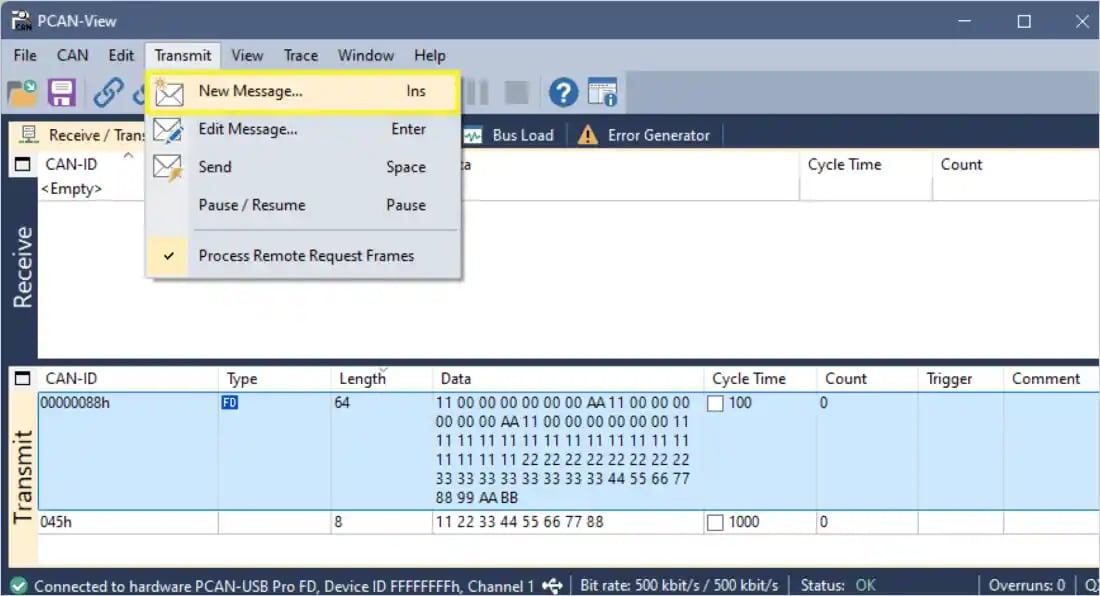
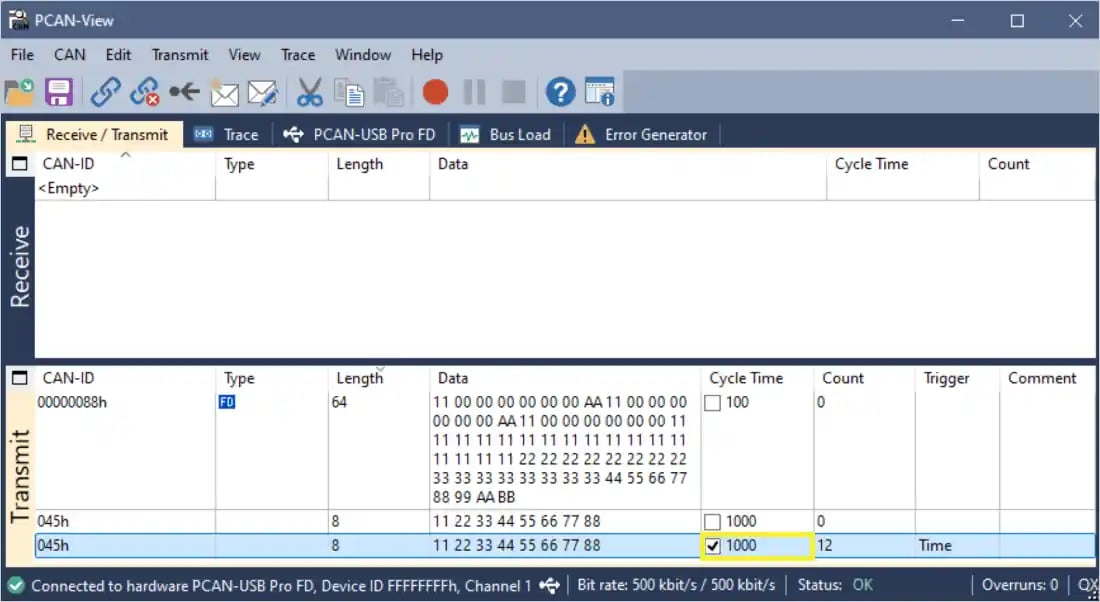
1. Select Transmit > New Message ....
`CAN RX`
To run the CAN RX command, do the following:
1. Select Transmit > New Message ....
 b. On the New Transmit Message window, set the following configurations:
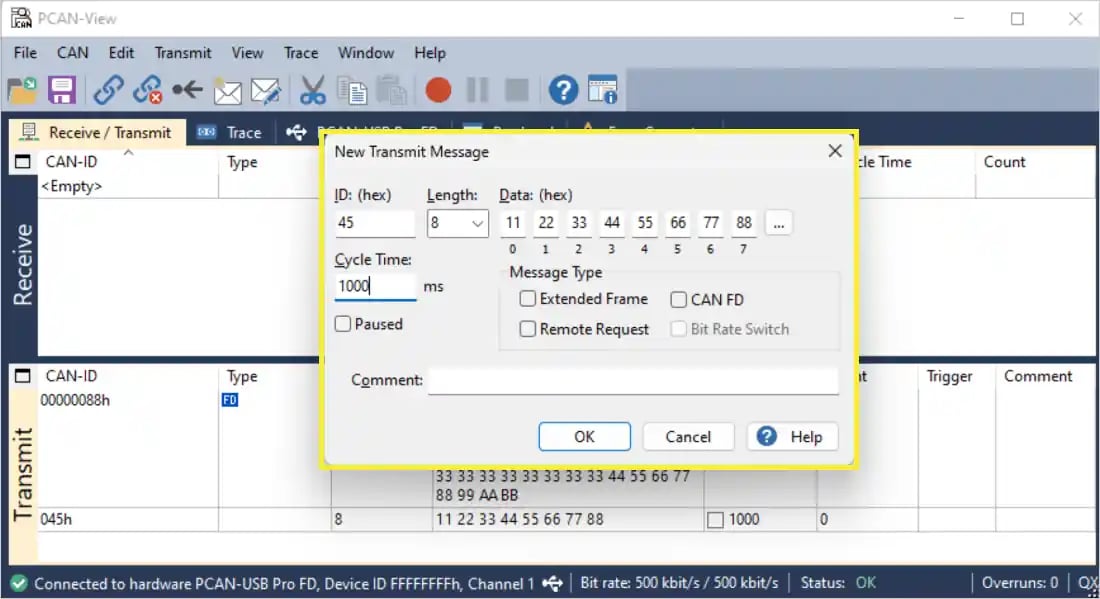 * ID: Enter the CAN ID (For example, 123).
* Length: Set the number of data bytes (8, 12, 32, 64).
* Data: Enter the data bytes (For example, 11 22 33 44 55 66 77 88).
* cycle time : 1000 ms
* under Message Type, ensure to select the **CAN FD** checkbox if it’s a CAN FD frame.
c. Click ok.
d. On the Transmit window, select the **cycle time** checkbox to start sending the message.
* ID: Enter the CAN ID (For example, 123).
* Length: Set the number of data bytes (8, 12, 32, 64).
* Data: Enter the data bytes (For example, 11 22 33 44 55 66 77 88).
* cycle time : 1000 ms
* under Message Type, ensure to select the **CAN FD** checkbox if it’s a CAN FD frame.
c. Click ok.
d. On the Transmit window, select the **cycle time** checkbox to start sending the message.
 Note
To stop sending the message, unselect the **cycle time**.
The following figure shows the transmitted message and received logs:
Note
To stop sending the message, unselect the **cycle time**.
The following figure shows the transmitted message and received logs:
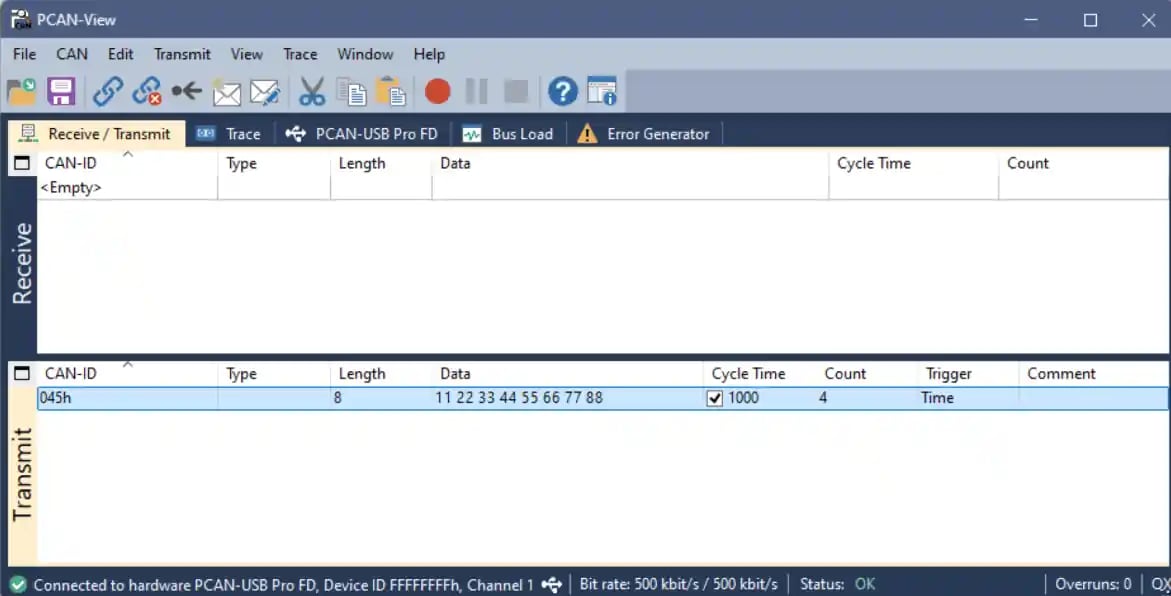 Sample logs for standard CAN:
```text theme={null}
c1[ 1677.177295s]CanTest_RxIndication is invoked with:
c1[ 1677.177310s]Mailbox-> CanId:0x45
c1[ 1677.177323s]Mailbox-> Hoh:3
c1[ 1677.177334s]Mailbox-> ControllerId:0
c1[ 1677.177347s]timeStamp.sec:1667 timeStamp.ns:162740000
c1[ 1677.177365s]DataLength:8
c1[ 1677.177375s]0x11
c1[ 1677.177384s]0x22
c1[ 1677.177393s]0x33
c1[ 1677.177402s]0x44
c1[ 1677.177410s]0x55
c1[ 1677.177419s]0x66
c1[ 1677.177428s]0x77
c1[ 1677.177437s]0x88
```
Sample logs for standard CAN:
```text theme={null}
c1[ 1677.177295s]CanTest_RxIndication is invoked with:
c1[ 1677.177310s]Mailbox-> CanId:0x45
c1[ 1677.177323s]Mailbox-> Hoh:3
c1[ 1677.177334s]Mailbox-> ControllerId:0
c1[ 1677.177347s]timeStamp.sec:1667 timeStamp.ns:162740000
c1[ 1677.177365s]DataLength:8
c1[ 1677.177375s]0x11
c1[ 1677.177384s]0x22
c1[ 1677.177393s]0x33
c1[ 1677.177402s]0x44
c1[ 1677.177410s]0x55
c1[ 1677.177419s]0x66
c1[ 1677.177428s]0x77
c1[ 1677.177437s]0x88
```