> ## Documentation Index
> Fetch the complete documentation index at: https://dragonwingdocs.qualcomm.com/llms.txt
> Use this file to discover all available pages before exploring further.
# Overview of peripheral interfaces
The Qualcomm® Linux® interfaces guide describes both the low-speed and high-speed input/output (I/O) peripheral interface subsystems used in the System-on-Chip (SoC).
* The low-speed I/O interfaces operate at a lower frequency than the high-speed interfaces in the SoC. The Qualcomm universal peripheral (QUP) v3 serial engine is a hardware core that supports the following low-speed peripheral interfaces:
* Universal asynchronous receiver/transmitter ([UART](https://dragonwingdocs.qualcomm.com/System/Interfaces/uart))
* Serial peripheral interface ([SPI](https://dragonwingdocs.qualcomm.com/System/Interfaces/spi))
* Interintegrated circuit ([I2C](https://dragonwingdocs.qualcomm.com/System/Interfaces/i2-c))
* Improved interintegrated circuit ([I3C](https://dragonwingdocs.qualcomm.com/System/Interfaces/i3-c))
These low-speed interfaces communicate with low-speed peripherals, such as sensor interface devices, Bluetooth® wireless technology devices, display or touch interface devices.
* The high-speed I/O interfaces include the following peripheral interfaces:
* Peripheral component interconnect express ([PCIe](https://dragonwingdocs.qualcomm.com/System/Interfaces/pcie))
* Universal serial bus ([USB](https://dragonwingdocs.qualcomm.com/System/Interfaces/usb))
The high-speed I/O interfaces are used to connect to high-speed devices, such as solid-state drives, network cards, external graphics cards.
## Peripheral interfaces software stack
The following figure shows the software stack for peripheral interfaces.
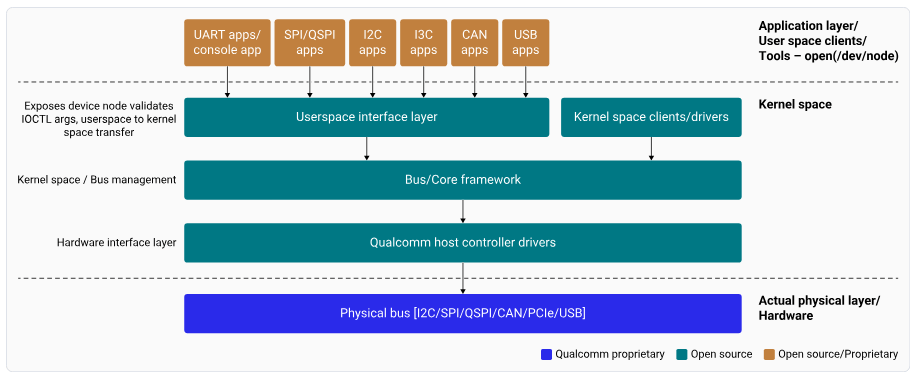 **Figure : Peripheral interfaces software stack high level (high-level view)**
**Application to QUP GENI hardware (high-level Linux flow)**
In Linux, applications communicate with peripherals through standard user-space interfaces provided by the kernel, such as `/dev` nodes or subsystem APIs. The flow works as follows:
1. Application layer
* An application issues a request using a standard user-space interface.
* The request enters the kernel through a system call.
2. Kernel core framework
* The kernel routes the request to the relevant subsystem, such as:
* I2C
* SPI
* I3C
* TTY
* The subsystem performs the following functions:
* Provides protocol-aware abstractions
* Manages synchronization and concurrency
* Integrates power-management hooks
* Offers a uniform programming interface to clients
3. Protocol controller driver
* The core framework calls the protocol controller driver.
* The driver translates framework-level operations into hardware-specific commands.
4. QUPv3 GENI Serial Engine (Qualcomm platforms)
* The controller driver programs the QUPv3 GENI serial engine.
* GENI implements the selected protocol (I2C, SPI, I3C, or UART) using:
* Configured transfer modes
* Protocol firmware
5. GENI hardware execution
* Performs register-level operations.
* Moves data between the system and the external device.
Throughout this process, the kernel framework retains control over:
* Driver and device lifecycle management
* Concurrency handling
* Power state coordination across the stack
The following figure shows the Linux flow from application to QUP-GENI hardware.
**Figure : Peripheral interfaces software stack high level (high-level view)**
**Application to QUP GENI hardware (high-level Linux flow)**
In Linux, applications communicate with peripherals through standard user-space interfaces provided by the kernel, such as `/dev` nodes or subsystem APIs. The flow works as follows:
1. Application layer
* An application issues a request using a standard user-space interface.
* The request enters the kernel through a system call.
2. Kernel core framework
* The kernel routes the request to the relevant subsystem, such as:
* I2C
* SPI
* I3C
* TTY
* The subsystem performs the following functions:
* Provides protocol-aware abstractions
* Manages synchronization and concurrency
* Integrates power-management hooks
* Offers a uniform programming interface to clients
3. Protocol controller driver
* The core framework calls the protocol controller driver.
* The driver translates framework-level operations into hardware-specific commands.
4. QUPv3 GENI Serial Engine (Qualcomm platforms)
* The controller driver programs the QUPv3 GENI serial engine.
* GENI implements the selected protocol (I2C, SPI, I3C, or UART) using:
* Configured transfer modes
* Protocol firmware
5. GENI hardware execution
* Performs register-level operations.
* Moves data between the system and the external device.
Throughout this process, the kernel framework retains control over:
* Driver and device lifecycle management
* Concurrency handling
* Power state coordination across the stack
The following figure shows the Linux flow from application to QUP-GENI hardware.
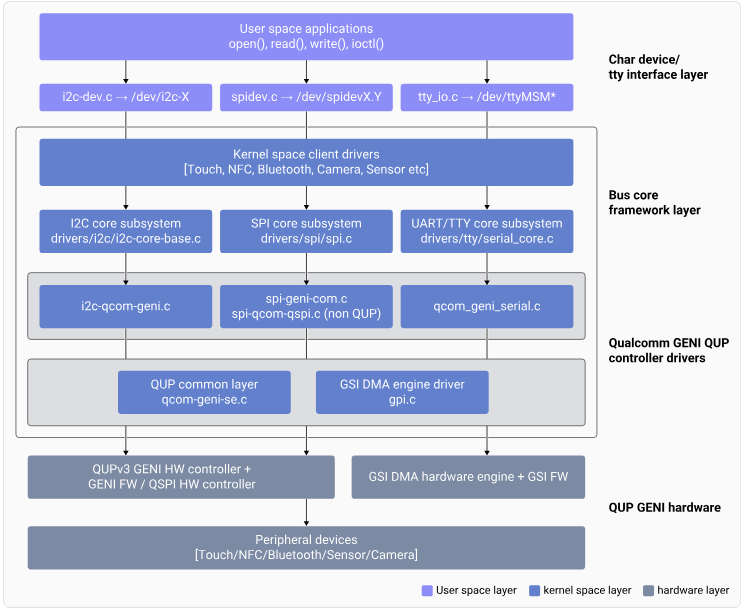 **Figure : Peripheral interfaces software stack high level (low-level view)**
## QUP v3
Qualcomm uses QUP v3, a highly flexible and programmable hardware to support a wide range of serial interfaces. For more information about QUP v3, see the following resources:
* [QUP v3 overview](https://dragonwingdocs.qualcomm.com/System/Interfaces/references#qup-v3-overview)
* [Supported transfer modes in QUP v3](https://dragonwingdocs.qualcomm.com/System/Interfaces/references#supported-transfer-modes-in-qup-v3)
* [QUP v3 access control customization](https://dragonwingdocs.qualcomm.com/System/Interfaces/references#qup-v3-access-control-customization)
* [QUP v3 firmware status verification](https://dragonwingdocs.qualcomm.com/System/Interfaces/references#qup-v3-firmware-status-verification)
**Note**
* The source code for boot and aDSP subsystems is available to licensed developers with authorized access.
* See [Hardware SoCs](https://dragonwingdocs.qualcomm.com/Hardware-SoCs) that are supported on Qualcomm Linux.
This guide is your primary resource for information about enabling low-speed and high-speed I/O interfaces and making configuration changes.
**Note**
Across this guide, `` refers to QCS6490, QCS5430, Qualcomm Dragonwing™ IQ-9075, Qualcomm Dragonwing™ IQ-8275, or Qualcomm Dragonwing™ IQ-615. For example, for `arch/arm64/boot/dts/qcom/.dts`, the corresponding device tree source (DTS) file is at [https://github.com/torvalds/linux/blob/master/arch/arm64/boot/dts/qcom/qcs6490-rb3gen2.dts](https://github.com/torvalds/linux/blob/master/arch/arm64/boot/dts/qcom/qcs6490-rb3gen2.dts) or [https://github.com/torvalds/linux/blob/master/arch/arm64/boot/dts/qcom/sa8775p.dtsi](https://github.com/torvalds/linux/blob/master/arch/arm64/boot/dts/qcom/sa8775p.dtsi) or [https://git.kernel.org/pub/scm/linux/kernel/git/qcom/linux.git/tree/arch/arm64/boot/dts/qcom/qcs615.dtsi?h=arm64-for-6.16](https://git.kernel.org/pub/scm/linux/kernel/git/qcom/linux.git/tree/arch/arm64/boot/dts/qcom/qcs615.dtsi?h=arm64-for-6.16).
**Figure : Peripheral interfaces software stack high level (low-level view)**
## QUP v3
Qualcomm uses QUP v3, a highly flexible and programmable hardware to support a wide range of serial interfaces. For more information about QUP v3, see the following resources:
* [QUP v3 overview](https://dragonwingdocs.qualcomm.com/System/Interfaces/references#qup-v3-overview)
* [Supported transfer modes in QUP v3](https://dragonwingdocs.qualcomm.com/System/Interfaces/references#supported-transfer-modes-in-qup-v3)
* [QUP v3 access control customization](https://dragonwingdocs.qualcomm.com/System/Interfaces/references#qup-v3-access-control-customization)
* [QUP v3 firmware status verification](https://dragonwingdocs.qualcomm.com/System/Interfaces/references#qup-v3-firmware-status-verification)
**Note**
* The source code for boot and aDSP subsystems is available to licensed developers with authorized access.
* See [Hardware SoCs](https://dragonwingdocs.qualcomm.com/Hardware-SoCs) that are supported on Qualcomm Linux.
This guide is your primary resource for information about enabling low-speed and high-speed I/O interfaces and making configuration changes.
**Note**
Across this guide, `` refers to QCS6490, QCS5430, Qualcomm Dragonwing™ IQ-9075, Qualcomm Dragonwing™ IQ-8275, or Qualcomm Dragonwing™ IQ-615. For example, for `arch/arm64/boot/dts/qcom/.dts`, the corresponding device tree source (DTS) file is at [https://github.com/torvalds/linux/blob/master/arch/arm64/boot/dts/qcom/qcs6490-rb3gen2.dts](https://github.com/torvalds/linux/blob/master/arch/arm64/boot/dts/qcom/qcs6490-rb3gen2.dts) or [https://github.com/torvalds/linux/blob/master/arch/arm64/boot/dts/qcom/sa8775p.dtsi](https://github.com/torvalds/linux/blob/master/arch/arm64/boot/dts/qcom/sa8775p.dtsi) or [https://git.kernel.org/pub/scm/linux/kernel/git/qcom/linux.git/tree/arch/arm64/boot/dts/qcom/qcs615.dtsi?h=arm64-for-6.16](https://git.kernel.org/pub/scm/linux/kernel/git/qcom/linux.git/tree/arch/arm64/boot/dts/qcom/qcs615.dtsi?h=arm64-for-6.16).