> ## Documentation Index
> Fetch the complete documentation index at: https://dragonwingdocs.qualcomm.com/llms.txt
> Use this file to discover all available pages before exploring further.

# References

export const tdA = {
  border: "1px solid #ddd",
  padding: "10px 14px",
  textAlign: "left",
  verticalAlign: "top"
};
export const thA1 = {
  border: "1px solid #ddd",
  padding: "10px 14px",
  textAlign: "center",
  backgroundColor: "#f5f5f5",
  fontWeight: "600",
  color: "#333",
  width: "30%"
};
export const thA2 = {
  border: "1px solid #ddd",
  padding: "10px 14px",
  textAlign: "center",
  backgroundColor: "#f5f5f5",
  fontWeight: "600",
  color: "#333",
  width: "70%"
};
export const thAeq = {
  border: "1px solid #ddd",
  padding: "10px 14px",
  textAlign: "center",
  backgroundColor: "#f5f5f5",
  fontWeight: "600",
  color: "#333"
};
export const tblA = {
  borderCollapse: "collapse",
  width: "100%",
  fontSize: "14px",
  tableLayout: "fixed"
};

## QUP v3 overview

The QUP v3 is a highly flexible and programmable hardware for supporting a wide range of serial interface. A single QUP v3 serial engine hardware core provides up to eight serial interfaces. The two QUP v3 hardware cores are as follows:

* 16-serial engine core
* SSC QUP v3 hardware core with five serial engines available in the SSC\_I/Os

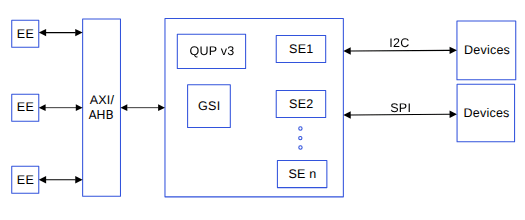
The QUP v3 supports access from multiple hardware entities in the system. Each entity has its own execution environment (EE), a separate address space, and an interrupt line. For information about the various transfer modes that can be configured in QUP v3, see [Supported transfer modes in QUP v3](#supported-transfer-modes-in-qup-v3).

The following figure shows one GSI core/engine connected with up to eight serial engines (SE). You have the flexibility to customize configurations depending on the use case or the protocol of the serial engine. For information about how to customize configurations, see [QUP v3 access control customization](#qup-v3-access-control-customization). To verify if the QUP v3 firmware is correctly flashed, see [QUP v3 firmware status verification](#qup-v3-firmware-status-verification).

<Frame>
  <img src="https://mintcdn.com/qualcomm-prod/rpHTx_a6zriKQll9/System/Interfaces/images/QUPv3_block_diagram.png?fit=max&auto=format&n=rpHTx_a6zriKQll9&q=85&s=1b2dffb69cc008817c1c7902d095b7c2" alt="QUPv3 block diagram" width="525" height="220" data-path="System/Interfaces/images/QUPv3_block_diagram.png" />
</Frame>

<p align="center"><strong>Figure : QUP v3 block diagram</strong></p>

## Supported transfer modes in QUP v3

The following modes can be configured in the QUP v3 serial engine.

* FIFO mode: Simple and reliable, but CPU-intensive. Best suited for low-traffic control operations and basic bring-up.
* CPU DMA (SE DMA mode): Offloads data movement but still relies on CPU coordination. Delivers moderate performance improvements.
* Generic software interface (GSI) DMA mode (preferred): Fully hardware-driven transfers with minimal CPU involvement. Optimized for high performance, scalability, and power efficiency.

**Table : User-level comparison summary**

<table style={tblA}>
  <thead>
    <tr>
      <th style={thAeq}>Aspect</th>
      <th style={thAeq}>FIFO</th>
      <th style={thAeq}>CPU DMA</th>
      <th style={thAeq}>GSI DMA</th>
    </tr>
  </thead>

  <tbody>
    <tr>
      <td style={tdA}>CPU involvement</td>
      <td style={tdA}>High</td>
      <td style={tdA}>Medium</td>
      <td style={tdA}>Minimal</td>
    </tr>

    <tr>
      <td style={tdA}>Interrupt frequency</td>
      <td style={tdA}>High</td>
      <td style={tdA}>Medium</td>
      <td style={tdA}>Very low</td>
    </tr>

    <tr>
      <td style={tdA}>Power efficiency</td>
      <td style={tdA}>Low</td>
      <td style={tdA}>Medium</td>
      <td style={tdA}>High</td>
    </tr>

    <tr>
      <td style={tdA}>Performance scalability</td>
      <td style={tdA}>Poor</td>
      <td style={tdA}>Moderate</td>
      <td style={tdA}>Excellent</td>
    </tr>

    <tr>
      <td style={tdA}>Best for</td>
      <td style={tdA}>Simple control</td>
      <td style={tdA}>Medium transfers</td>
      <td style={tdA}>High-performance systems</td>
    </tr>
  </tbody>
</table>

QUPv3 GENI supports multiple data movement mechanisms. Traditionally, transfers could be performed using FIFO (PIO-based) or CPU-managed DMA modes. While these approaches are sufficient for low-throughput or infrequent transfers, they place a continuous load on the CPU and generate a high interrupt rate under heavy traffic conditions.

### QUPv3 GENI transfer modes

QUPv3 GENI supports multiple data movement mechanisms. Traditionally, transfers could be performed using FIFO (PIO-based) or CPU-managed DMA modes. While these approaches are sufficient for low-throughput or infrequent transfers, they place a continuous load on the CPU and generate a high interrupt rate under heavy traffic conditions.

**FIFO mode**

<Frame>
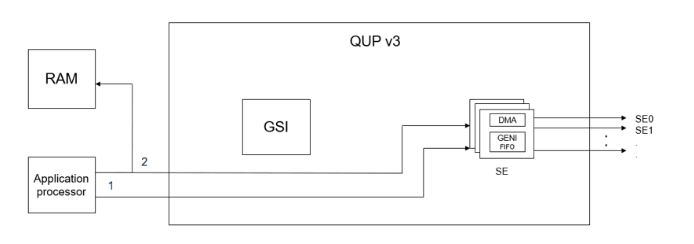
  <img src="https://mintcdn.com/qualcomm-prod/rpHTx_a6zriKQll9/System/Interfaces/images/Fifo_mode.png?fit=max&auto=format&n=rpHTx_a6zriKQll9&q=85&s=e214b6def139e58108b555bc1e36485c" alt="Fifo mode" width="694" height="244" data-path="System/Interfaces/images/Fifo_mode.png" />
</Frame>

<p align="center"><strong>Figure : FIFO mode</strong></p>

1. ①: The application processor configures the generic interface (GENI).
2. ②: The application processor processes Rx/Tx data. The data is transferred between GENI and memory.

**DMA mode**
<Frame>
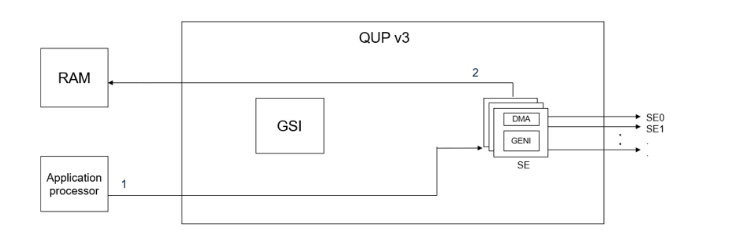
  <img src="https://mintcdn.com/qualcomm-prod/rpHTx_a6zriKQll9/System/Interfaces/images/DMA_mode.png?fit=max&auto=format&n=rpHTx_a6zriKQll9&q=85&s=d1f2a4ca9aee0773ff420a997faf0ca0" alt="DMA mode" width="733" height="243" data-path="System/Interfaces/images/DMA_mode.png" />
</Frame>

<p align="center"><strong>Figure : DMA mode</strong></p>

1. ①: The application processor initializes DMA.
2. ②: The serial engine configures GENI, and initiates the transfer process.

**GSI mode**

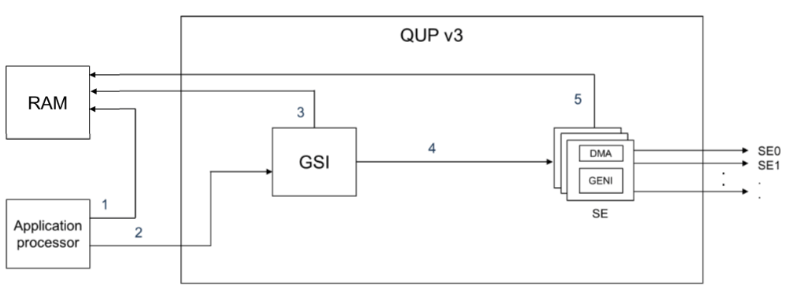
GSI mode introduces a hardware-assisted, descriptor-based DMA mechanism using Qualcomm's GPI DMA engine. In this mode, the CPU programs a set of transaction descriptors—called Transaction Ring Elements (TREs)—that fully describe an I/O operation. Once submitted, the GPI hardware autonomously executes the transfer, moving data between system memory and the GENI Serial Engine without further CPU intervention. GSI mode is best suited for the following use cases:

* High-speed I3C devices
* Camera and Ethernet subsystems
* PCIe switches over I2C

The system-level benefits of using GSI mode are as follows:

* Major CPU offload
* Fewer interrupts
* Better scalability under load
* Performance improvements
  * Stable performance for large transfers
  * Lower interrupt rate per transfer
  * Predictable latency
  * Consistent throughput at high speeds
  * No sharp degradation for large payloads
<Frame>
  <img src="https://mintcdn.com/qualcomm-prod/rpHTx_a6zriKQll9/System/Interfaces/images/GSI_mode.png?fit=max&auto=format&n=rpHTx_a6zriKQll9&q=85&s=957e6ee44cf0b873f2ff3b5e7b827021" alt="GSI mode" width="790" height="289" data-path="System/Interfaces/images/GSI_mode.png" />
</Frame>

<p align="center"><strong>Figure : GSI mode</strong></p>

1. ①: The application processor prepares TRE.
2. ②: The application processor informs QUP (GSI).
3. ③: The GSI processes TRE.
4. ④: After the TRE completes processing, it's sent to GENI.
5. ⑤: The serial engine processes the Rx/Tx data.

<Note>
  **Note**

  The QUP v3 UART serial engine doesn't support the GSI mode.
</Note>

## QUP v3 access control customization

The QUP v3 user access file `QUPAC_Access.c` specifies the owners of the serial engine resource. Initially, it's populated according to the system I/O GPIO allocation. All serial engines must be listed to access the subsystem. It's flexible enough to list only the available serial engine on a particular device.

To customize the access control for the required serial engine protocol, configure the parameters in the `QUPAC_Access.c` file. The Qualcomm TEE image for the `QUPAC_Access.c` file is at `/firmware/qualcomm-linux-spf-1-0_ap_standard_oem_nomodem/TZ.XF.5.0/trustzone_images/core/settings/buses/qup_accesscontrol/qupv3/config/<chipset>/QUPAC_Access.c`.

To specify the owner of the serial engine resource, modify the `QUPAC_Access.c` file to suit the board design.

The following use case specifies the default protocol that operates on an enabled serial engine. You can modify the code according to your board design.

**Nonsecure mode use case in QUP v3 serial engine**

The following nonsecure mode use cases are supported in the QUP v3 serial engine.

```c theme={null}
const QUPv3_se_security_permissions_type qupv3_perms_iot_rb3[] =
{
    /*  PeriphID,      ProtocolID,              Mode,      NsOwner,
        bAllowFifo,   bLoad,   bModExcl */
    { QUPV3_0_SE0, QUPV3_PROTOCOL_I2C,     QUPV3_MODE_FIFO, AC_HLOS,
      TRUE, TRUE, FALSE }, // LT9611 and QPS615 I2C
    { QUPV3_0_SE1, QUPV3_PROTOCOL_I2C,     QUPV3_MODE_FIFO, AC_HLOS,
      TRUE, TRUE, FALSE }, // APPS I2C - PCIE/ USB Type C
    { QUPV3_0_SE2, QUPV3_PROTOCOL_I2C,     QUPV3_MODE_FIFO, AC_HLOS,
      TRUE, TRUE, FALSE }, // SMB / LS1 I2C
    { QUPV3_0_SE3, QUPV3_PROTOCOL_SPI,     QUPV3_MODE_FIFO, AC_HLOS,
      TRUE, TRUE, FALSE }, // CAN SPI
    { QUPV3_0_SE4, QUPV3_PROTOCOL_UART_4W, QUPV3_MODE_FIFO, AC_HLOS,
      TRUE, TRUE, FALSE }, // LS1 UART
    { QUPV3_0_SE5, QUPV3_PROTOCOL_UART_2W, QUPV3_MODE_FIFO, AC_HLOS,
      TRUE, FALSE, FALSE }, // Debug UART
    { QUPV3_0_SE6, QUPV3_PROTOCOL_UART_2W, QUPV3_MODE_FIFO, AC_HLOS,
      TRUE, TRUE, FALSE }, // WLAN UART
    { QUPV3_0_SE7, QUPV3_PROTOCOL_UART_4W, QUPV3_MODE_FIFO, AC_HLOS,
      TRUE, TRUE, FALSE }, // Hastings BT
    { QUPV3_1_SE0, QUPV3_PROTOCOL_SPMI,    QUPV3_MODE_FIFO, AC_ADSP_Q6_ELF,
      TRUE, TRUE, FALSE }, // QuP SPMI
    { QUPV3_1_SE1, QUPV3_PROTOCOL_I2C,     QUPV3_MODE_FIFO, AC_HLOS,
      TRUE, TRUE, FALSE }, // NFC I2C
    { QUPV3_1_SE2, QUPV3_PROTOCOL_I2C,     QUPV3_MODE_FIFO, AC_HLOS,
      TRUE, TRUE, FALSE }, // HDMI OUT for VIDEOIOBoard
    { QUPV3_1_SE3, QUPV3_PROTOCOL_SPI,     QUPV3_MODE_FIFO, AC_HLOS,
      FALSE, TRUE, FALSE }, // LS1 SPI
    { QUPV3_1_SE4, QUPV3_PROTOCOL_SPI,     QUPV3_MODE_GSI,  AC_TZ,
      FALSE, TRUE, FALSE }, // SPI -NFC ESE
    { QUPV3_1_SE5, QUPV3_PROTOCOL_I2C,     QUPV3_MODE_GSI,  AC_HLOS,
      FALSE, TRUE, FALSE}, // Legacy Touch
    { QUPV3_1_SE6, QUPV3_PROTOCOL_SPI,     QUPV3_MODE_GSI,  AC_HLOS,
      FALSE, TRUE, FALSE}, // FP
    /*QUPV3_1_SE7*/
};
```

### QUP v3 serial engine access list description

The following variables are passed into the `QUPv3_se_security_permissions_type` structure.

**Table : Security permission variables for QUP v3**

<table style={tblA}>
  <thead>
    <tr>
      <th style={thA1}>Variables</th>
      <th style={thA2}>Description</th>
    </tr>
  </thead>

  <tbody>
    <tr><td style={tdA}>PeriphID</td><td style={tdA}>Serial engine peripheral to configure and assign.</td></tr>
    <tr><td style={tdA}>ProtocolID</td><td style={tdA}>Macro of the required protocol.</td></tr>
    <tr><td style={tdA}>Mode</td><td style={tdA}>Macro of FIFO/GSI/DMA modes.</td></tr>
    <tr><td style={tdA}>NsOwner</td><td style={tdA}>Holds a macro of the image that needs access.</td></tr>
    <tr><td style={tdA}>bAllowFifo</td><td style={tdA}>The boolean flag is set to True if the mode is FIFO, else the flag is set to False.</td></tr>
    <tr><td style={tdA}>bLoad</td><td style={tdA}>The boolean flag value is set to True to load the protocol firmware.</td></tr>
    <tr><td style={tdA}>bModExcl</td><td style={tdA}>This flag is exclusively for Qualcomm TEE. It's set to True when NsOwner is AC\_TZ.</td></tr>
  </tbody>
</table>

For more information about this macro, see `settings/buses/qup_accesscontrol/qupv3/interface/QupACCommonIds.h`.

## QUP v3 firmware status verification

For serial engines to work, the QUP firmware must be flashed correctly. The firmware is delivered through the metabuild at `common/core_qupv3fw/<chipset>/qupv3fw.elf`. You can verify the firmware status by checking `GENI_FW_REVISION_RO` (`0xa8c068`). For example, identify the register in the kernel log for the `0x0000ffff` value. In the following log, the `0000ffff` error indicates that the firmware isn't flashed correctly.

```
0a8c068: 0000ffff //Invalid firmware or firmware not loaded
00a80069: 00000126 //SPI
00a80068: 00000338 //I2C
```

Modify the `QUPAC_Access.c` file configuration only if you intend to use a protocol different from the default configuration.

The following sample log is displayed when configurations don't match after loading.

```
msm_geni_serial 898000.qcom,qup_uart:msm_geni_serial_startup: Invalid FW 255 loaded
```

## Related documents

<table style={tblA}>
  <thead>
    <tr>
      <th style={thA1}>Title</th>
      <th style={thA2}>Resource</th>
    </tr>
  </thead>

  <tbody>
    <tr><td style={{ ...tdA, fontWeight: "600" }} colSpan="2">Qualcomm Technologies, Inc.</td></tr>
    <tr><td style={tdA}>Secure shell</td><td style={tdA}>[https://docs.qualcomm.com/bundle/publicresource/topics/80-80022-254/how\_to.html](https://docs.qualcomm.com/bundle/publicresource/topics/80-80022-254/how_to.html)</td></tr>
    <tr><td style={tdA}>QDTE</td><td style={tdA}>[https://docs.qualcomm.com/bundle/publicresource/topics/80-80022-4/tools.html#qdte](https://docs.qualcomm.com/bundle/publicresource/topics/80-80022-4/tools.html#qdte)</td></tr>
    <tr><td style={{ ...tdA, fontWeight: "600" }} colSpan="2">Resources</td></tr>
    <tr><td style={tdA}>PCI bus subsystem</td><td style={tdA}>[https://www.kernel.org/doc/html/latest/PCI/index.html](https://www.kernel.org/doc/html/latest/PCI/index.html)</td></tr>
    <tr><td style={tdA}>Linux user space examples</td><td style={tdA}>[https://github.com/DigilientLinux-userspace-examples/tree/master/uart\_example\_linux/src](https://github.com/DigilientLinux-userspace-examples/tree/master/uart_example_linux/src)</td></tr>
    <tr><td style={tdA}>DTSI configuration examples</td><td style={tdA}>[https://github.com/torvalds/linux/blob/master/arch/arm64/boot/dts/qcom/qcs6490-rb3gen2.dts](https://github.com/torvalds/linux/blob/master/arch/arm64/boot/dts/qcom/qcs6490-rb3gen2.dts)</td></tr>
    <tr><td style={tdA}>Test tools and methods for the UART serial interface driver</td><td style={tdA}>[https://docs.kernel.org/admin-guide/serial-console.html](https://docs.kernel.org/admin-guide/serial-console.html)</td></tr>
    <tr><td style={tdA}>UART Linux APIs</td><td style={tdA}>[https://github.com/torvalds/linux/blob/master/include/linux/tty.h](https://github.com/torvalds/linux/blob/master/include/linux/tty.h)</td></tr>
    <tr><td style={tdA}>UART upstream device tree reference</td><td style={tdA}>[https://git.linaro.org/kernel-org/linux-next.git/tree/arch/arm64/boot/dts/qcom/sc7280.dtsi](https://git.linaro.org/kernel-org/linux-next.git/tree/arch/arm64/boot/dts/qcom/sc7280.dtsi)</td></tr>
    <tr><td style={tdA}>Qualcomm Dragonwing RB3 Gen 2 Development Kit device tree node</td><td style={tdA}>[https://git.linaro.org/kernel-org/linux-next.git/tree/arch/arm64/boot/dts/qcom/qcs6490-rb3gen2.dts](https://git.linaro.org/kernel-org/linux-next.git/tree/arch/arm64/boot/dts/qcom/qcs6490-rb3gen2.dts)</td></tr>
    <tr><td style={tdA}>SPI kernel tools</td><td style={tdA}>[https://git.kernel.org/pub/scm/linux/kernel/git/stable/linux.git/tree/tools/spi](https://git.kernel.org/pub/scm/linux/kernel/git/stable/linux.git/tree/tools/spi)</td></tr>
    <tr><td style={tdA}>SPI upstream device tree reference</td><td style={tdA}>[https://git.linaro.org/kernel-org/linux-next.git/tree/arch/arm64/boot/dts/qcom/sc7280.dtsi](https://git.linaro.org/kernel-org/linux-next.git/tree/arch/arm64/boot/dts/qcom/sc7280.dtsi)</td></tr>
    <tr><td style={tdA}>I2C samples</td><td style={tdA}><ul><li>[https://manpages.debian.org/testing/i2c-tools/index.html](https://manpages.debian.org/testing/i2c-tools/index.html)</li><li>[https://linuxhint.com/i2c-linux-utilities/](https://linuxhint.com/i2c-linux-utilities/)</li></ul></td></tr>
    <tr><td style={tdA}>I2C Linux APIs</td><td style={tdA}><ul><li>[https://github.com/torvalds/linux/blob/master/include/linux/i2c.h](https://github.com/torvalds/linux/blob/master/include/linux/i2c.h)</li><li>[https://github.com/torvalds/linux/blob/master/include/linux/i2c-dev.h](https://github.com/torvalds/linux/blob/master/include/linux/i2c-dev.h)</li></ul></td></tr>
    <tr><td style={tdA}>I2C upstream kernel test applications and I2C tool</td><td style={tdA}>[https://layers.openembedded.org/layerindex/recipe/27859/](https://layers.openembedded.org/layerindex/recipe/27859/)</td></tr>
    <tr><td style={tdA}>I2C upstream device tree reference</td><td style={tdA}>[https://git.linaro.org/kernel-org/linux-next.git/tree/arch/arm64/boot/dts/qcom/sc7280.dtsi](https://git.linaro.org/kernel-org/linux-next.git/tree/arch/arm64/boot/dts/qcom/sc7280.dtsi)</td></tr>
    <tr><td style={tdA}>PCIe device initialization and enumeration process</td><td style={tdA}>[https://www.kernel.org/doc/html/latest/PCI/index.html](https://www.kernel.org/doc/html/latest/PCI/index.html)</td></tr>
    <tr><td style={tdA}>PCIe framework and client driver PCIe registrations</td><td style={tdA}>[https://www.kernel.org/doc/html/latest/PCI/index.html](https://www.kernel.org/doc/html/latest/PCI/index.html)</td></tr>
    <tr><td style={tdA}>Add MSI groups supported for a PCIe instance</td><td style={tdA}>[https://lore.kernel.org/linux-arm-msm/f1168212-bc6e-4570-869c-2870d6f248ad@linaro.org/T/](https://lore.kernel.org/linux-arm-msm/f1168212-bc6e-4570-869c-2870d6f248ad@linaro.org/T/)</td></tr>
    <tr><td style={tdA}>PCIe debugging</td><td style={tdA}>[https://pcisig.com/specifications](https://pcisig.com/specifications)</td></tr>
    <tr><td style={tdA}>PCIe upstream device tree reference</td><td style={tdA}><ul><li>[https://git.linaro.org/kernel-org/linux-next.git/tree/arch/arm64/boot/dts/qcom/sc7280.dtsi](https://git.linaro.org/kernel-org/linux-next.git/tree/arch/arm64/boot/dts/qcom/sc7280.dtsi)</li><li>[https://git.kernel.org/pub/scm/linux/kernel/git/torvalds/linux.git/tree/drivers/pci/controller/dwc/pcie-qcom.c?h=v6.8-rc6#n1634](https://git.kernel.org/pub/scm/linux/kernel/git/torvalds/linux.git/tree/drivers/pci/controller/dwc/pcie-qcom.c?h=v6.8-rc6#n1634)</li></ul></td></tr>
    <tr><td style={tdA}>USB `Qscratch` wrapper driver</td><td style={tdA}>[https://github.com/torvalds/linux/blob/master/drivers/usb/dwc3/dwc3-qcom.c](https://github.com/torvalds/linux/blob/master/drivers/usb/dwc3/dwc3-qcom.c)</td></tr>
    <tr><td style={tdA}>Controller core driver</td><td style={tdA}>[https://github.com/torvalds/linux/blob/master/drivers/usb/dwc3/core.c](https://github.com/torvalds/linux/blob/master/drivers/usb/dwc3/core.c)</td></tr>
    <tr><td style={tdA}>USB software interface drivers for Type-C connector</td><td style={tdA}><ul><li>[https://git.kernel.org/pub/scm/linux/kernel/git/stable/linux.git/tree/drivers/usb/typec/ucsi/ucsi.h?h=v6.6.2](https://git.kernel.org/pub/scm/linux/kernel/git/stable/linux.git/tree/drivers/usb/typec/ucsi/ucsi.h?h=v6.6.2)</li><li>[https://git.kernel.org/pub/scm/linux/kernel/git/stable/linux.git/tree/drivers/usb/typec/ucsi/ucsi\_glink.c?h=v6.6.2](https://git.kernel.org/pub/scm/linux/kernel/git/stable/linux.git/tree/drivers/usb/typec/ucsi/ucsi_glink.c?h=v6.6.2)</li><li>[https://git.kernel.org/pub/scm/linux/kernel/git/stable/linux.git/tree/drivers/usb/typec/ucsi/displayport.c?h=v6.6.2](https://git.kernel.org/pub/scm/linux/kernel/git/stable/linux.git/tree/drivers/usb/typec/ucsi/displayport.c?h=v6.6.2)</li><li>[https://git.kernel.org/pub/scm/linux/kernel/git/stable/linux.git/tree/drivers/phy/qualcomm/phy-qcom-qmp-combo.c?h=v6.6.2](https://git.kernel.org/pub/scm/linux/kernel/git/stable/linux.git/tree/drivers/phy/qualcomm/phy-qcom-qmp-combo.c?h=v6.6.2)</li><li>[https://git.kernel.org/pub/scm/linux/kernel/git/stable/linux.git/tree/drivers/usb/dwc3/dwc3-qcom.c?h=v6.6.2](https://git.kernel.org/pub/scm/linux/kernel/git/stable/linux.git/tree/drivers/usb/dwc3/dwc3-qcom.c?h=v6.6.2)</li><li>[https://git.kernel.org/pub/scm/linux/kernel/git/stable/linux.git/tree/drivers/soc/qualcomm/pmic\_glink.c?h=v6.6.2](https://git.kernel.org/pub/scm/linux/kernel/git/stable/linux.git/tree/drivers/soc/qualcomm/pmic_glink.c?h=v6.6.2)</li><li>[https://git.kernel.org/pub/scm/linux/kernel/git/stable/linux.git/tree/drivers/soc/qualcomm/pmic\_glink\_altmode.c?h=v6.6.2](https://git.kernel.org/pub/scm/linux/kernel/git/stable/linux.git/tree/drivers/soc/qualcomm/pmic_glink_altmode.c?h=v6.6.2)</li></ul></td></tr>
    <tr><td style={tdA}>LPM support</td><td style={tdA}>[https://lore.kernel.org/20231017131851.8299-1-quic\_kriskura@quicinc.com/](https://lore.kernel.org/20231017131851.8299-1-quic_kriskura@quicinc.com/)</td></tr>
    <tr><td style={tdA}>USB DWC3 driver</td><td style={tdA}>[https://git.kernel.org/pub/scm/linux/kernel/git/stable/linux.git/tree/drivers/usb/dwc3/dwc3-qcom.c?h=v6.6.2](https://git.kernel.org/pub/scm/linux/kernel/git/stable/linux.git/tree/drivers/usb/dwc3/dwc3-qcom.c?h=v6.6.2)</td></tr>
    <tr><td style={tdA}>Qualcomm Synopsys femto PHY</td><td style={tdA}>[https://git.kernel.org/pub/scm/linux/kernel/git/stable/linux.git/tree/drivers/phy/qualcomm/phy-qcom-snps-femto-v2.c?h=v6.6.2](https://git.kernel.org/pub/scm/linux/kernel/git/stable/linux.git/tree/drivers/phy/qualcomm/phy-qcom-snps-femto-v2.c?h=v6.6.2)</td></tr>
    <tr><td style={tdA}>QMP DisplayPort combo PHY</td><td style={tdA}>[https://git.kernel.org/pub/scm/linux/kernel/git/stable/linux.git/tree/drivers/phy/qualcomm/phy-qcom-qmp-combo.c?h=v6.6.2](https://git.kernel.org/pub/scm/linux/kernel/git/stable/linux.git/tree/drivers/phy/qualcomm/phy-qcom-qmp-combo.c?h=v6.6.2)</td></tr>
    <tr><td style={tdA}>USB ADB</td><td style={tdA}>[https://developer.android.com/tools/adb](https://developer.android.com/tools/adb)</td></tr>
    <tr><td style={tdA}>`f_fs.c`</td><td style={tdA}>[https://git.kernel.org/pub/scm/linux/kernel/git/stable/linux.git/tree/drivers/usb/gadget/function/f\_fs.c?h=v6.6.2](https://git.kernel.org/pub/scm/linux/kernel/git/stable/linux.git/tree/drivers/usb/gadget/function/f_fs.c?h=v6.6.2)</td></tr>
    <tr><td style={tdA}>Mass storage</td><td style={tdA}>[https://git.kernel.org/pub/scm/linux/kernel/git/stable/linux.git/tree/drivers/usb/gadget/function/f\_mass\_storage.c?h=v6.6.2](https://git.kernel.org/pub/scm/linux/kernel/git/stable/linux.git/tree/drivers/usb/gadget/function/f_mass_storage.c?h=v6.6.2)</td></tr>
    <tr><td style={tdA}>Platform tools (adb/fastboot)</td><td style={tdA}>[https://developer.android.com/tools/releases/platform-tools](https://developer.android.com/tools/releases/platform-tools)</td></tr>
    <tr><td style={tdA}>Platform LibUVC</td><td style={tdA}><ul><li>[https://github.com/libuvc/libuvc](https://github.com/libuvc/libuvc)</li><li>[https://libuvc.github.io/libuvc/](https://libuvc.github.io/libuvc/)</li></ul></td></tr>
    <tr><td style={tdA}>UVC gadget</td><td style={tdA}>[https://github.com/wlhe/uvc-gadget](https://github.com/wlhe/uvc-gadget)</td></tr>
    <tr><td style={tdA}>UVC streamer</td><td style={tdA}>[https://github.com/bsapundzhiev/uvc-streamer](https://github.com/bsapundzhiev/uvc-streamer)</td></tr>
    <tr><td style={tdA}>UVC Video4Linux (v4l2-utils)</td><td style={tdA}>[https://linuxtv.org/downloads/v4l-dvb-apis/driver-api/v4l2-core.html](https://linuxtv.org/downloads/v4l-dvb-apis/driver-api/v4l2-core.html)</td></tr>
    <tr><td style={tdA}>USB upstream device tree reference</td><td style={tdA}>[https://git.linaro.org/kernel-org/linux-next.git/tree/arch/arm64/boot/dts/qcom/sc7280.dtsi](https://git.linaro.org/kernel-org/linux-next.git/tree/arch/arm64/boot/dts/qcom/sc7280.dtsi)</td></tr>
    <tr><td style={tdA}>Qualcomm Linux hardware SoC device-tree node</td><td style={tdA}>[https://git.linaro.org/kernel-org/linux-next.git/tree/arch/arm64/boot/dts/qcom/qcs6490-rb3gen2.dts](https://git.linaro.org/kernel-org/linux-next.git/tree/arch/arm64/boot/dts/qcom/qcs6490-rb3gen2.dts)</td></tr>
    <tr><td style={tdA}>RPM changes in the USB driver and other examples</td><td style={tdA}>[https://patchwork.kernel.org/project/linux-usb/list/?series=793939\&archive=both](https://patchwork.kernel.org/project/linux-usb/list/?series=793939\&archive=both)</td></tr>
    <tr><td style={tdA}>Flatten a device tree</td><td style={tdA}><ul><li>[https://lore.kernel.org/all/af60c05b-4a0f-51b8-486a-1fc601602515@quicinc.com/](https://lore.kernel.org/all/af60c05b-4a0f-51b8-486a-1fc601602515@quicinc.com/)</li><li>[https://lore.kernel.org/all/20231016-dwc3-refactor-v1-0-ab4a84165470@quicinc.com/](https://lore.kernel.org/all/20231016-dwc3-refactor-v1-0-ab4a84165470@quicinc.com/)</li></ul></td></tr>
  </tbody>
</table>

## Acronyms and terms

<table style={tblA}>
  <thead>
    <tr>
      <th style={thA1}>Acronym or term</th>
      <th style={thA2}>Definition</th>
    </tr>
  </thead>

  <tbody>
    <tr><td style={tdA}>aDSP</td><td style={tdA}>Application digital signal processor</td></tr>
    <tr><td style={tdA}>ADB</td><td style={tdA}>Android debug bridge</td></tr>
    <tr><td style={tdA}>ASPM</td><td style={tdA}>Active state power management</td></tr>
    <tr><td style={tdA}>BDF</td><td style={tdA}>Bus device function</td></tr>
    <tr><td style={tdA}>CAN</td><td style={tdA}>Controller area network</td></tr>
    <tr><td style={tdA}>CRC</td><td style={tdA}>Cyclic redundancy check</td></tr>
    <tr><td style={tdA}>CTS</td><td style={tdA}>Clear to send</td></tr>
    <tr><td style={tdA}>DLLP</td><td style={tdA}>Data link layer packet</td></tr>
    <tr><td style={tdA}>DTS</td><td style={tdA}>Device tree source</td></tr>
    <tr><td style={tdA}>ECRC</td><td style={tdA}>End-to-end CRC</td></tr>
    <tr><td style={tdA}>EE</td><td style={tdA}>Execution environment</td></tr>
    <tr><td style={tdA}>ESE</td><td style={tdA}>Execute secure environment</td></tr>
    <tr><td style={tdA}>FP</td><td style={tdA}>Fingerprint</td></tr>
    <tr><td style={tdA}>GPIO</td><td style={tdA}>General-purpose input/output</td></tr>
    <tr><td style={tdA}>GSI</td><td style={tdA}>Generic software interface</td></tr>
    <tr><td style={tdA}>HID</td><td style={tdA}>Human interface device</td></tr>
    <tr><td style={tdA}>I/O</td><td style={tdA}>Input/output</td></tr>
    <tr><td style={tdA}>IOMMU</td><td style={tdA}>Input/output memory management unit</td></tr>
    <tr><td style={tdA}>I2C</td><td style={tdA}>Interintegrated circuit</td></tr>
    <tr><td style={tdA}>I3C</td><td style={tdA}>Improved interintegrated circuit</td></tr>
    <tr><td style={tdA}>LSP</td><td style={tdA}>List processor</td></tr>
    <tr><td style={tdA}>MS</td><td style={tdA}>Mass storage</td></tr>
    <tr><td style={tdA}>MSI</td><td style={tdA}>Message signaled interrupt</td></tr>
    <tr><td style={tdA}>NCM</td><td style={tdA}>Network control modem</td></tr>
    <tr><td style={tdA}>NFC</td><td style={tdA}>Near-field communication</td></tr>
    <tr><td style={tdA}>NIC</td><td style={tdA}>Network interface card</td></tr>
    <tr><td style={tdA}>PCIe</td><td style={tdA}>Peripheral component interconnect express</td></tr>
    <tr><td style={tdA}>QoS</td><td style={tdA}>Quality of service</td></tr>
    <tr><td style={tdA}>QIM</td><td style={tdA}>Qualcomm intelligent multimedia</td></tr>
    <tr><td style={tdA}>RTS</td><td style={tdA}>Request to send</td></tr>
    <tr><td style={tdA}>SCL</td><td style={tdA}>Serial clock line</td></tr>
    <tr><td style={tdA}>SDK</td><td style={tdA}>Software development kit</td></tr>
    <tr><td style={tdA}>SDL</td><td style={tdA}>Serial data line</td></tr>
    <tr><td style={tdA}>SE</td><td style={tdA}>Serial engine</td></tr>
    <tr><td style={tdA}>SLPI</td><td style={tdA}>Sensor low-power island</td></tr>
    <tr><td style={tdA}>SPI</td><td style={tdA}>Serial peripheral interface</td></tr>
    <tr><td style={tdA}>SPMI</td><td style={tdA}>System power management interface</td></tr>
    <tr><td style={tdA}>SR-IOV</td><td style={tdA}>Single root I/O virtualization</td></tr>
    <tr><td style={tdA}>SSC</td><td style={tdA}>Snapdragon sensor core</td></tr>
    <tr><td style={tdA}>TC</td><td style={tdA}>Traffic class</td></tr>
    <tr><td style={tdA}>TEE</td><td style={tdA}>Trusted execution environment</td></tr>
    <tr><td style={tdA}>TLP</td><td style={tdA}>Transaction layer packet</td></tr>
    <tr><td style={tdA}>UEFI</td><td style={tdA}>Unified extensible firmware interface</td></tr>
    <tr><td style={tdA}>UAC</td><td style={tdA}>USB audio class</td></tr>
    <tr><td style={tdA}>UART</td><td style={tdA}>Universal asynchronous receiver-transmitter</td></tr>
    <tr><td style={tdA}>UCSI</td><td style={tdA}>USB Type-C connector system software interface</td></tr>
    <tr><td style={tdA}>V4L2</td><td style={tdA}>Video4Linux2</td></tr>
    <tr><td style={tdA}>VC</td><td style={tdA}>Virtual channel</td></tr>
    <tr><td style={tdA}>Yavta</td><td style={tdA}>Yet another V4L2 test application</td></tr>
  </tbody>
</table>