> ## Documentation Index
> Fetch the complete documentation index at: https://dragonwingdocs.qualcomm.com/llms.txt
> Use this file to discover all available pages before exploring further.
# UART
export const tdA = {
border: "1px solid #ddd",
padding: "10px 14px",
textAlign: "left",
verticalAlign: "top"
};
export const thA1 = {
border: "1px solid #ddd",
padding: "10px 14px",
textAlign: "center",
backgroundColor: "#f5f5f5",
fontWeight: "600",
color: "#333",
width: "20%"
};
export const thA2 = {
border: "1px solid #ddd",
padding: "10px 14px",
textAlign: "center",
backgroundColor: "#f5f5f5",
fontWeight: "600",
color: "#333",
width: "80%"
};
export const thAeq = {
border: "1px solid #ddd",
padding: "10px 14px",
textAlign: "center",
backgroundColor: "#f5f5f5",
fontWeight: "600",
color: "#333"
};
export const tblA = {
borderCollapse: "collapse",
width: "100%",
fontSize: "14px",
tableLayout: "fixed"
};
UART devices transmit data asynchronously. Hence, a clock signal doesn't synchronize the output of bits from the transmitting UART to the sampling of bits by the receiving UART. Instead of a clock signal, the transmitting UART adds start and stop bits to the data packet being transferred. These bits define the beginning and end of the data packet. This way, the receiving UART is aware of when to start reading the bits. When the receiving UART detects a start bit, it starts to read the incoming bits at a specific frequency known as the baud rate.
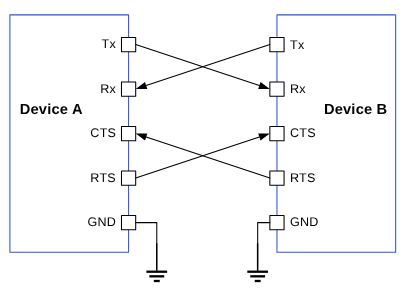
Figure : Data transfer between two UART devices
The parameters that determine successful transmission are as follows:
* **Baud rate**
* **Start bit**
* **Stop bit**
* **Parity bit**
* **Data bits**
* **Flow control**
The following figure shows a sample UART data packet.
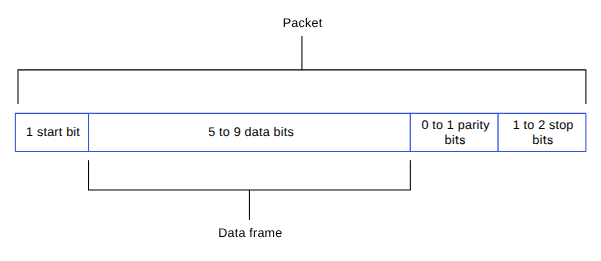
Figure : UART data packet
## **UART features**
The following table describes the UART transfer modes for applications.
Table : UART transfer modes
| Subsystem |
Transfer mode |
Description |
| Linux |
- FIFO (low speed)
- CPU DMA (high speed)
|
- Supports baud rates from 300 bps up to 4 Mbps.
- FIFO mode transfers data between its Rx/Tx buffers and system memory.
- DMA mode transfers data between its Rx/Tx buffers and system memory. Better performance is achieved with high-speed UART drivers supporting higher baud rates and bigger data packages. For example, the Bluetooth wireless technology connectivity module.
|
| Boot |
FIFO |
- Rx/Tx 5 bits to 8 bits per character.
- Supports a maximum baud rate of 115200.
|
| aDSP |
FIFO |
- Rx/Tx 5 bits to 8 bits per character.
- Supported baud rates: 115200, 230400, 460800, 921600, 1000000, 3000000, and 6000000.
|
## **UART interface components**
The following table provides the paths of UART driver configurations for the different subsystems.
**Table : UART interface: Linux**
| File type |
Description |
| Device tree source |
- QCS6490 and QCS5430: [https://git.linaro.org/kernel-org/linux-next.git/tree/arch/arm64/boot/dts/qcom/sc7280.dtsi](https://git.linaro.org/kernel-org/linux-next.git/tree/arch/arm64/boot/dts/qcom/sc7280.dtsi)
- Dragonwing IQ-9075: [https://github.com/torvalds/linux/blob/master/arch/arm64/boot/dts/qcom/sa8775p.dtsi](https://github.com/torvalds/linux/blob/master/arch/arm64/boot/dts/qcom/sa8775p.dtsi)
- Dragonwing IQ-615: [https://git.kernel.org/pub/scm/linux/kernel/git/qcom/linux.git/tree/arch/arm64/boot/dts/qcom/qcs615.dtsi?h=arm64-for-6.16](https://git.kernel.org/pub/scm/linux/kernel/git/qcom/linux.git/tree/arch/arm64/boot/dts/qcom/qcs615.dtsi?h=arm64-for-6.16)
|
| `Pinctrl` settings |
- The pin control table for the corresponding QUP v3 serial engine is at `/sources/kernel/kernel_platform/kernel/arch/arm64/boot/dts/qcom/.dts`.
- For DTSI configuration examples to override the chip product, see the following DTSI files.
- QCS6490 and QCS5430: [https://git.linaro.org/kernel-org/linux-next.git/tree/arch/arm64/boot/dts/qcom/sc7280.dtsi](https://git.linaro.org/kernel-org/linux-next.git/tree/arch/arm64/boot/dts/qcom/sc7280.dtsi)
- Dragonwing IQ-9075: [https://github.com/torvalds/linux/blob/master/arch/arm64/boot/dts/qcom/sa8775p.dtsi](https://github.com/torvalds/linux/blob/master/arch/arm64/boot/dts/qcom/sa8775p.dtsi)
- Dragonwing IQ-615: [https://git.kernel.org/pub/scm/linux/kernel/git/qcom/linux.git/tree/arch/arm64/boot/dts/qcom/qcs615.dtsi?h=arm64-for-6.16](https://git.kernel.org/pub/scm/linux/kernel/git/qcom/linux.git/tree/arch/arm64/boot/dts/qcom/qcs615.dtsi?h=arm64-for-6.16)
|
| Qualcomm TEE settings |
- `/firmware/qualcomm-linux-spf-1-0_ap_standard_oem_nomodem/TZ.XF.5.0/trustzone_images/core/settings/buses/qup_accesscontrol/qupv3/config//QUPAC_Access.c`
|
**Table : UART interface: Boot (UEFI-only)**
| File type |
Description |
| QUP v3 serial engine configuration |
- `/firmware/qualcomm-linux-spf-1-0_ap_standard_oem_nomodem/BOOT.MXF.1.0.c1/boot_images/boot/QcomPkg/SocPkg//Settings/UART/UartSettings.c`
|
| Qualcomm TEE settings |
- `/firmware/qualcomm-linux-spf-1-0_ap_standard_oem_nomodem/TZ.XF.5.0/trustzone_images/core/settings/buses/qup_accesscontrol/qupv3/config//QUPAC_Access.c`
|
**Table : UART interface: aDSP/SLPI**
| File type |
Description |
| QUP v3 serial engine configuration |
- `/firmware/qualcomm-linux-spf-1-0_ap_standard_oem_nomodem/ADSP.HT.5.5.c8/adsp_proc/core/settings/buses/qup_common/config//adsp/ssc/qup_devcfg.c`
- `/firmware/qualcomm-linux-spf-1-0_ap_standard_oem_nomodem/ADSP.HT.5.5.c8/adsp_proc/core/settings/buses/qup_fw/config//fw_devcfg.c`
|
| Firmware configuration settings |
- `/firmware/qualcomm-linux-spf-1-0_ap_standard_oem_nomodem/ADSP.HT.5.5.c8/adsp_proc/core/settings/buses/qup_fw/config//fw_devcfg.c`
- `/firmware/qualcomm-linux-spf-1-0_ap_standard_oem_nomodem/ADSP.HT.5.5.c8/adsp_proc/core/settings/buses/qup_fw/config//fw_devcfg.xml`
|
### **UART APIs**
UART APIs for the following subsystems are listed in this section.
* Linux: [https://github.com/torvalds/linux/blob/master/include/linux/tty.h](https://github.com/torvalds/linux/blob/master/include/linux/tty.h)
* Boot: QcomPkg/Include/HSUart.h
* aDSP: adsp\_proc/core/api/buses/uart.h
## **UART software device tree configuration**
This section provides information on the UART device tree configuration, and documentation for the device nodes.
### **Linux**
For information about Kernel device instances, see [https://github.com/torvalds/linux/blob/master/Documentation/devicetree/bindings/serial/qcom%2Cserial-geni-qcom.yaml](https://github.com/torvalds/linux/blob/master/Documentation/devicetree/bindings/serial/qcom%2Cserial-geni-qcom.yaml).
For information about the UART driver files, see [https://github.com/torvalds/linux/blob/master/drivers/tty/serial/qcom\_geni\_serial.c](https://github.com/torvalds/linux/blob/master/drivers/tty/serial/qcom_geni_serial.c)
```text theme={null}
uart7: serial@99c000 {
/* Manufacturer model of serial driver */
compatible = "qcom,geni-uart";
/* SE address and size */
reg = <0 0x0099c000 0 0x4000>;
/*Clocks for SE */
clocks = <&gcc GCC_QUPV3_WRAP0_S7_CLK>;
clock-names = "se";
/* pinctrl setting */
pinctrl-names = "default";
pinctrl-0 = <&qup_uart7_cts>, <&qup_uart7_rts>, <&qup_uart7_tx>, <&qup_uart7_rx>;
interrupts = ;
power-domains = <&rpmhpd SC7280_CX>;
operating-points-v2 = <&qup_opp_table>;
interconnects = <&clk_virt MASTER_QUP_CORE_0 0 &clk_virt SLAVE_QUP_CORE_0 0>,
<&gem_noc MASTER_APPSS_PROC 0 &cnoc2 SLAVE_QUP_0 0>;
interconnect-names = "qup-core", "qup-config";
/* To enable QUPV3 serial engine instance for UART protocol, change Status to OK */
status = "disabled";
};
}
```
For configuration settings of the serial engine GPIOs, see the following DTSI files.
* QCS6490 and QCS5430: [https://git.linaro.org/kernel-org/linux-next.git/tree/arch/arm64/boot/dts/qcom/sc7280.dtsi](https://git.linaro.org/kernel-org/linux-next.git/tree/arch/arm64/boot/dts/qcom/sc7280.dtsi)
* Dragonwing IQ-9075: [https://github.com/torvalds/linux/blob/master/arch/arm64/boot/dts/qcom/sa8775p.dtsi](https://github.com/torvalds/linux/blob/master/arch/arm64/boot/dts/qcom/sa8775p.dtsi)
* Dragonwing IQ-615: [https://git.kernel.org/pub/scm/linux/kernel/git/qcom/linux.git/tree/arch/arm64/boot/dts/qcom/qcs615.dtsi?h=arm64-for-6.16](https://git.kernel.org/pub/scm/linux/kernel/git/qcom/linux.git/tree/arch/arm64/boot/dts/qcom/qcs615.dtsi?h=arm64-for-6.16)
```text theme={null}
qup_uart7_cts: qup-uart7-cts-state {
pins = "gpio28";
function = "qup07";
};
qup_uart7_rts: qup-uart7-rts-state {
pins = "gpio29";
function = "qup07";
};
qup_uart7_tx: qup-uart7-tx-state {
pins = "gpio30";
function = "qup07";
};
qup_uart7_rx: qup-uart7-rx-state {
pins = "gpio31";
function = "qup07";
};
```
**Note**
The Qualcomm TEE configurations must be aligned in the `QUPAC_Access.c` file to ensure that the GPIO/QUP v3 can be used. You can access the Qualcomm TEE images at `/firmware/qualcomm-linux-spf-1-0_ap_standard_oem_nomodem/TZ.XF.5.0/trustzone_images/core/settings/buses/qup_accesscontrol/qupv3/config//QUPAC_Access.c`. Modify the required settings or see the default settings assigned for particular instances of the QUP v3 serial engine.
QUP v3 supports both 4-wire UART with flow-control enabled, and 2-wire UART without flow control enabled. The following example for Qualcomm TEE access, controls entry for both. The QUP v3 serial engine configurations to enable the UART protocol are as follows:
* Default configuration enabled for SE7 as HS UART
```text theme={null}
{ QUPV3_0_SE7, QUPV3_PROTOCOL_UART_4W, QUPV3_MODE_FIFO, AC_HLOS, TRUE, TRUE, FALSE },
```
* 2-wire UART configuration for SE5
```text theme={null}
uart5: serial@994000 {
compatible = "qcom,geni-uart";
reg = <0 0x00994000 0 0x4000>;
clocks = <&gcc GCC_QUPV3_WRAP0_S5_CLK>;
clock-names = "se";
pinctrl-names = "default";
pinctrl-0 = <&qup_uart5_tx>, <&qup_uart5_rx>;
interrupts = ;
power-domains = <&rpmhpd SC7280_CX>;
operating-points-v2 = <&qup_opp_table>;
interconnects = <&clk_virt MASTER_QUP_CORE_0 0 &clk_virt SLAVE_QUP_CORE_0 0>,
<&gem_noc MASTER_APPSS_PROC 0 &cnoc2 SLAVE_QUP_0 0>;
interconnect-names = "qup-core", "qup-config";
status = "disabled";
};
```
```text theme={null}
{ QUPV3_0_SE5, QUPV3_PROTOCOL_UART_2W, QUPV3_MODE_FIFO,
AC_HLOS, TRUE, FALSE, FALSE },
```
### **Boot**
The QUP v3 serial engine can be configured to UART in boot using the `/firmware/qualcomm-linux-spf-1-0_ap_standard_oem_nomodem/BOOT.MXF.1.0.c1/boot_images/boot/QcomPkg/SocPkg//Settings/UART/UartSettings.c` file.
```text theme={null}
UART_PROPERTIES devices =
{
// MAIN_PORT
0x00994000, // Serial Engine Base address
0x009C0000,// qup_common base address
0x2001c161, // GPIO TX pin Config
0x2000c171, // GPIO RX Pin Config
0, // gpio_cts_config
0, // gpio_rfr_config
0, // clock_id_index
(void*)0, // bus_clock_id
(void*)CLK_QUPV3_WRAP0_S5, // core_clock_id
0, // irq number not used
0, //TCSR base
0, // TCSR offset
0 // TCSR value
};
```
**GPIO configuration**
The GPIO configuration is listed in the following table.
**Table : UART GPIO configuration**
| Bits |
Parameters |
| \[0:3] |
GPIO function |
| \[4:13] |
GPIO number |
| \[14] |
Direction |
| \[15:17] |
Pull type |
| \[18:21] |
Drive strength |
You must configure each GPIO based on the following bit fields.
```text theme={null}
/*
| RESERVED | GPIO NUM | DRIVE | FUNC | PULL | DIR |
-------------------------------------------------------------------------
| 0000 | 0000 | 0001 | 1110 | 0001 | 0001 | 0010 | 0001 |
-------------------------------------------------------------------------
*/
```
### **aDSP**
The firmware loads SSC QUP during the bootup sequence of the aDSP subsystem. Hence, the configuration file is present in the aDSP build at `/firmware/qualcomm-linux-spf-1-0_ap_standard_oem_nomodem/ADSP.HT.5.5.c8/adsp_proc/core/settings/buses/qup_fw/config//fw_devcfg.c`.
The following configuration is a sample of SSC QUP SE5/6 loaded with the UART firmware in the FIFO mode.
```text theme={null}
offset, protocol, mode, load_fw, dfs_mode
se_cfg se0_cfg = { 0x80000, SE_PROTOCOL_I3C, GSI, TRUE, TRUE };
se_cfg se1_cfg = { 0x84000, SE_PROTOCOL_I2C, GSI, TRUE, TRUE };
se_cfg se2_cfg = { 0x88000, SE_PROTOCOL_I2C, GSI, TRUE, TRUE };
se_cfg se3_cfg = { 0x8C000, SE_PROTOCOL_I2C, GSI, FALSE, TRUE };
se_cfg se4_cfg = { 0x90000, SE_PROTOCOL_SPI, GSI, TRUE, TRUE };
se_cfg se5_cfg = { 0x94000, SE_PROTOCOL_UART, FIFO, TRUE,FALSE };
se_cfg se6_cfg = { 0x98000, SE_PROTOCOL_UART, FIFO, TRUE,FALSE };
```
GPIO configuration: Each serial engine in the QUP common driver is configured with the default GPIO configuration per protocol. The QUP v3 common driver picks the GPIO configuration according to the protocol loaded in the serial engine from `/firmware/qualcomm-linux-spf-1-0_ap_standard_oem_nomodem/ADSP.HT.5.5.c8/adsp_proc/core/settings/buses/qup_common/config//adsp/ssc/qup_instance_mapping.c`.
The default GPIO configuration can be overwritten as follows.
```text theme={null}
{ .instance_id = 6 , //Instance ID
.qup = QUP_SSC, //QUP Type
.se_index = 5, //SE ID
.se_data = NULL, //devcfg_map
.protocol_io_cfg = {
TLMM_MAP(TLMM_GPIO_KEEPER ,TLMM_GPIO_2MA,TLMM_GPIO_KEEPER ), //SLEEP CFG
TLMM_MAP(TLMM_GPIO_NO_PULL,TLMM_GPIO_6MA,TLMM_GPIO_KEEPER ), //SPI CFG
TLMM_MAP(TLMM_GPIO_NO_PULL,TLMM_GPIO_2MA,TLMM_GPIO_NO_PULL), //UART CFG
TLMM_MAP(TLMM_GPIO_PULL_UP,TLMM_GPIO_2MA,TLMM_GPIO_NO_PULL), //I2C CFG
TLMM_MAP(TLMM_GPIO_PULL_UP,TLMM_GPIO_2MA,TLMM_GPIO_KEEPER ) //I3C CFG
},
.se_exclusive = TRUE,
}
```
TLMM\_MAP is a macro to initialize the active and sleep state GPIO configurations. For example, sample usage of the TLMM\_MAP macro.
```text theme={null}
TLMM_MAP (active state pull type, drive strength, sleep state pull type)
```
## **UART tools**
This section provides information on various test tools and methods for the UART serial interface driver to confirm the UART data transfers.
### **Linux**
For more details, see [https://docs.kernel.org/admin-guide/serial-console.html](https://docs.kernel.org/admin-guide/serial-console.html).
## **Enable UART in kernel**
This section provides information on how to enable UART in the kernel.
### **Linux**
The following driver kernel configurations are required to support the UART interface.
* UART driver: [https://github.com/torvalds/linux/blob/master/drivers/tty/serial/qcom\_geni\_serial.c](https://github.com/torvalds/linux/blob/master/drivers/tty/serial/qcom_geni_serial.c)
* Kernel `defconfig` file path: `/sources/kernel/kernel_platform/kernel/arch/arm64/configs/qcom_defconfig`
Enable the following kernel configurations.
* `CONFIG_QCOM_GENI_SE=y`
* `CONFIG_SERIAL_QCOM_GENI=y`
To enable a serial node for the loopback validation, apply the following patch in the `/arch/arm64/boot/dts/qcom/.dtsi` file.
```text theme={null}
--- a/arch/arm64/boot/dts/qcom/.dtsi
+++ b/arch/arm64/boot/dts/qcom/.dtsi
@@ -70,6 +70,7 @@
spi13 = &spi13;
spi14 = &spi14;
spi15 = &spi15;
+ serial1 = &uart7;
};
+
+&uart7 {
+ status = "ok";
+};
```
**Note**
You should compile the kernel configuration and device tree changes. After compilation, you can load the images to the device to verify the interface. For information about interface verification, see the [Verify UART interface](https://dragonwingdocs.qualcomm.com/System/Interfaces/uart#verify-uart-interface) section.
### **Boot/aDSP**
For customizations, see the [UART software device tree configuration](https://dragonwingdocs.qualcomm.com/System/Interfaces/uart#uart-software-device-tree-configuration) section.
## **UART customization**
For information about customizing UART software, see [QUP v3 access control customization](https://dragonwingdocs.qualcomm.com/System/Interfaces/references#qup-v3-access-control-customization).
## **Verify UART interface**
This section describes the validation procedure for the UART drivers, and the test results for the Qualcomm drivers.
### **Linux**
To enable the UART nodes, do the following and compile the kernel configuration.
1. To change the UART status to **OK** and aliases to the specific UART node, edit the following DTSI files.
* QCS6490 and QCS5430: [https://git.linaro.org/kernel-org/linux-next.git/tree/arch/arm64/boot/dts/qcom/sc7280.dtsi](https://git.linaro.org/kernel-org/linux-next.git/tree/arch/arm64/boot/dts/qcom/sc7280.dtsi)
* Dragonwing IQ-9075: [https://github.com/torvalds/linux/blob/master/arch/arm64/boot/dts/qcom/sa8775p.dtsi](https://github.com/torvalds/linux/blob/master/arch/arm64/boot/dts/qcom/sa8775p.dtsi)
* Dragonwing IQ-615: [https://git.kernel.org/pub/scm/linux/kernel/git/qcom/linux.git/tree/arch/arm64/boot/dts/qcom/qcs615.dtsi?h=arm64-for-6.16](https://git.kernel.org/pub/scm/linux/kernel/git/qcom/linux.git/tree/arch/arm64/boot/dts/qcom/qcs615.dtsi?h=arm64-for-6.16)
**Note**
Enable the SSH shell or use the ADB shell to run the commands and display the output in the SSH shell (console) window. For more information about how to run SSH, see the [Use SSH](https://docs.qualcomm.com/bundle/publicresource/topics/80-80021-254/how_to.html) section.
```text theme={null}
aliases {
i2c0 = &i2c0;
spi15 = &spi15;
++serial1 = &uart7;
};
uart7: serial@99c000 {
compatible = "qcom,geni-uart";
reg = <0 0x0099c000 0 0x4000>;
clocks = <&gcc GCC_QUPV3_WRAP0_S7_CLK>;
clock-names = "se";
pinctrl-names = "default";
pinctrl-0 = <&qup_uart7_cts>, <&qup_uart7_rts>, <&qup_uart7_tx>,
<&qup_uart7_rx>;
interrupts = ;
power-domains = <&rpmhpd SC7280_CX>;
operating-points-v2 = <&qup_opp_table>;
interconnects = <&clk_virt MASTER_QUP_CORE_0 0 &clk_virt SLAVE_QUP_CORE_0
0>,
<&gem_noc MASTER_APPSS_PROC 0 &cnoc2 SLAVE_QUP_0 0>;
interconnect-names = "qup-core", "qup-config";
++status = "ok";
};
```
2. Disable the `if` condition in the `qcom_geni_serial.c` at [https://github.com/torvalds/linux/blob/master/drivers/tty/serial/qcom\_geni\_serial.c](https://github.com/torvalds/linux/blob/master/drivers/tty/serial/qcom_geni_serial.c) file for the loopback test.
```text theme={null}
//if (mctrl & TIOCM_LOOP) // Disabling the if condition for loopback test
port->loopback = RX_TX_CTS_RTS_SORTED;
```
To validate the QUP v3 UART registration functionality in the Linux kernel, ensure that the UART is correctly registered with the TTY stack.
1. Disable the UART default use case in the following DTSI files.
* QCS6490 and QCS5430: [https://git.linaro.org/kernel-org/linux-next.git/tree/arch/arm64/boot/dts/qcom/sc7280.dtsi](https://git.linaro.org/kernel-org/linux-next.git/tree/arch/arm64/boot/dts/qcom/sc7280.dtsi)
* Dragonwing IQ-9075: [https://github.com/torvalds/linux/blob/master/arch/arm64/boot/dts/qcom/sa8775p.dtsi](https://github.com/torvalds/linux/blob/master/arch/arm64/boot/dts/qcom/sa8775p.dtsi)
* Dragonwing IQ-615: [https://git.kernel.org/pub/scm/linux/kernel/git/qcom/linux.git/tree/arch/arm64/boot/dts/qcom/qcs615.dtsi?h=arm64-for-6.16](https://git.kernel.org/pub/scm/linux/kernel/git/qcom/linux.git/tree/arch/arm64/boot/dts/qcom/qcs615.dtsi?h=arm64-for-6.16)
```text theme={null}
bluetooth: bluetooth {
++ status = "disabled";
```
The following output is displayed.
```text theme={null}
ls /dev/ttyHS1
/dev/ttyHS1
dmesg | grep ttyH
[ 3.355487] 99c000.serial: ttyHS1 at MMIO 0x99c000 (irq = 137, base_baud = 0) is a MSM
```
2. To verify the UART driver, do the following:
1. Open the SSH shell in permissive mode or use the ADB shell.
2. Register the UART.
```text theme={null}
ls /dev/ttyHS*
```
The following is a sample output.
```text theme={null}
ls /dev/ttyHS*
/dev/ttyHS1
```
Map the `ttyHS1` port according to the aliases added for the `serial1 = &uart7` and enable the serial engine.
The UART devices registered in the kernel are listed. The UART driver follows the test sequence to enable loopback. After enabling the UART node in the DUT, run the following commands to verify that the UART instance is enabled in the DTSI file.
**Note**
Open two SSH shells or use the ADB shell to write and read the data for the UART loopback. For more information about how to run SSH, see the [Use SSH](https://docs.qualcomm.com/bundle/publicresource/topics/80-80021-254/how_to.html) section.
1. Open the SSH shell in permissive mode or use the ADB shell.
2. Transfer data with the `echo` command.
```text theme={null}
echo "This Document Is Very Much Helpful" > /dev/ttyHS1
```
3. Read data in the UART device node.
```text theme={null}
cat /dev/ttyHS1
```
## **Debug UART issues**
This section provides information about enabling the debug logs in the UART software driver.
### **Linux**
UART driver logging is enabled through the dynamic debugging method. Enable `CONFIG_DYNAMIC_DEBUG` in `/sources/kernel/kernel_platform/kernel/arch/arm64/configs/qcom_defconfig` to support the dynamic debugging for kernel drivers.
To enable and view the UART driver logs in the kernel logs (`dmesg`), run the following command.
```text theme={null}
mount -t debugfs none /sys/kernel/debug
echo -n "file qcom_geni_serial.c +p" > /sys/kernel/debug/dynamic_debug/control
echo -n "file qcom-geni-se.c +p" > /sys/kernel/debug/dynamic_debug/control
echo -n "file serial_core.c +p" > /sys/kernel/debug/dynamic_debug/control
echo -n "file gpi.c +p" > /sys/kernel/debug/dynamic_debug/control
```
## **UART examples**
For information about the upstream device tree reference, see the following DTSI files.
* QCS6490 and QCS5430: [https://git.linaro.org/kernel-org/linux-next.git/tree/arch/arm64/boot/dts/qcom/sc7280.dtsi](https://git.linaro.org/kernel-org/linux-next.git/tree/arch/arm64/boot/dts/qcom/sc7280.dtsi)
* Dragonwing IQ-9075: [https://github.com/torvalds/linux/blob/master/arch/arm64/boot/dts/qcom/sa8775p.dtsi](https://github.com/torvalds/linux/blob/master/arch/arm64/boot/dts/qcom/sa8775p.dtsi)
* Dragonwing IQ-615: [https://git.kernel.org/pub/scm/linux/kernel/git/qcom/linux.git/tree/arch/arm64/boot/dts/qcom/qcs615.dtsi?h=arm64-for-6.16](https://git.kernel.org/pub/scm/linux/kernel/git/qcom/linux.git/tree/arch/arm64/boot/dts/qcom/qcs615.dtsi?h=arm64-for-6.16)
For information about device-tree node for the Qualcomm Linux hardware SoCs, see the following DTSI files.
* QCS6490 and QCS5430: [https://git.linaro.org/kernel-org/linux-next.git/tree/arch/arm64/boot/dts/qcom/qcs6490-rb3gen2.dts](https://git.linaro.org/kernel-org/linux-next.git/tree/arch/arm64/boot/dts/qcom/qcs6490-rb3gen2.dts)
* Dragonwing IQ-9075: [https://github.com/torvalds/linux/blob/master/arch/arm64/boot/dts/qcom/sa8775p.dtsi](https://github.com/torvalds/linux/blob/master/arch/arm64/boot/dts/qcom/sa8775p.dtsi)
* Dragonwing IQ-615: [https://git.kernel.org/pub/scm/linux/kernel/git/qcom/linux.git/tree/arch/arm64/boot/dts/qcom/qcs615.dtsi?h=arm64-for-6.16](https://git.kernel.org/pub/scm/linux/kernel/git/qcom/linux.git/tree/arch/arm64/boot/dts/qcom/qcs615.dtsi?h=arm64-for-6.16)