> ## Documentation Index
> Fetch the complete documentation index at: https://dragonwingdocs.qualcomm.com/llms.txt
> Use this file to discover all available pages before exploring further.

# Customize for performance tuning

Customization is a process that includes fine-tuning various aspects of the system, which can significantly affect the overall performance and power of the system.

The CPU scheduler, CPU frequency governor, dynamic voltage and frequency scaling (DVFS) governor, Userspace Resource Manager (URM), and memory can be fine-tuned. It's recommended to undertake any tuning only after gaining a thorough understanding through extensive performance and power analysis.

<Warning>
  Any customization can impact the power and the performance of the device. Therefore, it's crucial to verify the impact across all the relevant use cases before performing any customization.
</Warning>

## **Customize CPU scheduler**

You can customize features of the CPU scheduler, such as utilization clamping (UCLAMP or util clamp) schedulers.

For more information, see [Understand the CPU scheduler](./features-impacting-performance#understand-the-cpu-scheduler).

### **UCLAMP**

UCLAMP is a scheduler feature that allows user space to manage the task performance requirements.

It's a hinting mechanism that helps the scheduler understand the performance demands and limitations of tasks, as a result, it assists the scheduler in making informed decisions.

When the `schedutil` CPU frequency governor is used, UCLAMP determines the CPU frequency selection. The UCLAMP value ranges from 0 to 1024.

The following parameters can be customized for UCLAMP:

* `sched_util_clamp_min`: This parameter sets the minimum acceptable performance level for individual tasks and task groups, ensuring that tasks receive sufficient resources to operate, even during periods of low demand. Any requested `uclamp.min` value for a task can't exceed `sched_util_clamp_min`.
  * For the scheduler, it acts as a lower bound on the per entity load tracking (PELT) signal, which tracks task usage.
  * For the CPU frequency, it instructs the governor to select a frequency that can meet the performance requirements of the task, thus ensuring responsiveness and efficiency. The Qualcomm-tuned value is 1024. To set this parameter, run the following command on the device:
  ```text theme={null}
  echo 1024 > /proc/sys/kernel/sched_util_clamp_min
  ```
* `sched_util_clamp_max`: This parameter sets the maximum acceptable performance level for individual tasks and task groups. It ensures that tasks don't consume excessive resources, preventing resource contention and system instability. Any requested `uclamp.max` value for a task can't exceed `sched_util_clamp_max`.
  * For the scheduler, it acts as a ceiling on the PELT signal, which tracks the task usage.
  * For the CPU frequency, if the task demands exceed the available frequency, the governor may adjust the frequency to prevent excessive power consumption. The Qualcomm-tuned value is 1024. To set this parameter, run the following command on the device:
  ```text theme={null}
  echo 1024 > /proc/sys/kernel/sched_util_clamp_max
  ```
* `sched_util_clamp_min_rt_default`: By default, the real-time (RT) tasks always run at the highest frequency and highest CPU capacity. This parameter allows you to change the default behavior of an RT task when UCLAMP is being used. It allows tuning the best value for an RT task, offering good performance without pushing it to the maximum performance point. This behavior addresses the system requirement without burning power and running at the maximum performance point all the time. The Qualcomm-tuned value is 128. To set this parameter, run the following command on the device:
  ```text theme={null}
  echo 128 > /proc/sys/kernel/sched_util_clamp_min_rt_default
  ```

For more information, see [Utilization Clamping](https://docs.kernel.org/scheduler/sched-util-clamp.html).

## **Customize CPU frequency governor**

You can configure a CPU frequency governor using the `scaling_governor` node to enhance CPU performance.

<Note>
  The commands containing `policy7` aren't supported on QCS5430 FP1.
</Note>

To customize a frequency governor for Qualcomm Dragonwing<sup>™</sup> IQ-9075 and Qualcomm Dragonwing<sup>™</sup> IQ-8275, see the corresponding addendum. The following guides are available to licensed users with authorized access:

* [Qualcomm Linux Performance Guide - Addendum for Qualcomm Dragonwing IQ-9075](https://docs.qualcomm.com/bundle/resource/topics/80-80023-10A/overview.html)
* [Qualcomm Linux Performance Guide - Addendum for Qualcomm Dragonwing IQ-8275](https://docs.qualcomm.com/bundle/resource/topics/80-80023-10B/overview.html)

<Note>
  The commands specified in the following table should be run on the device.
</Note>

**Table : Commands to customize the CPU frequency governor for QCS6490, QCS5430 FP2, FP2.5, FP3**

| Command                                                                                                                                                                                                                                             | Purpose                                                                                                                                                                                                                                                                                |
| --------------------------------------------------------------------------------------------------------------------------------------------------------------------------------------------------------------------------------------------------- | -------------------------------------------------------------------------------------------------------------------------------------------------------------------------------------------------------------------------------------------------------------------------------------- |
| `echo performance > /sys/devices/system/cpu/cpufreq/policy0/scaling_governor`<br />`echo performance > /sys/devices/system/cpu/cpufreq/policy4/scaling_governor`<br />`echo performance > /sys/devices/system/cpu/cpufreq/policy7/scaling_governor` | Sets the CPU governor to enhance the system performance.                                                                                                                                                                                                                               |
| `cat /sys/devices/system/cpu/cpufreq/policy0/scaling_governor`<br />`cat /sys/devices/system/cpu/cpufreq/policy4/scaling_governor`<br />`cat /sys/devices/system/cpu/cpufreq/policy7/scaling_governor`                                              | Verifies the CPU frequency governor.                                                                                                                                                                                                                                                   |
| `echo schedutil > /sys/devices/system/cpu/cpufreq/policy0/scaling_governor`<br />`echo schedutil > /sys/devices/system/cpu/cpufreq/policy4/scaling_governor`<br />`echo schedutil > /sys/devices/system/cpu/cpufreq/policy7/scaling_governor`       | Sets the CPU frequency governor to `schedutil`.                                                                                                                                                                                                                                        |
| `echo 1000 > /sys/devices/system/cpu/cpufreq/policyX/schedutil/rate_limit_us`                                                                                                                                                                       | Customizes `rate_limit_us`. The value of `X` in `policyX` corresponds to clusters 0, 4, and 7. This is a `schedutil` governor parameter. It contains the value in microseconds. The governor waits for `rate_limit_us` time to re-evaluate the load. The Qualcomm-tuned value is 1000. |

<Note>
  The commands specified in the following table should be run on the device.
</Note>

**Table : Commands to customize the CPU frequency governor for Dragonwing IQ-615**

| Command                                                                                                                                                          | Purpose                                                                                                                                                                                                                                                                                                                       |
| ---------------------------------------------------------------------------------------------------------------------------------------------------------------- | ----------------------------------------------------------------------------------------------------------------------------------------------------------------------------------------------------------------------------------------------------------------------------------------------------------------------------- |
| `echo performance > /sys/devices/system/cpu/cpufreq/policy0/scaling_governor`<br />`echo performance > /sys/devices/system/cpu/cpufreq/policy6/scaling_governor` | Sets the CPU governor to enhance the system performance.                                                                                                                                                                                                                                                                      |
| `cat /sys/devices/system/cpu/cpufreq/policy0/scaling_governor`<br />`cat /sys/devices/system/cpu/cpufreq/policy6/scaling_governor`                               | Verifies the CPU frequency governor.                                                                                                                                                                                                                                                                                          |
| `echo schedutil > /sys/devices/system/cpu/cpufreq/policy0/scaling_governor`<br />`echo schedutil > /sys/devices/system/cpu/cpufreq/policy6/scaling_governor`     | Sets the CPU frequency governor to `schedutil`.                                                                                                                                                                                                                                                                               |
| `echo 1000 > /sys/devices/system/cpu/cpufreq/policyX/schedutil/rate_limit_us`                                                                                    | Customizes `rate_limit_us`. The value of `X` in `policyX` corresponds to clusters 0 and 6. This is a `schedutil` governor parameter. It contains the value in microseconds. The governor waits for `rate_limit_us` time to re-evaluate the load after it has evaluated the load previously. The Qualcomm-tuned value is 1000. |

## **Customize DVFS governor**

You can customize the static map DVFS governor and bandwidth monitoring (BWMON) governor using DTSI files according to both the power and the performance requirements of your device.

### **Customize static map DVFS governor**

You can customize the mapping between the CPU frequency and the L3/DDR frequency according to both, the power and the performance requirements from the `arch/arm64/boot/dts/qcom/<target>.dtsi` file in the source code.

In the DTSI file, for each CPU node, there is an entry with `operating-points-v2 = <&cpux_opp_table>`, where `cpux_opp_table` holds the static mapping between the CPU frequency, and the L3 and the DDR frequencies.

For example, the following entry indicates that the CPU 0 frequency operates at 300 MHz:

```text theme={null}
cpu0_opp_300mhz: opp-300000000 {
                opp-hz = /bits/ 64 <300000000>;
                pp-peak-kBps = <800000 9600000>;
                };
```

When CPU 0 operates at 300 MHz, it performs the following actions:

* Votes L3 to 9600000, which is 9600000/w (where w = 32) = 300,000, which corresponds to 300 MHz
* Votes DDR to 800000, which is 800000/w (where w = 4) = 200,00, which corresponds to 200 MHz

In this example, 'w' represents the number of bytes you can write in a single cycle.

* For L3, this value is 32, which means one transaction per cycle at 32 bytes per transaction.
* For dual-channel DDR, this value is 4. Each channel can perform two transactions per cycle (because it's the DDR memory), and each transaction is of 2 bytes.

For more information, see [Generic OPP (Operating Performance Points) Bindings](https://www.kernel.org/doc/Documentation/devicetree/bindings/opp/opp.txt).

The tables specify the per channel DDR values. This implies that the mapping is between the CPU frequency and the bandwidth of each memory controller channel.

<Warning>
  If you change the DTSI files, it impacts the power and the performance of the device. Ensure that you verify the impact across all the relevant use cases before changing any nodes.
</Warning>

### **Customize BWMON governor**

You can customize `bwmon_opp_table` for the last level cache controller (LLCC) and DDR voting according to both the power and the performance requirements from the `arch/arm64/boot/dts/qcom/<target>.dtsi` file in the source code.

The following code samples contain the DDR frequency level and the LLCC frequency level, and each level translates to LLCC and DDR voting based on the traffic.

The following DTSI entry votes to DDR based on the CPU traffic between LLCC to DDR, which corresponds to 200 MHz. In this example, 800000/w (where w = 4) equals 200000:

```text theme={null}
llcc_bwmon_opp_table: opp-table {
        compatible = "operating-points-v2";
        opp-0 {
                 opp-peak-kBps = <800000>;
         };
```

The following DTSI entry votes to LLCC based on the CPU traffic between CPU and LLCC, which corresponds to 150 MHz. In this example, 2400000/w (where w = 16) equals 150000:

```text theme={null}
cpu_bwmon_opp_table: opp-table {
       compatible = "operating-points-v2";
       opp-0 {
                opp-peak-kBps = <2400000>;
         };
```

In these examples, 'w' represents the number of bytes that you can write in a single cycle.

* For DDR, this value is 4. Each channel can perform two transactions per cycle (DDR memory), and each transaction is of 2 bytes.
* For LLCC, this value is 16.

## **Customize URM using extensions**

URM extensions host Qualcomm chipset‑specific configurations and use case–specific customizations. These extensions enable additional configurations and extension modules to be integrated at runtime, allowing flexible tuning and policy customization without modifying the core URM implementation.

### **Customize per‑application tuning**

Per‑application tuning for Qualcomm‑specific chipsets is defined in `userspace-resource-manager-extensions/Configs/PerApp.yaml`.

The following sample code shows the usage of per-application tuning for the GST and cyclic test applications:

```text theme={null}
PerAppConfigs:
- App: "gst-launch-"
   Threads:
      - {"cam-server": "FOCUSED_CGROUP_IDENTIFIER"}
      - {"gst-launch-": "FOCUSED_CGROUP_IDENTIFIER"}

- App: "cyclictest"
   Threads:
      - {"cyclictest": "FOCUSED_CGROUP_IDENTIFIER"}
   Configurations: ["0x00800001"]
```

Chipset‑specific tuning configurations are defined in `userspace-resource-manager-extensions/Configs/<target-specific>`.

### **Customize signal settings**

Signal configurations for Qualcomm‑specific chipsets are defined in the `userspace-resource-manager-extensions/Configs/SignalsConfig.yaml` configuration file.

The following sample code shows the usage of signal settings for the application launches:

```text theme={null}
SignalConfigs:
- SigId: "0x0001"
   Category: "0x01"
   Name: URM_APP_OPEN
   Enable: true
   Permissions: ["system", "third_party"]
   Resources:
      - {ResCode: "RES_CGRP_RUN_CORES", Values: [2, 0,1,2,3]}
      - {ResCode: "RES_CGRP_CPU_LATENCY", Values: [4, -20]}

- SigId: "0x0001"
   Category: "0x80"
   Name: RT_TRIGGER
   Enable: true
   Permissions: ["system", "third_party"]
   Resources:
      - {ResCode: "0x00800000", Values: [0]}
      - {ResCode: "0x00800001", Values: [0]}
      - {ResCode: "0x00800002", Values: [0]}
      - {ResCode: "0x00030003", Values: [-1]}
      - {ResCode: "0x00040003", ResInfo: "0x00000000", Values: [1]}
      - {ResCode: "0x00040004", ResInfo: "0x00000100", Values: [1]}
      - {ResCode: "0x00040005", ResInfo: "0x00000200", Values: [1]}
```

Chipset‑specific `SignalsConfig.yaml` files are provided under `userspace-resource-manager-extensions/Configs/<target-specific>`, which override the common signal tuning.

### **Customize resource configuration**

Resource configurations for common Qualcomm‑specific chipsets are defined in `userspace-resource-manager-extensions/Configs/ResourcesConfig.yaml`.

The following sample code shows the customization of the resources configuration:

```text theme={null}
ResourceConfigs:
- ResType: "0x05"
   ResID: "0x0003"
   Name: "RES_KGSL_DEF_PWRLEVEL"
   Path: "/sys/class/kgsl/kgsl-3d0/default_pwrlevel"
   Supported: true
   LowThreshold: 0
   Permissions: "third_party"
   Modes: ["display_on", "doze"]
   Policy: "lower_is_better"
   ApplyType: "global"

- ResType: "0x05"
   ResID: "0x0004"
   Name: "RES_KGSL_DEVFREQ_MAX"
   Path: "/sys/class/kgsl/kgsl-3d0/devfreq/max_freq"
   Supported: true
   Permissions: "third_party"
   Modes: ["display_on", "doze"]
   Policy: "lower_is_better"
   ApplyType: "global"
```

The chipset‑specific `ResourcesConfig.yaml` files are provided under `userspace-resource-manager-extensions/Configs/<target-specific>`, which override the common resource configurations.

### **Customize initialization configuration**

Initialization configurations for all common Qualcomm‑specific chipsets are defined in `userspace-resource-manager-extensions/Configs/InitConfig.yaml`.

The following example shows how the initialization configuration can be customized:

```text theme={null}
InitConfigs:
- IRQConfigs:
   - AffineIRQToCluster: [-1, 0]
```

Chipset‑specific `InitConfig.yaml` files are provided under `e-manager-extensions/Configs/<target-specific>`.

### **Extend URM with custom plugins and resources**

URM provides an extension framework that enables the integration of custom resources and plugins to support platform or use case‑specific requirements.

For example, the following code segment registers custom resources such as `0x00800000` (governor change resource) and `0x00800002` (workqueue affinity resource). It also implements an extension to refine signal handling for the cyclictest application.

```text theme={null}
URM_REGISTER_RES_APPLIER_CB(0x00800000, governorApplierCallback)
URM_REGISTER_RES_APPLIER_CB(0x00800002, workqueueApplierCallback)
URM_REGISTER_RES_TEAR_CB(0x00800000, governorTearCallback)

static void postProcessCallback(void* context) {
   if(context == nullptr) {
      return;
   }

   PostProcessCBData* cbData = static_cast<PostProcessCBData*>(context);
   if(cbData == nullptr) {
      return;
   }

   // Match to our usecase
   cbData->mSigId = CONSTRUCT_SIG_CODE(0x80, 0x0001);
   cbData->mSigType = DEFAULT_SIGNAL_TYPE;
}

URM_REGISTER_POST_PROCESS_CB("cyclictest", postProcessCallback)
```

For more information about extensions and customization, see [Userspace Resource Manager Extensions](https://github.com/qualcomm/userspace-resource-manager-extensions/blob/main/docs/README.md/).

## **Customize memory**

You can manage virtual memory using Kswapd, regulate system memory using watermark, and define memory regions for specific subsystems through memory carveouts.

### **Kswapd**

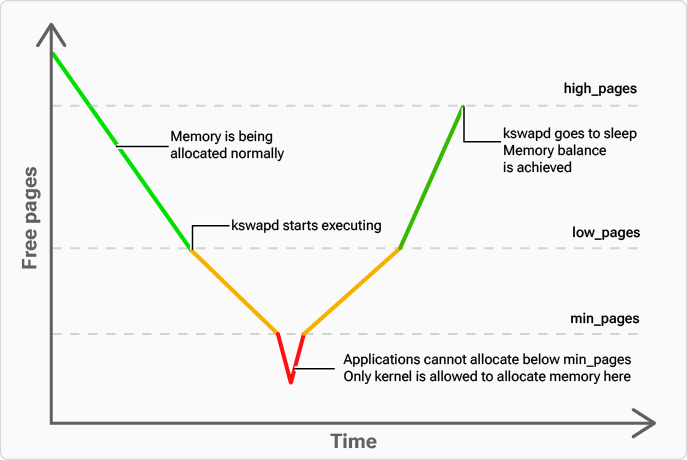
Kswapd is a kernel thread that manages the virtual memory. When the system is low on free memory, Kswapd is activated to reclaim memory by identifying less frequently used pages from the file cache and moving them to the swap space (ZRAM).

Kswapd does the following:

* Monitors the memory usage of the system
* Performs swapping activities in the background to maintain an optimal level of free memory

<div className="flex flex-col items-center gap-2">
  <img src="https://mintcdn.com/qualcomm-prod/rpHTx_a6zriKQll9/System/Performance/media/k2l-performance/cpu_usage_performance_using_kswapd.png?fit=max&auto=format&n=rpHTx_a6zriKQll9&q=85&s=e547c0a400b7af1265a380086444a776" alt="Figure : CPU usage vs. performance using Kswapd" width="687" height="460" data-path="System/Performance/media/k2l-performance/cpu_usage_performance_using_kswapd.png" />

  <p className="text-sm text-gray-700">
    Figure : CPU usage vs. performance using Kswapd
  </p>
</div>

### **Watermark**

A watermark is a threshold or limit set on memory parameters that helps regulate the allocation and usage of system memory.

**Table : Watermark parameters**

|             **Parameter**             |                                                                                                                                                                                                                                                                         **Description**                                                                                                                                                                                                                                                                        |
| :-----------------------------------: | :------------------------------------------------------------------------------------------------------------------------------------------------------------------------------------------------------------------------------------------------------------------------------------------------------------------------------------------------------------------------------------------------------------------------------------------------------------------------------------------------------------------------------------------------------------: |
|     `/proc/sys/vm/min_free_kbytes`    |                                                                                 <ul><li>This parameter determines the minimum amount of free memory that the system must maintain across all zones.</li><li>It ensures that a certain reserve of memory remains available for critical operations, such as handling atomic allocations, which can't wait for memory reclamation.</li><li>The number of reserved free pages in each zone is proportional to its size.</li></ul>                                                                                 |
| `/proc/sys/vm/watermark_scale_factor` |                                                <ul><li>This factor controls the aggressiveness of Kswapd.</li><li>It defines the amount of memory left in a system before Kswapd is woken up, and the amount of free memory required before Kswapd goes back to sleep.</li><li>The unit is in fractions of 10,000.</li><li>The default value of 10 means that the distance between the watermarks is 0.1% of the available memory in the node or system. The maximum value is 1000, or 10% of memory.</li></ul>                                                |
| `/proc/sys/vm/watermark_boost_factor` | <ul><li>This factor is used to optimize memory fragmentation by temporarily providing a high-watermark for the memory management area, which allows Kswapd to reclaim more memory.</li><li>The unit is in fractions of 10,000.</li><li>The default value of 15,000 means that up to 150% of the high watermark is reclaimed in the event of a pageblock being mixed due to fragmentation.</li><li>The number of fragmentation events that have occurred in the recent past determine the level of reclaim. A boost factor of 0 disables the feature.</li></ul> |

For more information, see [Documentation for /proc/sys/vm/](https://www.kernel.org/doc/Documentation/admin-guide/sysctl/vm.rst).

### **Memory carveout**

Memory carveouts refer to specific memory regions that the kernel can't address, known as no-map regions. Specific subsystems such as modem, camera, aDSP, cDSP, and Qualcomm<sup>®</sup> Trusted Execution Environment (TEE)/TrustZone (TZ) use these regions exclusively and hence those are inaccessible to the Linux kernel.

These carveouts are defined in the source code at `arch/arm64/boot/dts/qcom/<target>.dtsi`.

They fall under the `reserved-memory` node and can be configured.

The following code shows the no-map regions for the cDSP, camera, modem, and QTEE/TrustZone (TZ) subsystems:

```text theme={null}
reserved-memory {
        cdsp_secure_heap_mem: cdsp-secure-heap@81800000 {
            reg = <0x0 0x81800000 0x0 0x1e00000>;
            no-map;
        };

        camera_mem: camera@84300000 {
            reg = <0x0 0x84300000 0x0 0x500000>;
            no-map;
        };
        adsp_mem: adsp@86100000 {
            reg = <0x0 0x86100000 0x0 0x2800000>;
            no-map;
        };
        cdsp_mem: cdsp@88900000 {
            reg = <0x0 0x88900000 0x0 0x1e00000>;
            no-map;
        };
        mpss_mem: mpss@8b800000 {
            reg = <0x0 0x8b800000 0x0 0xf600000>;
            no-map;
        };

        tz_stat_mem: tz-stat@c0000000 {
            reg = <0x0 0xc0000000 0x0 0x100000>;
            no-map;
        };
        tags_mem: tags@c0100000 {
            reg = <0x0 0xc0100000 0x0 0x1200000>;
            no-map;
        };
```

You can adjust the reserved memory carveout regions based on your product requirements. This adjustment can include removing a modem carveout region or reducing the size of QTEE/TrustZone (TZ) application memory carveout regions.

For example, the following code snippet shows how to disable the modem memory carveout for memory optimization:

```text theme={null}
reserved-memory {
        mpss_mem: mpss@8b800000 {
            reg = <0x0 0x8b800000 0x0 0xf600000>;
            no-map;
                    status = "disabled";
        };
```

In this code:

* `0x8b800000` is the base address of the modem region.
* `0xf600000` is the size of the modem region, which is 246 MB.
* Add `status = disabled` to make this region available for the Linux kernel.

The following example snippets show how to reduce the memory carveout size of the QTEE/TrustZone (TZ) applications from 28 MB (`0x1c00000`) to 20 MB (`0x1400000`):

**Before:**

```text theme={null}
reserved-memory {
    trusted_apps_mem: trusted_apps@c1800000 {
        reg = <0x0 0xc1800000 0x0 0x1c00000>;
        no-map;
    };
```

**After:**

```text theme={null}
reserved-memory {
    trusted_apps_mem: trusted_apps@c1800000 {
        reg = <0x0 0xc1800000 0x0 0x1400000>;
        no-map;
    };
```

## **Next steps**

* [Troubleshoot performance issues](./troubleshoot-performance-issues)
