> ## Documentation Index
> Fetch the complete documentation index at: https://dragonwingdocs.qualcomm.com/llms.txt
> Use this file to discover all available pages before exploring further.

# Manage CPU idle power states for energy efficiency

CPU idle power management, or idle power management, keeps the CPU cores in the appropriate sleep state for efficient use of energy when the device is idle.

## **CPU sleep states**

A CPU core supports several sleep states. Each sleep state has associated entry and exit latencies and different levels of power consumption. The selection of a core’s sleep state depends on how soon that core is required again for another execution.

A C-state number represents each CPU sleep state. Two key parameters are associated with each C-state:

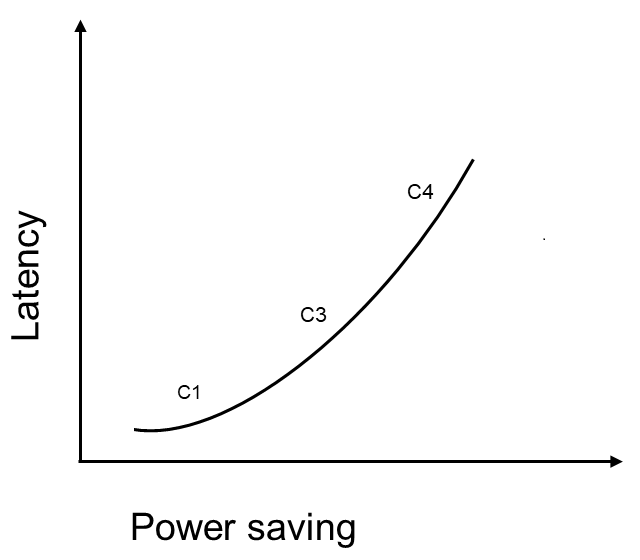
* Power saving: The power saving of the CPU increases as you select higher C-states, but it results in increased wake-up latency.
* Wake-up latency: This is the time taken to transition a CPU core from sleep state to running state.

For example, a deeper sleep state (C4) has higher wake-up latency and lower power consumption as shown in the following figure.

<img src="https://mintcdn.com/qualcomm-prod/OKFyShYzKWv2bmj8/System/Power/media/k2c-perf/latencypowersaving_1.png?fit=max&auto=format&n=OKFyShYzKWv2bmj8&q=85&s=45587c45aad104d1bad3764e6cdcbbc9" alt="Tradeoff between power and latency" width="640" height="560" data-path="System/Power/media/k2c-perf/latencypowersaving_1.png" />

**Figure : Tradeoff between power and latency**

> >

> > Use the following command to view the latencies of CPU sleep state:

```text theme={null}
cat /sys/devices/system/cpu/cpu<X>/cpuidle/state<Y>/latency
```

**Note**

Here, `<X>` represents the core ID, which varies from 0 to 7, and `<Y>` is the index of the Linux power state (0, 1, 2). The following table defines the Linux power states.

You can study and configure sleep states to tune applications for balanced power and performance.

The following table lists the supported CPU sleep states and their associated C-state numbers:

**Note**

The CPU sleep states are enabled by default.

<Tabs>
  <Tab title="QCS6490/QCS5430">
    **Table : Supported core power states for QCS6490/QCS5430**

    | **CPU sleep state** |                                                                   **Description**                                                                  | **Linux power state** |
    | :-----------------: | :------------------------------------------------------------------------------------------------------------------------------------------------: | :-------------------: |
    |          C1         |    <ul><li>CPU core clock domain off</li><li>Power domains `VDD_APC0/ VDD_APC1` on</li><li>Generic interrupt controller (GIC) clock on</li></ul>   |      State0 (S0)      |
    |          C3         | <ul><li>CPU core clock domain off</li><li>Core power collapse with L1 and L2 cache flushed</li><li>Power domains `VDD_APC0/ VDD_APC1` on</li></ul> |      State1 (S1)      |
    |          C4         |             <ul><li>C3 + PLL off for the Silver cluster</li><li>C3+ PLL power domains off for the Gold and the Prime clusters</li></ul>            |      State2 (S2)      |
  </Tab>

  <Tab title="IQ-9075">
    **Table : Supported core power states for IQ-9075**

    | **CPU sleep state** |                                                                   **Description**                                                                  | **Linux power state** |
    | :-----------------: | :------------------------------------------------------------------------------------------------------------------------------------------------: | :-------------------: |
    |          C1         |    <ul><li>CPU core clock domain off</li><li>Power domains `VDD_APC0/ VDD_APC1` on</li><li>Generic interrupt controller (GIC) clock on</li></ul>   |      State0 (S0)      |
    |          C3         | <ul><li>CPU core clock domain off</li><li>Core power collapse with L1 and L2 cache flushed</li><li>Power domains `VDD_APC0/ VDD_APC1` on</li></ul> |      State1 (S1)      |
    |          C4         |             <ul><li>C3 + PLL off for the Silver cluster</li><li>C3+ PLL power domains off for the Gold and the Prime clusters</li></ul>            |      State2 (S2)      |
  </Tab>

  <Tab title="IQ-8275">
    **Table : Supported core power states for IQ-8275**

    | **CPU sleep state** |                                                                   **Description**                                                                  | **Linux power state** |
    | :-----------------: | :------------------------------------------------------------------------------------------------------------------------------------------------: | :-------------------: |
    |          C1         |    <ul><li>CPU core clock domain off</li><li>Power domains `VDD_APC0/ VDD_APC1` on</li><li>Generic interrupt controller (GIC) clock on</li></ul>   |      State0 (S0)      |
    |          C3         | <ul><li>CPU core clock domain off</li><li>Core power collapse with L1 and L2 cache flushed</li><li>Power domains `VDD_APC0/ VDD_APC1` on</li></ul> |      State1 (S1)      |
    |          C4         |             <ul><li>C3 + PLL off for the Silver cluster</li><li>C3+ PLL power domains off for the Gold and the Prime clusters</li></ul>            |      State2 (S2)      |
  </Tab>

  <Tab title="IQ-615">
    **Table : Supported core power states for IQ-615**

    | **CPU sleep state** |                                                                   **Description**                                                                  | **Linux power state** |
    | :-----------------: | :------------------------------------------------------------------------------------------------------------------------------------------------: | :-------------------: |
    |          C1         |    <ul><li>CPU core clock domain off</li><li>Power domains `VDD_APC0/ VDD_APC1` on</li><li>Generic interrupt controller (GIC) clock on</li></ul>   |      State0 (S0)      |
    |          C3         | <ul><li>CPU core clock domain off</li><li>Core power collapse with L1 and L2 cache flushed</li><li>Power domains `VDD_APC0/ VDD_APC1` on</li></ul> |      State1 (S1)      |
    |          C4         |             <ul><li>C3 + PLL off for the Silver cluster</li><li>C3+ PLL power domains off for the Gold and the Prime clusters</li></ul>            |      State2 (S2)      |
  </Tab>

  <Tab title="IQ-X7181">
    **Table : Supported core power states for IQ-X7181**

    | **CPU sleep state** |                                                    **Description**                                                    | **Linux power state** |
    | :-----------------: | :-------------------------------------------------------------------------------------------------------------------: | :-------------------: |
    |          C2         | <ul><li>CPU core in clock-gated low power mode</li><li>Power domains `VDD_CLUSTERi_CX` on</li><li>i = 0,1,2</li></ul> |      State0 (S0)      |
    |          C4         |                             <ul><li>Flush L1D + Save CPU-Context + Power gating</li></ul>                             |      State1 (S1)      |
  </Tab>

  <Tab title="IQ-X5121">
    **Table : Supported core power states for IQ-X5121**

    | **CPU sleep state** |                                                   **Description**                                                   | **Linux power state** |
    | :-----------------: | :-----------------------------------------------------------------------------------------------------------------: | :-------------------: |
    |          C2         | <ul><li>CPU core in clock-gated low power mode</li><li>Power domains `VDD_CLUSTERi_CX` on</li><li>i = 0,1</li></ul> |      State0 (S0)      |
    |          C4         |                            <ul><li>Flush L1D + Save CPU-Context + Power gating</li></ul>                            |      State1 (S1)      |
  </Tab>
</Tabs>

## **Enable and disable low power management state**

The following table lists how to configure CPU sleep states:

**Note**

If you change the configuration of a sleep state, you should check the power impact on the device.

**Table : Commands to enable/disable CPU power states**

<table>
  <thead>
    <tr>
      <th style={{ textAlign: "center" }}>CPU sleep state</th>
      <th style={{ textAlign: "center" }}>Description</th>
      <th style={{ textAlign: "center" }}>Linux power state</th>
    </tr>
  </thead>

  <tbody>
    <tr>
      <td rowSpan={2} style={{ textAlign: "center", verticalAlign: "middle" }}>S0</td>
      <td style={{ textAlign: "center" }}>Disable</td>
      <td><code>echo 0 > /sys/devices/system/cpu/cpuX/cpuidle/state0/disable</code></td>
    </tr>

    <tr>
      <td style={{ textAlign: "center" }}>Enable</td>
      <td><code>echo 1 > /sys/devices/system/cpu/cpuX/cpuidle/state0/disable</code></td>
    </tr>

    <tr>
      <td rowSpan={2} style={{ textAlign: "center", verticalAlign: "middle" }}>S1</td>
      <td style={{ textAlign: "center" }}>Disable</td>
      <td><code>echo 0 > /sys/devices/system/cpu/cpuX/cpuidle/state1/disable</code></td>
    </tr>

    <tr>
      <td style={{ textAlign: "center" }}>Enable</td>
      <td><code>echo 1 > /sys/devices/system/cpu/cpuX/cpuidle/state1/disable</code></td>
    </tr>

    <tr>
      <td rowSpan={2} style={{ textAlign: "center", verticalAlign: "middle" }}>S2</td>
      <td style={{ textAlign: "center" }}>Disable</td>
      <td><code>echo 0 > /sys/devices/system/cpu/cpuX/cpuidle/state2/disable</code></td>
    </tr>

    <tr>
      <td style={{ textAlign: "center" }}>Enable</td>
      <td><code>echo 1 > /sys/devices/system/cpu/cpuX/cpuidle/state2/disable</code></td>
    </tr>
  </tbody>
</table>

**Note**

`<X>` denotes the core ID, which can vary from 0 to 11.

## **Verify CPU idle statistics**

To check the statistics of CPU core sleep states, run the following command:

```text theme={null}
cat /sys/devices/system/cpu/cpu<X>/cpuidle/state<Y>/usage
```

Here, `<X>` is the core ID, which varies from 0 to 7, and `<Y>` is the index of the Linux power state (0, 1, and 2).

The following is an example of the output:

cd /sys/devices/system/cpu

grep -r “” cpu\*/cpuidle/\*/usage

cpu0/cpuidle/state0/usage:97681

cpu0/cpuidle/state1/usage:95

cpu1/cpuidle/state0/usage:180055

cpu1/cpuidle/state1/usage:59

**Note**

The `usage` count represents the number of times `cpu<X>` enters a Linux power state.

## **Next steps**

* [Monitor Suspend Power Management](monitor-suspend-power-management)
