> ## Documentation Index
> Fetch the complete documentation index at: https://dragonwingdocs.qualcomm.com/llms.txt
> Use this file to discover all available pages before exploring further.
# Install or upgrade the SoftSKU feature packs
This feature isn’t enabled in the current release.
You can upgrade the QCS5430 soft stock keeping unit (SKU) feature packs using the Qualcomm® wireless edge services (WES) license. For more information about the feature packs, see [QCS5430: Feature packs](https://docs.qualcomm.com/bundle/publicresource/topics/80-75285-1/qcs5430-collection-landing-page.html#feature-packs).
**Important**
This feature is applicable to QCS5430.
## **Download the evaluation license**
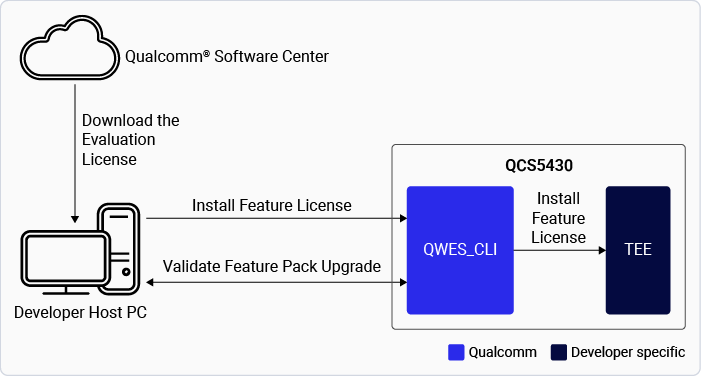
The figure shows the process of downloading and upgrading the QCS5430 SoftSKU feature packs.
**Figure : Upgrade QCS5430 SoftSKU feature packs**
 The table lists the feature packs along with the corresponding links to download their evaluation licenses.
**Table : Download evaluation license**
| **Feature packs** | **Download links to license files** |
| :---------------: | :------------------------------------------------------------------------------------------------------------------: |
| FP2 | [QCM5430 FP2.0](https://softwarecenter.qualcomm.com/api/download/software/licenses/feature_packs/QCM5430-FP-2.0.zip) |
| FP2.5 | [QCM5430 FP2.5](https://softwarecenter.qualcomm.com/api/download/software/licenses/feature_packs/QCM5430-FP-2.5.zip) |
| FP3 | [QCM5430 FP3.0](https://softwarecenter.qualcomm.com/api/download/software/licenses/feature_packs/QCM5430-FP-3.0.zip) |
## **Prepare the device**
1. Set up the Wi-Fi on the device and get the `device-ip-address`.
2. Connect to the device using SSH:
`ssh root@device-ip-address`
For instructions, see [Qualcomm Linux Build Guide](https://docs.qualcomm.com/bundle/publicresource/topics/80-80021-254/how_to.html#use-ssh).
3. Remount the file system with read/write permissions:
```text theme={null}
mount -o rw,remount /usr
```
4. Push the license to the device:
```text theme={null}
scp /path/to/.pfm root@device-ip-address:/data/
```
## **Install the evaluation license**
1. Ensure that the following prerequisites are met:
> * RPMB is provisioned.
> > To verify if RPMB is provisioned, see [Verify RPMB provision status](./verify-the-security-configurations-of-qualcomm-linux#verify-rpmb-provisioning-status).
> * The `qwes_cli` tool is available in the device.
2. Install the Qualcomm WES command-line interface tools:
* Help: `qwes_cli –help`.
* Default tools shipped with the Qualcomm Linux software product.
3. Install the evaluation license:
```text theme={null}
ssh root@device-ip-address
qwes_cli -f /data/.pfm install
```
4. Verify license installation:
```text theme={null}
qwes_cli list
```
| **Command** | **Output** |
| :----------------------: | :--------: |
| Check the serial number: | |
> `qwes_cli list`
> \| `# qwes_cli list` `Running GetAllSerialNumber test with multithread Disabled` `Success. Len = 25` `Parsing 2 serial numbers` `Serial Number: 15b3` `Serial Number: 3e52b512f2f47851a40fa5b30000018c86261aa1` |
> \| :-- |
5. Ensure you restart the device for the license to take effect.
## **Verify the feature pack upgrade**
The two ways to verify the feature packs are:
* Verify the feature pack upgrade by using the following commands:
> ```text theme={null}
> ssh root@device-ip-address
> cat /proc/device-tree/model
> ```
>
> The feature pack ID model is displayed in the output:
>
> * `FP2: Qualcomm Technologies, Inc. qcs5430 fp2 addons rb3gen2 platforms`
> * `FP2.5: Qualcomm Technologies, Inc. qcs5430 fp2p5 addons rb3gen2 platform`
> * `FP3: Qualcomm Technologies, Inc. qcs5430 fp3 addons rb3gen2 platform`
>
> **Note**
>
> The feature pack and model ID mapping will be `{Feature Pack2: fp2 ; Feature pack2.5: fp2.5; Feature pack 3: fp3}`.
* Verify feature pack ID from the following UEFI logs:
> | FP1 | `SoftSKU ID is disabled. The default setting is 1.` |
> | :---- | :-------------------------------------------------- |
> | FP2 | `SoftSKU ID is enabled. updated here: 2` |
> | FP2.5 | `SoftSKU ID enabled. updated here: 8` |
> | FP3 | `SoftSKU ID enabled. updated here: 3` |
## **Manage the device licenses**
You can perform the following operations to manage your device licenses:
* Upgrade the feature pack or apply a new license.
> * You can upgrade or downgrade the feature pack license as needed.
> * To apply a new license (whether upgrading or downgrading), the existing license must be removed first.
> * After the old license is removed, apply the license for the required feature pack.
> * This process ensures that the correct feature pack is enforced.
* Remove the evaluation license.
> * Get the license serial number:
> > ```text theme={null}
> > qwes_cli list
> > Running GetAllSerialNumber test with multithread Disabled
> > Success. Len = 25
> > Parsing 2 serial numbers
> > Serial Number: 15b3
> > Serial Number: 3e52b512f2f47851a40fa5b30000018c86261aa1
> > ```
> * Remove the license:
> > ```text theme={null}
> > ssh root@device-ip-address
> > qwes_cli -s 3e52b512f2f47851a40fa5b30000018c86261aa1 remove
> > Serial number length 20
> > Remove License is successful.
> > ```
> * Verify if the removed license serial number doesn’t appear in the license list:
> > ```text theme={null}
> > qwes_cli list
> > Running GetAllSerialNumber test with multithread Disabled
> > Success. Len = 4
> > Parsing 1 serial numbers
> > Serial Number: 15b3
> > ```
> * Ensure you restart the device for the removal of the license to take effect.
## **Feature pack license - Persistence over software upgrades**
* The license is installed in persistent secure storage, RPMB.
* When the license is installed successfully, its metadata is stored in RPMB, and a copy is maintained in the data partition.
* Even if user data is erased, the license remains preserved in RPMB, ensuring that the device functionality isn’t impacted.
**Note**
This feature is available to licensed users with authorized access to manage feature pack licenses. If you have access, see [Qualcomm Linux Wireless Edge Services Guide](https://docs.qualcomm.com/bundle/resource/topics/80-80021-11B/overview.html).
## **Next steps**
* To learn about Qualcomm WES, see [Qualcomm WES](./security-features#qualcomm-wireless-edge-services).
* To develop applications that offer hardware-based attestation, zero-touch device provisioning, and chipset feature management, see: [Qualcomm Linux Wireless Edge Services Guide](https://docs.qualcomm.com/bundle/resource/topics/80-80021-11B/overview.html). This feature is available to licensed users with authorized access.
The table lists the feature packs along with the corresponding links to download their evaluation licenses.
**Table : Download evaluation license**
| **Feature packs** | **Download links to license files** |
| :---------------: | :------------------------------------------------------------------------------------------------------------------: |
| FP2 | [QCM5430 FP2.0](https://softwarecenter.qualcomm.com/api/download/software/licenses/feature_packs/QCM5430-FP-2.0.zip) |
| FP2.5 | [QCM5430 FP2.5](https://softwarecenter.qualcomm.com/api/download/software/licenses/feature_packs/QCM5430-FP-2.5.zip) |
| FP3 | [QCM5430 FP3.0](https://softwarecenter.qualcomm.com/api/download/software/licenses/feature_packs/QCM5430-FP-3.0.zip) |
## **Prepare the device**
1. Set up the Wi-Fi on the device and get the `device-ip-address`.
2. Connect to the device using SSH:
`ssh root@device-ip-address`
For instructions, see [Qualcomm Linux Build Guide](https://docs.qualcomm.com/bundle/publicresource/topics/80-80021-254/how_to.html#use-ssh).
3. Remount the file system with read/write permissions:
```text theme={null}
mount -o rw,remount /usr
```
4. Push the license to the device:
```text theme={null}
scp /path/to/.pfm root@device-ip-address:/data/
```
## **Install the evaluation license**
1. Ensure that the following prerequisites are met:
> * RPMB is provisioned.
> > To verify if RPMB is provisioned, see [Verify RPMB provision status](./verify-the-security-configurations-of-qualcomm-linux#verify-rpmb-provisioning-status).
> * The `qwes_cli` tool is available in the device.
2. Install the Qualcomm WES command-line interface tools:
* Help: `qwes_cli –help`.
* Default tools shipped with the Qualcomm Linux software product.
3. Install the evaluation license:
```text theme={null}
ssh root@device-ip-address
qwes_cli -f /data/.pfm install
```
4. Verify license installation:
```text theme={null}
qwes_cli list
```
| **Command** | **Output** |
| :----------------------: | :--------: |
| Check the serial number: | |
> `qwes_cli list`
> \| `# qwes_cli list` `Running GetAllSerialNumber test with multithread Disabled` `Success. Len = 25` `Parsing 2 serial numbers` `Serial Number: 15b3` `Serial Number: 3e52b512f2f47851a40fa5b30000018c86261aa1` |
> \| :-- |
5. Ensure you restart the device for the license to take effect.
## **Verify the feature pack upgrade**
The two ways to verify the feature packs are:
* Verify the feature pack upgrade by using the following commands:
> ```text theme={null}
> ssh root@device-ip-address
> cat /proc/device-tree/model
> ```
>
> The feature pack ID model is displayed in the output:
>
> * `FP2: Qualcomm Technologies, Inc. qcs5430 fp2 addons rb3gen2 platforms`
> * `FP2.5: Qualcomm Technologies, Inc. qcs5430 fp2p5 addons rb3gen2 platform`
> * `FP3: Qualcomm Technologies, Inc. qcs5430 fp3 addons rb3gen2 platform`
>
> **Note**
>
> The feature pack and model ID mapping will be `{Feature Pack2: fp2 ; Feature pack2.5: fp2.5; Feature pack 3: fp3}`.
* Verify feature pack ID from the following UEFI logs:
> | FP1 | `SoftSKU ID is disabled. The default setting is 1.` |
> | :---- | :-------------------------------------------------- |
> | FP2 | `SoftSKU ID is enabled. updated here: 2` |
> | FP2.5 | `SoftSKU ID enabled. updated here: 8` |
> | FP3 | `SoftSKU ID enabled. updated here: 3` |
## **Manage the device licenses**
You can perform the following operations to manage your device licenses:
* Upgrade the feature pack or apply a new license.
> * You can upgrade or downgrade the feature pack license as needed.
> * To apply a new license (whether upgrading or downgrading), the existing license must be removed first.
> * After the old license is removed, apply the license for the required feature pack.
> * This process ensures that the correct feature pack is enforced.
* Remove the evaluation license.
> * Get the license serial number:
> > ```text theme={null}
> > qwes_cli list
> > Running GetAllSerialNumber test with multithread Disabled
> > Success. Len = 25
> > Parsing 2 serial numbers
> > Serial Number: 15b3
> > Serial Number: 3e52b512f2f47851a40fa5b30000018c86261aa1
> > ```
> * Remove the license:
> > ```text theme={null}
> > ssh root@device-ip-address
> > qwes_cli -s 3e52b512f2f47851a40fa5b30000018c86261aa1 remove
> > Serial number length 20
> > Remove License is successful.
> > ```
> * Verify if the removed license serial number doesn’t appear in the license list:
> > ```text theme={null}
> > qwes_cli list
> > Running GetAllSerialNumber test with multithread Disabled
> > Success. Len = 4
> > Parsing 1 serial numbers
> > Serial Number: 15b3
> > ```
> * Ensure you restart the device for the removal of the license to take effect.
## **Feature pack license - Persistence over software upgrades**
* The license is installed in persistent secure storage, RPMB.
* When the license is installed successfully, its metadata is stored in RPMB, and a copy is maintained in the data partition.
* Even if user data is erased, the license remains preserved in RPMB, ensuring that the device functionality isn’t impacted.
**Note**
This feature is available to licensed users with authorized access to manage feature pack licenses. If you have access, see [Qualcomm Linux Wireless Edge Services Guide](https://docs.qualcomm.com/bundle/resource/topics/80-80021-11B/overview.html).
## **Next steps**
* To learn about Qualcomm WES, see [Qualcomm WES](./security-features#qualcomm-wireless-edge-services).
* To develop applications that offer hardware-based attestation, zero-touch device provisioning, and chipset feature management, see: [Qualcomm Linux Wireless Edge Services Guide](https://docs.qualcomm.com/bundle/resource/topics/80-80021-11B/overview.html). This feature is available to licensed users with authorized access.