> ## Documentation Index
> Fetch the complete documentation index at: https://dragonwingdocs.qualcomm.com/llms.txt
> Use this file to discover all available pages before exploring further.
# Security architecture
Arm® v8 has enhanced the TrustZone technology to incorporate security into its architecture. This technology offers a security framework that allows a device to handle security threats at both software and hardware levels.
The architectural information is for comprehension purposes only. You don’t need to perform any configuration or customization.
Arm’s hardware solution allows the design and deployment of software, applications, or services within a secure execution environment. This environment is a separate execution unit that ensures hardware isolation from non‑secure execution environments. For more information, see [Qualcomm® Trusted Execution Environment (Qualcomm TEE)](./security-features#qualcomm-tee).
Qualcomm® Linux® operates on a 64‑bit Arm 8.x architecture. In this setup, Arm cores have two execution modes:
> * Non‑secure mode: Linux operates in this mode of the Arm core.
> * Secure mode: Qualcomm TEE and trusted applications operate in this Secure mode of the Arm core.
The secure mode of the Arm core forms the essence of the TrustZone technology. It provides a hardware-based security environment for a secure OS and separates the secure world from the non‑secure world.
The following figure shows the Qualcomm Linux security software architecture. It shows the distribution of components or modules across both the rich (user space and kernel space) and trusted execution environments.
**Figure : Qualcomm Linux security software components**
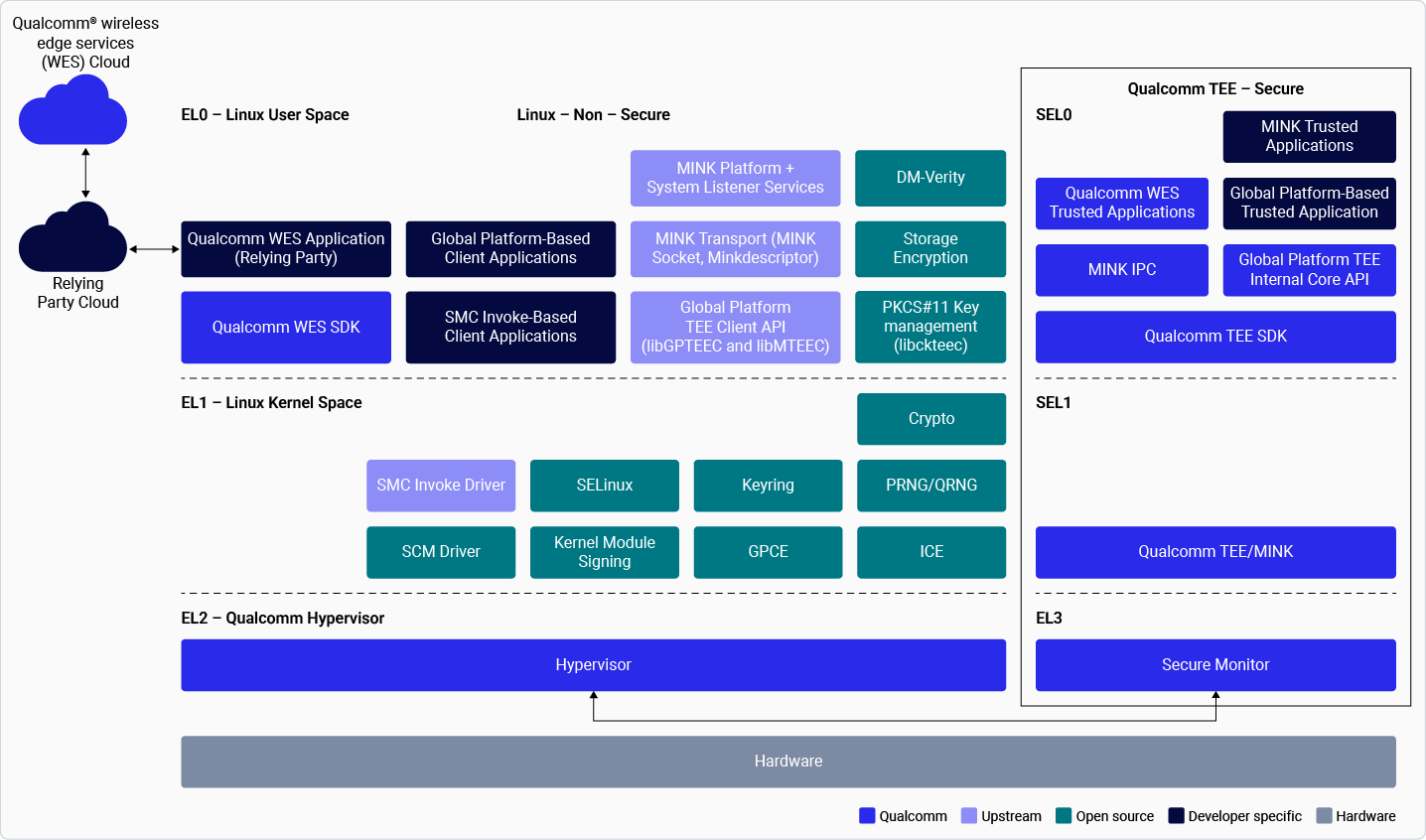 The Qualcomm Linux security software has the following key components, each operating in different execution environments.
**Table : Execution environments and key components**
| **Exception levels** | **Software components** |
| :-------------------------------------------------------------------------: | :-----------------------------------------------------------------------------------------------------------------: |
| [Non-secure EL0](./security-architecture#linux-user-space-non-secure-el0) | Linux user space - Mink, key management, client applications, and Qualcomm® wireless edge services (WES) |
| [Non-secure EL1](./security-architecture#linux-kernel-space-nonsecure-el1) | Linux kernel space - QCOMTEE driver and cryptographic/pseudo-random number generator (PRNG) driver |
| [Non-secure EL2](./security-architecture#qualcomm-hypervisor-nonsecure-el2) | Qualcomm® Hypervisor |
| [Secure EL0](./security-architecture#qualcomm-tee-sdk-secure-el0) | Qualcomm TEE SDK and trusted application |
| [Secure EL1](./security-architecture#qualcomm-tee-mink-secure-el1) | Qualcomm TEE mink |
| [Secure EL3](./security-architecture#secure-monitor-secure-el3) | Secure monitor |
## **Linux user space (Non-secure EL0)**
This user space includes the primary security modules/interfaces present in the Linux user space, which operates in non-secure EL0 according to the [Arm exception levels](https://developer.arm.com/documentation/102412/0103/Privilege-and-Exception-levels/Exception-levels).
> * Mink—Linux (Mink platform/System listener services/Transport mechanism)
> > * Provides the services and transport mechanism to use the Qualcomm TEE capabilities through trusted applications.
> > * Forms the system listener services (QTEE supplicant), designed to extend the Qualcomm TEE functionalities.
> > * Implements the global platform TEE client APIs for running global platform-based trusted applications through `libminkteec`. For more information, see [TEE Client API Specification](https://globalplatform.org/specs-library/tee-client-api-specification/).
> > * Implements client applications in a Rich Execution Environment (Linux user space) that interact with the trusted application that operates in Qualcomm TEE. The various client applications include:
> > > * Client application that’s developed using mink APIs
> > > * Global platform-based client application
> > > * Client application that’s developed using the global platform-based TEE client API specification
* Key management
> * The cryptographic client library (`libckqteec`) implements a PKCS#11 interface to the PKCS#11 Trusted Application running in QTEE. User space applications running on Linux can link to this library to request cryptographic operations from TEE via the PKCS#11 standard interface.
> * The `libckqteec` library defines a standard PKCS#11 interface between an application and a cryptographic device, enabling applications to treat cryptographic devices as tokens and perform cryptographic functions as implemented by these tokens.
> * The PKCS#11 interface provides a range of cryptographic services for encryption, decryption, signature generation, signature verification, and permanent key storage.
>
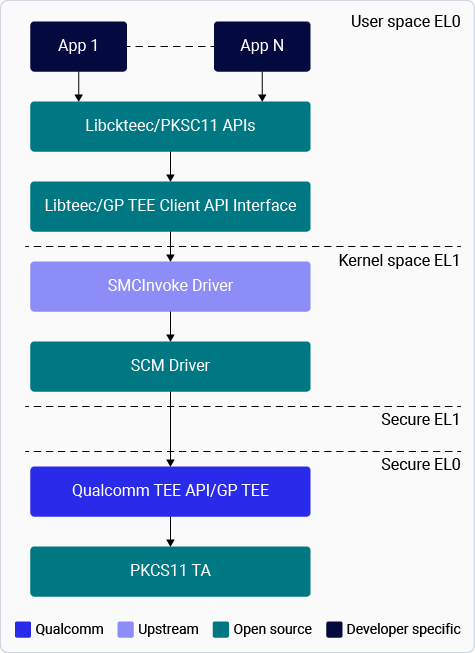
> The figure shows key management in the kernel and user space.
>
> > **Figure : Key management in kernel and user space**
>
>
The Qualcomm Linux security software has the following key components, each operating in different execution environments.
**Table : Execution environments and key components**
| **Exception levels** | **Software components** |
| :-------------------------------------------------------------------------: | :-----------------------------------------------------------------------------------------------------------------: |
| [Non-secure EL0](./security-architecture#linux-user-space-non-secure-el0) | Linux user space - Mink, key management, client applications, and Qualcomm® wireless edge services (WES) |
| [Non-secure EL1](./security-architecture#linux-kernel-space-nonsecure-el1) | Linux kernel space - QCOMTEE driver and cryptographic/pseudo-random number generator (PRNG) driver |
| [Non-secure EL2](./security-architecture#qualcomm-hypervisor-nonsecure-el2) | Qualcomm® Hypervisor |
| [Secure EL0](./security-architecture#qualcomm-tee-sdk-secure-el0) | Qualcomm TEE SDK and trusted application |
| [Secure EL1](./security-architecture#qualcomm-tee-mink-secure-el1) | Qualcomm TEE mink |
| [Secure EL3](./security-architecture#secure-monitor-secure-el3) | Secure monitor |
## **Linux user space (Non-secure EL0)**
This user space includes the primary security modules/interfaces present in the Linux user space, which operates in non-secure EL0 according to the [Arm exception levels](https://developer.arm.com/documentation/102412/0103/Privilege-and-Exception-levels/Exception-levels).
> * Mink—Linux (Mink platform/System listener services/Transport mechanism)
> > * Provides the services and transport mechanism to use the Qualcomm TEE capabilities through trusted applications.
> > * Forms the system listener services (QTEE supplicant), designed to extend the Qualcomm TEE functionalities.
> > * Implements the global platform TEE client APIs for running global platform-based trusted applications through `libminkteec`. For more information, see [TEE Client API Specification](https://globalplatform.org/specs-library/tee-client-api-specification/).
> > * Implements client applications in a Rich Execution Environment (Linux user space) that interact with the trusted application that operates in Qualcomm TEE. The various client applications include:
> > > * Client application that’s developed using mink APIs
> > > * Global platform-based client application
> > > * Client application that’s developed using the global platform-based TEE client API specification
* Key management
> * The cryptographic client library (`libckqteec`) implements a PKCS#11 interface to the PKCS#11 Trusted Application running in QTEE. User space applications running on Linux can link to this library to request cryptographic operations from TEE via the PKCS#11 standard interface.
> * The `libckqteec` library defines a standard PKCS#11 interface between an application and a cryptographic device, enabling applications to treat cryptographic devices as tokens and perform cryptographic functions as implemented by these tokens.
> * The PKCS#11 interface provides a range of cryptographic services for encryption, decryption, signature generation, signature verification, and permanent key storage.
>
> The figure shows key management in the kernel and user space.
>
> > **Figure : Key management in kernel and user space**
>
>  * For more information about key management, see [Qualcomm WES](./security-features#qualcomm-wireless-edge-services) and [Storage encryption](./security-features#storage-encryption).
* For more information about the various security software components, see [Security features](./security-features).
## **Linux kernel space (Non‑secure EL1)**
The following are the security-specific kernel drivers:
> * QCOMTEE driver:
> > * The driver is integrated into the standard Linux TEE Subsystem, however, it extends the subsystem’s functionality to support Qualcomm’s unique requirements.
> > * Placement: The driver source is located at `drivers/tee/qcomtee/`.
> > * Driver ID: Within the TEE subsystem, QCOMTEE is registered with a unique ID (typically 3), distinguishing it from OP-TEE (1) and AMD-TEE (2).
> > * Object IPC integration: Since the standard TEE subsystem doesn’t natively support object-based IPC, the QCOMTEE driver layers object-IPC on top of it. It introduces generic object abstractions that can be invoked using specific IOCTLs.
> > * Communication flow:
> > > * User space: Applications use the Mink TEEC or Mink Adaptor library to interact with QTEE through a GlobalPlatform or Object-IPC interface.
> > > * TEE subsystem: Standard IOCTLs (like TEE\_IOC\_SHM\_ALLOC) are reused where possible, while new ones (`like IOCTL_OBJECT_INVOKE`) handle object-specific logic.
> > > * QCOMTEE Driver: Marshals arguments into a format understood by Qualcomm TEE.
> > > * Firmware (Qualcomm TEE): Receives requests and executes the requested trusted application logic.
> * For the CM and cryptographic/PRNG drivers, see the respective kernel documentation.
## **Qualcomm Hypervisor (Non‑secure EL2)**
For more information, see [Qualcomm Hypervisor](./security-features#qualcomm-hypervisor).
## **Qualcomm TEE SDK (Secure EL0)**
Qualcomm offers a software development kit (SDK) for developing and building trusted applications. This SDK includes the necessary build system, header files, and library dependencies to compile trusted applications.
* Trusted applications. See [Qualcomm TEE → Trusted applications](./security-features#qualcomm-tee).
## **Qualcomm TEE mink (Secure EL1)**
In a Qualcomm TEE kernel-based system, software operates in one or more communicating domains, such as the kernel domain or user domain.
These domains vary in their ability to access memory and other system resources.
> * One of these domains, referred to as the kernel domain, executes at secure EL1 and has complete control over the system resources.
> * The other domains, known as user domains or processes, run at secure EL0 and have restricted access to system resources. The Object-IPC based Mink protocol allows for precise control over the access granted to a process.
Mink is an Object-IPC based synchronous message passing protocol based on an object-capability model, designed to facilitate secure communication between different domains. It enables code in one domain to invoke objects in another domain by passing unforgeable object references as input or output arguments.
## **Secure monitor (Secure EL3)**
The secure monitor, a component of TrustZone, is responsible for managing the transition between the secure and non‑secure worlds.
It operates in Monitor mode, which is activated by running the instruction from a privileged Arm mode.
The secure monitor ensures correct context saving and restoration when switching between the non‑secure and secure worlds. Additionally, it handles the initial processing of secure interrupts.
## **Next steps**
* To learn about security tools and how to integrate them into your workflows, see [Security tools](./security-tools).
* To explore the full range of integrated protections and capabilities, see [Security features](./security-features).
* For more information about key management, see [Qualcomm WES](./security-features#qualcomm-wireless-edge-services) and [Storage encryption](./security-features#storage-encryption).
* For more information about the various security software components, see [Security features](./security-features).
## **Linux kernel space (Non‑secure EL1)**
The following are the security-specific kernel drivers:
> * QCOMTEE driver:
> > * The driver is integrated into the standard Linux TEE Subsystem, however, it extends the subsystem’s functionality to support Qualcomm’s unique requirements.
> > * Placement: The driver source is located at `drivers/tee/qcomtee/`.
> > * Driver ID: Within the TEE subsystem, QCOMTEE is registered with a unique ID (typically 3), distinguishing it from OP-TEE (1) and AMD-TEE (2).
> > * Object IPC integration: Since the standard TEE subsystem doesn’t natively support object-based IPC, the QCOMTEE driver layers object-IPC on top of it. It introduces generic object abstractions that can be invoked using specific IOCTLs.
> > * Communication flow:
> > > * User space: Applications use the Mink TEEC or Mink Adaptor library to interact with QTEE through a GlobalPlatform or Object-IPC interface.
> > > * TEE subsystem: Standard IOCTLs (like TEE\_IOC\_SHM\_ALLOC) are reused where possible, while new ones (`like IOCTL_OBJECT_INVOKE`) handle object-specific logic.
> > > * QCOMTEE Driver: Marshals arguments into a format understood by Qualcomm TEE.
> > > * Firmware (Qualcomm TEE): Receives requests and executes the requested trusted application logic.
> * For the CM and cryptographic/PRNG drivers, see the respective kernel documentation.
## **Qualcomm Hypervisor (Non‑secure EL2)**
For more information, see [Qualcomm Hypervisor](./security-features#qualcomm-hypervisor).
## **Qualcomm TEE SDK (Secure EL0)**
Qualcomm offers a software development kit (SDK) for developing and building trusted applications. This SDK includes the necessary build system, header files, and library dependencies to compile trusted applications.
* Trusted applications. See [Qualcomm TEE → Trusted applications](./security-features#qualcomm-tee).
## **Qualcomm TEE mink (Secure EL1)**
In a Qualcomm TEE kernel-based system, software operates in one or more communicating domains, such as the kernel domain or user domain.
These domains vary in their ability to access memory and other system resources.
> * One of these domains, referred to as the kernel domain, executes at secure EL1 and has complete control over the system resources.
> * The other domains, known as user domains or processes, run at secure EL0 and have restricted access to system resources. The Object-IPC based Mink protocol allows for precise control over the access granted to a process.
Mink is an Object-IPC based synchronous message passing protocol based on an object-capability model, designed to facilitate secure communication between different domains. It enables code in one domain to invoke objects in another domain by passing unforgeable object references as input or output arguments.
## **Secure monitor (Secure EL3)**
The secure monitor, a component of TrustZone, is responsible for managing the transition between the secure and non‑secure worlds.
It operates in Monitor mode, which is activated by running the instruction from a privileged Arm mode.
The secure monitor ensures correct context saving and restoration when switching between the non‑secure and secure worlds. Additionally, it handles the initial processing of secure interrupts.
## **Next steps**
* To learn about security tools and how to integrate them into your workflows, see [Security tools](./security-tools).
* To explore the full range of integrated protections and capabilities, see [Security features](./security-features).