> ## Documentation Index
> Fetch the complete documentation index at: https://dragonwingdocs.qualcomm.com/llms.txt
> Use this file to discover all available pages before exploring further.
# Security features
Qualcomm® Linux® incorporates several security features designed to protect devices and applications. These features are essential for defending against vulnerabilities, ensuring data integrity and confidentiality, maintaining compliance with industry standards, and supporting overall system stability.
Qualcomm® Trusted Execution Environment (Qualcomm TEE) further enhances these security capabilities. It provides interfaces that enable the extension of the security feature set through trusted applications. The hardware-supported TrustZone architecture integrates certain features, providing a system security configuration. These features can be further customized to meet specific requirements.
Explore the following security features and videos in this section.
[Cryptography](./security-features#cryptography)
[Key management](./security-features#key-management)
[Secure boot](./security-features#secure-boot)
[Storage security](./security-features#storage-security)
[Storage encryption](./security-features#storage-encryption)
[QCOMTEE driver](./security-features#qcomtee-driver)
[Access control](./security-features#access-control)
[Secure peripheral image loading](./security-features#secure-peripheral-image-loading)
[SELinux](./security-features#selinux)
[Qualcomm TEE](./security-features#qualcomm-tee)
[Qualcomm Hypervisor](./security-features#qualcomm-hypervisor)
[Security hardening](./security-features#security-hardening)
[Qualcomm WES](./security-features#qualcomm-wireless-edge-services)
[Discrete trusted platform module](./security-features#discrete-trusted-platform-module)
[Watch a video on secure boot technology](./security-features#watch-a-video-on-secure-boot-technology)
[Watch video on Qualcomm Type-1 Hypervisor and trusted execution environment](./security-features#watch-a-video-on-qualcomm-type-1-hypervisor-and-trusted-execution-environment)
## **Cryptography**
Cryptography is the process of securing information by converting readable data into an unreadable format using algorithms and secret keys. Qualcomm Linux supports comprehensive cryptographic capabilities, leveraging both hardware-accelerated and software-based implementations to enhance system security.
The key capabilities include:
* A register and bus access manager with direct memory-based access.
* Interfaces to the cryptographic hardware.
* The Linux kernel crypto driver (qcrypto) provides access to the hardware cryptography independent of trusted applications.
* The Qualcomm TEE provides the hardware and software cryptographic application programming interfaces (APIs) to the trusted applications.
Qualcomm TEE supports the following cryptographic algorithms:
**Table : Cryptographic algorithms**
| **Algorithm** | **Hardware** | **Software** |
| :---------------: | :------------------------------------------------------------------------------------: | :-------------------------------------------------------------------------------------------------------------------------------------: |
| Hash | SHA-1/SHA-256 | - SHA-1/SHA-224/SHA-256/SHA-384/SHA-512
- SM3
|
| Symmetric cipher | - AES-128/AES-256 CBC, ECB, CTR, CCM, GCM,
- Triple-TDES CBC/ECB
| - AES-128/AES-192/AES-256 CBC, ECB, CTR, CCM, XTS, CFB, OFB, CTS
- Triple-TDES CBC/ECB
- PBKDF2
- SM4
|
| MAC | AES-CMAC | Hash-based message authentication (HMAC) |
| RNG | HRNG | – |
| HMAC | HMAC-SHA-1/SHA-256 | HMAC-SHA-1/SHA-224/SHA-256/SHA-384/SHA-512 |
| Asymmetric cipher | – | - RSA with 1024/2048/3072 modulus
- ECDSA with P224, P256, P384, P521
- ECDH
- SM2
|
### **Inline crypto engine**
ICE now support standard and wrapped keys on ufs and emmc storage variants.
iq-9075(emmc), iq-x7181(ufs) currently don't support ice.
The inline crypto engine (ICE) performs high-throughput cryptographic encryption of storage data.
ICE supports:
* AES 128/AES 256 ECB/XTS
* Multiple crypto streams to meet high throughput
* Multiple AES cores per crypto stream
* Provision of 32 software configurable keys
* Capability to enable symmetric and asymmetric operations
* Support with emmc and ufs storage variants.
* Standard keys in default configuration.
* Wrapped keys support configurable by module\_param(use\_wrapped\_keys).
## **Key management**
Key management is how cryptographic keys are safely created, stored, used, and deleted. These keys help protect sensitive data. The Qualcomm Linux Security solution supports public-key cryptography standards through the implementation of PKCS#11 APIs. This allows applications to manage and use cryptographic keys and certificates in a platform-independent and standardized manner.
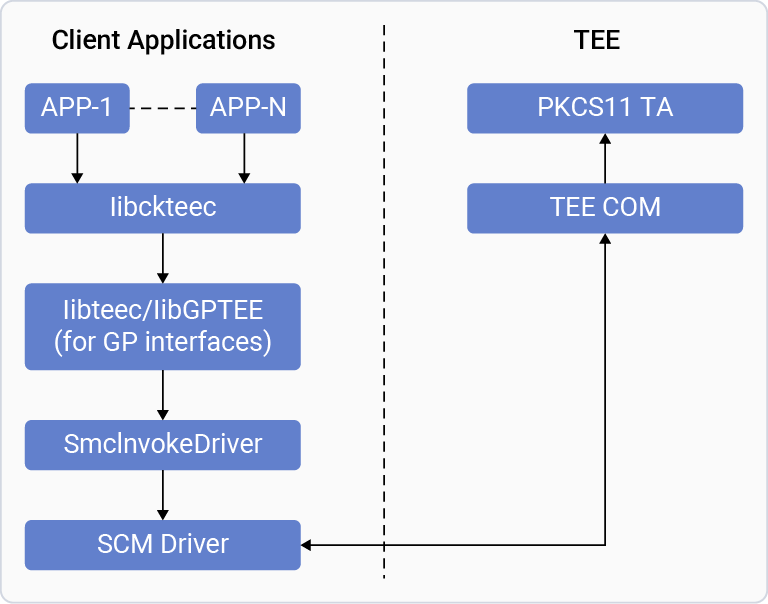
Qualcomm implements PKCS#11 interface within the `libckqteec` library on-top of the GlobalPlatform standard interface provided by the `libminkteec` library for communication with Trusted applications within the Qualcomm TEE.
### **Develop Linux user space applications for key management with PKCS#11**
To perform key management operations such as key generation, storage, retrieval, and deletion, use the PKCS#11 service APIs from your user space client application on Qualcomm Linux. Your application should interact with the Cryptoki client library `libckqteec` to access the PKCS#11 interface.
The following table list the generic APIs supported for key management functions.
| `C_GenerateKey` | generates a secret key | AES - CBC, CTS, CTR, CMAC |
| :------------------ | :-------------------------------------- | :---------------------------------------- |
| `C_GenerateKeyPair` | generates a public-key/private-key pair | RSA, ECDSA |
| `C_WrapKey` | wraps (encrypts) a key | RSA, AES |
| `C_UnwrapKey` | unwraps (decrypts) a key | RSA, AES |
| `C_DeriveKey` | derives a key from a base key | AES-ECB, AES-CBC |
| `C_DigestKey` | digests a key into a message digest | SHA-1, SHA-224, SHA-256, SHA-384, SHA-512 |
The following image shows the call flow from the client application to the PKCS trusted applications for key related use cases.
**Figure : Client and PKCS trusted application call flow**
 For more information, see the following documents:
* [PKCS #11 Cryptographic Token Interface Base Specification](http://docs.oasis-open.org/pkcs11/pkcs11-base/v2.40/os/pkcs11-base-v2.40-os.html)
* [PKCS #11 Cryptographic Token Interface Usage Guide](https://docs.oasis-open.org/pkcs11/pkcs11-ug/v2.40/cnd01/pkcs11-ug-v2.40-cnd01.html)
### **Limitations**
The following functionalities aren’t supported:
* Random number generator functionality
* P-192 in CKM\_ECDSA
* RSA PKCS key generation and signing in CKM\_RSA\_PKCS mode
* EDDSA key generation and signing
* RSA interoperability is limited; several legacy formats, specialized RSA modes, and SHA3-based RSA combinations are not supported.
* Elliptic-curve support is incomplete for newer PKCS#11 v3.0 features such as Edwards/Montgomery curves, EdDSA, XEdDSA, and advanced EC derivation/KDF variants.
* SHA3-based mechanisms such as digest, HMAC, key derivation, and related signature combinations are not supported.
* Advanced AES modes such as AES-OFB, AES-CFB, AES-XTS, AES-CCM, AES-GMAC, and some AES MAC variants are not supported.
* Several symmetric MAC and keyed-hash variants are incomplete, especially SHA3-based and some general-length mechanisms.
* Protocol-specific and specialized mechanisms such as SSL/TLS/WTLS, PBE, HKDF, ChaCha20/Poly1305, Salsa20/Poly1305, and similar advanced mechanisms are not supported.
* Some mechanisms are only partially supported or blocked by backend/QTEE GP limitations, including ECDSA and certain EC-related test flows
## **Watch a video on secure boot technology**
**Qualcomm Processor Security: Foundation**
*Unlock the full potential of Secure Boot technology on Qualcomm devices in this comprehensive tutorial. From generating cryptographic keys to programming hardware fuses and managing secure boot status, this video covers every step in detail. Ideal for users aiming to enhance device security through authenticated boot processes. Learn how to use Qualcomm tools effectively to ensure your device boots securely every time.*
[
For more information, see the following documents:
* [PKCS #11 Cryptographic Token Interface Base Specification](http://docs.oasis-open.org/pkcs11/pkcs11-base/v2.40/os/pkcs11-base-v2.40-os.html)
* [PKCS #11 Cryptographic Token Interface Usage Guide](https://docs.oasis-open.org/pkcs11/pkcs11-ug/v2.40/cnd01/pkcs11-ug-v2.40-cnd01.html)
### **Limitations**
The following functionalities aren’t supported:
* Random number generator functionality
* P-192 in CKM\_ECDSA
* RSA PKCS key generation and signing in CKM\_RSA\_PKCS mode
* EDDSA key generation and signing
* RSA interoperability is limited; several legacy formats, specialized RSA modes, and SHA3-based RSA combinations are not supported.
* Elliptic-curve support is incomplete for newer PKCS#11 v3.0 features such as Edwards/Montgomery curves, EdDSA, XEdDSA, and advanced EC derivation/KDF variants.
* SHA3-based mechanisms such as digest, HMAC, key derivation, and related signature combinations are not supported.
* Advanced AES modes such as AES-OFB, AES-CFB, AES-XTS, AES-CCM, AES-GMAC, and some AES MAC variants are not supported.
* Several symmetric MAC and keyed-hash variants are incomplete, especially SHA3-based and some general-length mechanisms.
* Protocol-specific and specialized mechanisms such as SSL/TLS/WTLS, PBE, HKDF, ChaCha20/Poly1305, Salsa20/Poly1305, and similar advanced mechanisms are not supported.
* Some mechanisms are only partially supported or blocked by backend/QTEE GP limitations, including ECDSA and certain EC-related test flows
## **Watch a video on secure boot technology**
**Qualcomm Processor Security: Foundation**
*Unlock the full potential of Secure Boot technology on Qualcomm devices in this comprehensive tutorial. From generating cryptographic keys to programming hardware fuses and managing secure boot status, this video covers every step in detail. Ideal for users aiming to enhance device security through authenticated boot processes. Learn how to use Qualcomm tools effectively to ensure your device boots securely every time.*
[ ](https://players.brightcove.net/1414329538001/BJv5wEFt_default/index.html?videoId=6358216194112)
[Watch the video: Qualcomm Processor Security: Foundation](https://players.brightcove.net/1414329538001/BJv5wEFt_default/index.html?videoId=6358216194112)
## **Secure boot**
Secure boot is the boot up sequence that establishes a trusted platform for the entire software stack.
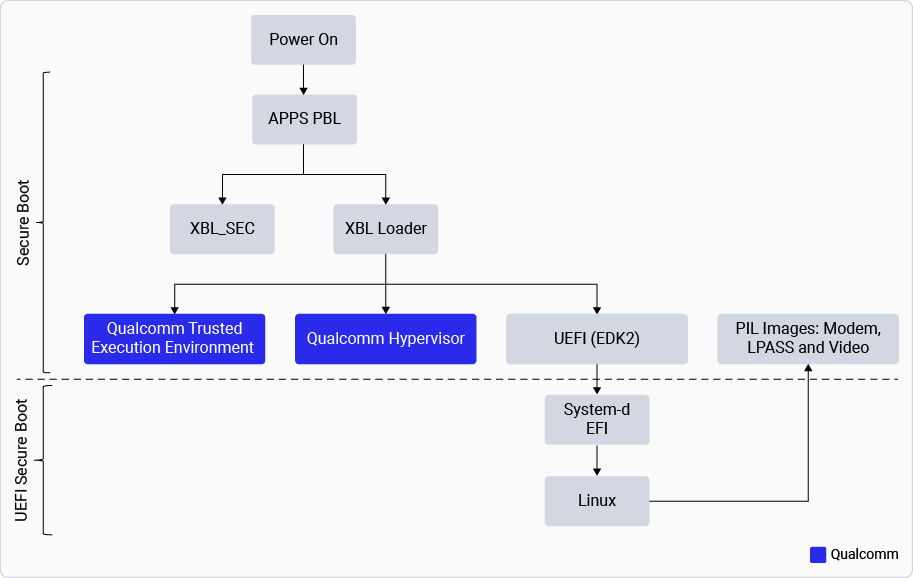
See the workflow to understand the secure boot and UEFI secure boot process.
**Figure : Secure boot vs UEFI secure boot**
](https://players.brightcove.net/1414329538001/BJv5wEFt_default/index.html?videoId=6358216194112)
[Watch the video: Qualcomm Processor Security: Foundation](https://players.brightcove.net/1414329538001/BJv5wEFt_default/index.html?videoId=6358216194112)
## **Secure boot**
Secure boot is the boot up sequence that establishes a trusted platform for the entire software stack.
See the workflow to understand the secure boot and UEFI secure boot process.
**Figure : Secure boot vs UEFI secure boot**
 This process uses cryptographic authentication to start an immutable sequence that validates the origin of the code, ensuring the execution of authorized software. This process:
* Confirms the authenticity of all software images (non-Linux images) signed by Qualcomm and the users. The device carries out this process.
* Prevents any unauthorized or maliciously modified software from running on the device.
The secure boot feature authenticates non-Linux images while UEFI secure boot authenticates the Linux images.
### **UEFI secure boot**
UEFI secure boot is a feature of the unified extensible firmware interface (UEFI) specification that defines an interface between an operating system and the platform firmware.
For more information, see [UEFI specification](https://uefi.org/specs/UEFI/2.10/).
The features of UEFI secure boot include:
* Ensuring that the code run by the device UEFI firmware is secure and trusted before the operating system begins boot up.
* Defining how the UEFI authenticates images such as the Linux image, the operating system loader (uki.efi), systemd boot (bootaa64.efi), and the device tree blob (DTB) image files.
* Ensuring that the images are loaded only when signed by valid and authorized users. This process also ensures that the Qualcomm Linux security and integrity over systems running on UEFI-based firmware.
The UEFI secure boot allows the Qualcomm Linux users to:
* Verify the integrity and security of a UEFI loaded image, ensuring it’s loaded in an approved manner.
* Manage the Qualcomm Linux security policy as defined by the UEFI secure boot authenticated variables, which includes:
* Platform key (PK)
* Key exchange keys (KEK)
* Allowed database (dB)
* Forbidden database (DBX) (Not supported in this release.)
## **Storage security**
The storage security feature stores and protects sensitive data through two key components: the Secure File System (SFS) and the Replay Protected Memory Block (RPMB).
### **SFS**
The SFS is a protected storage feature that securely stores sensitive data such as cryptographic keys and biometric information. It operates within Qualcomm TEE, using encryption and isolation to prevent unauthorized access.
It provides confidentiality, integrity, and anti-rollback support to the Trusted applications and securely stores sensitive data. The anti-rollback protection covers the files created or stored under SFS.
The SFS feature uses:
* An encryption key for each Trusted application to ensure the confidentiality of the files.
* An HMAC key for each Trusted application to verify the integrity of the files.
Both the encryption and HMAC keys are derived using a device unique key, which depends on the secure boot state of the device. The SFS anti-rollback protection is enabled by default.
When the devices are secure boot enabled, the SFS uses unique hardware keys for file data encryption and decryption to ensure they’re secure from each other.
### **RPMB**
The RPMB is a secure physical partition in storage devices such as the UFS/eMMC flash. This partition stores critical data that must be protected from tampering and rollback, and is only accessible from Qualcomm TEE.
To read from and write to the RPMB partition, [RPMB key provisioning](./customize-security-services) is required. This is a one-time process that can’t be overwritten or erased when completed.
Every access to the RPMB is authenticated, allowing the host to store data in an authenticated and replay-protected manner.
## **Storage encryption**
iq-9075(emmc), iq-x7181(ufs) currently don't support storage encryption.
Storage encryption enhances security by supporting the transparent encryption of files and directories.
The Qualcomm Linux supports storage encryption with the [ICE](./security-features#inline-crypto-engine) and a hardware-wrapped key. It provides better efficiency and enhanced key protection.
The storage encryption feature allows:
* Provision of standard keys ranging from 32 bytes to 64 bytes for content encryption
* Provision of wrapped keys for content encryption
* Encryption of filenames and file content with separate keys
* Generation of 32‑byte key identifiers
The Qualcomm universal flash storage (UFS) driver and eMMC(sdhc) can support the `fscrypt` API.
For more information about the `fscrypt` API, see [Filesystem-level encryption (fscrypt) Linux kernel documentation](https://www.kernel.org/doc/Documentation/filesystems/fscrypt.rst).
For related kernel documentation, see the following files:
* [Inline encryption](https://www.kernel.org/doc/Documentation/block/inline-encryption.rst)
* [I/O control (IOCTL) support for storage encryption](https://www.kernel.org/doc/Documentation/userspace-api/ioctl/ioctl-number.rst)
You can invoke the storage encryption functionality using the open-source [fscryptctl](https://github.com/google/fscryptctl) tool.
## **QCOMTEE driver**
The QCOMTEE driver is the cornerstone of secure communication on Qualcomm Linux. By integrating the Object-IPC based Mink communication protocol into the standard Linux TEE subsystem, it provides a secure, scalable, and upstream-friendly way to access hardware-backed trusted services. It successfully bridges the gap between Qualcomm’s object-oriented secure architecture and the Linux kernel’s standardized security frameworks.
The QCOMTEE driver is a specialized back-end driver in the Linux kernel, designed specifically for Qualcomm platforms. It facilitates communication between the high-level operating system (HLOS) and the Qualcomm TEE using the Mink-IPC protocol.
The QCOMTEE driver serves as the modern, upstream-compliant replacement for the legacy downstream si-core (SMCInvoke) driver. Its primary role is to provide a secure transport layer for Mink-IPC, which is an object-capability-based IPC protocol. Unlike traditional TEE drivers that use simple command-based interfaces, QCOMTEE implements an Object-based IPC model. This allows user-space applications and kernel clients to interact with Qualcomm TEE services as if they were local objects, enabling rich features like nested object passing and callbacks.
QCOMTEE has following main interface components:
* Mink TEEC library: Exposes the GlobalPlatform TEE client API interface that allows clients to communicate with Qualcomm TEE using the Mink Adaptor.
* Mink Adaptor library: Implements a Mink-IPC interface, which in-turn allows clients to use the Mink-IDL programming interface to communicate across security domain boundaries with Qualcomm TEE using QCOMTEE.
* QCOM-TEE library: Provides an interface for communication to the Qualcomm TEE using the QCOM-TEE driver registered with the Linux TEE subsystem. It supports generic Object-based IPC with Qualcomm TEE for user-space clients using the `TEE_IOC_OBJECT_INVOKE` IOCTL from the Linux TEE subsystem .
The figure shows the QCOMTEE driver architecture:
**Figure: QCOMTEE driver architecture**
This process uses cryptographic authentication to start an immutable sequence that validates the origin of the code, ensuring the execution of authorized software. This process:
* Confirms the authenticity of all software images (non-Linux images) signed by Qualcomm and the users. The device carries out this process.
* Prevents any unauthorized or maliciously modified software from running on the device.
The secure boot feature authenticates non-Linux images while UEFI secure boot authenticates the Linux images.
### **UEFI secure boot**
UEFI secure boot is a feature of the unified extensible firmware interface (UEFI) specification that defines an interface between an operating system and the platform firmware.
For more information, see [UEFI specification](https://uefi.org/specs/UEFI/2.10/).
The features of UEFI secure boot include:
* Ensuring that the code run by the device UEFI firmware is secure and trusted before the operating system begins boot up.
* Defining how the UEFI authenticates images such as the Linux image, the operating system loader (uki.efi), systemd boot (bootaa64.efi), and the device tree blob (DTB) image files.
* Ensuring that the images are loaded only when signed by valid and authorized users. This process also ensures that the Qualcomm Linux security and integrity over systems running on UEFI-based firmware.
The UEFI secure boot allows the Qualcomm Linux users to:
* Verify the integrity and security of a UEFI loaded image, ensuring it’s loaded in an approved manner.
* Manage the Qualcomm Linux security policy as defined by the UEFI secure boot authenticated variables, which includes:
* Platform key (PK)
* Key exchange keys (KEK)
* Allowed database (dB)
* Forbidden database (DBX) (Not supported in this release.)
## **Storage security**
The storage security feature stores and protects sensitive data through two key components: the Secure File System (SFS) and the Replay Protected Memory Block (RPMB).
### **SFS**
The SFS is a protected storage feature that securely stores sensitive data such as cryptographic keys and biometric information. It operates within Qualcomm TEE, using encryption and isolation to prevent unauthorized access.
It provides confidentiality, integrity, and anti-rollback support to the Trusted applications and securely stores sensitive data. The anti-rollback protection covers the files created or stored under SFS.
The SFS feature uses:
* An encryption key for each Trusted application to ensure the confidentiality of the files.
* An HMAC key for each Trusted application to verify the integrity of the files.
Both the encryption and HMAC keys are derived using a device unique key, which depends on the secure boot state of the device. The SFS anti-rollback protection is enabled by default.
When the devices are secure boot enabled, the SFS uses unique hardware keys for file data encryption and decryption to ensure they’re secure from each other.
### **RPMB**
The RPMB is a secure physical partition in storage devices such as the UFS/eMMC flash. This partition stores critical data that must be protected from tampering and rollback, and is only accessible from Qualcomm TEE.
To read from and write to the RPMB partition, [RPMB key provisioning](./customize-security-services) is required. This is a one-time process that can’t be overwritten or erased when completed.
Every access to the RPMB is authenticated, allowing the host to store data in an authenticated and replay-protected manner.
## **Storage encryption**
iq-9075(emmc), iq-x7181(ufs) currently don't support storage encryption.
Storage encryption enhances security by supporting the transparent encryption of files and directories.
The Qualcomm Linux supports storage encryption with the [ICE](./security-features#inline-crypto-engine) and a hardware-wrapped key. It provides better efficiency and enhanced key protection.
The storage encryption feature allows:
* Provision of standard keys ranging from 32 bytes to 64 bytes for content encryption
* Provision of wrapped keys for content encryption
* Encryption of filenames and file content with separate keys
* Generation of 32‑byte key identifiers
The Qualcomm universal flash storage (UFS) driver and eMMC(sdhc) can support the `fscrypt` API.
For more information about the `fscrypt` API, see [Filesystem-level encryption (fscrypt) Linux kernel documentation](https://www.kernel.org/doc/Documentation/filesystems/fscrypt.rst).
For related kernel documentation, see the following files:
* [Inline encryption](https://www.kernel.org/doc/Documentation/block/inline-encryption.rst)
* [I/O control (IOCTL) support for storage encryption](https://www.kernel.org/doc/Documentation/userspace-api/ioctl/ioctl-number.rst)
You can invoke the storage encryption functionality using the open-source [fscryptctl](https://github.com/google/fscryptctl) tool.
## **QCOMTEE driver**
The QCOMTEE driver is the cornerstone of secure communication on Qualcomm Linux. By integrating the Object-IPC based Mink communication protocol into the standard Linux TEE subsystem, it provides a secure, scalable, and upstream-friendly way to access hardware-backed trusted services. It successfully bridges the gap between Qualcomm’s object-oriented secure architecture and the Linux kernel’s standardized security frameworks.
The QCOMTEE driver is a specialized back-end driver in the Linux kernel, designed specifically for Qualcomm platforms. It facilitates communication between the high-level operating system (HLOS) and the Qualcomm TEE using the Mink-IPC protocol.
The QCOMTEE driver serves as the modern, upstream-compliant replacement for the legacy downstream si-core (SMCInvoke) driver. Its primary role is to provide a secure transport layer for Mink-IPC, which is an object-capability-based IPC protocol. Unlike traditional TEE drivers that use simple command-based interfaces, QCOMTEE implements an Object-based IPC model. This allows user-space applications and kernel clients to interact with Qualcomm TEE services as if they were local objects, enabling rich features like nested object passing and callbacks.
QCOMTEE has following main interface components:
* Mink TEEC library: Exposes the GlobalPlatform TEE client API interface that allows clients to communicate with Qualcomm TEE using the Mink Adaptor.
* Mink Adaptor library: Implements a Mink-IPC interface, which in-turn allows clients to use the Mink-IDL programming interface to communicate across security domain boundaries with Qualcomm TEE using QCOMTEE.
* QCOM-TEE library: Provides an interface for communication to the Qualcomm TEE using the QCOM-TEE driver registered with the Linux TEE subsystem. It supports generic Object-based IPC with Qualcomm TEE for user-space clients using the `TEE_IOC_OBJECT_INVOKE` IOCTL from the Linux TEE subsystem .
The figure shows the QCOMTEE driver architecture:
**Figure: QCOMTEE driver architecture**
 ## **Access control**
Access control ensures only authorized entities can access specific resources under defined conditions, using policies, technologies, and trust models.
The access control trust model ensures ongoing security by managing access control configurations among various assets, interfaces, system-on-chip (SoC) components, and images. This model helps support the integrity and confidentiality of sensitive information.
* The Qualcomm access control uses an external protection unit (xPU) to control access from the secondary side for registers, fixed address, and dynamic memory regions.
* The system memory management unit (SMMU) controls access from the primary side for content protection and subsystem memory sharing use cases.
### **Access control domains**
The two levels of control are:
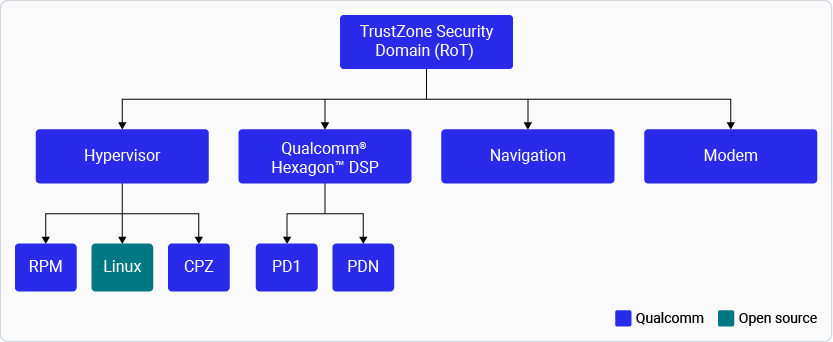
1. The TrustZone manages the TrustZone-domains and controls access from the secondary side using xPUs.
* An xPU is a combination of many security blocks known as protection units. It allows conditional access based on a set of programmable access control registers.
* If the system denies access, the xPU generates an error output signal and, if necessary, an interrupt request signal.
2. The hypervisor (EL2) manages the non‑secure domains, including the content protection zone (CPZ) that’s designed to prevent access to premium videos.
* It configures access control from the primary side through the second-stage page tables through the SMMU.
* It manages stage‑2 mappings to protect assets across all primary domains (Linux, display, GPU, and video). The Linux kernel manages stage‑1 mappings to protect the assets in applications that run at the user privilege level.
The figure shows the access control domains.
**Figure : Access control domains**
## **Access control**
Access control ensures only authorized entities can access specific resources under defined conditions, using policies, technologies, and trust models.
The access control trust model ensures ongoing security by managing access control configurations among various assets, interfaces, system-on-chip (SoC) components, and images. This model helps support the integrity and confidentiality of sensitive information.
* The Qualcomm access control uses an external protection unit (xPU) to control access from the secondary side for registers, fixed address, and dynamic memory regions.
* The system memory management unit (SMMU) controls access from the primary side for content protection and subsystem memory sharing use cases.
### **Access control domains**
The two levels of control are:
1. The TrustZone manages the TrustZone-domains and controls access from the secondary side using xPUs.
* An xPU is a combination of many security blocks known as protection units. It allows conditional access based on a set of programmable access control registers.
* If the system denies access, the xPU generates an error output signal and, if necessary, an interrupt request signal.
2. The hypervisor (EL2) manages the non‑secure domains, including the content protection zone (CPZ) that’s designed to prevent access to premium videos.
* It configures access control from the primary side through the second-stage page tables through the SMMU.
* It manages stage‑2 mappings to protect assets across all primary domains (Linux, display, GPU, and video). The Linux kernel manages stage‑1 mappings to protect the assets in applications that run at the user privilege level.
The figure shows the access control domains.
**Figure : Access control domains**
 ## **Secure peripheral image loading**
The secure peripheral image loading (PIL) of a TrustZone authenticates different images and configures the xPUs for all subsystems such as audio, camera, and video.
For more information about xPU, see [Access control](./security-features#access-control).
## **SELinux**
This feature isn’t enabled in the current release.
SELinux is a security enhancement for Linux, providing greater control over system access. It implements mandatory access control (MAC) in the Linux kernel using the Linux security modules (LSM) framework.
For more information, see [What’s SELinux?](https://www.redhat.com/en/topics/linux/what-is-selinux)
The LSM framework includes the following controls:
* Discretionary access control (DAC)
* This is the standard form of Linux access control. The data owner has full control over the resource (such as data and files) and can update or modify the data.
* Some applications (with root privilege) can override this control. Some resources, like the socket, are unchecked.
* Access controls are provided with limited granularity, based on user and group identity. For example, File mode `–rwxr-xr-x-`.
* MAC
* A system‑wide security policy determines the Linux access controls for all processes, objects, and operations.
* The policy can confine flawed and malicious applications or incautious users. It can even prevent users from escalating privileges such as root or UID 0.
* MAC provides finer granularity to access controls, allowing access to many more resources other than files with more specific controls. For example, unlink, append only, or move a file.
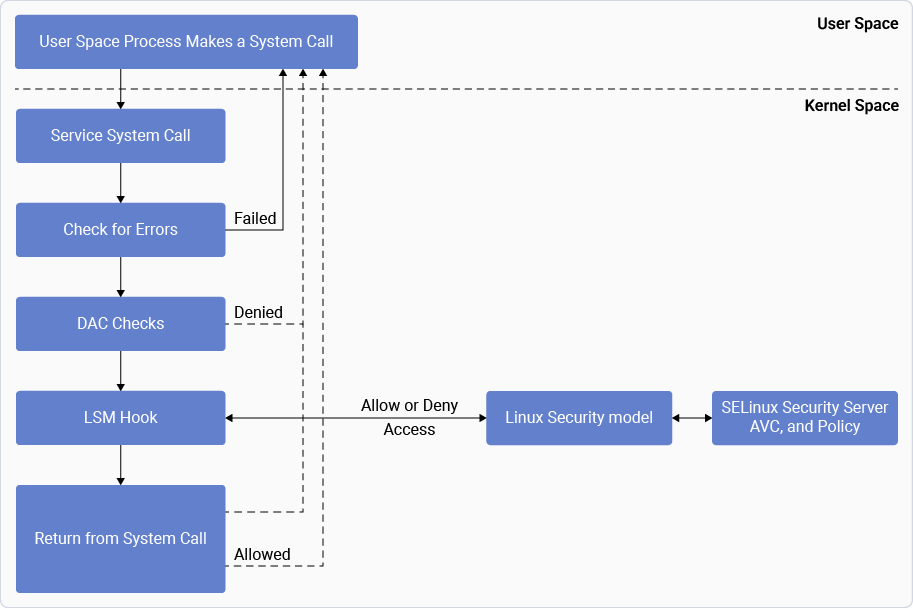
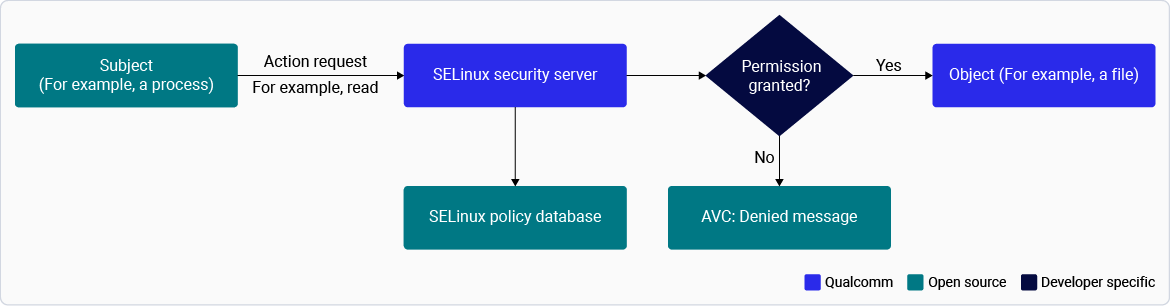
The figure shows the steps in the decision‑making chain for DAC and MAC:
**Figure : Linux security modules: DAC and MAC**
## **Secure peripheral image loading**
The secure peripheral image loading (PIL) of a TrustZone authenticates different images and configures the xPUs for all subsystems such as audio, camera, and video.
For more information about xPU, see [Access control](./security-features#access-control).
## **SELinux**
This feature isn’t enabled in the current release.
SELinux is a security enhancement for Linux, providing greater control over system access. It implements mandatory access control (MAC) in the Linux kernel using the Linux security modules (LSM) framework.
For more information, see [What’s SELinux?](https://www.redhat.com/en/topics/linux/what-is-selinux)
The LSM framework includes the following controls:
* Discretionary access control (DAC)
* This is the standard form of Linux access control. The data owner has full control over the resource (such as data and files) and can update or modify the data.
* Some applications (with root privilege) can override this control. Some resources, like the socket, are unchecked.
* Access controls are provided with limited granularity, based on user and group identity. For example, File mode `–rwxr-xr-x-`.
* MAC
* A system‑wide security policy determines the Linux access controls for all processes, objects, and operations.
* The policy can confine flawed and malicious applications or incautious users. It can even prevent users from escalating privileges such as root or UID 0.
* MAC provides finer granularity to access controls, allowing access to many more resources other than files with more specific controls. For example, unlink, append only, or move a file.
The figure shows the steps in the decision‑making chain for DAC and MAC:
**Figure : Linux security modules: DAC and MAC**
 SELinux supports three modes:
* Enforcing mode: In this mode, the SEPolicy is enforced on the system. If the SEPolicy rules aren’t met when software is run, access is prevented. The kernel logs an attempted access violation as an access vector cache (AVC) denial message to `dmesg` and `journalctl`.
* Permissive mode: In this mode, the SEPolicy isn’t enforced on the system. All denials are logged into `dmesg` and `journalctl` logs, but access of a process or software isn’t disallowed.
* Disable mode (Default): In this mode, the SEPolicy isn’t enforced or logged.
For information about enabling SELinux, see [Enable SELinux](./enable-se-linux). To configure the SELinux modes, see [SELinux configuration](./enable-se-linux).
### **SELinux layers**
The SELinux dynamic layer incorporates essential SELinux‑specific code modifications that activate and initialize the device when SELinux is enabled with a monolithic design.
**Figure : SELinux layers**
SELinux supports three modes:
* Enforcing mode: In this mode, the SEPolicy is enforced on the system. If the SEPolicy rules aren’t met when software is run, access is prevented. The kernel logs an attempted access violation as an access vector cache (AVC) denial message to `dmesg` and `journalctl`.
* Permissive mode: In this mode, the SEPolicy isn’t enforced on the system. All denials are logged into `dmesg` and `journalctl` logs, but access of a process or software isn’t disallowed.
* Disable mode (Default): In this mode, the SEPolicy isn’t enforced or logged.
For information about enabling SELinux, see [Enable SELinux](./enable-se-linux). To configure the SELinux modes, see [SELinux configuration](./enable-se-linux).
### **SELinux layers**
The SELinux dynamic layer incorporates essential SELinux‑specific code modifications that activate and initialize the device when SELinux is enabled with a monolithic design.
**Figure : SELinux layers**
 This layer is built on top of the meta‑SELinux layer, which is part of the Yocto upstream. It includes:
* The recipe‑kernel, which contains the recipe to enable the required kernel configuration flags for SELinux.
* The recipe‑security includes:
* Policies for booting the device to the shell
* Policies for Qualcomm services and test applications
* Policies of upstream services in the form of patches
* A recipe to manage compilation of Qualcomm policies
### **SEPolicy**
SEPolicy is a directory that contains the core SELinux policy configuration.
The upstream SEPolicy is defined in `sepolicy`, which is downloaded during the build and amended with Qualcomm SEPolicy at: `layers/meta-qcom-hwe/dynamic-layers/selinux/recipes-security/sepolicy/`.
The upstream directory structure is adhered to, with `apps/kernel/system/services` added to the respective directory.
The figure shows the high-level directory structure that’s merged and compiled to generate `policy.33`, which is the SEPolicy binary used or loaded during boot.
**Figure : SEPolicy high-level directory**
This layer is built on top of the meta‑SELinux layer, which is part of the Yocto upstream. It includes:
* The recipe‑kernel, which contains the recipe to enable the required kernel configuration flags for SELinux.
* The recipe‑security includes:
* Policies for booting the device to the shell
* Policies for Qualcomm services and test applications
* Policies of upstream services in the form of patches
* A recipe to manage compilation of Qualcomm policies
### **SEPolicy**
SEPolicy is a directory that contains the core SELinux policy configuration.
The upstream SEPolicy is defined in `sepolicy`, which is downloaded during the build and amended with Qualcomm SEPolicy at: `layers/meta-qcom-hwe/dynamic-layers/selinux/recipes-security/sepolicy/`.
The upstream directory structure is adhered to, with `apps/kernel/system/services` added to the respective directory.
The figure shows the high-level directory structure that’s merged and compiled to generate `policy.33`, which is the SEPolicy binary used or loaded during boot.
**Figure : SEPolicy high-level directory**
 For more information, see [Customize memory and SEPolicy](./customize-security-services).
## **Watch a video on Qualcomm Type-1 Hypervisor and trusted execution environment**
**Qualcomm Processor Security: TEE and Chipset Services**
*Learn how to use Qualcomm:sup*`® `*Type-1 Hypervisor and Trusted Execution Environment in this comprehensive tutorial. Dive deep into platform virtualization, secure communication, and the extensive security features offered by Qualcomm. Learn how to develop secure applications using Qualcomm tools and APIs, and understand the critical security use cases and compliance standards that Qualcomm supports. Perfect for users aiming to enhance device security and functionality.*
[
For more information, see [Customize memory and SEPolicy](./customize-security-services).
## **Watch a video on Qualcomm Type-1 Hypervisor and trusted execution environment**
**Qualcomm Processor Security: TEE and Chipset Services**
*Learn how to use Qualcomm:sup*`® `*Type-1 Hypervisor and Trusted Execution Environment in this comprehensive tutorial. Dive deep into platform virtualization, secure communication, and the extensive security features offered by Qualcomm. Learn how to develop secure applications using Qualcomm tools and APIs, and understand the critical security use cases and compliance standards that Qualcomm supports. Perfect for users aiming to enhance device security and functionality.*
[ ](https://players.brightcove.net/1414329538001/BJv5wEFt_default/index.html?videoId=6358216309112)
[Watch the video: Qualcomm Processor Security: TEE and Chipset Services](https://players.brightcove.net/1414329538001/BJv5wEFt_default/index.html?videoId=6358216309112)
## **Qualcomm TEE**
Qualcomm TEE is the software that operates within the Arm TrustZone environment on the Qualcomm device.
The TrustZone is a hardware-based security architecture enabled through a Secure mode of the Arm processor. It establishes two execution environments with system-wide hardware-enforced isolation. For more information, see [What’s TrustZone?](https://developer.arm.com/documentation/102418/0101/What-is-TrustZone-).
Qualcomm offers a 64‑bit Arm 8.x processor system with hardware virtualization to run TrustZone.
In the TrustZone architecture, there are two security states:
* Secure
* Non‑secure
At the EL0, EL1, and EL2 [exception levels](https://developer.arm.com/documentation/102412/0103/Privilege-and-Exception-levels/Exception-levels), the processor can be in either the secure state or the non‑secure state while EL3 is always in the secure state.
The operating system runs in non‑secure EL1. The transition from Non‑secure to Secure mode is facilitated through a Secure Monitor mode.
Qualcomm TEE provides the following features:
* Operation from hardware-protected memory
* Support for power-collapse of security blocks such as the crypto engine, PRNG, inline crypto engine, and external protection units (xPU)
* Support for a secure peripheral image loader (PIL)
* Support for subsystem restart
* Provision of content protection
* Support for running trusted applications
* Support for fuse management
### **Trusted applications**
Trusted applications (TA) offer services within a secure environment for Linux clients that aren’t secure. Qualcomm TEE extends the following services to trusted applications:
* Support for trusted applications to operate in the secure world at EL0
* Sand-boxing environment for trusted applications
* Position-independent loading of trusted applications
* Message passing between different trusted applications
Trusted applications operates from the memory that’s protected by the hardware. However, the applications that require more memory can use double data rate (DDR) memory for loading and running. By default, an application is set to run from hardware-protected memory.
## **Qualcomm Hypervisor**
Qualcomm® Hypervisor provides a modern virtualization framework that allows multiple operating systems to run independently and concurrently, delivering high performance.
Qualcomm Type-1 Hypervisor facilitates the hosting of multiple trusted execution environments for secure use cases. The figure shows the Qualcomm Hypervisor software architecture, components, and virtual machines. It also includes an example of one guest virtual machine using the Linux kernel.
**Figure : Hypervisor architecture**
](https://players.brightcove.net/1414329538001/BJv5wEFt_default/index.html?videoId=6358216309112)
[Watch the video: Qualcomm Processor Security: TEE and Chipset Services](https://players.brightcove.net/1414329538001/BJv5wEFt_default/index.html?videoId=6358216309112)
## **Qualcomm TEE**
Qualcomm TEE is the software that operates within the Arm TrustZone environment on the Qualcomm device.
The TrustZone is a hardware-based security architecture enabled through a Secure mode of the Arm processor. It establishes two execution environments with system-wide hardware-enforced isolation. For more information, see [What’s TrustZone?](https://developer.arm.com/documentation/102418/0101/What-is-TrustZone-).
Qualcomm offers a 64‑bit Arm 8.x processor system with hardware virtualization to run TrustZone.
In the TrustZone architecture, there are two security states:
* Secure
* Non‑secure
At the EL0, EL1, and EL2 [exception levels](https://developer.arm.com/documentation/102412/0103/Privilege-and-Exception-levels/Exception-levels), the processor can be in either the secure state or the non‑secure state while EL3 is always in the secure state.
The operating system runs in non‑secure EL1. The transition from Non‑secure to Secure mode is facilitated through a Secure Monitor mode.
Qualcomm TEE provides the following features:
* Operation from hardware-protected memory
* Support for power-collapse of security blocks such as the crypto engine, PRNG, inline crypto engine, and external protection units (xPU)
* Support for a secure peripheral image loader (PIL)
* Support for subsystem restart
* Provision of content protection
* Support for running trusted applications
* Support for fuse management
### **Trusted applications**
Trusted applications (TA) offer services within a secure environment for Linux clients that aren’t secure. Qualcomm TEE extends the following services to trusted applications:
* Support for trusted applications to operate in the secure world at EL0
* Sand-boxing environment for trusted applications
* Position-independent loading of trusted applications
* Message passing between different trusted applications
Trusted applications operates from the memory that’s protected by the hardware. However, the applications that require more memory can use double data rate (DDR) memory for loading and running. By default, an application is set to run from hardware-protected memory.
## **Qualcomm Hypervisor**
Qualcomm® Hypervisor provides a modern virtualization framework that allows multiple operating systems to run independently and concurrently, delivering high performance.
Qualcomm Type-1 Hypervisor facilitates the hosting of multiple trusted execution environments for secure use cases. The figure shows the Qualcomm Hypervisor software architecture, components, and virtual machines. It also includes an example of one guest virtual machine using the Linux kernel.
**Figure : Hypervisor architecture**
 Qualcomm Type-1 Hypervisor, also known as a native Hypervisor, does the following:
* Provides enhanced security compared to Type 2 (hosted) Hypervisors
* Supports multi-core, real-time operations that are independent of Linux
* Operates distinctly, independently, and with higher privileges than Linux
* Has a minimal impact on the performance
The architecture of the Type-1 Hypervisor includes Qualcomm Hypervisor access control, which supports:
* Multiple operating systems
* Smaller attack surface
The figure shows a Type-1 Hypervisor.
**Figure : Type-1 Hypervisor**
Qualcomm Type-1 Hypervisor, also known as a native Hypervisor, does the following:
* Provides enhanced security compared to Type 2 (hosted) Hypervisors
* Supports multi-core, real-time operations that are independent of Linux
* Operates distinctly, independently, and with higher privileges than Linux
* Has a minimal impact on the performance
The architecture of the Type-1 Hypervisor includes Qualcomm Hypervisor access control, which supports:
* Multiple operating systems
* Smaller attack surface
The figure shows a Type-1 Hypervisor.
**Figure : Type-1 Hypervisor**
 ### **Virtualization**
Virtual machines and CPUs provide flexibility and abstraction. The Qualcomm Hypervisor provides the following virtualization features:
| | **Table : Qualcomm Hypervisor virtualization features** |
| -------------------------------- | -------------------------------------------------------------------------------------------------------------------------------------------------------------------------------------------------------------- |
| **Feature** | **Description** |
| Memory management |
### **Virtualization**
Virtual machines and CPUs provide flexibility and abstraction. The Qualcomm Hypervisor provides the following virtualization features:
| | **Table : Qualcomm Hypervisor virtualization features** |
| -------------------------------- | -------------------------------------------------------------------------------------------------------------------------------------------------------------------------------------------------------------- |
| **Feature** | **Description** |
| Memory management | - Qualcomm Hypervisor manages stage-2 page tables and translates the intermediate physical address (IPA) to the physical address (PA)
- It also isolates memory between virtual machines
|
| Interrupt virtualization | It virtualizes and maps interrupts to the correct and independent virtual machines |
| Scheduling | The virtualization CPU (VCPU) scheduler prevents virtual machine starvation during failure |
| Interprocess communication (IPC) | This includes shared memory, message passing (IPC) APIs, and virtual interrupts |
| Power management | It supports multiple virtual machines and adopts the lowest common denominator power state |
### **Qualcomm Hypervisor BSP**
Qualcomm Hypervisor supports the following features within the board support package (BSP):
* PIL
* Access to SoC AC policy
* System MMU driver
* Pathway support for SMC TrustZone communication
The figure shows all the features of a Qualcomm Hypervisor and the BSP, which collectively provide a complete hypervisor solution:
**Figure : Qualcomm Hypervisor and BSP**
 ### **Resource manager**
The exception level 1 (EL1) resource manager performs the following functions:
* Creates and manages virtual machines
* Handles and assigns the virtual machine admission control policy
* Manages the I/O pass-through, which includes:
* I/O space mapping and isolation
* Interrupt routing configuration
For more information, see [Qualcomm Linux Kernel Guide](https://docs.qualcomm.com/bundle/publicresource/topics/80-80021-3/virtualization.html).
## **Security hardening**
Security hardening is a process that minimizes the risk of system attacks by making it more challenging for attackers to exploit the system vulnerabilities.
Kernel security hardening aligns with upstream kernel guidelines. Key kernel flags like KASLR, hardened user copy, stack protector, and permissions (RWX) are enabled.
### **User space hardening**
The [security\_flags.inc](https://github.com/yoctoproject/poky/blob/scarthgap/meta/conf/distro/include/security_flags.inc) file, a part of the [Yocto Project](https://www.thegoodpenguin.co.uk/blog/yocto-security-hardening-security-flags/) is used to enable security compiler and linker flags for a build.
To extend this feature to the Qualcomm modules, add the following command to `qcom-security_flags.inc` (file path: [qcom-security\_flags.inc](https://github.com/quic-yocto/meta-qcom-distro/blob/kirkstone/conf/distro/include/qcom-security_flags.inc)):
```text theme={null}
require conf/distro/include/security_flags.inc
```
Adding these flags may result in warnings or errors that can disrupt a build. However, Yocto provides a way to disable certain compiler flags for problematic packages. Modern compilers such as GCC and Clang offer a wide range of compiler flags that can make it more difficult for an attacker to exploit certain types of vulnerabilities.
The following are the example flags with GCC:
* The `Wformat` flag adds compile-time checks to detect issues related to the format of string arguments in common library functions such as `printf`, `scanf`, and `strftime`.
* The `D_FORTIFY_SOURCE` flag adds compile and runtime checks to detect buffer overflows in memory and string functions.
* The `Fstack-protector` flag adds runtime checks to detect buffer overflows and stack smashing.
* The `Fpie` flag enables position-independent code, which allows for loading the binary at randomized locations, thus making certain types of attacks (like return-oriented programming) more difficult.
* The `Wl,-z,relro,-z,now` flag makes it harder to abuse a binary global offset table.
If there are warnings and errors, customizing these flags for some modules can break a build. The binaries in a file system can be verified if the compiler exploit mitigation features are applied using the Checksec tool.
For information about making images more secure, see [The Yocto Project Documentation](https://docs.yoctoproject.org/scarthgap/dev-manual/securing-images.html).
## **Qualcomm Wireless Edge Services**
Qualcomm® wireless edge services (Qualcomm WES) is a suite of trusted services, rooted in hardware, which securely connects and manages devices.
It provides the following services:
* Feature licensing enables device features identified by a feature ID and an alias feature name. These features are enabled by installing the corresponding feature licenses or certificates.
* Device attestation provides cryptographically signed and encrypted data items that describe the security state of the device and its software. These data items are useful for risk engines and other similar applications.
* Secure provisioning enables the generation and use of cryptographic keys that are secured using unique device keys. These keys are used to:
* Securely provision data to the device post-sale and over-the-air (OTA).
* Sign data on the device.
To install or upgrade QCS5430 SoftSKU feature packs, see [Install or upgrade SoftSKU feature packs](./install-or-upgrade-the-soft-sku-feature-packs).
To develop applications that offer hardware-based attestation, zero-touch device provisioning, and chipset feature management, see [Qualcomm Linux Wireless Edge Services Guide](https://docs.qualcomm.com/bundle/resource/topics/80-80021-11B/overview.html). This feature is available to licensed users with authorized access.
Qualcomm WES isn’t supported for Qualcomm Dragonwing™ IQ-615 release.
## **Discrete Trusted Platform Module**
A discrete trusted platform module (dTPM) is a dedicated hardware module that provides robust security features such as secure key storage, cryptographic operations, measured boot, and platform attestation. Qualcomm Linux support dTPM integration, particularly for industrial and security-focused applications that require enhanced hardware-based protection.
The dTPM key features are:
* TPM 2.0 compliance: Full support for TPM 2.0 standard.
* Secure storage: Hardware-backed protection for cryptographic keys and sensitive assets.
* Open-source stack: Integration with TPM2 software stack (TSS, tpm2-tools, tpm2-abrmd, tpm2-tss-engine, tpm2-pkcs11).
* Linux kernel support: Upstream drivers for TPM 2.0 (SPI interface).
The following use cases are supported:
* Secure boot and measured boot
* Key management for cryptographic operations
* Platform attestation for industrial IoT
* Integration with OpenSSL and PKCS#11 using TPM2 engines
### **Qualcomm Linux chipsets supporting dTPM**
The dTPM support is enabled and verified for Qualcomm Linux custom software distributions on: QCS6490 (Industrial Mez Kit), Qualcomm Dragonwing™ IQ-9075 and Qualcomm Dragonwing™ IQ-8275
It includes the following integration and capabilities:
> **Note**
>
> On the **QCS6490 Industrial Mez Kit** platform, if the `/dev/tpm0` and `/dev/tpmrm0` device nodes are not present after boot, execute the following command and reboot the system:
>
> ```bash theme={null}
> echo "tpm_tis_spi" > /etc/modules-load.d/tpm.conf
> ```
>
> This ensures that the `tpm_tis_spi` module is loaded automatically during boot, enabling the TPM device nodes.
* Hardware interface: dTPM is connected using SPI, with reset controlled by GPIO.
* Device tree support: Only device tree changes are required for hardware detection; no kernel driver modifications are needed.
* Software stack: Yocto-based Linux distributions include the full TPM2 software stack (for example, tpm2-tss and tpm2-tools).
* Virtualization support: Multi-VM (KVM) configurations are supported, with dTPM resource manager passthrough for guest VMs.
* Platform specificity: dTPM isn’t enabled by default on all Qualcomm SoCs; it’s intended for platforms requiring industrial-grade security and measured boot.
* Availability: The TPM2 software stack is included in QC Linux Yocto layers for supported platforms.
#### **Software stack**
* Yocto layers: TPM user-space stack (for example, tpm2-tss, tpm2-tools) is enabled through dedicated recipes.
* Kernel driver: Uses upstream TPM drivers; minimal changes are needed for hardware bring-up. See [Bootlin Source Drivers](https://elixir.bootlin.com/linux/v6.10.4/source/drivers/char/tpm).
* User space interaction: Applications interact with the TPM through the libtss stack. See [Linux TPM2 & TSS2 Software](https://github.com/tpm2-software).
#### **Hardware integration**
* SPI interface: The TPM is connected through SPI lines (for example, SPI11), with reset controlled by a dedicated GPIO.
* Device tree configuration: TPM support is enabled by adding a TPM node to the device tree, allowing the open-source TPM driver to probe the hardware.
* GPIO control: The PMIC node is updated to manage TPM reset functionality.
#### **External dependencies**
* TPM2 software stack: Includes components such as tpm2-tss, tpm2-tools, and cryptographic engines for user-space interaction. See [tpm2-tools git.X](https://layers.openembedded.org/layerindex/recipe/87697/) and [tpm2-software/tpm2-tools](https://github.com/tpm2-software/tpm2-tools).
* UEFI firmware support: Requires firmware implementing EFI\_TCG2\_PROTOCOL for measured boot and platform attestation.
* Linux kernel integration: Relies upon upstream TPM drivers located in `build-qcom-wayland/workspace//drivers/char/tpm`.
#### **Software enablement**
To set up the Qualcomm Linux custom software distribution for QCS5430/QCS6490 and IQ-9075/IQ-9100, see the [Qualcomm Linux Release Notes](https://docs.qualcomm.com/doc/80-80021-300).
#### **Kernel**
* TPM driver support: Uses upstream Linux kernel TPM drivers; no more changes are required for standard dTPM hardware bring-up.
* Device tree configuration: Device tree updates are enough to enable hardware detection.
#### **Yocto/User space**
Enable the TPM2 software stack through Yocto recipes, including:
* `tpm2-tss` – TPM2 Software Stack (TSS) library
* `tpm2-tools` – Command-line tools for TPM2
* `tpm2-abrmd` – TPM2 access broker and resource manager daemon
* `tpm2-tss-engine` – OpenSSL engine for TPM2
* `tpm2-pkcs11` – PKCS#11 interface for TPM2
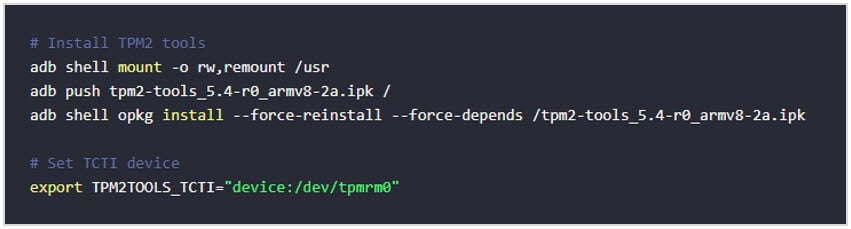
#### **Installation example**
The following figure shows an example for installation.
### **Resource manager**
The exception level 1 (EL1) resource manager performs the following functions:
* Creates and manages virtual machines
* Handles and assigns the virtual machine admission control policy
* Manages the I/O pass-through, which includes:
* I/O space mapping and isolation
* Interrupt routing configuration
For more information, see [Qualcomm Linux Kernel Guide](https://docs.qualcomm.com/bundle/publicresource/topics/80-80021-3/virtualization.html).
## **Security hardening**
Security hardening is a process that minimizes the risk of system attacks by making it more challenging for attackers to exploit the system vulnerabilities.
Kernel security hardening aligns with upstream kernel guidelines. Key kernel flags like KASLR, hardened user copy, stack protector, and permissions (RWX) are enabled.
### **User space hardening**
The [security\_flags.inc](https://github.com/yoctoproject/poky/blob/scarthgap/meta/conf/distro/include/security_flags.inc) file, a part of the [Yocto Project](https://www.thegoodpenguin.co.uk/blog/yocto-security-hardening-security-flags/) is used to enable security compiler and linker flags for a build.
To extend this feature to the Qualcomm modules, add the following command to `qcom-security_flags.inc` (file path: [qcom-security\_flags.inc](https://github.com/quic-yocto/meta-qcom-distro/blob/kirkstone/conf/distro/include/qcom-security_flags.inc)):
```text theme={null}
require conf/distro/include/security_flags.inc
```
Adding these flags may result in warnings or errors that can disrupt a build. However, Yocto provides a way to disable certain compiler flags for problematic packages. Modern compilers such as GCC and Clang offer a wide range of compiler flags that can make it more difficult for an attacker to exploit certain types of vulnerabilities.
The following are the example flags with GCC:
* The `Wformat` flag adds compile-time checks to detect issues related to the format of string arguments in common library functions such as `printf`, `scanf`, and `strftime`.
* The `D_FORTIFY_SOURCE` flag adds compile and runtime checks to detect buffer overflows in memory and string functions.
* The `Fstack-protector` flag adds runtime checks to detect buffer overflows and stack smashing.
* The `Fpie` flag enables position-independent code, which allows for loading the binary at randomized locations, thus making certain types of attacks (like return-oriented programming) more difficult.
* The `Wl,-z,relro,-z,now` flag makes it harder to abuse a binary global offset table.
If there are warnings and errors, customizing these flags for some modules can break a build. The binaries in a file system can be verified if the compiler exploit mitigation features are applied using the Checksec tool.
For information about making images more secure, see [The Yocto Project Documentation](https://docs.yoctoproject.org/scarthgap/dev-manual/securing-images.html).
## **Qualcomm Wireless Edge Services**
Qualcomm® wireless edge services (Qualcomm WES) is a suite of trusted services, rooted in hardware, which securely connects and manages devices.
It provides the following services:
* Feature licensing enables device features identified by a feature ID and an alias feature name. These features are enabled by installing the corresponding feature licenses or certificates.
* Device attestation provides cryptographically signed and encrypted data items that describe the security state of the device and its software. These data items are useful for risk engines and other similar applications.
* Secure provisioning enables the generation and use of cryptographic keys that are secured using unique device keys. These keys are used to:
* Securely provision data to the device post-sale and over-the-air (OTA).
* Sign data on the device.
To install or upgrade QCS5430 SoftSKU feature packs, see [Install or upgrade SoftSKU feature packs](./install-or-upgrade-the-soft-sku-feature-packs).
To develop applications that offer hardware-based attestation, zero-touch device provisioning, and chipset feature management, see [Qualcomm Linux Wireless Edge Services Guide](https://docs.qualcomm.com/bundle/resource/topics/80-80021-11B/overview.html). This feature is available to licensed users with authorized access.
Qualcomm WES isn’t supported for Qualcomm Dragonwing™ IQ-615 release.
## **Discrete Trusted Platform Module**
A discrete trusted platform module (dTPM) is a dedicated hardware module that provides robust security features such as secure key storage, cryptographic operations, measured boot, and platform attestation. Qualcomm Linux support dTPM integration, particularly for industrial and security-focused applications that require enhanced hardware-based protection.
The dTPM key features are:
* TPM 2.0 compliance: Full support for TPM 2.0 standard.
* Secure storage: Hardware-backed protection for cryptographic keys and sensitive assets.
* Open-source stack: Integration with TPM2 software stack (TSS, tpm2-tools, tpm2-abrmd, tpm2-tss-engine, tpm2-pkcs11).
* Linux kernel support: Upstream drivers for TPM 2.0 (SPI interface).
The following use cases are supported:
* Secure boot and measured boot
* Key management for cryptographic operations
* Platform attestation for industrial IoT
* Integration with OpenSSL and PKCS#11 using TPM2 engines
### **Qualcomm Linux chipsets supporting dTPM**
The dTPM support is enabled and verified for Qualcomm Linux custom software distributions on: QCS6490 (Industrial Mez Kit), Qualcomm Dragonwing™ IQ-9075 and Qualcomm Dragonwing™ IQ-8275
It includes the following integration and capabilities:
> **Note**
>
> On the **QCS6490 Industrial Mez Kit** platform, if the `/dev/tpm0` and `/dev/tpmrm0` device nodes are not present after boot, execute the following command and reboot the system:
>
> ```bash theme={null}
> echo "tpm_tis_spi" > /etc/modules-load.d/tpm.conf
> ```
>
> This ensures that the `tpm_tis_spi` module is loaded automatically during boot, enabling the TPM device nodes.
* Hardware interface: dTPM is connected using SPI, with reset controlled by GPIO.
* Device tree support: Only device tree changes are required for hardware detection; no kernel driver modifications are needed.
* Software stack: Yocto-based Linux distributions include the full TPM2 software stack (for example, tpm2-tss and tpm2-tools).
* Virtualization support: Multi-VM (KVM) configurations are supported, with dTPM resource manager passthrough for guest VMs.
* Platform specificity: dTPM isn’t enabled by default on all Qualcomm SoCs; it’s intended for platforms requiring industrial-grade security and measured boot.
* Availability: The TPM2 software stack is included in QC Linux Yocto layers for supported platforms.
#### **Software stack**
* Yocto layers: TPM user-space stack (for example, tpm2-tss, tpm2-tools) is enabled through dedicated recipes.
* Kernel driver: Uses upstream TPM drivers; minimal changes are needed for hardware bring-up. See [Bootlin Source Drivers](https://elixir.bootlin.com/linux/v6.10.4/source/drivers/char/tpm).
* User space interaction: Applications interact with the TPM through the libtss stack. See [Linux TPM2 & TSS2 Software](https://github.com/tpm2-software).
#### **Hardware integration**
* SPI interface: The TPM is connected through SPI lines (for example, SPI11), with reset controlled by a dedicated GPIO.
* Device tree configuration: TPM support is enabled by adding a TPM node to the device tree, allowing the open-source TPM driver to probe the hardware.
* GPIO control: The PMIC node is updated to manage TPM reset functionality.
#### **External dependencies**
* TPM2 software stack: Includes components such as tpm2-tss, tpm2-tools, and cryptographic engines for user-space interaction. See [tpm2-tools git.X](https://layers.openembedded.org/layerindex/recipe/87697/) and [tpm2-software/tpm2-tools](https://github.com/tpm2-software/tpm2-tools).
* UEFI firmware support: Requires firmware implementing EFI\_TCG2\_PROTOCOL for measured boot and platform attestation.
* Linux kernel integration: Relies upon upstream TPM drivers located in `build-qcom-wayland/workspace//drivers/char/tpm`.
#### **Software enablement**
To set up the Qualcomm Linux custom software distribution for QCS5430/QCS6490 and IQ-9075/IQ-9100, see the [Qualcomm Linux Release Notes](https://docs.qualcomm.com/doc/80-80021-300).
#### **Kernel**
* TPM driver support: Uses upstream Linux kernel TPM drivers; no more changes are required for standard dTPM hardware bring-up.
* Device tree configuration: Device tree updates are enough to enable hardware detection.
#### **Yocto/User space**
Enable the TPM2 software stack through Yocto recipes, including:
* `tpm2-tss` – TPM2 Software Stack (TSS) library
* `tpm2-tools` – Command-line tools for TPM2
* `tpm2-abrmd` – TPM2 access broker and resource manager daemon
* `tpm2-tss-engine` – OpenSSL engine for TPM2
* `tpm2-pkcs11` – PKCS#11 interface for TPM2
#### **Installation example**
The following figure shows an example for installation.
 #### **Validation**
* Use tpm2-tools for functional validation, including tests for random number generation (RNG), key management, and measured boot.
* Unit tests are available within the tpm2-tss and tpm2-tools packages to verify TPM2 functionality.
#### **Verify the TPM2 functionality - Test example**
**Prerequisites**
* Download the TPM2 tools package from the official upstream source before beginning the setup.
* See [tpm2-tools git.X](https://layers.openembedded.org/layerindex/recipe/87697/).
* See [tpm2-software/tpm2-tools](https://github.com/tpm2-software/tpm2-tools).
* Enable the secure shell (SSH) in permissive mode to securely access your host device.
* See [Sign in using SSH](https://docs.qualcomm.com/bundle/publicresource/topics/80-80021-254/how_to.html#use-ssh).
1. Connect to the device console using SSH.
2. Enable Write access.
```text theme={null}
mount -o rw,remount /usr
```
3. Copy the TPM2 tools package from another terminal on the host computer.
```text theme={null}
scp /path/to/tpm2-tools_5.4-r0_armv8-2a.ipk root@:/data/
```
4. Install the TPM2 tools.
```text theme={null}
opkg install --force-reinstall --force-depends /data/tpm2-tools_5.4-r0_armv8-2a.ipk
```
5. Verify the TPM2 functionality.
1. Generate a random data.
```text theme={null}
tpm2_getrandom --hex -T device:/dev/tpmrm0 16
```
2. Create a primary key.
```text theme={null}
tpm2_createprimary -C o -c primary.ctx
```
3. Create the RSA key pair.
```text theme={null}
tpm2_create -G rsa -u key.pub -r key.pri -C primary.ctx
```
4. Load the key.
```text theme={null}
tpm2_load -C primary.ctx -u key.pub -r key.pri -n key.name -c key.ctx
```
5. Encrypt the file.
```text theme={null}
echo "wangdg love eating fruit" > secre.data
tpm2_rsaencrypt -c key.ctx -o jiami_file.enc secre.data
cat jiami_file.enc
```
See the encrypted data.
6. Decrypt the file
```text theme={null}
tpm2_rsadecrypt -c key.ctx -o jiemi.dec jiami_file.enc
cat jiemi.dec
```
See the original message.
7. Hash the file
```text theme={null}
tpm2_hash -C e -g sha1 -o hash.bin -t ticket.bin secre.data --hex
cat hash.bin
```
## **Next steps**
* To learn about TrustZone and security framework, see [Security architecture](./security-architecture).
* To learn about security tools and how to integrate them into your workflows, see [Security tools](./security-tools).
#### **Validation**
* Use tpm2-tools for functional validation, including tests for random number generation (RNG), key management, and measured boot.
* Unit tests are available within the tpm2-tss and tpm2-tools packages to verify TPM2 functionality.
#### **Verify the TPM2 functionality - Test example**
**Prerequisites**
* Download the TPM2 tools package from the official upstream source before beginning the setup.
* See [tpm2-tools git.X](https://layers.openembedded.org/layerindex/recipe/87697/).
* See [tpm2-software/tpm2-tools](https://github.com/tpm2-software/tpm2-tools).
* Enable the secure shell (SSH) in permissive mode to securely access your host device.
* See [Sign in using SSH](https://docs.qualcomm.com/bundle/publicresource/topics/80-80021-254/how_to.html#use-ssh).
1. Connect to the device console using SSH.
2. Enable Write access.
```text theme={null}
mount -o rw,remount /usr
```
3. Copy the TPM2 tools package from another terminal on the host computer.
```text theme={null}
scp /path/to/tpm2-tools_5.4-r0_armv8-2a.ipk root@:/data/
```
4. Install the TPM2 tools.
```text theme={null}
opkg install --force-reinstall --force-depends /data/tpm2-tools_5.4-r0_armv8-2a.ipk
```
5. Verify the TPM2 functionality.
1. Generate a random data.
```text theme={null}
tpm2_getrandom --hex -T device:/dev/tpmrm0 16
```
2. Create a primary key.
```text theme={null}
tpm2_createprimary -C o -c primary.ctx
```
3. Create the RSA key pair.
```text theme={null}
tpm2_create -G rsa -u key.pub -r key.pri -C primary.ctx
```
4. Load the key.
```text theme={null}
tpm2_load -C primary.ctx -u key.pub -r key.pri -n key.name -c key.ctx
```
5. Encrypt the file.
```text theme={null}
echo "wangdg love eating fruit" > secre.data
tpm2_rsaencrypt -c key.ctx -o jiami_file.enc secre.data
cat jiami_file.enc
```
See the encrypted data.
6. Decrypt the file
```text theme={null}
tpm2_rsadecrypt -c key.ctx -o jiemi.dec jiami_file.enc
cat jiemi.dec
```
See the original message.
7. Hash the file
```text theme={null}
tpm2_hash -C e -g sha1 -o hash.bin -t ticket.bin secre.data --hex
cat hash.bin
```
## **Next steps**
* To learn about TrustZone and security framework, see [Security architecture](./security-architecture).
* To learn about security tools and how to integrate them into your workflows, see [Security tools](./security-tools).