> ## Documentation Index
> Fetch the complete documentation index at: https://dragonwingdocs.qualcomm.com/llms.txt
> Use this file to discover all available pages before exploring further.

# Audio overview

> Overview of the Qualcomm Linux audio subsystem architecture, components, and supported platforms.

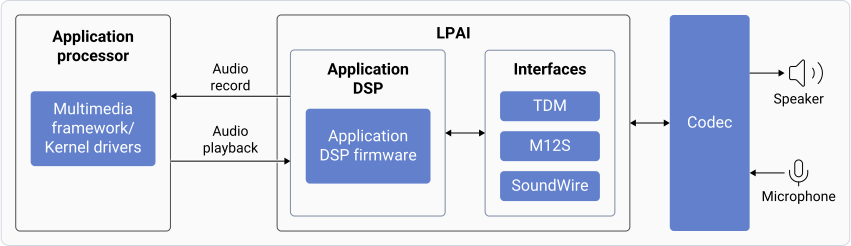
The audio subsystem powered by low-power AI (LPAI) delivers voice user interface and audio experiences. It uses a dedicated hardware-based AI accelerator for machine learning-based work.

<div className="flex flex-col items-center gap-2">
  <img src="https://mintcdn.com/qualcomm-prod/PyJ823JBh-_RDtS4/Technologies/Audio/media/qualcomm-linux-iot-audio-voice/hw_sw_components.svg?fit=max&auto=format&n=PyJ823JBh-_RDtS4&q=85&s=f48a75f5f6f2ba17d320a5c1899fd5e2" alt="Audio component overview" width="851" height="246" data-path="Technologies/Audio/media/qualcomm-linux-iot-audio-voice/hw_sw_components.svg" />

  <p className="text-sm text-gray-700">
    Audio component overview
  </p>
</div>

The audio system includes:

* **Application processor** – CPU that handles audio processing tasks. Tasks include:
  * Managing audio record and playback
  * Decoding audio formats
  * Using LPAI for postprocessing tasks
* **Low-Power AI (LPAI)** – Subsystem that runs audio playback/record and voice-activation (VA) algorithms. It integrates with a dedicated Qualcomm® Hexagon™ Processor (QDSP6) and a low-power island (LPI).
* **Audio codec** – Hardware that includes:
  * Analog-to-Digital Converter (ADC)
  * Digital-to-Analog Converter (DAC) These convert analog audio to digital, and vice versa.
* **Speaker AMP and microphone** – Devices that connect over I2S/TDM/SoundWire.

## **Architecture**

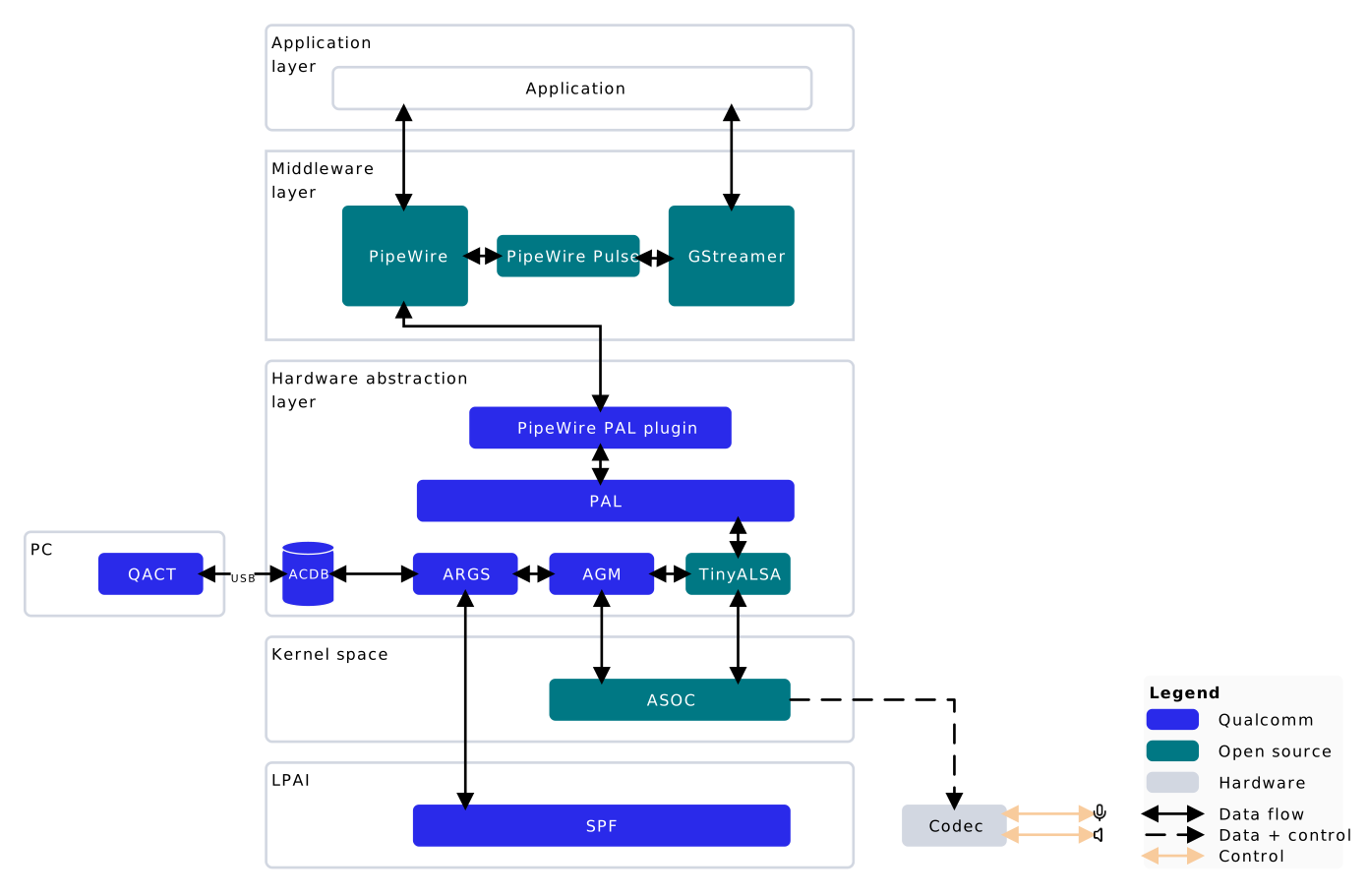
The following figure shows the high-level audio software architecture.

<div className="flex flex-col items-center">
  <img src="https://mintcdn.com/qualcomm-prod/PyJ823JBh-_RDtS4/Technologies/Audio/media/qualcomm-linux-iot-audio-voice/architecture.svg?fit=max&auto=format&n=PyJ823JBh-_RDtS4&q=85&s=62587182c8616cb032227263120fdf1f" alt="High-level audio software architecture" className="block" width="1391" height="911" data-path="Technologies/Audio/media/qualcomm-linux-iot-audio-voice/architecture.svg" />

  <p className="m-0 leading-none text-sm text-gray-700">
    High-level audio software architecture
  </p>
</div>

LegendApplication layerMiddleware layerHardware abstraction layerKernel spaceLPAIPCPipeWire PulsePALARGSAGMTinyALSAApplicationACDBQACTASOCSPFCodecUSBQualcommOpen sourceHardwareData flowData + controlControlPipeWire PAL pluginGStreamerPipeWire

High-level audio software architecture

The following are the major audio software architecture components:

**PipeWire**

PipeWire is a multimedia server for Linux that routes audio between Apps and hardware. It replaces PulseAudio, offering low-latency, secure, and flexible media handling for applications.

**Platform Abstraction Layer (PAL)**

Provides higher-level audio-specific APIs to access the audio hardware and drivers to enable audio features.

**Audio Graph Manager (AGM)**

Provides interfaces to allow TinyALSA-based mixer controls and PCM/compressed plug-ins to interact and enable audio features.

**AudioReach Graph Service (ARGS)**

Consists of the Graph Service Layer (GSL), Generic Packet Router (GPR), and acdb Management Layer (AML) modules. Handles initialization and creation of graphs, and creation of packets for sending a series of commands to the AudioReach Engine (ARE).

**Audio calibration database (acdb)**

Includes information about various audio use cases such as graphs, module calibration data, etc. The Apps processor parses acdb files to get the graph information used by ARE to enable the use case.

**AudioReach Engine (ARE)**

Modular framework that runs on the LPAI DSP. It helps set up, configure, and run signal processing modules for audio features.

[Qualcomm Audio Calibration Tool (QACT™ Platform)](../audio-addendum-overview)

PC-based software that provides a GUI to visualize, configure, and store audio graphs in the acdb for audio use cases.

## **Next steps**

* [Enable audio](enable-audio) — Configure audio hardware and verify basic playback and capture
* [Customize audio graph](customize-audio-graph) — Customize audio use cases at the PAL level
* [Audio Addendum](../audio-addendum-overview) — Learn about QACT and QXDM for calibration and diagnostics