> ## Documentation Index
> Fetch the complete documentation index at: https://dragonwingdocs.qualcomm.com/llms.txt
> Use this file to discover all available pages before exploring further.

# Bluetooth overview

> Learn about Bluetooth wireless technology and explore Qualcomm Linux's Bluetooth solutions.

The Bluetooth<sup>®</sup> wireless technology is a short-range communications system that facilitates wireless exchange of data between devices. The key advantages of Bluetooth technology are as follows:

* Replaces the cables connecting portable and fixed electronic devices.
* Provides robust, power efficient, and cost-effective solutions.
* Facilitates flexibility of solutions and their applications.

The Bluetooth technology provides the following radio options.

| Radio                                  | Description                                                                                                                                                                                                                             |
| -------------------------------------- | --------------------------------------------------------------------------------------------------------------------------------------------------------------------------------------------------------------------------------------- |
| Basic Rate/Enhanced Data Rate (BR/EDR) | <ul><li>Offers optional EDR, alternate media access control (MAC), and physical layer (PHY) extensions.</li><li>Supports synchronous and asynchronous connections with a data rate of 721.2 Kbps for BR and 2.1 Mbps for EDR.</li></ul> |
| Low Energy                             | <ul><li>Enables products that require lower current consumption, lower complexity, and lower cost than BR/EDR.</li><li>Facilitates use cases and applications with lower data rates and has lower duty cycles.</li></ul>                |

BR/EDR and Low Energy radio options enable device discovery, connection establishment, and connection mechanisms. The optimal choice of radio depends on the use case or application of a solution.

The Qualcomm<sup>®</sup> Linux<sup>®</sup> supports Bluetooth solutions for the following kits.

<table>
  <thead>
    <tr>
      <th>Kit</th>
      <th>Hardware system-on-chip (SoC)</th>
      <th>Bluetooth chipset</th>
      <th>Bluetooth stack</th>
    </tr>
  </thead>

  <tbody>
    <tr>
      <td>
        <ul>
          <li>Qualcomm Dragonwing<sup>TM</sup> RB3 Gen 2 Vision Development Kit</li>
          <li>Qualcomm Dragonwing RB3 Gen 2 Core Development Kit</li>
        </ul>
      </td>

      <td>QCS6490</td>

      <td>
        <ul>
          <li>WCN6750</li>
          <li>WCN6856 over M.2 USB</li>
        </ul>
      </td>

      <td>BlueZ</td>
    </tr>

    <tr>
      <td>
        <ul>
          <li>Qualcomm Dragonwing RB3 Gen 2 Lite Vision Development Kit</li>
          <li>Qualcomm Dragonwing RB3 Gen 2 Lite Core Development Kit</li>
        </ul>
      </td>

      <td>QCS5430</td>

      <td>
        <ul>
          <li>WCN6750</li>
        </ul>
      </td>

      <td>BlueZ</td>
    </tr>

    <tr>
      <td>
        <ul>
          <li>Qualcomm Dragonwing IQ-9075 Evaluation Kit (EVK)</li>
        </ul>
      </td>

      <td>IQ-9075</td>

      <td>
        <ul>
          <li>WCN6856</li>
          <li>WCN7850</li>
          <li>QCC2072 (To enable the chipset, see <a href="./known-issues-and-workarounds">Known issues and workarounds</a>)</li>
        </ul>
      </td>

      <td>BlueZ</td>
    </tr>

    <tr>
      <td>
        <ul>
          <li>Qualcomm Dragonwing IQ-8275 EVK</li>
        </ul>
      </td>

      <td>IQ-8275</td>

      <td>
        <ul>
          <li>WCN6856</li>
          <li>WCN7850</li>
        </ul>
      </td>

      <td>BlueZ</td>
    </tr>

    <tr>
      <td>
        <ul>
          <li>Qualcomm Dragonwing IQ-615 EVK</li>
        </ul>
      </td>

      <td>IQ-615</td>

      <td>
        <ul>
          <li>QCA6698AQ</li>
        </ul>
      </td>

      <td>BlueZ</td>
    </tr>

    <tr>
      <td>
        <ul>
          <li>Qualcomm Dragonwing IQ-x7181 EVK</li>
        </ul>
      </td>

      <td>IQ-x7181</td>

      <td>
        <ul>
          <li>WCN6855</li>
          <li>WCN7850</li>
        </ul>
      </td>

      <td>BlueZ</td>
    </tr>

    <tr>
      <td>
        <ul>
          <li>Qualcomm Dragonwing IQ-x5121 EVK</li>
        </ul>
      </td>

      <td>IQ-x5121</td>

      <td>
        <ul>
          <li>WCN6855</li>
          <li>WCN7850</li>
        </ul>
      </td>

      <td>BlueZ</td>
    </tr>
  </tbody>
</table>

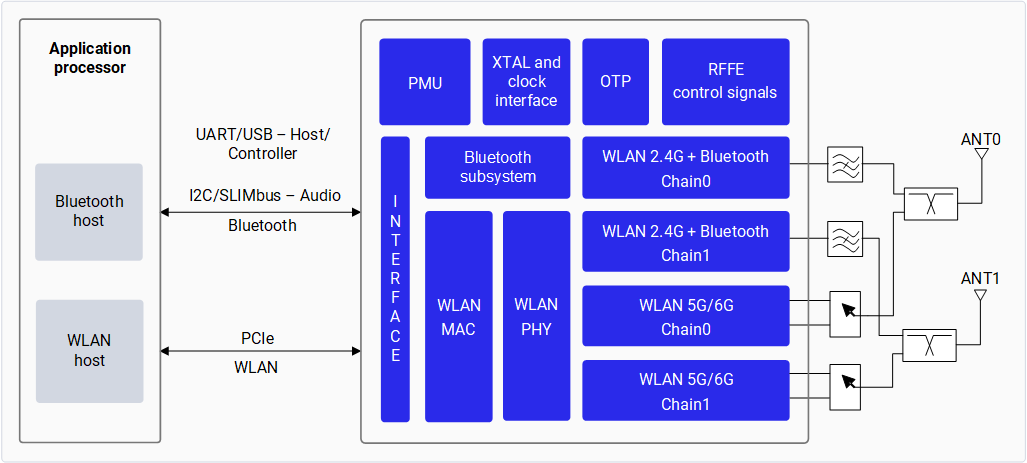
The following figure shows the various components of the Qualcomm connectivity chipset, including the Bluetooth subsystem and its interaction with the application processor.

<Frame caption="Figure: Qualcomm connectivity chipset block diagram">
  <img src="https://mintcdn.com/qualcomm-prod/PyJ823JBh-_RDtS4/Technologies/Bluetooth/media/qli-bt/QC_Connectivity_blockdiagram.png?fit=max&auto=format&n=PyJ823JBh-_RDtS4&q=85&s=e9da2bbc3bfa4adf41cfeedc503c236d" alt="High-level block diagram of a connectivity chipset." width="1027" height="463" data-path="Technologies/Bluetooth/media/qli-bt/QC_Connectivity_blockdiagram.png" />
</Frame>

<a id="bluetooth-specification" />

## Bluetooth specification

The WCN6750, WCN6856, WCN7850, and QCA6698AQ connectivity chipsets comply with the *Bluetooth Core specification v5.2 or v5.3*. These chipsets have the following controller features and capabilities:

* A Bluetooth Low Energy data rate of up to 2 Mbps
* A long-range mode with better sensitivity at two new lower bit rates, 500 Kbps and 125 Kbps
* An 8x improvement in broadcast capability with the use of advertising extensions
* An improved channel selection algorithm (CSA #2), which facilitates improved channel coordination and coexistence efficiency with other Bluetooth and non-Bluetooth traffic

The following table lists the Bluetooth specifications and features supported by the WCN6750, WCN6856, WCN7850, and QCA6698AQ connectivity chipsets.

| Feature                                 | WCN6750 | WCN6856 | WCN7850 | QCA6698AQ | QCC2072 |
| --------------------------------------- | :-----: | :-----: | :-----: | :-------: | :-----: |
| Bluetooth Low Energy secure connections |    ✓    |    ✓    |    ✓    |     ✓     |    ✓    |
| Bluetooth Low Energy privacy 1.2        |    ✓    |    ✓    |    ✓    |     ✓     |    ✓    |
| Bluetooth 5.2 Core specification        |    ✓    |    ✓    |    ✕    |     ✓     |    ✓    |
| Bluetooth 5.3 Core specification        |    ✕    |    ✕    |    ✓    |     ✕     |    ✓    |
| Data length extensions                  |    ✓    |    ✓    |    ✓    |     ✓     |    ✓    |
| 2 Mbps PHY                              |    ✓    |    ✓    |    ✓    |     ✓     |    ✓    |
| Advertising extensions                  |    ✓    |    ✓    |    ✓    |     ✓     |    ✓    |
| Bluetooth Low Energy long range         |    ✓    |    ✓    |    ✓    |     ✓     |    ✓    |
| CSA #2                                  |    ✓    |    ✓    |    ✓    |     ✓     |    ✓    |
| USB 1.1 interface support               |    ✕    |    ✓    |    ✓    |     ✕     |    ✕    |
| Bluetooth 6.0 Core specification        |    ✕    |    ✕    |    ✕    |     ✕     |    ✓    |

## BlueZ stack

BlueZ is a Bluetooth Linux stack that supports the core Bluetooth layers and protocols. BlueZ features are as follows:

* Complies with *Bluetooth Core specification v5.4*
* Supports multiple Bluetooth devices
* Implements a socket interface for all layers
* Supports multithreaded data processing

## Bluetooth profiles and roles

The Bluetooth profiles define the specifications, requirements, and roles of devices to establish a Bluetooth connection. A profile also determines the communication protocol used between devices.

The BlueZ stack supports the following Bluetooth profiles and roles for connectivity chipsets.

<table>
  <thead>
    <tr>
      <th rowSpan={2}>Profile</th>
      <th rowSpan={2}>Role</th>
      <th rowSpan={2}>Version</th>
      <th colSpan={3}>Support on chipset</th>
    </tr>

    <tr>
      <th>WCN6750 / WCN6856</th>
      <th>WCN7850</th>
      <th>QCA6698AQ</th>
    </tr>
  </thead>

  <tbody>
    <tr>
      <td>General Access Profile (GAP)</td>
      <td>Central and peripheral</td>

      <td />

      <td align="center">✓</td>
      <td align="center">✓</td>
      <td align="center">✓</td>
    </tr>

    <tr>
      <td>Serial Port Profile (SPP)</td>
      <td>Client and server</td>
      <td>v1.2</td>
      <td align="center">✓</td>
      <td align="center">✓</td>
      <td align="center">✓</td>
    </tr>

    <tr>
      <td>Human interface device (HID) over GATT Profile (HOGP)</td>
      <td>Host</td>
      <td>v1</td>
      <td align="center">✓</td>
      <td align="center">✓</td>
      <td align="center">✓</td>
    </tr>

    <tr>
      <td>General Attribute Profile (GATT)</td>
      <td>Central and peripheral</td>

      <td />

      <td align="center">✓</td>
      <td align="center">✓</td>
      <td align="center">✓</td>
    </tr>

    <tr>
      <td rowSpan={2}>Advanced Audio Distribution Profile (A2DP)</td>
      <td>Source</td>
      <td>Nonsplit v1.3</td>
      <td align="center">✓</td>
      <td align="center">✕</td>
      <td align="center">✓</td>
    </tr>

    <tr>
      <td>Sink</td>
      <td>Nonsplit v1.3</td>
      <td align="center">✓</td>
      <td align="center">✕</td>
      <td align="center">✓</td>
    </tr>

    <tr>
      <td rowSpan={2}>Audio/Video Remote Control Profile (AVRCP)</td>
      <td>Target</td>
      <td>v1.5</td>
      <td align="center">✓</td>
      <td align="center">✕</td>
      <td align="center">✓</td>
    </tr>

    <tr>
      <td>Controller</td>
      <td>v1.5</td>
      <td align="center">✓</td>
      <td align="center">✕</td>
      <td align="center">✓</td>
    </tr>

    <tr>
      <td rowSpan={2}>Hands-Free Profile (HFP)</td>
      <td>Audio gateway</td>
      <td>Nonsplit v1.7</td>
      <td align="center">✓</td>
      <td align="center">✕</td>
      <td align="center">✕</td>
    </tr>

    <tr>
      <td>Client</td>
      <td>Nonsplit v1.7</td>
      <td align="center">✓</td>
      <td align="center">✕</td>
      <td align="center">✕</td>
    </tr>

    <tr>
      <td>Object Push Profile (OPP)</td>
      <td>Client and server</td>
      <td>v1.2</td>
      <td align="center">✓</td>
      <td align="center">✓</td>
      <td align="center">✓</td>
    </tr>

    <tr>
      <td>File Transfer Protocol (FTP)</td>
      <td>Client and server</td>
      <td>v1.2</td>
      <td align="center">✓</td>
      <td align="center">✓</td>
      <td align="center">✓</td>
    </tr>

    <tr>
      <td>Phone Book Access Profile (PBAP)</td>
      <td>Client and server</td>
      <td>v1.1</td>
      <td align="center">✓</td>
      <td align="center">✓</td>
      <td align="center">✓</td>
    </tr>

    <tr>
      <td>Message Access Profile (MAP)</td>
      <td>Client and server</td>
      <td>v1.2</td>
      <td align="center">✓</td>
      <td align="center">✓</td>
      <td align="center">✓</td>
    </tr>
  </tbody>
</table>

<Note>Bluetooth profile concurrency is supported.</Note>

### General Access Profile

Bluetooth Low Energy GAP is an extension of the existing BR/EDR GAP. It handles the following basic operations of a device:

* Discover a device
* Establish a connection
* Bond multiple devices
* Establish a private connection
* Resolve private addresses

All Bluetooth devices must implement a basic level of functionality that GAP defines. GAP ensures that all Bluetooth devices can establish baseband connections, regardless of the higher-level functionality they support. GAP is responsible for the following functions:

* Generic procedures for discovering Bluetooth devices
* Link-management aspects for connecting to Bluetooth devices
* Procedures related to security levels
* Common formats for user interface-level parameters, such as naming conventions

GAP defines and assigns the following profile roles to the devices.

| Profile role | Description                                                                                                                                                                                                                                                                                                                                                     |
| ------------ | --------------------------------------------------------------------------------------------------------------------------------------------------------------------------------------------------------------------------------------------------------------------------------------------------------------------------------------------------------------- |
| Central      | <ul><li>A device with relatively greater processing power and memory. For example, a mobile phone or a tablet.</li><li>Always a primary device.</li><li>It does'nt advertise.</li><li>Supports active or passive scanning and all link layer control procedures.</li></ul>                                                                                      |
| Peripheral   | <ul><li>A small, low-power, and resource-contained device that can connect to a much more powerful central device. For example, an instrument like a heart rate monitor, or a Bluetooth Low Energy enabled proximity tag.</li><li>Always a secondary device.</li><li>Advertises over connections.</li><li>Supports all link layer control procedures.</li></ul> |
| Broadcaster  | <ul><li>Sends nonconnectable advertising events including characteristics and service data.</li><li>It doesn't require a receiver.</li></ul>                                                                                                                                                                                                                    |
| Observer     | <ul><li>Receives advertising events and listens for characteristics and service data.</li><li>It doesn't require a transmitter.</li></ul>                                                                                                                                                                                                                       |

### Serial Port Profile

SPP facilitates wireless communication between devices over a virtual serial port. It supports client and server roles.

SPP defines the following elements:

* Requirements of Bluetooth devices to set up emulated serial cable connections using Radio Frequency Communication (RFCOMM) between two peer devices.
* Terms of services provided to applications.
* Features and procedures for interoperability between Bluetooth devices.

### General Attribute Profile

GATT is a service framework that uses the Attribute Protocol (ATT) to discover services, and to read and write characteristic values on a peer device. It supports client and server roles.

GATT performs the following functions:

* Interfaces with the application through application profiles.

  The application profile defines the collection of attributes and any permissions required for the attributes used in communication between devices.

* Specifies how two Bluetooth Low Energy devices exchange data using services or declarations, characteristics, and descriptors.

  It doesn't define rules for attribute use. The upper-layer applications derive functionality by using these concepts.

* Stores services, characteristics, and related data in a basic lookup table, with 16‑bit IDs assigned to each entry.

### Human Interface Device over GATT Profile

HOGP defines how a Bluetooth Low Energy wireless communications device can support HID services over the Bluetooth Low Energy protocol stack using GATT. <Note>Only the Host role is supported and validated; the HOGP Client role isn't.</Note>

### Advanced Audio Distribution Profile

A2DP defines the requirements to transmit or stream high-quality audio from one device to another over a Bluetooth connection. For example, streaming music from a mobile phone, laptop, or desktop to a wireless headset, and streaming audio to a hearing aid, cochlear implant, or car console.

A2DP supports the following roles.

| Profile role | Description                                                                                                                                                                                                                                                                                   |
| ------------ | --------------------------------------------------------------------------------------------------------------------------------------------------------------------------------------------------------------------------------------------------------------------------------------------- |
| Source       | <ul><li>An audio source that streams digitally to the sink of the piconet.</li><li>Facilitates streaming of stereo-quality audio from a multimedia player to a wireless headset or speakers.</li></ul>                                                                                        |
| Sink         | <ul><li>An audio receiver device in a wireless audio setup.</li><li>Compresses audio data using audio codecs and then decodes at the speaker with minimal loss.</li><li>Supports high-quality, wireless audio playback and offers a convenient way to enhance the audio experience.</li></ul> |

### Hands-Free Profile

HFP defines how an audio gateway device can connect to a hands-free device for functions like remote control and audio connection.

HFP defines and assigns the following profile roles to the devices.

| Profile role  | Description                                                                                                                                                                                                                                                                                                                                                                             |
| ------------- | --------------------------------------------------------------------------------------------------------------------------------------------------------------------------------------------------------------------------------------------------------------------------------------------------------------------------------------------------------------------------------------- |
| Client        | <ul><li>A hands-free device. For example, a wireless headset or a vehicle console.</li><li>Establishes service level connections, creates an audio connection with a remote audio gateway, and transports dual-tone multifrequency (DTMF) codes.</li><li>Supports functionalities like answering or rejecting an incoming call, dialing a number, and controlling the volume.</li></ul> |
| Audio gateway | <ul><li>A gateway for audio input and output. For example, a mobile phone.</li><li>Communicates with a hands-free device, which controls the audio mechanism and other functions of the audio gateway remotely.</li></ul>                                                                                                                                                               |

### Object Push Profile

OPP defines how two Bluetooth devices can exchange objects, such as business cards, images, wallpapers, ringtones, or videos. It allows a Bluetooth device to:

* Pull an object from another Bluetooth device.
* Push an object to another Bluetooth device.
* Exchange objects with another Bluetooth device.

OPP supports client and server roles.

### File Transfer Protocol

FTP defines the requirements to exchange files between two Bluetooth devices. FTP supports client and server roles. It allows a Bluetooth device to:

* Browse the files and folders of another Bluetooth device.
* Exchange files and folders with another Bluetooth device.
* Create or delete files and folders on another Bluetooth device.

### Phone Book Access Profile

PBAP facilitates the exchange of phone book objects between a remote and a local device. It's based on a client-server interaction model where the client device gets the phone book objects from the server device. In the BlueZ stack, PBAP supports the following roles:

* Phone book server equipment (PSE): Consists of the source phone book objects.
* Phone book client equipment (PCE): Retrieves phone book objects from the PSE.

The types of phone book objects are listed as follows.

| Phone book object     | Description                                            |
| --------------------- | ------------------------------------------------------ |
| Main phone book       | Phone book of the device, such as a mobile phone.      |
| Incoming call history | List of most recently received calls.                  |
| Outgoing call history | List of most recently made calls.                      |
| Missed call history   | List of most recently missed calls.                    |
| Combined call history | List of most recently received, made, or missed calls. |
| Speed-dial contacts   | List of speed dial entries on the PSE.                 |
| Favorite contacts     | List of favorite contacts on the PSE.                  |

PBAP allows the following functions:

* Download contacts and call histories from a remote device.
* Browse contacts on a remote device.
* Select a phone book object.

### Message Access Profile

MAP defines the features and procedures that devices use to exchange message objects. It's based on a client-server interaction model where the client initiates the transactions. The types of message objects include electronic messages (Email) and short message service (SMS).

MAP combines the messaging capabilities of a messaging server device and the user interface capabilities of a client device to notify, browse, read, delete, generate, and send messages. In the BlueZ stack, MAP supports the following device roles:

* Message server equipment (MSE): Provides the message repository engine.
* Message client equipment (MCE): Uses the message repository engine of the MSE for MAP functions.

## Next steps

* To get started with verifying the functionality of BlueZ stack, see <a href="verify-the-functionality-of-blue-z-stack" target="_self">Verify functionality of BlueZ stack</a>.

* To learn more about the Bluetooth architecture, see <a href="bluetooth-architecture" target="_self">Bluetooth software architecture</a>.