> ## Documentation Index
> Fetch the complete documentation index at: https://dragonwingdocs.qualcomm.com/llms.txt
> Use this file to discover all available pages before exploring further.
# Perform Bluetooth PBAP server functions
> You can verify Bluetooth PBAP server functionality using the commands provided in the main menu of ``obexctl``. Bluetooth PBAP server functions allow you to get a contact from the server.
## Pull a contact from the server
Before you begin, do the following:
* Pair the DUT and the remote device. For instructions, see Pair with a remote Bluetooth device.
* Create a PBAP directory on the server.
In the BlueZ stack, PBAP server functionality can't be tested or verified directly as you can't create contacts on the server. Hence, you must create a PBAP directory on the DUT. For more information about creating a PBAP directory, see Sample PBAP directory.
To pull a contact from the server, do the following:
1. Initiate a connection from the remote device to the DUT.
2. Accept the connection request on the DUT as follows:
a. Run SSH on the DUT.
b. Open the `bluetoothctl` application by running the following command:
```text theme={null}
bluetoothctl
```
c. Authenticate the connection request.
3. Pull the intended contact from the server to the client.
4. Open and verify the retrieved contact on the client.
## Sample PBAP directory
You can create a sample PBAP directory to verify PBAP server functionality as follows:
1. Run SSH on the DUT.
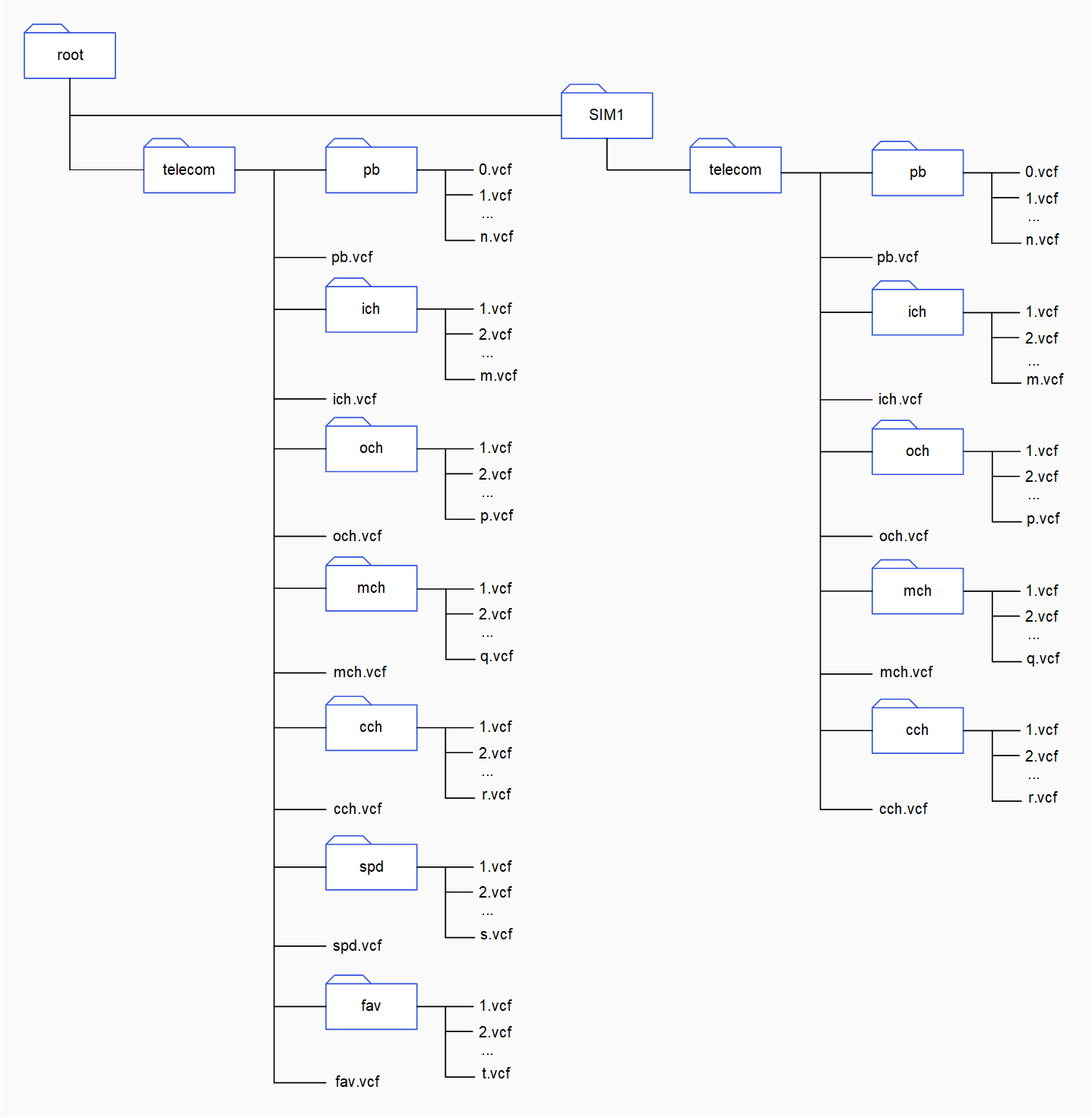
2. Create a `telecom` folder for each phone book repository at the `root` by running the following command:
```text theme={null}
mkdir telecom
```
3. Change the current directory to `telecom` by running the following command:
```text theme={null}
cd telecom
```
4. In the `telecom` directory, create subfolders for different phone book objects.
To create a subfolder at `telecom`, run the following command:
```text theme={null}
mkdir
```
**Parameters**
`` is the name of the subfolder. For example, `pb`.
Use the following folder names for phone book objects:
| Phone book object | Folder name |
| --------------------- | ----------- |
| Main phone book | `pb` |
| Incoming call history | `ich` |
| Outgoing call history | `och` |
| Missed call history | `mch` |
| Combined call history | `cch` |
| Speed-dial contacts | `spd` |
| Favorite contacts | `fav` |
5. In each subfolder, create sample VCF files.
The following figure shows a sample PBAP directory. It contains `telecom` directories for two phone book repositories. In the `telecom` directory, there are subfolders for different phone book objects. These subfolders contain VCF files.