> ## Documentation Index
> Fetch the complete documentation index at: https://dragonwingdocs.qualcomm.com/llms.txt
> Use this file to discover all available pages before exploring further.
# Multi-Camera Offline IFE
> Enable concurrent streaming from up to 4 bayer cameras on a single IFE hardware instance by routing frames through DDR using the Offline IFE feature on IQ-9075-EVK and IQ-8275-EVK.
IQ-9075-EVK
IQ-8275-EVK
Stable
Cameras (IQ-9075-EVK)
Cameras (IQ-8275-EVK)
IFE Hardware Used
Bus Fetch Engine
**Platform Scope:**
This feature is applicable for **IQ-9075-EVK** and **IQ-8275-EVK** only.
Both platforms have two IFEs that natively support real-time de-bayering of bayer camera images.
***
## 01 · What Is It?
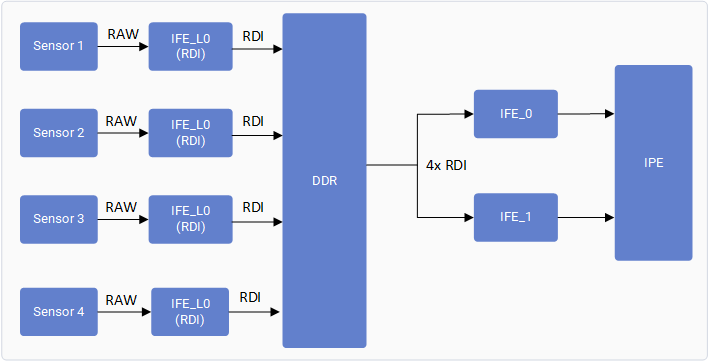
The Offline IFE feature allows a single IFE hardware instance to process bayer images from **multiple cameras** by running in **offline mode**. Instead of real-time de-bayering, frames are first stored in DDR via IFE-Lite's RDI port, then fetched by the IFE using the SFE Lite bus engine for bayer-to-YUV conversion.
```
Real-Time Path: Sensor → IFE-Lite (RDI) → DDR
Offline Path: DDR → SFE Lite (Fetch) → IFE Offline → YUV Output
```
 ***
## 02 · What Does It Control?
Controls how many concurrent bayer cameras can stream simultaneously by reusing a single IFE in offline mode rather than requiring dedicated IFE instances per camera.
| Capability | Without Offline IFE | With Offline IFE |
| ------------------------ | ------------------- | ----------------------------- |
| Concurrent bayer cameras | 2 cameras max | 4 cameras (IQ-9075-EVK) |
| IFE instances required | 1 per 2 cameras | 1 shared (offline) |
| Frame routing | Direct sensor → IFE | Sensor → IFE-Lite → DDR → IFE |
| SFE Lite usage | Not used | Used as bus fetch engine |
| IQ-8275-EVK camera count | 2 cameras max | 3 cameras |
***
## 03 · Feature Validation
Connect to the device console using SSH. See [How To SSH?](https://dragonwingdocs.qualcomm.com/Linux/devices/iq9075-evk/set-up-the-device#connect-over-ssh) for instructions.
### Platform Reference Configurations
Ensure you have connected one of the following camera configurations:
* **IQ-9075-EVK**: Four OV9282 MIPI cameras connected to four MIPI CSI slots (0, 1, 2, and 3).
* **IQ-8275-EVK**: Three OV9282 MIPI cameras connected to three MIPI CSI slots (0, 1, and 2).
| Key | Value |
| -------------- | ------------- |
| Camera count | 4 |
| Sensor | OV9282 MIPI |
| MIPI CSI slots | 0, 1, 2, 3 |
| Format | NV12 1280×720 |
| Key | Value |
| -------------- | ------------- |
| Camera count | 3 |
| Sensor | OV9282 MIPI |
| MIPI CSI slots | 0, 1, 2 |
| Format | NV12 1280×720 |
```text Collect User Log theme={null}
# On device console
journalctl -f > /opt/user_log.txt
```
```text Collect Kernel Log theme={null}
dmesg -w > /opt/kernel_log.txt
```
Run the following for **each camera** (change `camera=0` to `1`, `2`, `3` accordingly):
```bash GStreamer Pipeline theme={null}
gst-launch-1.0 -e qtiqmmfsrc name=camsrc camera=0 multicamera-hint=true ! \
video/x-raw,format=NV12,width=1280,height=720,framerate=30/1,\
interlace-mode=progressive,colorimetry=bt601 ! v4l2h264enc \
capture-io-mode=4 output-io-mode=5 extra-controls="controls,video_bitrate=6000000,\
video_bitrate_mode=0;" ! h264parse ! mp4mux ! filesink location=/opt/mux_avc.mp4
```
**Repeat for each camera**\
Run similarly for `camera=1`, `camera=2`, and `camera=3` (IQ-9075-EVK) or up to `camera=2` (IQ-8275-EVK) with `multicamera-hint=true` on each.
After running the pipeline, confirm the feature is active by checking these exact log entries:
**User log — CamX pipeline status:**
```text User Log Trace theme={null}
CamX: [CORE_CFG]3509 3556 [CORE ] camxpipeline.h:4222 SetPipelineStatus() RealTimeFeatureZSLPreviewRawOfflineIFE_0_cam_0 status is now PipelineStatus::STREAM_ON
```
**Kernel log — IFE acquisition confirmation:**
```text Kernel Log Trace theme={null}
CAM_INFO: CAM-ISP: cam_ife_hw_mgr_print_acquire_info: 1733: 0:4:11.835 Acquired Single IFE[0] SFE[0] OFFLINE: Y with [9 pix] [0 pd] [0 rdi] ports for ctx:1
```
`OFFLINE: Y` in the kernel log confirms the IFE is running in offline mode. `STREAM_ON` in the user log confirms the CamX pipeline is live.
***
## 🛠️ Troubleshooting
| Issue | Cause | Fix |
| -------------------------------------- | ----------------------------------------------------- | --------------------------------------------------------------- |
| Only 2 cameras stream; 3rd/4th dropped | `multicamera-hint=true` not set on all streams | Ensure every `gst-launch` call includes `multicamera-hint=true` |
| `OFFLINE: N` in kernel log | Offline IFE not acquired — possible resource conflict | Restart camera service; verify no other pipeline is holding IFE |
| Pipeline stalls or drops frames | DDR bandwidth saturation at 4-camera load | Reduce framerate to 24fps or lower resolution to 720p |
***
## 02 · What Does It Control?
Controls how many concurrent bayer cameras can stream simultaneously by reusing a single IFE in offline mode rather than requiring dedicated IFE instances per camera.
| Capability | Without Offline IFE | With Offline IFE |
| ------------------------ | ------------------- | ----------------------------- |
| Concurrent bayer cameras | 2 cameras max | 4 cameras (IQ-9075-EVK) |
| IFE instances required | 1 per 2 cameras | 1 shared (offline) |
| Frame routing | Direct sensor → IFE | Sensor → IFE-Lite → DDR → IFE |
| SFE Lite usage | Not used | Used as bus fetch engine |
| IQ-8275-EVK camera count | 2 cameras max | 3 cameras |
***
## 03 · Feature Validation
Connect to the device console using SSH. See [How To SSH?](https://dragonwingdocs.qualcomm.com/Linux/devices/iq9075-evk/set-up-the-device#connect-over-ssh) for instructions.
### Platform Reference Configurations
Ensure you have connected one of the following camera configurations:
* **IQ-9075-EVK**: Four OV9282 MIPI cameras connected to four MIPI CSI slots (0, 1, 2, and 3).
* **IQ-8275-EVK**: Three OV9282 MIPI cameras connected to three MIPI CSI slots (0, 1, and 2).
| Key | Value |
| -------------- | ------------- |
| Camera count | 4 |
| Sensor | OV9282 MIPI |
| MIPI CSI slots | 0, 1, 2, 3 |
| Format | NV12 1280×720 |
| Key | Value |
| -------------- | ------------- |
| Camera count | 3 |
| Sensor | OV9282 MIPI |
| MIPI CSI slots | 0, 1, 2 |
| Format | NV12 1280×720 |
```text Collect User Log theme={null}
# On device console
journalctl -f > /opt/user_log.txt
```
```text Collect Kernel Log theme={null}
dmesg -w > /opt/kernel_log.txt
```
Run the following for **each camera** (change `camera=0` to `1`, `2`, `3` accordingly):
```bash GStreamer Pipeline theme={null}
gst-launch-1.0 -e qtiqmmfsrc name=camsrc camera=0 multicamera-hint=true ! \
video/x-raw,format=NV12,width=1280,height=720,framerate=30/1,\
interlace-mode=progressive,colorimetry=bt601 ! v4l2h264enc \
capture-io-mode=4 output-io-mode=5 extra-controls="controls,video_bitrate=6000000,\
video_bitrate_mode=0;" ! h264parse ! mp4mux ! filesink location=/opt/mux_avc.mp4
```
**Repeat for each camera**\
Run similarly for `camera=1`, `camera=2`, and `camera=3` (IQ-9075-EVK) or up to `camera=2` (IQ-8275-EVK) with `multicamera-hint=true` on each.
After running the pipeline, confirm the feature is active by checking these exact log entries:
**User log — CamX pipeline status:**
```text User Log Trace theme={null}
CamX: [CORE_CFG]3509 3556 [CORE ] camxpipeline.h:4222 SetPipelineStatus() RealTimeFeatureZSLPreviewRawOfflineIFE_0_cam_0 status is now PipelineStatus::STREAM_ON
```
**Kernel log — IFE acquisition confirmation:**
```text Kernel Log Trace theme={null}
CAM_INFO: CAM-ISP: cam_ife_hw_mgr_print_acquire_info: 1733: 0:4:11.835 Acquired Single IFE[0] SFE[0] OFFLINE: Y with [9 pix] [0 pd] [0 rdi] ports for ctx:1
```
`OFFLINE: Y` in the kernel log confirms the IFE is running in offline mode. `STREAM_ON` in the user log confirms the CamX pipeline is live.
***
## 🛠️ Troubleshooting
| Issue | Cause | Fix |
| -------------------------------------- | ----------------------------------------------------- | --------------------------------------------------------------- |
| Only 2 cameras stream; 3rd/4th dropped | `multicamera-hint=true` not set on all streams | Ensure every `gst-launch` call includes `multicamera-hint=true` |
| `OFFLINE: N` in kernel log | Offline IFE not acquired — possible resource conflict | Restart camera service; verify no other pipeline is holding IFE |
| Pipeline stalls or drops frames | DDR bandwidth saturation at 4-camera load | Reduce framerate to 24fps or lower resolution to 720p |