> ## Documentation Index
> Fetch the complete documentation index at: https://dragonwingdocs.qualcomm.com/llms.txt
> Use this file to discover all available pages before exploring further.
# Support per port grouping
> Enable high-density camera concurrency by multiplexing up to 4 GMSL sensors over a single CSI/IFE-Lite path using Virtual Channel (VC) mapping on IQ-9075-EVK and IQ-8275-EVK.
IQ-9075-EVK
IQ-8275-EVK
Sensors per CSI
Multiplexing
Independent Ports
Interface
**Platform Scope:**
This section is applicable for **IQ-9075-EVK** and **IQ-8275-EVK**.
***
## 01 · What Is It?
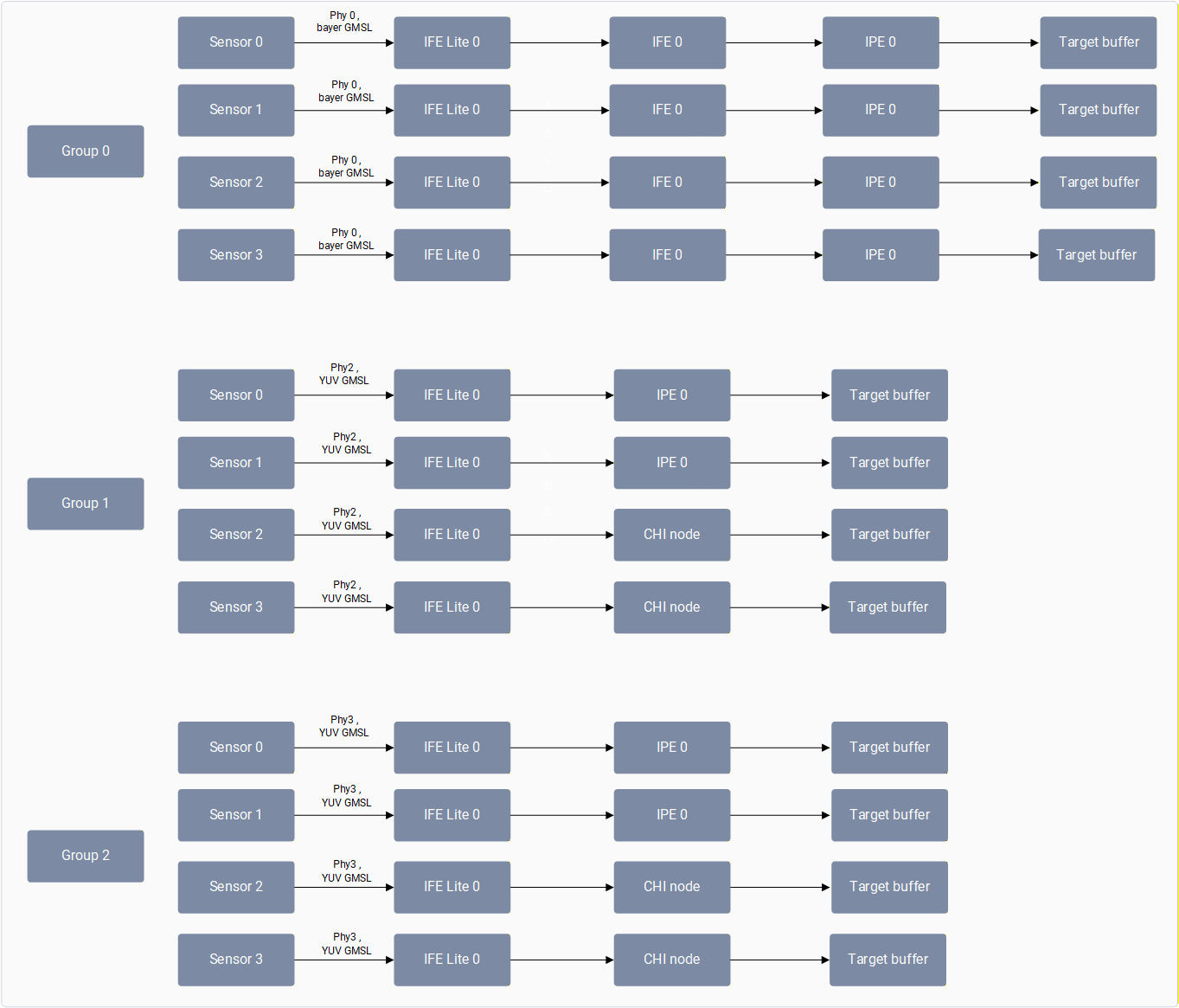
Per Port Grouping enables the connection of up to **4 GMSL sensors** through a single deserializer to a shared CSI interface and IFE-Lite instance.
Each sensor utilizes a unique **Virtual Channel (VC)** to transmit image streams. The hardware then routes these streams to individual **RDI ports** (4 available in IFE-Lite) via VC/DT mapping.
```text theme={null}
Sensor [0..3] → Deserializer → Shared CSI → IFE-Lite [RDI 0..3] → Virtual RDI → User Space
```
***
## 02 · How Does It Work?
As part of boot up, the camera software sends camera group information to the application through a vendor tag (`org.codeaurora.qcamera3.AvailableISPGroupsInfoTag`). The application then sends additional information for all the cameras it’s going to open in that use case via `EnabledISPGroupsConfigTag`.
### Implementation Logic
* **Kernel Management:** The kernel space manages different sensors connected to same CSI by mapping the virtual RDI with hardware ports of the same IFE-Lite using port sharing information.
* **Configuration:** All RDI ports need to be configured before enabling streaming on any port.
* **Concurrency:** As long as the group configuration isn’t changed, the application can start any camera mentioned in that group at any time and stop at any time.
***
## 03 · Hardware Topology
In both IQ-9075-EVK and IQ-8275-EVK architectures, each GMSL deserializer port supports multiplexing up to four cameras into a single CSI group.
| Instance | IQ-9075-EVK Configuration | IQ-8275-EVK Configuration |
| :----------------- | :-------------------------- | :-------------------------- |
| **Deserializer-0** | 4x 3F10 Bayer (Group-0) | 4x 3F10 Bayer (Group-0) |
| **Deserializer-1** | ❌ Disabled (Hardware Issue) | ❌ Disabled (Hardware Issue) |
| **Deserializer-2** | 4x 3F10 YUV (Group-1) | 4x 3F10 YUV (Group-1) |
| **Deserializer-3** | 4x 3F10 YUV (Group-2) | — |
***
## 04 · Validation
Currently on IQ-9075-EVK, the following GMSL concurrency is supported using the gst-camera-per-port-example application, which runs cameras with the per port group feature.
| **GMSL camera concurrency** | **Supported resolution and FPS** | **Connection** |
| :-------------------------- | :------------------------------- | :-------------------------------------------------------------------- |
| Four 3F10 YUV GMSL cameras | 1920x1536, 30 FPS | Connect 4 3F10 YUV GMSLs to Port-2 |
| Four 3F10 YUV GMSL cameras | 1920x1536, 30 FPS | Connect 4 3F10 YUV GMSLs to Port-3 |
| Eight 3F10 YUV GMSL cameras | 1920x1536, 30 FPS | Connect 4 3F10 YUV GMSLs to Port-2 Connect 4 3F10 YUV GMSLs to Port-3 |
The four YUV GMSL concurrency use case is supported on GMSL Port 2 and Port 3. Four bayer GMSL and eight YUV GMSL camera concurrency is not supported in this release.
To run an eight 3F10 YUV GMSL camera concurrency use case using the gst-camera-per-port-example:
Connect four 3F10 YUV GMSLs to Port-2 and four 3F10 YUV GMSLs to Port-3.
Run the gst-camera-per-port-example application.
```bash Application Launch theme={null}
# gst-camera-per-port-example --custom
```
Enter the camera ID’s you want to open (space separated): `0 1 2 3 4 5 6 7`
Enter the following details for all eight cameras:
* Number of streams for camera 0: 1
* Width for stream 1 of camera 0: 1920
* Height for stream 1 of camera 0: 1536
* Framerate for stream 1 of camera 0: 30
* Number of streams for camera 1: 1
* Width for stream 1 of camera 1: 1920
* Height for stream 1 of camera 1: 1536
* Framerate for stream 1 of camera 1: 30
Enter the GST camera pipeline command for all 8 cameras. Use different file names when saving the encoded file of each camera.
The GST command needs to be in a single line without any new line or ‘\’ characters.
**Camera 0:**
```bash GStreamer Pipeline theme={null}
qtiqmmfsrc name=camsrc0 camera=0 video_0::type=video ! video/x-raw,format=NV12,width=1920,height=1536,framerate=30/1,interlace-mode=progressive,colorimetry=bt601 ! queue ! v4l2h264enc capture-io-mode=4 output-io-mode=5 ! h264parse ! mp4mux ! queue ! filesink location=/opt/cam0_IOT_1536p_NV12.mp4
```
**Camera 1:**
```bash GStreamer Pipeline theme={null}
qtiqmmfsrc name=camsrc1 camera=1 video_0::type=video ! video/x-raw,format=NV12,width=1920,height=1536,framerate=30/1,interlace-mode=progressive,colorimetry=bt601 ! queue ! v4l2h264enc capture-io-mode=4 output-io-mode=5 ! h264parse ! mp4mux ! queue ! filesink location=/opt/cam1_IOT_1536p_NV12.mp4
```
Confirm pipelines are started successfully:
```text Terminal Output theme={null}
Setting pipeline gst-camera-pipeline for camera 0 to PLAYING
Pipeline is PREROLLING ...
Setting pipeline gst-camera-pipeline for camera 1 to PLAYING
Pipeline is PREROLLING ...
Pipelines are started
```
To stop camera streaming, select **(q)**. The following logs are shown while exiting the application:
```text Exit Logs theme={null}
Quit pressed!!
gst-camera-pipeline for camera 0 Received End-of-Stream...
Setting pipeline to NULL
Pipeline state change was successful
gst-camera-pipeline for camera 1 Received End-of-Stream...
Setting pipeline to NULL
Pipeline state change was successful
g_main_loop_run ends
```
Currently on IQ-8275-EVK, the following GMSL concurrency is supported using the gst-camera-per-port-example application, which runs cameras with the per port group feature.
| **GMSL camera concurrency** | **Supported resolution and FPS** | **Connection** |
| :------------------------------------------------ | :------------------------------------------------------- | :---------------------------------------------------------------------- |
| Four 3F10 Bayer GMSL cameras | 1824x1536, 30 FPS | Connect 4 3F10 YUV GMSLs to Port-0 |
| Four 3F10 YUV GMSL cameras | 1920x1536, 30 FPS | Connect 4 3F10 YUV GMSLs to Port-2 |
| Four 3F10 bayer GMSL cameras + 4 YUV GMSL cameras | Bayer GMSLs:1824x1536, 30 FPS YUV GMSLs:1920x1536, 30fps | Connect 4 3F10 Bayer GMSLs to Port-0 Connect 4 3F10 YUV GMSLs to Port-2 |
Four bayer + four YUV GMSL camera concurrency is not supported in this release.
To run an eight GMSL camera concurrency use case (four 3F10 bayer GMSL cameras + four YUV GMSL cameras) using the gst-camera-per-port-example:
Connect four 3F10 bayer GMSLs to Port-0 and four 3F10 YUV GMSLs to Port-2.
Run the gst-camera-per-port-example application.
```bash Application Launch theme={null}
# gst-camera-per-port-example --custom
```
Enter the camera ID’s you want to open (space separated): `0 1 2 3 4 5 6 7`
Enter the following details for all eight cameras:
* Number of streams for camera 0: 1
* Width for stream 1 of camera 0: 1920
* Height for stream 1 of camera 0: 1536
* Framerate for stream 1 of camera 0: 30
* Number of streams for camera 1: 1
* Width for stream 1 of camera 1: 1920
* Height for stream 1 of camera 1: 1536
* Framerate for stream 1 of camera 1: 30
Enter the GST camera pipeline command for all 8 cameras. Use different file names when saving the encoded file of each camera.
The GST command needs to be in a single line without any new line or ‘\’ characters.
**Camera 0:**
```bash GStreamer Pipeline theme={null}
qtiqmmfsrc name=camsrc0 camera=0 video_0::type=video ! video/x-raw,format=NV12,width=1824,height=1536,framerate=30/1,interlace-mode=progressive,colorimetry=bt601 ! queue ! v4l2h264enc capture-io-mode=4 output-io-mode=5 ! h264parse ! mp4mux ! queue ! filesink location=/opt/cam0_IOT_1536p_NV12.mp4
```
**Camera 1:**
```bash GStreamer Pipeline theme={null}
qtiqmmfsrc name=camsrc1 camera=1 video_0::type=video ! video/x-raw,format=NV12,width=1824,height=1536,framerate=30/1,interlace-mode=progressive,colorimetry=bt601 ! queue ! v4l2h264enc capture-io-mode=4 output-io-mode=5 ! h264parse ! mp4mux ! queue ! filesink location=/opt/cam1_IOT_1536p_NV12.mp4
```
Confirm pipelines are started successfully:
```text Terminal Output theme={null}
Setting pipeline gst-camera-pipeline for camera 0 to PLAYING
Pipeline is PREROLLING ...
Setting pipeline gst-camera-pipeline for camera 1 to PLAYING
Pipeline is PREROLLING ...
Pipelines are started
```
To stop camera streaming, select **(q)**. The following logs are shown while exiting the application:
```text Exit Logs theme={null}
Quit pressed!!
gst-camera-pipeline for camera 0 Received End-of-Stream...
Setting pipeline to NULL
Pipeline state change was successful
gst-camera-pipeline for camera 1 Received End-of-Stream...
Setting pipeline to NULL
Pipeline state change was successful
g_main_loop_run ends
```
## 🛠️ Troubleshooting / Known Issues
| Issue / Observation | Affected Platform | Details / Notes |
| ----------------------------------------- | ------------------------- | ---------------------------------------------------------------------------------------- |
| Deserializer-1 Disabled | IQ-9075-EVK & IQ-8275-EVK | Deserializer-1 is disabled on both platforms due to a hardware issue |
| Four Bayer GMSL concurrency not supported | IQ-9075-EVK | 4x Bayer GMSL concurrent streaming is not supported in the current release |
| Eight YUV GMSL concurrency not supported | IQ-9075-EVK | 8x YUV GMSL camera concurrency is not supported in the current release |
| Deserializer-3 not available | IQ-8275-EVK | Deserializer-3 (Group-2, 4x 3F10 YUV) exists on IQ-9075-EVK but is absent on IQ-8275-EVK |