> ## Documentation Index
> Fetch the complete documentation index at: https://dragonwingdocs.qualcomm.com/llms.txt
> Use this file to discover all available pages before exploring further.
# Support software TNR/MCTF
> Implement GPU-based Motion Compensated Temporal Filter (MCTF) to enhance preview and video quality by reducing noise and refining motion clarity on IQ-9075-EVK and IQ-8275-EVK.
IQ-9075-EVK
IQ-8275-EVK
GPU Accelerated
Processing Engine
Input Format
Noise Reduction
**Platform Scope:**
SW TNR / MCTF is enabled only for **IQ-9075-EVK** and **IQ-8275-EVK**.
***
## 01 · What Is It?
**Motion Compensated Temporal Filtering** - a software-based video quality filter that reduces noise across frames — runs on the GPU where IPE hardware MCTF is unavailable.
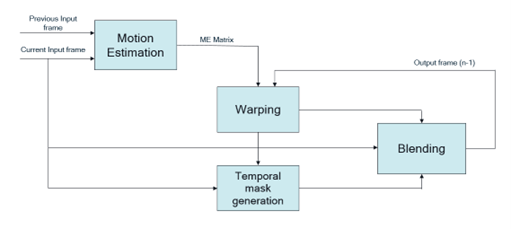
MCTF improves preview and video quality by reducing temporal noise and enhancing motion clarity. The SW implementation runs on the **GPU**, performing inter-frame blending in static regions and applying global motion compensation transforms.
 ***
## 02 · What It Controls
```
SW MCTF Workflow Pipeline:
Current Frame → ME Matrix → Warp (prev frame) → Alpha Mask → Blend → Output Frame
Previous Output → Noise Calc → Blend Input ↗
```
| Stage | What it does | Impact if skipped |
| ---------------------- | ------------------------------------------------------------------ | --------------------------------------------------- |
| Motion Estimation (ME) | Calculates transform matrix between current and previous frame | No motion compensation → ghosting artifacts |
| Warp | Warps previous output frame using ME matrix | Misaligned blend → smearing |
| Alpha Mask | Classifies background vs. local motion regions | Static noise not reduced, moving areas over-blended |
| Blend | Merges current + previous frames using alpha mask + noise estimate | Temporal noise visible in output video |
***
For high-motion scenarios (robotics, automotive), reducing MCTF blend strength prevents temporal ghosting on fast-moving objects.
***
## 03 · Validation
Connect to the device console using SSH. See [How To SSH?](https://dragonwingdocs.qualcomm.com/Linux/devices/iq9075-evk/set-up-the-device#connect-over-ssh) for instructions.
Monitor the CamX core configuration status in real-time.
```bash Log Collection theme={null}
# On device console
journalctl -f > /opt/user_log.txt
```
Capture ISP hardware manager events and acquisition info.
```bash Kernel Logging theme={null}
dmesg -w > /opt/kernel_log.txt
```
Execute the pipeline using the `NV12_Q08C` format and enable the software TNR flag.
```bash GStreamer (SW MCTF Enablement) theme={null}
gst-launch-1.0 -e qtiqmmfsrc name=camsrc video_0::type=preview sw-tnr=true ! \
video/x-raw,format=NV12_Q08C,width=1280,height=720,framerate=30/1 ! \
v4l2h264enc capture-io-mode=4 output-io-mode=5 \
extra-controls="controls,video_bitrate=6000000,video_bitrate_mode=0;" ! \
h264parse ! mp4mux ! filesink location=/opt/cam_prev.mp4
```
Confirm the feature is active by checking these exact log entries in the user log:
**CamX pipeline status:**
```text User Log Verification theme={null}
CamX: [CORE_CFG] 3509 3556 [CORE] camxpipeline.h:4222 SetPipelineStatus()
RealTimeFeatureZSLPreviewRawSWMCTF_0_cam_0 status is now PipelineStatus::STREAM_ON
```
**MCTF library initialization:**
```text User Log Verification theme={null}
CamX: [ INFO] 3509 3556 [CHI ] camxchimoduleswmctf.cpp:328 Initialize()
libmctf Version: 1.0.0
```
`STREAM_ON` confirms the CamX pipeline is live with MCTF enabled. The `libmctf Version` string confirms the software library is initialized on the GPU.
## 🛠️ Troubleshooting / Known Issues — SW TNR/MCTF
| Issue / Observation | Details / Notes |
| ----------------------------------------- | ----------------------------------------------------------------------------------------------------------------------------------------------------------- |
| Ghosting artifacts on fast-moving objects | High-motion scenarios (robotics, automotive) can cause temporal ghosting — reduce MCTF blend strength to mitigate |
| `STREAM_ON` status not seen in user log | CamX pipeline may not be live with MCTF enabled — verify log entry: `SetPipelineStatus() ... status is now PipelineStatus::STREAM_ON` |
| `libmctf` library not initialized | If `libmctf Version: 1.0.0` is absent from user log, the SW MCTF library failed to initialize on the GPU — check `camxchimoduleswmctf.cpp:328 Initialize()` |
***
## 02 · What It Controls
```
SW MCTF Workflow Pipeline:
Current Frame → ME Matrix → Warp (prev frame) → Alpha Mask → Blend → Output Frame
Previous Output → Noise Calc → Blend Input ↗
```
| Stage | What it does | Impact if skipped |
| ---------------------- | ------------------------------------------------------------------ | --------------------------------------------------- |
| Motion Estimation (ME) | Calculates transform matrix between current and previous frame | No motion compensation → ghosting artifacts |
| Warp | Warps previous output frame using ME matrix | Misaligned blend → smearing |
| Alpha Mask | Classifies background vs. local motion regions | Static noise not reduced, moving areas over-blended |
| Blend | Merges current + previous frames using alpha mask + noise estimate | Temporal noise visible in output video |
***
For high-motion scenarios (robotics, automotive), reducing MCTF blend strength prevents temporal ghosting on fast-moving objects.
***
## 03 · Validation
Connect to the device console using SSH. See [How To SSH?](https://dragonwingdocs.qualcomm.com/Linux/devices/iq9075-evk/set-up-the-device#connect-over-ssh) for instructions.
Monitor the CamX core configuration status in real-time.
```bash Log Collection theme={null}
# On device console
journalctl -f > /opt/user_log.txt
```
Capture ISP hardware manager events and acquisition info.
```bash Kernel Logging theme={null}
dmesg -w > /opt/kernel_log.txt
```
Execute the pipeline using the `NV12_Q08C` format and enable the software TNR flag.
```bash GStreamer (SW MCTF Enablement) theme={null}
gst-launch-1.0 -e qtiqmmfsrc name=camsrc video_0::type=preview sw-tnr=true ! \
video/x-raw,format=NV12_Q08C,width=1280,height=720,framerate=30/1 ! \
v4l2h264enc capture-io-mode=4 output-io-mode=5 \
extra-controls="controls,video_bitrate=6000000,video_bitrate_mode=0;" ! \
h264parse ! mp4mux ! filesink location=/opt/cam_prev.mp4
```
Confirm the feature is active by checking these exact log entries in the user log:
**CamX pipeline status:**
```text User Log Verification theme={null}
CamX: [CORE_CFG] 3509 3556 [CORE] camxpipeline.h:4222 SetPipelineStatus()
RealTimeFeatureZSLPreviewRawSWMCTF_0_cam_0 status is now PipelineStatus::STREAM_ON
```
**MCTF library initialization:**
```text User Log Verification theme={null}
CamX: [ INFO] 3509 3556 [CHI ] camxchimoduleswmctf.cpp:328 Initialize()
libmctf Version: 1.0.0
```
`STREAM_ON` confirms the CamX pipeline is live with MCTF enabled. The `libmctf Version` string confirms the software library is initialized on the GPU.
## 🛠️ Troubleshooting / Known Issues — SW TNR/MCTF
| Issue / Observation | Details / Notes |
| ----------------------------------------- | ----------------------------------------------------------------------------------------------------------------------------------------------------------- |
| Ghosting artifacts on fast-moving objects | High-motion scenarios (robotics, automotive) can cause temporal ghosting — reduce MCTF blend strength to mitigate |
| `STREAM_ON` status not seen in user log | CamX pipeline may not be live with MCTF enabled — verify log entry: `SetPipelineStatus() ... status is now PipelineStatus::STREAM_ON` |
| `libmctf` library not initialized | If `libmctf Version: 1.0.0` is absent from user log, the SW MCTF library failed to initialize on the GPU — check `camxchimoduleswmctf.cpp:328 Initialize()` |