> ## Documentation Index
> Fetch the complete documentation index at: https://dragonwingdocs.qualcomm.com/llms.txt
> Use this file to discover all available pages before exploring further.
# CQ2390M/CQ2390S
For supported interfaces and capabilities, see [CQ2390M/CQ2390S display specifications](display-specs-cq2390m-cq2390s).
## Set up the DSI display
The display subsystem provides the Weston and Wayland compositors, along with `libdrm`, which interact with the DPU driver to render the Wayland client applications. Use the sample test applications to evaluate the basic rendering of the Wayland applications and to verify the DSI display.
**Verify the DSI display setup**
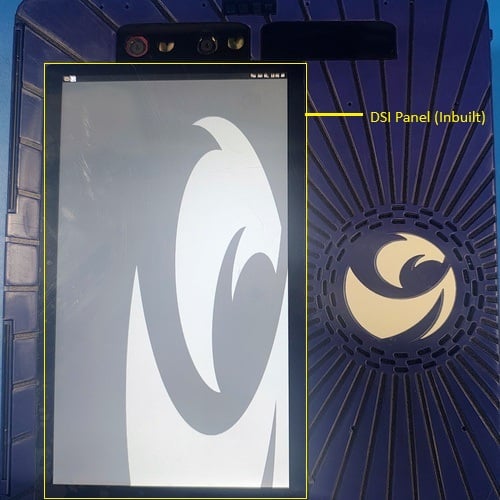
1. The DLC0697 DSI panel is connected to the DSI0 interface on the CQ2390M/CQ2390S evaluation kit (EVK) board (inbuilt DSI panel). The following figure shows the CQ2390M/CQ2390S EVK board:
**Figure: CQ2390M/CQ2390S EVK board**
2. Power on the device. Weston launches automatically during boot.
3. Verify the display.
The following Weston flower pattern displays on the DSI panel, indicating successful setup.
**Figure: Weston flower pattern**
If you are experiencing a no-display issue, see [Debug the DSI display](troubleshoot-debug-dsi-cq2390m-cq2390s).
After you have set up the display, run the following test applications to verify the display functionality:
Verify composition and rendering of frames on your display.
Verify the display driver topology and DPU paths.