> ## Documentation Index
> Fetch the complete documentation index at: https://dragonwingdocs.qualcomm.com/llms.txt
> Use this file to discover all available pages before exploring further.

# Video overview

The Qualcomm<sup>®</sup> Adreno<sup>™</sup> Video Processing Unit (VPU) is a hardware-accelerated video engine that supports video playback (decode) and recording (encode) for multiple video codecs. Applications can offload video operations to the Adreno VPU using the [Qualcomm® Intelligent Multimedia SDK](https://dragonwingdocs.qualcomm.com/SDKs/IMSDK/index) (IM SDK) or Video4Linux2 (V4L2), freeing up the CPU and GPU for other operations.

<div
  style={{
borderLeft: '4px solid #3B5BDB',
backgroundColor: '#EEF2FF',
padding: '12px 16px',
borderRadius: '4px',
marginBottom: '16px'
}}
>
  <p style={{ margin: '0 0 6px 0', fontWeight: 'bold', color: '#1E3A8A' }}>Note:</p>
  <p style={{ margin: 0 }}>See <a href="https://dragonwingdocs.qualcomm.com/Hardware-SoCs/IQ-9075" style={{ color: '#1D4ED8', textDecoration: 'none' }}>Hardware SoCs</a> supported on Qualcomm<sup>®</sup> Linux<sup>®</sup>.</p>
</div>

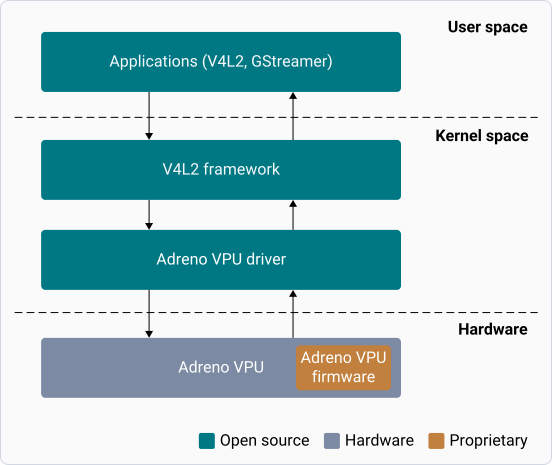
The video software architecture includes the following:

* **User space**: Consists of applications based on V4L2 or GStreamer
* **Kernel space**: Consists of the V4L2 framework and the Adreno VPU driver
* **Hardware module**: Consists of the Adreno VPU firmware and hardware

The following figure shows the modules in the video software architecture:

<div className="flex flex-col items-center gap-2">
  <img src="https://mintcdn.com/qualcomm-prod/h7j64QujhJHkLxyj/Technologies/Video/media/qli-video-technology/Highlevel-video-sw-architecture.svg?fit=max&auto=format&n=h7j64QujhJHkLxyj&q=85&s=7251f23aa15078dfc036c308dc3ebffc" alt="Figure: High-level architecture of the video software" width="552" height="465" data-path="Technologies/Video/media/qli-video-technology/Highlevel-video-sw-architecture.svg" />

  <p className="text-sm text-gray-700">
    Figure: High-level architecture of the video software
  </p>
</div>

## **Next steps**

* [Enable video](https://dragonwingdocs.qualcomm.com/Technologies/Video/enable-video)
* [Explore video sample applications](https://dragonwingdocs.qualcomm.com/Technologies/Video/explore-video-sample-applications)
