> ## Documentation Index
> Fetch the complete documentation index at: https://dragonwingdocs.qualcomm.com/llms.txt
> Use this file to discover all available pages before exploring further.

# Sample applications

## **Implement and deploy OpenCV sample application**

<img src="https://mintcdn.com/qualcomm-prod/h7j64QujhJHkLxyj/Technologies/Vision/images/developer-workflow.svg?fit=max&auto=format&n=h7j64QujhJHkLxyj&q=85&s=d6305a7fbe4c317c9f44d7576165b31a" alt="Developer workflow" width="901" height="208" data-path="Technologies/Vision/images/developer-workflow.svg" />

## **Prerequisites**

* Install the Platform SDK using either of the following methods:
  * [Using the Qualcomm release archive](https://docs.qualcomm.com/doc/80-80021-51/topic/install-sdk.html#download-and-install-esdk)
  * [Manually compiling the Qualcomm Linux SDK](https://docs.qualcomm.com/doc/80-80021-254/topic/how_to.html#generate-an-esdk)

## **Implement OpenCV rotate application with FastCV**

See [OpenCV rotate()](https://docs.qualcomm.com/doc/80-80021-21/topic/sample-applications.html?product=895724676033554725\&facet=Computer%20Vision\&version=2.0-rc2#opencv-rotate) for API usage details.

1. Go to your SDK installation path on the Linux host and set the SDK environment by running the following command:
   ```bash theme={null}
   source environment-setup-armv8-2a-qcom-linux
   ```
2. Run the following command to set the SDKTARGETSYSROOT.
   ```bash theme={null}
   export SDKTARGETSYSROOT={<absolute path to SDK install directory>}/sysroots
   ```
3. Run the following commands to create and change the `/opencv_rotate/` directory in the SDK install directory.
   ```bash theme={null}
   mkdir opencv_rotate
   cd opencv_rotate
   ```
4. Create the following [configure.ac](https://docs.qualcomm.com/doc/80-80021-21/topic/sample-applications.html?product=895724676033554725\&facet=Computer%20Vision\&version=2.0-rc2#configureac3), [Makefile.am](https://docs.qualcomm.com/doc/80-80021-21/topic/sample-applications.html?product=895724676033554725\&facet=Computer%20Vision\&version=2.0-rc2#makefile3), and [opencv\_rotate.cpp](https://docs.qualcomm.com/doc/80-80021-21/topic/sample-applications.html?product=895724676033554725\&facet=Computer%20Vision\&version=2.0-rc2#opencv-rotate-cpp3) files in the `/opencv_rotate/` directory.

   <Note>
     **Note**

     The JPG image referenced in this example is from [https://github.com/opencv/opencv\_extra/blob/4.x/testdata/stitching/boat1.jpg](https://github.com/opencv/opencv_extra/blob/4.x/testdata/stitching/boat1.jpg), and can be changed.
   </Note>

   * `configure.ac`
     > ```bash theme={null}
     > AC_PREREQ([2.71])
     > AC_INIT([opencv_rotate],[1.0.0])
     > AM_INIT_AUTOMAKE([-Wall gnu foreign subdir-objects])
     > AC_CONFIG_SRCDIR([Makefile.am])
     > AC_CONFIG_HEADERS([config.h])
     > AC_CONFIG_MACRO_DIR([m4])
     >
     > AC_ARG_WITH([sanitized-headers],
     >     [AS_HELP_STRING([--with-sanitized-headers=DIR],[location of the sanitized Linux headers])],
     >     [CPPFLAGS="$CPPFLAGS -I$withval"])
     >
     > AM_PROG_AS
     > AM_PROG_AR
     > AC_PROG_CC
     > AM_PROG_CC_C_O
     > AC_PROG_CPP
     > AC_PROG_CXX
     > LT_INIT
     > AC_PROG_AWK
     > AC_PROG_INSTALL
     > AC_PROG_LN_S
     > AC_PROG_MAKE_SET
     >
     > AC_ARG_WITH([opencv-path],
     >     [AS_HELP_STRING([--with-opencv-path=DIR],[path to opencv])],
     >     [OPENCV_PATH="$withval"])
     >
     > # The toolchain parameter passed by the bitbake is consumed here
     > AC_ARG_WITH([toolchain-used],
     >         AS_HELP_STRING([--with-toolchain-used],
     >                 [Specify the toolchain-used for compilation]),
     >         [toolchain_used=$withval],
     >         toolchain_used=sdllvm)
     > AM_CONDITIONAL(GCC_ENABLE, test "x$toolchain_used" = "xgcc")
     > AM_CONDITIONAL(SDLLVM_ENABLE, test "x$toolchain_used" = "xsdllvm")
     >
     > AC_SUBST([OPENCV_PATH])
     >
     > AC_CONFIG_FILES([ Makefile])
     > AC_OUTPUT
     > ```
   * `Makefile.am`
     > ```makefile theme={null}
     > #ACLOCAL_AMFLAGS = -I m4
     > # ---------------------------------------------------------------------------------
     > #                       Make the libfastcvOPT library (libfastcvopt)
     > # ---------------------------------------------------------------------------------
     >
     > common_flags = -O3 \
     >                -fPIC \
     >                -Wall \
     >                -Wno-error \
     >                -Wno-error=uninitialized \
     >                -flax-vector-conversions \
     >                -I${OPENCV_PATH}
     >
     > AM_CFLAGS = $(common_flags)
     >
     > AM_CPPFLAGS = $(common_flags)
     >
     > test_sources = opencv_rotate.cpp
     >
     > bin_PROGRAMS = opencv_rotate_test
     > opencv_rotate_test_SOURCES  = $(test_sources)
     > opencv_rotate_test_CPPFLAGS = $(AM_CPPFLAGS)
     > opencv_rotate_test_CFLAGS = $(AM_CFLAGS)
     > opencv_rotate_test_LDADD = -ldl -lpthread -lopencv_core -lopencv_imgproc -lopencv_imgcodecs -lopencv_fastcv
     > ```
   * `opencv_rotate.cpp`
     > ```cpp theme={null}
     > #include<iostream>
     > #include<chrono>
     > #include "opencv2/opencv.hpp"
     > #include "opencv2/imgcodecs.hpp"
     > #include "opencv2/fastcv/scale.hpp"
     >
     > using namespace cv;
     >
     > int main()
     > {
     >    Mat input = imread("/tmp/test/samples/boat1.jpg");
     >    Mat dst;
     >    auto start = std::chrono::high_resolution_clock::now();
     >    rotate(input, dst, ROTATE_90_CLOCKWISE);
     >    imwrite("/tmp/test/samples/output.jpg", dst);
     >    auto end = std::chrono::high_resolution_clock::now();
     >    std::chrono::microseconds time_span = std::chrono::duration_cast<std::chrono::microseconds>(end - start);
     >    std::cout << "Total time taken: " << time_span.count() << " us.\n";
     >
     >     return 0;
     > }
     > ```

### **Compile OpenCV rotate application**

1. Run the following commands.
   ```bash theme={null}
   mkdir -p m4
   aclocal
   autoconf
   touch NEWS README AUTHORS ChangeLog
   autoreconf --install
   automake -a
   ./configure ${CONFIGURE_FLAGS} --with-opencv_path=${SDKTARGETSYSROOT}/qcom-armv8a/usr/include/opencv4
   ```
2. Run the `make` command to compile the application.
   ```bash theme={null}
   make
   ```
   The `opencv_rotate_test` test application generates in the `/opencv_rotate/` directory.

### **Run the OpenCV rotate application**

1. To push the test bin, run the following command on the host.

   ```bash theme={null}
   scp -r opencv_rotate_test root@{[IP-ADDR]}:/usr/bin/
   ```

   <Note>
     **Note**

     If you are unable to copy the file, remount using the following commands:

     ```bash theme={null}
     mount -o remount,rw /usr
     ```

     Check permissions using:

     ```bash theme={null}
     mount | grep /
     ```
   </Note>
2. Run the following command to change directories (`cd`) to the path (for example `./images/boat1.jpg`) of the test image.
   ```bash theme={null}
   cd {<test image path>}
   ```
3. Create a directory (for example `/tmp/test/samples/`) on the device to push the test image.

   This `/tmp/test/samples/` directory is also the location of the output image in test code. Modify this directory according to the specified output location on your machine.
4. Run the following command to push the test image to the device.
   ```bash theme={null}
   scp -r boat1.jpg root@{[IP-ADDR]}:{/tmp/test/samples/}
   ```
5. To start the test on the target device, run the following commands.
   ```bash theme={null}
   chmod 777 /usr/bin/opencv_rotate_test
   /usr/bin/opencv_rotate_test
   ```
6. To get the results, run the following command.

   ```bash theme={null}
   scp -r root@{[IP-ADDR]}:/tmp/test/samples/output.jpg user2@{[HOST IP-ADDR]}:/workspace
   ```

   The `/tmp/test/samples/` directory is the location of the output image in test code. Modify according to your specified output location.

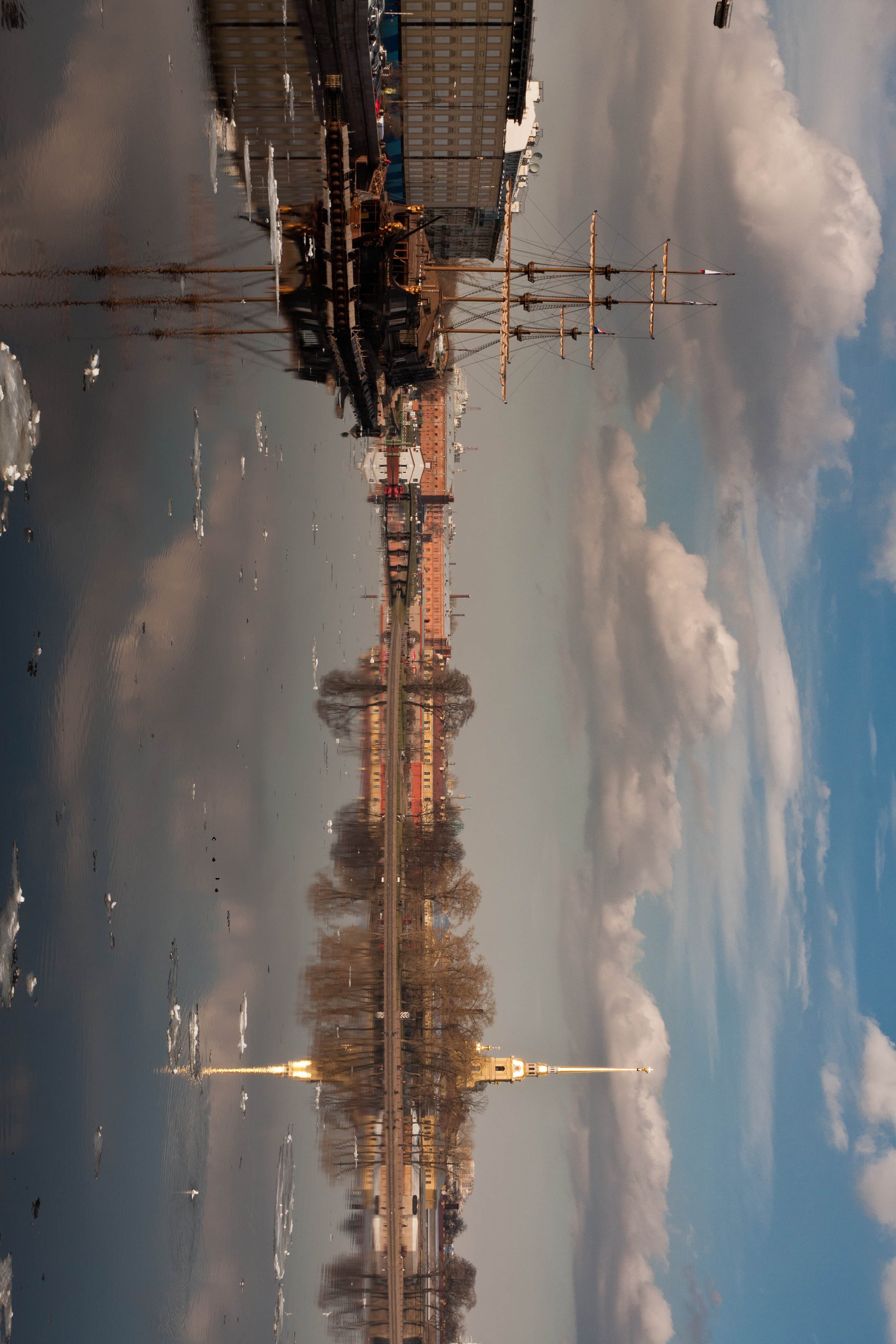
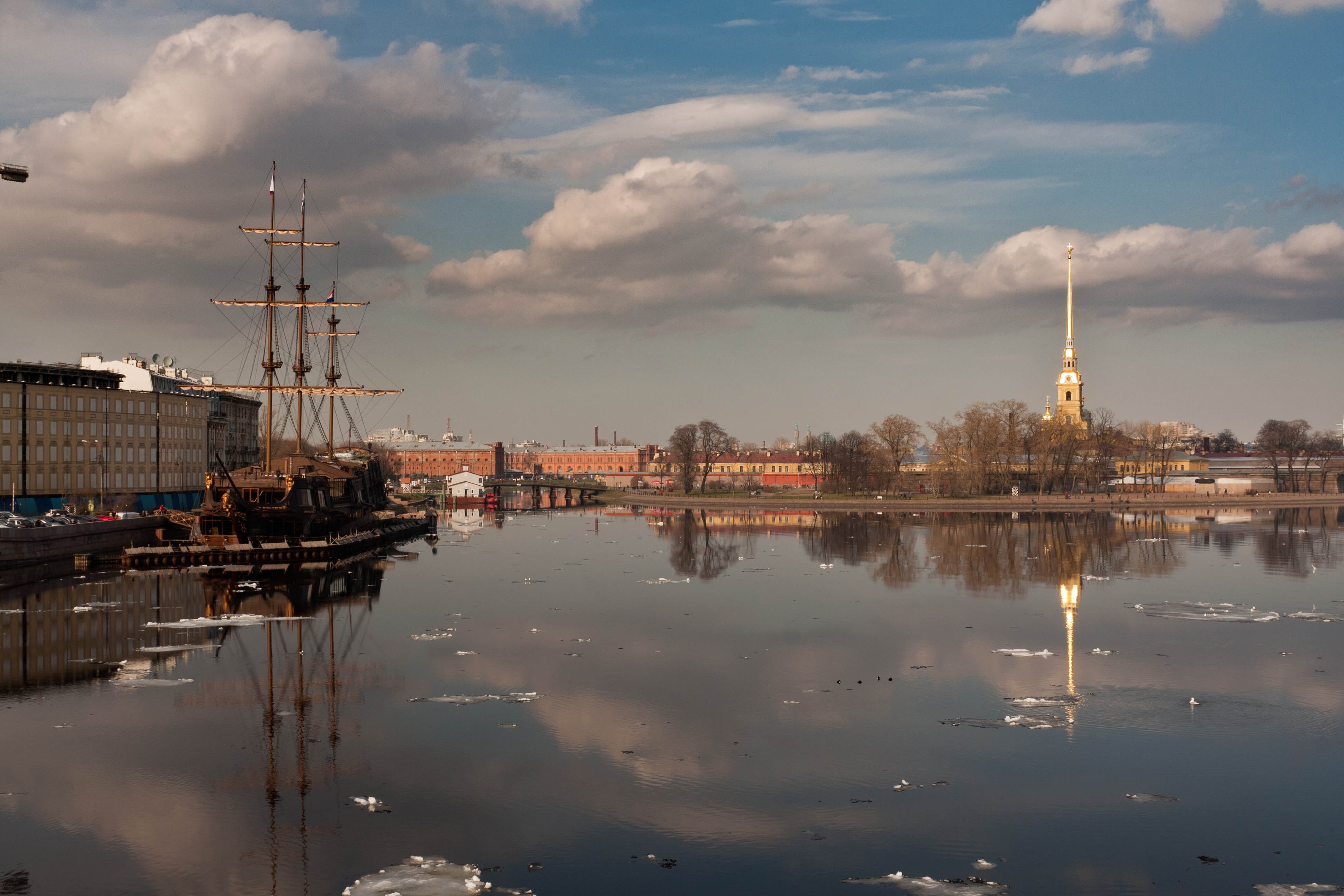
   The following is the expected result.

   |                                                                                                                                                                                                                                                                                                                                                                                                                                                                                                                                                                                                                                                                                                                                                                                                    **Input**                                                                                                                                                                                                                                                                                                                                                                                                                                                                                                                                                                                                                                                                                                                                                                                                   |       **Rotate**      | **Output**                                                                                                                                                                                                                                                                                                                                                                                                                                                                                                                                                                                                                                                                                                                                                                                                                                                                                                                                                                                                                                                                                                                                                                                                                                                                                                                                                                                                                                                                                                                                                                                                              |
   | :------------------------------------------------------------------------------------------------------------------------------------------------------------------------------------------------------------------------------------------------------------------------------------------------------------------------------------------------------------------------------------------------------------------------------------------------------------------------------------------------------------------------------------------------------------------------------------------------------------------------------------------------------------------------------------------------------------------------------------------------------------------------------------------------------------------------------------------------------------------------------------------------------------------------------------------------------------------------------------------------------------------------------------------------------------------------------------------------------------------------------------------------------------------------------------------------------------------------------------------------------------------------------------------------------------------------------------------------------------------------------------------------------------------------------------------------------------------------------------------------------------------------------------------------------------------------------------------------------------: | :-------------------: | :---------------------------------------------------------------------------------------------------------------------------------------------------------------------------------------------------------------------------------------------------------------------------------------------------------------------------------------------------------------------------------------------------------------------------------------------------------------------------------------------------------------------------------------------------------------------------------------------------------------------------------------------------------------------------------------------------------------------------------------------------------------------------------------------------------------------------------------------------------------------------------------------------------------------------------------------------------------------------------------------------------------------------------------------------------------------------------------------------------------------------------------------------------------------------------------------------------------------------------------------------------------------------------------------------------------------------------------------------------------------------------------------------------------------------------------------------------------------------------------------------------------------------------------------------------------------------------------------------------------------- |
   | <img src="https://mintcdn.com/qualcomm-prod/RietNfmN9gs2vaJw/Technologies/Vision/images/rotate-input-image.png?fit=max&auto=format&n=RietNfmN9gs2vaJw&q=85&s=06be0368a6b85a3278ad30670e7f6413" alt="Rotate Input Image" width="3888" height="2592" data-path="Technologies/Vision/images/rotate-input-image.png" /> | ROTATE\_90\_CLOCKWISE | <img src="https://mintcdn.com/qualcomm-prod/RietNfmN9gs2vaJw/Technologies/Vision/images/rotate-output-image.png?fit=max&auto=format&n=RietNfmN9gs2vaJw&q=85&s=d45f15eb4d37d4c84a19e46b61fd6702" alt="Rotate Output Image" width="2592" height="3888" data-path="Technologies/Vision/images/rotate-output-image.png" /> |

## **Implement OpenCV resize application with FastCV extension**

See [OpenCV resize()](https://docs.qualcomm.com/doc/80-80021-21/topic/sample-applications.html?product=895724676033554725\&facet=Computer%20Vision\&version=2.0-rc2#opencv-resize) for API usage details.

1. Once the eSDK is installed, run the following commands to create and change the `/opencv_resize_extension/` directory in the SDK install directory.
   ```bash theme={null}
   mkdir opencv_resize_extension
   cd opencv_resize_extension
   ```
2. Create the following `configure.ac`, `Makefile.am`, and `opencv_resize_extension.cpp` files in the `/opencv_resize_extension/` directory.
   <Note>
     **Note**

     The PNG image referenced in this example is [https://github.com/opencv/opencv/blob/4.x/samples/data/box\_in\_scene.png](https://github.com/opencv/opencv/blob/4.x/samples/data/box_in_scene.png), but you can use another image if you want.
   </Note>

   * `configure.ac`
     ```bash theme={null}
     AC_PREREQ([2.71])
     AC_INIT([opencv_resize],[1.0.0])
     AM_INIT_AUTOMAKE([-Wall gnu foreign subdir-objects])
     AC_CONFIG_SRCDIR([Makefile.am])
     AC_CONFIG_HEADERS([config.h])
     AC_CONFIG_MACRO_DIR([m4])
     AC_ARG_WITH([sanitized-headers],
         [AS_HELP_STRING([--with-sanitized-headers=DIR],[location of the sanitized Linux headers])],
         [CPPFLAGS="$CPPFLAGS -I$withval"])
     AM_PROG_AS
     AM_PROG_AR
     AC_PROG_CC
     AM_PROG_CC_C_O
     AC_PROG_CPP
     AC_PROG_CXX
     LT_INIT
     AC_PROG_AWK
     AC_PROG_INSTALL
     AC_PROG_LN_S
     AC_PROG_MAKE_SET
     AC_ARG_WITH([opencv-path],
         [AS_HELP_STRING([--with-opencv-path=DIR],[path to opencv])],
         [OPENCV_PATH="$withval"])
     # The toolchain parameter passed by the bitbake is consumed here
     AC_ARG_WITH([toolchain-used],
             AS_HELP_STRING([--with-toolchain-used],
                     [Specify the toolchain-used for compilation]),
             [toolchain_used=$withval],
             toolchain_used=sdllvm)
     AM_CONDITIONAL(GCC_ENABLE, test "x$toolchain_used" = "xgcc")
     AM_CONDITIONAL(SDLLVM_ENABLE, test "x$toolchain_used" = "xsdllvm")
     AC_SUBST([OPENCV_PATH])
     AC_CONFIG_FILES([ Makefile])
     AC_OUTPUT
     ```
   * `Makefile.am`
     ```makefile theme={null}
     #ACLOCAL_AMFLAGS = -I m4
     # ---------------------------------------------------------------------------------
     #                       Make the libfastcvOPT library (libfastcvopt)
     # ---------------------------------------------------------------------------------
     common_flags = -O3 \
                    -fPIC \
                    -Wall \
                    -Wno-error \
                    -Wno-error=uninitialized \
                    -flax-vector-conversions \
                    -I${OPENCV_PATH}
     AM_CFLAGS = $(common_flags)
     AM_CPPFLAGS = $(common_flags)
     test_sources = opencv_resize_extension.cpp
     bin_PROGRAMS = opencv_resize_test
     opencv_resize_test_SOURCES  = $(test_sources)
     opencv_resize_test_CPPFLAGS = $(AM_CPPFLAGS)
     opencv_resize_test_CFLAGS = $(AM_CFLAGS)
     opencv_resize_test_LDADD = -ldl -lpthread -lopencv_core -lopencv_imgproc -lopencv_imgcodecs -lopencv_fastcv
     ```
   * `opencv_resize_extension.cpp`
     ```cpp theme={null}
     #include<iostream>
     #include<chrono>
     #include "opencv2/opencv.hpp"
     #include "opencv2/imgcodecs.hpp"
     #include "opencv2/fastcv/scale.hpp"
     using namespace cv;
     int main()
     {
        Mat input = imread("/tmp/test/samples/box_in_scene.png", IMREAD_GRAYSCALE);
        Mat dst ;
        auto start = std::chrono::high_resolution_clock::now();
        fastcv::resizeDown(input, dst, cv::Size(), 0.5, 0.5);
        //resize(input, dst, Size(), 0.5, 0.5, INTER_LINEAR);
        imwrite("/tmp/test/samples/output.png", dst);
        auto end = std::chrono::high_resolution_clock::now();
        std::chrono::microseconds time_span = std::chrono::duration_cast<std::chrono::microseconds>(end - start);
        std::cout << "Total time taken: " << time_span.count() << " us.\n";
        // if(!dst) std::cout << "Test not executed properly" << std::endl;
         return 0;
     }
     ```

### **Compile OpenCV resize application**

1. Run the following commands.
   ```bash theme={null}
   mkdir -p m4
   aclocal
   autoconf
   touch NEWS README AUTHORS ChangeLog
   autoreconf --install
   automake -a
   ./configure ${CONFIGURE_FLAGS} --with-opencv_path=${SDKTARGETSYSROOT}/qcom-armv8a/usr/include/opencv4
   ```
2. Run the make command to compile the application.
   ```bash theme={null}
   make
   ```
   The `opencv_resize_test` test application generates in the `/opencv_resize_extension/` directory.

### **Run OpenCV resize application**

1. To push the test bin, run the following command on the host.
   ```bash theme={null}
   scp -r opencv_resize_test root@{[IP-ADDR]}:/usr/bin/
   ```
2. Run the following command to change directories (`cd`) to the path of the test image (for example `./images/box_in_scene.png`).
   ```bash theme={null}
   cd {<test image path>}
   ```
3. Create a directory on the device to copy the test image to (for example `/tmp/test/samples/`).

   This `/tmp/test/samples/` directory is also the location of the output image in the sample code.

   Modify this directory according to the specified output location on your machine.
4. Run the following command to copy the test image to the device.
   ```bash theme={null}
   scp -r box_in_scene.png root@{[IP-ADDR]}:{/tmp/test/samples/}
   ```
5. To start the test on the target device, run the following commands.
   ```bash theme={null}
   chmod 777 /usr/bin/opencv_resize_test
   /usr/bin/opencv_resize_test
   ```
6. To get the results, run the following command.

   ```bash theme={null}
   scp -r root@{[IP-ADDR]}:/tmp/test/samples/output.png user2@{[HOST IP-ADDR]}:/workspace
   ```

   The `/tmp/test/samples/` directory is the location of the output image in the sample code.

   Modify this location according to your specified output location.

   The following is the expected result.

   |                                                                                                                                                                                                                                                                                                                                                                                                                                                                                                                                                                                                                                                                                                                                                                       **Input**                                                                                                                                                                                                                                                                                                                                                                                                                                                                                                                                                                                                                                                                                                                                                                       | **Resize factor** | **Output**                                                                                                                                                                                                                                                                                                                                                                                                                                                                                                                                                                                                                                                                                                                                                                                                                                                                                                                                                                                                                                                                                                                                                                                                                                                                                                                                                                                                                                                                                                                                                   |
   | :---------------------------------------------------------------------------------------------------------------------------------------------------------------------------------------------------------------------------------------------------------------------------------------------------------------------------------------------------------------------------------------------------------------------------------------------------------------------------------------------------------------------------------------------------------------------------------------------------------------------------------------------------------------------------------------------------------------------------------------------------------------------------------------------------------------------------------------------------------------------------------------------------------------------------------------------------------------------------------------------------------------------------------------------------------------------------------------------------------------------------------------------------------------------------------------------------------------------------------------------------------------------------------------------------------------------------------------------------------------------------------------------------------------------------------------------------------------------------------------------------------------------------------------------------: | :---------------: | :----------------------------------------------------------------------------------------------------------------------------------------------------------------------------------------------------------------------------------------------------------------------------------------------------------------------------------------------------------------------------------------------------------------------------------------------------------------------------------------------------------------------------------------------------------------------------------------------------------------------------------------------------------------------------------------------------------------------------------------------------------------------------------------------------------------------------------------------------------------------------------------------------------------------------------------------------------------------------------------------------------------------------------------------------------------------------------------------------------------------------------------------------------------------------------------------------------------------------------------------------------------------------------------------------------------------------------------------------------------------------------------------------------------------------------------------------------------------------------------------------------------------------------------------------------- |
   | <img src="https://mintcdn.com/qualcomm-prod/RietNfmN9gs2vaJw/Technologies/Vision/images/size-input-image.png?fit=max&auto=format&n=RietNfmN9gs2vaJw&q=85&s=b4f020dddca5dde101f10f51c661b509" width="100%" data-path="Technologies/Vision/images/size-input-image.png" /> |   fx=1/2 fy=1/2   | <img src="https://mintcdn.com/qualcomm-prod/RietNfmN9gs2vaJw/Technologies/Vision/images/size-output-image.png?fit=max&auto=format&n=RietNfmN9gs2vaJw&q=85&s=d92c831a32ce943217f0bea18646bd9a" width="50%" data-path="Technologies/Vision/images/size-output-image.png" /> |

## **OpenCV rotate function usage**

Rotates a 2D array in multiples of 90 degrees. The `rotate()` function rotates the array in one of the following ways.

* 90 degrees clockwise: `rotateCode = ROTATE_90_CLOCKWISE`
* 180 degrees clockwise: `rotateCode = ROTATE_180`
* 270 degrees clockwise: `rotateCode = ROTATE_90_COUNTERCLOCKWISE`

<Card>
  <b style={{fontSize: "1.1rem", display: "block", textAlign: "center"}}>Parameters</b>

  <table>
    <thead>
      <tr>
        <th style={{color: "white", fontWeight: "bold"}}>Type</th>
        <th style={{color: "white", fontWeight: "bold"}}>Parameter</th>
        <th style={{color: "white", fontWeight: "bold"}}>Description</th>
      </tr>
    </thead>

    <tbody>
      <tr>
        <td>InputArray</td>
        <td>src</td>
        <td>Input array.</td>
      </tr>

      <tr>
        <td>OutputArray</td>
        <td>dst</td>
        <td>Output array of the same type as the source.<br />The size is the same with <code>ROTATE\_180</code> and the rows and columns are switched for <code>ROTATE\_90\_CLOCKWISE</code> and <code>ROTATE\_90\_COUNTERCLOCKWISE</code>.</td>
      </tr>

      <tr>
        <td>int</td>
        <td>code</td>
        <td>An enum to specify how to rotate the array; see the <code>RotateFlags</code> enum.<br />RotateFlags:<ul><li><code>ROTATE\_90\_CLOCKWISE</code></li><li><code>ROTATE\_180</code></li><li><code>ROTATE\_90\_COUNTERCLOCKWISE</code></li></ul></td>
      </tr>
    </tbody>
  </table>
</Card>

For more information about `rotate()`, see [the full API documentation](https://docs.opencv.org/3.4/d2/de8/group__core__array.html#ga4ad01c0978b0ce64baa246811deeac24)

## **OpenCV resize function usage**

Input to the OpenCV resize() function is a source (src) image in the form of CVMatrix.

<Note>
  **Note**

  Only grayscale images are supported.
</Note>

Output is a destination image in the form of CVMatrix.

The FastCV namespace is used to call the FastCV extension APIs.

The resizeDown() extension API requires the input image and destination image as parameters.

<Card>
  <b style={{fontSize: "1.1rem", display: "block", textAlign: "center"}}>Parameters</b>

  <table>
    <thead>
      <tr>
        <th style={{color: "white", fontWeight: "bold"}}>Type</th>
        <th style={{color: "white", fontWeight: "bold"}}>Parameter</th>
        <th style={{color: "white", fontWeight: "bold"}}>Description</th>
      </tr>
    </thead>

    <tbody>
      <tr>
        <td>InputArray</td>
        <td>input</td>
        <td>Input image.</td>
      </tr>

      <tr>
        <td>OutputArray</td>
        <td>dst</td>
        <td>Output image.</td>
      </tr>

      <tr>
        <td>Size</td>
        <td>dsize</td>
        <td>The desired size of the output image. If empty, it is calculated using inv\_scale\_x and inv\_scale\_y.</td>
      </tr>

      <tr>
        <td>double</td>
        <td>inv\_scale\_x</td>
        <td>The inverse scaling factor for the width. If <code>dsize</code> is provided, this parameter is ignored.</td>
      </tr>

      <tr>
        <td>double</td>
        <td>inv\_scale\_y</td>
        <td>The inverse scaling factor for the height. If <code>dsize</code> is provided, this parameter is ignored.</td>
      </tr>
    </tbody>
  </table>
</Card>

For more information about `resize()`, see [the full API documentation](https://docs.opencv.org/4.13.0/da/d54/group__imgproc__transform.html#ga47a974309e9102f5f08231edc7e7529d).