> ## Documentation Index
> Fetch the complete documentation index at: https://dragonwingdocs.qualcomm.com/llms.txt
> Use this file to discover all available pages before exploring further.
# UART
UART (Universal Asynchronous Receiver-Transmitter) transmits data asynchronously using start and stop bits instead of a clock signal. The receiving UART reads bits at a specific frequency known as the baud rate.
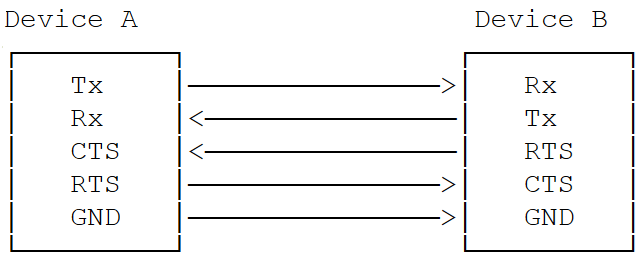 ## Key Parameters
* **Baud rate** — Communication speed (bits per second)
* **Start/Stop bits** — Frame delimiters
* **Parity bit** — Optional error checking
* **Data bits** — 5–9 bits per frame
* **Flow control** — Hardware handshaking via CTS/RTS
## Key Parameters
* **Baud rate** — Communication speed (bits per second)
* **Start/Stop bits** — Frame delimiters
* **Parity bit** — Optional error checking
* **Data bits** — 5–9 bits per frame
* **Flow control** — Hardware handshaking via CTS/RTS
 ## Transfer Modes by Subsystem
| Subsystem | Transfer Mode | Baud Rates | Notes |
| --------------- | ------------- | ------------------------------------------ | ------------------------------- |
| **Linux** | FIFO, CPU DMA | 300 bps – 4 Mbps | DMA ideal for Bluetooth modules |
| **Boot (UEFI)** | FIFO only | Up to 115200 | 5–8 bits per character |
| **aDSP** | FIFO only | 115200, 230400, 460800, 921600, 1M, 3M, 6M | 5–8 bits per character |
## Interface Components
### Device Tree Sources
| Platform | File |
| ------------------ | --------------------------------------- |
| Dragonwing IQ-8275 | `arch/arm64/boot/dts/qcom/sa8295p.dtsi` |
### APIs
| Subsystem | Header |
| --------- | --------------------------------- |
| Linux | `include/linux/tty.h` |
| Boot | `QcomPkg/Include/HSUart.h` |
| aDSP | `adsp_proc/core/api/buses/uart.h` |
## Software Configuration
### Linux Device Tree Example
**4-wire UART (with flow control):**
```dts theme={null}
uart7: serial@99c000 {
compatible = "qcom,geni-uart";
reg = <0 0x0099c000 0 0x4000>;
clocks = <&gcc GCC_QUPV3_WRAP0_S7_CLK>;
clock-names = "se";
pinctrl-names = "default";
pinctrl-0 = <&qup_uart7_cts>, <&qup_uart7_rts>,
<&qup_uart7_tx>, <&qup_uart7_rx>;
interrupts = ;
power-domains = <&rpmhpd SA8295P_CX>;
interconnect-names = "qup-core", "qup-config";
status = "disabled";
};
```
**QUPAC access control:**
```c theme={null}
// 4-wire HS UART
{ QUPV3_0_SE7, QUPV3_PROTOCOL_UART_4W, QUPV3_MODE_FIFO, AC_HLOS, TRUE, TRUE, FALSE }
// 2-wire UART (no flow control)
{ QUPV3_0_SE5, QUPV3_PROTOCOL_UART_2W, QUPV3_MODE_FIFO, AC_HLOS, TRUE, FALSE, FALSE }
```
## Kernel Configuration
```
CONFIG_QCOM_GENI_SE=y
CONFIG_SERIAL_QCOM_GENI=y
```
Enable the UART node in the device tree:
```diff theme={null}
+serial1 = &uart7;
+&uart7 {
+ status = "ok";
+};
```
## Verification
```bash theme={null}
ls /dev/ttyHS*
# Expected: /dev/ttyHS1
dmesg | grep ttyH
```
```bash theme={null}
stty -F /dev/ttyHS1 115200
```
Open two SSH terminals.
**Terminal 1 (write):**
```bash theme={null}
echo "Hello UART" > /dev/ttyHS1
```
**Terminal 2 (read):**
```bash theme={null}
cat /dev/ttyHS1
```
## Debugging
```bash theme={null}
mount -t debugfs none /sys/kernel/debug
echo -n "file qcom_geni_serial.c +p" > /sys/kernel/debug/dynamic_debug/control
echo -n "file serial_core.c +p" > /sys/kernel/debug/dynamic_debug/control
dmesg | grep -i uart
dmesg | grep ttyHS
```
## Troubleshooting
```bash theme={null}
lsmod | grep qcom_geni
cat /proc/device-tree/soc/serial@*/status
ls -la /dev/tty*
```
* Verify device tree status is `"ok"`
* Confirm `CONFIG_SERIAL_QCOM_GENI=y`
```bash theme={null}
stty -F /dev/ttyHS1 -a
stty -F /dev/ttyHS1 115200
stty -F /dev/ttyHS1 crtscts # enable flow control
stty -F /dev/ttyHS1 -crtscts # disable flow control
```
```bash theme={null}
ls -la /dev/ttyHS*
usermod -a -G dialout $USER
```
## Resources
* [Linux Kernel Device Tree Bindings](https://github.com/torvalds/linux/blob/master/Documentation/devicetree/bindings/serial/qcom%2Cserial-geni-qcom.yaml)
* [UART Driver Source](https://github.com/torvalds/linux/blob/master/drivers/tty/serial/qcom_geni_serial.c)
* [Serial Console Documentation](https://docs.kernel.org/admin-guide/serial-console.html)
## Transfer Modes by Subsystem
| Subsystem | Transfer Mode | Baud Rates | Notes |
| --------------- | ------------- | ------------------------------------------ | ------------------------------- |
| **Linux** | FIFO, CPU DMA | 300 bps – 4 Mbps | DMA ideal for Bluetooth modules |
| **Boot (UEFI)** | FIFO only | Up to 115200 | 5–8 bits per character |
| **aDSP** | FIFO only | 115200, 230400, 460800, 921600, 1M, 3M, 6M | 5–8 bits per character |
## Interface Components
### Device Tree Sources
| Platform | File |
| ------------------ | --------------------------------------- |
| Dragonwing IQ-8275 | `arch/arm64/boot/dts/qcom/sa8295p.dtsi` |
### APIs
| Subsystem | Header |
| --------- | --------------------------------- |
| Linux | `include/linux/tty.h` |
| Boot | `QcomPkg/Include/HSUart.h` |
| aDSP | `adsp_proc/core/api/buses/uart.h` |
## Software Configuration
### Linux Device Tree Example
**4-wire UART (with flow control):**
```dts theme={null}
uart7: serial@99c000 {
compatible = "qcom,geni-uart";
reg = <0 0x0099c000 0 0x4000>;
clocks = <&gcc GCC_QUPV3_WRAP0_S7_CLK>;
clock-names = "se";
pinctrl-names = "default";
pinctrl-0 = <&qup_uart7_cts>, <&qup_uart7_rts>,
<&qup_uart7_tx>, <&qup_uart7_rx>;
interrupts = ;
power-domains = <&rpmhpd SA8295P_CX>;
interconnect-names = "qup-core", "qup-config";
status = "disabled";
};
```
**QUPAC access control:**
```c theme={null}
// 4-wire HS UART
{ QUPV3_0_SE7, QUPV3_PROTOCOL_UART_4W, QUPV3_MODE_FIFO, AC_HLOS, TRUE, TRUE, FALSE }
// 2-wire UART (no flow control)
{ QUPV3_0_SE5, QUPV3_PROTOCOL_UART_2W, QUPV3_MODE_FIFO, AC_HLOS, TRUE, FALSE, FALSE }
```
## Kernel Configuration
```
CONFIG_QCOM_GENI_SE=y
CONFIG_SERIAL_QCOM_GENI=y
```
Enable the UART node in the device tree:
```diff theme={null}
+serial1 = &uart7;
+&uart7 {
+ status = "ok";
+};
```
## Verification
```bash theme={null}
ls /dev/ttyHS*
# Expected: /dev/ttyHS1
dmesg | grep ttyH
```
```bash theme={null}
stty -F /dev/ttyHS1 115200
```
Open two SSH terminals.
**Terminal 1 (write):**
```bash theme={null}
echo "Hello UART" > /dev/ttyHS1
```
**Terminal 2 (read):**
```bash theme={null}
cat /dev/ttyHS1
```
## Debugging
```bash theme={null}
mount -t debugfs none /sys/kernel/debug
echo -n "file qcom_geni_serial.c +p" > /sys/kernel/debug/dynamic_debug/control
echo -n "file serial_core.c +p" > /sys/kernel/debug/dynamic_debug/control
dmesg | grep -i uart
dmesg | grep ttyHS
```
## Troubleshooting
```bash theme={null}
lsmod | grep qcom_geni
cat /proc/device-tree/soc/serial@*/status
ls -la /dev/tty*
```
* Verify device tree status is `"ok"`
* Confirm `CONFIG_SERIAL_QCOM_GENI=y`
```bash theme={null}
stty -F /dev/ttyHS1 -a
stty -F /dev/ttyHS1 115200
stty -F /dev/ttyHS1 crtscts # enable flow control
stty -F /dev/ttyHS1 -crtscts # disable flow control
```
```bash theme={null}
ls -la /dev/ttyHS*
usermod -a -G dialout $USER
```
## Resources
* [Linux Kernel Device Tree Bindings](https://github.com/torvalds/linux/blob/master/Documentation/devicetree/bindings/serial/qcom%2Cserial-geni-qcom.yaml)
* [UART Driver Source](https://github.com/torvalds/linux/blob/master/drivers/tty/serial/qcom_geni_serial.c)
* [Serial Console Documentation](https://docs.kernel.org/admin-guide/serial-console.html)