> ## Documentation Index
> Fetch the complete documentation index at: https://dragonwingdocs.qualcomm.com/llms.txt
> Use this file to discover all available pages before exploring further.
# USB
The Universal Serial Bus (USB) supports data exchange and power supply between electronic devices at speeds from 1.5 Mbps (low speed) up to 10 Gbps (SuperSpeed Plus). The IQ-9075 uses the **Synopsys DesignWare Core SuperSpeed USB 3.x** controller connected to USB2 PHY (UTMI) and USB3 PHY (PIPE) interfaces.
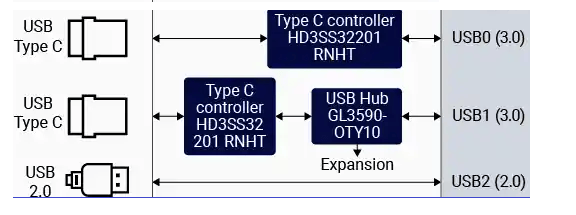
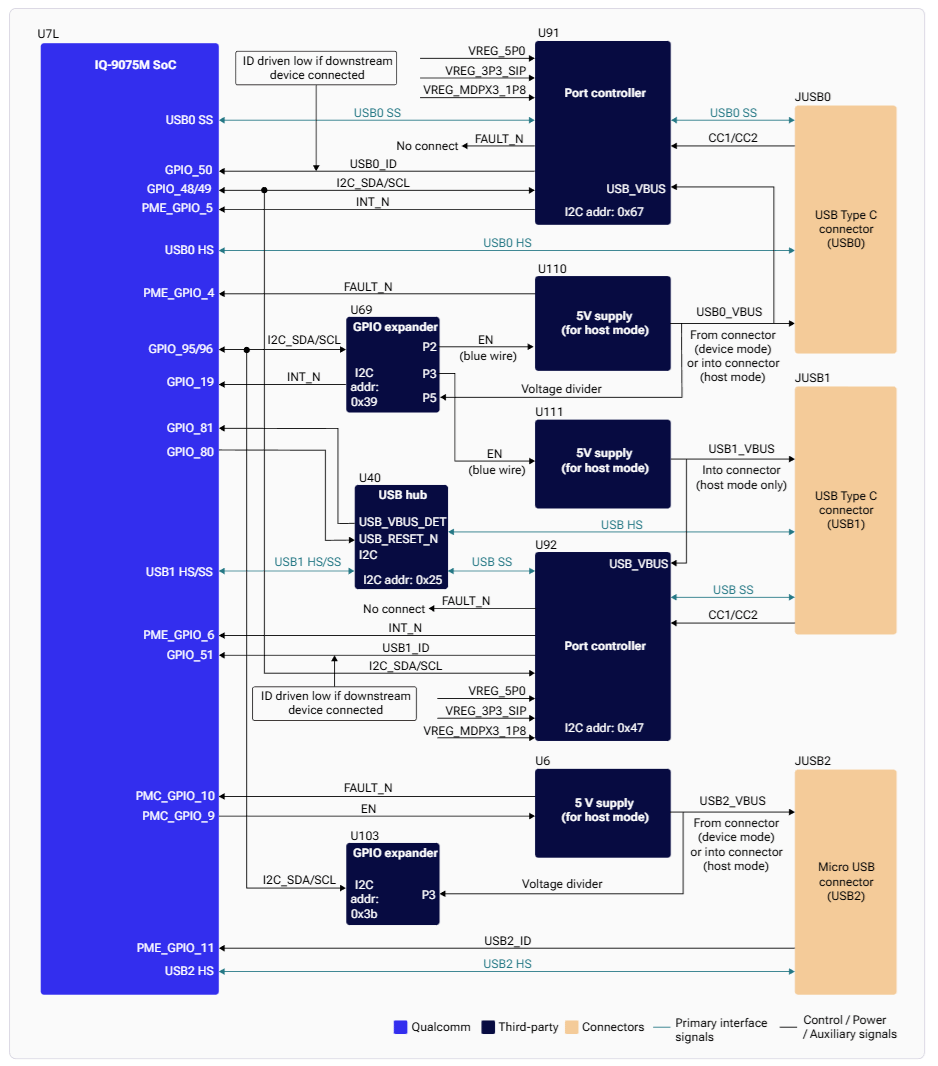
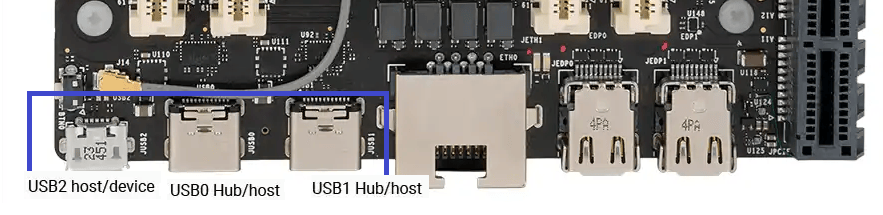 The board features three USB connectors: two Type-C (USB0, USB1) and one micro-USB (USB2).
## Controllers
| Controller | Address | Max Speed | HS PHY Rails | SS PHY Rails |
| ---------- | --------- | ------------------ | -------------------------------------------- | ------------ |
| **USB0** | 0xa600000 | USB 3.x SuperSpeed | L7A (0.88V), L6C (1.8V), L9A (3.3V) | L1C, L7A |
| **USB1** | 0xa800000 | USB 3.x SuperSpeed | L7A (0.88V), L6C (1.8V), L9A (3.3V) | L1C, L7A |
| **USB2** | 0xa400000 | USB 2.0 High Speed | VDD\_A\_USBHS\_2\_1P8, VDD\_A\_USBHS\_2\_3P1 | — |
The board features three USB connectors: two Type-C (USB0, USB1) and one micro-USB (USB2).
## Controllers
| Controller | Address | Max Speed | HS PHY Rails | SS PHY Rails |
| ---------- | --------- | ------------------ | -------------------------------------------- | ------------ |
| **USB0** | 0xa600000 | USB 3.x SuperSpeed | L7A (0.88V), L6C (1.8V), L9A (3.3V) | L1C, L7A |
| **USB1** | 0xa800000 | USB 3.x SuperSpeed | L7A (0.88V), L6C (1.8V), L9A (3.3V) | L1C, L7A |
| **USB2** | 0xa400000 | USB 2.0 High Speed | VDD\_A\_USBHS\_2\_1P8, VDD\_A\_USBHS\_2\_3P1 | — |
 ## Features
### Hardware Features
| Feature | Description |
| -------------------------- | ------------------------------------------------- |
| **Dual-Role Device (DRD)** | Host and device modes with dynamic role detection |
| **USB 3.1 Gen1** | SuperSpeed 5 Gbps on USB0 and USB1 |
| **USB 2.0 High Speed** | 480 Mbps on all controllers |
| **xHCI** | eXtensible Host Controller Interface compliance |
| **Transfer types** | Control, bulk, interrupt, isochronous |
| **Link Power Management** | ASPM-style LPM for power savings |
### Software Features
**Peripheral mode:** Mass Storage, Diagnostics (FunctionFS), RNDIS, NCM
**Host mode:** xHCI, HID/MS/Hub class drivers, UVC (USB camera), Link Power Management
## Architecture
## Features
### Hardware Features
| Feature | Description |
| -------------------------- | ------------------------------------------------- |
| **Dual-Role Device (DRD)** | Host and device modes with dynamic role detection |
| **USB 3.1 Gen1** | SuperSpeed 5 Gbps on USB0 and USB1 |
| **USB 2.0 High Speed** | 480 Mbps on all controllers |
| **xHCI** | eXtensible Host Controller Interface compliance |
| **Transfer types** | Control, bulk, interrupt, isochronous |
| **Link Power Management** | ASPM-style LPM for power savings |
### Software Features
**Peripheral mode:** Mass Storage, Diagnostics (FunctionFS), RNDIS, NCM
**Host mode:** xHCI, HID/MS/Hub class drivers, UVC (USB camera), Link Power Management
## Architecture
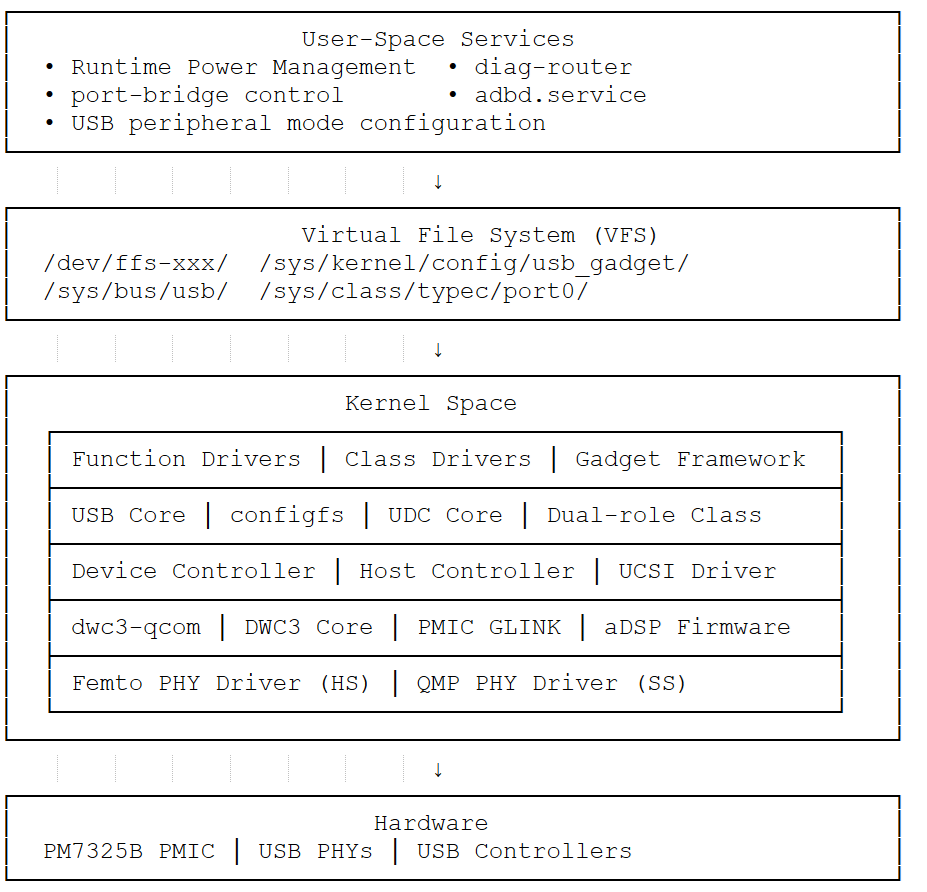
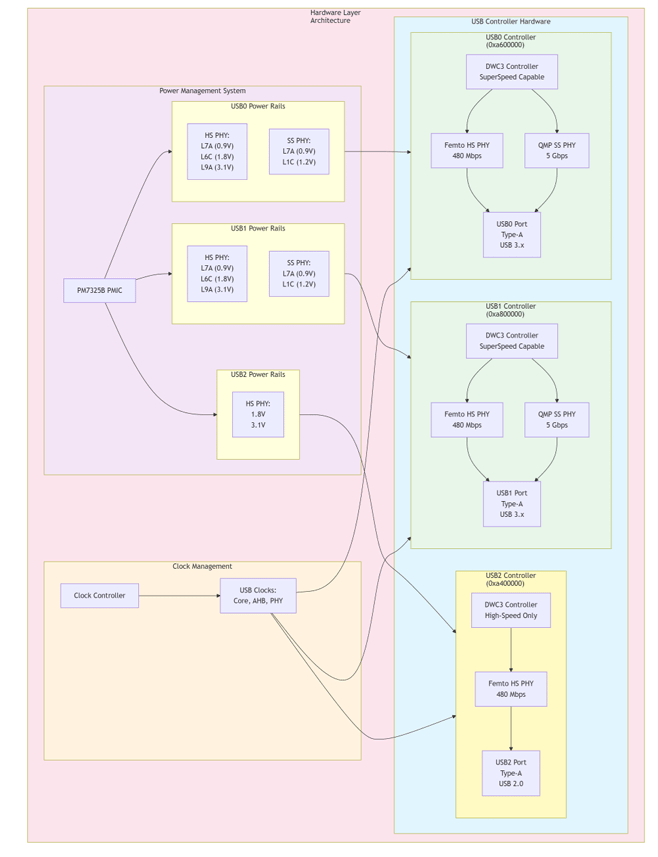 | Layer | Key Components |
| -------------- | -------------------------------------------------------------------- |
| **User Space** | `diag-router`, `qusb` — service management, composition switching |
| **VFS** | `/dev/ffs-*`, `/sys/kernel/config` — dynamic config, endpoint access |
| **Kernel** | `dwc3-qcom`, xHCI, Gadget Framework — dual-role, power management |
| **Hardware** | DWC3 Controllers, Femto/QMP PHYs |
## Configuration
### Runtime Power Management
```bash theme={null}
# Enable autosuspend
echo auto > /sys/bus/platform/devices/a600000.usb/power/control
echo 2000 > /sys/bus/platform/devices/a600000.usb/power/autosuspend_delay_ms
# Check status
cat /sys/bus/platform/devices/a600000.usb/power/runtime_status
```
Runtime PM is not supported for Type-C ports on IQ-9075.
### Enable Remote Wake-up (Host Mode)
```bash theme={null}
# Enable wake-up for xHCI
echo enabled > /sys/bus/platform/devices/xhci-hcd.X.auto/power/wakeup
# Enable wake-up for root hubs
echo enabled > /sys/bus/usb/devices/usb1/power/wakeup
echo enabled > /sys/bus/usb/devices/usb2/power/wakeup
```
### Prevent Suspend During Composition Switch
```bash theme={null}
echo on > /sys/bus/platform/devices/a600000.usb/power/control
# Perform composition switch
echo auto > /sys/bus/platform/devices/a600000.usb/power/control
```
## USB Camera
The IQ-9075 supports USB cameras that comply with the USB Video Class (UVC) standard via the `uvcvideo` kernel driver, exposing devices as `/dev/videoX`.
### Detect and Configure
```bash theme={null}
lsusb
v4l2-ctl --list-devices
ls -l /dev/v4l/by-id/
```
```bash theme={null}
yavta /dev/video2 --enum-formats
```
```bash theme={null}
# MJPEG capture
yavta -f MJPEG -s 1280x720 -t 1/30 -c10 -F/home/ubuntu/test.jpeg /dev/video2
# YUYV capture
yavta -f YUYV -s 1280x720 -t 1/5 -c10 -F/tmp/test.yuv /dev/video2
```
```bash theme={null}
ffplay -f v4l2 -framerate 30 -input_format mjpeg -video_size 1920x1080 -i /dev/video2
ffplay -f v4l2 -framerate 30 -input_format yuyv422 -video_size 1920x1080 -i /dev/video2
```
```bash theme={null}
export XDG_RUNTIME_DIR=/run/user/$(id -u ubuntu)
export WAYLAND_DISPLAY=wayland-1
# 720p stream (YUYV = YUY2 in GStreamer)
gst-launch-1.0 -e v4l2src device=/dev/video2 ! \
video/x-raw,format=YUY2,width=1280,height=720,framerate=30/1 ! \
videoconvert ! waylandsink fullscreen=true
```
For multi-stream inference with USB cameras, see the [Qualcomm IM SDK](../../../ai-workflows/im-sdk) and the [gst-usb-single-camera-app](https://docs.qualcomm.com/doc/80-70022-50/topic/usb-camera.html).
## Verification
### Host Mode
```bash theme={null}
lsusb # List connected USB devices
cat /sys/kernel/debug/usb/devices # Detailed device info
ls /sys/bus/usb/devices/ # USB device tree
```
### Device Mode
```bash theme={null}
cat /sys/kernel/debug/usb/a600000.usb/mode # Check USB mode
cat /sys/kernel/debug/usb/a600000.usb/link_state # Check link state
qusb showpid # List compositions
```
## Debugging
### Enable USB Tracing
```bash theme={null}
mount -t debugfs none /sys/kernel/debug
# Enable traces
echo 1 > /sys/kernel/debug/tracing/events/dwc3/enable
echo 1 > /sys/kernel/debug/tracing/events/xhci-hcd/enable
echo 1 > /sys/kernel/debug/tracing/events/gadget/enable
cat /sys/kernel/debug/tracing/trace
```
### Collect Register Dumps
```bash theme={null}
mkdir -p /tmp/usb_debug
cat /sys/kernel/debug/usb/a600000.usb/regdump > /tmp/usb_debug/regdump.txt
cat /sys/kernel/debug/usb/a600000.usb/lsp_dump > /tmp/usb_debug/lsp_dump.txt
cat /sys/kernel/debug/usb/a600000.usb/mode > /tmp/usb_debug/mode.txt
cat /sys/kernel/debug/usb/a600000.usb/link_state > /tmp/usb_debug/link_state.txt
dmesg > /tmp/usb_debug/dmesg.txt
lsusb -v > /tmp/usb_debug/lsusb.txt
```
## Troubleshooting
```bash theme={null}
cat /sys/kernel/debug/usb/a600000.usb/mode
cat /sys/kernel/debug/usb/a600000.usb/link_state
dmesg | grep -i usb
```
* Rebind gadget: `qusb unbind && qusb bind`
* Change composition: `qusb setpid `
* Check cable connection and power rails
```bash theme={null}
lsusb
ls /dev/video*
dmesg | grep -i uvc
lsmod | grep uvcvideo
```
* Ensure `uvcvideo` driver is loaded
* Try a different USB port
* Verify camera is UVC-compliant
```bash theme={null}
cat /sys/bus/platform/devices/a600000.usb/power/runtime_status
cat /sys/bus/platform/devices/a600000.usb/power/control
```
Enable autosuspend:
```bash theme={null}
echo auto > /sys/bus/platform/devices/a600000.usb/power/control
echo 2000 > /sys/bus/platform/devices/a600000.usb/power/autosuspend_delay_ms
```
Prevent suspend during the switch:
```bash theme={null}
echo on > /sys/bus/platform/devices/a600000.usb/power/control
qusb setpid
echo auto > /sys/bus/platform/devices/a600000.usb/power/control
```
## Resources
* [DWC3 QCOM Driver](https://git.kernel.org/pub/scm/linux/kernel/git/stable/linux.git/tree/drivers/usb/dwc3/dwc3-qcom.c?h=v6.6.2)
* [Femto PHY Driver](https://git.kernel.org/pub/scm/linux/kernel/git/stable/linux.git/tree/drivers/phy/qualcomm/phy-qcom-snps-femto-v2.c?h=v6.6.2)
* [UVC Video Driver](https://www.kernel.org/doc/html/v4.19/media/v4l-drivers/uvcvideo.html)
* [LibUVC](https://github.com/libuvc/libuvc)
| Layer | Key Components |
| -------------- | -------------------------------------------------------------------- |
| **User Space** | `diag-router`, `qusb` — service management, composition switching |
| **VFS** | `/dev/ffs-*`, `/sys/kernel/config` — dynamic config, endpoint access |
| **Kernel** | `dwc3-qcom`, xHCI, Gadget Framework — dual-role, power management |
| **Hardware** | DWC3 Controllers, Femto/QMP PHYs |
## Configuration
### Runtime Power Management
```bash theme={null}
# Enable autosuspend
echo auto > /sys/bus/platform/devices/a600000.usb/power/control
echo 2000 > /sys/bus/platform/devices/a600000.usb/power/autosuspend_delay_ms
# Check status
cat /sys/bus/platform/devices/a600000.usb/power/runtime_status
```
Runtime PM is not supported for Type-C ports on IQ-9075.
### Enable Remote Wake-up (Host Mode)
```bash theme={null}
# Enable wake-up for xHCI
echo enabled > /sys/bus/platform/devices/xhci-hcd.X.auto/power/wakeup
# Enable wake-up for root hubs
echo enabled > /sys/bus/usb/devices/usb1/power/wakeup
echo enabled > /sys/bus/usb/devices/usb2/power/wakeup
```
### Prevent Suspend During Composition Switch
```bash theme={null}
echo on > /sys/bus/platform/devices/a600000.usb/power/control
# Perform composition switch
echo auto > /sys/bus/platform/devices/a600000.usb/power/control
```
## USB Camera
The IQ-9075 supports USB cameras that comply with the USB Video Class (UVC) standard via the `uvcvideo` kernel driver, exposing devices as `/dev/videoX`.
### Detect and Configure
```bash theme={null}
lsusb
v4l2-ctl --list-devices
ls -l /dev/v4l/by-id/
```
```bash theme={null}
yavta /dev/video2 --enum-formats
```
```bash theme={null}
# MJPEG capture
yavta -f MJPEG -s 1280x720 -t 1/30 -c10 -F/home/ubuntu/test.jpeg /dev/video2
# YUYV capture
yavta -f YUYV -s 1280x720 -t 1/5 -c10 -F/tmp/test.yuv /dev/video2
```
```bash theme={null}
ffplay -f v4l2 -framerate 30 -input_format mjpeg -video_size 1920x1080 -i /dev/video2
ffplay -f v4l2 -framerate 30 -input_format yuyv422 -video_size 1920x1080 -i /dev/video2
```
```bash theme={null}
export XDG_RUNTIME_DIR=/run/user/$(id -u ubuntu)
export WAYLAND_DISPLAY=wayland-1
# 720p stream (YUYV = YUY2 in GStreamer)
gst-launch-1.0 -e v4l2src device=/dev/video2 ! \
video/x-raw,format=YUY2,width=1280,height=720,framerate=30/1 ! \
videoconvert ! waylandsink fullscreen=true
```
For multi-stream inference with USB cameras, see the [Qualcomm IM SDK](../../../ai-workflows/im-sdk) and the [gst-usb-single-camera-app](https://docs.qualcomm.com/doc/80-70022-50/topic/usb-camera.html).
## Verification
### Host Mode
```bash theme={null}
lsusb # List connected USB devices
cat /sys/kernel/debug/usb/devices # Detailed device info
ls /sys/bus/usb/devices/ # USB device tree
```
### Device Mode
```bash theme={null}
cat /sys/kernel/debug/usb/a600000.usb/mode # Check USB mode
cat /sys/kernel/debug/usb/a600000.usb/link_state # Check link state
qusb showpid # List compositions
```
## Debugging
### Enable USB Tracing
```bash theme={null}
mount -t debugfs none /sys/kernel/debug
# Enable traces
echo 1 > /sys/kernel/debug/tracing/events/dwc3/enable
echo 1 > /sys/kernel/debug/tracing/events/xhci-hcd/enable
echo 1 > /sys/kernel/debug/tracing/events/gadget/enable
cat /sys/kernel/debug/tracing/trace
```
### Collect Register Dumps
```bash theme={null}
mkdir -p /tmp/usb_debug
cat /sys/kernel/debug/usb/a600000.usb/regdump > /tmp/usb_debug/regdump.txt
cat /sys/kernel/debug/usb/a600000.usb/lsp_dump > /tmp/usb_debug/lsp_dump.txt
cat /sys/kernel/debug/usb/a600000.usb/mode > /tmp/usb_debug/mode.txt
cat /sys/kernel/debug/usb/a600000.usb/link_state > /tmp/usb_debug/link_state.txt
dmesg > /tmp/usb_debug/dmesg.txt
lsusb -v > /tmp/usb_debug/lsusb.txt
```
## Troubleshooting
```bash theme={null}
cat /sys/kernel/debug/usb/a600000.usb/mode
cat /sys/kernel/debug/usb/a600000.usb/link_state
dmesg | grep -i usb
```
* Rebind gadget: `qusb unbind && qusb bind`
* Change composition: `qusb setpid `
* Check cable connection and power rails
```bash theme={null}
lsusb
ls /dev/video*
dmesg | grep -i uvc
lsmod | grep uvcvideo
```
* Ensure `uvcvideo` driver is loaded
* Try a different USB port
* Verify camera is UVC-compliant
```bash theme={null}
cat /sys/bus/platform/devices/a600000.usb/power/runtime_status
cat /sys/bus/platform/devices/a600000.usb/power/control
```
Enable autosuspend:
```bash theme={null}
echo auto > /sys/bus/platform/devices/a600000.usb/power/control
echo 2000 > /sys/bus/platform/devices/a600000.usb/power/autosuspend_delay_ms
```
Prevent suspend during the switch:
```bash theme={null}
echo on > /sys/bus/platform/devices/a600000.usb/power/control
qusb setpid
echo auto > /sys/bus/platform/devices/a600000.usb/power/control
```
## Resources
* [DWC3 QCOM Driver](https://git.kernel.org/pub/scm/linux/kernel/git/stable/linux.git/tree/drivers/usb/dwc3/dwc3-qcom.c?h=v6.6.2)
* [Femto PHY Driver](https://git.kernel.org/pub/scm/linux/kernel/git/stable/linux.git/tree/drivers/phy/qualcomm/phy-qcom-snps-femto-v2.c?h=v6.6.2)
* [UVC Video Driver](https://www.kernel.org/doc/html/v4.19/media/v4l-drivers/uvcvideo.html)
* [LibUVC](https://github.com/libuvc/libuvc)