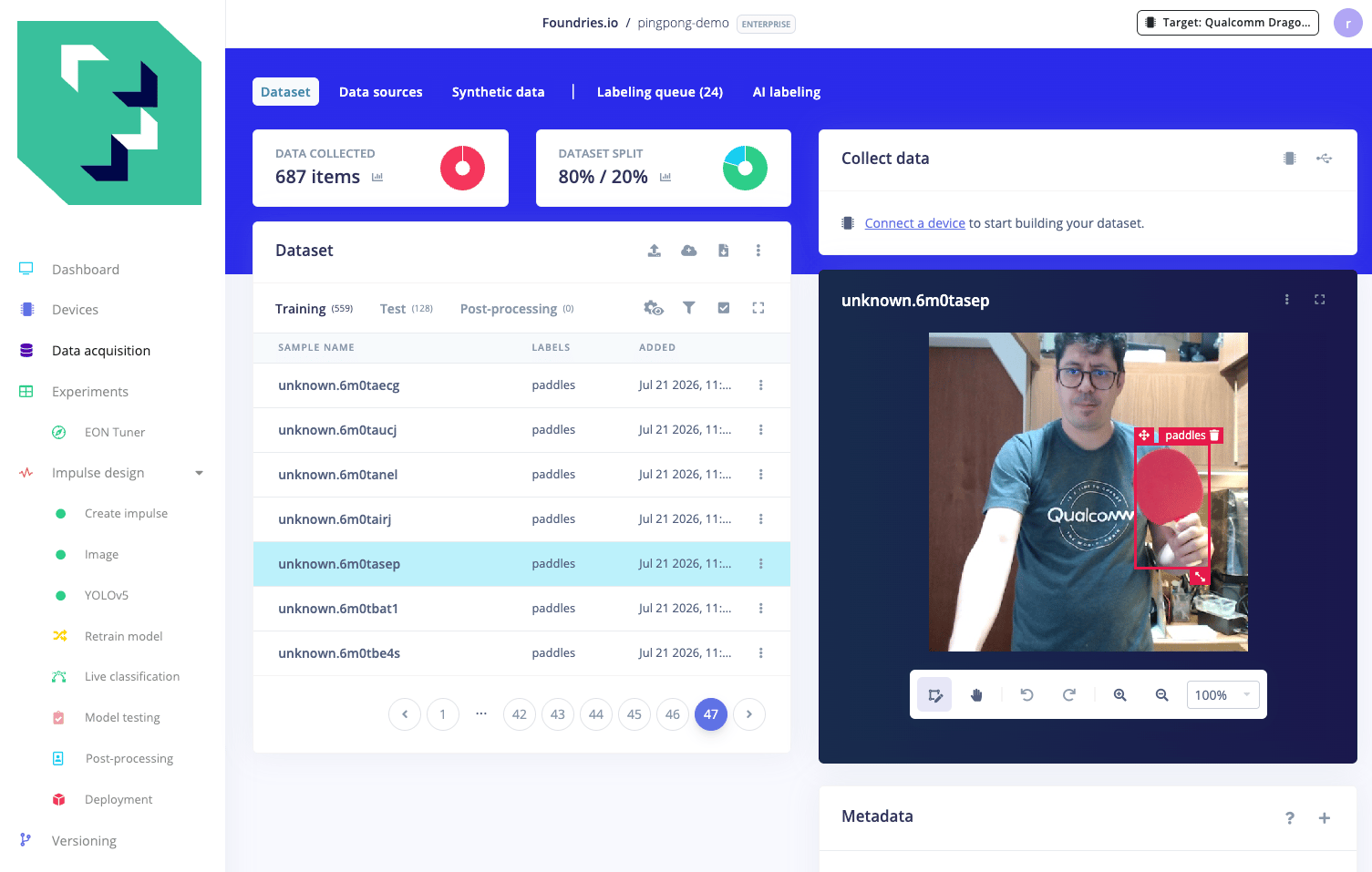
 From there, the full pipeline is a handful of browser steps: design an impulse (Image input at 320x320, YOLOv5 object detection block), generate features, train on a GPU worker for about 15 minutes, download the deployment binary for the IQ-8275 EVK.
The result: **mAP\@0.5 = 0.980** (mean Average Precision, how accurately and completely the model finds the paddle, where 1.0 is perfect), and after one `scp`:
```bash theme={null}
scp pingpong-demo.eim root@
From there, the full pipeline is a handful of browser steps: design an impulse (Image input at 320x320, YOLOv5 object detection block), generate features, train on a GPU worker for about 15 minutes, download the deployment binary for the IQ-8275 EVK.
The result: **mAP\@0.5 = 0.980** (mean Average Precision, how accurately and completely the model finds the paddle, where 1.0 is perfect), and after one `scp`:
```bash theme={null}
scp pingpong-demo.eim root@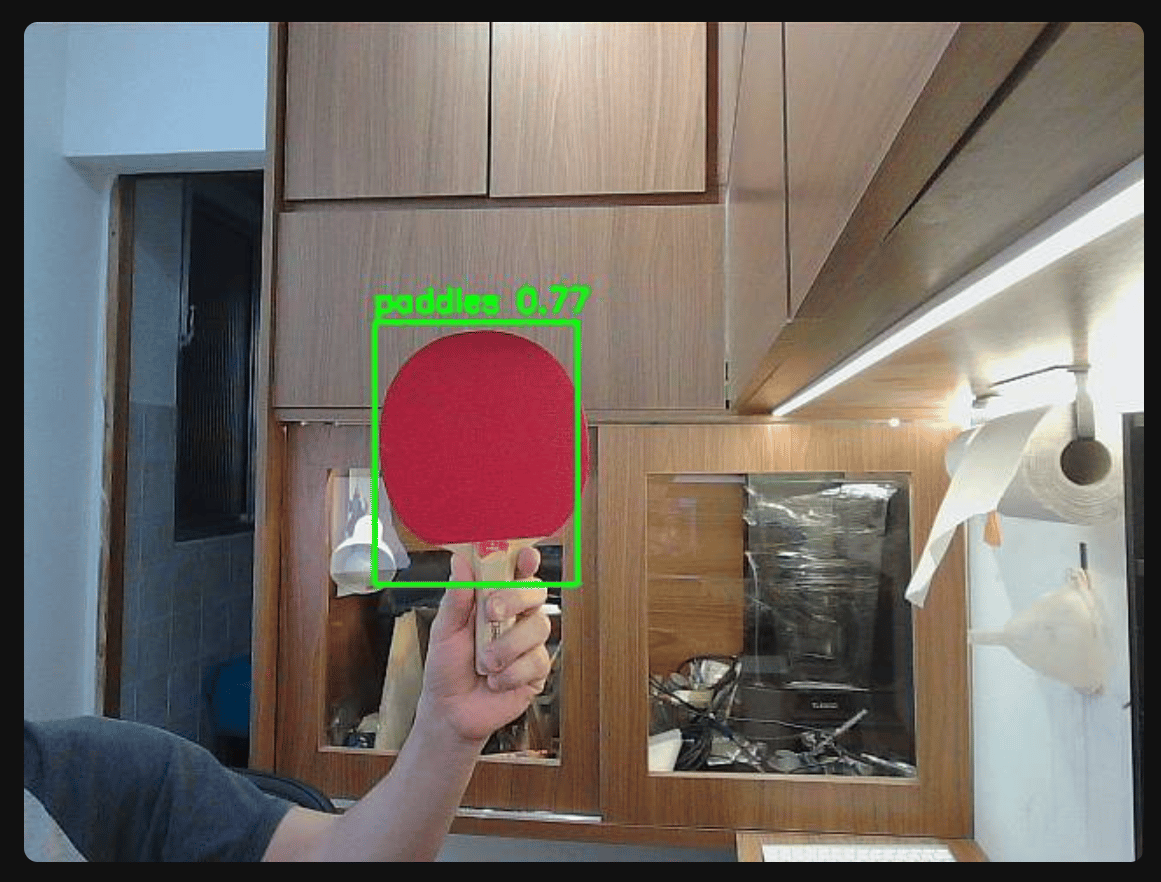 ***
## The part I want to understand: what's actually going on in there?
The `.eim` file Edge Impulse gave me contains a quantized neural network, a custom Linux runtime, and a QNN (Qualcomm Neural Network) delegate that places the graph on the HTP NPU automatically. In four browser clicks I got the same result that the manual pipeline below takes days to reach.
But why does quantization matter? What is a QNN delegate? Why did plain INT8 (8-bit Integer) silently break my model's confidence scores? What is a "context binary" and why does the AOT-compiled version have zero warm-up while the `.eim` costs 3 ms on the first call?
Those questions are why the rest of this story exists.
***
## Part 1: The dataset, the only thing that actually matters first
A model is only as good as what it learned from. The dataset here is roughly 670 photos of ping-pong paddles: different rooms, lighting levels, distances, and backgrounds. Each photo has a bounding box drawn around the paddle, or is a background frame with no paddle at all. Background frames matter. They teach the model what "nothing here" looks like, which is half the job for a detector.
All labeling was done in Edge Impulse Studio's data acquisition interface, box by box in the browser. Whether you take the platform path or the manual one, this is where you start.
The one lesson I keep relearning: **variety in the dataset beats a bigger model almost every time.** Part 2 shows exactly why.
***
## Part 2: Building a brain from scratch (and why it half-failed)
The first attempt was a custom CNN (Convolutional Neural Network) built from scratch: a small network with one image input, trained only on those \~670 photos. No pre-training, no borrowed knowledge.
It worked on photos that looked like the training set: person standing back, good light, full paddle visible. Then I pointed a live webcam at a close-up face in a dim room and it returned nothing. Not a low-confidence detection. Nothing.
I tested it like a doctor:
* Changed the paddle size, small to large: no difference. Not a scale problem.
* Cropped my face out of the frame: suddenly detected. **The face was the problem.**
* Brightened the dim image: confidence jumped. **Darkness hurt too.**
The model had memorized the training album. That album only had well-lit photos of people standing back from the camera. A close-up face in a dim room was a scene it had never seen. It hadn't learned "paddle". It had learned "this exact kind of photo with a paddle in it."
Score: roughly **IoU 0.56** (Intersection over Union, how much the predicted box overlaps the true one, 0 = miss, 1 = perfect). Not good enough to ship.
***
## Part 3: Fine-tuning a pre-trained model (the fix that actually works)
The fix: don't start from zero. **YOLOv8n** (You Only Look Once, nano variant) is a pre-trained detector that has already seen millions of everyday photos, every lighting, every distance, every scene. It understands what edges, shapes, faces, and objects held in hands look like. It just doesn't know the specific word "paddle." Teaching it that last step, called fine-tuning, takes the same \~670 photos and a short training run.
The same training images. The same Mac. The same amount of my time.
Result: **mAP\@0.5 = 0.979**. And it found the paddle in the close-up-face-in-a-dark-room shot that had completely stumped the from-scratch model.
The from-scratch model scored 0.56. Fine-tuned YOLO scored 0.979. The only thing that changed was starting from a model that had already seen the world.
***
## Part 4: Watching it live
Numbers in a table are abstract. A live browser tab with a green box tracking the paddle as you wave it around is proof. A small Python web server opens the camera, runs each frame through the model, paints the bounding box, and serves the result as an MJPEG stream. You pick your camera, hit start, wave the paddle.
The useful design choice: the server doesn't care which model is running. Whether it's the from-scratch CNN, YOLOv8n on CPU, or eventually the NPU on the edge board, swapping the inference engine is one argument. That decoupling made every step afterward much easier.
***
## Part 5: Moving to the Qualcomm board
Training stays on the Mac (PyTorch with Apple's MPS GPU backend). Inference moves to the **IQ-8275 EVK**. The bridge between the two is **ONNX (Open Neural Network Exchange)**, a portable model format the board can run without the full PyTorch stack installed. Copy the `.onnx` file to the board, run it with `onnxruntime`. The board's CPU delivered roughly 24 fps. Smooth, but the NPU is sitting right there doing nothing.
***
***
## The part I want to understand: what's actually going on in there?
The `.eim` file Edge Impulse gave me contains a quantized neural network, a custom Linux runtime, and a QNN (Qualcomm Neural Network) delegate that places the graph on the HTP NPU automatically. In four browser clicks I got the same result that the manual pipeline below takes days to reach.
But why does quantization matter? What is a QNN delegate? Why did plain INT8 (8-bit Integer) silently break my model's confidence scores? What is a "context binary" and why does the AOT-compiled version have zero warm-up while the `.eim` costs 3 ms on the first call?
Those questions are why the rest of this story exists.
***
## Part 1: The dataset, the only thing that actually matters first
A model is only as good as what it learned from. The dataset here is roughly 670 photos of ping-pong paddles: different rooms, lighting levels, distances, and backgrounds. Each photo has a bounding box drawn around the paddle, or is a background frame with no paddle at all. Background frames matter. They teach the model what "nothing here" looks like, which is half the job for a detector.
All labeling was done in Edge Impulse Studio's data acquisition interface, box by box in the browser. Whether you take the platform path or the manual one, this is where you start.
The one lesson I keep relearning: **variety in the dataset beats a bigger model almost every time.** Part 2 shows exactly why.
***
## Part 2: Building a brain from scratch (and why it half-failed)
The first attempt was a custom CNN (Convolutional Neural Network) built from scratch: a small network with one image input, trained only on those \~670 photos. No pre-training, no borrowed knowledge.
It worked on photos that looked like the training set: person standing back, good light, full paddle visible. Then I pointed a live webcam at a close-up face in a dim room and it returned nothing. Not a low-confidence detection. Nothing.
I tested it like a doctor:
* Changed the paddle size, small to large: no difference. Not a scale problem.
* Cropped my face out of the frame: suddenly detected. **The face was the problem.**
* Brightened the dim image: confidence jumped. **Darkness hurt too.**
The model had memorized the training album. That album only had well-lit photos of people standing back from the camera. A close-up face in a dim room was a scene it had never seen. It hadn't learned "paddle". It had learned "this exact kind of photo with a paddle in it."
Score: roughly **IoU 0.56** (Intersection over Union, how much the predicted box overlaps the true one, 0 = miss, 1 = perfect). Not good enough to ship.
***
## Part 3: Fine-tuning a pre-trained model (the fix that actually works)
The fix: don't start from zero. **YOLOv8n** (You Only Look Once, nano variant) is a pre-trained detector that has already seen millions of everyday photos, every lighting, every distance, every scene. It understands what edges, shapes, faces, and objects held in hands look like. It just doesn't know the specific word "paddle." Teaching it that last step, called fine-tuning, takes the same \~670 photos and a short training run.
The same training images. The same Mac. The same amount of my time.
Result: **mAP\@0.5 = 0.979**. And it found the paddle in the close-up-face-in-a-dark-room shot that had completely stumped the from-scratch model.
The from-scratch model scored 0.56. Fine-tuned YOLO scored 0.979. The only thing that changed was starting from a model that had already seen the world.
***
## Part 4: Watching it live
Numbers in a table are abstract. A live browser tab with a green box tracking the paddle as you wave it around is proof. A small Python web server opens the camera, runs each frame through the model, paints the bounding box, and serves the result as an MJPEG stream. You pick your camera, hit start, wave the paddle.
The useful design choice: the server doesn't care which model is running. Whether it's the from-scratch CNN, YOLOv8n on CPU, or eventually the NPU on the edge board, swapping the inference engine is one argument. That decoupling made every step afterward much easier.
***
## Part 5: Moving to the Qualcomm board
Training stays on the Mac (PyTorch with Apple's MPS GPU backend). Inference moves to the **IQ-8275 EVK**. The bridge between the two is **ONNX (Open Neural Network Exchange)**, a portable model format the board can run without the full PyTorch stack installed. Copy the `.onnx` file to the board, run it with `onnxruntime`. The board's CPU delivered roughly 24 fps. Smooth, but the NPU is sitting right there doing nothing.
***
Part 6: The NPU, the quantization trap, and the benchmark that looked wrong
Getting a model onto Qualcomm's HTP NPU requires the **QAIRT (Qualcomm AI Runtime SDK)** toolchain: a converter, a quantizer, and a context binary generator. The chip achieves its speed by using compact integer arithmetic instead of floating-point. That rounding process is called quantization. ### The INT8 trap First attempt: quantize everything to 8-bit integers (INT8). The model loaded on the NPU. It detected the paddle. But the confidence score, the number between 0 and 1 that says "I'm 87% sure this is a paddle", **collapsed to zero on every detection.** The cause is a scale collision: bounding-box coordinates are large numbers (like 400, 580 pixels). Confidence scores are tiny numbers (0.87). Forcing both through the same 8-bit scale, calibrated to handle the large box coordinates, crushes the delicate confidence values into nothing. The fix: **A16W8 (16-bit Activations, 8-bit Weights)**. Keep the weights at compact 8-bit, but let the in-flight numbers (activations) use 16-bit precision. That extra range protects the confidence score. After this change, the NPU reported a healthy 87% detection immediately. ```bash theme={null} qairt-quantizer \ --input_dlc best_fp.dlc \ --input_list calib/input_list.txt \ --act_bitwidth 16 \ --weights_bitwidth 8 \ --output_dlc best_a16w8.dlc ``` ### The benchmark surprise Raw NPU math: **1.74 ms per inference** vs **145 ms on CPU**, 84x faster. The live stream should fly. It didn't, at first. The end-to-end measurement showed the NPU version at \~57 ms per frame vs \~42 ms on CPU. The chip with 84x faster math was losing the real race. I went looking. The math was never the slow part. The chip did its 1.74 ms and then sat waiting. The waiting had a cause: **format conversion**. The NPU wants its input as compact 16-bit integers. The camera delivers 32-bit floats. Converting 307,200 numbers per frame was happening one number at a time on the CPU, using the toolkit's default path. That was the missing 30 ms. Fix: convert the whole frame at once with a vectorized call (under 0.5 ms), hand the chip exactly the bytes it wants. After that fix: **NPU: 25 ms/frame vs CPU: 42 ms/frame, a genuine 1.7x end-to-end win.** Same detection, same green box, same confidence. The fast engine finally had a road to match its speed. The lesson I keep coming back to: the NPU was 84x faster at math from the start. The win only appeared after fixing a format-conversion step that was feeding it one number at a time. The bottleneck was never the chip. *** ## Part 7: The resident daemon The way the one-shot benchmark runs, loading the context binary fresh per call, includes \~150 ms of process-startup overhead. For live video you want the model **resident**: loaded once, processing frames forever. The solution is a C++ daemon that holds the QNN context in memory, reads raw frames from a named FIFO pipe, runs inference, and writes results back, while a second thread encodes and streams MJPEG over HTTP. The browser tab stays live. The NPU never unloads between frames. This is the architecture the 25 ms/frame number above comes from. Frame arrives via FIFO, format converts in \~0.2 ms, NPU runs in \~1.74 ms, bounding box decodes, HTTP encoder picks it up. About 40 fps end-to-end.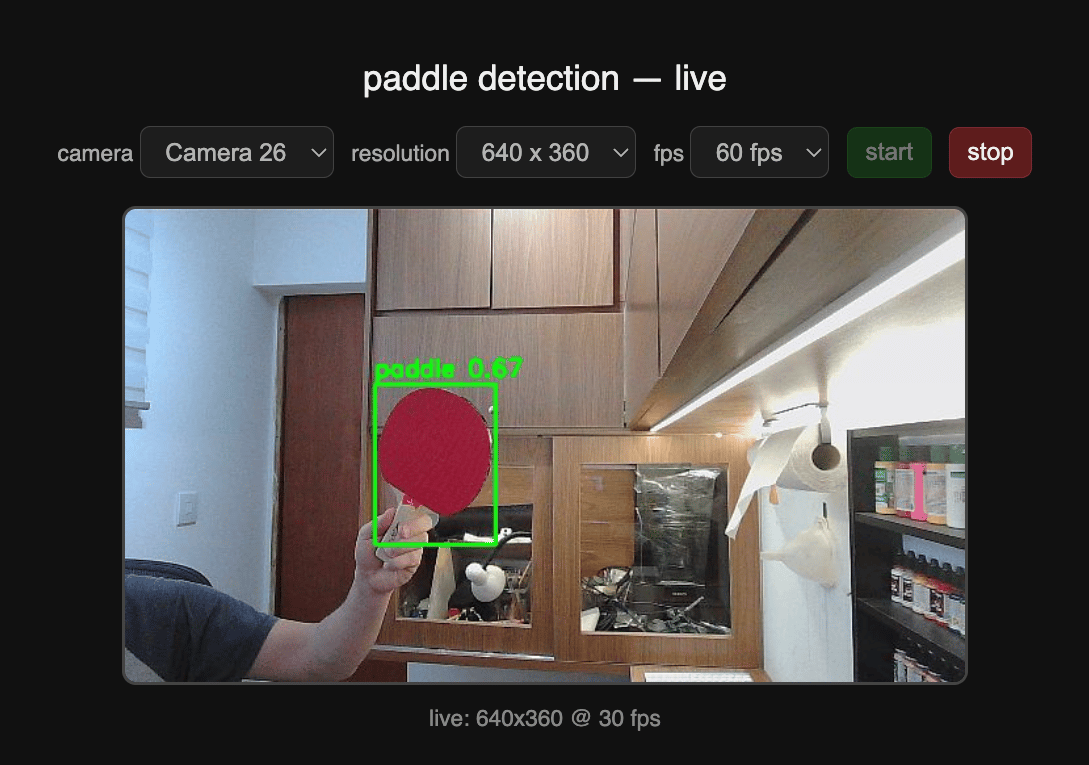 The daemon source and build scripts are in `npu/` — covered in full in [Part 3: Paddle detection step by step with Qualcomm tools](/tutorials/paddle-npu-reproduce). See also the [companion files page](/tutorials/paddle-npu-story-files) for env.sh and the conversion scripts inline.
***
## Part 8: The comparison
| | Manual pipeline | Edge Impulse |
| ------------------- | ------------------------------ | ---------------------------- |
| Model | YOLOv8n, 3.2M params | YOLOv5 Small, 7.2M params |
| Quantization | A16W8 (manual recipe) | INT8 via QNN TFLite delegate |
| mAP\@0.5 | **0.979** | **0.980** |
| NPU inference | **\~2 ms** (daemon, resident) | **2 ms** (JIT delegate) |
| Warm-up cost | None (AOT, context pre-loaded) | 3 ms (JIT on first call) |
| Path to this result | Parts 1–7 above | Part 0 |
The platform matched every metric that matters. 2 ms either way, mAP within 0.001.
The gap is in the journey. The manual pipeline required a QAIRT toolchain, a quantization recipe, an A16W8 debugging session, a C++ daemon, and about a week. Edge Impulse required a browser and an afternoon.
Why does the manual path matter? Because taking it taught things the platform hides: why INT8 silently breaks a detector's confidence score, why a chip that's 84x faster at math can lose an end-to-end race, and what "JIT compile on first call" means in practice versus a pre-compiled context binary. That knowledge makes you a better engineer on the next project, even if you use the platform for this one.
***
## A note on how this was built
This project was not built in isolation. An **AI coding agent (Claude Code)** was the co-pilot throughout: writing scripts, running benchmarks on the board over SSH, explaining toolchain errors, and hunting down the correct UNIX socket message key for the Edge Impulse `.eim` protocol when no documentation existed. That last one, finding `classify_shm` by searching strings inside the binary, is the kind of thing an agent handles well and a person would spend an hour on.
If you're reproducing this, use an AI agent. The QAIRT toolchain has sharp edges and error messages that need domain context to decode. It doesn't make hard things trivial. It makes them tractable in an afternoon instead of a week.
***
## The four things I'd tell myself at the start
1. **Your data is your ceiling.** A few hundred similar photos produce a memorizer, not a generalizer. More variety beats a bigger model almost every time.
2. **Start from a pre-trained model.** Fine-tuning YOLOv8n took mAP from 0.56 to 0.979 with the same dataset and roughly the same effort. There is no good reason to train from scratch unless you've exhausted all the pre-trained options.
3. **Measure the whole pipeline honestly.** The NPU was 84x faster at math and still lost the end-to-end race, until I fixed the format conversion that was feeding it one number at a time. A benchmark that only measures the chip is not a benchmark.
4. **The bottleneck is never where you first guess.** Not the chip, not the disk, not the network. One-at-a-time format conversion on the CPU. Fix the road, and the fast engine wins.
***
## Go further
* **Copy-paste path to 2 ms on the NPU via Edge Impulse:**
[Paddle detection with Edge Impulse](/tutorials/edge-impulse-quickstart)
* **Every command, every script, end to end:**
[Paddle detection step by step with Qualcomm tools](/tutorials/paddle-npu-reproduce)
* **Python and shell source files inline; daemon C++ diffs against SDK SampleApp:**
[Companion files](/tutorials/paddle-npu-story-files)
The daemon source and build scripts are in `npu/` — covered in full in [Part 3: Paddle detection step by step with Qualcomm tools](/tutorials/paddle-npu-reproduce). See also the [companion files page](/tutorials/paddle-npu-story-files) for env.sh and the conversion scripts inline.
***
## Part 8: The comparison
| | Manual pipeline | Edge Impulse |
| ------------------- | ------------------------------ | ---------------------------- |
| Model | YOLOv8n, 3.2M params | YOLOv5 Small, 7.2M params |
| Quantization | A16W8 (manual recipe) | INT8 via QNN TFLite delegate |
| mAP\@0.5 | **0.979** | **0.980** |
| NPU inference | **\~2 ms** (daemon, resident) | **2 ms** (JIT delegate) |
| Warm-up cost | None (AOT, context pre-loaded) | 3 ms (JIT on first call) |
| Path to this result | Parts 1–7 above | Part 0 |
The platform matched every metric that matters. 2 ms either way, mAP within 0.001.
The gap is in the journey. The manual pipeline required a QAIRT toolchain, a quantization recipe, an A16W8 debugging session, a C++ daemon, and about a week. Edge Impulse required a browser and an afternoon.
Why does the manual path matter? Because taking it taught things the platform hides: why INT8 silently breaks a detector's confidence score, why a chip that's 84x faster at math can lose an end-to-end race, and what "JIT compile on first call" means in practice versus a pre-compiled context binary. That knowledge makes you a better engineer on the next project, even if you use the platform for this one.
***
## A note on how this was built
This project was not built in isolation. An **AI coding agent (Claude Code)** was the co-pilot throughout: writing scripts, running benchmarks on the board over SSH, explaining toolchain errors, and hunting down the correct UNIX socket message key for the Edge Impulse `.eim` protocol when no documentation existed. That last one, finding `classify_shm` by searching strings inside the binary, is the kind of thing an agent handles well and a person would spend an hour on.
If you're reproducing this, use an AI agent. The QAIRT toolchain has sharp edges and error messages that need domain context to decode. It doesn't make hard things trivial. It makes them tractable in an afternoon instead of a week.
***
## The four things I'd tell myself at the start
1. **Your data is your ceiling.** A few hundred similar photos produce a memorizer, not a generalizer. More variety beats a bigger model almost every time.
2. **Start from a pre-trained model.** Fine-tuning YOLOv8n took mAP from 0.56 to 0.979 with the same dataset and roughly the same effort. There is no good reason to train from scratch unless you've exhausted all the pre-trained options.
3. **Measure the whole pipeline honestly.** The NPU was 84x faster at math and still lost the end-to-end race, until I fixed the format conversion that was feeding it one number at a time. A benchmark that only measures the chip is not a benchmark.
4. **The bottleneck is never where you first guess.** Not the chip, not the disk, not the network. One-at-a-time format conversion on the CPU. Fix the road, and the fast engine wins.
***
## Go further
* **Copy-paste path to 2 ms on the NPU via Edge Impulse:**
[Paddle detection with Edge Impulse](/tutorials/edge-impulse-quickstart)
* **Every command, every script, end to end:**
[Paddle detection step by step with Qualcomm tools](/tutorials/paddle-npu-reproduce)
* **Python and shell source files inline; daemon C++ diffs against SDK SampleApp:**
[Companion files](/tutorials/paddle-npu-story-files)