> ## Documentation Index
> Fetch the complete documentation index at: https://dragonwingdocs.qualcomm.com/llms.txt
> Use this file to discover all available pages before exploring further.
# 开发生成式 AI(GenAI)应用程序:GenAI Studio
> 在 Qualcomm Dragonwing IoT 平台上设置并运行 GenAI Studio,用于文本生成、文本转语音、图像生成、图像转文本(VLM)和语音转文本应用程序。
GenAI Studio 是一套容器化解决方案,通过简化在 Qualcomm Linux 系统上创建和部署生成式 AI 应用程序,实现快速原型开发和定制。GenAI Studio 为以下核心服务提供与 OpenAI 兼容的 API:
文本生成、文本转语音、图像生成、图像转文本(VLM)和语音转文本。
所有服务均可通过 Web 界面和与 OpenAI 兼容的 API 端点访问。
* GenAI Studio 不包含模型文件或容器镜像。
* 您必须自行生成模型并构建容器镜像。
* 请确保您的主机满足[要求](https://github.com/qualcomm/ai-hub-apps/tree/main/tutorials/llm_on_genie)。
* 使用主机生成模型。
* 使用目标设备构建 docker 容器。
| 用例 | 说明 | 支持的平台 | 模型 |
| ----------------- | ------------------------------------------ | ------------------ | --------------------------- |
| 文本到文本 | 使用 LLM 针对输入提示词生成类人回复。可用于自动创建文章、摘要、报告或创意内容。 | IQ9 Qualcomm Linux | LLaMA 3.2-3B
Qwen 3-4B |
| 文本转语音 | 将文本转换为清晰、自然的音频。非常适合语音助手、有声书和无障碍解决方案。 | IQ9 Qualcomm Linux | Melo-TTS |
| 文本转图像 | 根据文本描述生成图像。非常适合在无需手动设计的情况下创建图形、插图或视觉内容。 | 不支持 | Stable Diffusion 2.1 |
| 语音转文本 | 将语音转换为书面文本。适用于转录、语音命令和免手操作应用。 | 不支持 | Whisper Tiny |
| 图像转文本 | 使用自然语言描述图像,用于视觉理解和内容审核。 | IQ9 Qualcomm Linux | Qwen 2.5-VL-7B |
| 编排器(Orchestrator) | 提供易于使用的 Web 界面,将所有这些功能集中在一处,方便开发者和用户使用。 | IQ9 Qualcomm Linux | 上述所有模型 |
## 高层架构
下图显示了 GenAI Studio 的高层架构。每个功能模块作为独立容器运行,提供隔离性、可扩展性和可延展性。这使得新的模态可以作为额外容器添加,而不会干扰现有服务。
每个端点都有特定端口。请参阅[端点端口号](#tbl-endpoint-ports)中的端口号。
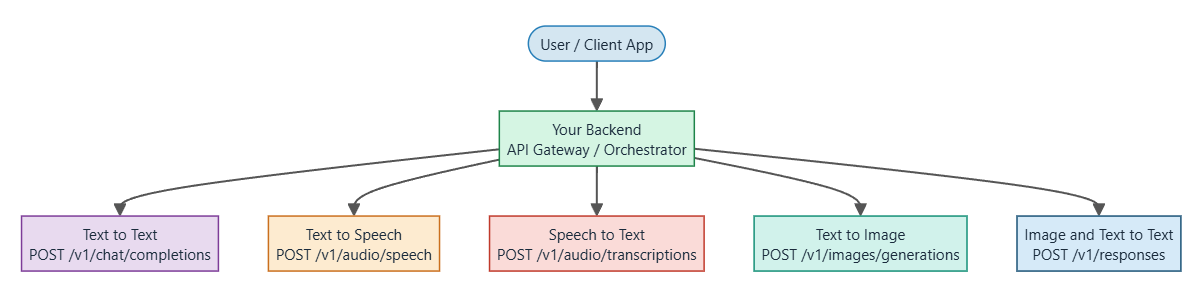 下表列出了每个端点及其对应的端口号。
**端点端口号**
| 服务 | 端口 | OpenAI 兼容端点 |
| ----- | ---- | ------------------------------- |
| 文本转语音 | 8083 | `POST /v1/audio/speech` |
| 文本转图像 | 8084 | `POST /v1/images/generations` |
| 图像转文本 | 8080 | `POST /v1/responses` |
| 文本到文本 | 8088 | `POST /v1/chat/completions` |
| 语音转文本 | 8081 | `POST /v1/audio/transcriptions` |
| 编排器 | 8090 | 统一网关 |
### 用户交互
用户可通过托管在主机上的网页访问 GenAI Studio,或通过具有 OpenAI 兼容端点的第三方应用程序进行 API 调用。
### 请求路由到目标设备
网页或 API 调用与运行在目标设备(例如 Qualcomm Dragonwing™ IQ9)上的编排器服务通信,并将 UI 上的每个用户操作转换为对后端服务的相应 REST API 调用。
### 编排层
编排器容器充当中央枢纽。它接收请求、管理会话历史、处理多轮对话连续性(KV-cache),并聚合各模态容器的响应,为用户呈现统一的体验。
容器化架构与可扩展性:
每个功能模块(编排器、文本到文本、文本转语音、文本转图像、图像转文本、语音转文本)作为独立容器运行。
这带来以下优势:
* 服务之间相互隔离。
* 可扩展性,每个服务可根据用例独立扩展。
* 可延展性,您可以将新的模态或模型作为额外容器添加。
有关更多详细信息,请参阅各用例的相应文档。
### 文本到文本
此应用程序使用 Genie API 运行文本到文本大语言模型(LLM)。
它提供一个持久(常驻)LLM 服务器,支持以下功能:
* 根据用户提示词生成 LLM 回复(文本到文本)。
* 复用预加载模型,避免每次请求都重新加载。
* 用于模型/会话重置和模型重新加载的控制端点。
* 直接从 UI 更新系统提示词。
* 对话历史,允许 UI 获取之前的消息。
下表列出了每个端点及其对应的端口号。
**端点端口号**
| 服务 | 端口 | OpenAI 兼容端点 |
| ----- | ---- | ------------------------------- |
| 文本转语音 | 8083 | `POST /v1/audio/speech` |
| 文本转图像 | 8084 | `POST /v1/images/generations` |
| 图像转文本 | 8080 | `POST /v1/responses` |
| 文本到文本 | 8088 | `POST /v1/chat/completions` |
| 语音转文本 | 8081 | `POST /v1/audio/transcriptions` |
| 编排器 | 8090 | 统一网关 |
### 用户交互
用户可通过托管在主机上的网页访问 GenAI Studio,或通过具有 OpenAI 兼容端点的第三方应用程序进行 API 调用。
### 请求路由到目标设备
网页或 API 调用与运行在目标设备(例如 Qualcomm Dragonwing™ IQ9)上的编排器服务通信,并将 UI 上的每个用户操作转换为对后端服务的相应 REST API 调用。
### 编排层
编排器容器充当中央枢纽。它接收请求、管理会话历史、处理多轮对话连续性(KV-cache),并聚合各模态容器的响应,为用户呈现统一的体验。
容器化架构与可扩展性:
每个功能模块(编排器、文本到文本、文本转语音、文本转图像、图像转文本、语音转文本)作为独立容器运行。
这带来以下优势:
* 服务之间相互隔离。
* 可扩展性,每个服务可根据用例独立扩展。
* 可延展性,您可以将新的模态或模型作为额外容器添加。
有关更多详细信息,请参阅各用例的相应文档。
### 文本到文本
此应用程序使用 Genie API 运行文本到文本大语言模型(LLM)。
它提供一个持久(常驻)LLM 服务器,支持以下功能:
* 根据用户提示词生成 LLM 回复(文本到文本)。
* 复用预加载模型,避免每次请求都重新加载。
* 用于模型/会话重置和模型重新加载的控制端点。
* 直接从 UI 更新系统提示词。
* 对话历史,允许 UI 获取之前的消息。
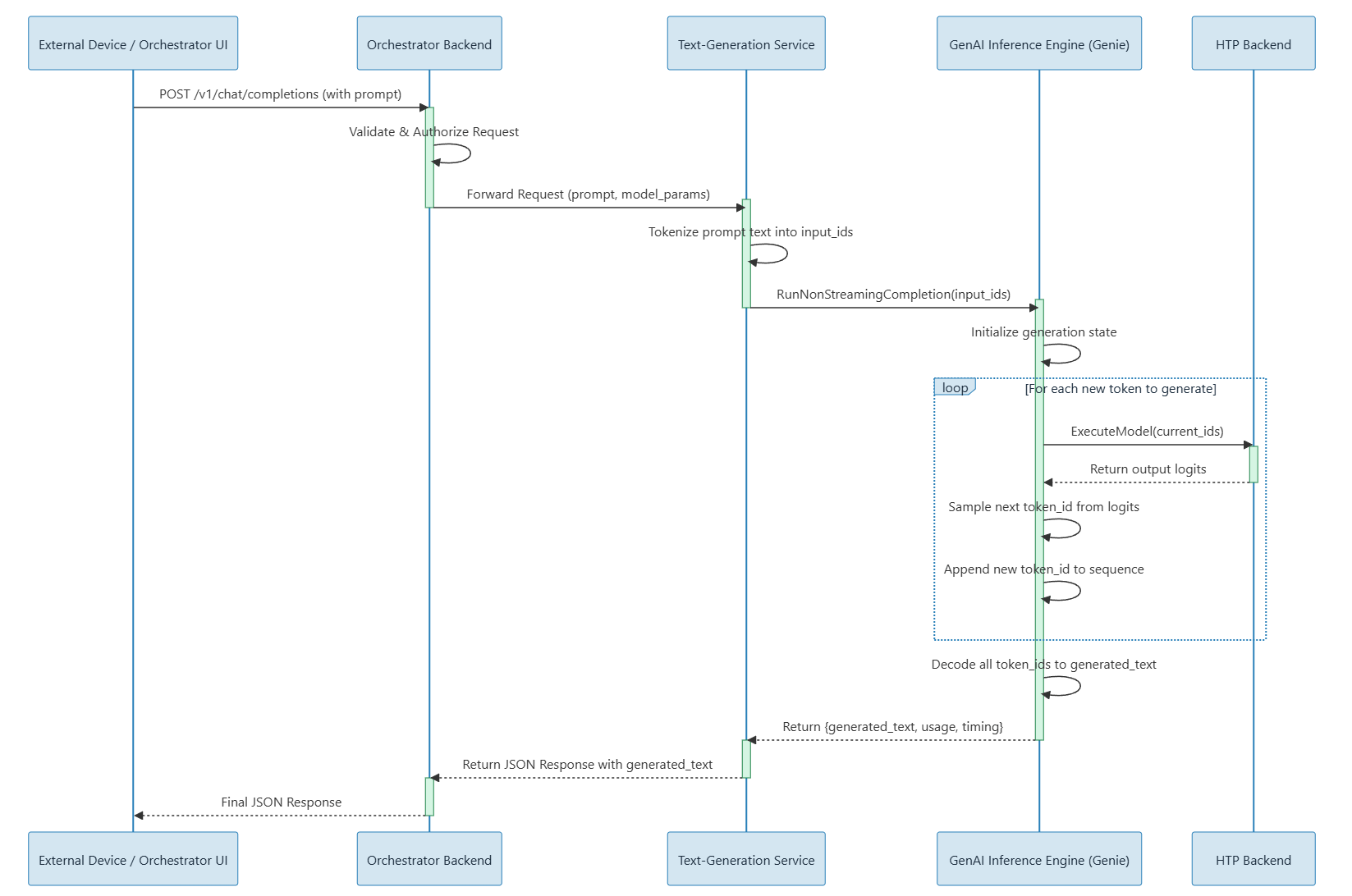 有关更多信息,请参阅[文本到文本 README](https://github.com/qualcomm/sample-apps-for-qualcomm-linux/blob/main/GenAI-Solutions/GenAI-Studio/core-services/text-to-text/README.md)
和[代码流程文件](https://github.com/qualcomm/sample-apps-for-qualcomm-linux/blob/main/GenAI-Solutions/GenAI-Studio/core-services/text-to-text/CODE_FLOW.md)。
### 文本转图像
已知问题:GA 版本不支持文本转图像。
下图显示了文本转图像容器中的调用流程序列示例。
有关更多信息,请参阅[文本到文本 README](https://github.com/qualcomm/sample-apps-for-qualcomm-linux/blob/main/GenAI-Solutions/GenAI-Studio/core-services/text-to-text/README.md)
和[代码流程文件](https://github.com/qualcomm/sample-apps-for-qualcomm-linux/blob/main/GenAI-Solutions/GenAI-Studio/core-services/text-to-text/CODE_FLOW.md)。
### 文本转图像
已知问题:GA 版本不支持文本转图像。
下图显示了文本转图像容器中的调用流程序列示例。
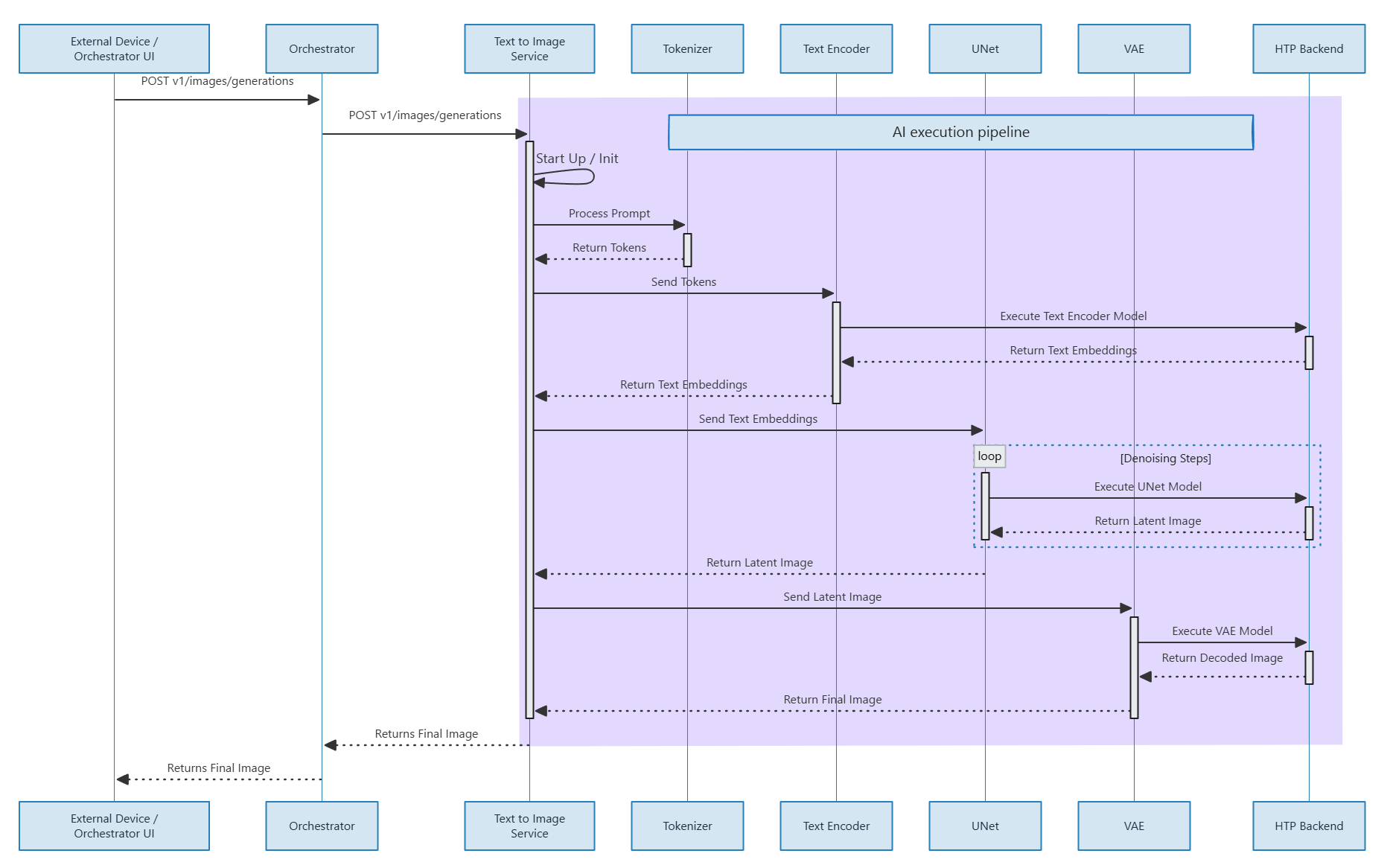 有关更多信息,请参阅[文本转图像 README](https://github.com/qualcomm/sample-apps-for-qualcomm-linux/blob/main/GenAI-Solutions/GenAI-Studio/core-services/text-to-image/README.md)
和[代码流程文件](https://github.com/qualcomm/sample-apps-for-qualcomm-linux/blob/main/GenAI-Solutions/GenAI-Studio/core-services/text-to-image/CODE_FLOW.md)。
### 图像转文本
图像转文本容器使用视觉语言模型(VLM)以自然语言描述图像,支持视觉理解和内容审核用例。
有关更多信息,请参阅[图像转文本 README](https://github.com/qualcomm/sample-apps-for-qualcomm-linux/blob/main/GenAI-Solutions/GenAI-Studio/core-services/image-to-text/README.md)
和[代码流程文件](https://github.com/qualcomm/sample-apps-for-qualcomm-linux/blob/main/GenAI-Solutions/GenAI-Studio/core-services/image-to-text/CODE_FLOW.md)。
### 文本转语音
下图显示了文本转语音容器中的调用流程序列示例。
有关更多信息,请参阅[文本转图像 README](https://github.com/qualcomm/sample-apps-for-qualcomm-linux/blob/main/GenAI-Solutions/GenAI-Studio/core-services/text-to-image/README.md)
和[代码流程文件](https://github.com/qualcomm/sample-apps-for-qualcomm-linux/blob/main/GenAI-Solutions/GenAI-Studio/core-services/text-to-image/CODE_FLOW.md)。
### 图像转文本
图像转文本容器使用视觉语言模型(VLM)以自然语言描述图像,支持视觉理解和内容审核用例。
有关更多信息,请参阅[图像转文本 README](https://github.com/qualcomm/sample-apps-for-qualcomm-linux/blob/main/GenAI-Solutions/GenAI-Studio/core-services/image-to-text/README.md)
和[代码流程文件](https://github.com/qualcomm/sample-apps-for-qualcomm-linux/blob/main/GenAI-Solutions/GenAI-Studio/core-services/image-to-text/CODE_FLOW.md)。
### 文本转语音
下图显示了文本转语音容器中的调用流程序列示例。
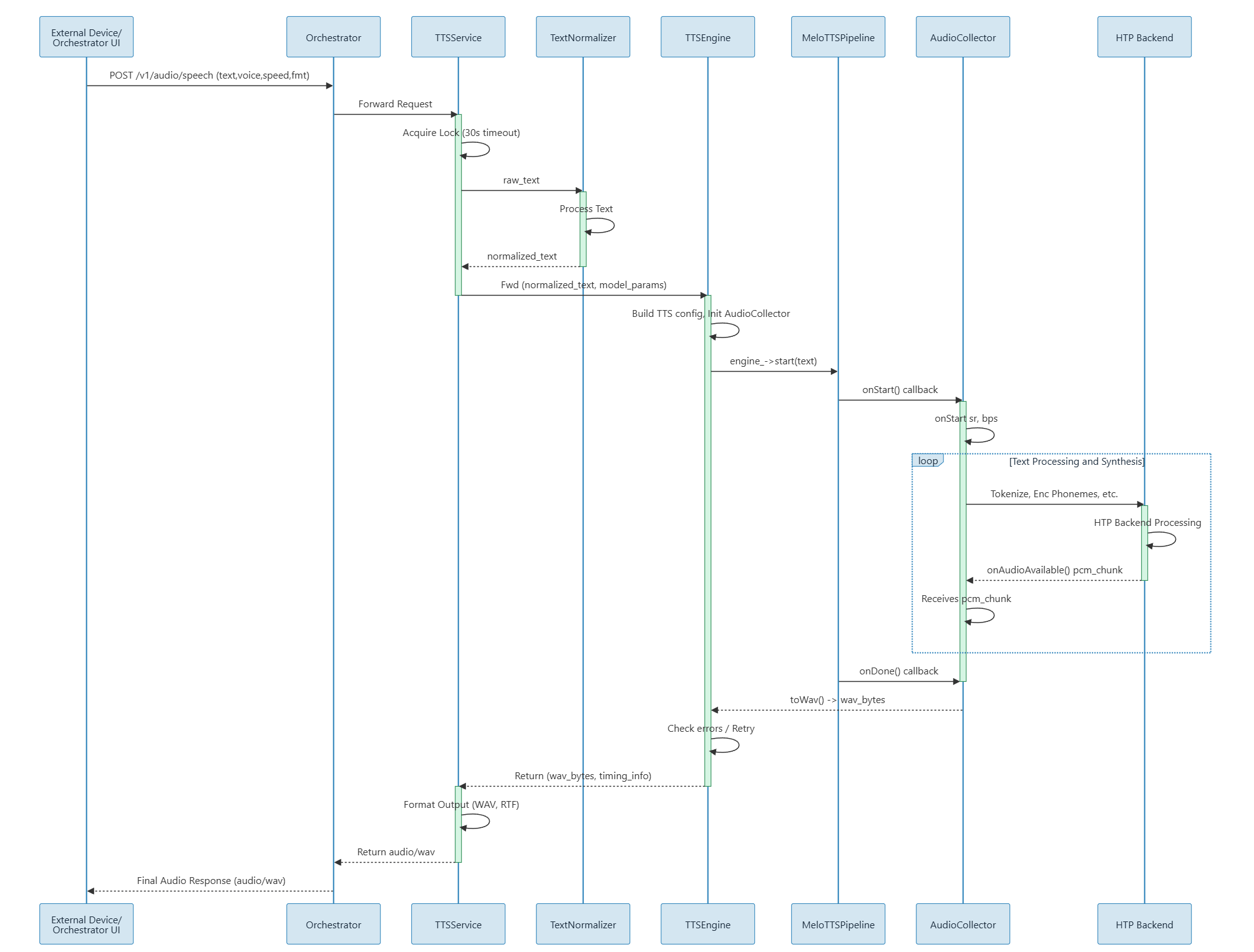 有关更多信息,请参阅[文本转语音 README](https://github.com/qualcomm/sample-apps-for-qualcomm-linux/blob/main/GenAI-Solutions/GenAI-Studio/core-services/text-to-speech/meloTTS/README.md)。
### 语音转文本
已知问题:GA 版本不支持语音转文本。
下图显示了语音转文本容器中的调用流程序列示例。
有关更多信息,请参阅[文本转语音 README](https://github.com/qualcomm/sample-apps-for-qualcomm-linux/blob/main/GenAI-Solutions/GenAI-Studio/core-services/text-to-speech/meloTTS/README.md)。
### 语音转文本
已知问题:GA 版本不支持语音转文本。
下图显示了语音转文本容器中的调用流程序列示例。
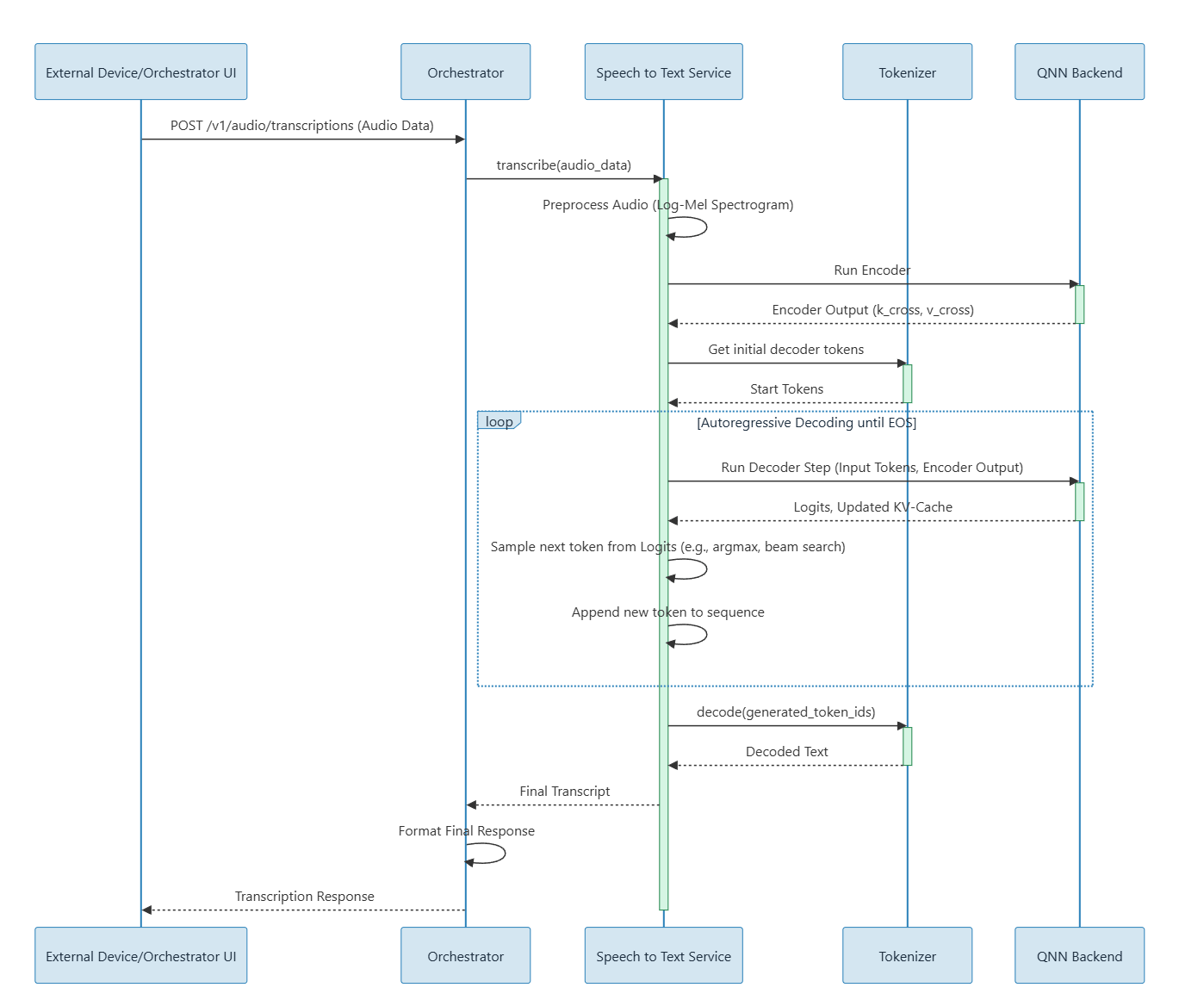 有关更多信息,请参阅[语音转文本 README](https://github.com/qualcomm/sample-apps-for-qualcomm-linux/blob/main/GenAI-Solutions/GenAI-Studio/core-services/speech-to-text/README.md)
和[代码流程文件](https://github.com/qualcomm/sample-apps-for-qualcomm-linux/blob/main/GenAI-Solutions/GenAI-Studio/core-services/speech-to-text/CODE_FLOW.md)。
## 设置 GenAI Studio
GenAI Studio 在 IQ9 上受支持,兼容 Qualcomm Linux 发行版和 Qualcomm IoT 平台上的 Ubuntu。
GenAI Studio 不随附语言模型。您必须[使用 AI Hub 生成模型](../topic/genai-prepare-ai-hub)。
1. 在主机上,从 [CodeLinaro](https://artifacts.codelinaro.org/ui/native/qli-ci/flashable-binaries/qimpsdk/) 下载适用于您 EVK 的预编译 Qualcomm Linux 构建镜像。
2. 从主机[将镜像刷写](https://dragonwingdocs.qualcomm.com/Key-Documents/Flash-Guide/flash-with-qdl)到目标设备。
在 QLI 上,Qualcomm 相关的 DSP 库和 Docker 已预装。
3. 将仓库克隆到目标设备并进入本地目录:
```shell theme={null}
git clone https://github.com/qualcomm/sample-apps-for-qualcomm-linux.git
```
```shell theme={null}
cd sample-apps-for-qualcomm-linux/GenAI-Solutions/GenAI-Studio
```
4. 在主机上准备 SDK(可选)。
仅当您要启动完整技术栈或私有 STT 或 TTS 服务时才需要执行此操作。
```shell theme={null}
qpm-cli --login
```
```shell theme={null}
qpm-cli --install VoiceAI_ASR -v 2.5.0.0 --path /opt/qcom/qpm/VoiceAI_ASR/2.5.0.0 --silent
```
```shell theme={null}
qpm-cli --install VoiceAI_TTS -v 1.1.1.0 --path /opt/qcom/qpm/VoiceAI_TTS/1.1.1.0 --silent
```
```shell theme={null}
TARGET_REPO=/path/to/genai-studio-on-target
```
```shell theme={null}
rsync -av /opt/qcom/qpm/VoiceAI_ASR/2.5.0.0/whisper_sdk/ \
ubuntu@:${TARGET_REPO}/core-services/speech-to-text/whisper_sdk/
```
```shell theme={null}
rsync -av /opt/qcom/qpm/VoiceAI_TTS/1.1.1.0/melo_sdk/ \
ubuntu@:${TARGET_REPO}/core-services/text-to-speech/meloTTS/melo_sdk/
```
5. 在目标设备上的示例应用仓库根目录中,完成预检(preflight)检查:
在运行预检检查之前,请确保设备已正确配置。
有关设备初始配置,请参阅
[设备设置](https://github.com/qualcomm/sample-apps-for-qualcomm-linux/blob/main/GenAI-Solutions/GenAI-Studio/docs/setup/DEVICE_SETUP.md)。
```shell theme={null}
docker --version
```
```shell theme={null}
docker compose version
```
```shell theme={null}
python3 --version
```
```shell theme={null}
ls -l /dev/fastrpc-cdsp
```
```shell theme={null}
ls /etc/cdi/
```
6. 为目标设备准备模型。
有关更多信息,请参阅各服务的模型生成和设置文档。
请在 `/opt/genai-studio-models` 下准备模型文件夹。
| 服务 | 目标路径 | 文档 |
| ----- | -------------------------------------------------------------------------------------------------------- | --------------------------------------------------------------------------------------------------------------------------------------------------------------------------------- |
| 文本到文本 | `/opt/genai-studio-models/text-to-text/...` | [MODEL\_SETUP.md](https://github.com/qualcomm/sample-apps-for-qualcomm-linux/blob/main/GenAI-Solutions/GenAI-Studio/core-services/text-to-text/MODEL_SETUP.md) |
| 图像转文本 | `/opt/genai-studio-models/image-to-text/Lemans_LE_Gen2_QNN2_41_qwen25_vl_7B/files` | [MODEL\_SETUP.md](https://github.com/qualcomm/sample-apps-for-qualcomm-linux/blob/main/GenAI-Solutions/GenAI-Studio/core-services/image-to-text/MODEL_SETUP.md) |
| 文本转图像 | `/opt/genai-studio-models/text-to-image/stable_diffusion_v2_1-qnn_context_binary-w8a16-qualcomm_qcs9075` | [MODEL\_SETUP.md](https://github.com/qualcomm/sample-apps-for-qualcomm-linux/blob/main/GenAI-Solutions/GenAI-Studio/core-services/text-to-image/MODEL_SETUP.md) |
| 语音转文本 | `/opt/genai-studio-models/speech-to-text/whisper_tiny-qnn_context_binary-float-qualcomm_qcs9075` | [MODEL\_SETUP.md](https://github.com/qualcomm/sample-apps-for-qualcomm-linux/blob/main/GenAI-Solutions/GenAI-Studio/core-services/speech-to-text/MODEL_SETUP.md) |
| 文本转语音 | `/opt/genai-studio-models/text-to-speech/melo-tts-v73/files` | [Model-Generation.md](https://github.com/qualcomm/sample-apps-for-qualcomm-linux/blob/main/GenAI-Solutions/GenAI-Studio/core-services/text-to-speech/meloTTS/Model-Generation.md) |
7. 构建基础镜像(一次性设置)。
```shell theme={null}
bash scripts/download-qairt-sdk.sh --service base
```
```shell theme={null}
bash scripts/pull-ubuntu-arm64.sh
```
```shell theme={null}
DOCKER_BUILDKIT=1 docker build --progress=plain -f Dockerfile.runtime -t ubuntu-runtime:24.04 .
```
```shell theme={null}
DOCKER_BUILDKIT=1 docker build --progress=plain -f Dockerfile.build-base -t genai-build-base:latest .
```
8. 构建服务镜像。
请参阅各服务的 README 文件(例如 [core-services/README.md](https://github.com/qualcomm/sample-apps-for-qualcomm-linux/blob/main/GenAI-Solutions/GenAI-Studio/core-services/README.md))
获取指导,确保所有必需文件均已就位。
```shell theme={null}
DOCKER_BUILDKIT=1 docker build --progress=plain -t text-to-text:latest core-services/text-to-text/
```
```shell theme={null}
DOCKER_BUILDKIT=1 docker build --progress=plain -t image-to-text:responses-v1 core-services/image-to-text/
```
```shell theme={null}
DOCKER_BUILDKIT=1 docker build --progress=plain -t text-to-image:latest core-services/text-to-image/
```
```shell theme={null}
DOCKER_BUILDKIT=1 docker build --progress=plain -t speech-to-text:latest core-services/speech-to-text/
```
```shell theme={null}
DOCKER_BUILDKIT=1 docker build --progress=plain -t text-to-speech:latest core-services/text-to-speech/meloTTS/
```
```shell theme={null}
DOCKER_BUILDKIT=1 docker build --progress=plain -t orchestrator:latest core-services/orchestrator/
```
9. 使用 `docker-compose` 启动服务。
有关运行 `docker-compose` 之前建议设置的环境变量,请参阅 [README](https://github.com/qualcomm/sample-apps-for-qualcomm-linux/tree/main/GenAI-Solutions/GenAI-Studio#7-start-services-with-docker-compose)。
```shell theme={null}
docker-compose up -d
```
```shell theme={null}
docker ps
```
10. 运行服务健康检查和功能检查,验证所有服务均在运行:
```shell theme={null}
curl -sf http://127.0.0.1:8080/health >/dev/null && echo "Image-to-Text (8080) OK"
```
```shell theme={null}
curl -sf http://127.0.0.1:8081/health >/dev/null && echo "Speech-to-Text (8081) OK"
```
```shell theme={null}
curl -sf http://127.0.0.1:8083/health >/dev/null && echo "Text-to-Speech (8083) OK"
```
```shell theme={null}
curl -sf http://127.0.0.1:8084/health >/dev/null && echo "Text-to-Image (8084) OK"
```
```shell theme={null}
curl -sf http://127.0.0.1:8088/health >/dev/null && echo "Text-to-Text (8088) OK"
```
```shell theme={null}
curl -sf http://127.0.0.1:8090/api/status >/dev/null && echo "Orchestrator (8090) OK"
```
11. 运行统一测试套件:
```shell theme={null}
python3 -m pip install --user -r tests/unified/requirements.txt
```
```shell theme={null}
python3 tests/unified/run_manifest.py --target-host
```
有关功能端点检查和测试,请参阅
[功能端点测试](https://github.com/qualcomm/sample-apps-for-qualcomm-linux/tree/main/GenAI-Solutions/GenAI-Studio#3-functional-endpoint-tests)
和各服务的 README 文件。
如果任何服务无法收集日志,请查看该服务 `docs` 文件夹中的故障排除和常见问题文档。
要查看服务日志,请运行以下命令:
```shell theme={null}
docker compose ps
```
```shell theme={null}
docker logs --tail 200 text-to-text
```
```shell theme={null}
docker logs --tail 200 image-to-text
```
```shell theme={null}
docker logs --tail 200 text-to-image
```
```shell theme={null}
docker logs --tail 200 speech-to-text
```
```shell theme={null}
docker logs --tail 200 text-to-speech
```
```shell theme={null}
docker logs --tail 200 orchestrator
```
有关更多信息,请参阅[语音转文本 README](https://github.com/qualcomm/sample-apps-for-qualcomm-linux/blob/main/GenAI-Solutions/GenAI-Studio/core-services/speech-to-text/README.md)
和[代码流程文件](https://github.com/qualcomm/sample-apps-for-qualcomm-linux/blob/main/GenAI-Solutions/GenAI-Studio/core-services/speech-to-text/CODE_FLOW.md)。
## 设置 GenAI Studio
GenAI Studio 在 IQ9 上受支持,兼容 Qualcomm Linux 发行版和 Qualcomm IoT 平台上的 Ubuntu。
GenAI Studio 不随附语言模型。您必须[使用 AI Hub 生成模型](../topic/genai-prepare-ai-hub)。
1. 在主机上,从 [CodeLinaro](https://artifacts.codelinaro.org/ui/native/qli-ci/flashable-binaries/qimpsdk/) 下载适用于您 EVK 的预编译 Qualcomm Linux 构建镜像。
2. 从主机[将镜像刷写](https://dragonwingdocs.qualcomm.com/Key-Documents/Flash-Guide/flash-with-qdl)到目标设备。
在 QLI 上,Qualcomm 相关的 DSP 库和 Docker 已预装。
3. 将仓库克隆到目标设备并进入本地目录:
```shell theme={null}
git clone https://github.com/qualcomm/sample-apps-for-qualcomm-linux.git
```
```shell theme={null}
cd sample-apps-for-qualcomm-linux/GenAI-Solutions/GenAI-Studio
```
4. 在主机上准备 SDK(可选)。
仅当您要启动完整技术栈或私有 STT 或 TTS 服务时才需要执行此操作。
```shell theme={null}
qpm-cli --login
```
```shell theme={null}
qpm-cli --install VoiceAI_ASR -v 2.5.0.0 --path /opt/qcom/qpm/VoiceAI_ASR/2.5.0.0 --silent
```
```shell theme={null}
qpm-cli --install VoiceAI_TTS -v 1.1.1.0 --path /opt/qcom/qpm/VoiceAI_TTS/1.1.1.0 --silent
```
```shell theme={null}
TARGET_REPO=/path/to/genai-studio-on-target
```
```shell theme={null}
rsync -av /opt/qcom/qpm/VoiceAI_ASR/2.5.0.0/whisper_sdk/ \
ubuntu@:${TARGET_REPO}/core-services/speech-to-text/whisper_sdk/
```
```shell theme={null}
rsync -av /opt/qcom/qpm/VoiceAI_TTS/1.1.1.0/melo_sdk/ \
ubuntu@:${TARGET_REPO}/core-services/text-to-speech/meloTTS/melo_sdk/
```
5. 在目标设备上的示例应用仓库根目录中,完成预检(preflight)检查:
在运行预检检查之前,请确保设备已正确配置。
有关设备初始配置,请参阅
[设备设置](https://github.com/qualcomm/sample-apps-for-qualcomm-linux/blob/main/GenAI-Solutions/GenAI-Studio/docs/setup/DEVICE_SETUP.md)。
```shell theme={null}
docker --version
```
```shell theme={null}
docker compose version
```
```shell theme={null}
python3 --version
```
```shell theme={null}
ls -l /dev/fastrpc-cdsp
```
```shell theme={null}
ls /etc/cdi/
```
6. 为目标设备准备模型。
有关更多信息,请参阅各服务的模型生成和设置文档。
请在 `/opt/genai-studio-models` 下准备模型文件夹。
| 服务 | 目标路径 | 文档 |
| ----- | -------------------------------------------------------------------------------------------------------- | --------------------------------------------------------------------------------------------------------------------------------------------------------------------------------- |
| 文本到文本 | `/opt/genai-studio-models/text-to-text/...` | [MODEL\_SETUP.md](https://github.com/qualcomm/sample-apps-for-qualcomm-linux/blob/main/GenAI-Solutions/GenAI-Studio/core-services/text-to-text/MODEL_SETUP.md) |
| 图像转文本 | `/opt/genai-studio-models/image-to-text/Lemans_LE_Gen2_QNN2_41_qwen25_vl_7B/files` | [MODEL\_SETUP.md](https://github.com/qualcomm/sample-apps-for-qualcomm-linux/blob/main/GenAI-Solutions/GenAI-Studio/core-services/image-to-text/MODEL_SETUP.md) |
| 文本转图像 | `/opt/genai-studio-models/text-to-image/stable_diffusion_v2_1-qnn_context_binary-w8a16-qualcomm_qcs9075` | [MODEL\_SETUP.md](https://github.com/qualcomm/sample-apps-for-qualcomm-linux/blob/main/GenAI-Solutions/GenAI-Studio/core-services/text-to-image/MODEL_SETUP.md) |
| 语音转文本 | `/opt/genai-studio-models/speech-to-text/whisper_tiny-qnn_context_binary-float-qualcomm_qcs9075` | [MODEL\_SETUP.md](https://github.com/qualcomm/sample-apps-for-qualcomm-linux/blob/main/GenAI-Solutions/GenAI-Studio/core-services/speech-to-text/MODEL_SETUP.md) |
| 文本转语音 | `/opt/genai-studio-models/text-to-speech/melo-tts-v73/files` | [Model-Generation.md](https://github.com/qualcomm/sample-apps-for-qualcomm-linux/blob/main/GenAI-Solutions/GenAI-Studio/core-services/text-to-speech/meloTTS/Model-Generation.md) |
7. 构建基础镜像(一次性设置)。
```shell theme={null}
bash scripts/download-qairt-sdk.sh --service base
```
```shell theme={null}
bash scripts/pull-ubuntu-arm64.sh
```
```shell theme={null}
DOCKER_BUILDKIT=1 docker build --progress=plain -f Dockerfile.runtime -t ubuntu-runtime:24.04 .
```
```shell theme={null}
DOCKER_BUILDKIT=1 docker build --progress=plain -f Dockerfile.build-base -t genai-build-base:latest .
```
8. 构建服务镜像。
请参阅各服务的 README 文件(例如 [core-services/README.md](https://github.com/qualcomm/sample-apps-for-qualcomm-linux/blob/main/GenAI-Solutions/GenAI-Studio/core-services/README.md))
获取指导,确保所有必需文件均已就位。
```shell theme={null}
DOCKER_BUILDKIT=1 docker build --progress=plain -t text-to-text:latest core-services/text-to-text/
```
```shell theme={null}
DOCKER_BUILDKIT=1 docker build --progress=plain -t image-to-text:responses-v1 core-services/image-to-text/
```
```shell theme={null}
DOCKER_BUILDKIT=1 docker build --progress=plain -t text-to-image:latest core-services/text-to-image/
```
```shell theme={null}
DOCKER_BUILDKIT=1 docker build --progress=plain -t speech-to-text:latest core-services/speech-to-text/
```
```shell theme={null}
DOCKER_BUILDKIT=1 docker build --progress=plain -t text-to-speech:latest core-services/text-to-speech/meloTTS/
```
```shell theme={null}
DOCKER_BUILDKIT=1 docker build --progress=plain -t orchestrator:latest core-services/orchestrator/
```
9. 使用 `docker-compose` 启动服务。
有关运行 `docker-compose` 之前建议设置的环境变量,请参阅 [README](https://github.com/qualcomm/sample-apps-for-qualcomm-linux/tree/main/GenAI-Solutions/GenAI-Studio#7-start-services-with-docker-compose)。
```shell theme={null}
docker-compose up -d
```
```shell theme={null}
docker ps
```
10. 运行服务健康检查和功能检查,验证所有服务均在运行:
```shell theme={null}
curl -sf http://127.0.0.1:8080/health >/dev/null && echo "Image-to-Text (8080) OK"
```
```shell theme={null}
curl -sf http://127.0.0.1:8081/health >/dev/null && echo "Speech-to-Text (8081) OK"
```
```shell theme={null}
curl -sf http://127.0.0.1:8083/health >/dev/null && echo "Text-to-Speech (8083) OK"
```
```shell theme={null}
curl -sf http://127.0.0.1:8084/health >/dev/null && echo "Text-to-Image (8084) OK"
```
```shell theme={null}
curl -sf http://127.0.0.1:8088/health >/dev/null && echo "Text-to-Text (8088) OK"
```
```shell theme={null}
curl -sf http://127.0.0.1:8090/api/status >/dev/null && echo "Orchestrator (8090) OK"
```
11. 运行统一测试套件:
```shell theme={null}
python3 -m pip install --user -r tests/unified/requirements.txt
```
```shell theme={null}
python3 tests/unified/run_manifest.py --target-host
```
有关功能端点检查和测试,请参阅
[功能端点测试](https://github.com/qualcomm/sample-apps-for-qualcomm-linux/tree/main/GenAI-Solutions/GenAI-Studio#3-functional-endpoint-tests)
和各服务的 README 文件。
如果任何服务无法收集日志,请查看该服务 `docs` 文件夹中的故障排除和常见问题文档。
要查看服务日志,请运行以下命令:
```shell theme={null}
docker compose ps
```
```shell theme={null}
docker logs --tail 200 text-to-text
```
```shell theme={null}
docker logs --tail 200 image-to-text
```
```shell theme={null}
docker logs --tail 200 text-to-image
```
```shell theme={null}
docker logs --tail 200 speech-to-text
```
```shell theme={null}
docker logs --tail 200 text-to-speech
```
```shell theme={null}
docker logs --tail 200 orchestrator
```